
ePortfolio
Versions
Current version
0.3.7 (2026042901)
0.3.7
Plugin type: Local plugins
Frankenstyle component name: local_eportfolio
Version build number: 2026042901
Version release name: 0.3.7
Maturity: Stable
Supported Moodle versions: 5.0, 5.1
Repository URL (Git): https://github.com/weqon/moodle-local_eportfolio
Repository branch:
Repository tag:
Issue/bug tracker URL: https://github.com/weqon/moodle-local_eportfolio/issues
ePortfolio
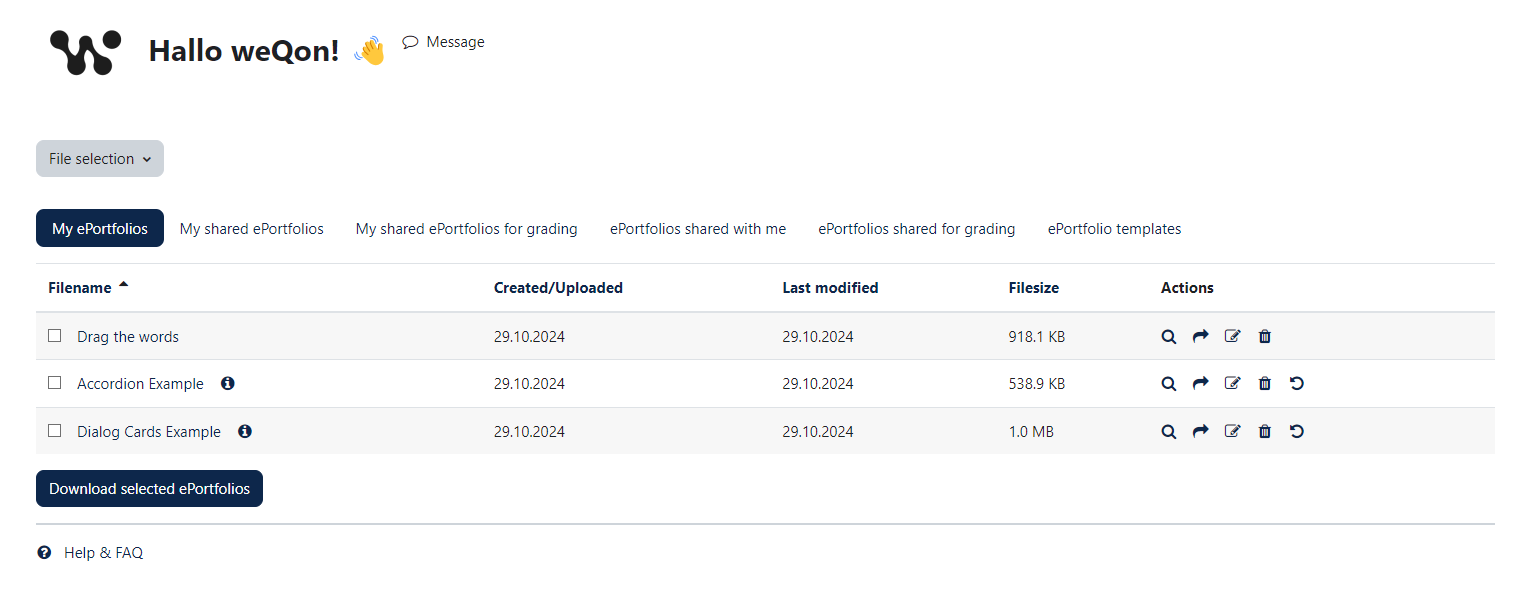
The "ePortfolio" in Moodle provides a way to share your own content created
with H5P available with other students. The H5P content can be created directly
via the plugin or existing content types can be uploaded via a form.
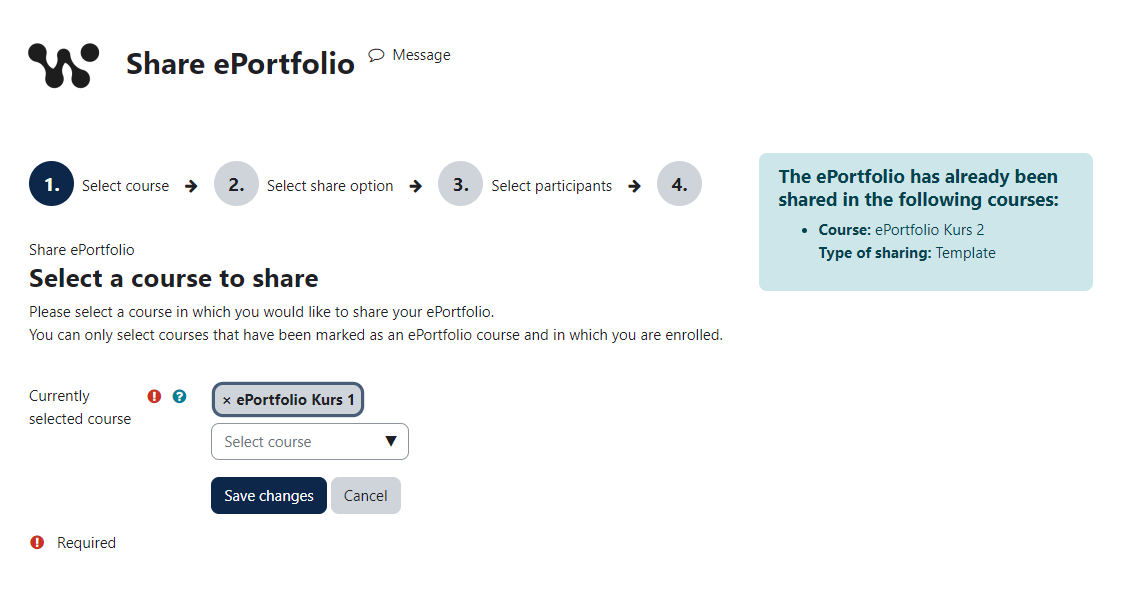
Currently, the content can be shared for viewing and grading.
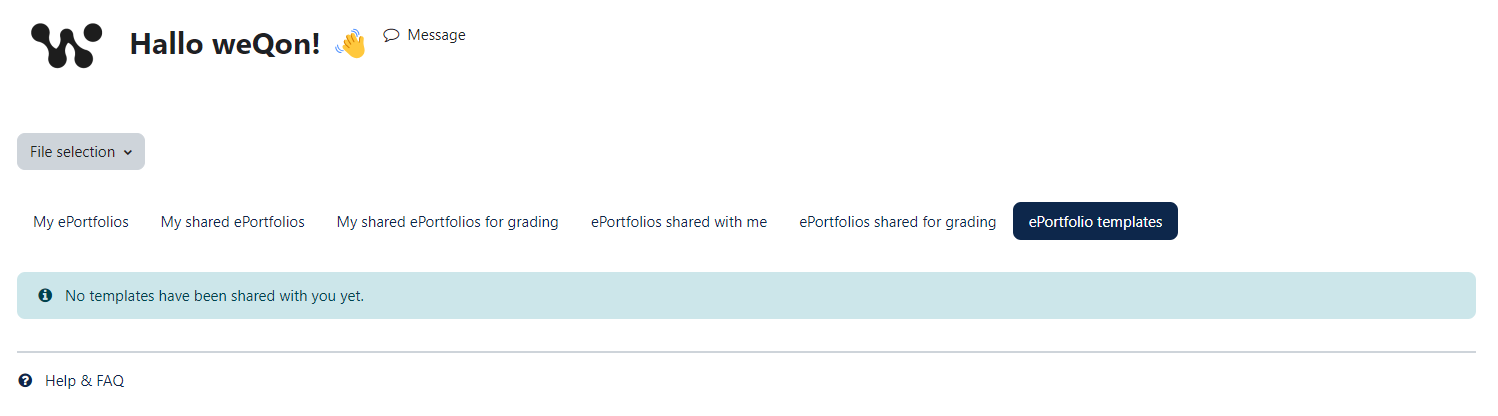
A teacher also has the option of making H5P content available as a
"template".
Also, a H5P content type has been developed for the ePortfolio-Plugin:
https://www.olivertacke.de/labs/2022/10/25/show-what-you-can-do-with-h5p-portfolio/
Installing via uploaded ZIP file
- Log in to your Moodle site as an admin and go to Site administration >
Plugins > Install plugins. - Upload the ZIP file with the plugin code. You should only be prompted to add
extra details if your plugin type is not automatically detected. - Check the plugin validation report and finish the installation.
Installing manually
The plugin can be also installed by putting the contents of this directory to
{your/moodle/dirroot}/local/eportfolio
Afterwards, log in to your Moodle site as an admin and go to Site administration >
Notifications to complete the installation.
Alternatively, you can run
$ php admin/cli/upgrade.php
to complete the installation from the command line.
After installation
Set the capability "moodle/h5p:deploy" for role "user".
The default "user" role requires the capability "moodle/h5p:deploy".
Without this capability user can't share H5P content and other participants cannot access the file.
Set the default roles for "students" and "grading teacher" in the plugin settings.
Relase notes
Moodle 5.0
Version 0.3.7
- Security improvements
- Added better file ownership checks
- Bug fix view.php when accessings file from the course context
Version 0.3.6
- Plugin parity matched with MOODLE_405_STABLE
- UX improvements
- Additional form buttons for edit page at the top
- Added buttons for "Save and continue" and "Save and leave"
- Quick access button on the overview page
- Added configuration for upload size limit
- If mod_activity is using feedback files, they will be linked on the overview page
Version 0.3.5
- Added new setting to disable selection of users for better privacy
- Set maturity to stable
Version 0.3.4
- Added new setting to disable selection of users for better privacy
- Set maturity to stable
Version 0.3.3
- Added new setting to disable selection of users for better privacy
- Set maturity to stable
Moodle 4.5
Version 0.3.2
- Updated icons to use Font Awesome 6
- Set supported Moodle version to 4.5
Version 0.3.1
- Changed optional_param to optional_param_array in download.php
Version 0.3.0
- Added new output hook class to replace http_before_headers in lib.php.
- Fixed objecttable in events.
Moodle 4.1
Version 0.2.6
- New functionality to select the activity to share an ePortfolio for grading if more than one activity is available in a course.
- If only one activity is available for ePortfolio grading in the course, the intermediate step is automatically skipped.
- If an ePortfolio is shared for viewing or as a template, the intermediate step is also skipped.
- New column to display the activity for which the ePortfolio was shared.
- Bug fix, if no users were selected for sharing.
Version 0.2.5
- Workaround for missing configdata for course custom field, until Custom fields API will be implemented.
- Fixed missing lang strings for mustache template missing configurations.
- Bug fix selecting available roles for sharing forms.
- Added new settings for own Help & FAQ page.
- Added observer to check for course_deleted event and clean up shared eportfolios for deleted course.
Version 0.2.4
- Switched from custom session handling to Moodle core Cache API
- Reworking the privacy provider
- Removed deprecated constants from message provider
- Moved Help & FAQ page to the Github Wiki
- English translation Help & FAQ page
- Fixed error when uninstalling the plugin
- Changed field courseid in local_eportfolio_share from char to bigint
Version 0.2.3
- Added adhoc task for sending notifications
Version 0.2.2
- Added privacy provider class
- Added configuration check
- Removed duplicate DB field from local_eportfolio_share
- Field "userid" had no additional purpose
Version 0.2.1
- Quality check iteration
Version 0.2.0
Please make a backup before updating!
- Added new DB table local_eportfolio
- Each content now has its own entry. In the previous version the content was only stored in the "files" table
- Added new fields "title" and "description"
- It is now possible to add an individual title and a short description
- New "renderer"-like class to output the ePortfolio overview page (index.php)
- Improved usability
- Added capability check for all pages
- Added setting page
- Enable entry for main navigation
- Default grading teacher role
- Default student role
- Sharing form improvements
- Info box, if and where an ePortfolio file was already shared
- Removed hard coded role IDs
- Several code improvements & quality check
- Removed capability assignment from install.php and upgrade.php
- Removed hard coded role IDs
- Preparations to upload the plugin to the Moodle plugin repo
License
2024 weQon UG support@weqon.net
This program is free software: you can redistribute it and/or modify it under
the terms of the GNU General Public License as published by the Free Software
Foundation, either version 3 of the License, or (at your option) any later
version.
This program is distributed in the hope that it will be useful, but WITHOUT ANY
WARRANTY; without even the implied warranty of MERCHANTABILITY or FITNESS FOR A
PARTICULAR PURPOSE. See the GNU General Public License for more details.
You should have received a copy of the GNU General Public License along with
this program. If not, see https://www.gnu.org/licenses/.
0.3.7 (2026042900)
0.3.7
Plugin type: Local plugins
Frankenstyle component name: local_eportfolio
Version build number: 2026042900
Version release name: 0.3.7
Maturity: Stable
Supported Moodle versions: 4.1, 4.2, 4.3, 4.4, 4.5
Repository URL (Git): https://github.com/weqon/moodle-local_eportfolio
Repository branch:
Repository tag:
Issue/bug tracker URL: https://github.com/weqon/moodle-local_eportfolio/issues
ePortfolio
The "ePortfolio" in Moodle provides a way to share your own content created
with H5P available with other students. The H5P content can be created directly
via the plugin or existing content types can be uploaded via a form.
Currently, the content can be shared for viewing and grading.
A teacher also has the option of making H5P content available as a
"template".
Also, a H5P content type has been developed for the ePortfolio-Plugin:
https://www.olivertacke.de/labs/2022/10/25/show-what-you-can-do-with-h5p-portfolio/
Installing via uploaded ZIP file
- Log in to your Moodle site as an admin and go to Site administration >
Plugins > Install plugins. - Upload the ZIP file with the plugin code. You should only be prompted to add
extra details if your plugin type is not automatically detected. - Check the plugin validation report and finish the installation.
Installing manually
The plugin can be also installed by putting the contents of this directory to
{your/moodle/dirroot}/local/eportfolio
Afterwards, log in to your Moodle site as an admin and go to Site administration >
Notifications to complete the installation.
Alternatively, you can run
$ php admin/cli/upgrade.php
to complete the installation from the command line.
After installation
Set the capability "moodle/h5p:deploy" for role "user".
The default "user" role requires the capability "moodle/h5p:deploy".
Without this capability user can't share H5P content and other participants cannot access the file.
Set the default roles for "students" and "grading teacher" in the plugin settings.
Relase notes
Moodle 4.5
Version 0.3.7
- Security improvements
- Added better file ownership checks
- Bug fix view.php when accessings file from the course context
Version 0.3.6
- Bug fix getting upload limit plugin config/global config
- Implemented PR #29 - Fixed visibility of shared eportfolios
Version 0.3.5
- UX improvements
- Additional form buttons for edit page at the top
- Added buttons for "Save and continue" and "Save and leave"
- Quick access button on the overview page
- Added configuration for upload size limit
- If mod_activity is using feedback files, they will be linked on the overview page
Version 0.3.4
- Reverted required Moodle version to 4.1
Version 0.3.3
- Added new setting to disable selection of users for better privacy
- Set maturity to stable
Version 0.3.2
- Updated icons to use Font Awesome 6
- Set supported Moodle version to 4.5
Version 0.3.1
- Changed optional_param to optional_param_array in download.php
Version 0.3.0
- Added new output hook class to replace http_before_headers in lib.php.
- Fixed objecttable in events.
Moodle 4.1
Version 0.2.6
- New functionality to select the activity to share an ePortfolio for grading if more than one activity is available in a course.
- If only one activity is available for ePortfolio grading in the course, the intermediate step is automatically skipped.
- If an ePortfolio is shared for viewing or as a template, the intermediate step is also skipped.
- New column to display the activity for which the ePortfolio was shared.
- Bug fix, if no users were selected for sharing.
Version 0.2.5
- Workaround for missing configdata for course custom field, until Custom fields API will be implemented.
- Fixed missing lang strings for mustache template missing configurations.
- Bug fix selecting available roles for sharing forms.
- Added new settings for own Help & FAQ page.
- Added observer to check for course_deleted event and clean up shared eportfolios for deleted course.
Version 0.2.4
- Switched from custom session handling to Moodle core Cache API
- Reworking the privacy provider
- Removed deprecated constants from message provider
- Moved Help & FAQ page to the Github Wiki
- English translation Help & FAQ page
- Fixed error when uninstalling the plugin
- Changed field courseid in local_eportfolio_share from char to bigint
Version 0.2.3
- Added adhoc task for sending notifications
Version 0.2.2
- Added privacy provider class
- Added configuration check
- Removed duplicate DB field from local_eportfolio_share
- Field "userid" had no additional purpose
Version 0.2.1
- Quality check iteration
Version 0.2.0
Please make a backup before updating!
- Added new DB table local_eportfolio
- Each content now has its own entry. In the previous version the content was only stored in the "files" table
- Added new fields "title" and "description"
- It is now possible to add an individual title and a short description
- New "renderer"-like class to output the ePortfolio overview page (index.php)
- Improved usability
- Added capability check for all pages
- Added setting page
- Enable entry for main navigation
- Default grading teacher role
- Default student role
- Sharing form improvements
- Info box, if and where an ePortfolio file was already shared
- Removed hard coded role IDs
- Several code improvements & quality check
- Removed capability assignment from install.php and upgrade.php
- Removed hard coded role IDs
- Preparations to upload the plugin to the Moodle plugin repo
License
2024 weQon UG support@weqon.net
This program is free software: you can redistribute it and/or modify it under
the terms of the GNU General Public License as published by the Free Software
Foundation, either version 3 of the License, or (at your option) any later
version.
This program is distributed in the hope that it will be useful, but WITHOUT ANY
WARRANTY; without even the implied warranty of MERCHANTABILITY or FITNESS FOR A
PARTICULAR PURPOSE. See the GNU General Public License for more details.
You should have received a copy of the GNU General Public License along with
this program. If not, see https://www.gnu.org/licenses/.
0.3.6 (2025121201)
0.3.6
Plugin type: Local plugins
Frankenstyle component name: local_eportfolio
Version build number: 2025121201
Version release name: 0.3.6
Maturity: Stable
Supported Moodle versions: 5.0
Repository URL (Git): https://github.com/weqon/moodle-local_eportfolio
Repository branch:
Repository tag:
Issue/bug tracker URL: https://github.com/weqon/moodle-local_eportfolio/issues
ePortfolio
The "ePortfolio" in Moodle provides a way to share your own content created
with H5P available with other students. The H5P content can be created directly
via the plugin or existing content types can be uploaded via a form.
Currently, the content can be shared for viewing and grading.
A teacher also has the option of making H5P content available as a
"template".
Also, a H5P content type has been developed for the ePortfolio-Plugin:
https://www.olivertacke.de/labs/2022/10/25/show-what-you-can-do-with-h5p-portfolio/
Installing via uploaded ZIP file
- Log in to your Moodle site as an admin and go to Site administration >
Plugins > Install plugins. - Upload the ZIP file with the plugin code. You should only be prompted to add
extra details if your plugin type is not automatically detected. - Check the plugin validation report and finish the installation.
Installing manually
The plugin can be also installed by putting the contents of this directory to
{your/moodle/dirroot}/local/eportfolio
Afterwards, log in to your Moodle site as an admin and go to Site administration >
Notifications to complete the installation.
Alternatively, you can run
$ php admin/cli/upgrade.php
to complete the installation from the command line.
After installation
Set the capability "moodle/h5p:deploy" for role "user".
The default "user" role requires the capability "moodle/h5p:deploy".
Without this capability user can't share H5P content and other participants cannot access the file.
Set the default roles for "students" and "grading teacher" in the plugin settings.
Relase notes
Moodle 5.0
Version 0.3.6
- Plugin parity matched with MOODLE_405_STABLE
- UX improvements
- Additional form buttons for edit page at the top
- Added buttons for "Save and continue" and "Save and leave"
- Quick access button on the overview page
- Added configuration for upload size limit
- If mod_activity is using feedback files, they will be linked on the overview page
Version 0.3.5
- Added new setting to disable selection of users for better privacy
- Set maturity to stable
Version 0.3.4
- Added new setting to disable selection of users for better privacy
- Set maturity to stable
Version 0.3.3
- Added new setting to disable selection of users for better privacy
- Set maturity to stable
Moodle 4.5
Version 0.3.2
- Updated icons to use Font Awesome 6
- Set supported Moodle version to 4.5
Version 0.3.1
- Changed optional_param to optional_param_array in download.php
Version 0.3.0
- Added new output hook class to replace http_before_headers in lib.php.
- Fixed objecttable in events.
Moodle 4.1
Version 0.2.6
- New functionality to select the activity to share an ePortfolio for grading if more than one activity is available in a course.
- If only one activity is available for ePortfolio grading in the course, the intermediate step is automatically skipped.
- If an ePortfolio is shared for viewing or as a template, the intermediate step is also skipped.
- New column to display the activity for which the ePortfolio was shared.
- Bug fix, if no users were selected for sharing.
Version 0.2.5
- Workaround for missing configdata for course custom field, until Custom fields API will be implemented.
- Fixed missing lang strings for mustache template missing configurations.
- Bug fix selecting available roles for sharing forms.
- Added new settings for own Help & FAQ page.
- Added observer to check for course_deleted event and clean up shared eportfolios for deleted course.
Version 0.2.4
- Switched from custom session handling to Moodle core Cache API
- Reworking the privacy provider
- Removed deprecated constants from message provider
- Moved Help & FAQ page to the Github Wiki
- English translation Help & FAQ page
- Fixed error when uninstalling the plugin
- Changed field courseid in local_eportfolio_share from char to bigint
Version 0.2.3
- Added adhoc task for sending notifications
Version 0.2.2
- Added privacy provider class
- Added configuration check
- Removed duplicate DB field from local_eportfolio_share
- Field "userid" had no additional purpose
Version 0.2.1
- Quality check iteration
Version 0.2.0
Please make a backup before updating!
- Added new DB table local_eportfolio
- Each content now has its own entry. In the previous version the content was only stored in the "files" table
- Added new fields "title" and "description"
- It is now possible to add an individual title and a short description
- New "renderer"-like class to output the ePortfolio overview page (index.php)
- Improved usability
- Added capability check for all pages
- Added setting page
- Enable entry for main navigation
- Default grading teacher role
- Default student role
- Sharing form improvements
- Info box, if and where an ePortfolio file was already shared
- Removed hard coded role IDs
- Several code improvements & quality check
- Removed capability assignment from install.php and upgrade.php
- Removed hard coded role IDs
- Preparations to upload the plugin to the Moodle plugin repo
License
2024 weQon UG support@weqon.net
This program is free software: you can redistribute it and/or modify it under
the terms of the GNU General Public License as published by the Free Software
Foundation, either version 3 of the License, or (at your option) any later
version.
This program is distributed in the hope that it will be useful, but WITHOUT ANY
WARRANTY; without even the implied warranty of MERCHANTABILITY or FITNESS FOR A
PARTICULAR PURPOSE. See the GNU General Public License for more details.
You should have received a copy of the GNU General Public License along with
this program. If not, see https://www.gnu.org/licenses/.
0.3.6 (2025121200)
0.3.6
Plugin type: Local plugins
Frankenstyle component name: local_eportfolio
Version build number: 2025121200
Version release name: 0.3.6
Maturity: Stable
Supported Moodle versions: 4.1, 4.2, 4.3, 4.4, 4.5
Repository URL (Git): https://github.com/weqon/moodle-local_eportfolio
Repository branch:
Repository tag:
Issue/bug tracker URL: https://github.com/weqon/moodle-local_eportfolio/issues
ePortfolio
The "ePortfolio" in Moodle provides a way to share your own content created
with H5P available with other students. The H5P content can be created directly
via the plugin or existing content types can be uploaded via a form.
Currently, the content can be shared for viewing and grading.
A teacher also has the option of making H5P content available as a
"template".
Also, a H5P content type has been developed for the ePortfolio-Plugin:
https://www.olivertacke.de/labs/2022/10/25/show-what-you-can-do-with-h5p-portfolio/
Installing via uploaded ZIP file
- Log in to your Moodle site as an admin and go to Site administration >
Plugins > Install plugins. - Upload the ZIP file with the plugin code. You should only be prompted to add
extra details if your plugin type is not automatically detected. - Check the plugin validation report and finish the installation.
Installing manually
The plugin can be also installed by putting the contents of this directory to
{your/moodle/dirroot}/local/eportfolio
Afterwards, log in to your Moodle site as an admin and go to Site administration >
Notifications to complete the installation.
Alternatively, you can run
$ php admin/cli/upgrade.php
to complete the installation from the command line.
After installation
Set the capability "moodle/h5p:deploy" for role "user".
The default "user" role requires the capability "moodle/h5p:deploy".
Without this capability user can't share H5P content and other participants cannot access the file.
Set the default roles for "students" and "grading teacher" in the plugin settings.
Relase notes
Moodle 4.5
Version 0.3.6
- Bug fix getting upload limit plugin config/global config
- Implemented PR #29 - Fixed visibility of shared eportfolios
Version 0.3.5
- UX improvements
- Additional form buttons for edit page at the top
- Added buttons for "Save and continue" and "Save and leave"
- Quick access button on the overview page
- Added configuration for upload size limit
- If mod_activity is using feedback files, they will be linked on the overview page
Version 0.3.4
- Reverted required Moodle version to 4.1
Version 0.3.3
- Added new setting to disable selection of users for better privacy
- Set maturity to stable
Version 0.3.2
- Updated icons to use Font Awesome 6
- Set supported Moodle version to 4.5
Version 0.3.1
- Changed optional_param to optional_param_array in download.php
Version 0.3.0
- Added new output hook class to replace http_before_headers in lib.php.
- Fixed objecttable in events.
Moodle 4.1
Version 0.2.6
- New functionality to select the activity to share an ePortfolio for grading if more than one activity is available in a course.
- If only one activity is available for ePortfolio grading in the course, the intermediate step is automatically skipped.
- If an ePortfolio is shared for viewing or as a template, the intermediate step is also skipped.
- New column to display the activity for which the ePortfolio was shared.
- Bug fix, if no users were selected for sharing.
Version 0.2.5
- Workaround for missing configdata for course custom field, until Custom fields API will be implemented.
- Fixed missing lang strings for mustache template missing configurations.
- Bug fix selecting available roles for sharing forms.
- Added new settings for own Help & FAQ page.
- Added observer to check for course_deleted event and clean up shared eportfolios for deleted course.
Version 0.2.4
- Switched from custom session handling to Moodle core Cache API
- Reworking the privacy provider
- Removed deprecated constants from message provider
- Moved Help & FAQ page to the Github Wiki
- English translation Help & FAQ page
- Fixed error when uninstalling the plugin
- Changed field courseid in local_eportfolio_share from char to bigint
Version 0.2.3
- Added adhoc task for sending notifications
Version 0.2.2
- Added privacy provider class
- Added configuration check
- Removed duplicate DB field from local_eportfolio_share
- Field "userid" had no additional purpose
Version 0.2.1
- Quality check iteration
Version 0.2.0
Please make a backup before updating!
- Added new DB table local_eportfolio
- Each content now has its own entry. In the previous version the content was only stored in the "files" table
- Added new fields "title" and "description"
- It is now possible to add an individual title and a short description
- New "renderer"-like class to output the ePortfolio overview page (index.php)
- Improved usability
- Added capability check for all pages
- Added setting page
- Enable entry for main navigation
- Default grading teacher role
- Default student role
- Sharing form improvements
- Info box, if and where an ePortfolio file was already shared
- Removed hard coded role IDs
- Several code improvements & quality check
- Removed capability assignment from install.php and upgrade.php
- Removed hard coded role IDs
- Preparations to upload the plugin to the Moodle plugin repo
License
2024 weQon UG support@weqon.net
This program is free software: you can redistribute it and/or modify it under
the terms of the GNU General Public License as published by the Free Software
Foundation, either version 3 of the License, or (at your option) any later
version.
This program is distributed in the hope that it will be useful, but WITHOUT ANY
WARRANTY; without even the implied warranty of MERCHANTABILITY or FITNESS FOR A
PARTICULAR PURPOSE. See the GNU General Public License for more details.
You should have received a copy of the GNU General Public License along with
this program. If not, see https://www.gnu.org/licenses/.
0.3.4 (2025093000)
0.3.4
Plugin type: Local plugins
Frankenstyle component name: local_eportfolio
Version build number: 2025093000
Version release name: 0.3.4
Maturity: Stable
Supported Moodle versions: 4.1, 4.2, 4.3, 4.4, 4.5
Repository URL (Git): https://github.com/weqon/moodle-local_eportfolio
Repository branch:
Repository tag:
Issue/bug tracker URL: https://github.com/weqon/moodle-local_eportfolio/issues
ePortfolio
The "ePortfolio" in Moodle provides a way to share your own content created
with H5P available with other students. The H5P content can be created directly
via the plugin or existing content types can be uploaded via a form.
Currently, the content can be shared for viewing and grading.
A teacher also has the option of making H5P content available as a
"template".
Also, a H5P content type has been developed for the ePortfolio-Plugin:
https://www.olivertacke.de/labs/2022/10/25/show-what-you-can-do-with-h5p-portfolio/
Installing via uploaded ZIP file
- Log in to your Moodle site as an admin and go to Site administration >
Plugins > Install plugins. - Upload the ZIP file with the plugin code. You should only be prompted to add
extra details if your plugin type is not automatically detected. - Check the plugin validation report and finish the installation.
Installing manually
The plugin can be also installed by putting the contents of this directory to
{your/moodle/dirroot}/local/eportfolio
Afterwards, log in to your Moodle site as an admin and go to Site administration >
Notifications to complete the installation.
Alternatively, you can run
$ php admin/cli/upgrade.php
to complete the installation from the command line.
After installation
Set the capability "moodle/h5p:deploy" for role "user".
The default "user" role requires the capability "moodle/h5p:deploy".
Without this capability user can't share H5P content and other participants cannot access the file.
Set the default roles for "students" and "grading teacher" in the plugin settings.
Relase notes
Moodle 4.5
Version 0.3.4
- Reverted required Moodle version to 4.1
Version 0.3.3
- Added new setting to disable selection of users for better privacy
- Set maturity to stable
Version 0.3.2
- Updated icons to use Font Awesome 6
- Set supported Moodle version to 4.5
Version 0.3.1
- Changed optional_param to optional_param_array in download.php
Version 0.3.0
- Added new output hook class to replace http_before_headers in lib.php.
- Fixed objecttable in events.
Moodle 4.1
Version 0.2.6
- New functionality to select the activity to share an ePortfolio for grading if more than one activity is available in a course.
- If only one activity is available for ePortfolio grading in the course, the intermediate step is automatically skipped.
- If an ePortfolio is shared for viewing or as a template, the intermediate step is also skipped.
- New column to display the activity for which the ePortfolio was shared.
- Bug fix, if no users were selected for sharing.
Version 0.2.5
- Workaround for missing configdata for course custom field, until Custom fields API will be implemented.
- Fixed missing lang strings for mustache template missing configurations.
- Bug fix selecting available roles for sharing forms.
- Added new settings for own Help & FAQ page.
- Added observer to check for course_deleted event and clean up shared eportfolios for deleted course.
Version 0.2.4
- Switched from custom session handling to Moodle core Cache API
- Reworking the privacy provider
- Removed deprecated constants from message provider
- Moved Help & FAQ page to the Github Wiki
- English translation Help & FAQ page
- Fixed error when uninstalling the plugin
- Changed field courseid in local_eportfolio_share from char to bigint
Version 0.2.3
- Added adhoc task for sending notifications
Version 0.2.2
- Added privacy provider class
- Added configuration check
- Removed duplicate DB field from local_eportfolio_share
- Field "userid" had no additional purpose
Version 0.2.1
- Quality check iteration
Version 0.2.0
Please make a backup before updating!
- Added new DB table local_eportfolio
- Each content now has its own entry. In the previous version the content was only stored in the "files" table
- Added new fields "title" and "description"
- It is now possible to add an individual title and a short description
- New "renderer"-like class to output the ePortfolio overview page (index.php)
- Improved usability
- Added capability check for all pages
- Added setting page
- Enable entry for main navigation
- Default grading teacher role
- Default student role
- Sharing form improvements
- Info box, if and where an ePortfolio file was already shared
- Removed hard coded role IDs
- Several code improvements & quality check
- Removed capability assignment from install.php and upgrade.php
- Removed hard coded role IDs
- Preparations to upload the plugin to the Moodle plugin repo
License
2024 weQon UG support@weqon.net
This program is free software: you can redistribute it and/or modify it under
the terms of the GNU General Public License as published by the Free Software
Foundation, either version 3 of the License, or (at your option) any later
version.
This program is distributed in the hope that it will be useful, but WITHOUT ANY
WARRANTY; without even the implied warranty of MERCHANTABILITY or FITNESS FOR A
PARTICULAR PURPOSE. See the GNU General Public License for more details.
You should have received a copy of the GNU General Public License along with
this program. If not, see https://www.gnu.org/licenses/.
0.3.5 (2025092900)
0.3.5
Plugin type: Local plugins
Frankenstyle component name: local_eportfolio
Version build number: 2025092900
Version release name: 0.3.5
Maturity: Stable
Supported Moodle versions: 5.0
Repository URL (Git): https://github.com/weqon/moodle-local_eportfolio
Repository branch:
Repository tag:
Issue/bug tracker URL: https://github.com/weqon/moodle-local_eportfolio/issues
ePortfolio
The "ePortfolio" in Moodle provides a way to share your own content created
with H5P available with other students. The H5P content can be created directly
via the plugin or existing content types can be uploaded via a form.
Currently, the content can be shared for viewing and grading.
A teacher also has the option of making H5P content available as a
"template".
Also, a H5P content type has been developed for the ePortfolio-Plugin:
https://www.olivertacke.de/labs/2022/10/25/show-what-you-can-do-with-h5p-portfolio/
Installing via uploaded ZIP file
- Log in to your Moodle site as an admin and go to Site administration >
Plugins > Install plugins. - Upload the ZIP file with the plugin code. You should only be prompted to add
extra details if your plugin type is not automatically detected. - Check the plugin validation report and finish the installation.
Installing manually
The plugin can be also installed by putting the contents of this directory to
{your/moodle/dirroot}/local/eportfolio
Afterwards, log in to your Moodle site as an admin and go to Site administration >
Notifications to complete the installation.
Alternatively, you can run
$ php admin/cli/upgrade.php
to complete the installation from the command line.
After installation
Set the capability "moodle/h5p:deploy" for role "user".
The default "user" role requires the capability "moodle/h5p:deploy".
Without this capability user can't share H5P content and other participants cannot access the file.
Set the default roles for "students" and "grading teacher" in the plugin settings.
Relase notes
Moodle 5.0
Version 0.3.5
- Added new setting to disable selection of users for better privacy
- Set maturity to stable
Version 0.3.4
- Added new setting to disable selection of users for better privacy
- Set maturity to stable
Version 0.3.3
- Added new setting to disable selection of users for better privacy
- Set maturity to stable
Moodle 4.5
Version 0.3.2
- Updated icons to use Font Awesome 6
- Set supported Moodle version to 4.5
Version 0.3.1
- Changed optional_param to optional_param_array in download.php
Version 0.3.0
- Added new output hook class to replace http_before_headers in lib.php.
- Fixed objecttable in events.
Moodle 4.1
Version 0.2.6
- New functionality to select the activity to share an ePortfolio for grading if more than one activity is available in a course.
- If only one activity is available for ePortfolio grading in the course, the intermediate step is automatically skipped.
- If an ePortfolio is shared for viewing or as a template, the intermediate step is also skipped.
- New column to display the activity for which the ePortfolio was shared.
- Bug fix, if no users were selected for sharing.
Version 0.2.5
- Workaround for missing configdata for course custom field, until Custom fields API will be implemented.
- Fixed missing lang strings for mustache template missing configurations.
- Bug fix selecting available roles for sharing forms.
- Added new settings for own Help & FAQ page.
- Added observer to check for course_deleted event and clean up shared eportfolios for deleted course.
Version 0.2.4
- Switched from custom session handling to Moodle core Cache API
- Reworking the privacy provider
- Removed deprecated constants from message provider
- Moved Help & FAQ page to the Github Wiki
- English translation Help & FAQ page
- Fixed error when uninstalling the plugin
- Changed field courseid in local_eportfolio_share from char to bigint
Version 0.2.3
- Added adhoc task for sending notifications
Version 0.2.2
- Added privacy provider class
- Added configuration check
- Removed duplicate DB field from local_eportfolio_share
- Field "userid" had no additional purpose
Version 0.2.1
- Quality check iteration
Version 0.2.0
Please make a backup before updating!
- Added new DB table local_eportfolio
- Each content now has its own entry. In the previous version the content was only stored in the "files" table
- Added new fields "title" and "description"
- It is now possible to add an individual title and a short description
- New "renderer"-like class to output the ePortfolio overview page (index.php)
- Improved usability
- Added capability check for all pages
- Added setting page
- Enable entry for main navigation
- Default grading teacher role
- Default student role
- Sharing form improvements
- Info box, if and where an ePortfolio file was already shared
- Removed hard coded role IDs
- Several code improvements & quality check
- Removed capability assignment from install.php and upgrade.php
- Removed hard coded role IDs
- Preparations to upload the plugin to the Moodle plugin repo
License
2024 weQon UG support@weqon.net
This program is free software: you can redistribute it and/or modify it under
the terms of the GNU General Public License as published by the Free Software
Foundation, either version 3 of the License, or (at your option) any later
version.
This program is distributed in the hope that it will be useful, but WITHOUT ANY
WARRANTY; without even the implied warranty of MERCHANTABILITY or FITNESS FOR A
PARTICULAR PURPOSE. See the GNU General Public License for more details.
You should have received a copy of the GNU General Public License along with
this program. If not, see https://www.gnu.org/licenses/.
0.3.2 (2025052100)
0.3.2
Plugin type: Local plugins
Frankenstyle component name: local_eportfolio
Version build number: 2025052100
Version release name: 0.3.2
Maturity: Release Candidate
Supported Moodle versions: 4.5
Repository URL (Git): https://github.com/weqon/moodle-local_eportfolio
Repository branch:
Repository tag:
Issue/bug tracker URL: https://github.com/weqon/moodle-local_eportfolio/issues
ePortfolio
The "ePortfolio" in Moodle provides a way to share your own content created
with H5P available with other students. The H5P content can be created directly
via the plugin or existing content types can be uploaded via a form.
Currently, the content can be shared for viewing and grading.
A teacher also has the option of making H5P content available as a
"template".
Also, a H5P content type has been developed for the ePortfolio-Plugin:
https://www.olivertacke.de/labs/2022/10/25/show-what-you-can-do-with-h5p-portfolio/
Installing via uploaded ZIP file
- Log in to your Moodle site as an admin and go to Site administration >
Plugins > Install plugins. - Upload the ZIP file with the plugin code. You should only be prompted to add
extra details if your plugin type is not automatically detected. - Check the plugin validation report and finish the installation.
Installing manually
The plugin can be also installed by putting the contents of this directory to
{your/moodle/dirroot}/local/eportfolio
Afterwards, log in to your Moodle site as an admin and go to Site administration >
Notifications to complete the installation.
Alternatively, you can run
$ php admin/cli/upgrade.php
to complete the installation from the command line.
After installation
Set the capability "moodle/h5p:deploy" for role "user".
The default "user" role requires the capability "moodle/h5p:deploy".
Without this capability user can't share H5P content and other participants cannot access the file.
Set the default roles for "students" and "grading teacher" in the plugin settings.
Relase notes
Please note: This plugin is a "Release Candidate" and should not be used in productive systems.
Moodle 4.5 - pre release
Version 0.3.2
- Updated icons to use Font Awesome 6
- Set supported Moodle version to 4.5
Version 0.3.1
- Changed optional_param to optional_param_array in download.php
Version 0.3.0
- Added new output hook class to replace http_before_headers in lib.php.
- Fixed objecttable in events.
Moodle 4.1
Version 0.2.6
- New functionality to select the activity to share an ePortfolio for grading if more than one activity is available in a course.
- If only one activity is available for ePortfolio grading in the course, the intermediate step is automatically skipped.
- If an ePortfolio is shared for viewing or as a template, the intermediate step is also skipped.
- New column to display the activity for which the ePortfolio was shared.
- Bug fix, if no users were selected for sharing.
Version 0.2.5
- Workaround for missing configdata for course custom field, until Custom fields API will be implemented.
- Fixed missing lang strings for mustache template missing configurations.
- Bug fix selecting available roles for sharing forms.
- Added new settings for own Help & FAQ page.
- Added observer to check for course_deleted event and clean up shared eportfolios for deleted course.
Version 0.2.4
- Switched from custom session handling to Moodle core Cache API
- Reworking the privacy provider
- Removed deprecated constants from message provider
- Moved Help & FAQ page to the Github Wiki
- English translation Help & FAQ page
- Fixed error when uninstalling the plugin
- Changed field courseid in local_eportfolio_share from char to bigint
Version 0.2.3
- Added adhoc task for sending notifications
Version 0.2.2
- Added privacy provider class
- Added configuration check
- Removed duplicate DB field from local_eportfolio_share
- Field "userid" had no additional purpose
Version 0.2.1
- Quality check iteration
Version 0.2.0
Please make a backup before updating!
- Added new DB table local_eportfolio
- Each content now has its own entry. In the previous version the content was only stored in the "files" table
- Added new fields "title" and "description"
- It is now possible to add an individual title and a short description
- New "renderer"-like class to output the ePortfolio overview page (index.php)
- Improved usability
- Added capability check for all pages
- Added setting page
- Enable entry for main navigation
- Default grading teacher role
- Default student role
- Sharing form improvements
- Info box, if and where an ePortfolio file was already shared
- Removed hard coded role IDs
- Several code improvements & quality check
- Removed capability assignment from install.php and upgrade.php
- Removed hard coded role IDs
- Preparations to upload the plugin to the Moodle plugin repo
License
2024 weQon UG support@weqon.net
This program is free software: you can redistribute it and/or modify it under
the terms of the GNU General Public License as published by the Free Software
Foundation, either version 3 of the License, or (at your option) any later
version.
This program is distributed in the hope that it will be useful, but WITHOUT ANY
WARRANTY; without even the implied warranty of MERCHANTABILITY or FITNESS FOR A
PARTICULAR PURPOSE. See the GNU General Public License for more details.
You should have received a copy of the GNU General Public License along with
this program. If not, see https://www.gnu.org/licenses/.
0.2.6 (2025031700)
0.2.6
Plugin type: Local plugins
Frankenstyle component name: local_eportfolio
Version build number: 2025031700
Version release name: 0.2.6
Maturity: Release Candidate
Supported Moodle versions: 4.1, 4.2, 4.3, 4.4
Repository URL (Git): https://github.com/weqon/moodle-local_eportfolio
Repository branch:
Repository tag:
Issue/bug tracker URL: https://github.com/weqon/moodle-local_eportfolio/issues
ePortfolio
The "ePortfolio" in Moodle provides a way to share your own content created
with H5P available with other students. The H5P content can be created directly
via the plugin or existing content types can be uploaded via a form.
Currently, the content can be shared for viewing and grading.
A teacher also has the option of making H5P content available as a
"template".
Also, a H5P content type has been developed for the ePortfolio-Plugin:
https://www.olivertacke.de/labs/2022/10/25/show-what-you-can-do-with-h5p-portfolio/
Installing via uploaded ZIP file
- Log in to your Moodle site as an admin and go to Site administration >
Plugins > Install plugins. - Upload the ZIP file with the plugin code. You should only be prompted to add
extra details if your plugin type is not automatically detected. - Check the plugin validation report and finish the installation.
Installing manually
The plugin can be also installed by putting the contents of this directory to
{your/moodle/dirroot}/local/eportfolio
Afterwards, log in to your Moodle site as an admin and go to Site administration >
Notifications to complete the installation.
Alternatively, you can run
$ php admin/cli/upgrade.php
to complete the installation from the command line.
After installation
Set the capability "moodle/h5p:deploy" for role "user".
The default "user" role requires the capability "moodle/h5p:deploy".
Without this capability user can't share H5P content and other participants cannot access the file.
Set the default roles for "students" and "grading teacher" in the plugin settings.
Relase notes
Please note: This plugin is a "Release Candidate" and should not be used in productive systems.
Version 0.2.6
- New functionality to select the activity to share an ePortfolio for grading if more than one activity is available in a course.
- If only one activity is available for ePortfolio grading in the course, the intermediate step is automatically skipped.
- If an ePortfolio is shared for viewing or as a template, the intermediate step is also skipped.
- New column to display the activity for which the ePortfolio was shared.
- Bug fix, if no users were selected for sharing.
Version 0.2.5
- Workaround for missing configdata for course custom field, until Custom fields API will be implemented.
- Fixed missing lang strings for mustache template missing configurations.
- Bug fix selecting available roles for sharing forms.
- Added new settings for own Help & FAQ page.
- Added observer to check for course_deleted event and clean up shared eportfolios for deleted course.
Version 0.2.4
- Switched from custom session handling to Moodle core Cache API
- Reworking the privacy provider
- Removed deprecated constants from message provider
- Moved Help & FAQ page to the Github Wiki
- English translation Help & FAQ page
- Fixed error when uninstalling the plugin
- Changed field courseid in local_eportfolio_share from char to bigint
Version 0.2.3
- Added adhoc task for sending notifications
Version 0.2.2
- Added privacy provider class
- Added configuration check
- Removed duplicate DB field from local_eportfolio_share
- Field "userid" had no additional purpose
Version 0.2.1
- Quality check iteration
Version 0.2.0
Please make a backup before updating!
- Added new DB table local_eportfolio
- Each content now has its own entry. In the previous version the content was only stored in the "files" table
- Added new fields "title" and "description"
- It is now possible to add an individual title and a short description
- New "renderer"-like class to output the ePortfolio overview page (index.php)
- Improved usability
- Added capability check for all pages
- Added setting page
- Enable entry for main navigation
- Default grading teacher role
- Default student role
- Sharing form improvements
- Info box, if and where an ePortfolio file was already shared
- Removed hard coded role IDs
- Several code improvements & quality check
- Removed capability assignment from install.php and upgrade.php
- Removed hard coded role IDs
- Preparations to upload the plugin to the Moodle plugin repo
License
2024 weQon UG support@weqon.net
This program is free software: you can redistribute it and/or modify it under
the terms of the GNU General Public License as published by the Free Software
Foundation, either version 3 of the License, or (at your option) any later
version.
This program is distributed in the hope that it will be useful, but WITHOUT ANY
WARRANTY; without even the implied warranty of MERCHANTABILITY or FITNESS FOR A
PARTICULAR PURPOSE. See the GNU General Public License for more details.
You should have received a copy of the GNU General Public License along with
this program. If not, see https://www.gnu.org/licenses/.
0.2.5 (2025020600)
0.2.5
Plugin type: Local plugins
Frankenstyle component name: local_eportfolio
Version build number: 2025020600
Version release name: 0.2.5
Maturity: Release Candidate
Supported Moodle versions: 4.1
Repository URL (Git): https://github.com/weqon/moodle-local_eportfolio
Repository branch:
Repository tag:
Issue/bug tracker URL: https://github.com/weqon/moodle-local_eportfolio/issues
ePortfolio
The "ePortfolio" in Moodle provides a way to share your own content created
with H5P available with other students. The H5P content can be created directly
via the plugin or existing content types can be uploaded via a form.
Currently, the content can be shared for viewing and grading.
A teacher also has the option of making H5P content available as a
"template".
Also, a H5P content type has been developed for the ePortfolio-Plugin:
https://www.olivertacke.de/labs/2022/10/25/show-what-you-can-do-with-h5p-portfolio/
Installing via uploaded ZIP file
- Log in to your Moodle site as an admin and go to Site administration >
Plugins > Install plugins. - Upload the ZIP file with the plugin code. You should only be prompted to add
extra details if your plugin type is not automatically detected. - Check the plugin validation report and finish the installation.
Installing manually
The plugin can be also installed by putting the contents of this directory to
{your/moodle/dirroot}/local/eportfolio
Afterwards, log in to your Moodle site as an admin and go to Site administration >
Notifications to complete the installation.
Alternatively, you can run
$ php admin/cli/upgrade.php
to complete the installation from the command line.
After installation
Set the capability "moodle/h5p:deploy" for role "user".
The default "user" role requires the capability "moodle/h5p:deploy".
Without this capability user can't share H5P content and other participants cannot access the file.
Set the default roles for "students" and "grading teacher" in the plugin settings.
Relase notes
Please note: This plugin is a "Release Candidate" and should not be used in productive systems.
Version 0.2.5
- Workaround for missing configdata for course custom field, until Custom fields API will be implemented.
- Fixed missing lang strings for mustache template missing configurations.
- Bug fix selecting available roles for sharing forms.
- Added new settings for own Help & FAQ page.
- Added observer to check for course_deleted event and clean up shared eportfolios for deleted course.
Version 0.2.4
- Switched from custom session handling to Moodle core Cache API
- Reworking the privacy provider
- Removed deprecated constants from message provider
- Moved Help & FAQ page to the Github Wiki
- English translation Help & FAQ page
- Fixed error when uninstalling the plugin
- Changed field courseid in local_eportfolio_share from char to bigint
Version 0.2.3
- Added adhoc task for sending notifications
Version 0.2.2
- Added privacy provider class
- Added configuration check
- Removed duplicate DB field from local_eportfolio_share
- Field "userid" had no additional purpose
Version 0.2.1
- Quality check iteration
Version 0.2.0
Please make a backup before updating!
- Added new DB table local_eportfolio
- Each content now has its own entry. In the previous version the content was only stored in the "files" table
- Added new fields "title" and "description"
- It is now possible to add an individual title and a short description
- New "renderer"-like class to output the ePortfolio overview page (index.php)
- Improved usability
- Added capability check for all pages
- Added setting page
- Enable entry for main navigation
- Default grading teacher role
- Default student role
- Sharing form improvements
- Info box, if and where an ePortfolio file was already shared
- Removed hard coded role IDs
- Several code improvements & quality check
- Removed capability assignment from install.php and upgrade.php
- Removed hard coded role IDs
- Preparations to upload the plugin to the Moodle plugin repo
License
2024 weQon UG support@weqon.net
This program is free software: you can redistribute it and/or modify it under
the terms of the GNU General Public License as published by the Free Software
Foundation, either version 3 of the License, or (at your option) any later
version.
This program is distributed in the hope that it will be useful, but WITHOUT ANY
WARRANTY; without even the implied warranty of MERCHANTABILITY or FITNESS FOR A
PARTICULAR PURPOSE. See the GNU General Public License for more details.
You should have received a copy of the GNU General Public License along with
this program. If not, see https://www.gnu.org/licenses/.
0.2.4 (2024112700)
0.2.4
Plugin type: Local plugins
Frankenstyle component name: local_eportfolio
Version build number: 2024112700
Version release name: 0.2.4
Maturity: Release Candidate
Supported Moodle versions: 4.1
Repository URL (Git): https://github.com/weqon/moodle_local_eportfolio
Repository branch:
Repository tag:
Issue/bug tracker URL: https://github.com/weqon/moodle-local_eportfolio/issues
ePortfolio
The "ePortfolio" in Moodle provides a way to share your own content created
with H5P available with other students. The H5P content can be created directly
via the plugin or existing content types can be uploaded via a form.
Currently, the content can be shared for viewing and grading.
A teacher also has the option of making H5P content available as a
"template".
Also, a H5P content type has been developed for the ePortfolio-Plugin:
https://www.olivertacke.de/labs/2022/10/25/show-what-you-can-do-with-h5p-portfolio/
Installing via uploaded ZIP file
- Log in to your Moodle site as an admin and go to Site administration >
Plugins > Install plugins. - Upload the ZIP file with the plugin code. You should only be prompted to add
extra details if your plugin type is not automatically detected. - Check the plugin validation report and finish the installation.
Installing manually
The plugin can be also installed by putting the contents of this directory to
{your/moodle/dirroot}/local/eportfolio
Afterwards, log in to your Moodle site as an admin and go to Site administration >
Notifications to complete the installation.
Alternatively, you can run
$ php admin/cli/upgrade.php
to complete the installation from the command line.
After installation
Set the capability "moodle/h5p:deploy" for role "user".
The default "user" role requires the capability "moodle/h5p:deploy".
Without this capability user can't share H5P content and other participants cannot access the file.
Set the default roles for "students" and "grading teacher" in the plugin settings.
Relase notes
Please note: This plugin is a "Release Candidate" and should not be used in productive systems.
Version 0.2.4
- Switched from custom session handling to Moodle core Cache API
- Reworking the privacy provider
- Removed deprecated constants from message provider
- Moved Help & FAQ page to the Github Wiki
- English translation Help & FAQ page
- Fixed error when uninstalling the plugin
- Changed field courseid in local_eportfolio_share from char to bigint
Version 0.2.3
- Added adhoc task for sending notifications
Version 0.2.2
- Added privacy provider class
- Added configuration check
- Removed duplicate DB field from local_eportfolio_share
- Field "userid" had no additional purpose
Version 0.2.1
- Quality check iteration
Version 0.2.0
Please make a backup before updating!
- Added new DB table local_eportfolio
- Each content now has its own entry. In the previous version the content was only stored in the "files" table
- Added new fields "title" and "description"
- It is now possible to add an individual title and a short description
- New "renderer"-like class to output the ePortfolio overview page (index.php)
- Improved usability
- Added capability check for all pages
- Added setting page
- Enable entry for main navigation
- Default grading teacher role
- Default student role
- Sharing form improvements
- Info box, if and where an ePortfolio file was already shared
- Removed hard coded role IDs
- Several code improvements & quality check
- Removed capability assignment from install.php and upgrade.php
- Removed hard coded role IDs
- Preparations to upload the plugin to the Moodle plugin repo
License
2024 weQon UG support@weqon.net
This program is free software: you can redistribute it and/or modify it under
the terms of the GNU General Public License as published by the Free Software
Foundation, either version 3 of the License, or (at your option) any later
version.
This program is distributed in the hope that it will be useful, but WITHOUT ANY
WARRANTY; without even the implied warranty of MERCHANTABILITY or FITNESS FOR A
PARTICULAR PURPOSE. See the GNU General Public License for more details.
You should have received a copy of the GNU General Public License along with
this program. If not, see https://www.gnu.org/licenses/.
0.2.3 (2024112200)
0.2.3
Plugin type: Local plugins
Frankenstyle component name: local_eportfolio
Version build number: 2024112200
Version release name: 0.2.3
Maturity: Release Candidate
Supported Moodle versions: 4.1
Repository URL (Git): https://github.com/weqon/moodle_local_eportfolio
Repository branch:
Repository tag:
Issue/bug tracker URL: https://github.com/weqon/moodle-local_eportfolio/issues
ePortfolio
The "ePortfolio" in Moodle provides a way to share your own content created
with H5P available with other students. The H5P content can be created directly
via the plugin or existing content types can be uploaded via a form.
Currently, the content can be shared for viewing and grading.
A teacher also has the option of making H5P content available as a
"template".
Also, a H5P content type has been developed for the ePortfolio-Plugin:
https://www.olivertacke.de/labs/2022/10/25/show-what-you-can-do-with-h5p-portfolio/
Installing via uploaded ZIP file
- Log in to your Moodle site as an admin and go to Site administration >
Plugins > Install plugins. - Upload the ZIP file with the plugin code. You should only be prompted to add
extra details if your plugin type is not automatically detected. - Check the plugin validation report and finish the installation.
Installing manually
The plugin can be also installed by putting the contents of this directory to
{your/moodle/dirroot}/local/eportfolio
Afterwards, log in to your Moodle site as an admin and go to Site administration >
Notifications to complete the installation.
Alternatively, you can run
$ php admin/cli/upgrade.php
to complete the installation from the command line.
After installation
Set the capability "moodle/h5p:deploy" for role "user".
The default "user" role requires the capability "moodle/h5p:deploy".
Without this capability user can't share H5P content and other participants cannot access the file.
Set the default roles for "students" and "grading teacher" in the plugin settings.
Relase notes
Please note: This plugin is a "Release Candidate" and should not be used in productive systems.
Version 0.2.3
- Added adhoc task for sending notifications
Version 0.2.2
- Added privacy provider class
- Added configuration check
- Removed duplicate DB field from local_eportfolio_share
- Field "userid" had no additional purpose
Version 0.2.1
- Quality check iteration
Version 0.2.0
Please make a backup before updating!
- Added new DB table local_eportfolio
- Each content now has its own entry. In the previous version the content was only stored in the "files" table
- Added new fields "title" and "description"
- It is now possible to add an individual title and a short description
- New "renderer"-like class to output the ePortfolio overview page (index.php)
- Improved usability
- Added capability check for all pages
- Added setting page
- Enable entry for main navigation
- Default grading teacher role
- Default student role
- Sharing form improvements
- Info box, if and where an ePortfolio file was already shared
- Removed hard coded role IDs
- Several code improvements & quality check
- Removed capability assignment from install.php and upgrade.php
- Removed hard coded role IDs
- Preparations to upload the plugin to the Moodle plugin repo
License
2024 weQon UG support@weqon.net
This program is free software: you can redistribute it and/or modify it under
the terms of the GNU General Public License as published by the Free Software
Foundation, either version 3 of the License, or (at your option) any later
version.
This program is distributed in the hope that it will be useful, but WITHOUT ANY
WARRANTY; without even the implied warranty of MERCHANTABILITY or FITNESS FOR A
PARTICULAR PURPOSE. See the GNU General Public License for more details.
You should have received a copy of the GNU General Public License along with
this program. If not, see https://www.gnu.org/licenses/.
0.2.2 (2024111100)
0.2.2
Plugin type: Local plugins
Frankenstyle component name: local_eportfolio
Version build number: 2024111100
Version release name: 0.2.2
Maturity: Release Candidate
Supported Moodle versions: 4.1
Repository URL (Git): https://github.com/weqon/moodle_local_eportfolio
Repository branch:
Repository tag:
Issue/bug tracker URL: https://github.com/weqon/moodle-local_eportfolio/issues
ePortfolio
The "ePortfolio" in Moodle provides a way to share your own content created
with H5P available with other students. The H5P content can be created directly
via the plugin or existing content types can be uploaded via a form.
Currently, the content can be shared for viewing and grading.
A teacher also has the option of making H5P content available as a
"template".
Also, a H5P content type has been developed for the ePortfolio-Plugin:
https://www.olivertacke.de/labs/2022/10/25/show-what-you-can-do-with-h5p-portfolio/
Installing via uploaded ZIP file
- Log in to your Moodle site as an admin and go to Site administration >
Plugins > Install plugins. - Upload the ZIP file with the plugin code. You should only be prompted to add
extra details if your plugin type is not automatically detected. - Check the plugin validation report and finish the installation.
Installing manually
The plugin can be also installed by putting the contents of this directory to
{your/moodle/dirroot}/local/eportfolio
Afterwards, log in to your Moodle site as an admin and go to Site administration >
Notifications to complete the installation.
Alternatively, you can run
$ php admin/cli/upgrade.php
to complete the installation from the command line.
After installation
Set the capability "moodle/h5p:deploy" for role "user".
The default "user" role requires the capability "moodle/h5p:deploy".
Without this capability user can't share H5P content and other participants cannot access the file.
Set the default roles for "students" and "grading teacher" in the plugin settings.
Relase notes
Version 0.2.2
- Added privacy provider class
- Removed duplicate DB field from local_eportfolio_share
- Field "userid" had no additional purpose.
Version 0.2.1
- Quality check iteration.
Version 0.2.0
Please make a backup before updating!
- Added new DB table local_eportfolio
- Each content now has its own entry. In the previous version the content was only stored in the "files" table
- Added new fields "title" and "description"
- It is now possible to add an individual title and a short description
- New "renderer"-like class to output the ePortfolio overview page (index.php)
- Improved usability
- Added capability check for all pages
- Added setting page
- Enable entry for main navigation
- Default grading teacher role
- Default student role
- Sharing form improvements
- Info box, if and where an ePortfolio file was already shared
- Removed hard coded role IDs
- Several code improvements & quality check
- Removed capability assignment from install.php and upgrade.php
- Removed hard coded role IDs
- Preparations to upload the plugin to the Moodle plugin repo
License
2024 weQon UG support@weqon.net
This program is free software: you can redistribute it and/or modify it under
the terms of the GNU General Public License as published by the Free Software
Foundation, either version 3 of the License, or (at your option) any later
version.
This program is distributed in the hope that it will be useful, but WITHOUT ANY
WARRANTY; without even the implied warranty of MERCHANTABILITY or FITNESS FOR A
PARTICULAR PURPOSE. See the GNU General Public License for more details.
You should have received a copy of the GNU General Public License along with
this program. If not, see https://www.gnu.org/licenses/.
0.2.1 (2024110800)
0.2.1
Plugin type: Local plugins
Frankenstyle component name: local_eportfolio
Version build number: 2024110800
Version release name: 0.2.1
Maturity: Release Candidate
Supported Moodle versions: 4.1
Repository URL (Git): https://github.com/weqon/moodle_local_eportfolio
Repository branch:
Repository tag:
Issue/bug tracker URL: https://github.com/weqon/moodle-local_eportfolio/issues
ePortfolio
The "ePortfolio" in Moodle provides a way to share your own content created
with H5P available with other students. The H5P content can be created directly
via the plugin or existing content types can be uploaded via a form.
Currently, the content can be shared for viewing and grading.
A teacher also has the option of making H5P content available as a
"template".
Also, a H5P content type has been developed for the ePortfolio-Plugin:
https://www.olivertacke.de/labs/2022/10/25/show-what-you-can-do-with-h5p-portfolio/
Installing via uploaded ZIP file
- Log in to your Moodle site as an admin and go to Site administration >
Plugins > Install plugins. - Upload the ZIP file with the plugin code. You should only be prompted to add
extra details if your plugin type is not automatically detected. - Check the plugin validation report and finish the installation.
Installing manually
The plugin can be also installed by putting the contents of this directory to
{your/moodle/dirroot}/local/eportfolio
Afterwards, log in to your Moodle site as an admin and go to Site administration >
Notifications to complete the installation.
Alternatively, you can run
$ php admin/cli/upgrade.php
to complete the installation from the command line.
After installation
Set the capability "moodle/h5p:deploy" for role "user".
The default "user" role requires the capability "moodle/h5p:deploy".
Without this capability user can't share H5P content and other participants cannot access the file.
Set the default roles for "students" and "grading teacher" in the plugin settings.
Relase notes
Version 0.2.0
Please make a backup before updating!
- Added new DB table local_eportfolio
- Each content now has its own entry. In the previous version the content was only stored in the "files" table
- Added new fields "title" and "description"
- It is now possible to add an individual title and a short description
- New "renderer"-like class to output the ePortfolio overview page (index.php)
- Improved usability
- Added capability check for all pages
- Added setting page
- Enable entry for main navigation
- Default grading teacher role
- Default student role
- Sharing form improvements
- Info box, if and where an ePortfolio file was already shared
- Removed hard coded role IDs
- Several code improvements & quality check
- Removed capability assignment from install.php and upgrade.php
- Removed hard coded role IDs
- Preparations to upload the plugin to the Moodle plugin repo
License
2024 weQon UG support@weqon.net
This program is free software: you can redistribute it and/or modify it under
the terms of the GNU General Public License as published by the Free Software
Foundation, either version 3 of the License, or (at your option) any later
version.
This program is distributed in the hope that it will be useful, but WITHOUT ANY
WARRANTY; without even the implied warranty of MERCHANTABILITY or FITNESS FOR A
PARTICULAR PURPOSE. See the GNU General Public License for more details.
You should have received a copy of the GNU General Public License along with
this program. If not, see https://www.gnu.org/licenses/.
0.2.0 (2024110700)
0.2.0
Plugin type: Local plugins
Frankenstyle component name: local_eportfolio
Version build number: 2024110700
Version release name: 0.2.0
Maturity: Release Candidate
Supported Moodle versions: 4.1
Repository URL (Git): https://github.com/weqon/moodle_local_eportfolio
Repository branch:
Repository tag:
Issue/bug tracker URL: https://github.com/weqon/moodle-local_eportfolio/issues
ePortfolio
The "ePortfolio" in Moodle provides a way to share your own content created
with H5P available with other students. The H5P content can be created directly
via the plugin or existing content types can be uploaded via a form.
Currently, the content can be shared for viewing and grading.
A teacher also has the option of making H5P content available as a
"template".
Also, a H5P content type has been developed for the ePortfolio-Plugin:
https://www.olivertacke.de/labs/2022/10/25/show-what-you-can-do-with-h5p-portfolio/
Installing via uploaded ZIP file
- Log in to your Moodle site as an admin and go to Site administration >
Plugins > Install plugins. - Upload the ZIP file with the plugin code. You should only be prompted to add
extra details if your plugin type is not automatically detected. - Check the plugin validation report and finish the installation.
Installing manually
The plugin can be also installed by putting the contents of this directory to
{your/moodle/dirroot}/local/eportfolio
Afterwards, log in to your Moodle site as an admin and go to Site administration >
Notifications to complete the installation.
Alternatively, you can run
$ php admin/cli/upgrade.php
to complete the installation from the command line.
After installation
Set the capability "moodle/h5p:deploy" for role "user".
The default "user" role requires the capability "moodle/h5p:deploy".
Without this capability user can't share H5P content and other participants cannot access the file.
Set the default roles for "students" and "grading teacher" in the plugin settings.
Relase notes
Version 0.2.0
Please make a backup before updating!
- Added new DB table local_eportfolio
- Each content now has its own entry. In the previous version the content was only stored in the "files" table
- Added new fields "title" and "description"
- It is now possible to add an individual title and a short description
- New "renderer"-like class to output the ePortfolio overview page (index.php)
- Improved usability
- Added capability check for all pages
- Added setting page
- Enable entry for main navigation
- Default grading teacher role
- Default student role
- Sharing form improvements
- Info box, if and where an ePortfolio file was already shared
- Removed hard coded role IDs
- Several code improvements & quality check
- Removed capability assignment from install.php and upgrade.php
- Removed hard coded role IDs
- Preparations to upload the plugin to the Moodle plugin repo
License
2024 weQon UG support@weqon.net
This program is free software: you can redistribute it and/or modify it under
the terms of the GNU General Public License as published by the Free Software
Foundation, either version 3 of the License, or (at your option) any later
version.
This program is distributed in the hope that it will be useful, but WITHOUT ANY
WARRANTY; without even the implied warranty of MERCHANTABILITY or FITNESS FOR A
PARTICULAR PURPOSE. See the GNU General Public License for more details.
You should have received a copy of the GNU General Public License along with
this program. If not, see https://www.gnu.org/licenses/.