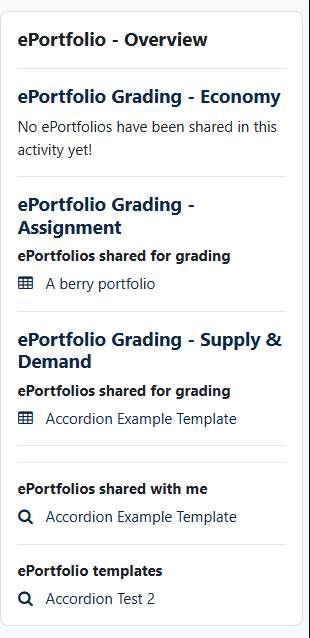
ePortfolio Block
Versions
Current version
0.2.6 (2025093000)
0.2.6
Plugin type: Blocks
Frankenstyle component name: block_eportfolio
Version build number: 2025093000
Version release name: 0.2.6
Maturity: Stable
Supported Moodle versions: 4.1, 4.2, 4.3, 4.4, 4.5
Repository URL (Git): https://github.com/weqon/moodle_block_eportfolio
Repository branch:
Repository tag:
Issue/bug tracker URL: https://github.com/weqon/moodle_block_eportfolio/issues
Block ePortfolio
This plugin is part of the ePortfolio collection and requires local_eportfolio to work.
Installing via uploaded ZIP file
- Log in to your Moodle site as an admin and go to Site administration >
Plugins > Install plugins. - Upload the ZIP file with the plugin code. You should only be prompted to add
extra details if your plugin type is not automatically detected. - Check the plugin validation report and finish the installation.
Installing manually
The plugin can be also installed by putting the contents of this directory to
{your/moodle/dirroot}/blocks/eportfolio
Afterwards, log in to your Moodle site as an admin and go to Site administration >
Notifications to complete the installation.
Alternatively, you can run
$ php admin/cli/upgrade.php
to complete the installation from the command line.
Relase notes
Moodle 4.5
Version 0.2.6
- Reverted required Moodle version to 4.1
Version 0.2.5
- Set supported Moodle version to 4.5
- Set maturity to stable
Moodle 4.1
Version 0.2.4
- Bug fix reset variable for enddate.
Version 0.2.3
- Check whether multiple ePortfolio-activity instances are available in the course.
- Restructuring output of ePortfolios.
Version 0.2.2
- Fixed PHPDoc inconsistency.
- Fixed namespace collisions.
- Added required capability and missing translation.
Version 0.2.1
- Added privacy provider class.
Version 0.2.0
- Complete code overhaul and refactoring.
- Added mustache template for displaying content.
License
2024 weQon UG support@weqon.net
This program is free software: you can redistribute it and/or modify it under
the terms of the GNU General Public License as published by the Free Software
Foundation, either version 3 of the License, or (at your option) any later
version.
This program is distributed in the hope that it will be useful, but WITHOUT ANY
WARRANTY; without even the implied warranty of MERCHANTABILITY or FITNESS FOR A
PARTICULAR PURPOSE. See the GNU General Public License for more details.
You should have received a copy of the GNU General Public License along with
this program. If not, see https://www.gnu.org/licenses/.
0.2.6 (2025092800)
0.2.6
Plugin type: Blocks
Frankenstyle component name: block_eportfolio
Version build number: 2025092800
Version release name: 0.2.6
Maturity: Stable
Supported Moodle versions: 5.0
Repository URL (Git): https://github.com/weqon/moodle_block_eportfolio
Repository branch:
Repository tag:
Issue/bug tracker URL: https://github.com/weqon/moodle_block_eportfolio/issues
Block ePortfolio
This plugin is part of the ePortfolio collection and requires local_eportfolio to work.
Installing via uploaded ZIP file
- Log in to your Moodle site as an admin and go to Site administration >
Plugins > Install plugins. - Upload the ZIP file with the plugin code. You should only be prompted to add
extra details if your plugin type is not automatically detected. - Check the plugin validation report and finish the installation.
Installing manually
The plugin can be also installed by putting the contents of this directory to
{your/moodle/dirroot}/blocks/eportfolio
Afterwards, log in to your Moodle site as an admin and go to Site administration >
Notifications to complete the installation.
Alternatively, you can run
$ php admin/cli/upgrade.php
to complete the installation from the command line.
Relase notes
Moodle 5.0
Version 0.2.6
- Set supported Moodle version to 5.0
Moodle 4.5
Version 0.2.5
- Set supported Moodle version to 4.5
- Set maturity to stable
Moodle 4.1
Version 0.2.4
- Bug fix reset variable for enddate.
Version 0.2.3
- Check whether multiple ePortfolio-activity instances are available in the course.
- Restructuring output of ePortfolios.
Version 0.2.2
- Fixed PHPDoc inconsistency.
- Fixed namespace collisions.
- Added required capability and missing translation.
Version 0.2.1
- Added privacy provider class.
Version 0.2.0
- Complete code overhaul and refactoring.
- Added mustache template for displaying content.
License
2024 weQon UG support@weqon.net
This program is free software: you can redistribute it and/or modify it under
the terms of the GNU General Public License as published by the Free Software
Foundation, either version 3 of the License, or (at your option) any later
version.
This program is distributed in the hope that it will be useful, but WITHOUT ANY
WARRANTY; without even the implied warranty of MERCHANTABILITY or FITNESS FOR A
PARTICULAR PURPOSE. See the GNU General Public License for more details.
You should have received a copy of the GNU General Public License along with
this program. If not, see https://www.gnu.org/licenses/.
0.2.4 (2025051900)
0.2.4
Plugin type: Blocks
Frankenstyle component name: block_eportfolio
Version build number: 2025051900
Version release name: 0.2.4
Maturity: Release Candidate
Supported Moodle versions: 4.1, 4.2, 4.3, 4.4, 4.5
Repository URL (Git): https://github.com/weqon/moodle_block_eportfolio
Repository branch:
Repository tag:
Issue/bug tracker URL: https://github.com/weqon/moodle_block_eportfolio/issues
Block ePortfolio
This plugin is part of the ePortfolio collection and requires local_eportfolio to work.
Installing via uploaded ZIP file
- Log in to your Moodle site as an admin and go to Site administration >
Plugins > Install plugins. - Upload the ZIP file with the plugin code. You should only be prompted to add
extra details if your plugin type is not automatically detected. - Check the plugin validation report and finish the installation.
Installing manually
The plugin can be also installed by putting the contents of this directory to
{your/moodle/dirroot}/blocks/eportfolio
Afterwards, log in to your Moodle site as an admin and go to Site administration >
Notifications to complete the installation.
Alternatively, you can run
$ php admin/cli/upgrade.php
to complete the installation from the command line.
Relase notes
Version 0.2.4
- Bug fix reset variable for enddate.
Version 0.2.3
- Check whether multiple ePortfolio-activity instances are available in the course.
- Restructuring output of ePortfolios.
Version 0.2.2
- Fixed PHPDoc inconsistency.
- Fixed namespace collisions.
- Added required capability and missing translation.
Version 0.2.1
- Added privacy provider class.
Version 0.2.0
- Complete code overhaul and refactoring.
- Added mustache template for displaying content.
License
2024 weQon UG support@weqon.net
This program is free software: you can redistribute it and/or modify it under
the terms of the GNU General Public License as published by the Free Software
Foundation, either version 3 of the License, or (at your option) any later
version.
This program is distributed in the hope that it will be useful, but WITHOUT ANY
WARRANTY; without even the implied warranty of MERCHANTABILITY or FITNESS FOR A
PARTICULAR PURPOSE. See the GNU General Public License for more details.
You should have received a copy of the GNU General Public License along with
this program. If not, see https://www.gnu.org/licenses/.
0.2.3 (2025031200)
0.2.3
Plugin type: Blocks
Frankenstyle component name: block_eportfolio
Version build number: 2025031200
Version release name: 0.2.3
Maturity: Release Candidate
Supported Moodle versions: 4.1
Repository URL (Git): https://github.com/weqon/moodle_block_eportfolio
Repository branch:
Repository tag:
Issue/bug tracker URL: https://github.com/weqon/moodle_block_eportfolio/issues
Block ePortfolio
This plugin is part of the ePortfolio collection and requires local_eportfolio to work.
Installing via uploaded ZIP file
- Log in to your Moodle site as an admin and go to Site administration >
Plugins > Install plugins. - Upload the ZIP file with the plugin code. You should only be prompted to add
extra details if your plugin type is not automatically detected. - Check the plugin validation report and finish the installation.
Installing manually
The plugin can be also installed by putting the contents of this directory to
{your/moodle/dirroot}/blocks/eportfolio
Afterwards, log in to your Moodle site as an admin and go to Site administration >
Notifications to complete the installation.
Alternatively, you can run
$ php admin/cli/upgrade.php
to complete the installation from the command line.
Relase notes
Upcoming
- Improved output of ePortfolios to maintain a clear overview, especially with a larger number of ePortfolios
Version 0.2.3
- Check whether multiple ePortfolio-activity instances are available in the course.
- Restructuring output of ePortfolios.
Version 0.2.2
- Fixed PHPDoc inconsistency.
- Fixed namespace collisions.
- Added required capability and missing translation.
Version 0.2.1
- Added privacy provider class.
Version 0.2.0
- Complete code overhaul and refactoring.
- Added mustache template for displaying content.
License
2024 weQon UG support@weqon.net
This program is free software: you can redistribute it and/or modify it under
the terms of the GNU General Public License as published by the Free Software
Foundation, either version 3 of the License, or (at your option) any later
version.
This program is distributed in the hope that it will be useful, but WITHOUT ANY
WARRANTY; without even the implied warranty of MERCHANTABILITY or FITNESS FOR A
PARTICULAR PURPOSE. See the GNU General Public License for more details.
You should have received a copy of the GNU General Public License along with
this program. If not, see https://www.gnu.org/licenses/.
0.2.2 (2025020700)
0.2.2
Plugin type: Blocks
Frankenstyle component name: block_eportfolio
Version build number: 2025020700
Version release name: 0.2.2
Maturity: Release Candidate
Supported Moodle versions: 4.1
Repository URL (Git): https://github.com/weqon/moodle_block_eportfolio
Repository branch:
Repository tag:
Issue/bug tracker URL: https://github.com/weqon/moodle_block_eportfolio/issues
Block ePortfolio
This plugin is part of the ePortfolio collection and requires local_eportfolio to work.
Installing via uploaded ZIP file
- Log in to your Moodle site as an admin and go to Site administration >
Plugins > Install plugins. - Upload the ZIP file with the plugin code. You should only be prompted to add
extra details if your plugin type is not automatically detected. - Check the plugin validation report and finish the installation.
Installing manually
The plugin can be also installed by putting the contents of this directory to
{your/moodle/dirroot}/blocks/eportfolio
Afterwards, log in to your Moodle site as an admin and go to Site administration >
Notifications to complete the installation.
Alternatively, you can run
$ php admin/cli/upgrade.php
to complete the installation from the command line.
Relase notes
Version 0.2.2
- Fixed PHPDoc inconsistency.
- Fixed namespace collisions.
- Added required capability and missing translation.
Version 0.2.1
- Added privacy provider class.
Version 0.2.0
- Complete code overhaul and refactoring.
- Added mustache template for displaying content.
License
2024 weQon UG support@weqon.net
This program is free software: you can redistribute it and/or modify it under
the terms of the GNU General Public License as published by the Free Software
Foundation, either version 3 of the License, or (at your option) any later
version.
This program is distributed in the hope that it will be useful, but WITHOUT ANY
WARRANTY; without even the implied warranty of MERCHANTABILITY or FITNESS FOR A
PARTICULAR PURPOSE. See the GNU General Public License for more details.
You should have received a copy of the GNU General Public License along with
this program. If not, see https://www.gnu.org/licenses/.
0.2.1 (2024111900)
0.2.1
Plugin type: Blocks
Frankenstyle component name: block_eportfolio
Version build number: 2024111900
Version release name: 0.2.1
Maturity: Release Candidate
Supported Moodle versions: 4.1
Repository URL (Git): https://github.com/weqon/moodle-block_eportfolio
Repository branch:
Repository tag:
Issue/bug tracker URL: https://github.com/weqon/moodle_block_eportfolio/issues
Block ePortfolio
This plugin is part of the ePortfolio collection and requires local_eportfolio to work.
Installing via uploaded ZIP file
- Log in to your Moodle site as an admin and go to Site administration >
Plugins > Install plugins. - Upload the ZIP file with the plugin code. You should only be prompted to add
extra details if your plugin type is not automatically detected. - Check the plugin validation report and finish the installation.
Installing manually
The plugin can be also installed by putting the contents of this directory to
{your/moodle/dirroot}/blocks/eportfolio
Afterwards, log in to your Moodle site as an admin and go to Site administration >
Notifications to complete the installation.
Alternatively, you can run
$ php admin/cli/upgrade.php
to complete the installation from the command line.
Relase notes
Version 0.2.1
- Added privacy provider class.
Version 0.2.0
- Complete code overhaul and refactoring.
- Added mustache template for displaying content.
License
2024 weQon UG support@weqon.net
This program is free software: you can redistribute it and/or modify it under
the terms of the GNU General Public License as published by the Free Software
Foundation, either version 3 of the License, or (at your option) any later
version.
This program is distributed in the hope that it will be useful, but WITHOUT ANY
WARRANTY; without even the implied warranty of MERCHANTABILITY or FITNESS FOR A
PARTICULAR PURPOSE. See the GNU General Public License for more details.
You should have received a copy of the GNU General Public License along with
this program. If not, see https://www.gnu.org/licenses/.