
Alphabees AI Tutor / AI Chat

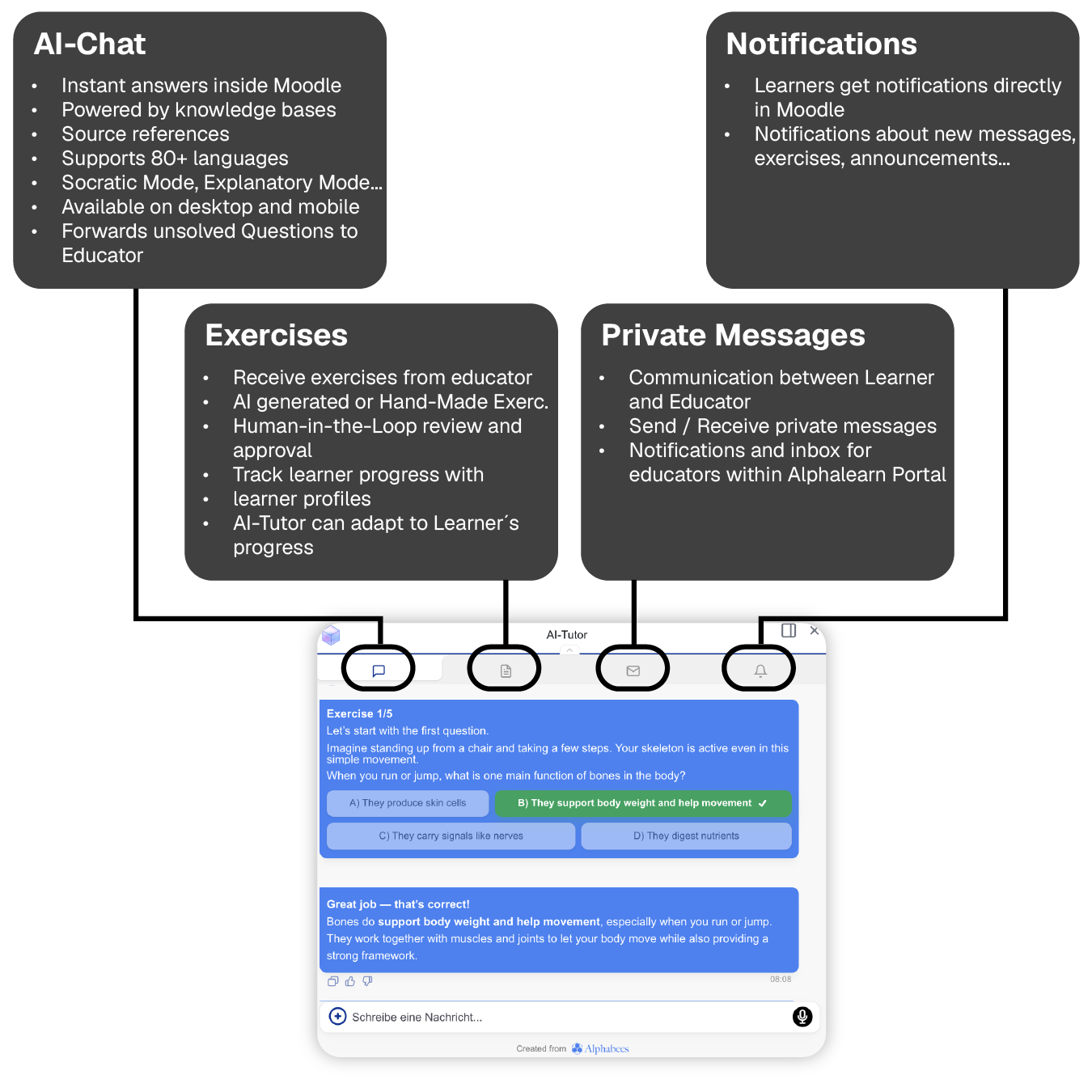
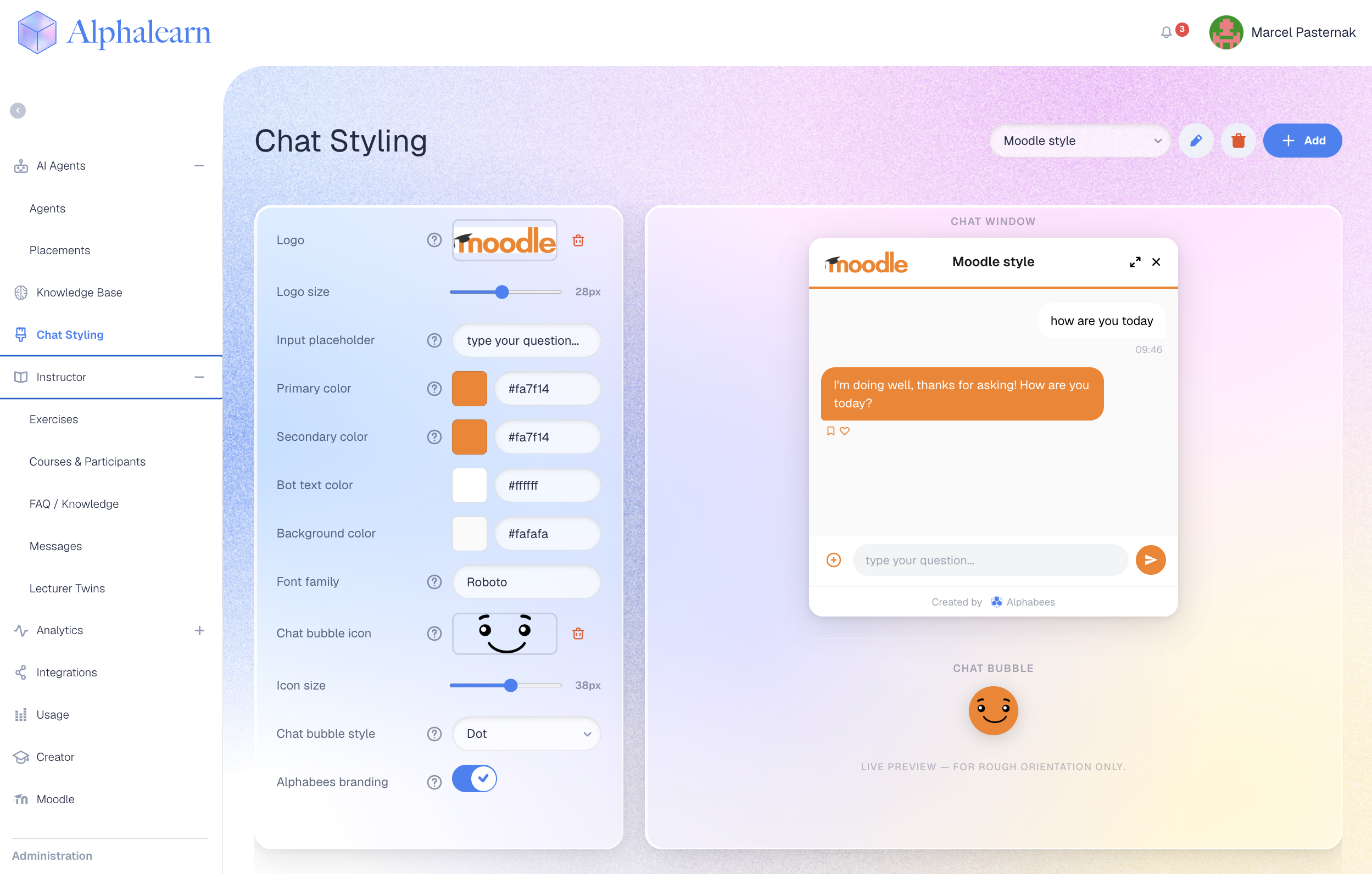
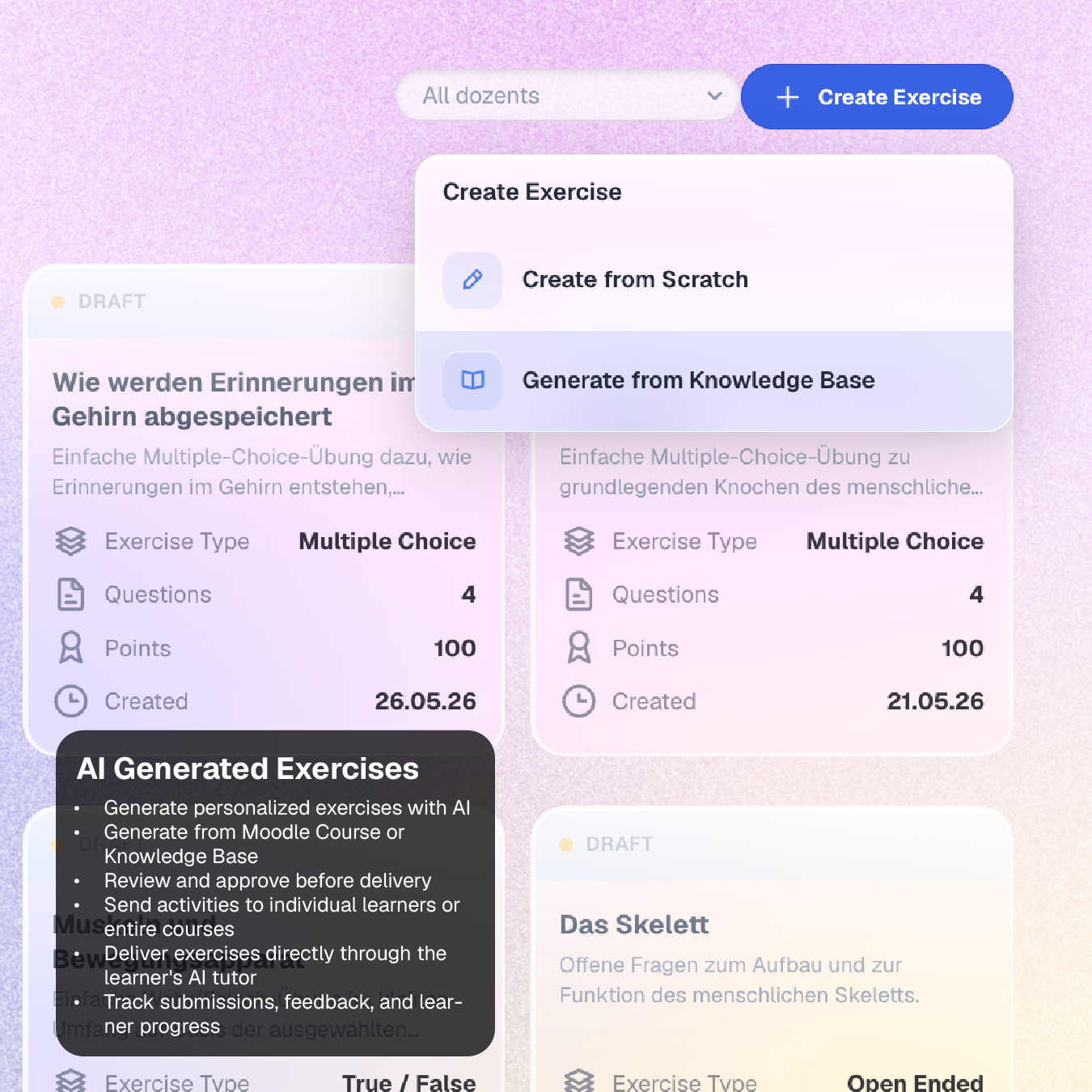
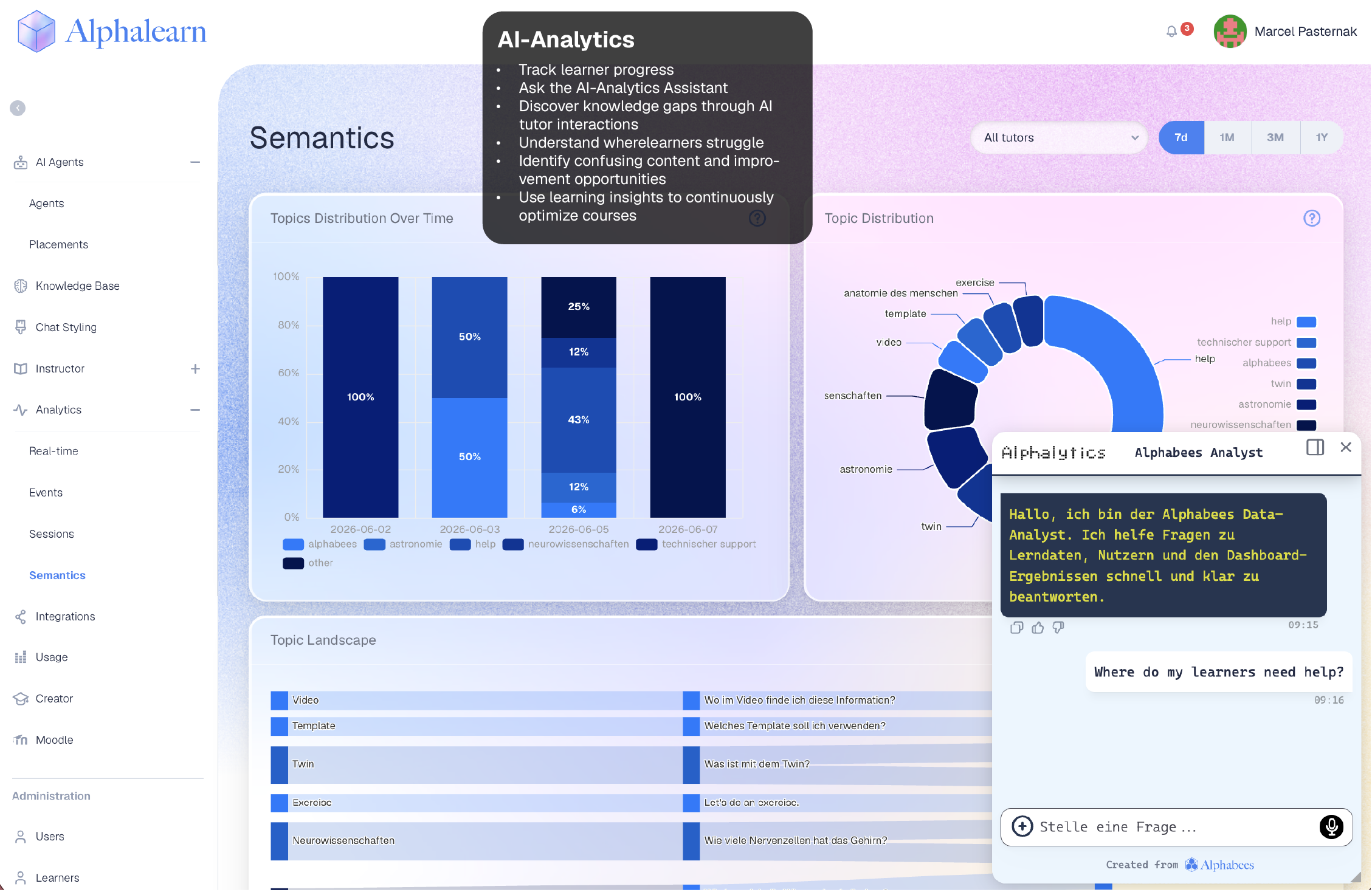
Versions
Current version
3.0.3 (2026062200)
3.0.3
Plugin type: Blocks
Frankenstyle component name: block_alphabees
Version build number: 2026062200
Version release name: 3.0.3
Maturity: Stable
Supported Moodle versions: 4.1, 4.2, 4.3, 4.4, 4.5, 5.0, 5.1, 5.2
Repository URL (Git): https://github.com/LErdweg/moodle-block_alphabees
Repository branch:
Repository tag:
Issue/bug tracker URL: https://github.com/LErdweg/moodle-block_alphabees/issues
Alphabees Moodle Plugin
Added
- Added support for portal-managed placements in Moodle activity contexts such as SCORM, Lesson, Quiz, H5P, Forum, Wiki, Database, and Feedback.
- Added Moodle web-service access for additional activity content APIs where available on the target Moodle site.
Support
For support:
- Use the Alphabees portal.
- Report plugin issues through the Moodle Plugin Directory or GitHub.
- Contact support at support@alphabees.de.
3.0.2 (2026061100)
3.0.2
Plugin type: Blocks
Frankenstyle component name: block_alphabees
Version build number: 2026061100
Version release name: 3.0.2
Maturity: Stable
Supported Moodle versions: 4.1, 4.2, 4.3, 4.4, 4.5, 5.0, 5.1, 5.2
Repository URL (Git): https://github.com/LErdweg/moodle-block_alphabees
Repository branch:
Repository tag:
Issue/bug tracker URL: https://github.com/LErdweg/moodle-block_alphabees/issues
Alphabees Moodle Plugin
Release Notes 5.0.2
This release improves the Alphabees Moodle plugin connection with the Alphabees portal and makes placement handling more reliable.
What’s New
Portal-managed placements can now update Moodle block instances more reliably.
Tutor/agent selection in block settings now shows the correct selected tutor after remote updates.
Tutor names are displayed more clearly when available.
Moodle App/mobile support has been updated to use the same relevant placement data as the web version.
The chat widget now loads from the production Alphabees domain.
Fixes
Fixed an issue where the chat widget AMD module could fail to load in Moodle.
Improved handling of placement updates such as tutor, color, visibility, and delete actions.
Improved compatibility across supported Moodle versions.
Upgrade Notes
Recommended update for all installations using portal-managed placements.
After updating, clear Moodle caches if the old widget version is still loaded.
Support
For support:
- Use the Alphabees portal.
- Report plugin issues through the Moodle Plugin Directory or GitHub.
- Contact support at support@alphabees.de.
3.0.1 (2026051800)
3.0.1
Plugin type: Blocks
Frankenstyle component name: block_alphabees
Version build number: 2026051800
Version release name: 3.0.1
Maturity: Stable
Supported Moodle versions: 4.1, 4.2, 4.3, 4.4, 4.5, 5.0, 5.1, 5.2
Repository URL (Git): https://github.com/LErdweg/moodle-block_alphabees
Repository branch:
Repository tag:
Issue/bug tracker URL: https://github.com/LErdweg/moodle-block_alphabees/issues
Changelog
All notable changes to the Alphabees AI Tutor Moodle block plugin are documented in this file.
The format is based on Keep a Changelog,
and this project adheres to Semantic Versioning.
[3.0.1] - 2026-05-18
Fixed
- Added an idempotent upgrade step that creates the
block_alphabees_noncesandblock_alphabees_retryqueuetables when upgrading from older plugin versions. - Prevented
dml_exceptiondatabase-read errors on upgraded customer sites where Moodle had not rundb/install.xmlfor the V3 tables.
Changed
- Bumped plugin version to
2026051800and release label to3.0.1.
[3.0.0] - 2026-05-10
Added
- First stable 3.x release.
- Automatic Moodle site registration with the Alphabees backend after saving the API key.
- Signed backend communication using locally generated Ed25519 keys, site identifiers, and nonce replay protection.
- Optional Alphabees web-services integration with automatic service user creation, role assignment, token generation, and teardown.
- Portal-managed placement synchronization for Alphabees blocks.
- Scheduled tasks for site registration, placement sync, outbound retry processing, web-service token posting, placement lifecycle events, and nonce cleanup.
- Retry queue for transient outbound backend communication failures.
- Backend course writing/export support and REST connection endpoint.
- Status and diagnostics panel for backend connection and web-services state.
Changed
- Updated supported Moodle range to 4.1 LTS through 5.2.
- Updated plugin version to
2026051001and release label to3.0.0. - Updated portal references to
portal.alphalearn.ai. - Updated chat widget and mobile app configuration for the current Alphabees backend.
Fixed
- Corrected GitHub README links and screenshot references for the current public repository.
[2.0.3] - 2025-10-14
Fixed
- Bug fix in AMD build (JavaScript module)
- Version number update
[2.0.1] - 2025-10-09
Added
- Moodle 5.1 support added to supported versions list
Changed
- Updated sidebar text
- Bumped plugin version to
2025100901
[2.0.0] - 2025-09-03
Added
- Mobile app support
- Moodle 5 compliance
Changed
- Cleaned up repository (removed unwanted files, updated
.gitignore) - Updated README
Fixed
- Missing language strings added
- Privacy API implementation corrected
- Various Moodle compliance issues resolved
- Gruntfile fixed
- Node modules properly excluded from tracking
- Image references corrected
[1.0.1] - 2025-01-28
Changed
- Updated widget version
- Added screenshots to README
Fixed
- Moodle flags corrected
- Image reference fixed
- Added README to install ZIP package
[1.0.0] - 2024-12-11
Added
- Initial release of the Alphabees AI Tutor block plugin
- Integration of AI tutor chat widget into Moodle via block structure
- API key configuration in admin settings
- Tutor selection via block instance settings
- WebSocket-driven real-time chat communication
- Multi-language support (English and German)
- Moodle code guidelines compliance
- GNU GPL v3.0 license
3.0.0 (2026051001)
3.0.0
Plugin type: Blocks
Frankenstyle component name: block_alphabees
Version build number: 2026051001
Version release name: 3.0.0
Maturity: Stable
Supported Moodle versions: 4.1, 4.2, 4.3, 4.4, 4.5, 5.0, 5.1, 5.2
Repository URL (Git): https://github.com/LErdweg/moodle-block_alphabees
Repository branch:
Repository tag:
Issue/bug tracker URL: https://github.com/LErdweg/moodle-block_alphabees/issues
Alphabees AI Tutor 3.0.0 — stable release
The plugin now installs end-to-end with three clicks (API key, web-services consent, save) instead of the legacy 11-step manual setup.
Highlights
- One-click web-services integration. A consent checkbox creates a dedicated
alphabees-serviceuser, grants it site-wide manager-role access, generates a permanent token and sends it to Alphabees automatically. Unticking the box revokes the token and tears the integration down. - No
local_wsmanagesectionsdependency. Section summaries and module HTML are now pushed through plugin-native actions — the third-party plugin is no longer required. - Bidirectional course management. Alphabees can now read and write courses, users, grades, sections and modules through 24 bundled web-service functions.
What's new
- Opt-in admin setting
allow_remote_placementlets the Alphabees portal autonomously place tutor blocks across courses. - Tutor placements can now be remotely managed for visibility and primary-color override.
- "Connect now" button bypasses the cron wait when registering with the backend.
- Initial backfill sync of existing tutor placements runs automatically after first registration, so the portal sees the full state immediately.
Improvements
- Adding, editing or removing a tutor block no longer triggers Moodle's "Continue" intermediate page — lifecycle events now run asynchronously in the background.
- Settings page reorganised: API key and opt-in checkboxes at the top, full connection status and diagnostic details collapsible under one heading.
- Service-creation no longer collides with
Alphabeesservices from the legacy manual setup — both can coexist while you migrate.
Compatibility
Moodle 4.1 LTS through 5.2.
Migration
Sites that ran the legacy 11-step manual setup are unaffected — the auto-managed and manual services coexist. The legacy service can be removed via Site Admin ' External Services once the backend is fully migrated to the signed-channel pipeline.
Development and Contributions
- GitHub Repository: moodle-block_alphabees
- Contributions are welcome! Please fork the repository, make your changes, and submit a pull request.
Privacy
This plugin complies with Moodle's privacy policies. It does not store personal data on Moodle but communicates with the Alphabees backend. For more information, refer to the PRIVACY.md file.
License
This plugin is licensed under the GNU General Public License v3.0. For more details, see the LICENSE file included in the repository.
Proprietary Components
The Alphabees Chat Widget is a proprietary, externally hosted JavaScript file dynamically loaded into Moodle via this plugin.
To ensure consistency and efficiency, the widget is centrally managed and versioned on our servers. This approach reduces maintenance overhead across plugins for different LMS platforms, enabling seamless updates and a consistent user experience.
As part of our business model, the chat widget generates revenue to finance ongoing operations and development. For this reason, it is not open-source, though the Moodle plugin code remains fully open-source and compliant with Moodle's development standards.
Support
For issues, please:
- Report them via GitHub Issues.
- Contact support at support@alphabees.de.
2.0.3 (2025101401)
2.0.3
Plugin type: Blocks
Frankenstyle component name: block_alphabees
Version build number: 2025101401
Version release name: 2.0.3
Maturity: Stable
Supported Moodle versions: 4.1, 4.2, 4.3, 4.4, 4.5, 5.0, 5.1
Repository URL (Git): https://github.com/LErdweg/moodle-block_alphabees
Repository branch:
Repository tag:
Issue/bug tracker URL: https://github.com/LErdweg/moodle-block_alphabees/issues
Alphabees Moodle Plugin
Overview
The Alphabees Moodle Plugin integrates a powerful AI tutor chat widget into Moodle, enabling precise placement using Moodle's block structure. It seamlessly combines integration with a high-quality custom UI and backend, fully customizable through the Alphabees portal.
This plugin leverages Moodle's flexible block placement capabilities while incorporating robust WebSocket-driven communication and advanced customization options, ensuring a high-performance and user-friendly AI tutoring solution.
How It Works: Alphabees AI Tutor Integration
Step 1: Register on the Alphabees Portal
Start by registering at portal.alphabees.de, where you can:
- Upload files and connect external data sources (e.g., websites) to build a custom knowledge base.
- Design chat widget styles with customizable options, including:
- Logo and placeholder messages.
- Colors and fonts.
- Placement on the screen (e.g., bottom-right, bottom-left, center).
Step 2: Configure AI Tutors
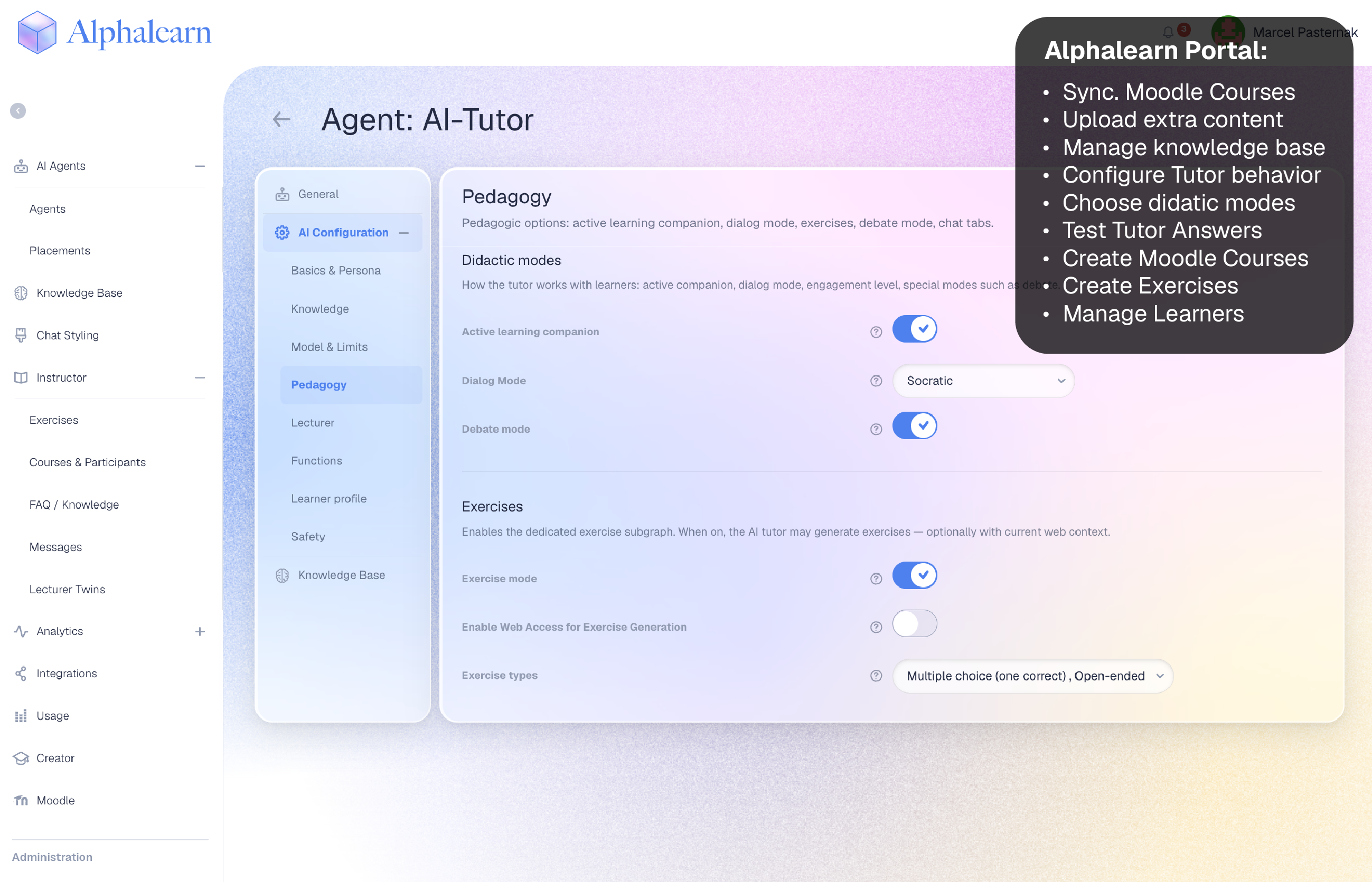
Create AI tutors using templates such as Q&A Tutor or Tutor Mode. Customize each tutor with:
- Assigned knowledge bases.
- Chat widget styles.
- Behavior settings:
- Tone, engagement level, and strict topic adherence.
- Enable live web search or include sources.
- AI model providers like OpenAI, Anthropic, or Meta.
- Custom prompt instructions for tailored interactions.
Step 3: Deploy the AI Tutor
Deploy your AI tutor in two ways:
- Embed on Websites: Use an HTML snippet to add the tutor to any website.
- Integrate with Moodle: Install the Alphabees Moodle block plugin for seamless deployment within Moodle environments.
Step 4: Integrate with Moodle
- Generate an API key from the Alphabees portal.
- Enter the API key into the admin settings of the Alphabees Moodle plugin.
- Add the Alphabees block plugin wherever needed within Moodle.
- In the block settings, select the desired AI tutor from a dropdown list of tutors created in the Alphabees portal.
- Once configured, the AI tutor is ready to interact with Moodle users.
Features
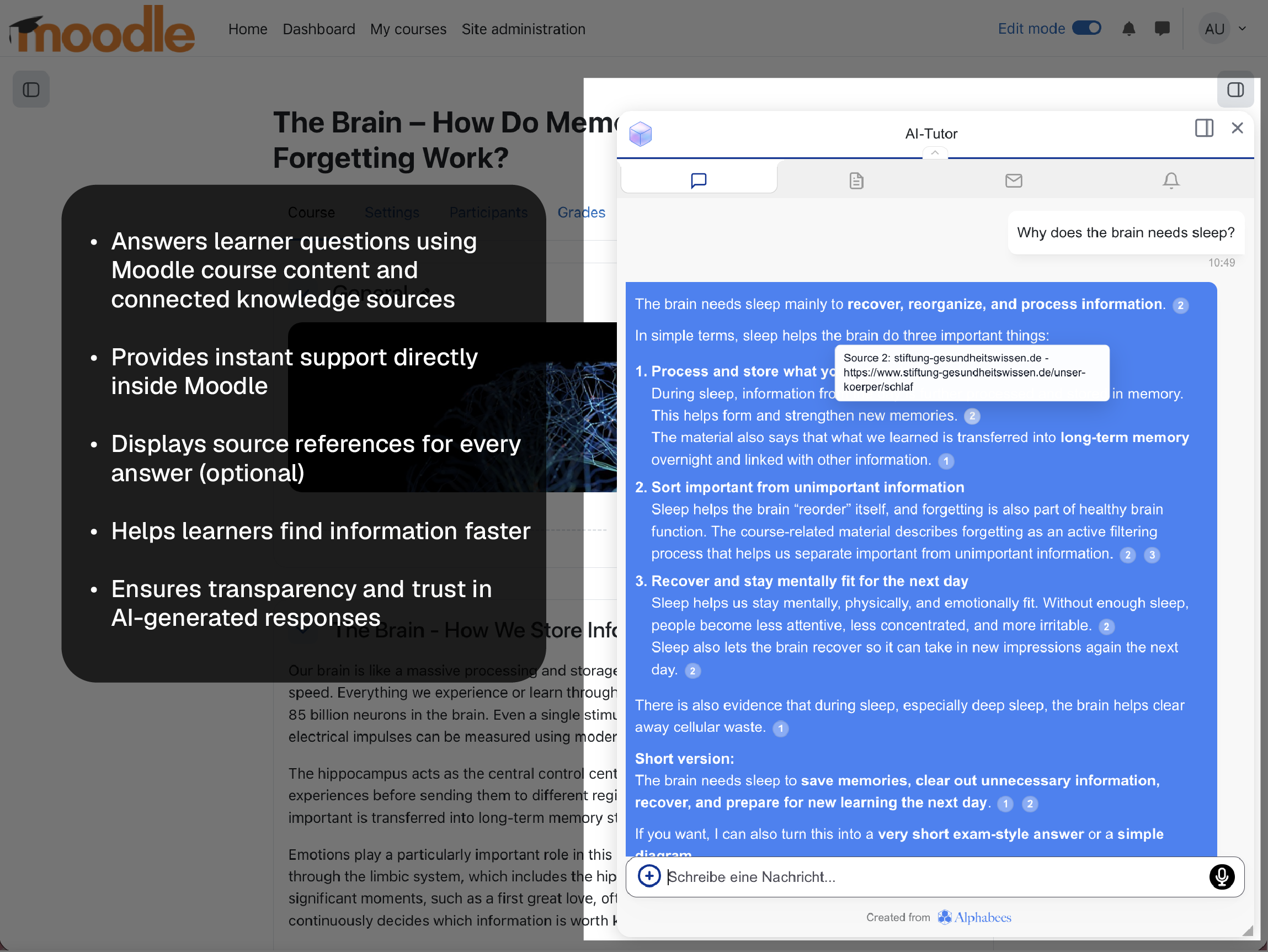
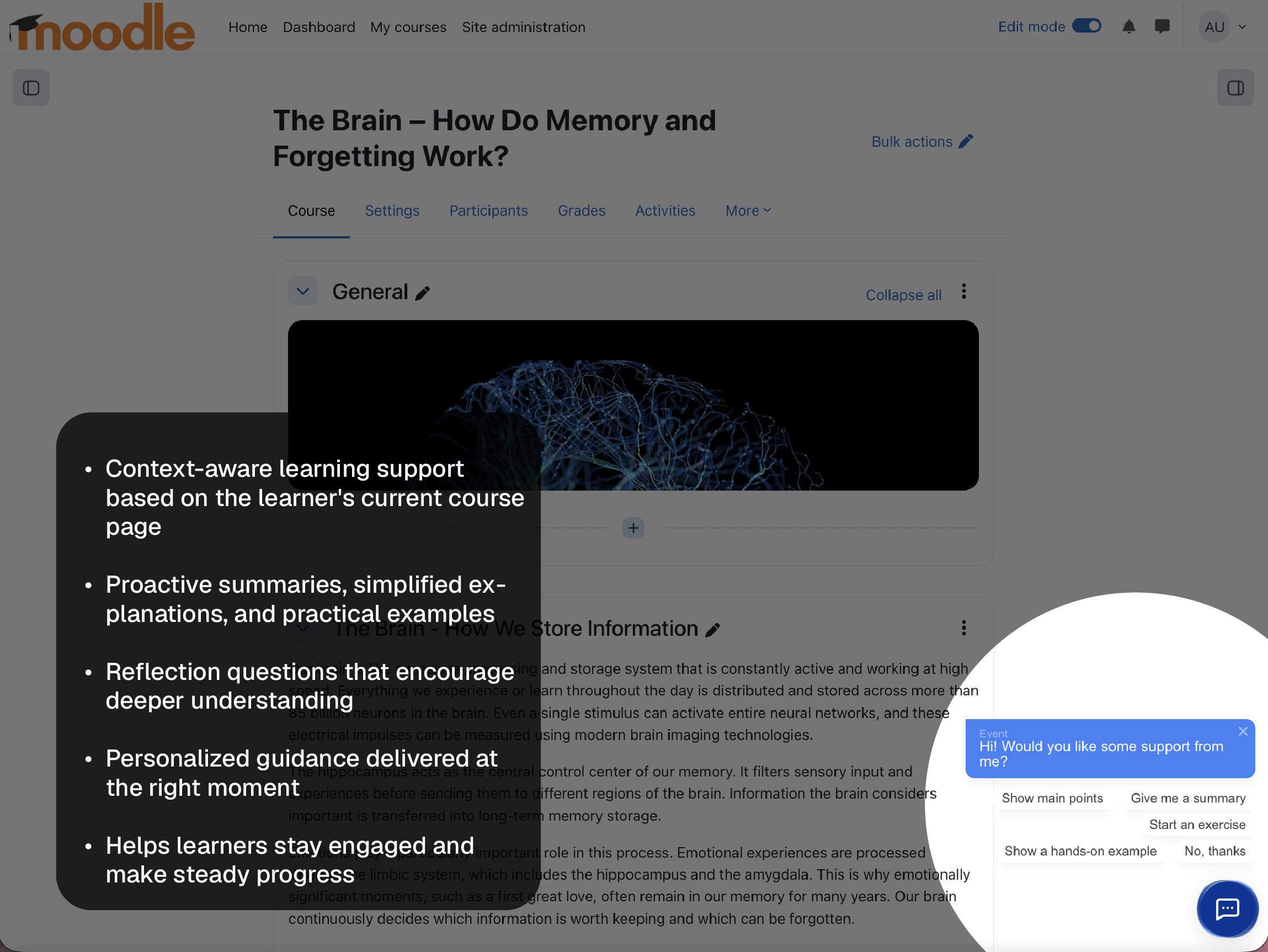
- Granular Placement Control: Place the chat widget in specific courses, dashboards, or other Moodle pages using block functionality.
- High-Quality UI: The chat widget features an advanced, responsive design independent of Moodle’s UI.
- Customizable Styling: Configure widget colors, fonts, logos, and placement via the Alphabees portal.
- AI-Powered Tutoring: Supports AI-driven interaction for answering questions and engaging with learners in real time.
- WebSocket Communication: Real-time chat experience powered by WebSockets for fast, seamless interactions.
- Multi-language Support: Available in English and German for broader accessibility.
- File Metadata Options: Add metadata such as readability index, tone of voice, and persona to enhance AI responses.
Installation
The Alphabees Moodle Plugin can be installed in two ways:
1. Installation via Moodle Plugin Directory (Recommended)
- Log in to your Moodle site as an administrator.
- Go to Site Administration > Plugins > Install Plugins.
- Search for "Alphabees" in the Plugin Directory.
- Click Install now to download and install the plugin.
- Follow the on-screen prompts to complete the installation.
- Navigate to Site Administration > Plugins > Blocks > Alphabees to configure the plugin.
2. Installation via Moodle's Built-in Plugin Installer (ZIP File)
- Download the latest plugin ZIP file from the repository: Alphabees Moodle Plugin ZIP.
- Log in to your Moodle site as an administrator.
- Go to Site Administration > Plugins > Install Plugins.
- Upload the ZIP file and click Install plugin.
- Follow the on-screen prompts to finalize the installation.
- Navigate to Site Administration > Plugins > Blocks > Alphabees to configure the plugin.
For more detailed instructions, visit the Installation Wiki.
Configuration
Register a free or paid Account on portal.alphabees.de and retrieve your API key
Enter your API key from the Alphabees portal in the plugin settings.
Customize the chat widget appearance through the Alphabees portal, including colors, fonts, logos, and placement.
Add the Alphabees block to specific courses or pages in Moodle.
Use the block settings to select the desired AI tutor from the dropdown list.
Customizations
Change size of chat window.
Change position of chat window.
Free and Paid Plans
1. Free Plan (Ideal for small teams & individuals)
- 1 AI Tutor**
- 30 conversations per month**
- 3 data sources**
- Basic Q&A AI Tutor**
- Access to the admin portal**
- Cost: €0 (Free Forever)**
2. Basic Plan (€99/month)
- 5 AI Tutors**
- 2,000 conversations per month**
- 50 data sources**
- Custom chat design with branding**
- Email support**
3. Professional Plan (€249/month)
- 20 AI Tutors**
- 5,000 conversations per month**
- 50 data sources**
- Custom chat design without branding**
- Email support**
For enterprise pricing, please contact us directly via the Alphabees portal.
Usage
- Add the Alphabees AI Tutor block to a Moodle course or desired page.
- Upload files and include metadata (if applicable) to optimize AI interactions.
- Style the widget via the Alphabees portal to align with your branding.
- Interact with the AI tutor through the dynamic chat widget, powered by real-time WebSocket communication.
Development and Contributions
- GitHub Repository: moodle-block_alphabees
- Contributions are welcome! Please fork the repository, make your changes, and submit a pull request.
Privacy
This plugin complies with Moodle's privacy policies. It does not store personal data on Moodle but communicates with the Alphabees backend. For more information, refer to the PRIVACY.md file.
License
This plugin is licensed under the GNU General Public License v3.0. For more details, see the LICENSE file included in the repository.
Proprietary Components
The Alphabees Chat Widget is a proprietary, externally hosted JavaScript file dynamically loaded into Moodle via this plugin.
To ensure consistency and efficiency, the widget is centrally managed and versioned on our servers. This approach reduces maintenance overhead across plugins for different LMS platforms, enabling seamless updates and a consistent user experience.
As part of our business model, the chat widget generates revenue to finance ongoing operations and development. For this reason, it is not open-source, though the Moodle plugin code remains fully open-source and compliant with Moodle's development standards.
Support
For issues, please:
- Report them via GitHub Issues.
- Contact support at support@alphabees.de.
2.0.0 (2025072521)
2.0.0
Plugin type: Blocks
Frankenstyle component name: block_alphabees
Version build number: 2025072521
Version release name: 2.0.0
Maturity: Stable
Supported Moodle versions: 4.1, 4.2, 4.3, 4.4, 4.5, 5.0
Repository URL (Git): https://github.com/LErdweg/moodle-block_alphabees
Repository branch:
Repository tag:
Issue/bug tracker URL: https://github.com/LErdweg/moodle-block_alphabees/issues
Alphabees AI Tutor Block – Version 2.0.0
🚀 New in this release
Moodle Mobile App Support
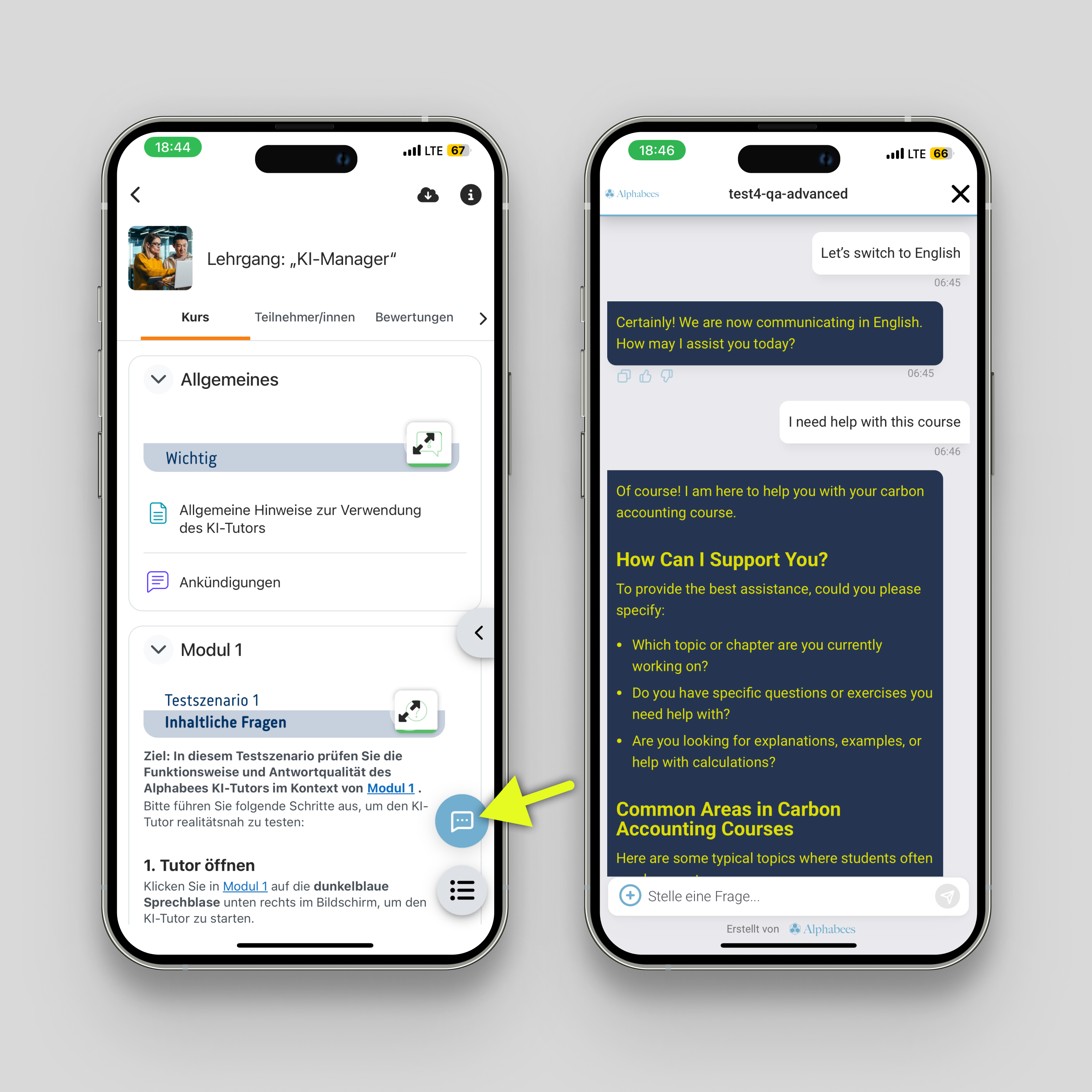
- The Alphabees AI Tutor block plugin now works seamlessly inside the official Moodle mobile app.
- The same AI tutor instance that you place in your Moodle LMS will also be available in the mobile app on the corresponding pages.
- If no Alphabees block is present on a page, the AI tutor will not be shown — ensuring a clean, context-aware experience.
Moodle 5 Compatibility
- The plugin has been updated and tested for compatibility with Moodle 5.0 while maintaining support for Moodle 4.x (from 4.0 upwards).
' This means educators and learners get a consistent AI tutor experience across web and mobile, with reliable versioning for the latest Moodle core.
1.0.3 (2025020600)
1.0.3
Plugin type: Blocks
Frankenstyle component name: block_alphabees
Version build number: 2025020600
Version release name: 1.0.3
Maturity: Stable
Supported Moodle versions: 4.0, 4.1, 4.2, 4.3, 4.4, 4.5
Repository URL (Git): https://github.com/LErdweg/moodle-block_alphabees
Repository branch:
Repository tag:
Issue/bug tracker URL: https://github.com/LErdweg/moodle-block_alphabees/issues
Added missing strings, and adjusted the privacy API implementation.
1.0.2 (2025020500)
1.0.2
Plugin type: Blocks
Frankenstyle component name: block_alphabees
Version build number: 2025020500
Version release name: 1.0.2
Maturity: Stable
Supported Moodle versions: 4.0, 4.1, 4.2, 4.3, 4.4, 4.5
Repository URL (Git): https://github.com/LErdweg/moodle-block_alphabees
Repository branch:
Repository tag:
Issue/bug tracker URL: https://github.com/LErdweg/moodle-block_alphabees/issues
Here’s a summary of the fixes and improvements made:
• API Key Generation Documentation:
•Updated the README and wiki with clearer instructions on obtaining an API key from our portal.
•Added an image in the GitHub README that highlights the necessary buttons to click.
•Implemented a full English translation in our portal.
• Subscription Information:
•Although the website remains in its original language, the README and portal now provide clear descriptions of our subscription packages and quotas.
• Installation:
•Fixed the issue with missing language strings in the plugin settings definition.
• Coding Style and Assets:
•Ensured adherence to Moodle coding guidelines by compressing the previously uncompressed config.js file and including the compressed version.
• Boilerplate and Copyrights:
•Added the correct header and boilerplate in JS files.
•Included the appropriate copyright notice.
• Privacy Provider:
•Made improvements to the privacy API implementation.
1.0.1 (2025012800)
1.0.1
Plugin type: Blocks
Frankenstyle component name: block_alphabees
Version build number: 2025012800
Version release name: 1.0.1
Maturity: Stable
Supported Moodle versions: 4.0, 4.1, 4.2, 4.3, 4.4, 4.5
Repository URL (Git): https://github.com/LErdweg/moodle-block_alphabees
Repository branch:
Repository tag:
Issue/bug tracker URL: https://github.com/LErdweg/moodle-block_alphabees/issues
Alphabees Moodle Plugin
Overview
The Alphabees Moodle Plugin integrates a powerful AI tutor chat widget into Moodle, enabling precise placement using Moodle's block structure. It seamlessly combines integration with a high-quality custom UI and backend, fully customizable through the Alphabees portal.
This plugin leverages Moodle's flexible block placement capabilities while incorporating robust WebSocket-driven communication and advanced customization options, ensuring a high-performance and user-friendly AI tutoring solution.
How It Works: Alphabees AI Tutor Integration
Step 1: Register on the Alphabees Portal
Start by registering at portal.alphabees.de, where you can:
- Upload files and connect external data sources (e.g., websites) to build a custom knowledge base.
- Design chat widget styles with customizable options, including:
- Logo and placeholder messages.
- Colors and fonts.
- Placement on the screen (e.g., bottom-right, bottom-left, center).
Step 2: Configure AI Tutors
Create AI tutors using templates such as Q&A Tutor or Tutor Mode. Customize each tutor with:
- Assigned knowledge bases.
- Chat widget styles.
- Behavior settings:
- Tone, engagement level, and strict topic adherence.
- Enable live web search or include sources.
- AI model providers like OpenAI, Anthropic, or Meta.
- Custom prompt instructions for tailored interactions.
Step 3: Deploy the AI Tutor
Deploy your AI tutor in two ways:
- Embed on Websites: Use an HTML snippet to add the tutor to any website.
- Integrate with Moodle: Install the Alphabees Moodle block plugin for seamless deployment within Moodle environments.
Step 4: Integrate with Moodle
- Generate an API key from the Alphabees portal.
- Enter the API key into the admin settings of the Alphabees Moodle plugin.
- Add the Alphabees block plugin wherever needed within Moodle.
- In the block settings, select the desired AI tutor from a dropdown list of tutors created in the Alphabees portal.
- Once configured, the AI tutor is ready to interact with Moodle users.
Features
- Granular Placement Control: Place the chat widget in specific courses, dashboards, or other Moodle pages using block functionality.
- High-Quality UI: The chat widget features an advanced, responsive design independent of Moodle’s UI.
- Customizable Styling: Configure widget colors, fonts, logos, and placement via the Alphabees portal.
- AI-Powered Tutoring: Supports AI-driven interaction for answering questions and engaging with learners in real time.
- WebSocket Communication: Real-time chat experience powered by WebSockets for fast, seamless interactions.
- Multi-language Support: Available in English and German for broader accessibility.
- File Metadata Options: Add metadata such as readability index, tone of voice, and persona to enhance AI responses.
Installation
The Alphabees Moodle Plugin can be installed in two ways:
1. Installation via Moodle Plugin Directory (Recommended)
- Log in to your Moodle site as an administrator.
- Go to Site Administration > Plugins > Install Plugins.
- Search for "Alphabees" in the Plugin Directory.
- Click Install now to download and install the plugin.
- Follow the on-screen prompts to complete the installation.
- Navigate to Site Administration > Plugins > Blocks > Alphabees to configure the plugin.
2. Installation via Moodle's Built-in Plugin Installer (ZIP File)
- Download the latest plugin ZIP file from the repository: Alphabees Moodle Plugin ZIP.
- Log in to your Moodle site as an administrator.
- Go to Site Administration > Plugins > Install Plugins.
- Upload the ZIP file and click Install plugin.
- Follow the on-screen prompts to finalize the installation.
- Navigate to Site Administration > Plugins > Blocks > Alphabees to configure the plugin.
For more detailed instructions, visit the Installation Wiki.
Configuration
Enter your API key from the Alphabees portal in the plugin settings.
Customize the chat widget appearance through the Alphabees portal, including colors, fonts, logos, and placement.
Add the Alphabees block to specific courses or pages in Moodle.
Use the block settings to select the desired AI tutor from the dropdown list.
Customizations
Change size of chat window.
Change position of chat window.
Free and Paid Plans
- Free Tier:
- Includes 3 file uploads.
- Limited AI tutor interaction quota.
- Paid Plan:
- Offers enhanced functionality and higher quotas.
- Available for €99 per month.
Usage
- Add the Alphabees AI Tutor block to a Moodle course or desired page.
- Upload files and include metadata (if applicable) to optimize AI interactions.
- Style the widget via the Alphabees portal to align with your branding.
- Interact with the AI tutor through the dynamic chat widget, powered by real-time WebSocket communication.
Development and Contributions
- GitHub Repository: moodle-block_alphabees
- Contributions are welcome! Please fork the repository, make your changes, and submit a pull request.
Privacy
This plugin complies with Moodle's privacy policies. It does not store personal data on Moodle but communicates with the Alphabees backend. For more information, refer to the PRIVACY.md file.
License
This plugin is licensed under the GNU General Public License v3.0. For more details, see the LICENSE file included in the repository.
Proprietary Components
The Alphabees Chat Widget is a proprietary, externally hosted JavaScript file dynamically loaded into Moodle via this plugin.
To ensure consistency and efficiency, the widget is centrally managed and versioned on our servers. This approach reduces maintenance overhead across plugins for different LMS platforms, enabling seamless updates and a consistent user experience.
As part of our business model, the chat widget generates revenue to finance ongoing operations and development. For this reason, it is not open-source, though the Moodle plugin code remains fully open-source and compliant with Moodle's development standards.
Support
For issues, please:
- Report them via GitHub Issues.
- Contact support at support@alphabees.de.
1.0.0 (2023100500)
1.0.0
Plugin type: Blocks
Frankenstyle component name: block_alphabees
Version build number: 2023100500
Version release name: 1.0.0
Maturity: Stable
Supported Moodle versions: 4.4, 4.5
Repository URL (Git): https://github.com/LErdweg/moodle-block_alphabees
Repository branch: main
Repository tag:
Issue/bug tracker URL: https://github.com/LErdweg/moodle-block_alphabees/issues
Alphabees Moodle Plugin
Overview
The Alphabees Moodle Plugin integrates a powerful AI tutor chat widget into Moodle, enabling precise placement using Moodle's block structure. It seamlessly combines integration with a high-quality custom UI and backend, fully customizable through the Alphabees portal.
This plugin leverages Moodle's flexible block placement capabilities while incorporating robust WebSocket-driven communication and advanced customization options, ensuring a high-performance and user-friendly AI tutoring solution.
How It Works: Alphabees AI Tutor Integration
Step 1: Register on the Alphabees Portal
Start by registering at portal.alphabees.de, where you can:
- Upload files and connect external data sources (e.g., websites) to build a custom knowledge base.
- Design chat widget styles with customizable options, including:
- Logo and placeholder messages.
- Colors and fonts.
- Placement on the screen (e.g., bottom-right, bottom-left, center).
Step 2: Configure AI Tutors
Create AI tutors using templates such as Q&A Tutor or Tutor Mode. Customize each tutor with:
- Assigned knowledge bases.
- Chat widget styles.
- Behavior settings:
- Tone, engagement level, and strict topic adherence.
- Enable live web search or include sources.
- AI model providers like OpenAI, Anthropic, or Meta.
- Custom prompt instructions for tailored interactions.
Step 3: Deploy the AI Tutor
Deploy your AI tutor in two ways:
- Embed on Websites: Use an HTML snippet to add the tutor to any website.
- Integrate with Moodle: Install the Alphabees Moodle block plugin for seamless deployment within Moodle environments.
Step 4: Integrate with Moodle
- Generate an API key from the Alphabees portal.
- Enter the API key into the admin settings of the Alphabees Moodle plugin.
- Add the Alphabees block plugin wherever needed within Moodle.
- In the block settings, select the desired AI tutor from a dropdown list of tutors created in the Alphabees portal.
- Once configured, the AI tutor is ready to interact with Moodle users.
Features
- Granular Placement Control: Place the chat widget in specific courses, dashboards, or other Moodle pages using block functionality.
- High-Quality UI: The chat widget features an advanced, responsive design independent of Moodle’s UI.
- Customizable Styling: Configure widget colors, fonts, logos, and placement via the Alphabees portal.
- AI-Powered Tutoring: Supports AI-driven interaction for answering questions and engaging with learners in real time.
- WebSocket Communication: Real-time chat experience powered by WebSockets for fast, seamless interactions.
- Multi-language Support: Available in English and German for broader accessibility.
- File Metadata Options: Add metadata such as readability index, tone of voice, and persona to enhance AI responses.
Installation
The Alphabees Moodle Plugin can be installed in two ways:
1. Installation via Moodle Plugin Directory (Recommended)
- Log in to your Moodle site as an administrator.
- Go to Site Administration > Plugins > Install Plugins.
- Search for "Alphabees" in the Plugin Directory.
- Click Install now to download and install the plugin.
- Follow the on-screen prompts to complete the installation.
- Navigate to Site Administration > Plugins > Blocks > Alphabees to configure the plugin.
2. Installation via Moodle's Built-in Plugin Installer (ZIP File)
- Download the latest plugin ZIP file from the repository: Alphabees Moodle Plugin ZIP.
- Log in to your Moodle site as an administrator.
- Go to Site Administration > Plugins > Install Plugins.
- Upload the ZIP file and click Install plugin.
- Follow the on-screen prompts to finalize the installation.
- Navigate to Site Administration > Plugins > Blocks > Alphabees to configure the plugin.
For more detailed instructions, visit the Installation Wiki.
Configuration
Enter your API key from the Alphabees portal in the plugin settings.
Customize the chat widget appearance through the Alphabees portal, including colors, fonts, logos, and placement.
Add the Alphabees block to specific courses or pages in Moodle.
Use the block settings to select the desired AI tutor from the dropdown list.
Customizations
Change size of chat window.
Change position of chat window.
Free and Paid Plans
- Free Tier:
- Includes 3 file uploads.
- Limited AI tutor interaction quota.
- Paid Plan:
- Offers enhanced functionality and higher quotas.
- Available for €99 per month.
Usage
- Add the Alphabees AI Tutor block to a Moodle course or desired page.
- Upload files and include metadata (if applicable) to optimize AI interactions.
- Style the widget via the Alphabees portal to align with your branding.
- Interact with the AI tutor through the dynamic chat widget, powered by real-time WebSocket communication.
Development and Contributions
- GitHub Repository: moodle-block_alphabees
- Contributions are welcome! Please fork the repository, make your changes, and submit a pull request.
Privacy
This plugin complies with Moodle's privacy policies. It does not store personal data on Moodle but communicates with the Alphabees backend. For more information, refer to the PRIVACY.md file.
License
This plugin is licensed under the GNU General Public License v3.0. For more details, see the LICENSE file included in the repository.
Support
For issues, please:
- Report them via GitHub Issues.
- Contact support at support@alphabees.de.