Purge question category Moodle plugin
Requirements
- Moodle 4.0 (build 2022041900) or later.
Installation
Copy the purgecategory folder into your Moodle /question/bank directory and visit your Admin Notification page to complete the installation.
Usage
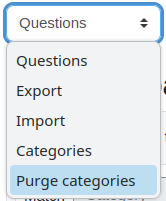
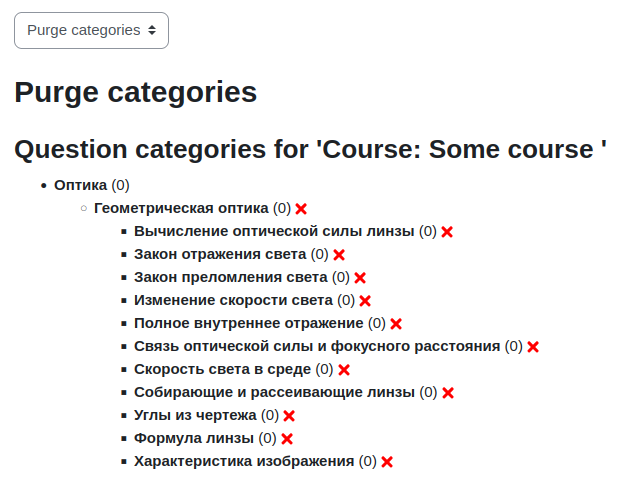
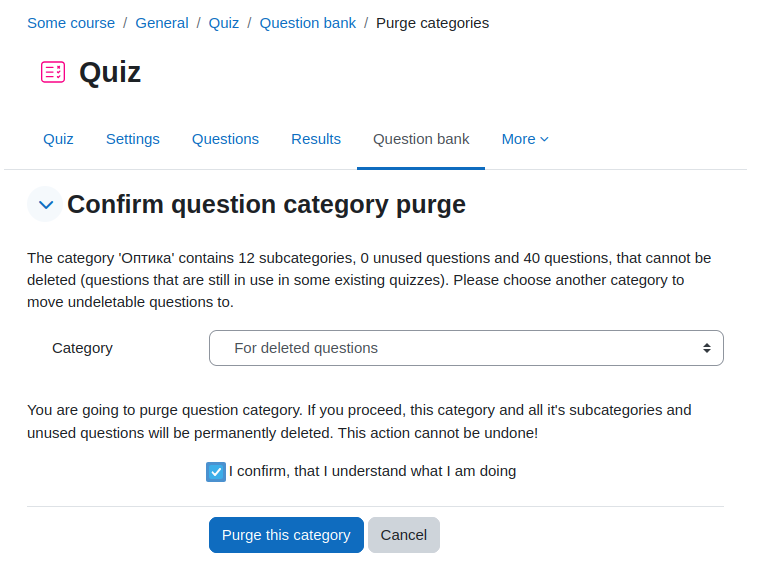
Question bank navigation node will be extended with "Purge categories" item. Select category you want to delete and specify where to
move questions, that cannot be deleted. Questions, that cannot be deleted, are questions, that are used in quizes or in history of quiz
attempts. Such questions will be moved to specified categories and marked as hidden. This can be useful if you are importing a lot of
questions with many categories and want to delete all of them and reimport them.
Author
- Vadim Dvorovenko (Vadimon@mail.ru)
Links
Changes
- Release 0.9 (build 2016041500):
- Release 1.0 (build 2016051000):
- Adding some capability checks.
- Release 1.1 (build 2016051300):
- No need to select new category if no used questions present.
- Release 1.2 (build 2018011100):
- Support for 3.3 and higher (replaced usage of deprecated $OUTPUT->pix_url).
- Release 1.3 (build 2020061200):
- Privacy API support.
- Question bank tabs.
- Fix error message after deleting questions in category and system contexts.
- Fix error after deprecating of question_is_only_toplevel_category_in_context.
- Release 2.0 (build 2025012600)
- Renamed from local_purgequestioncategory to qbank_purgecategory.
- Refactored for Moodle 4 question bank changes.