
EDUdashboard
Versions
Current version
1.0 (2025042400)
1.0
Plugin type: Local plugins
Frankenstyle component name: local_edudashboard
Version build number: 2025042400
Version release name: 1.0
Maturity: Stable
Supported Moodle versions: 4.0, 4.1, 4.2, 4.3, 4.4, 4.5
Repository URL (Git): https://github.com/edudigital/moodle-local_edudashboard
Repository branch:
Repository tag:
Issue/bug tracker URL: https://github.com/edudigital/moodle-local_edudashboard/
EDUdashboard - Moodle Plugin
Introduction
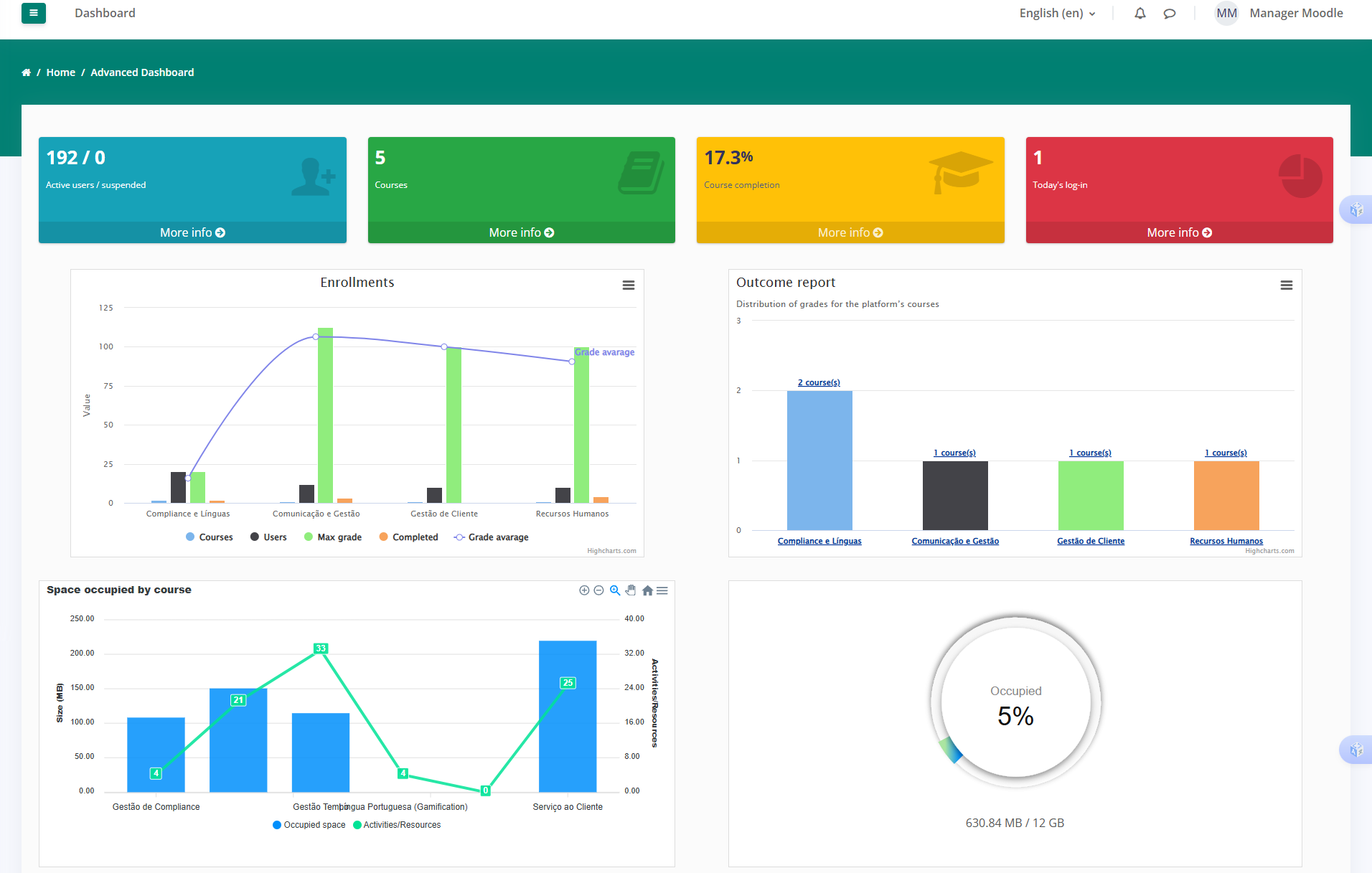
EDUdashboard is a powerful plugin for Moodle that provides detailed graphical reports and analytics for platform administrators and decision-makers. With this plugin, users can monitor platform activity, track user engagement, and visualize key performance indicators (KPIs) with ease.
Features
- User Insights: Extract data on active users, enrollments, and authentication trends.
- Course Analytics: View the number of available courses and their completion rates.
- Performance Monitoring: Track daily logins, activities completed, and knowledge areas covered.
- Graphical Dashboards: Access visually appealing charts and tables to analyze learning trends.
- Custom Reports: Generate customized reports on user activity and course engagement.
- Role-Based Access: Different user roles (administrators, managers, etc.) can access relevant reports.
Installation
- Download the latest release from Moodle Plugin Directory.
- Extract the plugin into the
local/edudashboarddirectory of your Moodle installation. - Navigate to Site Administration > Notifications to complete the installation.
- Configure the plugin under Site Administration > Plugins > EDUdashboard.
Usage
- Access the plugin via Site Administration > Reports > EDUdashboard.
- Select the type of report you wish to generate.
- Filter data based on time range, user roles, and course categories.
- Export reports in CSV or PDF format for further analysis.
5.Access the plugin directly via the URL: {your_moodle_url}/local/edudashboard/. For example, if your Moodle site is hosted at http://example.com/moodle, visit http://example.com/moodle/local/edudashboard/ to view the EDUdashboard interface.
Security & Performance
- The plugin follows Moodle's coding standards and security best practices.
- It does not store unnecessary data beyond Moodle's native logs.
- Unused features have been disabled to prevent unauthorized reactivation.
Support & Contributions
For issues, feature requests, or contributions, please visit our GitHub repository:
GitHub Repository
Acknowledgements
This plugin was developed by taking inspiration from various existing Moodle plugins, including the reporting solutions provided by the Edwiser team. We are grateful for the open-source community and the contributions of other developers, which have helped shape the features and functionality of EDUdashboard.
License
This plugin is licensed under the GPL v3 license.
© 2025 EduDigital. All rights reserved.
1.0 (2025042101)
1.0
Plugin type: Local plugins
Frankenstyle component name: local_edudashboard
Version build number: 2025042101
Version release name: 1.0
Maturity: Stable
Supported Moodle versions: 4.0, 4.1, 4.2, 4.3, 4.4, 4.5
Repository URL (Git): https://github.com/edudigital/moodle-local_edudashboard
Repository branch:
Repository tag:
Issue/bug tracker URL: https://github.com/edudigital/moodle-local_edudashboard/
EDUdashboard - Moodle Plugin
Introduction
EDUdashboard is a powerful plugin for Moodle that provides detailed graphical reports and analytics for platform administrators and decision-makers. With this plugin, users can monitor platform activity, track user engagement, and visualize key performance indicators (KPIs) with ease.
Features
- User Insights: Extract data on active users, enrollments, and authentication trends.
- Course Analytics: View the number of available courses and their completion rates.
- Performance Monitoring: Track daily logins, activities completed, and knowledge areas covered.
- Graphical Dashboards: Access visually appealing charts and tables to analyze learning trends.
- Custom Reports: Generate customized reports on user activity and course engagement.
- Role-Based Access: Different user roles (administrators, managers, etc.) can access relevant reports.
Installation
- Download the latest release from Moodle Plugin Directory.
- Extract the plugin into the
local/edudashboarddirectory of your Moodle installation. - Navigate to Site Administration > Notifications to complete the installation.
- Configure the plugin under Site Administration > Plugins > EDUdashboard.
Requirements
- Moodle 3.0+ (compatible with Moodle 4.x)
- PHP 7.4+
- Database: MySQL / PostgreSQL
Usage
- Access the plugin via Site Administration > Reports > EDUdashboard.
- Select the type of report you wish to generate.
- Filter data based on time range, user roles, and course categories.
- Export reports in CSV or PDF format for further analysis.
5.Access the plugin directly via the URL: {your_moodle_url}/local/edudashboard/. For example, if your Moodle site is hosted at http://example.com/moodle, visit http://example.com/moodle/local/edudashboard/ to view the EDUdashboard interface.
Security & Performance
- The plugin follows Moodle's coding standards and security best practices.
- It does not store unnecessary data beyond Moodle's native logs.
- Unused features have been disabled to prevent unauthorized reactivation.
Support & Contributions
For issues, feature requests, or contributions, please visit our GitHub repository:
GitHub Repository
Acknowledgements
This plugin was developed by taking inspiration from various existing Moodle plugins, including the reporting solutions provided by the Edwiser team. We are grateful for the open-source community and the contributions of other developers, which have helped shape the features and functionality of EDUdashboard.
License
This plugin is licensed under the GPL v3 license.
© 2024 EduDigital. All rights reserved.
1.0 (2025042100)
1.0
Plugin type: Local plugins
Frankenstyle component name: local_edudashboard
Version build number: 2025042100
Version release name: 1.0
Maturity: Stable
Supported Moodle versions: 4.0, 4.1, 4.2, 4.3, 4.4, 4.5
Repository URL (Git): https://github.com/edudigital/moodle-local_edudashboard
Repository branch:
Repository tag:
Issue/bug tracker URL: https://github.com/edudigital/moodle-local_edudashboard/
EDUdashboard - Moodle Plugin
Introduction
EDUdashboard is a powerful plugin for Moodle that provides detailed graphical reports and analytics for platform administrators and decision-makers. With this plugin, users can monitor platform activity, track user engagement, and visualize key performance indicators (KPIs) with ease.
Features
- User Insights: Extract data on active users, enrollments, and authentication trends.
- Course Analytics: View the number of available courses and their completion rates.
- Performance Monitoring: Track daily logins, activities completed, and knowledge areas covered.
- Graphical Dashboards: Access visually appealing charts and tables to analyze learning trends.
- Custom Reports: Generate customized reports on user activity and course engagement.
- Role-Based Access: Different user roles (administrators, managers, etc.) can access relevant reports.
Installation
- Download the latest release from Moodle Plugin Directory.
- Extract the plugin into the
local/edudashboarddirectory of your Moodle installation. - Navigate to Site Administration > Notifications to complete the installation.
- Configure the plugin under Site Administration > Plugins > EDUdashboard.
Requirements
- Moodle 3.0+ (compatible with Moodle 4.x)
- PHP 7.4+
- Database: MySQL / PostgreSQL
Usage
- Access the plugin via Site Administration > Reports > EDUdashboard.
- Select the type of report you wish to generate.
- Filter data based on time range, user roles, and course categories.
- Export reports in CSV or PDF format for further analysis.
5.Access the plugin directly via the URL: {your_moodle_url}/local/edudashboard/. For example, if your Moodle site is hosted at http://example.com/moodle, visit http://example.com/moodle/local/edudashboard/ to view the EDUdashboard interface.
Security & Performance
- The plugin follows Moodle's coding standards and security best practices.
- It does not store unnecessary data beyond Moodle's native logs.
- Unused features have been disabled to prevent unauthorized reactivation.
Support & Contributions
For issues, feature requests, or contributions, please visit our GitHub repository:
GitHub Repository
Acknowledgements
This plugin was developed by taking inspiration from various existing Moodle plugins, including the reporting solutions provided by the Edwiser team. We are grateful for the open-source community and the contributions of other developers, which have helped shape the features and functionality of EDUdashboard.
License
This plugin is licensed under the GPL v3 license.
© 2024 EduDigital. All rights reserved.
1.0 (2025041701)
1.0
Plugin type: Local plugins
Frankenstyle component name: local_edudashboard
Version build number: 2025041701
Version release name: 1.0
Maturity: Stable
Supported Moodle versions: 4.0, 4.1, 4.2, 4.3, 4.4, 4.5
Repository URL (Git): https://github.com/edudigital/moodle-local_edudashboard
Repository branch:
Repository tag:
Issue/bug tracker URL: https://github.com/edudigital/moodle-local_edudashboard/
EDUdashboard - Moodle Plugin
Introduction
EDUdashboard is a powerful plugin for Moodle that provides detailed graphical reports and analytics for platform administrators and decision-makers. With this plugin, users can monitor platform activity, track user engagement, and visualize key performance indicators (KPIs) with ease.
Features
- User Insights: Extract data on active users, enrollments, and authentication trends.
- Course Analytics: View the number of available courses and their completion rates.
- Performance Monitoring: Track daily logins, activities completed, and knowledge areas covered.
- Graphical Dashboards: Access visually appealing charts and tables to analyze learning trends.
- Custom Reports: Generate customized reports on user activity and course engagement.
- Role-Based Access: Different user roles (administrators, managers, etc.) can access relevant reports.
Installation
- Download the latest release from Moodle Plugin Directory.
- Extract the plugin into the
local/edudashboarddirectory of your Moodle installation. - Navigate to Site Administration > Notifications to complete the installation.
- Configure the plugin under Site Administration > Plugins > EDUdashboard.
Requirements
- Moodle 3.0+ (compatible with Moodle 4.x)
- PHP 7.4+
- Database: MySQL / PostgreSQL
Usage
- Access the plugin via Site Administration > Reports > EDUdashboard.
- Select the type of report you wish to generate.
- Filter data based on time range, user roles, and course categories.
- Export reports in CSV or PDF format for further analysis.
5.Access the plugin directly via the URL: {your_moodle_url}/local/edudashboard/. For example, if your Moodle site is hosted at http://example.com/moodle, visit http://example.com/moodle/local/edudashboard/ to view the EDUdashboard interface.
Security & Performance
- The plugin follows Moodle's coding standards and security best practices.
- It does not store unnecessary data beyond Moodle's native logs.
- Unused features have been disabled to prevent unauthorized reactivation.
Support & Contributions
For issues, feature requests, or contributions, please visit our GitHub repository:
GitHub Repository
Acknowledgements
This plugin was developed by taking inspiration from various existing Moodle plugins, including the reporting solutions provided by the Edwiser team. We are grateful for the open-source community and the contributions of other developers, which have helped shape the features and functionality of EDUdashboard.
License
This plugin is licensed under the GPL v3 license.
© 2024 EduDigital. All rights reserved.
1.0 (2025041700)
1.0
Plugin type: Local plugins
Frankenstyle component name: local_edudashboard
Version build number: 2025041700
Version release name: 1.0
Maturity: Stable
Supported Moodle versions: 4.0, 4.1, 4.2, 4.3, 4.4, 4.5
Repository URL (Git): https://github.com/edudigital/moodle-local_edudashboard
Repository branch:
Repository tag:
Issue/bug tracker URL: https://github.com/edudigital/moodle-local_edudashboard/
EDUdashboard - Moodle Plugin
Introduction
EDUdashboard is a powerful plugin for Moodle that provides detailed graphical reports and analytics for platform administrators and decision-makers. With this plugin, users can monitor platform activity, track user engagement, and visualize key performance indicators (KPIs) with ease.
Features
- User Insights: Extract data on active users, enrollments, and authentication trends.
- Course Analytics: View the number of available courses and their completion rates.
- Performance Monitoring: Track daily logins, activities completed, and knowledge areas covered.
- Graphical Dashboards: Access visually appealing charts and tables to analyze learning trends.
- Custom Reports: Generate customized reports on user activity and course engagement.
- Role-Based Access: Different user roles (administrators, managers, etc.) can access relevant reports.
Installation
- Download the latest release from Moodle Plugin Directory.
- Extract the plugin into the
local/edudashboarddirectory of your Moodle installation. - Navigate to Site Administration > Notifications to complete the installation.
- Configure the plugin under Site Administration > Plugins > EDUdashboard.
Requirements
- Moodle 3.0+ (compatible with Moodle 4.x)
- PHP 7.4+
- Database: MySQL / PostgreSQL
Usage
- Access the plugin via Site Administration > Reports > EDUdashboard.
- Select the type of report you wish to generate.
- Filter data based on time range, user roles, and course categories.
- Export reports in CSV or PDF format for further analysis.
5.Access the plugin directly via the URL: {your_moodle_url}/local/edudashboard/. For example, if your Moodle site is hosted at http://example.com/moodle, visit http://example.com/moodle/local/edudashboard/ to view the EDUdashboard interface.
Security & Performance
- The plugin follows Moodle's coding standards and security best practices.
- It does not store unnecessary data beyond Moodle's native logs.
- Unused features have been disabled to prevent unauthorized reactivation.
Support & Contributions
For issues, feature requests, or contributions, please visit our GitHub repository:
GitHub Repository
Acknowledgements
This plugin was developed by taking inspiration from various existing Moodle plugins, including the reporting solutions provided by the Edwiser team. We are grateful for the open-source community and the contributions of other developers, which have helped shape the features and functionality of EDUdashboard.
License
This plugin is licensed under the GPL v3 license.
© 2025 EduDigital. All rights reserved.