Code-checker
Versions
Current version
5.0.8 - Refreshing summer (2024070500)
5.0.8 - Refreshing summer
Plugin type: Local plugins
Frankenstyle component name: local_codechecker
Version build number: 2024070500
Version release name: 5.0.8 - Refreshing summer
Maturity: Stable
Supported Moodle versions: 3.10, 3.11, 3.8, 3.9, 4.0, 4.1, 4.2, 4.3, 4.4
Repository URL (Git): https://github.com/moodlehq/moodle-local_codechecker
Repository branch: main
Repository tag: v5.0.8
Issue/bug tracker URL: https://github.com/moodlehq/moodle-local_codechecker/issues
Moodle Code Checker

Changes in version 5.0.8 (20240705) - Refreshing summer
- Bundled dependencies updated:
- Moodle CS v3.4.10
Information
This Moodle plugin uses the PHP CodeSniffer tool to
check that code follows the Moodle coding style.
It uses the Moodle Coding Style 'sniffs' that check many aspects of the code, including the awesome
PHPCompatibility ones.
It was created by developers at the Open University, including Sam Marshall,
Tim Hunt and Jenny Gray. It is now maintained by Moodle HQ.
Available releases can be downloaded and installed from
https://moodle.org/plugins/view.php?plugin=local_codechecker.
To install it using git, type this command in the root of your Moodle install:
git clone https://github.com/moodlehq/moodle-local_codechecker.git local/codechecker
Then add /local/codechecker to your git ignore.
Additionally, remember to only use the version of PHPCS located in phpcs/bin/phpcs rather than installing PHPCS directly. Add the location of the PHPCS executable to your system path, tell PHPCS about the Moodle coding standard with phpcs --config-set installed_paths /path/to/moodle-local_codechecker and set the default coding standard to Moodle with phpcs --config-set default_standard moodle. You can now test a file (or folder) with: phpcs /path/to/file.php.
Alternatively, download the zip from
https://github.com/moodlehq/moodle-local_codechecker/zipball/main,
unzip it into the local folder, and then rename the new folder to "codechecker".
After you have installed this local plugin, you
should see a new option in the settings block:
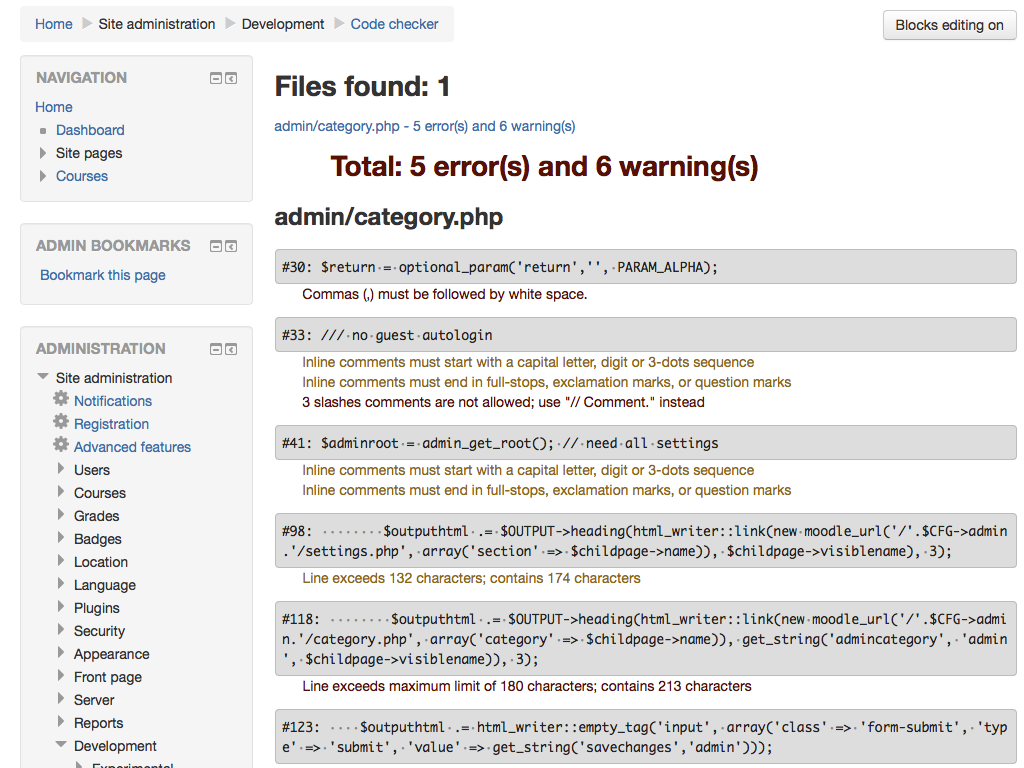
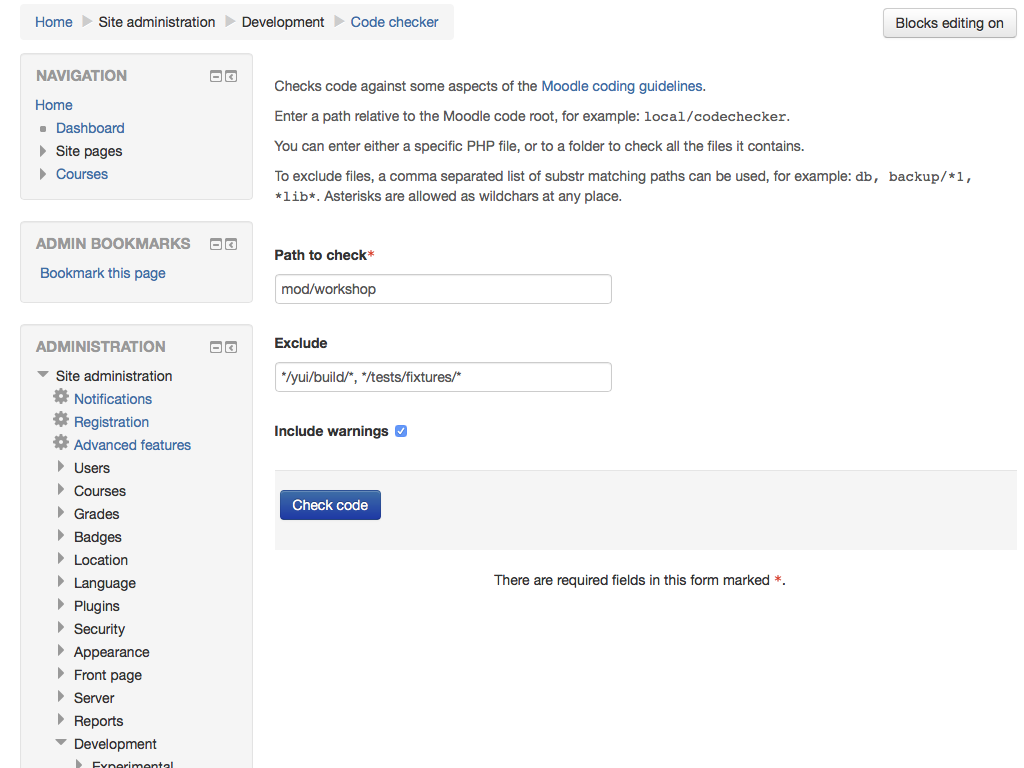
Site administration -> Development -> Code checker
We hope you find this tool useful. Feel free to enhance it! Also, you can report any idea or bug using GitHub's issues and pull requests, thanks!
Integrations
Since version v4.0.0 this plugin shouldn't be used as source for any integration with IDEs or tools, and Moodle Coding Style (the new source for the moodle-cs standard) should be used instead.
Please refer to the information available in that repository to know more about how to install, configure and integrate it with your development environment.
5.0.7 - It's a small world (2024061400)
5.0.7 - It's a small world
Plugin type: Local plugins
Frankenstyle component name: local_codechecker
Version build number: 2024061400
Version release name: 5.0.7 - It's a small world
Maturity: Stable
Supported Moodle versions: 3.10, 3.11, 3.8, 3.9, 4.0, 4.1, 4.2, 4.3, 4.4
Repository URL (Git): https://github.com/moodlehq/moodle-local_codechecker
Repository branch: main
Repository tag: v5.0.7
Issue/bug tracker URL: https://github.com/moodlehq/moodle-local_codechecker/issues
Moodle Code Checker
Changes in version 5.0.7 (20240614) - It's a small world
- Bundled dependencies updated:
- Moodle CS v3.4.8
Information
This Moodle plugin uses the PHP CodeSniffer tool to
check that code follows the Moodle coding style.
It uses the Moodle Coding Style 'sniffs' that check many aspects of the code, including the awesome
PHPCompatibility ones.
It was created by developers at the Open University, including Sam Marshall,
Tim Hunt and Jenny Gray. It is now maintained by Moodle HQ.
Available releases can be downloaded and installed from
https://moodle.org/plugins/view.php?plugin=local_codechecker.
To install it using git, type this command in the root of your Moodle install:
git clone https://github.com/moodlehq/moodle-local_codechecker.git local/codechecker
Then add /local/codechecker to your git ignore.
Additionally, remember to only use the version of PHPCS located in phpcs/bin/phpcs rather than installing PHPCS directly. Add the location of the PHPCS executable to your system path, tell PHPCS about the Moodle coding standard with phpcs --config-set installed_paths /path/to/moodle-local_codechecker and set the default coding standard to Moodle with phpcs --config-set default_standard moodle. You can now test a file (or folder) with: phpcs /path/to/file.php.
Alternatively, download the zip from
https://github.com/moodlehq/moodle-local_codechecker/zipball/main,
unzip it into the local folder, and then rename the new folder to "codechecker".
After you have installed this local plugin, you
should see a new option in the settings block:
Site administration -> Development -> Code checker
We hope you find this tool useful. Feel free to enhance it! Also, you can report any idea or bug using GitHub's issues and pull requests, thanks!
Integrations
Since version v4.0.0 this plugin shouldn't be used as source for any integration with IDEs or tools, and Moodle Coding Style (the new source for the moodle-cs standard) should be used instead.
Please refer to the information available in that repository to know more about how to install, configure and integrate it with your development environment.
5.0.6 - Bye, May! (2024053100)
5.0.6 - Bye, May!
Plugin type: Local plugins
Frankenstyle component name: local_codechecker
Version build number: 2024053100
Version release name: 5.0.6 - Bye, May!
Maturity: Stable
Supported Moodle versions: 3.10, 3.11, 3.8, 3.9, 4.0, 4.1, 4.2, 4.3, 4.4
Repository URL (Git): https://github.com/moodlehq/moodle-local_codechecker
Repository branch: main
Repository tag: v5.0.6
Issue/bug tracker URL: https://github.com/moodlehq/moodle-local_codechecker/issues
Moodle Code Checker
Changes in version 5.0.6 (20240531) - Bye, May!
- Bundled dependencies updated:
- Moodle CS v3.4.7
- PHP Compatibility 96072c30
- PHP CodeSniffer 3.10.1
- PHPCS Utils 1.0.12
Information
This Moodle plugin uses the PHP CodeSniffer tool to
check that code follows the Moodle coding style.
It uses the Moodle Coding Style 'sniffs' that check many aspects of the code, including the awesome
PHPCompatibility ones.
It was created by developers at the Open University, including Sam Marshall,
Tim Hunt and Jenny Gray. It is now maintained by Moodle HQ.
Available releases can be downloaded and installed from
https://moodle.org/plugins/view.php?plugin=local_codechecker.
To install it using git, type this command in the root of your Moodle install:
git clone https://github.com/moodlehq/moodle-local_codechecker.git local/codechecker
Then add /local/codechecker to your git ignore.
Additionally, remember to only use the version of PHPCS located in phpcs/bin/phpcs rather than installing PHPCS directly. Add the location of the PHPCS executable to your system path, tell PHPCS about the Moodle coding standard with phpcs --config-set installed_paths /path/to/moodle-local_codechecker and set the default coding standard to Moodle with phpcs --config-set default_standard moodle. You can now test a file (or folder) with: phpcs /path/to/file.php.
Alternatively, download the zip from
https://github.com/moodlehq/moodle-local_codechecker/zipball/main,
unzip it into the local folder, and then rename the new folder to "codechecker".
After you have installed this local plugin, you
should see a new option in the settings block:
Site administration -> Development -> Code checker
We hope you find this tool useful. Feel free to enhance it! Also, you can report any idea or bug using GitHub's issues and pull requests, thanks!
Integrations
Since version v4.0.0 this plugin shouldn't be used as source for any integration with IDEs or tools, and Moodle Coding Style (the new source for the moodle-cs standard) should be used instead.
Please refer to the information available in that repository to know more about how to install, configure and integrate it with your development environment.
5.0.5 - Fools plus 9 (2024041000)
5.0.5 - Fools plus 9
Plugin type: Local plugins
Frankenstyle component name: local_codechecker
Version build number: 2024041000
Version release name: 5.0.5 - Fools plus 9
Maturity: Stable
Supported Moodle versions: 3.10, 3.11, 3.8, 3.9, 4.0, 4.1, 4.2, 4.3, 4.4
Repository URL (Git): https://github.com/moodlehq/moodle-local_codechecker
Repository branch: main
Repository tag: v5.0.5
Issue/bug tracker URL: https://github.com/moodlehq/moodle-local_codechecker/issues
Moodle Code Checker
Changes in version 5.0.5 (20240410) - Fools plus 9
- Bundled dependencies updated:
- Moodle CS v3.4.6
- PHP Compatibility e5cd2e24
- PHP CodeSniffer 3.9.1
- PHPCS Utils 1.0.10
Information
This Moodle plugin uses the PHP CodeSniffer tool to
check that code follows the Moodle coding style.
It uses the Moodle Coding Style 'sniffs' that check many aspects of the code, including the awesome
PHPCompatibility ones.
It was created by developers at the Open University, including Sam Marshall,
Tim Hunt and Jenny Gray. It is now maintained by Moodle HQ.
Available releases can be downloaded and installed from
https://moodle.org/plugins/view.php?plugin=local_codechecker.
To install it using git, type this command in the root of your Moodle install:
git clone https://github.com/moodlehq/moodle-local_codechecker.git local/codechecker
Then add /local/codechecker to your git ignore.
Additionally, remember to only use the version of PHPCS located in phpcs/bin/phpcs rather than installing PHPCS directly. Add the location of the PHPCS executable to your system path, tell PHPCS about the Moodle coding standard with phpcs --config-set installed_paths /path/to/moodle-local_codechecker and set the default coding standard to Moodle with phpcs --config-set default_standard moodle. You can now test a file (or folder) with: phpcs /path/to/file.php.
Alternatively, download the zip from
https://github.com/moodlehq/moodle-local_codechecker/zipball/main,
unzip it into the local folder, and then rename the new folder to "codechecker".
After you have installed this local plugin, you
should see a new option in the settings block:
Site administration -> Development -> Code checker
We hope you find this tool useful. Feel free to enhance it! Also, you can report any idea or bug using GitHub's issues and pull requests, thanks!
Integrations
Since version v4.0.0 this plugin shouldn't be used as source for any integration with IDEs or tools, and Moodle Coding Style (the new source for the moodle-cs standard) should be used instead.
Please refer to the information available in that repository to know more about how to install, configure and integrate it with your development environment.
5.0.4 - Depend-a-bot (2024012600)
5.0.4 - Depend-a-bot
Plugin type: Local plugins
Frankenstyle component name: local_codechecker
Version build number: 2024012600
Version release name: 5.0.4 - Depend-a-bot
Maturity: Stable
Supported Moodle versions: 3.10, 3.11, 3.8, 3.9, 4.0, 4.1, 4.2, 4.3
Repository URL (Git): https://github.com/moodlehq/moodle-local_codechecker
Repository branch: main
Repository tag: v5.0.4
Issue/bug tracker URL: https://github.com/moodlehq/moodle-local_codechecker/issues
Moodle Code Checker
Changes in version 5.0.4 (20230126) - Depend-a-bot
- First steps towards managing dependencies automatically with Dependabot.
- Bundled dependencies updated:
- Moodle CS updated to v3.3.14.
- PHP CodeSniffer updated to 3.8.1.
Information
This Moodle plugin uses the PHP CodeSniffer tool to
check that code follows the Moodle coding style.
It uses the Moodle Coding Style 'sniffs' that check many aspects of the code, including the awesome
PHPCompatibility ones.
It was created by developers at the Open University, including Sam Marshall,
Tim Hunt and Jenny Gray. It is now maintained by Moodle HQ.
Available releases can be downloaded and installed from
https://moodle.org/plugins/view.php?plugin=local_codechecker.
To install it using git, type this command in the root of your Moodle install:
git clone https://github.com/moodlehq/moodle-local_codechecker.git local/codechecker
Then add /local/codechecker to your git ignore.
Additionally, remember to only use the version of PHPCS located in phpcs/bin/phpcs rather than installing PHPCS directly. Add the location of the PHPCS executable to your system path, tell PHPCS about the Moodle coding standard with phpcs --config-set installed_paths /path/to/moodle-local_codechecker and set the default coding standard to Moodle with phpcs --config-set default_standard moodle. You can now test a file (or folder) with: phpcs /path/to/file.php.
Alternatively, download the zip from
https://github.com/moodlehq/moodle-local_codechecker/zipball/main,
unzip it into the local folder, and then rename the new folder to "codechecker".
After you have installed this local plugin, you
should see a new option in the settings block:
Site administration -> Development -> Code checker
We hope you find this tool useful. Feel free to enhance it! Also, you can report any idea or bug using GitHub's issues and pull requests, thanks!
Integrations
Since version v4.0.0 this plugin shouldn't be used as source for any integration with IDEs or tools, and Moodle Coding Style (the new source for the moodle-cs standard) should be used instead.
Please refer to the information available in that repository to know more about how to install, configure and integrate it with your development environment.
5.0.3 - Bumping bumps (2023121900)
5.0.3 - Bumping bumps
Plugin type: Local plugins
Frankenstyle component name: local_codechecker
Version build number: 2023121900
Version release name: 5.0.3 - Bumping bumps
Maturity: Stable
Supported Moodle versions: 3.10, 3.11, 3.8, 3.9, 4.0, 4.1, 4.2, 4.3
Repository URL (Git): https://github.com/moodlehq/moodle-local_codechecker
Repository branch: main
Repository tag: v5.0.3
Issue/bug tracker URL: https://github.com/moodlehq/moodle-local_codechecker/issues
Moodle Code Checker
Changes in version 5.0.3 (20231219) - Bumping bumps
- Bundled dependencies updated:
- PHP CodeSniffer updated to 3.8.0.
- PHP Compatibility updated to 306cd263.
- PHPCS Extra updated to 1.2.1.
- PHPCS Utils updated to 1.0.9.
- Moodle CS updated to v3.3.12.
Information
This Moodle plugin uses the PHP CodeSniffer tool to
check that code follows the Moodle coding style.
It uses the Moodle Coding Style 'sniffs' that check many aspects of the code, including the awesome
PHPCompatibility ones.
It was created by developers at the Open University, including Sam Marshall,
Tim Hunt and Jenny Gray. It is now maintained by Moodle HQ.
Available releases can be downloaded and installed from
https://moodle.org/plugins/view.php?plugin=local_codechecker.
To install it using git, type this command in the root of your Moodle install:
git clone https://github.com/moodlehq/moodle-local_codechecker.git local/codechecker
Then add /local/codechecker to your git ignore.
Additionally, remember to only use the version of PHPCS located in phpcs/bin/phpcs rather than installing PHPCS directly. Add the location of the PHPCS executable to your system path, tell PHPCS about the Moodle coding standard with phpcs --config-set installed_paths /path/to/moodle-local_codechecker and set the default coding standard to Moodle with phpcs --config-set default_standard moodle. You can now test a file (or folder) with: phpcs /path/to/file.php.
Alternatively, download the zip from
https://github.com/moodlehq/moodle-local_codechecker/zipball/main,
unzip it into the local folder, and then rename the new folder to "codechecker".
After you have installed this local plugin, you
should see a new option in the settings block:
Site administration -> Development -> Code checker
We hope you find this tool useful. Feel free to enhance it! Also, you can report any idea or bug using GitHub's issues and pull requests, thanks!
Integrations
Since version v4.0.0 this plugin shouldn't be used as source for any integration with IDEs or tools, and Moodle Coding Style (the new source for the moodle-cs standard) should be used instead.
Please refer to the information available in that repository to know more about how to install, configure and integrate it with your development environment.
5.0.2 - Mainly main (2023112900)
5.0.2 - Mainly main
Plugin type: Local plugins
Frankenstyle component name: local_codechecker
Version build number: 2023112900
Version release name: 5.0.2 - Mainly main
Maturity: Stable
Supported Moodle versions: 3.10, 3.11, 3.8, 3.9, 4.0, 4.1, 4.2, 4.3
Repository URL (Git): https://github.com/moodlehq/moodle-local_codechecker
Repository branch: main
Repository tag: v5.0.2
Issue/bug tracker URL: https://github.com/moodlehq/moodle-local_codechecker/issues
Moodle Code Checker
Changes in version 5.0.2 (20231129) - Mainly main
- This repository has moved its default branch from "master" to "main".
- Tests updated to suit Moodle 4.4dev requirements.
- Bundled dependencies updated:
Information
This Moodle plugin uses the PHP CodeSniffer tool to
check that code follows the Moodle coding style.
It uses the Moodle Coding Style 'sniffs' that check many aspects of the code, including the awesome
PHPCompatibility ones.
It was created by developers at the Open University, including Sam Marshall,
Tim Hunt and Jenny Gray. It is now maintained by Moodle HQ.
Available releases can be downloaded and installed from
https://moodle.org/plugins/view.php?plugin=local_codechecker.
To install it using git, type this command in the root of your Moodle install:
git clone https://github.com/moodlehq/moodle-local_codechecker.git local/codechecker
Then add /local/codechecker to your git ignore.
Additionally, remember to only use the version of PHPCS located in phpcs/bin/phpcs rather than installing PHPCS directly. Add the location of the PHPCS executable to your system path, tell PHPCS about the Moodle coding standard with phpcs --config-set installed_paths /path/to/moodle-local_codechecker and set the default coding standard to Moodle with phpcs --config-set default_standard moodle. You can now test a file (or folder) with: phpcs /path/to/file.php.
Alternatively, download the zip from
https://github.com/moodlehq/moodle-local_codechecker/zipball/main,
unzip it into the local folder, and then rename the new folder to "codechecker".
After you have installed this local plugin, you
should see a new option in the settings block:
Site administration -> Development -> Code checker
We hope you find this tool useful. Feel free to enhance it! Also, you can report any idea or bug using GitHub's issues and pull requests, thanks!
Integrations
Since version v4.0.0 this plugin shouldn't be used as source for any integration with IDEs or tools, and Moodle Coding Style (the new source for the moodle-cs standard) should be used instead.
Please refer to the information available in that repository to know more about how to install, configure and integrate it with your development environment.
5.0.1 - Daddy's birthday (2023102000)
5.0.1 - Daddy's birthday
Plugin type: Local plugins
Frankenstyle component name: local_codechecker
Version build number: 2023102000
Version release name: 5.0.1 - Daddy's birthday
Maturity: Stable
Supported Moodle versions: 3.10, 3.11, 3.8, 3.9, 4.0, 4.1, 4.2, 4.3
Repository URL (Git): https://github.com/moodlehq/moodle-local_codechecker
Repository branch: master
Repository tag: v5.0.1
Issue/bug tracker URL: https://github.com/moodlehq/moodle-local_codechecker/issues
Moodle Code Checker
Changes in version 5.0.1 (20231020) - Daddy's birthday
Information
This Moodle plugin uses the PHP CodeSniffer tool to
check that code follows the Moodle coding style.
It uses the Moodle Coding Style 'sniffs' that check many aspects of the code, including the awesome
PHPCompatibility ones.
It was created by developers at the Open University, including Sam Marshall,
Tim Hunt and Jenny Gray. It is now maintained by Moodle HQ.
Available releases can be downloaded and installed from
https://moodle.org/plugins/view.php?plugin=local_codechecker.
To install it using git, type this command in the root of your Moodle install:
git clone https://github.com/moodlehq/moodle-local_codechecker.git local/codechecker
Then add /local/codechecker to your git ignore.
Additionally, remember to only use the version of PHPCS located in phpcs/bin/phpcs rather than installing PHPCS directly. Add the location of the PHPCS executable to your system path, tell PHPCS about the Moodle coding standard with phpcs --config-set installed_paths /path/to/moodle-local_codechecker and set the default coding standard to Moodle with phpcs --config-set default_standard moodle. You can now test a file (or folder) with: phpcs /path/to/file.php.
Alternatively, download the zip from
https://github.com/moodlehq/moodle-local_codechecker/zipball/master,
unzip it into the local folder, and then rename the new folder to "codechecker".
After you have installed this local plugin, you
should see a new option in the settings block:
Site administration -> Development -> Code checker
We hope you find this tool useful. Feel free to enhance it! Also, you can report any idea or bug using GitHub's issues and pull requests, thanks!
Integrations
Since version v4.0.0 this plugin shouldn't be used as source for any integration with IDEs or tools, and Moodle Coding Style (the new source for the moodle-cs standard) should be used instead.
Please refer to the information available in that repository to know more about how to install, configure and integrate it with your development environment.
5.0.0 - Cinque, this is cinque! (2023092600)
5.0.0 - Cinque, this is cinque!
Plugin type: Local plugins
Frankenstyle component name: local_codechecker
Version build number: 2023092600
Version release name: 5.0.0 - Cinque, this is cinque!
Maturity: Stable
Supported Moodle versions: 3.10, 3.11, 3.8, 3.9, 4.0, 4.1, 4.2, 4.3
Repository URL (Git): https://github.com/moodlehq/moodle-local_codechecker
Repository branch: master
Repository tag: v5.0.0
Issue/bug tracker URL: https://github.com/moodlehq/moodle-local_codechecker/issues
Moodle Code Checker
Changes in version 5.0.0 (20230926) - Cinque, this is cinque!
- IMPORTANT - New (raised) requirements:
- PHP 7.4 and up supported (previously PHP 7.0 and up).
- Moodle v3.8.3 and up supported (previously Moodle v3.7.0).
- Changed the process to build the plugin. Until now it was a tedious process, manually copying all the dependencies within the plugin (
PHP_CodeSniffer,PHPCompatibility,PHPCSExtra,PHPCSUtilandmoodle-cs). Now all the dependencies are managed via Composer and the plugin comes with thevendordirectory ready to be used. - This change has been applied for improving the release process, and towards 100% automating it, now that the plugin is just a Web/CLI wrapper over all the tools listed above.
- The old 4.x series will not receive more updates (unless absolutely needed).
- Bundled dependencies updated:
Information
This Moodle plugin uses the PHP CodeSniffer tool to
check that code follows the Moodle coding style.
It uses the Moodle Coding Style 'sniffs' that check many aspects of the code, including the awesome
PHPCompatibility ones.
It was created by developers at the Open University, including Sam Marshall,
Tim Hunt and Jenny Gray. It is now maintained by Moodle HQ.
Available releases can be downloaded and installed from
.
To install it using git, type this command in the root of your Moodle install:
git clone https://github.com/moodlehq/moodle-local_codechecker.git local/codechecker
Then add /local/codechecker to your git ignore.
Additionally, remember to only use the version of PHPCS located in phpcs/bin/phpcs rather than installing PHPCS directly. Add the location of the PHPCS executable to your system path, tell PHPCS about the Moodle coding standard with phpcs --config-set installed_paths /path/to/moodle-local_codechecker and set the default coding standard to Moodle with phpcs --config-set default_standard moodle. You can now test a file (or folder) with: phpcs /path/to/file.php.
Alternatively, download the zip from
,
unzip it into the local folder, and then rename the new folder to "codechecker".
After you have installed this local plugin, you
should see a new option in the settings block:
> Site administration -> Development -> Code checker
We hope you find this tool useful. Feel free to enhance it! Also, you can report any idea or bug using GitHub's issues and pull requests, thanks!
Integrations
Since version v4.0.0 this plugin shouldn't be used as source for any integration with IDEs or tools, and Moodle Coding Style (the new source for the moodle-cs standard) should be used instead.
Please refer to the information available in that repository to know more about how to install, configure and integrate it with your development environment.
4.0.8 - Few hours later (2023092300)
4.0.8 - Few hours later
Plugin type: Local plugins
Frankenstyle component name: local_codechecker
Version build number: 2023092300
Version release name: 4.0.8 - Few hours later
Maturity: Stable
Supported Moodle versions: 3.10, 3.11, 3.7, 3.8, 3.9, 4.0, 4.1, 4.2
Repository URL (Git): https://github.com/moodlehq/moodle-local_codechecker
Repository branch: main
Repository tag: v4.0.8
Issue/bug tracker URL: https://github.com/moodlehq/moodle-local_codechecker/issues
Moodle Code Checker
Changes in version 4.0.8 (20230923) - Few hours later
- Bundled dependencies updated:
- moodle-cs updated to v3.3.8.
- PHPCSExtra updated to 1.1.2. It was missing in the previous release!
Information
This Moodle plugin uses the PHP CodeSniffer tool to
check that code follows the Moodle coding style.
It uses the Moodle Coding Style 'sniffs' that check many aspects of the code, including the awesome
PHPCompatibility ones.
It was created by developers at the Open University, including Sam Marshall,
Tim Hunt and Jenny Gray. It is now maintained by Moodle HQ.
Available releases can be downloaded and installed from
https://moodle.org/plugins/view.php?plugin=local_codechecker.
To install it using git, type this command in the root of your Moodle install:
git clone https://github.com/moodlehq/moodle-local_codechecker.git local/codechecker
Then add /local/codechecker to your git ignore.
Additionally, remember to only use the version of PHPCS located in phpcs/bin/phpcs rather than installing PHPCS directly. Add the location of the PHPCS executable to your system path, tell PHPCS about the Moodle coding standard with phpcs --config-set installed_paths /path/to/moodle-local_codechecker and set the default coding standard to Moodle with phpcs --config-set default_standard moodle. You can now test a file (or folder) with: phpcs /path/to/file.php.
Alternatively, download the zip from
https://github.com/moodlehq/moodle-local_codechecker/zipball/master,
unzip it into the local folder, and then rename the new folder to "codechecker".
After you have installed this local plugin, you
should see a new option in the settings block:
Site administration -> Development -> Code checker
We hope you find this tool useful. Feel free to enhance it! Also, you can report any idea or bug using GitHub's issues and pull requests, thanks!
Integrations
Since version v4.0.0 this plugin shouldn't be used as source for any integration with IDEs or tools, and Moodle Coding Style (the new source for the moodle-cs standard) should be used instead.
Please refer to the information available in that repository to know more about how to install, configure and integrate it with your development environment.
4.0.7 - Day after Saint Matthew here! (2023092200)
4.0.7 - Day after Saint Matthew here!
Plugin type: Local plugins
Frankenstyle component name: local_codechecker
Version build number: 2023092200
Version release name: 4.0.7 - Day after Saint Matthew here!
Maturity: Stable
Supported Moodle versions: 3.10, 3.11, 3.7, 3.8, 3.9, 4.0, 4.1, 4.2
Repository URL (Git): https://github.com/moodlehq/moodle-local_codechecker
Repository branch: master
Repository tag: v4.0.7
Issue/bug tracker URL: https://github.com/moodlehq/moodle-local_codechecker/issues
Moodle Code Checker
Changes in version 4.0.7 (20230922) - Day after Saint Matthew here!
Information
This Moodle plugin uses the PHP CodeSniffer tool to
check that code follows the Moodle coding style.
It uses the Moodle Coding Style 'sniffs' that check many aspects of the code, including the awesome
PHPCompatibility ones.
It was created by developers at the Open University, including Sam Marshall,
Tim Hunt and Jenny Gray. It is now maintained by Moodle HQ.
Available releases can be downloaded and installed from
.
To install it using git, type this command in the root of your Moodle install:
git clone https://github.com/moodlehq/moodle-local_codechecker.git local/codechecker
Then add /local/codechecker to your git ignore.
Additionally, remember to only use the version of PHPCS located in phpcs/bin/phpcs rather than installing PHPCS directly. Add the location of the PHPCS executable to your system path, tell PHPCS about the Moodle coding standard with phpcs --config-set installed_paths /path/to/moodle-local_codechecker and set the default coding standard to Moodle with phpcs --config-set default_standard moodle. You can now test a file (or folder) with: phpcs /path/to/file.php.
Alternatively, download the zip from
,
unzip it into the local folder, and then rename the new folder to "codechecker".
After you have installed this local plugin, you
should see a new option in the settings block:
> Site administration -> Development -> Code checker
We hope you find this tool useful. Feel free to enhance it! Also, you can report any idea or bug using GitHub's issues and pull requests, thanks!
Integrations
Since version v4.0.0 this plugin shouldn't be used as source for any integration with IDEs or tools, and Moodle Coding Style (the new source for the moodle-cs standard) should be used instead.
Please refer to the information available in that repository to know more about how to install, configure and integrate it with your development environment.
4.0.6 - Composing our lifes (2023090800)
4.0.6 - Composing our lifes
Plugin type: Local plugins
Frankenstyle component name: local_codechecker
Version build number: 2023090800
Version release name: 4.0.6 - Composing our lifes
Maturity: Stable
Supported Moodle versions: 3.10, 3.11, 3.7, 3.8, 3.9, 4.0, 4.1, 4.2
Repository URL (Git): https://github.com/moodlehq/moodle-local_codechecker
Repository branch: master
Repository tag: v4.0.6
Issue/bug tracker URL: https://github.com/moodlehq/moodle-local_codechecker/issues
Moodle Code Checker
Changes in version 4.0.6 (20230908) - Composing our lifes
- Various small internal CI changes:
- PHP 8.2 support.
- Bundled dependencies updated:
- PHPCompatibility updated to 10.0dev (0a17f9ed).
- PHPCSUtils updated to 1.0.8.
- moodle-cs updated to v3.3.5.
Information
This Moodle plugin uses the PHP CodeSniffer tool to
check that code follows the Moodle coding style.
It uses the Moodle Coding Style 'sniffs' that check many aspects of the code, including the awesome
PHPCompatibility ones.
It was created by developers at the Open University, including Sam Marshall,
Tim Hunt and Jenny Gray. It is now maintained by Moodle HQ.
Available releases can be downloaded and installed from
https://moodle.org/plugins/view.php?plugin=local_codechecker.
To install it using git, type this command in the root of your Moodle install:
git clone https://github.com/moodlehq/moodle-local_codechecker.git local/codechecker
Then add /local/codechecker to your git ignore.
Additionally, remember to only use the version of PHPCS located in phpcs/bin/phpcs rather than installing PHPCS directly. Add the location of the PHPCS executable to your system path, tell PHPCS about the Moodle coding standard with phpcs --config-set installed_paths /path/to/moodle-local_codechecker and set the default coding standard to Moodle with phpcs --config-set default_standard moodle. You can now test a file (or folder) with: phpcs /path/to/file.php.
Alternatively, download the zip from
https://github.com/moodlehq/moodle-local_codechecker/zipball/master,
unzip it into the local folder, and then rename the new folder to "codechecker".
After you have installed this local plugin, you
should see a new option in the settings block:
Site administration -> Development -> Code checker
We hope you find this tool useful. Feel free to enhance it! Also, you can report any idea or bug using GitHub's issues and pull requests, thanks!
Integrations
Since version v4.0.0 this plugin shouldn't be used as source for any integration with IDEs or tools, and Moodle Coding Style (the new source for the moodle-cs standard) should be used instead.
Please refer to the information available in that repository to know more about how to install, configure and integrate it with your development environment.
4.0.5 - Forever in my heart, Tina (2023052800)
4.0.5 - Forever in my heart, Tina
Plugin type: Local plugins
Frankenstyle component name: local_codechecker
Version build number: 2023052800
Version release name: 4.0.5 - Forever in my heart, Tina
Maturity: Stable
Supported Moodle versions: 3.10, 3.11, 3.7, 3.8, 3.9, 4.0, 4.1, 4.2
Repository URL (Git): https://github.com/moodlehq/moodle-local_codechecker
Repository branch: master
Repository tag: v4.0.5
Issue/bug tracker URL: https://github.com/moodlehq/moodle-local_codechecker/issues
Moodle Code Checker
Changes in version 4.0.5 (20230528) - Forever in my heart, Tina
- Various small internal CI changes:
- 402_STABLE support.
- moodle-plugin-ci updated to v4.0.0.
- Bundled dependencies upgraded:
- PHP_CodeSniffer updated to 3.7.2.
- PHPCompatibility updated to 10.0dev (70e4ca24).
- PHPCSUtils updated to 1.0.5.
- moodle-cs updated to v3.3.4.
Information
This Moodle plugin uses the PHP CodeSniffer tool to
check that code follows the Moodle coding style.
It uses the Moodle Coding Style 'sniffs' that check many aspects of the code, including the awesome
PHPCompatibility ones.
It was created by developers at the Open University, including Sam Marshall,
Tim Hunt and Jenny Gray. It is now maintained by Moodle HQ.
Available releases can be downloaded and installed from
https://moodle.org/plugins/view.php?plugin=local_codechecker.
To install it using git, type this command in the root of your Moodle install:
git clone https://github.com/moodlehq/moodle-local_codechecker.git local/codechecker
Then add /local/codechecker to your git ignore.
Additionally, remember to only use the version of PHPCS located in phpcs/bin/phpcs rather than installing PHPCS directly. Add the location of the PHPCS executable to your system path, tell PHPCS about the Moodle coding standard with phpcs --config-set installed_paths /path/to/moodle-local_codechecker and set the default coding standard to Moodle with phpcs --config-set default_standard moodle. You can now test a file (or folder) with: phpcs /path/to/file.php.
Alternatively, download the zip from
https://github.com/moodlehq/moodle-local_codechecker/zipball/master,
unzip it into the local folder, and then rename the new folder to "codechecker".
After you have installed this local plugin, you
should see a new option in the settings block:
Site administration -> Development -> Code checker
We hope you find this tool useful. Feel free to enhance it! Also, you can report any idea or bug using GitHub's issues and pull requests, thanks!
Integrations
Since version v4.0.0 this plugin shouldn't be used as source for any integration with IDEs or tools, and Moodle Coding Style (the new source for the moodle-cs standard) should be used instead.
Please refer to the information available in that repository to know more about how to install, configure and integrate it with your development environment.
4.0.3 - Valentine's D (2023021400)
4.0.3 - Valentine's D
Plugin type: Local plugins
Frankenstyle component name: local_codechecker
Version build number: 2023021400
Version release name: 4.0.3 - Valentine's D
Maturity: Stable
Supported Moodle versions: 3.10, 3.11, 3.7, 3.8, 3.9, 4.0, 4.1, 4.2
Repository URL (Git): https://github.com/moodlehq/moodle-local_codechecker
Repository branch: master
Repository tag: v4.0.3
Issue/bug tracker URL: https://github.com/moodlehq/moodle-local_codechecker/issues
Moodle Code Checker
Changes in version 4.0.3 (20230214) - Valentine's D
Information
This Moodle plugin uses the PHP CodeSniffer tool to
check that code follows the Moodle coding style.
It uses the Moodle Coding Style 'sniffs' that check many aspects of the code, including the awesome
PHPCompatibility ones.
It was created by developers at the Open University, including Sam Marshall,
Tim Hunt and Jenny Gray. It is now maintained by Moodle HQ.
Available releases can be downloaded and installed from
.
To install it using git, type this command in the root of your Moodle install:
git clone https://github.com/moodlehq/moodle-local_codechecker.git local/codechecker
Then add /local/codechecker to your git ignore.
Additionally, remember to only use the version of PHPCS located in phpcs/bin/phpcs rather than installing PHPCS directly. Add the location of the PHPCS executable to your system path, tell PHPCS about the Moodle coding standard with phpcs --config-set installed_paths /path/to/moodle-local_codechecker and set the default coding standard to Moodle with phpcs --config-set default_standard moodle. You can now test a file (or folder) with: phpcs /path/to/file.php.
Alternatively, download the zip from
,
unzip it into the local folder, and then rename the new folder to "codechecker".
After you have installed this local plugin, you
should see a new option in the settings block:
> Site administration -> Development -> Code checker
We hope you find this tool useful. Feel free to enhance it! Also, you can report any idea or bug using GitHub's issues and pull requests, thanks!
Integrations
Since version v4.0.0 this plugin shouldn't be used as source for any integration with IDEs or tools, and Moodle Coding Style (the new source for the moodle-cs standard) should be used instead.
Please refer to the information available in that repository to know more about how to install, configure and integrate it with your development environment.
4.0.2 - Comp-at-ibility (2023012000)
4.0.2 - Comp-at-ibility
Plugin type: Local plugins
Frankenstyle component name: local_codechecker
Version build number: 2023012000
Version release name: 4.0.2 - Comp-at-ibility
Maturity: Stable
Supported Moodle versions: 3.10, 3.11, 3.7, 3.8, 3.9, 4.0, 4.1
Repository URL (Git): https://github.com/moodlehq/moodle-local_codechecker
Repository branch: master
Repository tag: v4.0.2
Issue/bug tracker URL: https://github.com/moodlehq/moodle-local_codechecker/issues
Moodle Code Checker
Changes in version 4.0.2 (20230120) - Comp-at-ibility
- Various small internal changes:
- 401_STABLE CI support.
- Prepare for 4.2 new requirements.
- PHP 8.1 fixes.
- Bundled dependencies overhaul:
- moodle-cs updated to 3.3.1 (from 3.2.4).
- PHPCompatibility updated to 10.0dev (2fb82334).
- PHPCSUtils updated to 1.0.1.
Information
This Moodle plugin uses the PHP CodeSniffer tool to
check that code follows the Moodle coding style.
It uses the Moodle Coding Style 'sniffs' that check many aspects of the code, including the awesome
PHPCompatibility ones.
It was created by developers at the Open University, including Sam Marshall,
Tim Hunt and Jenny Gray. It is now maintained by Moodle HQ.
Available releases can be downloaded and installed from
https://moodle.org/plugins/view.php?plugin=local_codechecker.
To install it using git, type this command in the root of your Moodle install:
git clone https://github.com/moodlehq/moodle-local_codechecker.git local/codechecker
Then add /local/codechecker to your git ignore.
Additionally, remember to only use the version of PHPCS located in phpcs/bin/phpcs rather than installing PHPCS directly. Add the location of the PHPCS executable to your system path, tell PHPCS about the Moodle coding standard with phpcs --config-set installed_paths /path/to/moodle-local_codechecker and set the default coding standard to Moodle with phpcs --config-set default_standard moodle. You can now test a file (or folder) with: phpcs /path/to/file.php.
Alternatively, download the zip from
https://github.com/moodlehq/moodle-local_codechecker/zipball/master,
unzip it into the local folder, and then rename the new folder to "codechecker".
After you have installed this local plugin, you
should see a new option in the settings block:
Site administration -> Development -> Code checker
We hope you find this tool useful. Feel free to enhance it! Also, you can report any idea or bug using GitHub's issues and pull requests, thanks!
Integrations
Since version v4.0.0 this plugin shouldn't be used as source for any integration with IDEs or tools, and Moodle Coding Style (the new source for the moodle-cs standard) should be used instead.
Please refer to the information available in that repository to know more about how to install, configure and integrate it with your development environment.
4.0.1 - Dear Windows (2022100700)
4.0.1 - Dear Windows
Plugin type: Local plugins
Frankenstyle component name: local_codechecker
Version build number: 2022100700
Version release name: 4.0.1 - Dear Windows
Maturity: Stable
Supported Moodle versions: 3.10, 3.11, 3.7, 3.8, 3.9, 4.0, 4.1
Repository URL (Git): https://github.com/moodlehq/moodle-local_codechecker
Repository branch: master
Repository tag: v4.0.1
Issue/bug tracker URL: https://github.com/moodlehq/moodle-local_codechecker/issues
Moodle Code Checker
Changes in version 4.0.1 (20221007) - Dear Windows
- PR#205: Allow CRLF (Windows) line ending in .csv testing fixtures (stronk7).
- PR#206: Fix various links to point to the new coding style docs (Tim Hunt).
- PR#209: Solve a problem, specially noticeable under Windows, where core's PHP_CodeSniffer configuration was interfering with codechecker runs (stronk7).
Information
This Moodle plugin uses the PHP CodeSniffer tool to
check that code follows the Moodle coding style.
It uses the Moodle Coding Style 'sniffs' that check many aspects of the code, including the awesome
PHPCompatibility ones.
It was created by developers at the Open University, including Sam Marshall,
Tim Hunt and Jenny Gray. It is now maintained by Moodle HQ.
Available releases can be downloaded and installed from
.
To install it using git, type this command in the root of your Moodle install:
git clone https://github.com/moodlehq/moodle-local_codechecker.git local/codechecker
Then add /local/codechecker to your git ignore.
Additionally, remember to only use the version of PHPCS located in phpcs/bin/phpcs rather than installing PHPCS directly. Add the location of the PHPCS executable to your system path, tell PHPCS about the Moodle coding standard with phpcs --config-set installed_paths /path/to/moodle-local_codechecker and set the default coding standard to Moodle with phpcs --config-set default_standard moodle. You can now test a file (or folder) with: phpcs /path/to/file.php.
Alternatively, download the zip from
,
unzip it into the local folder, and then rename the new folder to "codechecker".
After you have installed this local plugin, you
should see a new option in the settings block:
> Site administration -> Development -> Code checker
We hope you find this tool useful. Feel free to enhance it! Also, you can report any idea or bug using GitHub's issues and pull requests, thanks!
Integrations
Since version v4.0.0 this plugin shouldn't be used as source for any integration with IDEs or tools, and Moodle Coding Style (the new source for the moodle-cs standard) should be used instead.
Please refer to the information available in that repository to know more about how to install, configure and integrate it with your development environment.
4.0.0 - Welcome moodle-cs (2022082500)
4.0.0 - Welcome moodle-cs
Plugin type: Local plugins
Frankenstyle component name: local_codechecker
Version build number: 2022082500
Version release name: 4.0.0 - Welcome moodle-cs
Maturity: Stable
Supported Moodle versions: 3.10, 3.11, 3.7, 3.8, 3.9, 4.0
Repository URL (Git): https://github.com/moodlehq/moodle-local_codechecker
Repository branch: master
Repository tag: v4.0.0
Issue/bug tracker URL: https://github.com/moodlehq/moodle-local_codechecker/issues
Moodle Code Checker
Changes in version 4.0.0 (20220825) - Welcome moodle-cs
- PR#192, PR#197: Various fixes to own CI tests (stronk7).
- PR#193: Move to use the moodle-cs standard that is now the source for everything else and should be the one used for all (tools, editors, IDEs...) integrations. (Andrew Lyons and stronk7). This change includes, noticeably:
- PHP_CodeSniffer updated to current 3.7.1.
- moodle-cs updated to current 3.2.4+.
- Adjust tests, docs and other bits to keep everything working.
- PR#199: Correct handling of empty files (Michael Milette).
- PR#200: Fix GitHub repository URLs (David Mudrák).
Information
This Moodle plugin uses the PHP CodeSniffer tool to
check that code follows the Moodle coding style. It uses the Moodle Coding Style 'sniffs' that check many aspects of the code, including the awesome PHPCompatibility ones.
It was created by developers at the Open University, including Sam Marshall,
Tim Hunt and Jenny Gray. It is now maintained by Moodle HQ.
Available releases can be downloaded and installed from
.
To install it using git, type this command in the root of your Moodle install:
git clone https://github.com/moodlehq/moodle-local_codechecker.git local/codechecker
Then add /local/codechecker to your git ignore.
Additionally, remember to only use the version of PHPCS located in phpcs/bin/phpcs rather than installing PHPCS directly. Add the location of the PHPCS executable to your system path, tell PHPCS about the Moodle coding standard with phpcs --config-set installed_paths /path/to/moodle-local_codechecker and set the default coding standard to Moodle with phpcs --config-set default_standard moodle. You can now test a file (or folder) with: phpcs /path/to/file.php.
Alternatively, download the zip from
,
unzip it into the local folder, and then rename the new folder to "codechecker".
After you have installed this local plugin, you
should see a new option in the settings block:
> Site administration -> Development -> Code checker
We hope you find this tool useful. Feel free to enhance it! Also, you can report any idea or bug using GitHub's issues and pull requests, thanks!
Integrations
Since version v4.0.0 this plugin shouldn't be used as source for any integration with IDEs or tools, and Moodle Coding Style (the new source for the moodle-cs standard) should be used instead.
Please refer to the information available in that repository to know more about how to install, configure and integrate it with your development environment.
3.1.0 - Fondant chocolate (2022022500)
3.1.0 - Fondant chocolate
Plugin type: Local plugins
Frankenstyle component name: local_codechecker
Version build number: 2022022500
Version release name: 3.1.0 - Fondant chocolate
Maturity: Stable
Supported Moodle versions: 3.10, 3.11, 3.4, 3.5, 3.6, 3.7, 3.8, 3.9, 4.0
Repository URL (Git): https://github.com/moodlehq/moodle-local_codechecker
Repository branch: master
Repository tag: v3.1.0
Issue/bug tracker URL: https://github.com/moodlehq/moodle-local_codechecker/issues
Moodle Code Checker
Changes in version 3.1.0 (20220225) - Fondant chocolate
- PR#176: Avoid some
usestatements to make theMOODLE_INTERNALcheck to be required (stronk7). - PR#177: Make it possible to show the erroring standard/sniff/rule in the UI executions (Ruslan Kabalin).
- PR#178: Warn, for Moodle 4.0 and up, about unit tests missing coverage information (stronk7).
- PR#180: Allow
@codeCoverageIgnoreannotations in inline comments (stronk7). - PR#181: Apply the
ValidFunctionNamesniff to all scoped tokens (stronk7). - PR#183: Ensure that the "other" checks do observe UI defined exclusions (stronk7).
- PR#186: Add support for installing via Composer (Andrew Lyons).
- PR#190: Control spacing around array indexes (stronk7).
- PR#191: Fix a problem about not detecting relevant code in files without any artifact (stronk7).
- Various small fixes and tweaks.
Information
This Moodle plugin uses the PHP CodeSniffer tool to
check that code follows the Moodle coding style. It
implements and reuses a set of 'sniffs' that check many aspects of the code,
including the awesome PHPCompatibility ones.
It was created by developers at the Open University, including Sam Marshall,
Tim Hunt and Jenny Gray. It is now maintained by Moodle HQ.
Available releases can be downloaded and installed from
.
To install it using git, type this command in the root of your Moodle install:
git clone git://github.com/moodlehq/moodle-local_codechecker.git local/codechecker
Then add /local/codechecker to your git ignore.
Additionally, remember to only use the version of PHPCS located in phpcs/bin/phpcs rather than installing PHPCS directly. Add the location of the PHPCS executable to your system path, tell PHPCS about the Moodle coding standard with phpcs --config-set installed_paths /path/to/moodle-local_codechecker and set the default coding standard to Moodle with phpcs --config-set default_standard moodle. You can now test a file (or folder) with: phpcs /path/to/file.php.
Alternatively, download the zip from
,
unzip it into the local folder, and then rename the new folder to "codechecker".
After you have installed this local plugin, you
should see a new option in the settings block:
> Site administration -> Development -> Code checker
We hope you find this tool useful. Please feel free to enhance it.
Report any idea or bug in the Tracker, thanks!
Composer installation
- Install via composer:
composer global require moodlehq/moodle-local_codechecker
This will install the correct version of phpcs, with the Moodle rules installed, and install the rules.
You can set the Moodle standard as the system default:
phpcs --config-set default_standard moodle
This will inform most IDEs automatically.
IDE Integration
Eclipse:
- Outdated!: If if you use Eclipse for development, you might want to install the PHP CodeSniffer plugin (http://www.phpsrc.org/).
- Create a new "CodeSniffer standard" in the preferences page.
- Point it at the moodle directory inside the codechecker folder.
- Thank Michael Aherne from University of Strathclyde who worked this out!
PhpStorm
- Install the phpcs cli tool
- Open PhpStorm preferences
- Go to PHP > CodeSniffer and supply the path to the phpcs executable
- Go to Inspections > PHP > PHP Code Sniffer Validation
- In the 'coding standard' dropdown select 'custom' and press the [...]
button next to the path to the coding standard. Point is at the moodle
directory inside the this plugin directory.
Sublime Text
Find documentation here.
Install PHP CS following steps described in this moodle docs page.
Go in your Sublime Text to Preferences -> Package Control -> Package Control: Install Package
Write 'phpcs' in the search field, if you see Phpcs and SublimeLinter-phpcs, click on them to install them.
If not, check if they are already installed Preferences -> Package Control -> Package Control: Remove Package.
To set your codecheck to moodle standards go to Preferences -> Package Settings -> PHP Code Sniffer -> Settings-User and write:
 { "phpcs_additional_args": {

         "--standard": "moodle",

         "-n": "

     },

 }
If you don’t have the auto-save plugin turned on, YOU’RE DONE!
If you have the auto-save plugin turned on, because the codecheck gets triggered on save, the quick panel will keep popping making it impossible to type.
To stop quick panel from showing go to Settings-User file and add:
"phpcs_show_quick_panel": false,
The line with the error will still get marked and if you’ll click on it you’ll see the error text in the status bar.
VSCode
Find documentation here.
Install PHP CS following steps described in this moodle docs page.
Install PHPSniffer.
Open VSCode settings.json and add the following setting to define standard PHP CS (if you haven't set it as default in your system):
"phpSniffer.standard": "moodle",
3.0.6 - January's crunch (take 2) (2022011700)
3.0.6 - January's crunch (take 2)
Plugin type: Local plugins
Frankenstyle component name: local_codechecker
Version build number: 2022011700
Version release name: 3.0.6 - January's crunch (take 2)
Maturity: Stable
Supported Moodle versions: 3.10, 3.11, 3.4, 3.5, 3.6, 3.7, 3.8, 3.9
Repository URL (Git): https://github.com/moodlehq/moodle-local_codechecker
Repository branch: master
Repository tag: v3.0.6
Issue/bug tracker URL: https://github.com/moodlehq/moodle-local_codechecker/issues
Moodle Code Checker
Changes in version 3.0.6 (20220117) - January's crunch (take 2)
- PR#174: Lower the unexpected MOODLE_INTERNAL check to be a warning, instead of error, as originally planned (stronk7).
Information
This Moodle plugin uses the PHP CodeSniffer tool to
check that code follows the Moodle coding style. It
implements and reuses a set of 'sniffs' that check many aspects of the code,
including the awesome PHPCompatibility ones.
It was created by developers at the Open University, including Sam Marshall,
Tim Hunt and Jenny Gray. It is now maintained by Moodle HQ.
Available releases can be downloaded and installed from
.
To install it using git, type this command in the root of your Moodle install:
git clone git://github.com/moodlehq/moodle-local_codechecker.git local/codechecker
Then add /local/codechecker to your git ignore.
Additionally, remember to only use the version of PHPCS located in phpcs/bin/phpcs rather than installing PHPCS directly. Add the location of the PHPCS executable to your system path, tell PHPCS about the Moodle coding standard with phpcs --config-set installed_paths /path/to/moodle-local_codechecker and set the default coding standard to Moodle with phpcs --config-set default_standard moodle. You can now test a file (or folder) with: phpcs /path/to/file.php.
Alternatively, download the zip from
,
unzip it into the local folder, and then rename the new folder to "codechecker".
After you have installed this local plugin, you
should see a new option in the settings block:
> Site administration -> Development -> Code checker
We hope you find this tool useful. Please feel free to enhance it.
Report any idea or bug in the Tracker, thanks!
IDE Integration
Eclipse:
- Outdated!: If if you use Eclipse for development, you might want to install the PHP CodeSniffer plugin (http://www.phpsrc.org/).
- Create a new "CodeSniffer standard" in the preferences page.
- Point it at the moodle directory inside the codechecker folder.
- Thank Michael Aherne from University of Strathclyde who worked this out!
PhpStorm
- Install the phpcs cli tool
- Open PhpStorm preferences
- Go to PHP > CodeSniffer and supply the path to the phpcs executable
- Go to Inspections > PHP > PHP Code Sniffer Validation
- In the 'coding standard' dropdown select 'custom' and press the [...]
button next to the path to the coding standard. Point is at the moodle
directory inside the this plugin directory.
Sublime Text
Find documentation here.
Install PHP CS following steps described in this moodle docs page.
Go in your Sublime Text to Preferences -> Package Control -> Package Control: Install Package
Write 'phpcs' in the search field, if you see Phpcs and SublimeLinter-phpcs, click on them to install them.
If not, check if they are already installed Preferences -> Package Control -> Package Control: Remove Package.
To set your codecheck to moodle standards go to Preferences -> Package Settings -> PHP Code Sniffer -> Settings-User and write:
 { "phpcs_additional_args": {

         "--standard": "moodle",

         "-n": "

     },

 }
If you don’t have the auto-save plugin turned on, YOU’RE DONE!
If you have the auto-save plugin turned on, because the codecheck gets triggered on save, the quick panel will keep popping making it impossible to type.
To stop quick panel from showing go to Settings-User file and add:
"phpcs_show_quick_panel": false,
The line with the error will still get marked and if you’ll click on it you’ll see the error text in the status bar.
VSCode
Find documentation here.
Install PHP CS following steps described in this moodle docs page.
Install PHPSniffer.
Open VSCode settings.json and add the following setting to define standard PHP CS (if you haven't set it as default in your system):
"phpSniffer.standard": "moodle",
3.0.5 - January's crunch (2022011100)
3.0.5 - January's crunch
Plugin type: Local plugins
Frankenstyle component name: local_codechecker
Version build number: 2022011100
Version release name: 3.0.5 - January's crunch
Maturity: Stable
Supported Moodle versions: 3.10, 3.11, 3.4, 3.5, 3.6, 3.7, 3.8, 3.9
Repository URL (Git): https://github.com/moodlehq/moodle-local_codechecker
Repository branch: master
Repository tag: v3.0.5
Issue/bug tracker URL: https://github.com/moodlehq/moodle-local_codechecker/issues
Moodle Code Checker
Changes in version 3.0.5 (20220111) - January's crunch
- PHP_CodeSniffer upgraded to 3.6.2 release (stronk7).
- PR#164: Make testcase class names to be fixable by
phpcbf(stronk7). - PR#167: Verify that tescase location matches sub-namespace definition (stronk7).
- PR#168: Check class opening curly brackets correctness (kabalin).
- PR#169: Report unexpected MOODLE_INTERNAL uses (stronk7).
- PR#172: Allow phpcs:xxx annotations in the first line of files (stronk7).
- Small doc changes and typo fixes here and there.
Information
This Moodle plugin uses the PHP CodeSniffer tool to
check that code follows the Moodle coding style. It
implements and reuses a set of 'sniffs' that check many aspects of the code,
including the awesome PHPCompatibility ones.
It was created by developers at the Open University, including Sam Marshall,
Tim Hunt and Jenny Gray. It is now maintained by Moodle HQ.
Available releases can be downloaded and installed from
.
To install it using git, type this command in the root of your Moodle install:
git clone git://github.com/moodlehq/moodle-local_codechecker.git local/codechecker
Then add /local/codechecker to your git ignore.
Additionally, remember to only use the version of PHPCS located in phpcs/bin/phpcs rather than installing PHPCS directly. Add the location of the PHPCS executable to your system path, tell PHPCS about the Moodle coding standard with phpcs --config-set installed_paths /path/to/moodle-local_codechecker and set the default coding standard to Moodle with phpcs --config-set default_standard moodle. You can now test a file (or folder) with: phpcs /path/to/file.php.
Alternatively, download the zip from
,
unzip it into the local folder, and then rename the new folder to "codechecker".
After you have installed this local plugin, you
should see a new option in the settings block:
> Site administration -> Development -> Code checker
We hope you find this tool useful. Please feel free to enhance it.
Report any idea or bug in the Tracker, thanks!
IDE Integration
Eclipse:
- Outdated!: If if you use Eclipse for development, you might want to install the PHP CodeSniffer plugin (http://www.phpsrc.org/).
- Create a new "CodeSniffer standard" in the preferences page.
- Point it at the moodle directory inside the codechecker folder.
- Thank Michael Aherne from University of Strathclyde who worked this out!
PhpStorm
- Install the phpcs cli tool
- Open PhpStorm preferences
- Go to PHP > CodeSniffer and supply the path to the phpcs executable
- Go to Inspections > PHP > PHP Code Sniffer Validation
- In the 'coding standard' dropdown select 'custom' and press the [...]
button next to the path to the coding standard. Point is at the moodle
directory inside the this plugin directory.
Sublime Text
Find documentation here.
Install PHP CS following steps described in this moodle docs page.
Go in your Sublime Text to Preferences -> Package Control -> Package Control: Install Package
Write 'phpcs' in the search field, if you see Phpcs and SublimeLinter-phpcs, click on them to install them.
If not, check if they are already installed Preferences -> Package Control -> Package Control: Remove Package.
To set your codecheck to moodle standards go to Preferences -> Package Settings -> PHP Code Sniffer -> Settings-User and write:
 { "phpcs_additional_args": {

         "--standard": "moodle",

         "-n": "

     },

 }
If you don’t have the auto-save plugin turned on, YOU’RE DONE!
If you have the auto-save plugin turned on, because the codecheck gets triggered on save, the quick panel will keep popping making it impossible to type.
To stop quick panel from showing go to Settings-User file and add:
"phpcs_show_quick_panel": false,
The line with the error will still get marked and if you’ll click on it you’ll see the error text in the status bar.
VSCode
Find documentation here.
Install PHP CS following steps described in this moodle docs page.
Install PHPSniffer.
Open VSCode settings.json and add the following setting to define standard PHP CS (if you haven't set it as default in your system):
"phpSniffer.standard": "moodle",
3.0.4 - Downgrading expectations (2021120400)
3.0.4 - Downgrading expectations
Plugin type: Local plugins
Frankenstyle component name: local_codechecker
Version build number: 2021120400
Version release name: 3.0.4 - Downgrading expectations
Maturity: Stable
Supported Moodle versions: 3.10, 3.11, 3.4, 3.5, 3.6, 3.7, 3.8, 3.9
Repository URL (Git): https://github.com/moodlehq/moodle-local_codechecker
Repository branch:
Repository tag: v3.0.4
Issue/bug tracker URL: https://github.com/moodlehq/moodle-local_codechecker/issues
Moodle Code Checker
Changes in version 3.0.4 (20211204) - Downgrading expectations
- PR#162: Downgrade some recently code added to the "moodle" standard to make it PHP 7.0 compliant, needed to continue supporting old branches by various tools (stronk7).
Changes in version 3.0.3 (20211130) - Cyber releasing
- Various internal changes and improvements:
- Own conformance with new PHPUnit naming rules.
- New MoodleUtil class to be able to detect Moodle dir root, branch and components (calculated or imported) within code checker. This new awareness will help improving various sniffs.
- Drop some Moodle own < 3.7 testing. Code checker continues supporting Moodle 3.4 and up.
- Improvements to the base test case, now able to automatically verify
phpcbffixes. - Bye, bye to Travis for self-tests. Now relying only on GHA.
- PR#155: Make some common errors to be fixable by
phpcbf(cameron1729). - PR#158: Fixes for the MOODLE_INTERNAL sniff to better detect some allowed exceptions (stronk7).
- PR#161: New sniff to follow PHPUnit files, classes and namespaces naming rules (stronk7).
Information
This Moodle plugin uses the PHP CodeSniffer tool to
check that code follows the Moodle coding style. It
implements and reuses a set of 'sniffs' that check many aspects of the code,
including the awesome PHPCompatibility ones.
It was created by developers at the Open University, including Sam Marshall,
Tim Hunt and Jenny Gray. It is now maintained by Moodle HQ.
Available releases can be downloaded and installed from
https://moodle.org/plugins/view.php?plugin=local_codechecker.
To install it using git, type this command in the root of your Moodle install:
git clone git://github.com/moodlehq/moodle-local_codechecker.git local/codechecker
Then add /local/codechecker to your git ignore.
Additionally, remember to only use the version of PHPCS located in phpcs/bin/phpcs rather than installing PHPCS directly. Add the location of the PHPCS executable to your system path, tell PHPCS about the Moodle coding standard with phpcs --config-set installed_paths /path/to/moodle-local_codechecker and set the default coding standard to Moodle with phpcs --config-set default_standard moodle. You can now test a file (or folder) with: phpcs /path/to/file.php.
Alternatively, download the zip from
https://github.com/moodlehq/moodle-local_codechecker/zipball/master,
unzip it into the local folder, and then rename the new folder to "codechecker".
After you have installed this local plugin, you
should see a new option in the settings block:
Site administration -> Development -> Code checker
We hope you find this tool useful. Please feel free to enhance it.
Report any idea or bug in the Tracker, thanks!
IDE Integration
Eclipse:
- Outdated!: If if you use Eclipse for development, you might want to install the PHP CodeSniffer plugin (http://www.phpsrc.org/).
- Create a new "CodeSniffer standard" in the preferences page.
- Point it at the moodle directory inside the codechecker folder.
- Thank Michael Aherne from University of Strathclyde who worked this out!
PhpStorm
- Install the phpcs cli tool
- Open PhpStorm preferences
- Go to PHP > CodeSniffer and supply the path to the phpcs executable
- Go to Inspections > PHP > PHP Code Sniffer Validation
- In the 'coding standard' dropdown select 'custom' and press the [...]
button next to the path to the coding standard. Point is at the moodle
directory inside the this plugin directory.
Sublime Text
Find documentation here.
Install PHP CS following steps described in this moodle docs page.
Go in your Sublime Text to Preferences -> Package Control -> Package Control: Install Package
Write 'phpcs' in the search field, if you see Phpcs and SublimeLinter-phpcs, click on them to install them.
If not, check if they are already installed Preferences -> Package Control -> Package Control: Remove Package.
To set your codecheck to moodle standards go to Preferences -> Package Settings -> PHP Code Sniffer -> Settings-User and write:
 { "phpcs_additional_args": {

         "--standard": "moodle",

         "-n": "

     },

 }
If you don’t have the auto-save plugin turned on, YOU’RE DONE!
If you have the auto-save plugin turned on, because the codecheck gets triggered on save, the quick panel will keep popping making it impossible to type.
To stop quick panel from showing go to Settings-User file and add:
"phpcs_show_quick_panel": false,
The line with the error will still get marked and if you’ll click on it you’ll see the error text in the status bar.
VSCode
Find documentation here.
Install PHP CS following steps described in this moodle docs page.
Install PHPSniffer.
Open VSCode settings.json and add the following setting to define standard PHP CS (if you haven't set it as default in your system):
"phpSniffer.standard": "moodle",
3.0.3 - Cyber releasing (2021113000)
3.0.3 - Cyber releasing
Plugin type: Local plugins
Frankenstyle component name: local_codechecker
Version build number: 2021113000
Version release name: 3.0.3 - Cyber releasing
Maturity: Stable
Supported Moodle versions: 3.10, 3.11, 3.4, 3.5, 3.6, 3.7, 3.8, 3.9
Repository URL (Git): https://github.com/moodlehq/moodle-local_codechecker
Repository branch: master
Repository tag: v3.0.3
Issue/bug tracker URL: https://github.com/moodlehq/moodle-local_codechecker/issues
Moodle Code Checker
Changes in version 3.0.3 (20211130) - Cyber releasing
- Various internal changes and improvements:
- Own conformance with new PHPUnit naming rules.
- New MoodleUtil class to be able to detect Moodle dir root, branch and components (calculated or imported) within code checker. This new awareness will help improving various sniffs.
- Drop some Moodle own < 3.7 testing. Code checker continues supporting Moodle 3.4 and up.
- Improvements to the base test case, now able to automatically verify
phpcbffixes. - Bye, bye to Travis for self-tests. Now relying only on GHA.
- PR#155: Make some common errors to be fixable by
phpcbf(cameron1729). - PR#158: Fixes for the MOODLE_INTERNAL sniff to better detect some allowed exceptions (stronk7).
- PR#161: New sniff to follow PHPUnit files, classes and namespaces naming rules (stronk7).
Information
This Moodle plugin uses the PHP CodeSniffer tool to
check that code follows the Moodle coding style. It
implements and reuses a set of 'sniffs' that check many aspects of the code,
including the awesome PHPCompatibility ones.
It was created by developers at the Open University, including Sam Marshall,
Tim Hunt and Jenny Gray. It is now maintained by Moodle HQ.
Available releases can be downloaded and installed from
https://moodle.org/plugins/view.php?plugin=local_codechecker.
To install it using git, type this command in the root of your Moodle install:
git clone git://github.com/moodlehq/moodle-local_codechecker.git local/codechecker
Then add /local/codechecker to your git ignore.
Additionally, remember to only use the version of PHPCS located in phpcs/bin/phpcs rather than installing PHPCS directly. Add the location of the PHPCS executable to your system path, tell PHPCS about the Moodle coding standard with phpcs --config-set installed_paths /path/to/moodle-local_codechecker and set the default coding standard to Moodle with phpcs --config-set default_standard moodle. You can now test a file (or folder) with: phpcs /path/to/file.php.
Alternatively, download the zip from
https://github.com/moodlehq/moodle-local_codechecker/zipball/master,
unzip it into the local folder, and then rename the new folder to "codechecker".
After you have installed this local plugin, you
should see a new option in the settings block:
Site administration -> Development -> Code checker
We hope you find this tool useful. Please feel free to enhance it.
Report any idea or bug in the Tracker, thanks!
IDE Integration
Eclipse:
- Outdated!: If if you use Eclipse for development, you might want to install the PHP CodeSniffer plugin (http://www.phpsrc.org/).
- Create a new "CodeSniffer standard" in the preferences page.
- Point it at the moodle directory inside the codechecker folder.
- Thank Michael Aherne from University of Strathclyde who worked this out!
PhpStorm
- Install the phpcs cli tool
- Open PhpStorm preferences
- Go to PHP > CodeSniffer and supply the path to the phpcs executable
- Go to Inspections > PHP > PHP Code Sniffer Validation
- In the 'coding standard' dropdown select 'custom' and press the [...]
button next to the path to the coding standard. Point is at the moodle
directory inside the this plugin directory.
Sublime Text
Find documentation here.
Install PHP CS following steps described in this moodle docs page.
Go in your Sublime Text to Preferences -> Package Control -> Package Control: Install Package
Write 'phpcs' in the search field, if you see Phpcs and SublimeLinter-phpcs, click on them to install them.
If not, check if they are already installed Preferences -> Package Control -> Package Control: Remove Package.
To set your codecheck to moodle standards go to Preferences -> Package Settings -> PHP Code Sniffer -> Settings-User and write:
 { "phpcs_additional_args": {

         "--standard": "moodle",

         "-n": "

     },

 }
If you don’t have the auto-save plugin turned on, YOU’RE DONE!
If you have the auto-save plugin turned on, because the codecheck gets triggered on save, the quick panel will keep popping making it impossible to type.
To stop quick panel from showing go to Settings-User file and add:
"phpcs_show_quick_panel": false,
The line with the error will still get marked and if you’ll click on it you’ll see the error text in the status bar.
VSCode
Find documentation here.
Install PHP CS following steps described in this moodle docs page.
Install PHPSniffer.
Open VSCode settings.json and add the following setting to define standard PHP CS (if you haven't set it as default in your system):
"phpSniffer.standard": "moodle",
3.0.2 - Summer break (2021071600)
3.0.2 - Summer break
Plugin type: Local plugins
Frankenstyle component name: local_codechecker
Version build number: 2021071600
Version release name: 3.0.2 - Summer break
Maturity: Stable
Supported Moodle versions: 3.10, 3.11, 3.4, 3.5, 3.6, 3.7, 3.8, 3.9
Repository URL (Git): https://github.com/moodlehq/moodle-local_codechecker
Repository branch: master
Repository tag: v3.0.2
Issue/bug tracker URL: https://github.com/moodlehq/moodle-local_codechecker/issues
Moodle Code Checker

Changes in version 3.0.2 (20210716) - Summer break
- Various internal changes and improvements:
- Removed some legacy code (33_STABLE) and out of support 7.1 tests.
- Disable coverage reporting in Travis own builds.
- Added PHP 8.0 support in own tests.
- Fulfill Moodle 4.0 requirements.
- Make mariadb own tests sticky to 10.5 until MDL-72131 is fixed.
- PR#146: Suggest debugging() as alternative to error_log() (Ruslan Kabalin).
- PR#148: Verify that there is one and only one EOL @ EOF (stronk7).
Information
This Moodle plugin uses the PHP CodeSniffer tool to
check that code follows the Moodle coding style. It
implements and reuses a set of 'sniffs' that check many aspects of the code,
including the awesome PHPCompatibility ones.
It was created by developers at the Open University, including Sam Marshall,
Tim Hunt and Jenny Gray. It is now maintained by Moodle HQ.
Available releases can be downloaded and installed from
https://moodle.org/plugins/view.php?plugin=local_codechecker.
To install it using git, type this command in the root of your Moodle install:
git clone git://github.com/moodlehq/moodle-local_codechecker.git local/codechecker
Then add /local/codechecker to your git ignore.
Additionally, remember to only use the version of PHPCS located in phpcs/bin/phpcs rather than installing PHPCS directly. Add the location of the PHPCS executable to your system path, tell PHPCS about the Moodle coding standard with phpcs --config-set installed_paths /path/to/moodle-local_codechecker and set the default coding standard to Moodle with phpcs --config-set default_standard moodle. You can now test a file (or folder) with: phpcs /path/to/file.php.
Alternatively, download the zip from
https://github.com/moodlehq/moodle-local_codechecker/zipball/master,
unzip it into the local folder, and then rename the new folder to "codechecker".
After you have installed this local plugin, you
should see a new option in the settings block:
Site administration -> Development -> Code checker
We hope you find this tool useful. Please feel free to enhance it.
Report any idea or bug in the Tracker, thanks!
IDE Integration
Eclipse:
- Outdated!: If if you use Eclipse for development, you might want to install the PHP CodeSniffer plugin (http://www.phpsrc.org/).
- Create a new "CodeSniffer standard" in the preferences page.
- Point it at the moodle directory inside the codechecker folder.
- Thank Michael Aherne from University of Strathclyde who worked this out!
PhpStorm
- Install the phpcs cli tool
- Open PhpStorm preferences
- Go to PHP > CodeSniffer and supply the path to the phpcs executable
- Go to Inspections > PHP > PHP Code Sniffer Validation
- In the 'coding standard' dropdown select 'custom' and press the [...]
button next to the path to the coding standard. Point is at the moodle
directory inside the this plugin directory.
Sublime Text
Find documentation here.
Install PHP CS following steps described in this moodle docs page.
Go in your Sublime Text to Preferences -> Package Control -> Package Control: Install Package
Write 'phpcs' in the search field, if you see Phpcs and SublimeLinter-phpcs, click on them to install them.
If not, check if they are already installed Preferences -> Package Control -> Package Control: Remove Package.
To set your codecheck to moodle standards go to Preferences -> Package Settings -> PHP Code Sniffer -> Settings-User and write:
 { "phpcs_additional_args": {

         "--standard": "moodle",

         "-n": "

     },

 }
If you don’t have the auto-save plugin turned on, YOU’RE DONE!
If you have the auto-save plugin turned on, because the codecheck gets triggered on save, the quick panel will keep popping making it impossible to type.
To stop quick panel from showing go to Settings-User file and add:
"phpcs_show_quick_panel": false,
The line with the error will still get marked and if you’ll click on it you’ll see the error text in the status bar.
VSCode
Find documentation here.
Install PHP CS following steps described in this moodle docs page.
Install PHPSniffer.
Open VSCode settings.json and add the following setting to define standard PHP CS (if you haven't set it as default in your system):
"phpSniffer.standard": "moodle",
3.0.1 - April's cool (2021042300)
3.0.1 - April's cool
Plugin type: Local plugins
Frankenstyle component name: local_codechecker
Version build number: 2021042300
Version release name: 3.0.1 - April's cool
Maturity: Stable
Supported Moodle versions: 3.10, 3.11, 3.4, 3.5, 3.6, 3.7, 3.8, 3.9
Repository URL (Git): https://github.com/moodlehq/moodle-local_codechecker
Repository branch: master
Repository tag: v3.0.1
Issue/bug tracker URL: https://github.com/moodlehq/moodle-local_codechecker/issues
Moodle Code Checker
Changes in versions 3.0.1 (20210423) - April's cool
- Various internal changes and improvements:
- Travis and GHA support updated.
- Support docker login to workaround anonymous pull limits.
- Added instructions to work with VSCode.
- Apply for own
coverage.phpto better define coverage reporting.
- PR#132: jsonSerialize() is now a valid function name (Tobias Goltz).
- PR#136: Added support for --exclude option in the CLI runner (Adrian Perez).
- PR#139: Added check for
abstract/final/staticpositioning in function declarations (stronk7). - PR#141: Deprecated
print_error()(stronk7). - PR#143: Added support for
return new class extendsPHPDoc blocks (stronk7).
Information
This Moodle plugin uses the PHP CodeSniffer tool to
check that code follows the Moodle coding style. It
implements and reuses a set of 'sniffs' that check many aspects of the code,
including the awesome PHPCompatibility ones.
It was created by developers at the Open University, including Sam Marshall,
Tim Hunt and Jenny Gray. It is now maintained by Moodle HQ.
Available releases can be downloaded and installed from
.
To install it using git, type this command in the root of your Moodle install:
git clone git://github.com/moodlehq/moodle-local_codechecker.git local/codechecker
Then add /local/codechecker to your git ignore.
Additionally, remember to only use the version of PHPCS located in phpcs/bin/phpcs rather than installing PHPCS directly. Add the location of the PHPCS executable to your system path, tell PHPCS about the Moodle coding standard with phpcs --config-set installed_paths /path/to/moodle-local_codechecker and set the default coding standard to Moodle with phpcs --config-set default_standard moodle. You can now test a file (or folder) with: phpcs /path/to/file.php.
Alternatively, download the zip from
,
unzip it into the local folder, and then rename the new folder to "codechecker".
After you have installed this local plugin, you
should see a new option in the settings block:
> Site administration -> Development -> Code checker
We hope you find this tool useful. Please feel free to enhance it.
Report any idea or bug in the Tracker, thanks!
IDE Integration
Eclipse:
- Outdated!: If if you use Eclipse for development, you might want to install the PHP CodeSniffer plugin (http://www.phpsrc.org/).
- Create a new "CodeSniffer standard" in the preferences page.
- Point it at the moodle directory inside the codechecker folder.
- Thank Michael Aherne from University of Strathclyde who worked this out!
PhpStorm
- Install the phpcs cli tool
- Open PhpStorm preferences
- Go to PHP > CodeSniffer and supply the path to the phpcs executable
- Go to Inspections > PHP > PHP Code Sniffer Validation
- In the 'coding standard' dropdown select 'custom' and press the [...]
button next to the path to the coding standard. Point is at the moodle
directory inside the this plugin directory.
Sublime Text
Find documentation here.
Install PHP CS following steps described in this moodle docs page.
Go in your Sublime Text to Preferences -> Package Control -> Package Control: Install Package
Write 'phpcs' in the search field, if you see Phpcs and SublimeLinter-phpcs, click on them to install them.
If not, check if they are already installed Preferences -> Package Control -> Package Control: Remove Package.
To set your codecheck to moodle standards go to Preferences -> Package Settings -> PHP Code Sniffer -> Settings-User and write:
 { "phpcs_additional_args": {

         "--standard": "moodle",

         "-n": "

     },

 }
If you don’t have the auto-save plugin turned on, YOU’RE DONE!
If you have the auto-save plugin turned on, because the codecheck gets triggered on save, the quick panel will keep popping making it impossible to type.
To stop quick panel from showing go to Settings-User file and add:
"phpcs_show_quick_panel": false,
The line with the error will still get marked and if you’ll click on it you’ll see the error text in the status bar.
VSCode
Find documentation here.
Install PHP CS following steps described in this moodle docs page.
Install PHPSniffer.
Open VSCode settings.json and add the following setting to define standard PHP CS (if you haven't set it as default in your system):
"phpSniffer.standard": "moodle",
3.0.0 - Welcome phpcs 3 (2020112700)
3.0.0 - Welcome phpcs 3
Plugin type: Local plugins
Frankenstyle component name: local_codechecker
Version build number: 2020112700
Version release name: 3.0.0 - Welcome phpcs 3
Maturity: Stable
Supported Moodle versions: 3.10, 3.4, 3.5, 3.6, 3.7, 3.8, 3.9
Repository URL (Git): https://github.com/moodlehq/moodle-local_codechecker
Repository branch: master
Repository tag: 3.0.0
Issue/bug tracker URL: https://github.com/moodlehq/moodle-local_codechecker/issues
Moodle Code Checker
Changes in version 3.0.0 (20201127) - Welcome phpcs 3
- Upgrade to PHP_CodeSniffer 3.5.8 (stronk7):
- PHP_CodeSniffer move to phpcs directory (see readme_moodle.txt for complete instructions).
- Move Moodle sniffs to PHP_CodeSniffer 3.
- Create own runner/report.
- Move as much as possible from locallib.php to classes.
- Add PHPUnit 8 compatibility, keeping PHPUnit 6 working.
- Min Moodle version required increases from 3.2 to 3.4.
- PR#90: Adapt custom PHP_CodeSniffer runner (classes/runner.php) to use PHP_CodeSniffer 3 API (Sara Arjona).
- PR#95: Unlock session before processing files (Víctor Déniz).
Information
This Moodle plugin uses the PHP CodeSniffer tool to
check that code follows the Moodle coding style. It
implements and reuses a set of 'sniffs' that check many aspects of the code,
including the awesome PHPCompatibility ones.
It was created by developers at the Open University, including Sam Marshall,
Tim Hunt and Jenny Gray. It is now maintained by Moodle HQ.
Available releases can be downloaded and installed from
.
To install it using git, type this command in the root of your Moodle install:
git clone git://github.com/moodlehq/moodle-local_codechecker.git local/codechecker
Then add /local/codechecker to your git ignore.
Additionally, remember to only use the version of PHPCS located in phpcs/bin/phpcs rather than installing PHPCS directly. Add the location of the PHPCS executable to your system path, tell PHPCS about the Moodle coding standard with phpcs --config-set installed_paths /path/to/moodle-local_codechecker and set the default coding standard to Moodle with phpcs --config-set default_standard moodle. You can now test a file (or folder) with: phpcs /path/to/file.php.
Alternatively, download the zip from
,
unzip it into the local folder, and then rename the new folder to "codechecker".
After you have installed this local plugin, you
should see a new option in the settings block:
> Site administration -> Development -> Code checker
We hope you find this tool useful. Please feel free to enhance it.
Report any idea or bug in the Tracker, thanks!
IDE Integration
Eclipse:
- Outdated!: If if you use Eclipse for development, you might want to install the PHP CodeSniffer plugin (http://www.phpsrc.org/).
- Create a new "CodeSniffer standard" in the preferences page.
- Point it at the moodle directory inside the codechecker folder.
- Thank Michael Aherne from University of Strathclyde who worked this out!
PhpStorm
- Install the phpcs cli tool
- Open PhpStorm preferences
- Go to PHP > CodeSniffer and supply the path to the phpcs executable
- Go to Inspections > PHP > PHP Code Sniffer Validation
- In the 'coding standard' dropdown select 'custom' and press the [...]
button next to the path to the coding standard. Point is at the moodle
directory inside the this plugin directory.
Sublime Text
Find documentation here.
After step 3 in the Sublime PHP CS section:
Go in your Sublime Text to Preferences -> Package Control -> Package Control: Install Package
Write 'phpcs' in the search field, if you see Phpcs and SublimeLinter-phpcs, click on them to install them.
If not, check if they are already installed Preferences -> Package Control -> Package Control: Remove Package.
To set your codecheck to moodle standards go to Preferences -> Package Settings -> PHP Code Sniffer -> Settings-User and write:
 { "phpcs_additional_args": {

         "--standard": "moodle",

         "-n": "

     },

 }
If you don’t have the auto-save plugin turned on, YOU’RE DONE!
If you have the auto-save plugin turned on, because the codecheck gets triggered on save, the quick panel will keep popping making it impossible to type.
To stop quick panel from showing go to Settings-User file and add:
"phpcs_show_quick_panel": false,
The line with the error will still get marked and if you’ll click on it you’ll see the error text in the status bar.
3.0.0beta - Welcome phpcs3 (2020111400)
3.0.0beta - Welcome phpcs3
Plugin type: Local plugins
Frankenstyle component name: local_codechecker
Version build number: 2020111400
Version release name: 3.0.0beta - Welcome phpcs3
Maturity: Beta
Supported Moodle versions: 3.10, 3.4, 3.5, 3.6, 3.7, 3.8, 3.9
Repository URL (Git): https://github.com/moodlehq/moodle-local_codechecker
Repository branch: phpcs3
Repository tag: v3.0.0-beta
Issue/bug tracker URL: https://github.com/moodlehq/moodle-local_codechecker/issues
Moodle Code Checker

Changes in version 3.0.0 (20201102) - Welcome phpcs 3
- Upgrade to PHP_CodeSniffer 3.5.8 (stronk7):
- PHP_CodeSniffer move to phpcs directory (see readme_moodle.txt for complete instructions).
- Move Moodle sniffs to PHP_CodeSniffer 3.
- Create own runner/report.
- Move as much as possible from locallib.php to classes.
- Add PHPUnit 8 compatibility, keeping PHPUnit 6 working.
- Min Moodle version required increases from 3.2 to 3.4.
- PR#90: Adapt custom PHP_CodeSniffer runner (classes/runner.php) to use PHP_CodeSniffer 3 API (Sara Arjona).
- PR#95: Unlock session before processing files (Víctor Déniz).
Information
This Moodle plugin uses the Pear CodeSniffer library to
check that code follows the Moodle coding guidelines, available @ http://docs.moodle.org/en/Development:Coding_style.
It was created by developers at the Open University, including Sam Marshall,
Tim Hunt and Jenny Gray. It is now maintained by Moodle HQ.
Available releases can be downloaded and installed from https://moodle.org/plugins/view.php?plugin=local_codechecker.
To install it using git, type these commands in the root of your Moodle install:
    git clone git://github.com/moodlehq/moodle-local_codechecker.git local/codechecker

    cd local/codechecker

    git checkout phpcs3
Then add /local/codechecker to your git ignore.
Additionally, remember to only use the version of PHPCS located in phpcs rather than installing PHPCS directly. Add the location of the PHPCS executable to your system path, tell PHPCS about the Moodle coding standard with phpcs --config-set installed_paths /path/to/moodle-local_codechecker and set the default coding standard to Moodle with phpcs --config-set default_standard moodle. You can now test a file (or folder) with: phpcs /path/to/file.php.
Alternatively, download the zip from https://github.com/moodlehq/moodle-local_codechecker/zipball/phpcs3, unzip it into the local folder, and then rename the new folder to "codechecker".
After you have installed this local plugin, you
should see a new option in the settings block:
> Site administration > Development > Code checker
We hope you find this tool useful. Please feel free to enhance it.
Report any idea or bug in GitHub, thanks!
IDE Integration
Eclipse:
- Outdated!: If if you use Eclipse for development, you might want to install the PHP CodeSniffer plugin (http://www.phpsrc.org/).
- Create a new "CodeSniffer standard" in the preferences page.
- Point it at the moodle directory inside the codechecker folder.
- Thank Michael Aherne from University of Strathclyde who worked this out!
PhpStorm
- Install the phpcs cli tool
- Open PhpStorm preferences
- Go to PHP > CodeSniffer and supply the path to the phpcs executable
- Go to Inspections > PHP > PHP Code Sniffer Validation
- In the 'coding standard' dropdown select 'custom' and press the [...]
button next to the path to the coding standard. Point is at the moodle
directory inside the this plugin directory.
Sublime Text
Find documentation here.
After step 3 in the Sublime PHP CS section:
Go in your Sublime Text to Preferences -> Package Control -> Package Control: Install Package
Write 'phpcs' in the search field, if you see Phpcs and SublimeLinter-phpcs, click on them to install them.
If not, check if they are already installed Preferences -> Package Control -> Package Control: Remove Package.
To set your codecheck to moodle standards go to Preferences -> Package Settings -> PHP Code Sniffer -> Settings-User and write:
 { "phpcs_additional_args": {

         "--standard": "moodle",

         "-n": "

     },

 }
If you don’t have the auto-save plugin turned on, YOU’RE DONE!
If you have the auto-save plugin turned on, because the codecheck gets triggered on save, the quick panel will keep popping making it impossible to type.
To stop quick panel from showing go to Settings-User file and add:
"phpcs_show_quick_panel": false,
The line with the error will still get marked and if you’ll click on it you’ll see the error text in the status bar.
2.9.8 - Bye and thank you, phpcs 2 (2020100200)
2.9.8 - Bye and thank you, phpcs 2
Plugin type: Local plugins
Frankenstyle component name: local_codechecker
Version build number: 2020100200
Version release name: 2.9.8 - Bye and thank you, phpcs 2
Maturity: Stable
Supported Moodle versions: 3.10, 3.2, 3.3, 3.4, 3.5, 3.6, 3.7, 3.8, 3.9
Repository URL (Git): https://github.com/moodlehq/moodle-local_codechecker
Repository branch: master
Repository tag: v2.9.8
Issue/bug tracker URL: https://github.com/moodlehq/moodle-local_codechecker/issues
Moodle Code Checker

Changes in version 2.9.8 (20201002) - Bye and thank you, phpcs 2.x
- PR#83 and PR#84: Allow a list of files to be checked (Sam Marshall).
- PR#80: Remove require of now-deleted coursecatlib.php (Jun Pataleta).
- Several travis changes:
- Small README changes: information section improved and travis status badge update to show travis.com build status.
Information
This Moodle plugin uses the Pear CodeSniffer library to
check that code follows the Moodle coding guidelines, available @ http://docs.moodle.org/en/Development:Coding_style.
It was created by developers at the Open University, including Sam Marshall,
Tim Hunt and Jenny Gray. It is now maintained by Moodle HQ.
Available releases can be downloaded and installed from https://moodle.org/plugins/view.php?plugin=local_codechecker.
To install it using git, type this command in the root of your Moodle install:
git clone git://github.com/moodlehq/moodle-local_codechecker.git local/codechecker
Then add /local/codechecker to your git ignore.
Additionally, remember to only use the version of PHPCS located in pear/PHP/scripts/phpcs rather than installing PHPCS directly. Add the location of the PHPCS executable to your system path, tell PHPCS about the Moodle coding standard with phpcs --config-set installed_paths /path/to/moodle-local_codechecker and set the default coding standard to Moodle with phpcs --config-set default_standard moodle. You can now test a file (or folder) with: phpcs /path/to/file.php.
Alternatively, download the zip from
,
unzip it into the local folder, and then rename the new folder to "codechecker".
After you have installed this local plugin, you
should see a new option in the settings block:
> Site administration -> Development -> Code checker
We hope you find this tool useful. Please feel free to enhance it.
Report any idea or bug in the Tracker, thanks!
IDE Integration
Eclipse:
- Outdated!: If if you use Eclipse for development, you might want to install the PHP CodeSniffer plugin (http://www.phpsrc.org/).
- Create a new "CodeSniffer standard" in the preferences page.
- Point it at the moodle directory inside the codechecker folder.
- Thank Michael Aherne from University of Strathclyde who worked this out!
PhpStorm
- Install the phpcs cli tool
- Open PhpStorm preferences
- Go to PHP > CodeSniffer and supply the path to the phpcs executable
- Go to Inspections > PHP > PHP Code Sniffer Validation
- In the 'coding standard' dropdown select 'custom' and press the [...]
button next to the path to the coding standard. Point is at the moodle
directory inside the this plugin directory.
Sublime Text
Find documentation here.
After step 3 in the Sublime PHP CS section:
Go in your Sublime Text to Preferences -> Package Control -> Package Control: Install Package
Write 'phpcs' in the search field, if you see Phpcs and SublimeLinter-phpcs, click on them to install them.
If not, check if they are already installed Preferences -> Package Control -> Package Control: Remove Package.
To set your codecheck to moodle standards go to Preferences -> Package Settings -> PHP Code Sniffer -> Settings-User and write:
 { "phpcs_additional_args": {

         "--standard": "moodle",

         "-n": "

     },

 }
If you don’t have the auto-save plugin turned on, YOU’RE DONE!
If you have the auto-save plugin turned on, because the codecheck gets triggered on save, the quick panel will keep popping making it impossible to type.
To stop quick panel from showing go to Settings-User file and add:
"phpcs_show_quick_panel": false,
The line with the error will still get marked and if you’ll click on it you’ll see the error text in the status bar.
2.9.7 - Bye bye, JS (2020071800)
2.9.7 - Bye bye, JS
Plugin type: Local plugins
Frankenstyle component name: local_codechecker
Version build number: 2020071800
Version release name: 2.9.7 - Bye bye, JS
Maturity: Stable
Supported Moodle versions: 3.2, 3.3, 3.4, 3.5, 3.6, 3.7, 3.8, 3.9
Repository URL (Git): https://github.com/moodlehq/moodle-local_codechecker
Repository branch: master
Repository tag: v2.9.7
Issue/bug tracker URL: https://github.com/moodlehq/moodle-local_codechecker/issues
Moodle Code Checker
Changes in version 2.9.7 (20200718) - Bye bye, JS
- PR#75 and PR#77: Small tweaks for better transition to phpcs3.
- CONTRIB-8122: Stop processing non-php files (runner and UI).
Information
This Moodle plugin uses the Pear CodeSniffer library to
check that code follows the Moodle coding guidelines, available @
http://docs.moodle.org/en/Development:Coding_style.
It was created by developers at the Open University, including Sam Marshall,
Tim Hunt and Jenny Gray. It is now maintained by Moodle HQ.
Available releases can be downloaded and installed from
https://moodle.org/plugins/view.php?plugin=local_codechecker.
To install it using git, type this command in the root of your Moodle install:
git clone git://github.com/moodlehq/moodle-local_codechecker.git local/codechecker
Then add /local/codechecker to your git ignore.
Additionally, remember to only use the version of PHPCS located in pear/PHP/scripts/phpcs rather than installing PHPCS directly. Add the location of the PHPCS executable to your system path, tell PHPCS about the Moodle coding standard with phpcs --config-set installed_paths /path/to/moodle-local_codechecker and set the default coding standard to Moodle with phpcs --config-set default_standard moodle. You can now test a file (or folder) with: phpcs /path/to/file.php.
Alternatively, download the zip from
https://github.com/moodlehq/moodle-local_codechecker/zipball/master,
unzip it into the local folder, and then rename the new folder to "codechecker".
After you have installed this local plugin, you
should see a new option in the settings block:
Site administration -> Development -> Code checker
We hope you find this tool useful. Please feel free to enhance it.
Report any idea or bug in the Tracker, thanks!
IDE Integration
Eclipse:
- Outdated!: If if you use Eclipse for development, you might want to install the PHP CodeSniffer plugin (http://www.phpsrc.org/).
- Create a new "CodeSniffer standard" in the preferences page.
- Point it at the moodle directory inside the codechecker folder.
- Thank Michael Aherne from University of Strathclyde who worked this out!
PhpStorm
- Install the phpcs cli tool
- Open PhpStorm preferences
- Go to PHP > CodeSniffer and supply the path to the phpcs executable
- Go to Inspections > PHP > PHP Code Sniffer Validation
- In the 'coding standard' dropdown select 'custom' and press the [...]
button next to the path to the coding standard. Point is at the moodle
directory inside the this plugin directory.
Sublime Text
Find documentation here.
After step 3 in the Sublime PHP CS section:
Go in your Sublime Text to Preferences -> Package Control -> Package Control: Install Package
Write 'phpcs' in the search field, if you see Phpcs and SublimeLinter-phpcs, click on them to install them.
If not, check if they are already installed Preferences -> Package Control -> Package Control: Remove Package.
To set your codecheck to moodle standards go to Preferences -> Package Settings -> PHP Code Sniffer -> Settings-User and write:
 { "phpcs_additional_args": {

         "--standard": "moodle",

         "-n": "

     },

 }
If you don’t have the auto-save plugin turned on, YOU’RE DONE!
If you have the auto-save plugin turned on, because the codecheck gets triggered on save, the quick panel will keep popping making it impossible to type.
To stop quick panel from showing go to Settings-User file and add:
"phpcs_show_quick_panel": false,
The line with the error will still get marked and if you’ll click on it you’ll see the error text in the status bar.
2.9.6 - June's Roentgenium (2020061100)
2.9.6 - June's Roentgenium
Plugin type: Local plugins
Frankenstyle component name: local_codechecker
Version build number: 2020061100
Version release name: 2.9.6 - June's Roentgenium
Maturity: Stable
Supported Moodle versions: 3.2, 3.3, 3.4, 3.5, 3.6, 3.7, 3.8, 3.9
Repository URL (Git): https://github.com/moodlehq/moodle-local_codechecker
Repository branch: master
Repository tag: v2.9.6
Issue/bug tracker URL: https://github.com/moodlehq/moodle-local_codechecker/issues
Moodle Code Checker
Changes in version 2.9.6 (20200611) - June's Roentgenium
- PR#63: Make MOODLE_INTERNAL check declare() aware (Peter Burnett).
- PR#72: Minor php74 fixes and travis refactor.
Information
This Moodle plugin uses the Pear CodeSniffer library to
check that code follows the Moodle coding guidelines, available @
http://docs.moodle.org/en/Development:Coding_style.
It was created by developers at the Open University, including Sam Marshall,
Tim Hunt and Jenny Gray. It is now maintained by Moodle HQ.
Available releases can be downloaded and installed from
https://moodle.org/plugins/view.php?plugin=local_codechecker.
To install it using git, type this command in the root of your Moodle install:
git clone git://github.com/moodlehq/moodle-local_codechecker.git local/codechecker
Then add /local/codechecker to your git ignore.
Additionally, remember to only use the version of PHPCS located in pear/PHP/scripts/phpcs rather than installing PHPCS directly. Add the location of the PHPCS executable to your system path, tell PHPCS about the Moodle coding standard with phpcs --config-set installed_paths /path/to/moodle-local_codechecker and set the default coding standard to Moodle with phpcs --config-set default_standard moodle. You can now test a file (or folder) with: phpcs /path/to/file.php.
Alternatively, download the zip from
https://github.com/moodlehq/moodle-local_codechecker/zipball/master,
unzip it into the local folder, and then rename the new folder to "codechecker".
After you have installed this local plugin, you
should see a new option in the settings block:
Site administration -> Development -> Code checker
We hope you find this tool useful. Please feel free to enhance it.
Report any idea or bug in the Tracker, thanks!
IDE Integration
Eclipse:
- Outdated!: If if you use Eclipse for development, you might want to install the PHP CodeSniffer plugin (http://www.phpsrc.org/).
- Create a new "CodeSniffer standard" in the preferences page.
- Point it at the moodle directory inside the codechecker folder.
- Thank Michael Aherne from University of Strathclyde who worked this out!
PhpStorm
- Install the phpcs cli tool
- Open PhpStorm preferences
- Go to PHP > CodeSniffer and supply the path to the phpcs executable
- Go to Inspections > PHP > PHP Code Sniffer Validation
- In the 'coding standard' dropdown select 'custom' and press the [...]
button next to the path to the coding standard. Point is at the moodle
directory inside the this plugin directory.
Sublime Text
Find documentation here.
After step 3 in the Sublime PHP CS section:
Go in your Sublime Text to Preferences -> Package Control -> Package Control: Install Package
Write 'phpcs' in the search field, if you see Phpcs and SublimeLinter-phpcs, click on them to install them.
If not, check if they are already installed Preferences -> Package Control -> Package Control: Remove Package.
To set your codecheck to moodle standards go to Preferences -> Package Settings -> PHP Code Sniffer -> Settings-User and write:
 { "phpcs_additional_args": {

         "--standard": "moodle",

         "-n": "

     },

 }
If you don’t have the auto-save plugin turned on, YOU’RE DONE!
If you have the auto-save plugin turned on, because the codecheck gets triggered on save, the quick panel will keep popping making it impossible to type.
To stop quick panel from showing go to Settings-User file and add:
"phpcs_show_quick_panel": false,
The line with the error will still get marked and if you’ll click on it you’ll see the error text in the status bar.
2.9.5 - Poisson d'avril (2020040100)
2.9.5 - Poisson d'avril
Plugin type: Local plugins
Frankenstyle component name: local_codechecker
Version build number: 2020040100
Version release name: 2.9.5 - Poisson d'avril
Maturity: Stable
Supported Moodle versions: 3.2, 3.3, 3.4, 3.5, 3.6, 3.7, 3.8
Repository URL (Git): https://github.com/moodlehq/moodle-local_codechecker
Repository branch: master
Repository tag: v2.9.5
Issue/bug tracker URL: https://github.com/moodlehq/moodle-local_codechecker/issues
Moodle Code Checker
Changes in version 2.9.5 (20200401) - Poisson d'avril
- CONTRIB-8024: Process all files as UTF-8 encoded (defined @ standard level).
- CONTRIB-6175: Only process PHP files (defined @ standard level).
- PR#69: Upgrade PHPCompatibility to 9.3.5+ (9fb3244).
- CONTRIB-8031: Detect wrong uses of $PAGE and $OUTPUT in renderers and blocks (Tim Hunt).
- MDLSITE-6093: Don't require MOODLE_INTERNAL check for pure 1-artifact (class, interface, trait) files.
- PR#65: PHP 7.4 support.
- PR#64: Add Travis support for 38 and 39 branches.
- PR#62: Improved command line instructions (Steven McCullagh).
Information
This Moodle plugin uses the Pear CodeSniffer library to
check that code follows the Moodle coding guidelines, available @
.
It was created by developers at the Open University, including Sam Marshall,
Tim Hunt and Jenny Gray. It is now maintained by Moodle HQ.
Available releases can be downloaded and installed from
.
To install it using git, type this command in the root of your Moodle install:
git clone git://github.com/moodlehq/moodle-local_codechecker.git local/codechecker
Then add /local/codechecker to your git ignore.
Additionally, remember to only use the version of PHPCS located in pear/PHP/scripts/phpcs rather than installing PHPCS directly. Add the location of the PHPCS executable to your system path, tell PHPCS about the Moodle coding standard with phpcs --config-set installed_paths /path/to/moodle-local_codechecker and set the default coding standard to Moodle with phpcs --config-set default_standard moodle. You can now test a file (or folder) with: phpcs /path/to/file.php.
Alternatively, download the zip from
,
unzip it into the local folder, and then rename the new folder to "codechecker".
After you have installed this local plugin, you
should see a new option in the settings block:
> Site administration -> Development -> Code checker
We hope you find this tool useful. Please feel free to enhance it.
Report any idea or bug in the Tracker, thanks!
IDE Integration
Eclipse:
- Outdated!: If if you use Eclipse for development, you might want to install the PHP CodeSniffer plugin (http://www.phpsrc.org/).
- Create a new "CodeSniffer standard" in the preferences page.
- Point it at the moodle directory inside the codechecker folder.
- Thank Michael Aherne from University of Strathclyde who worked this out!
PhpStorm
- Install the phpcs cli tool
- Open PhpStorm preferences
- Go to PHP > CodeSniffer and supply the path to the phpcs executable
- Go to Inspections > PHP > PHP Code Sniffer Validation
- In the 'coding standard' dropdown select 'custom' and press the [...]
button next to the path to the coding standard. Point is at the moodle
directory inside the this plugin directory.
Sublime Text
Find documentation here.
After step 3 in the Sublime PHP CS section:
Go in your Sublime Text to Preferences -> Package Control -> Package Control: Install Package
Write 'phpcs' in the search field, if you see Phpcs and SublimeLinter-phpcs, click on them to install them.
If not, check if they are already installed Preferences -> Package Control -> Package Control: Remove Package.
To set your codecheck to moodle standards go to Preferences -> Package Settings -> PHP Code Sniffer -> Settings-User and write:
 { "phpcs_additional_args": {

         "--standard": "moodle",

         "-n": "

     },

 }
If you don’t have the auto-save plugin turned on, YOU’RE DONE!
If you have the auto-save plugin turned on, because the codecheck gets triggered on save, the quick panel will keep popping making it impossible to type.
To stop quick panel from showing go to Settings-User file and add:
"phpcs_show_quick_panel": false,
The line with the error will still get marked and if you’ll click on it you’ll see the error text in the status bar.
2.9.4 - Late Beorc (2019111200)
2.9.4 - Late Beorc
Plugin type: Local plugins
Frankenstyle component name: local_codechecker
Version build number: 2019111200
Version release name: 2.9.4 - Late Beorc
Maturity: Stable
Supported Moodle versions: 3.2, 3.3, 3.4, 3.5, 3.6, 3.7, 3.8
Repository URL (Git): https://github.com/moodlehq/moodle-local_codechecker
Repository branch: master
Repository tag: v2.9.4
Issue/bug tracker URL: https://github.com/moodlehq/moodle-local_codechecker/issues
Moodle Code Checker
Changes in version 2.9.4 (20191112) - Late Beorc
- PR#60: Added support for
require_adminsince MDL-58439 (Brendan Heywood). - CONTRIB-7165: Allow type-hint for foreach variable (Daniel Thee Roperto).
- PR#58: Allow tearDownAfterClass as a valid function name (Mikhail Golenkov).
- MDLSITE-5908: Respect eslint configuration comments in JS files (Ruslan Kabalin).
- Various README, thirdpartylib, travis fixes (Tobias Uhmann and others).
Information
This Moodle plugin uses the Pear CodeSniffer library to
check that code follows the Moodle coding guidelines, available @
.
It was created by developers at the Open University, including Sam Marshall,
Tim Hunt and Jenny Gray. It is now maintained by Moodle HQ.
Available releases can be downloaded and installed from
.
To install it using git, type this command in the root of your Moodle install:
git clone git://github.com/moodlehq/moodle-local_codechecker.git local/codechecker
Then add /local/codechecker to your git ignore.
Alternatively, download the zip from
,
unzip it into the local folder, and then rename the new folder to "codechecker".
After you have installed this local plugin, you
should see a new option in the settings block:
> Site administration -> Development -> Code checker
We hope you find this tool useful. Please feel free to enhance it.
Report any idea or bug in the Tracker, thanks!
IDE Integration
Eclipse:
- Outdated!: If if you use Eclipse for development, you might want to install the PHP CodeSniffer plugin (http://www.phpsrc.org/).
- Create a new "CodeSniffer standard" in the preferences page.
- Point it at the moodle directory inside the codechecker folder.
- Thank Michael Aherne from University of Strathclyde who worked this out!
PhpStorm
- Install the phpcs cli tool
- Open PhpStorm preferences
- Go to PHP > CodeSniffer and supply the path to the phpcs executable
- Go to Inspections > PHP > PHP Code Sniffer Validation
- In the 'coding standard' dropdown select 'custom' and press the [...]
button next to the path to the coding standard. Point is at the moodle
directory inside the this plugin directory.
Sublime Text
Find documentation here.
After step 3 in the Sublime PHP CS section:
Go in your Sublime Text to Preferences -> Package Control -> Package Control: Install Package
Write 'phpcs' in the search field, if you see Phpcs and SublimeLinter-phpcs, click on them to install them.
If not, check if they are already installed Preferences -> Package Control -> Package Control: Remove Package.
To set your codecheck to moodle standards go to Preferences -> Package Settings -> PHP Code Sniffer -> Settings-User and write:
 { "phpcs_additional_args": {

         "--standard": "moodle",

         "-n": "

     },

 }
If you don’t have the auto-save plugin turned on, YOU’RE DONE!
If you have the auto-save plugin turned on, because the codecheck gets triggered on save, the quick panel will keep popping making it impossible to type.
To stop quick panel from showing go to Settings-User file and add:
"phpcs_show_quick_panel": false,
The line with the error will still get marked and if you’ll click on it you’ll see the error text in the status bar.
2.9.3 - Selectivenesses (take #2) (2019011800)
2.9.3 - Selectivenesses (take #2)
Plugin type: Local plugins
Frankenstyle component name: local_codechecker
Version build number: 2019011800
Version release name: 2.9.3 - Selectivenesses (take #2)
Maturity: Stable
Supported Moodle versions: 3.1, 3.2, 3.3, 3.4, 3.5, 3.6, 3.7
Repository URL (Git): https://github.com/moodlehq/moodle-local_codechecker
Repository branch: master
Repository tag: v2.9.3
Issue/bug tracker URL: https://github.com/moodlehq/moodle-local_codechecker/issues
Moodle Code Checker
Changes in version 2.9.3 (20190118) - Selectivenesses (take #2)
- NOBUG: Some minor changes towards stable travis builds.
- INCOMPETENCE: Fix the version.php information that Eloy missed for 2.9.2 :-)
Information
This Moodle plugin uses the Pear CodeSniffer library to
check that code follows the Moodle coding guidelines, available @
.
It was created by developers at the Open University, including Sam Marshall,
Tim Hunt and Jenny Gray. It is now maintained by Moodle HQ.
Available releases can be downloaded and installed from
.
To install it using git, type this command in the root of your Moodle install:
git clone git://github.com/moodlehq/moodle-local_codechecker.git local/codechecker
Then add /local/codechecker to your git ignore.
Alternatively, download the zip from
,
unzip it into the local folder, and then rename the new folder to "codechecker".
After you have installed this local plugin, you
should see a new option in the settings block:
> Site administration -> Development -> Code checker
We hope you find this tool useful. Please feel free to enhance it.
Report any idea or bug @
, thanks!
IDE Integration
Eclipse:
- If if you use Eclipse for development, you might want to install
the PHP CodeSniffer plugin (http://www.phpsrc.org/). - Create a new "CodeSniffer standard" in the preferences page.
- Point it at the moodle directory inside the codechecker folder.
- Thank Michael Aherne from University of Strathclyde who worked this out!
PhpStorm
- Install the phpcs cli tool
- Open PhpStorm preferences
- Go to PHP > CodeSniffer and supply the path to the phpcs executable
- Go to Inspections > PHP > PHP Code Sniffer Validation
- In the 'coding standard' dropdown select 'custom' and press the [...]
button next to the path to the coding standard. Point is at the moodle
directory inside the this plugin directory.
Sublime Text
Find documentation here: https://docs.moodle.org/dev/Setting_up_Sublime2#Sublime_PHP_CS.
After step 3 in the Sublime PHP CS section:
- Go in your Sublime Text to Preferences -> Package Control -> Package Control: Install Package
- Write 'phpcs' in the search field, if you see Phpcs and SublimeLinter-phpcs, click on them to install them.
- If not, check if they are already installed Preferences -> Package Control -> Package Control: Remove Package.
- To set your codecheck to moodle standards go to Preferences -> Package Settings -> PHP Code Sniffer -> Settings-User and write:
               {   "phpcs_additional_args": {

                      "--standard": "moodle",

                       "-n": ""

                   },

               }
- If you don’t have the auto-save plugin turned on, YOU’RE DONE!
- If you have the auto-save plugin turned on, because the codecheck gets triggered on save, the quick panel will keep popping making it impossible to type.
To stop quick panel from showing go to Settings-User file and add:
"phpcs_show_quick_panel": false,
The line with the error will still get marked and if you’ll click on it you’ll see the error text in the status bar.
2.9.2 - Selectivenesses (2019011500)
2.9.2 - Selectivenesses
Plugin type: Local plugins
Frankenstyle component name: local_codechecker
Version build number: 2019011500
Version release name: 2.9.2 - Selectivenesses
Maturity: Stable
Supported Moodle versions: 3.1, 3.2, 3.3, 3.4, 3.5, 3.6
Repository URL (Git): https://github.com/moodlehq/moodle-local_codechecker
Repository branch: master
Repository tag: v2.9.2
Issue/bug tracker URL: https://github.com/moodlehq/moodle-local_codechecker/issues
Moodle Code Checker
Changes in version 2.9.2 (20190115) - Selectivenesses
- NOBUG: Updated PHP_CodeSniffer to 2.9.2+ (4665f64).
- NOBUG: Updated PHPCompatibility to 9.1.1+ (4487042)
- NOBUG: Added support for PHP 7.3 and Moodle 3.6/3.7dev.
- MDLSITE-5660: Allow spaced, non spaced and nullable return types in function/method declarations.
Information
This Moodle plugin uses the Pear CodeSniffer library to
check that code follows the Moodle coding guidelines, available @
.
It was created by developers at the Open University, including Sam Marshall,
Tim Hunt and Jenny Gray. It is now maintained by Moodle HQ.
Available releases can be downloaded and installed from
.
To install it using git, type this command in the root of your Moodle install:
git clone git://github.com/moodlehq/moodle-local_codechecker.git local/codechecker
Then add /local/codechecker to your git ignore.
Alternatively, download the zip from
,
unzip it into the local folder, and then rename the new folder to "codechecker".
After you have installed this local plugin, you
should see a new option in the settings block:
> Site administration -> Development -> Code checker
We hope you find this tool useful. Please feel free to enhance it.
Report any idea or bug @
, thanks!
IDE Integration
Eclipse:
- If if you use Eclipse for development, you might want to install
the PHP CodeSniffer plugin (http://www.phpsrc.org/). - Create a new "CodeSniffer standard" in the preferences page.
- Point it at the moodle directory inside the codechecker folder.
- Thank Michael Aherne from University of Strathclyde who worked this out!
PhpStorm
- Install the phpcs cli tool
- Open PhpStorm preferences
- Go to PHP > CodeSniffer and supply the path to the phpcs executable
- Go to Inspections > PHP > PHP Code Sniffer Validation
- In the 'coding standard' dropdown select 'custom' and press the [...]
button next to the path to the coding standard. Point is at the moodle
directory inside the this plugin directory.
Sublime Text
Find documentation here: https://docs.moodle.org/dev/Setting_up_Sublime2#Sublime_PHP_CS.
After step 3 in the Sublime PHP CS section:
- Go in your Sublime Text to Preferences -> Package Control -> Package Control: Install Package
- Write 'phpcs' in the search field, if you see Phpcs and SublimeLinter-phpcs, click on them to install them.
- If not, check if they are already installed Preferences -> Package Control -> Package Control: Remove Package.
- To set your codecheck to moodle standards go to Preferences -> Package Settings -> PHP Code Sniffer -> Settings-User and write:
               {   "phpcs_additional_args": {

                      "--standard": "moodle",

                       "-n": ""

                   },

               }
- If you don’t have the auto-save plugin turned on, YOU’RE DONE!
- If you have the auto-save plugin turned on, because the codecheck gets triggered on save, the quick panel will keep popping making it impossible to type.
To stop quick panel from showing go to Settings-User file and add:
"phpcs_show_quick_panel": false,
The line with the error will still get marked and if you’ll click on it you’ll see the error text in the status bar.
2.7.2 - Barcelona awesomeness (2018070100)
2.7.2 - Barcelona awesomeness
Plugin type: Local plugins
Frankenstyle component name: local_codechecker
Version build number: 2018070100
Version release name: 2.7.2 - Barcelona awesomeness
Maturity: Stable
Supported Moodle versions: 2.7, 2.8, 2.9, 3.0, 3.1, 3.2, 3.3, 3.4, 3.5
Repository URL (Git): https://github.com/moodlehq/moodle-local_codechecker
Repository branch: master
Repository tag: v2.7.2
Issue/bug tracker URL: https://github.com/moodlehq/moodle-local_codechecker/issues
Moodle Code Checker
Changes in version 2.7.2 (20180701) - Barcelona awesomeness
- NOBUG: Upgrade PHPCompatibility to 8.1.0+ (609be5c).
- MDLSITE-2825: Allow obj-op / fluid interfaces + indentation (4 char) checks.
- PR#46: Privacy support (null provider).
Information
This Moodle plugin uses the Pear CodeSniffer library to
check that code follows the Moodle coding guidelines, available @
http://docs.moodle.org/en/Development:Coding_style.
It was created by developers at the Open University, including Sam Marshall,
Tim Hunt and Jenny Gray. It is now maintained by Moodle HQ.
Available releases can be downloaded and installed from
https://moodle.org/plugins/view.php?plugin=local_codechecker.
To install it using git, type this command in the root of your Moodle install:
git clone git://github.com/moodlehq/moodle-local_codechecker.git local/codechecker
Then add /local/codechecker to your git ignore.
Alternatively, download the zip from
https://github.com/moodlehq/moodle-local_codechecker/zipball/master,
unzip it into the local folder, and then rename the new folder to "codechecker".
After you have installed this local plugin, you
should see a new option in the settings block:
Site administration -> Development -> Code checker
We hope you find this tool useful. Please feel free to enhance it.
Report any idea or bug @
https://tracker.moodle.org/browse/CONTRIB/component/12130, thanks!
IDE Integration
Eclipse:
- If if you use Eclipse for development, you might want to install
the PHP CodeSniffer plugin (http://www.phpsrc.org/). - Create a new "CodeSniffer standard" in the preferences page.
- Point it at the moodle directory inside the codechecker folder.
- Thank Michael Aherne from University of Strathclyde who worked this out!
PhpStorm
- Install the phpcs cli tool
- Open PhpStorm preferences
- Go to PHP > CodeSniffer and supply the path to the phpcs executable
- Go to Inspections > PHP > PHP Code Sniffer Validation
- In the 'coding standard' dropdown select 'custom' and press the [...]
button next to the path to the coding standard. Point is at the moodle
directory inside the this plugin directory.
Sublime Text
Find documentation here: https://docs.moodle.org/dev/Setting_up_Sublime2#Sublime_PHP_CS.
After step 3 in the Sublime PHP CS section:
- Go in your Sublime Text to Preferences -> Package Control -> Package Control: Install Package
- Write 'phpcs' in the search field, if you see Phpcs and SublimeLinter-phpcs, click on them to install them.
- If not, check if they are already installed Preferences -> Package Control -> Package Control: Remove Package.
- To set your codecheck to moodle standards go to Preferences -> Package Settings -> PHP Code Sniffer -> Settings-User and write:
               {   "phpcs_additional_args": {

                      "--standard": "moodle",

                       "-n": ""

                   },

               }
- If you don’t have the auto-save plugin turned on, YOU’RE DONE!
- If you have the auto-save plugin turned on, because the codecheck gets triggered on save, the quick panel will keep popping making it impossible to type.
To stop quick panel from showing go to Settings-User file and add:
"phpcs_show_quick_panel": false,
The line with the error will still get marked and if you’ll click on it you’ll see the error text in the status bar.
2.7.1 - Slowly yours (2018012000)
2.7.1 - Slowly yours
Plugin type: Local plugins
Frankenstyle component name: local_codechecker
Version build number: 2018012000
Version release name: 2.7.1 - Slowly yours
Maturity: Stable
Supported Moodle versions: 2.7, 2.8, 2.9, 3.0, 3.1, 3.2, 3.3, 3.4
Repository URL (Git): https://github.com/moodlehq/moodle-local_codechecker
Repository branch:
Repository tag: v2.7.1
Issue/bug tracker URL: https://github.com/moodlehq/moodle-local_codechecker/issues
Moodle Code Checker
Changes in version 2.7.1 (20180120) - Slowly yours
- NOBUG: Bump to moodlerooms/moodle-plugin-ci v2. Apply to 32_STABLE and up in travis conf. Problems with behat forces us to keep it disabled.
- PR#45: Upgrade PHPCompatibility to 7.1.5. (Mark Nielsen)
- PR#41: Allow newline characters before or after object operators. (Ankit Agarwal)
Information
This Moodle plugin uses the Pear CodeSniffer library to
check that code follows the Moodle coding guidelines, available @
http://docs.moodle.org/en/Development:Coding_style.
It was created by developers at the Open University, including Sam Marshall,
Tim Hunt and Jenny Gray. It is now maintained by Moodle HQ.
Available releases can be downloaded and installed from
https://moodle.org/plugins/view.php?plugin=local_codechecker.
To install it using git, type this command in the root of your Moodle install:
git clone git://github.com/moodlehq/moodle-local_codechecker.git local/codechecker
Then add /local/codechecker to your git ignore.
Alternatively, download the zip from
https://github.com/moodlehq/moodle-local_codechecker/zipball/master,
unzip it into the local folder, and then rename the new folder to "codechecker".
After you have installed this local plugin, you
should see a new option in the settings block:
Site administration -> Development -> Code checker
We hope you find this tool useful. Please feel free to enhance it.
Report any idea or bug @
https://tracker.moodle.org/browse/CONTRIB/component/12130, thanks!
IDE Integration
Eclipse:
- If if you use Eclipse for development, you might want to install
the PHP CodeSniffer plugin (http://www.phpsrc.org/). - Create a new "CodeSniffer standard" in the preferences page.
- Point it at the moodle directory inside the codechecker folder.
- Thank Michael Aherne from University of Strathclyde who worked this out!
PhpStorm
- Install the phpcs cli tool
- Open PhpStorm preferences
- Go to PHP > CodeSniffer and supply the path to the phpcs executable
- Go to Inspections > PHP > PHP Code Sniffer Validation
- In the 'coding standard' dropdown select 'custom' and press the [...]
button next to the path to the coding standard. Point is at the moodle
directory inside the this plugin directory.
Sublime Text
Find documentation here: https://docs.moodle.org/dev/Setting_up_Sublime2#Sublime_PHP_CS.
After step 3 in the Sublime PHP CS section:
- Go in your Sublime Text to Preferences -> Package Control -> Package Control: Install Package
- Write 'phpcs' in the search field, if you see Phpcs and SublimeLinter-phpcs, click on them to install them.
- If not, check if they are already installed Preferences -> Package Control -> Package Control: Remove Package.
- To set your codecheck to moodle standards go to Preferences -> Package Settings -> PHP Code Sniffer -> Settings-User and write:
               {   "phpcs_additional_args": {

                      "--standard": "moodle",

                       "-n": ""

                   },

               }
- If you don’t have the auto-save plugin turned on, YOU’RE DONE!
- If you have the auto-save plugin turned on, because the codecheck gets triggered on save, the quick panel will keep popping making it impossible to type.
To stop quick panel from showing go to Settings-User file and add:
"phpcs_show_quick_panel": false,
The line with the error will still get marked and if you’ll click on it you’ll see the error text in the status bar.
2.7.0 - Boosting you! (2017052700)
2.7.0 - Boosting you!
Plugin type: Local plugins
Frankenstyle component name: local_codechecker
Version build number: 2017052700
Version release name: 2.7.0 - Boosting you!
Maturity: Stable
Supported Moodle versions: 2.7, 2.8, 2.9, 3.0, 3.1, 3.2, 3.3
Repository URL (Git): https://github.com/moodlehq/moodle-local_codechecker
Repository branch:
Repository tag: v2.7.0
Issue/bug tracker URL: https://github.com/moodlehq/moodle-local_codechecker/issues
Moodle Code Checker

Changes in version 2.7.0 (20170527) - Boosting you!
- PR#40: Update PHPCompatibility to 7.1.4. (Mark Nielsen)
- NOBUG: Add instructions for use with Sublime Text editor. (Maria Sorica)
- CONTRIB-6619: Make behat tests pass under Boost.
- MDLSITE-3688: Detect missing login checks and side effects on internal check. (Dan Poltawski)
- NOBUG: Travis: Add support for 32 and 33 stable runs.
- NOBUG: Updated PHP_CodeSniffer to 2.7.0 version.
Information
This Moodle plugin uses the Pear CodeSniffer library to
check that code follows the Moodle coding guidelines, available @
.
It was created by developers at the Open University, including Sam Marshall,
Tim Hunt and Jenny Gray. It is now maintained by Moodle HQ.
Available releases can be downloaded and installed from
.
To install it using git, type this command in the root of your Moodle install:
git clone git://github.com/moodlehq/moodle-local_codechecker.git local/codechecker
Then add /local/codechecker to your git ignore.
Alternatively, download the zip from
,
unzip it into the local folder, and then rename the new folder to "codechecker".
After you have installed this local plugin, you
should see a new option in the settings block:
> Site administration -> Development -> Code checker
We hope you find this tool useful. Please feel free to enhance it.
Report any idea or bug @
, thanks!
IDE Integration
Eclipse:
- If if you use Eclipse for development, you might want to install
the PHP CodeSniffer plugin (http://www.phpsrc.org/). - Create a new "CodeSniffer standard" in the preferences page.
- Point it at the moodle directory inside the codechecker folder.
- Thank Michael Aherne from University of Strathclyde who worked this out!
PhpStorm
- Install the phpcs cli tool
- Open PhpStorm preferences
- Go to PHP > CodeSniffer and supply the path to the phpcs executable
- Go to Inspections > PHP > PHP Code Sniffer Validation
- In the 'coding standard' dropdown select 'custom' and press the [...]
button next to the path to the coding standard. Point is at the moodle
directory inside the this plugin directory.
Sublime Text
Find documentation here: https://docs.moodle.org/dev/Setting_up_Sublime2#Sublime_PHP_CS.
After step 3 in the Sublime PHP CS section:
- Go in your Sublime Text to Preferences -> Package Control -> Package Control: Install Package
- Write 'phpcs' in the search field, if you see Phpcs and SublimeLinter-phpcs, click on them to install them.
- If not, check if they are already installed Preferences -> Package Control -> Package Control: Remove Package.
- To set your codecheck to moodle standards go to Preferences -> Package Settings -> PHP Code Sniffer -> Settings-User and write:
               {   "phpcs_additional_args": {

                      "--standard": "moodle",

                       "-n": ""

                   },

               }
- If you don’t have the auto-save plugin turned on, YOU’RE DONE!
- If you have the auto-save plugin turned on, because the codecheck gets triggered on save, the quick panel will keep popping making it impossible to type.
To stop quick panel from showing go to Settings-User file and add:
"phpcs_show_quick_panel": false,
The line with the error will still get marked and if you’ll click on it you’ll see the error text in the status bar.
2.5.4 (2016093000)
2.5.4
Plugin type: Local plugins
Frankenstyle component name: local_codechecker
Version build number: 2016093000
Version release name: 2.5.4
Maturity: Stable
Supported Moodle versions: 2.7, 2.8, 2.9, 3.0, 3.1
Repository URL (Git): https://github.com/moodlehq/moodle-local_codechecker
Repository branch:
Repository tag: v2.5.4
Issue/bug tracker URL: https://github.com/moodlehq/moodle-local_codechecker/issues
Moodle Code Checker

Changes in version 2.5.4 (20160930) - Internally safe
- NOBUG: Updated PHP_CodeSniffer to 2.6.2 version.
- MDLSITE-3688: Verify all files have MOODLE_INTERNAL or require config.php (Dan Poltawski)
- PR#31: Avoid PHPUnit's setUpBeforeClass() to generate CS errors. (David Mudrák)
- NOBUG: Adjust php combinations for travis testing on multiple branches.
- PR#29: Allow http_response_header global. (Andrew Downes)
Information
This Moodle plugin uses the Pear CodeSniffer library to
check that code follows the Moodle coding guidelines, available @
.
It was created by developers at the Open University, including Sam Marshall,
Tim Hunt and Jenny Gray. It is now maintained by Moodle HQ.
Available releases can be downloaded and installed from
.
To install it using git, type this command in the root of your Moodle install:
git clone git://github.com/moodlehq/moodle-local_codechecker.git local/codechecker
Then add /local/codechecker to your git ignore.
Alternatively, download the zip from
,
unzip it into the local folder, and then rename the new folder to "codechecker".
After you have installed this local plugin, you
should see a new option in the settings block:
> Site administration -> Development -> Code checker
We hope you find this tool useful. Please feel free to enhance it.
Report any idea or bug @
, thanks!
IDE Integration
Eclipse:
- If if you use Eclipse for development, you might want to install
the PHP CodeSniffer plugin (http://www.phpsrc.org/). - Create a new "CodeSniffer standard" in the preferences page.
- Point it at the moodle directory inside the codechecker folder.
- Thank Michael Aherne from University of Strathclyde who worked this out!
PhpStorm
- Install the phpcs cli tool
- Open PhpStorm preferences
- Go to PHP > CodeSniffer and supply the path to the phpcs executable
- Go to Inspections > PHP > PHP Code Sniffer Validation
- In the 'coding standard' dropdown select 'custom' and press the [...]
button next to the path to the coding standard. Point is at the moodle
directory inside the this plugin directory.
2.5.3 - Another dent to indent (2016060800)
2.5.3 - Another dent to indent
Plugin type: Local plugins
Frankenstyle component name: local_codechecker
Version build number: 2016060800
Version release name: 2.5.3 - Another dent to indent
Maturity: Stable
Supported Moodle versions: 2.7, 2.8, 2.9, 3.0, 3.1
Repository URL (Git): https://github.com/moodlehq/moodle-local_codechecker
Repository branch: master
Repository tag: v2.5.3
Issue/bug tracker URL: https://github.com/moodlehq/moodle-local_codechecker/issues
Moodle Code Checker

Changes in version 2.5.3 (20160608) - Another dent to indent
- NOBUG: Add travis support (using the nice moodle-plugin-ci
assistant for Moodle plugins). - NOBUG: Upgrade PHP_CodeSniffer to 2.6.0 version. (Mark Nielsen)
- CONTRIB-5921: Exclude yui/amd and fixtures by default. (Brendan Heywood)
- CONTRIB-6206: Fixed indentation issues when mixing functions and arrays. Bundled PHP_CodeSniffer upgraded to 2.6.2 dev version.
Information
This Moodle plugin uses the Pear CodeSniffer library to
check that code follows the Moodle coding guidelines, available @
.
It was created by developers at the Open University, including Sam Marshall,
Tim Hunt and Jenny Gray. It is now maintained by Moodle HQ.
Available releases can be downloaded and installed from
.
To install it using git, type this command in the root of your Moodle install:
git clone git://github.com/moodlehq/moodle-local_codechecker.git local/codechecker
Then add /local/codechecker to your git ignore.
Alternatively, download the zip from
,
unzip it into the local folder, and then rename the new folder to "codechecker".
After you have installed this local plugin, you
should see a new option in the settings block:
> Site administration -> Development -> Code checker
We hope you find this tool useful. Please feel free to enhance it.
Report any idea or bug @
, thanks!
IDE Integration
Eclipse:
- If if you use Eclipse for development, you might want to install
the PHP CodeSniffer plugin (http://www.phpsrc.org/). - Create a new "CodeSniffer standard" in the preferences page.
- Point it at the moodle directory inside the codechecker folder.
- Thank Michael Aherne from University of Strathclyde who worked this out!
PhpStorm
- Install the phpcs cli tool
- Open PhpStorm preferences
- Go to PHP > CodeSniffer and supply the path to the phpcs executable
- Go to Inspections > PHP > PHP Code Sniffer Validation
- In the 'coding standard' dropdown select 'custom' and press the [...]
button next to the path to the coding standard. Point is at the moodle
directory inside the this plugin directory.
2.5.2 - The March begins (2016031400)
2.5.2 - The March begins
Plugin type: Local plugins
Frankenstyle component name: local_codechecker
Version build number: 2016031400
Version release name: 2.5.2 - The March begins
Maturity: Stable
Supported Moodle versions: 2.7, 2.8, 2.9, 3.0, 3.1
Repository URL (Git): https://github.com/moodlehq/moodle-local_codechecker
Repository branch: master
Repository tag: v2.5.2
Issue/bug tracker URL: https://github.com/moodlehq/moodle-local_codechecker/issues
Moodle Code Checker
Changes in version 2.5.2 (20160314) - The March begins...
- MDLSITE-4197: Allow backticks within lang strings. Valid Markdown.
- CONTRIB-6146: Better handling of indentation in files having multiple PHP blocks.
- Moving away from our custom indentation Sniff.
- Using upstream Generic.Whitespace.ScopeIndent, with open/close tags rooting indentation.
- Added Generic.Whitespace.DisallowTabIndent (to detect tabs within codechecker).
- Better coverage of indentation tests.
- NOBUG: Upgrade PHP_CodeSniffer to pre 2.6.0 version (8c5d176).
Information
This Moodle plugin uses the Pear CodeSniffer library to
check that code follows the Moodle coding guidelines, available @
.
It was created by developers at the Open University, including Sam Marshall,
Tim Hunt and Jenny Gray. It is now maintained by Moodle HQ.
Available releases can be downloaded and installed from
.
To install it using git, type this command in the root of your Moodle install:
git clone git://github.com/moodlehq/moodle-local_codechecker.git local/codechecker
Then add /local/codechecker to your git ignore.
Alternatively, download the zip from
,
unzip it into the local folder, and then rename the new folder to "codechecker".
After you have installed this local plugin, you
should see a new option in the settings block:
> Site administration -> Development -> Code checker
We hope you find this tool useful. Please feel free to enhance it.
Report any idea or bug @
, thanks!
IDE Integration
Eclipse:
- If if you use Eclipse for development, you might want to install
the PHP CodeSniffer plugin (http://www.phpsrc.org/). - Create a new "CodeSniffer standard" in the preferences page.
- Point it at the moodle directory inside the codechecker folder.
- Thank Michael Aherne from University of Strathclyde who worked this out!
PhpStorm
- Install the phpcs cli tool
- Open PhpStorm preferences
- Go to PHP > CodeSniffer and supply the path to the phpcs executable
- Go to Inspections > PHP > PHP Code Sniffer Validation
- In the 'coding standard' dropdown select 'custom' and press the [...]
button next to the path to the coding standard. Point is at the moodle
directory inside the this plugin directory.
2.5.1 - Valentinius release! (2016021400)
2.5.1 - Valentinius release!
Plugin type: Local plugins
Frankenstyle component name: local_codechecker
Version build number: 2016021400
Version release name: 2.5.1 - Valentinius release!
Maturity: Stable
Supported Moodle versions: 2.7, 2.8, 2.9, 3.0
Repository URL (Git): https://github.com/moodlehq/moodle-local_codechecker
Repository branch: master
Repository tag: v2.5.1
Issue/bug tracker URL: https://github.com/moodlehq/moodle-local_codechecker/issues
Moodle Code Checker
Changes in version 2.5.1 (20160214) - Valentinius release!
- Pull request #19. Minor changes to make it work with CS 2.x (Corey Wallis).
- CONTRIB-5175: Better modifiers matching in regexps.
- CONTRIB-5732: Upgrade to recent version (Mark Nielsen):
- Upgrade PHP_CodeSniffer to 2.5.1+ (b506fcd).
- Upgrade PHPCompatibility to PHP 5.6 release.
- Renew various moodle Sniffs using their updated sources.
- Fixes to reporting API, unit tests...
- Allow the UI to skip warnings (warningSeverity).
- CONTRIB-6025, CONTRIB-6105: Allow type hinting phpdoc blocks, supported both in variable/list assignments and variable actions.
- NOBUG: Improve moodle standard unit test coverage.
- NOBUG: Added some UI acceptance tests.
Information
This Moodle plugin uses the Pear CodeSniffer library to
check that code follows the Moodle coding guidelines, available @
http://docs.moodle.org/en/Development:Coding_style.
It was created by developers at the Open University, including Sam Marshall,
Tim Hunt and Jenny Gray. It is now maintained by Moodle HQ.
Available releases can be downloaded and installed from
https://moodle.org/plugins/view.php?plugin=local_codechecker.
To install it using git, type this command in the root of your Moodle install:
git clone git://github.com/moodlehq/moodle-local_codechecker.git local/codechecker
Then add /local/codechecker to your git ignore.
Alternatively, download the zip from
https://github.com/moodlehq/moodle-local_codechecker/zipball/master,
unzip it into the local folder, and then rename the new folder to "codechecker".
After you have installed this local plugin, you
should see a new option in the settings block:
Site administration -> Development -> Code checker
We hope you find this tool useful. Please feel free to enhance it.
Report any idea or bug @
https://tracker.moodle.org/browse/CONTRIB/component/12130, thanks!
IDE Integration
Eclipse:
- If if you use Eclipse for development, you might want to install
the PHP CodeSniffer plugin (http://www.phpsrc.org/). - Create a new "CodeSniffer standard" in the preferences page.
- Point it at the moodle directory inside the codechecker folder.
- Thank Michael Aherne from University of Strathclyde who worked this out!
PhpStorm
- Install the phpcs cli tool
- Open PhpStorm preferences
- Go to PHP > CodeSniffer and supply the path to the phpcs executable
- Go to Inspections > PHP > PHP Code Sniffer Validation
- In the 'coding standard' dropdown select 'custom' and press the [...]
button next to the path to the coding standard. Point is at the moodle
directory inside the this plugin directory.
2.3.2 - Candelaria, mojo's paradise! (2014081500)
2.3.2 - Candelaria, mojo's paradise!
Plugin type: Local plugins
Frankenstyle component name: local_codechecker
Version build number: 2014081500
Version release name: 2.3.2 - Candelaria, mojo's paradise!
Maturity: Stable
Supported Moodle versions: 2.2, 2.3, 2.4, 2.5, 2.6, 2.7, 2.8, 2.9, 3.0
Repository URL (Git): https://github.com/moodlehq/moodle-local_codechecker
Repository branch: master
Repository tag: v2.3.2
Issue/bug tracker URL: https://github.com/moodlehq/moodle-local_codechecker/issues
Moodle Code Checker
Changes in version 2.3.2 (20140815) - Candelaria, mojo's paradise!
- CONTRIB-5240: Fix CamelCase problems (so it works ok on any OS,
no matter its file case-sensitiveness). - NOBUG: Allow clone() (T_CLONE) to be used as function.
- NOBUG: Add some sensible exclude defaults (Tim Hunt).
- NOBUG: Sort results by path (Tim Hunt).
- CONTRIB-5175: Fixed some regexp false positives (CONTRIB-4146 regression).
Information
This Moodle plugin uses the Pear CodeSniffer library to
check that code follows the Moodle coding guidelines, available @
.
It was created by developers at the Open University, including Sam Marshall,
Tim Hunt and Jenny Gray. It is now maintained by Moodle HQ.
Available releases can be downloaded and installed from
.
To install it using git, type this command in the root of your Moodle install:
git clone git://github.com/moodlehq/moodle-local_codechecker.git local/codechecker
Then add /local/codechecker to your git ignore.
Alternatively, download the zip from
,
unzip it into the local folder, and then rename the new folder to "codechecker".
After you have installed this local plugin, you
should see a new option in the settings block:
> Site administration -> Development -> Code checker
We hope you find this tool useful. Please feel free to enhance it.
Report any idea or bug @
, thanks!
IDE Integration
Eclipse:
- If if you use Eclipse for development, you might want to install
the PHP CodeSniffer plugin (http://www.phpsrc.org/). - Create a new "CodeSniffer standard" in the preferences page.
- Point it at the moodle directory inside the codechecker folder.
- Thank Michael Aherne from University of Strathclyde who worked this out!
PhpStorm
- Install the phpcs cli tool
- Open PhpStorm preferences
- Go to PHP > CodeSniffer and supply the path to the phpcs executable
- Go to Inspections > PHP > PHP Code Sniffer Validation
- In the 'coding standard' dropdown select 'custom' and press the [...]
button next to the path to the coding standard. Point is at the moodle
directory inside the this plugin directory.
2.3.1 - San Fermín release! (2014070700)
2.3.1 - San Fermín release!
Plugin type: Local plugins
Frankenstyle component name: local_codechecker
Version build number: 2014070700
Version release name: 2.3.1 - San Fermín release!
Maturity: Stable
Supported Moodle versions: 2.2, 2.3, 2.4, 2.5, 2.6, 2.7
Repository URL (Git): https://github.com/moodlehq/moodle-local_codechecker
Repository branch: master
Repository tag: v2.3.1
Issue/bug tracker URL: https://github.com/moodlehq/moodle-local_codechecker/issues
Moodle Code Checker
Changes in version 2.3.1 (20140707) - San Fermín release!
- MDLSITE-2800: Upgrade to CS 1.5.3.
- Exclude the DefaultTimezoneRequired sniff properly.
- Upgrade the PHPCompatibility standard to current version.
- CONTRIB-4146: Forbid the use of some functions/operators.
- extract().
- eval() - no matter we are aware of few places where they are ok to be used.
- goto and goto labels.
- preg_replace() with /e modifier.
- backticks shell execution.
- backticks within strings.
- MDLSITE-3150: Forbid use of AS keyword for table aliasing.
Information
This Moodle plugin uses the Pear CodeSniffer library to
check that code follows the Moodle coding guidelines, available @
http://docs.moodle.org/en/Development:Coding_style.
It was created by developers at the Open University, including Sam Marshall,
Tim Hunt and Jenny Gray. It is now maintained by Moodle HQ.
Available releases can be downloaded and installed from
https://moodle.org/plugins/view.php?plugin=local_codechecker.
To install it using git, type this command in the root of your Moodle install:
git clone git://github.com/moodlehq/moodle-local_codechecker.git local/codechecker
Then add /local/codechecker to your git ignore.
Alternatively, download the zip from
https://github.com/moodlehq/moodle-local_codechecker/zipball/master,
unzip it into the local folder, and then rename the new folder to "codechecker".
After you have installed this local plugin, you
should see a new option in the settings block:
Site administration -> Development -> Code checker
We hope you find this tool useful. Please feel free to enhance it.
Report any idea or bug @
https://tracker.moodle.org/browse/CONTRIB/component/12130, thanks!
IDE Integration
Eclipse:
- If if you use Eclipse for development, you might want to install
the PHP CodeSniffer plugin (http://www.phpsrc.org/). - Create a new "CodeSniffer standard" in the preferences page.
- Point it at the moodle directory inside the codechecker folder.
- Thank Michael Aherne from University of Strathclyde who worked this out!
PhpStorm
- Install the phpcs cli tool
- Open PhpStorm preferences
- Go to PHP > CodeSniffer and supply the path to the phpcs executable
- Go to Inspections > PHP > PHP Code Sniffer Validation
- In the 'coding standard' dropdown select 'custom' and press the [...]
button next to the path to the coding standard. Point is at the moodle
directory inside the this plugin directory.
2.3.0 (2014021700)
2.3.0
Plugin type: Local plugins
Frankenstyle component name: local_codechecker
Version build number: 2014021700
Version release name: 2.3.0
Maturity: Stable
Supported Moodle versions: 2.2, 2.3, 2.4, 2.5, 2.6, 2.7
Repository URL (Git): https://github.com/moodlehq/moodle-local_codechecker
Repository branch: master
Repository tag: v2.3.0
Issue/bug tracker URL: https://github.com/moodlehq/moodle-local_codechecker/issues
Changes in version 2.3.0 (20140217)
- CONTRIB-4876: Upgrade to CS 1.5.2.
- (internal) Changes to use new APIs (sniffs and reporting). Applied to
the web client, the CLI (run.php) and testing framework. - (internal) Renderer modified to work based on a reported xml
structure (SimpleXMLElement). - Added new option to the CLI about running in interactive mode.
- Beautify the web report, grouping problems per line of code.
- (internal) Changes to use new APIs (sniffs and reporting). Applied to
- CONTRIB-4742: Fix incorrect thirdpartylibs.xml debugging for Windows.
- CONTRIB-4705: Convert own txt files to markdown.
Information
This Moodle plugin uses the Pear CodeSniffer library to
check that code follows the Moodle coding guidelines, available @
.
It was created by developers at the Open University, including Sam Marshall,
Tim Hunt and Jenny Gray. It is now maintained by Moodle HQ.
Available releases can be downloaded and installed from
.
To install it using git, type this command in the root of your Moodle install:
git clone git://github.com/moodlehq/moodle-local_codechecker.git local/codechecker
Then add /local/codechecker to your git ignore.
Alternatively, download the zip from
,
unzip it into the local folder, and then rename the new folder to "codechecker".
After you have installed this local plugin, you
should see a new option in the settings block:
> Site administration -> Development -> Code checker
We hope you find this tool useful. Please feel free to enhance it.
Report any idea or bug @
, thanks!
IDE Integration
Eclipse:
- If if you use Eclipse for development, you might want to install
the PHP CodeSniffer plugin (http://www.phpsrc.org/). - Create a new "CodeSniffer standard" in the preferences page.
- Point it at the moodle directory inside the codechecker folder.
- Thank Michael Aherne from University of Strathclyde who worked this out!
PhpStorm
- Install the phpcs cli tool
- Open PhpStorm preferences
- Go to PHP > CodeSniffer and supply the path to the phpcs executable
- Go to Inspections > PHP > PHP Code Sniffer Validation
- In the 'coding standard' dropdown select 'custom' and press the [...]
button next to the path to the coding standard. Point is at the moodle
directory inside the this plugin directory.
2.2.9 (2013101800)
2.2.9
Plugin type: Local plugins
Frankenstyle component name: local_codechecker
Version build number: 2013101800
Version release name: 2.2.9
Maturity: Stable
Supported Moodle versions: 2.2, 2.3, 2.4, 2.5, 2.6
Repository URL (Git): https://github.com/moodlehq/moodle-local_codechecker
Repository branch: master
Repository tag: v2.2.9
Issue/bug tracker URL: https://github.com/moodlehq/moodle-local_codechecker/issues
Changes in version 2.2.9 (20131018)
- NOBUG: Better instructions for integration with phpStorm (Dan Poltawski).
- NOBUG: Instruct checker about some more valid globals (Sam Hemelryk).
- NOBUG: New sniffs to verify spaces around operators (Ankit Agarwal).
- NOBUG: Internal cleanup.
- CONTRIB-4696: Add support for new 2.6 distributed thirdpartylibs.xml.
Information
This Moodle plugin uses the Pear CodeSniffer library to
check that code follows the Moodle coding guidelines, available @
.
It was created by developers at the Open University, including Sam Marshall,
Tim Hunt and Jenny Gray. It is now maintained by Moodle HQ.
Available releases can be downloaded and installed from
.
To install it using git, type this command in the root of your Moodle install:
git clone git://github.com/moodlehq/moodle-local_codechecker.git local/codechecker
Then add /local/codechecker to your git ignore.
Alternatively, download the zip from
,
unzip it into the local folder, and then rename the new folder to "codechecker".
After you have installed this local plugin, you
should see a new option in the settings block:
> Site administration -> Development -> Code checker
We hope you find this tool useful. Please feel free to enhance it.
Report any idea or bug @
, thanks!
IDE Integration
Eclipse:
- If if you use Eclipse for development, you might want to install
the PHP CodeSniffer plugin (http://www.phpsrc.org/). - Create a new "CodeSniffer standard" in the preferences page.
- Point it at the moodle directory inside the codechecker folder.
- Thank Michael Aherne from University of Strathclyde who worked this out!
PhpStorm
- Install the phpcs cli tool
- Open PhpStorm preferences
- Go to PHP > CodeSniffer and supply the path to the phpcs executable
- Go to Inspections > PHP > PHP Code Sniffer Validation
- In the 'coding standard' dropdown select 'custom' and press the [...]
button next to the path to the coding standard. Point is at the moodle
directory inside the this plugin directory.
2.2.8 (2013071300)
2.2.8
Plugin type: Local plugins
Frankenstyle component name: local_codechecker
Version build number: 2013071300
Version release name: 2.2.8
Maturity: Stable
Supported Moodle versions: 2.2, 2.3, 2.4, 2.5
Repository URL (Git): https://github.com/moodlehq/moodle-local_codechecker
Repository branch: master
Repository tag: v2.2.8
Issue/bug tracker URL: https://github.com/moodlehq/moodle-local_codechecker/issues
Changes in version 2.2.8 (20130713):
- NOBUG: Update phpcompatibility standard with latest changes (plus testing).
- MDLSITE-2106: Detect underscores in variable names.
This Moodle plugin uses the Pear CodeSniffer library to check that code follows
the Moodle coding guidelines http://docs.moodle.org/en/Development:Coding_style
It was created by developers at the Open University, including Sam Marshall,
Tim Hunt and Jenny Gray. It is now maintained by Moodle HQ.
To install using git, type this command in the root of your Moodle install
git clone git://github.com/moodlehq/moodle-local_codechecker.git local/codechecker
Then add /local/codechecker to your git ignore.
Alternatively, download the zip from
https://github.com/moodlehq/moodle-local_codechecker/zipball/master
unzip it into the local folder, and then rename the new folder to codechecker.
After you have installed this local plugin , you should see a new option
Site administration -> Development -> Code checker in the settings block.
We hope you find this tool useful. Please feel free to enhance it.
Tip for Eclipse users:
If if you use Eclipse for development, you might want to install the
PHP CodeSniffer plugin (http://www.phpsrc.org/).
- Create a new "CodeSniffer standard" in the preferences page.
- Point it at the moodle directory inside the codechecker folder.
- Thank Michael Aherne from University of Strathclyde who worked this out!
2.2.7 (2013060600)
2.2.7
Plugin type: Local plugins
Frankenstyle component name: local_codechecker
Version build number: 2013060600
Version release name: 2.2.7
Maturity: Stable
Supported Moodle versions: 2.2, 2.3, 2.4, 2.5
Repository URL (Git): https://github.com/moodlehq/moodle-local_codechecker
Repository branch: master
Repository tag: v2.2.7
Issue/bug tracker URL: https://github.com/moodlehq/moodle-local_codechecker/issues
Changes in version 2.2.7 (20130606):
- MDLSITE-2205: Allow 20-120 chars long hyphen commenting-separators.
- NOBUG: Fixed some dev warnings under 2.5.
This Moodle plugin uses the Pear CodeSniffer library to check that code follows the Moodle coding guidelines http://docs.moodle.org/en/Development:Coding_style It was created by developers at the Open University, including Sam Marshall, Tim Hunt and Jenny Gray. It is now maintained by Moodle HQ. To install using git, type this command in the root of your Moodle install git clone git://github.com/moodlehq/moodle-local_codechecker.git local/codechecker Then add /local/codechecker to your git ignore. Alternatively, download the zip from https://github.com/moodlehq/moodle-local_codechecker/zipball/master unzip it into the local folder, and then rename the new folder to codechecker. After you have installed this local plugin , you should see a new option Site administration -> Development -> Code checker in the settings block. We hope you find this tool useful. Please feel free to enhance it. Tip for Eclipse users: If if you use Eclipse for development, you might want to install the PHP CodeSniffer plugin (http://www.phpsrc.org/). 1. Create a new "CodeSniffer standard" in the preferences page. 2. Point it at the moodle directory inside the codechecker folder. 3. Thank Michael Aherne from University of Strathclyde who worked this out!
2.2.6 (2013031200)
2.2.6
Plugin type: Local plugins
Frankenstyle component name: local_codechecker
Version build number: 2013031200
Version release name: 2.2.6
Maturity: Stable
Supported Moodle versions: 2.2, 2.3, 2.4, 2.5
Repository URL (Git): https://github.com/moodlehq/moodle-local_codechecker
Repository branch: master
Repository tag: v2.2.6
Issue/bug tracker URL: https://github.com/moodlehq/moodle-local_codechecker/issues
Changes in version 2.2.6 (20130312):
- CONTRIB-4160: fail tests if there are unexpected results (errors & warnings).
- CONTRIB-4150: allow phpdocs block before define().
- CONTRIB-4186: fix CSS / rendering of results.
- CONTRIB-3582: allow to specify excluded paths.
- CONTRIB-3562: skip indentation checks on inline html sections within PHP code.
This Moodle plugin uses the Pear CodeSniffer library to check that code follows
the Moodle coding guidelines http://docs.moodle.org/en/Development:Coding_style
It was created by developers at the Open University, including Sam Marshall,
Tim Hunt and Jenny Gray. It is now maintained by Moodle HQ.
To install using git, type this command in the root of your Moodle install
git clone git://github.com/moodlehq/moodle-local_codechecker.git local/codechecker
Then add /local/codechecker to your git ignore.
Alternatively, download the zip from
https://github.com/moodlehq/moodle-local_codechecker/zipball/master
unzip it into the local folder, and then rename the new folder to codechecker.
After you have installed this local plugin , you should see a new option
Site administration -> Development -> Code checker in the settings block.
We hope you find this tool useful. Please feel free to enhance it.
Tip for Eclipse users:
If if you use Eclipse for development, you might want to install the
PHP CodeSniffer plugin (http://www.phpsrc.org/).
- Create a new "CodeSniffer standard" in the preferences page.
- Point it at the moodle directory inside the codechecker folder.
- Thank Michael Aherne from University of Strathclyde who worked this out!
2.2.5 (2013021400)
2.2.5
Plugin type: Local plugins
Frankenstyle component name: local_codechecker
Version build number: 2013021400
Version release name: 2.2.5
Maturity: Stable
Supported Moodle versions: 2.2, 2.3, 2.4
Repository URL (Git): https://github.com/moodlehq/moodle-local_codechecker
Repository branch: master
Repository tag: v2.2.5
Issue/bug tracker URL: https://github.com/moodlehq/moodle-local_codechecker/issues
Changes in version 2.2.5 (20130214):
- CONTRIB-4151: added moodle phpunit support (via local_codechecker_testcase).
- CONTRIB-4149: added phpcompatibility sniffs (git://github.com/wimg/PHPCompatibility.git).
- CONTRIB-4145: upgrade to PHPCS 1.4.4.
- CONTRIB-4144: add (this) CHANGES.txt file.
This Moodle plugin uses the Pear CodeSniffer library to check that code follows
the Moodle coding guidelines http://docs.moodle.org/en/Development:Coding_style
It was created by developers at the Open University, including Sam Marshall,
Tim Hunt and Jenny Gray. It is now maintained by Moodle HQ.
To install using git, type this command in the root of your Moodle install
git clone git://github.com/moodlehq/moodle-local_codechecker.git local/codechecker
Then add /local/codechecker to your git ignore.
Alternatively, download the zip from
https://github.com/moodlehq/moodle-local_codechecker/zipball/master
unzip it into the local folder, and then rename the new folder to codechecker.
After you have installed this local plugin , you should see a new option
Site administration -> Development -> Code checker in the settings block.
We hope you find this tool useful. Please feel free to enhance it.
Tip for Eclipse users:
If if you use Eclipse for development, you might want to install the
PHP CodeSniffer plugin (http://www.phpsrc.org/).
- Create a new "CodeSniffer standard" in the preferences page.
- Point it at the moodle directory inside the codechecker folder.
- Thank Michael Aherne from University of Strathclyde who worked this out!
2.2.2 (2012061600)
2.2.2
Plugin type: Local plugins
Frankenstyle component name: local_codechecker
Version build number: 2012061600
Version release name: 2.2.2
Maturity: Stable
Supported Moodle versions: 2.2, 2.3, 2.4
Repository URL (Git): https://github.com/moodlehq/moodle-local_codechecker
Repository branch: master
Repository tag: v2.2.2
Issue/bug tracker URL: https://github.com/moodlehq/moodle-local_codechecker/issues
Changes in this version (v2.2.2):
- add some well known globals to avoid reporting them.
- don't check .xml files (Tim Hunt).
This Moodle plugin uses the Pear CodeSniffer library to check that code follows
the Moodle coding guidelines http://docs.moodle.org/en/Development:Coding_style
It was created by developers at the Open University, including Sam Marshall,
Tim Hunt and Jenny Gray. It is now maintained by Moodle HQ
To install using git, type this command in the root of your Moodle install
git clone git://github.com/moodlehq/moodle-local_codechecker.git local/codechecker
Then add /local/codechecker to your git ignore.
Alternatively, download the zip from
https://github.com/moodlehq/moodle-local_codechecker/zipball/master
unzip it into the local folder, and then rename the new folder to codechecker.
After you have installed this local plugin , you should see a new option
Site administration -> Development -> Code checker in the settings block.
We hope you find this tool useful. Please feel free to enhance it.
Tip for Eclipse users:
If if you use Eclipse for development, you might want to install the
PHP CodeSniffer plugin (http://www.phpsrc.org/).
- Create a new "CodeSniffer standard" in the preferences page.
- Point it at the moodle directory inside the codechecker folder.
- Thank Michael Aherne from University of Strathclyde who worked this out!
2.2.1 (2012040800)
2.2.1
Plugin type: Local plugins
Frankenstyle component name: local_codechecker
Version build number: 2012040800
Version release name: 2.2.1
Maturity: Stable
Supported Moodle versions: 2.2
Repository URL (Git): https://github.com/moodlehq/moodle-local_codechecker
Repository branch:
Repository tag: v2.2.1
Issue/bug tracker URL: https://github.com/moodlehq/moodle-local_codechecker/issues
Changes in this version (v2.2.1):
- maturity stable.
- added plugin icon.
- fixed copy/paste typo @ version.php.
- accept inline comments starting by digit (Tim Hunt).
- improve line length check on non-php files (Tim Hunt).
This Moodle plugin uses the Pear CodeSniffer library to check that code follows
the Moodle coding guidelines http://docs.moodle.org/en/Development:Coding_style
It was created by developers at the Open University, including Sam Marshall,
Tim Hunt and Jenny Gray. It is now maintained by Moodle HQ
To install using git, type this command in the root of your Moodle install
git clone git://github.com/moodlehq/moodle-local_codechecker.git local/codechecker
Then add /local/codechecker to your git ignore.
Alternatively, download the zip from
https://github.com/moodlehq/moodle-local_codechecker/zipball/master
unzip it into the local folder, and then rename the new folder to codechecker.
After you have installed this local plugin , you should see a new option
Site administration -> Development -> Code checker in the settings block.
We hope you find this tool useful. Please feel free to enhance it.
Tip for Eclipse users:
If if you use Eclipse for development, you might want to install the
PHP CodeSniffer plugin (http://www.phpsrc.org/).
- Create a new "CodeSniffer standard" in the preferences page.
- Point it at the moodle directory inside the codechecker folder.
- Thank Michael Aherne from University of Strathclyde who worked this out!
(2012030100)
Plugin type: Local plugins
Frankenstyle component name: local_codechecker
Version build number: 2012030100
Version release name:
Maturity: Alpha
Supported Moodle versions: 2.2
Repository URL (Git): https://github.com/moodlehq/moodle-local_codechecker
Repository branch: master
Repository tag:
Issue/bug tracker URL: https://github.com/moodlehq/moodle-local_codechecker/issues
This Moodle plugin uses the Pear CodeSniffer library to check that code follows
the Moodle coding guidelines http://docs.moodle.org/en/Development:Coding_style
It was created by developers at the Open University, including Sam Marshall,
Tim Hunt and Jenny Gray. It is now maintained by Moodle HQ
To install using git, type this command in the root of your Moodle install
git clone git://github.com/moodlehq/moodle-local_codechecker.git local/codechecker
Then add /local/codechecker to your git ignore.
Alternatively, download the zip from
https://github.com/moodlehq/moodle-local_codechecker/zipball/master
unzip it into the local folder, and then rename the new folder to codechecker.
After you have installed this local plugin , you should see a new option
Site administration -> Development -> Code checker in the settings block.
We hope you find this tool useful. Please feel free to enhance it.
Tip for Eclipse users:
If if you use Eclipse for development, you might want to install the
PHP CodeSniffer plugin (http://www.phpsrc.org/).
- Create a new "CodeSniffer standard" in the preferences page.
- Point it at the moodle directory inside the codechecker folder.
- Thank Michael Aherne from University of Strathclyde who worked this out!
(2011040400)
Plugin type: Local plugins
Frankenstyle component name: local_codechecker
Version build number: 2011040400
Version release name:
Maturity: Alpha
Supported Moodle versions: 2.0, 2.1
Repository URL (Git): https://github.com/moodlehq/moodle-local_codechecker
Repository branch: MOODLE_21_STABLE
Repository tag:
Issue/bug tracker URL: https://github.com/moodlehq/moodle-local_codechecker/issues
This Moodle plugin uses the Pear CodeSniffer library to check that code follows
the Moodle coding guidelines http://docs.moodle.org/en/Development:Coding_style
It was created by developers at the Open University, including Sam Marshall,
Tim Hunt and Jenny Gray. It is now maintained by Moodle HQ
To install using git, type this command in the root of your Moodle install
git clone git://github.com/moodlehq/moodle-local_codechecker.git local/codechecker
Then add /local/codechecker to your git ignore.
Alternatively, download the zip from
https://github.com/moodlehq/moodle-local_codechecker/zipball/MOODLE_21_STABLE
unzip it into the local folder, and then rename the new folder to codechecker.
After you have installed this local plugin , you should see a new option
Site administration -> Development -> Code checker in the settings block.
We hope you find this tool useful. Please feel free to enhance it.
Tip for Eclipse users:
If if you use Eclipse for development, you might want to install the
PHP CodeSniffer plugin (http://www.phpsrc.org/).
- Create a new "CodeSniffer standard" in the preferences page.
- Point it at the moodle directory inside the codechecker folder.
- Thank Michael Aherne from University of Strathclyde who worked this out!