Rubric Importer Core
Versions
Current version
1.0.3 (2025101000)
1.0.3
Plugin type: Local plugins
Frankenstyle component name: local_customgradingform_renderer
Version build number: 2025101000
Version release name: 1.0.3
Maturity: Stable
Supported Moodle versions: 4.0, 4.1, 4.2, 4.3, 4.4, 4.5, 5.0
Repository URL (Git): https://github.com/ingrichardrangel/customgradingform_renderer
Repository branch:
Repository tag:
Issue/bug tracker URL: https://github.com/ingrichardrangel/customgradingform_renderer/issues
Plugin: Import Rubric from CSV
This plugin allows teachers or managers to import a grading rubric from a CSV file directly into
activities that use the advanced grading method by rubrics in Moodle.
📦 Plugin name:
local_customgradingform_renderer
' Author:
Richard Rangel
🔄 Version:
1.0.3 (2025-10-10)
🧩 Requirements:
- Moodle 4.1 or higher
- The local plugin "customgradingform_renderer" must be installed (required dependency)
🔧 Functionality:
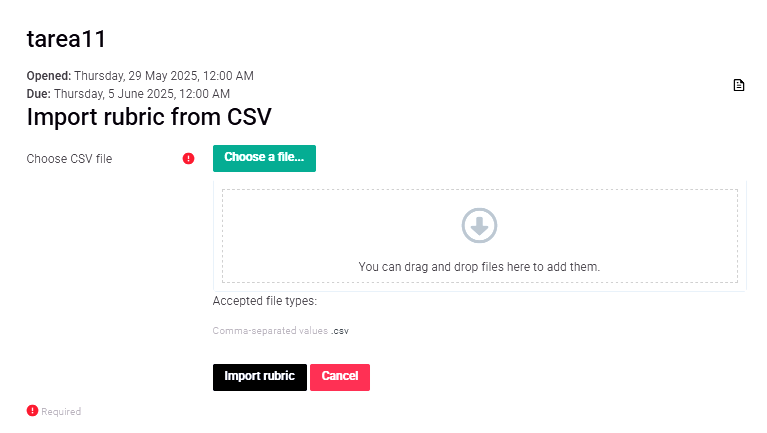
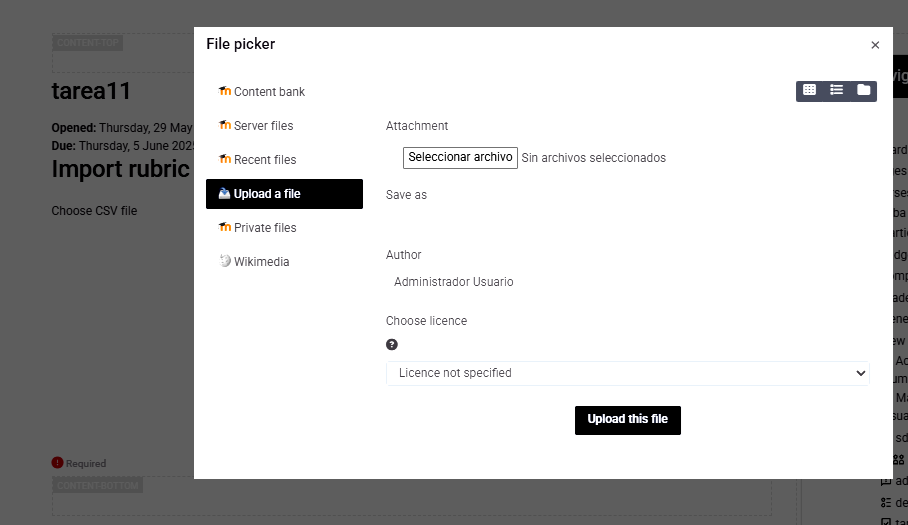
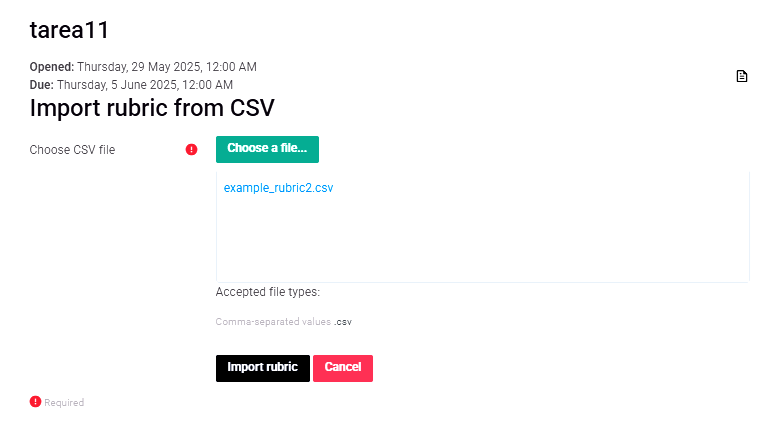
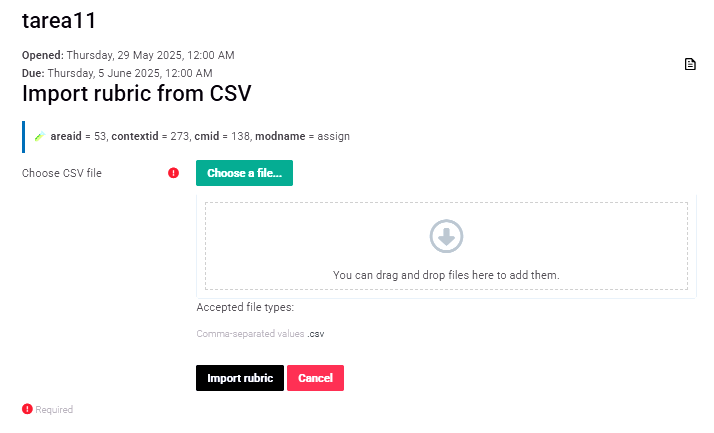
After accessing using the block_importrubric, you'll get an option to upload a CSV file.
This is an example of the CSV file structure:
criterion,level,level_description,score
Clarity,1,Excellent clarity,25
Clarity,2,Very clear with minor details,16
Clarity,3,Clear but with some doubts,12
Clarity,4,Not very clear,8
Clarity,5,Confusing,0
Organization,1,Impeccable structure,15
Organization,2,Clear structure with minimal adjustments,8
Organization,3,Functional structure,5
Organization,4,Poor organization,3
Organization,5,No clear structure,0
Subject knowledge,1,Outstanding command,20
Subject knowledge,2,Good command,16
Subject knowledge,3,Acceptable command,12
Subject knowledge,4,Limited command,8
Subject knowledge,5,Evident lack of knowledge,0
Writing,1,Perfect syntax and fluency,20
Writing,2,Good syntax with minor errors,16
Writing,3,Functional writing,12
Writing,4,Frequent errors,8
Writing,5,Very poor,0
Creativity,1,Highly creative,20
Creativity,2,Creative with original contributions,16
Creativity,3,Moderately creative,12
Creativity,4,Not very creative,8
Creativity,5,No creativity,0
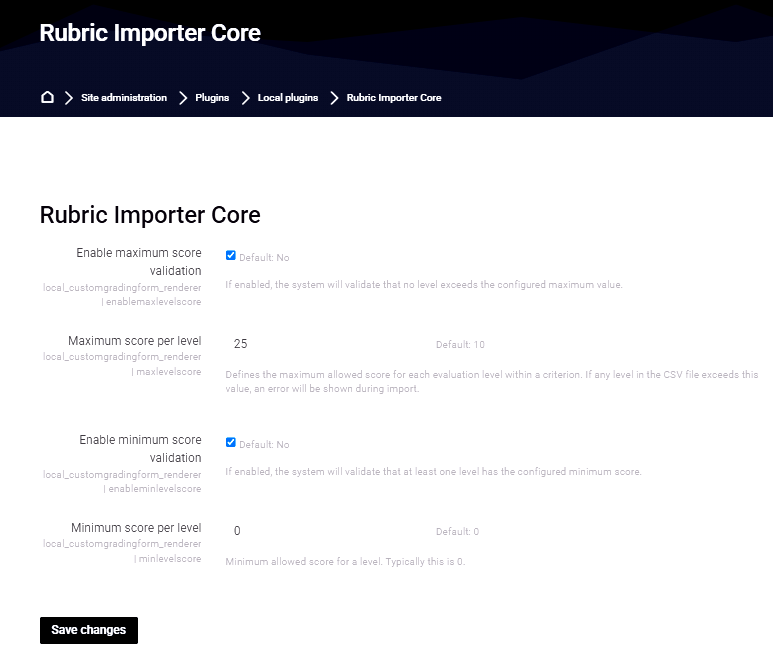
The plugin will check for the settings.php validations if set in the administration page.
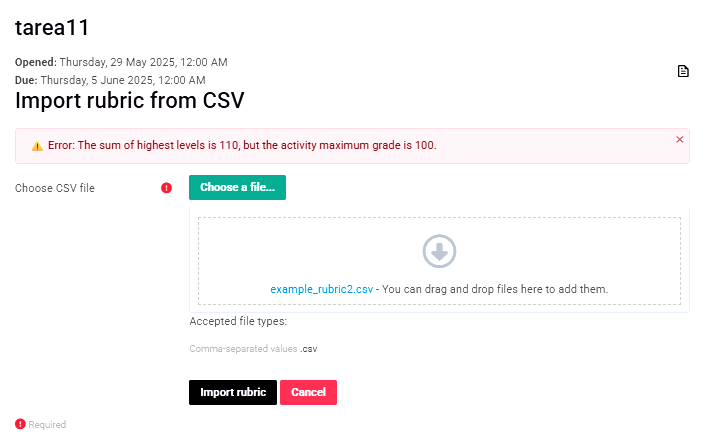
It will also check that the total score matches the activity max score.
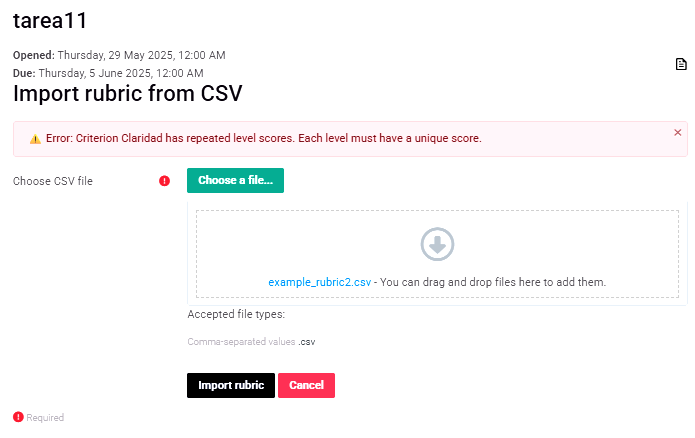
Additionally, it validates repeated scores between levels of the same criteria.
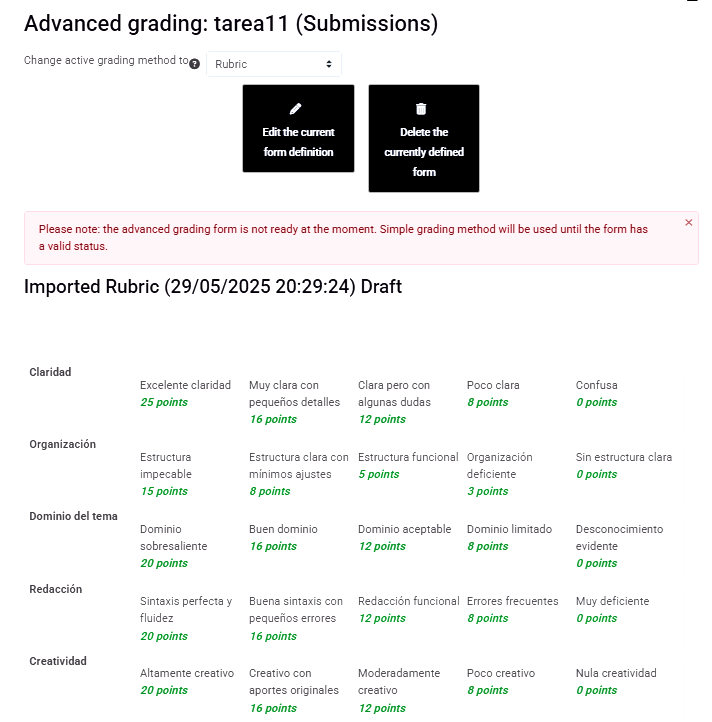
After importing, the rubric will save as a draft and redirect to the manage.php of the module
activity inside the course for quick verification of the rubric.
🚀 Installation:
- Place this
customgradingform_rendererfolder inside/local/. - Make sure the plugin
block/block_importrubricis also installed. - Go to Site Administration to complete the installation.
- Add the block to any valid activity (as a teacher or manager).
- You can also use the plugin installation module integrated in Moodle.
🌐 Available languages:
- English (
lang/en)
🛡️ Permissions:
This plugin can only be used by users with editing capabilities:
- editingteacher (teachers with editing rights)
- manager (site managers or administrators)
📄 License:
GNU GPL v3 – Free and open-source software.
' Notes:
This plugin does not modify the Moodle core and is fully compatible with the official plugin system.
1.0.2 (2025053000)
1.0.2
Plugin type: Local plugins
Frankenstyle component name: local_customgradingform_renderer
Version build number: 2025053000
Version release name: 1.0.2
Maturity: Stable
Supported Moodle versions: 4.0, 4.1, 4.2, 4.3, 4.4, 4.5, 5.0
Repository URL (Git): https://github.com/ingrichardrangel/customgradingform_renderer
Repository branch:
Repository tag:
Issue/bug tracker URL: https://github.com/ingrichardrangel/customgradingform_renderer/issues
Plugin: Import Rubric from CSV
This Plugin allows teachers or managers to import a grading rubric from a CSV file directly into activities that use the advanced grading method by rubrics in Moodle.
📦 Plugin name:
local_customgradingform_renderer
' Author:
Richard Rangel
🔄 Version:
1.0.0 (2025-05-19)
🧩 Requirements:
- Moodle 4.1 or higher
- The local plugin "customgradingform_renderer" must be installed (required dependency)
🔧 Functionality:
-Afer accessing using the block_importrubric, you'll get a option to upload a CSV file.
This is a example of the CSV File structure.
criterion,level,level_description,score
Clarity,1,Excellent clarity,25
Clarity,2,Very clear with minor details,16
Clarity,3,Clear but with some doubts,12
Clarity,4,Not very clear,8
Clarity,5,Confusing,0
Organization,1,Impeccable structure,15
Organization,2,Clear structure with minimal adjustments,8
Organization,3,Functional structure,5
Organization,4,Poor organization,3
Organization,5,No clear structure,0
Subject knowledge,1,Outstanding command,20
Subject knowledge,2,Good command,16
Subject knowledge,3,Acceptable command,12
Subject knowledge,4,Limited command,8
Subject knowledge,5,Evident lack of knowledge,0
Writing,1,Perfect syntax and fluency,20
Writing,2,Good syntax with minor errors,16
Writing,3,Functional writing,12
Writing,4,Frequent errors,8
Writing,5,Very poor,0
Creativity,1,Highly creative,20
Creativity,2,Creative with original contributions,16
Creativity,3,Moderately creative,12
Creativity,4,Not very creative,8
Creativity,5,No creativity,0
The plugin Will check for the Settings.php validations if set in administration page.
The plugin Will also check for total score being the same of the activity max score.
The plugin Will also check for repetead scores between levels of the same criteria.
after importing, the rubric Will sabe has a draft and it Will redirect to the manage.php of the module activity inside the course for quick verification of the rubric.
🚀 Installation:
- Place this
customgradingform_rendererfolder inside/local/ - Make sure the plugin
block/block_importrubricis also installed. - Go to Site Administration to complete the installation.
- Add the block to any valid activity (as a teacher or manager).
- You can also use the plugin installation module integrated in Moodle for the installation.
🌐 Available languages:
- English (
lang/en)
🛡️ Permissions:
This plugin can only be used by users with editing capabilities:
- editingteacher (teachers with editing rights)
- manager (site managers or administrators)
📄 License:
GNU GPL v3 – Free and open-source software.
' Notes:
This plugin does not modify the Moodle core and is fully compatible with the official plugin system.
1.0.1 (2025052800)
1.0.1
Plugin type: Local plugins
Frankenstyle component name: local_customgradingform_renderer
Version build number: 2025052800
Version release name: 1.0.1
Maturity: Stable
Supported Moodle versions: 4.0, 4.1, 4.2, 4.3, 4.4, 4.5
Repository URL (Git): https://github.com/ingrichardrangel/moodle-local_customgradingform_renderer
Repository branch:
Repository tag:
Issue/bug tracker URL: https://github.com/ingrichardrangel/customgradingform_renderer/issues
🧩 Plugin: Rubric Importer Core (local_customgradingform_renderer)
Component: local_customgradingform_renderer
📌 Features
Enables importing rubrics from a CSV file into any Moodle Assignment using the advanced grading method.
Processes and structures criteria, levels, and scores using Moodle's internal grading APIs.
Ensures data integrity through robust validation and sanitization.
Provides auto-debugging when Moodle debugging mode is enabled — helpful for developers and site administrators.
Supports localization and uses standard Moodle file handling APIs for secure temporary file management.
📂 CSV Format Example
Your CSV file should follow this exact structure:
criterion,level,level_description,score
"Clarity","1","Clear and concise","10"
"Clarity","2","Mostly clear","5"
"Clarity","3","Lacks clarity","0"
🧪 Usage Scenario
Download and install the latest version of this plugin from:
- https://github.com/ingrichardrangel/moodle-local_customgradingform_renderer
Also download and install the block plugin to access the import button within Assignment activities: - https://github.com/ingrichardrangel/moodle-block_importrubric
Enter an Assignment activity and add the "Import rubric from CSV" block manually.
Click the button, upload your CSV, and the plugin will process and validate the rubric data.
You will be redirected to the Advanced Grading interface where the rubric is available in draft form for review and activation.
" Validation Rules
Ensures no repeated scores among levels under the same criterion.
Validates that the sum of the maximum levels across all criteria equals the maximum grade of the Assignment.
Displays actual score total and expected maximum to help user comparison.
If enabled in plugin settings:
Verifies that each criterion includes a level with the minimum allowed score.
Checks that individual level scores do not exceed the Assignment’s maximum score.
📤 File Handling
Uploaded CSV files are stored temporarily in Moodle's draft area while parsing and processing.
Rubric data is inserted directly into Moodle’s database through the Advanced Grading APIs.
Rubrics are always stored as drafts, giving teachers full control to enable, modify, or discard them.
🛡️ Security and Debugging
All user-submitted data is sanitized using clean_param() to ensure input security.
In Moodle debugging mode, the plugin outputs helpful information and error messages for deeper insight.
⚙️ Requirements
Requires Moodle 4.1 or later.
Must be used alongside the block block_importrubric to enable interface access from Assignment activities.
Developed by Richard Rangel – 2025
1.0.0 (2025051800)
1.0.0
Plugin type: Local plugins
Frankenstyle component name: local_customgradingform_renderer
Version build number: 2025051800
Version release name: 1.0.0
Maturity: Stable
Supported Moodle versions: 4.1, 4.2, 4.3, 4.4, 4.5
Repository URL (Git): https://github.com/ingrichardrangel/customgradingform_renderer
Repository branch:
Repository tag:
Issue/bug tracker URL: https://github.com/ingrichardrangel/customgradingform_renderer/issues
Plugin: Import Rubric from CSV
This Plugin allows teachers or managers to import a grading rubric from a CSV file directly into activities that use the advanced grading method by rubrics in Moodle.
This plugin uses the block_importrubric has a conduct to access.
📦 Plugin name:
local_customgradingform_renderer
' Author:
Richard Rangel
🔄 Version:
1.0.0 (2025-05-19)
🧩 Requirements:
- Moodle 4.1 or higher
- The local plugin "customgradingform_renderer" must be installed (required dependency)
🔧 Functionality:
-After accessing using the block_importrubric, you'll get a option to upload a CSV file.
This is a example of the CSV File structure.
criterion,level,level_description,score
Clarity,1,Excellent clarity,25
Clarity,2,Very clear with minor details,16
Clarity,3,Clear but with some doubts,12
Clarity,4,Not very clear,8
Clarity,5,Confusing,0
Organization,1,Impeccable structure,15
Organization,2,Clear structure with minimal adjustments,8
Organization,3,Functional structure,5
Organization,4,Poor organization,3
Organization,5,No clear structure,0
Subject knowledge,1,Outstanding command,20
Subject knowledge,2,Good command,16
Subject knowledge,3,Acceptable command,12
Subject knowledge,4,Limited command,8
Subject knowledge,5,Evident lack of knowledge,0
Writing,1,Perfect syntax and fluency,20
Writing,2,Good syntax with minor errors,16
Writing,3,Functional writing,12
Writing,4,Frequent errors,8
Writing,5,Very poor,0
Creativity,1,Highly creative,20
Creativity,2,Creative with original contributions,16
Creativity,3,Moderately creative,12
Creativity,4,Not very creative,8
Creativity,5,No creativity,0
The plugin Will check for the Settings.php validations if set in administration page.
The plugin Will also check for total score being the same of the activity max score.
The plugin Will also check for repetead scores between levels of the same criteria.
after importing, the rubric Will sabe has a draft and it Will redirect to the manage.php of the module activity inside the course for quick verification of the rubric.
🚀 Installation:
- Place this
customgradingform_rendererfolder inside/local/ - Make sure the plugin
block/block_importrubricis also installed. - Go to Site Administration to complete the installation.
- Add the block to any valid activity (as a teacher or manager).
- You can also use the plugin installation module integrated in Moodle for the installation.
🌐 Available languages:
- English (
lang/en)
🛡️ Permissions:
This plugin can only be used by users with editing capabilities:
- editingteacher (teachers with editing rights)
- manager (site managers or administrators)
📄 License:
GNU GPL v3 – Free and open-source software.
' Notes:
This plugin does not modify the Moodle core and is fully compatible with the official plugin system.