
AI tools for teachers - prompt generator
Versions
Current version
1.7.0 (2026030501)
1.7.0
Plugin type: Blocks
Frankenstyle component name: block_aipromptgen
Version build number: 2026030501
Version release name: 1.7.0
Maturity: Stable
Supported Moodle versions: 4.1, 4.2, 4.3, 4.4, 4.5, 5.0, 5.1, 5.2
Repository URL (Git): https://github.com/blagojevicboban/moodle-block_aipromptgen
Repository branch:
Repository tag:
Issue/bug tracker URL: https://github.com/blagojevicboban/moodle-block_aipromptgen/issues
Changes
1.7.0 (2026-03-05)
- Feature: Streaming Endpoint Refactor - Switched to POST-based fetch with ReadableStream for better reliability and to avoid URL length limits.
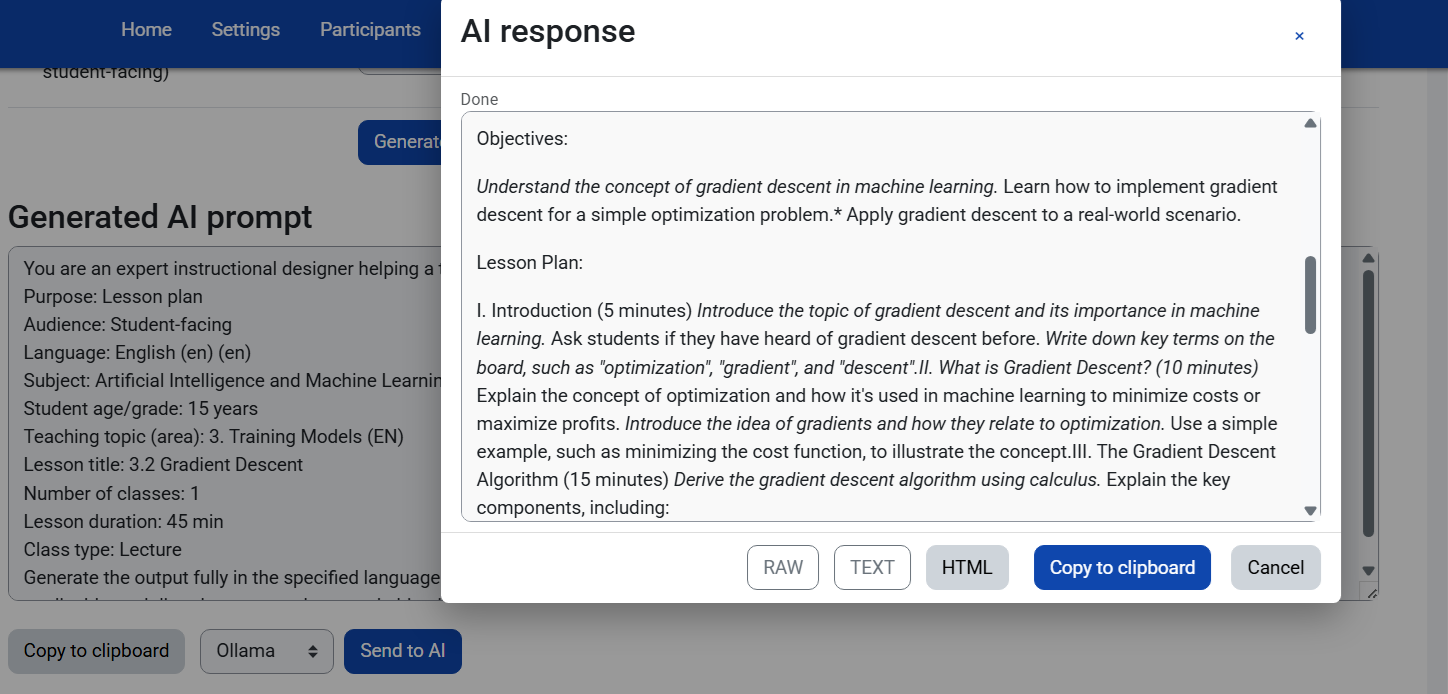
- Feature: Real-time Streaming Status - Added status indicators (Connecting, Receiving, Done) in the AI response modal.
- Feature: Added support for Gemini, Claude, DeepSeek, and Custom OpenAI-compatible endpoints.
- Fix: Permission issues resolved for all plugin files.
- Fix: ESLint and AMD build compliance.
1.6.0 (2026-03-04)
- Feature: Added support for Gemini API (Google).
- Feature: Added support for Claude API (Anthropic).
1.5.0 (2026-01-31)
- Feature: Dynamic Prompt Generation - prompt updates in real-time as you type, removing the need for a "Generate" button.
- Refactor: Removed "Insert into Editor" functionality to simplify the block and decouple it from specific editors.
- Fix: Improved Ollama streaming stability with timeout handling and immediate availability of response actions.
- Fix: Removed manual "Generate prompt" button for a smoother workflow.
1.4 (2026-01-31)
- Fix: Resolved PHP TypeError (htmlspecialchars) when rendering course competencies in Mustache templates.
- Fix: Achieved full ESLint compliance for all Javascript modules (actions, ui, markdown, stream, etc.).
- Refactor: Split complex logic in
markdown.jsandui.jsinto smaller, maintainable helper functions. - Clean: Removed trailing whitespace and addressed all pending linting warnings.
1.3 (2026-01-31)
- Feature: Refined AI Response Modal with 4 view modes: RAW, TEXT, HTML (Rich preview), and HTML CODE (source).
- Feature: Smart "Copy to Clipboard" with support for copying rich text.
- Feature: Improved UI feedback with copy status indicators.
- Feature: Enhanced Markdown rendering compatibility.
- Fix: Improved auto-formatting for streamed AI responses.
- Fix: UI layout refinements for better modal visibility.
1.2 (2025-12-06)
- Feature: Added RAW, TEXT, and HTML view modes for AI response improved accessibility and usage.
- Feature: Added "Copy" buttons that respects current view mode.
- Feature: Client-side Markdown rendering with auto-fix for clumped text from streams.
- Fix: Ollama connection now supports local/private IP addresses by bypassing SSL verification for local subnets.
- Fix: Reduced modal height to prevent buttons from being pushed off-screen.
- Fix: Improved TEXT view cleanup (removed stray markdown artifacts).
1.0 (2025-12-04)
- Stable release.
- Added unified "Send to AI" workflow.
- Added Ollama provider support.
- Refined prompt builder UI.
0.3.0 (2025-08-31)
- Unified "Send to AI" button with provider select.
- Added Ollama endpoint & model settings.
0.2.0 (2025-08-25)
- Initial OpenAI ChatGPT send support.
- Prompt builder refinements.
0.1.0
- First public prototype (prompt builder only).
1.6.0 (2026030400)
1.6.0
Plugin type: Blocks
Frankenstyle component name: block_aipromptgen
Version build number: 2026030400
Version release name: 1.6.0
Maturity: Stable
Supported Moodle versions: 3.10, 3.11, 3.9, 4.0, 4.1, 4.2, 4.3, 4.4, 4.5, 5.0, 5.1
Repository URL (Git): https://github.com/blagojevicboban/moodle-block_aipromptgen
Repository branch:
Repository tag:
Issue/bug tracker URL: https://github.com/blagojevicboban/moodle-block_aipromptgen/issues
Changes
1.6.0 (2026-03-04)
- Feature: Added support for Gemini API (Google).
- Feature: Added support for Claude API (Anthropic).
1.5.0 (2026-01-31)
- Feature: Dynamic Prompt Generation - prompt updates in real-time as you type, removing the need for a "Generate" button.
- Refactor: Removed "Insert into Editor" functionality to simplify the block and decouple it from specific editors.
- Fix: Improved Ollama streaming stability with timeout handling and immediate availability of response actions.
- Fix: Removed manual "Generate prompt" button for a smoother workflow.
1.4 (2026-01-31)
- Fix: Resolved PHP TypeError (htmlspecialchars) when rendering course competencies in Mustache templates.
- Fix: Achieved full ESLint compliance for all Javascript modules (actions, ui, markdown, stream, etc.).
- Refactor: Split complex logic in
markdown.jsandui.jsinto smaller, maintainable helper functions. - Clean: Removed trailing whitespace and addressed all pending linting warnings.
1.3 (2026-01-31)
- Feature: Refined AI Response Modal with 4 view modes: RAW, TEXT, HTML (Rich preview), and HTML CODE (source).
- Feature: Smart "Copy to Clipboard" with support for copying rich text.
- Feature: Improved UI feedback with copy status indicators.
- Feature: Enhanced Markdown rendering compatibility.
- Fix: Improved auto-formatting for streamed AI responses.
- Fix: UI layout refinements for better modal visibility.
1.2 (2025-12-06)
- Feature: Added RAW, TEXT, and HTML view modes for AI response improved accessibility and usage.
- Feature: Added "Copy" buttons that respects current view mode.
- Feature: Client-side Markdown rendering with auto-fix for clumped text from streams.
- Fix: Ollama connection now supports local/private IP addresses by bypassing SSL verification for local subnets.
- Fix: Reduced modal height to prevent buttons from being pushed off-screen.
- Fix: Improved TEXT view cleanup (removed stray markdown artifacts).
1.0 (2025-12-04)
- Stable release.
- Added unified "Send to AI" workflow.
- Added Ollama provider support.
- Refined prompt builder UI.
0.3.0 (2025-08-31)
- Unified "Send to AI" button with provider select.
- Added Ollama endpoint & model settings.
0.2.0 (2025-08-25)
- Initial OpenAI ChatGPT send support.
- Prompt builder refinements.
0.1.0
- First public prototype (prompt builder only).
1.5.0 (2026013103)
1.5.0
Plugin type: Blocks
Frankenstyle component name: block_aipromptgen
Version build number: 2026013103
Version release name: 1.5.0
Maturity: Stable
Supported Moodle versions: 4.0, 4.1, 4.2, 4.3, 4.4, 4.5, 5.0, 5.1
Repository URL (Git): https://github.com/blagojevicboban/moodle-block_aipromptgen
Repository branch:
Repository tag:
Issue/bug tracker URL: https://github.com/blagojevicboban/moodle-block_aipromptgen/issues
Changes
1.5.0 (2026-01-31)
- Feature: Dynamic Prompt Generation - prompt updates in real-time as you type, removing the need for a "Generate" button.
- Refactor: Removed "Insert into Editor" functionality to simplify the block and decouple it from specific editors.
- Fix: Improved Ollama streaming stability with timeout handling and immediate availability of response actions.
- Fix: Removed manual "Generate prompt" button for a smoother workflow.
1.4 (2026-01-31)
- Fix: Resolved PHP TypeError (htmlspecialchars) when rendering course competencies in Mustache templates.
- Fix: Achieved full ESLint compliance for all Javascript modules (actions, ui, markdown, stream, etc.).
- Refactor: Split complex logic in
markdown.jsandui.jsinto smaller, maintainable helper functions. - Clean: Removed trailing whitespace and addressed all pending linting warnings.
1.3 (2026-01-31)
- Feature: Refined AI Response Modal with 4 view modes: RAW, TEXT, HTML (Rich preview), and HTML CODE (source).
- Feature: Smart "Copy to Clipboard" with support for copying rich text.
- Feature: Improved UI feedback with copy status indicators.
- Feature: Enhanced Markdown rendering compatibility.
- Fix: Improved auto-formatting for streamed AI responses.
- Fix: UI layout refinements for better modal visibility.
1.2 (2025-12-06)
- Feature: Added RAW, TEXT, and HTML view modes for AI response improved accessibility and usage.
- Feature: Added "Copy" buttons that respects current view mode.
- Feature: Client-side Markdown rendering with auto-fix for clumped text from streams.
- Fix: Ollama connection now supports local/private IP addresses by bypassing SSL verification for local subnets.
- Fix: Reduced modal height to prevent buttons from being pushed off-screen.
- Fix: Improved TEXT view cleanup (removed stray markdown artifacts).
1.0 (2025-12-04)
- Stable release.
- Added unified "Send to AI" workflow.
- Added Ollama provider support.
- Refined prompt builder UI.
0.3.0 (2025-08-31)
- Unified "Send to AI" button with provider select.
- Added Ollama endpoint & model settings.
0.2.0 (2025-08-25)
- Initial OpenAI ChatGPT send support.
- Prompt builder refinements.
0.1.0
- First public prototype (prompt builder only).
1.4 (2026013101)
1.4
Plugin type: Blocks
Frankenstyle component name: block_aipromptgen
Version build number: 2026013101
Version release name: 1.4
Maturity: Stable
Supported Moodle versions: 3.10, 3.11, 3.9, 4.0, 4.1, 4.2, 4.3, 4.4, 4.5, 5.0, 5.1
Repository URL (Git): https://github.com/blagojevicboban/moodle-block_aipromptgen
Repository branch:
Repository tag:
Issue/bug tracker URL: https://github.com/blagojevicboban/moodle-block_aipromptgen/issues
Changes
1.4 (2026-01-31)
- Fix: Resolved PHP TypeError (htmlspecialchars) when rendering course competencies in Mustache templates.
- Fix: Achieved full ESLint compliance for all Javascript modules (actions, ui, markdown, stream, etc.).
- Refactor: Split complex logic in
markdown.jsandui.jsinto smaller, maintainable helper functions. - Clean: Removed trailing whitespace and addressed all pending linting warnings.
1.3 (2026-01-31)
- Feature: Refined AI Response Modal with 4 view modes: RAW, TEXT, HTML (Rich preview), and HTML CODE (source).
- Feature: Smart "Copy to Clipboard" with support for copying rich text.
- Feature: Improved UI feedback with copy status indicators.
- Feature: Enhanced Markdown rendering compatibility.
- Fix: Improved auto-formatting for streamed AI responses.
- Fix: UI layout refinements for better modal visibility.
1.2 (2025-12-06)
- Feature: Added RAW, TEXT, and HTML view modes for AI response improved accessibility and usage.
- Feature: Added "Copy" buttons that respects current view mode.
- Feature: Client-side Markdown rendering with auto-fix for clumped text from streams.
- Fix: Ollama connection now supports local/private IP addresses by bypassing SSL verification for local subnets.
- Fix: Reduced modal height to prevent buttons from being pushed off-screen.
- Fix: Improved TEXT view cleanup (removed stray markdown artifacts).
1.0 (2025-12-04)
- Stable release.
- Added unified "Send to AI" workflow.
- Added Ollama provider support.
- Refined prompt builder UI.
0.3.0 (2025-08-31)
- Unified "Send to AI" button with provider select.
- Added Ollama endpoint & model settings.
0.2.0 (2025-08-25)
- Initial OpenAI ChatGPT send support.
- Prompt builder refinements.
0.1.0
- First public prototype (prompt builder only).
1.3 (2026013100)
1.3
Plugin type: Blocks
Frankenstyle component name: block_aipromptgen
Version build number: 2026013100
Version release name: 1.3
Maturity: Beta
Supported Moodle versions: 4.0, 4.1, 4.2, 4.3, 4.4, 4.5, 5.0, 5.1
Repository URL (Git): https://github.com/blagojevicboban/moodle-block_aipromptgen
Repository branch:
Repository tag:
Issue/bug tracker URL: https://github.com/blagojevicboban/moodle-block_aipromptgen/issues
Changes
1.3 (2026-01-31)
- Feature: Refined AI Response Modal with 4 view modes: RAW, TEXT, HTML (Rich preview), and HTML CODE (source).
- Feature: Smart "Copy to Clipboard" with support for copying rich text.
- Feature: Improved UI feedback with copy status indicators.
- Feature: Enhanced Markdown rendering compatibility.
- Fix: Improved auto-formatting for streamed AI responses.
- Fix: UI layout refinements for better modal visibility.
1.2 (2025-12-06)
- Feature: Added RAW, TEXT, and HTML view modes for AI response improved accessibility and usage.
- Feature: Added "Copy" buttons that respects current view mode.
- Feature: Client-side Markdown rendering with auto-fix for clumped text from streams.
- Fix: Ollama connection now supports local/private IP addresses by bypassing SSL verification for local subnets.
- Fix: Reduced modal height to prevent buttons from being pushed off-screen.
- Fix: Improved TEXT view cleanup (removed stray markdown artifacts).
1.0 (2025-12-04)
- Stable release.
- Added unified "Send to AI" workflow.
- Added Ollama provider support.
- Refined prompt builder UI.
0.3.0 (2025-08-31)
- Unified "Send to AI" button with provider select.
- Added Ollama endpoint & model settings.
0.2.0 (2025-08-25)
- Initial OpenAI ChatGPT send support.
- Prompt builder refinements.
0.1.0
- First public prototype (prompt builder only).
1.2 (2025120600)
1.2
Plugin type: Blocks
Frankenstyle component name: block_aipromptgen
Version build number: 2025120600
Version release name: 1.2
Maturity: Stable
Supported Moodle versions: 3.10, 3.11, 3.9, 4.0, 4.1, 4.2, 4.3, 4.4, 4.5, 5.0, 5.1
Repository URL (Git): https://github.com/blagojevicboban/moodle-block_aipromptgen
Repository branch:
Repository tag:
Issue/bug tracker URL: https://github.com/blagojevicboban/moodle-block_aipromptgen/issues
AI for Teachers - prompt generator (Moodle block)
Release: 1.2 (2025-12-06)
A block plugin that provides an AI prompt builder for teachers on a per'course basis. Students cannot access it.
Compatibility
- Moodle 4.3+ and 5.x (tested with Moodle 5).
- Optional: Competencies (Learning plans) and Gradebook Outcomes.
Features
- Visible only to roles with capability (editing teachers/managers by default).
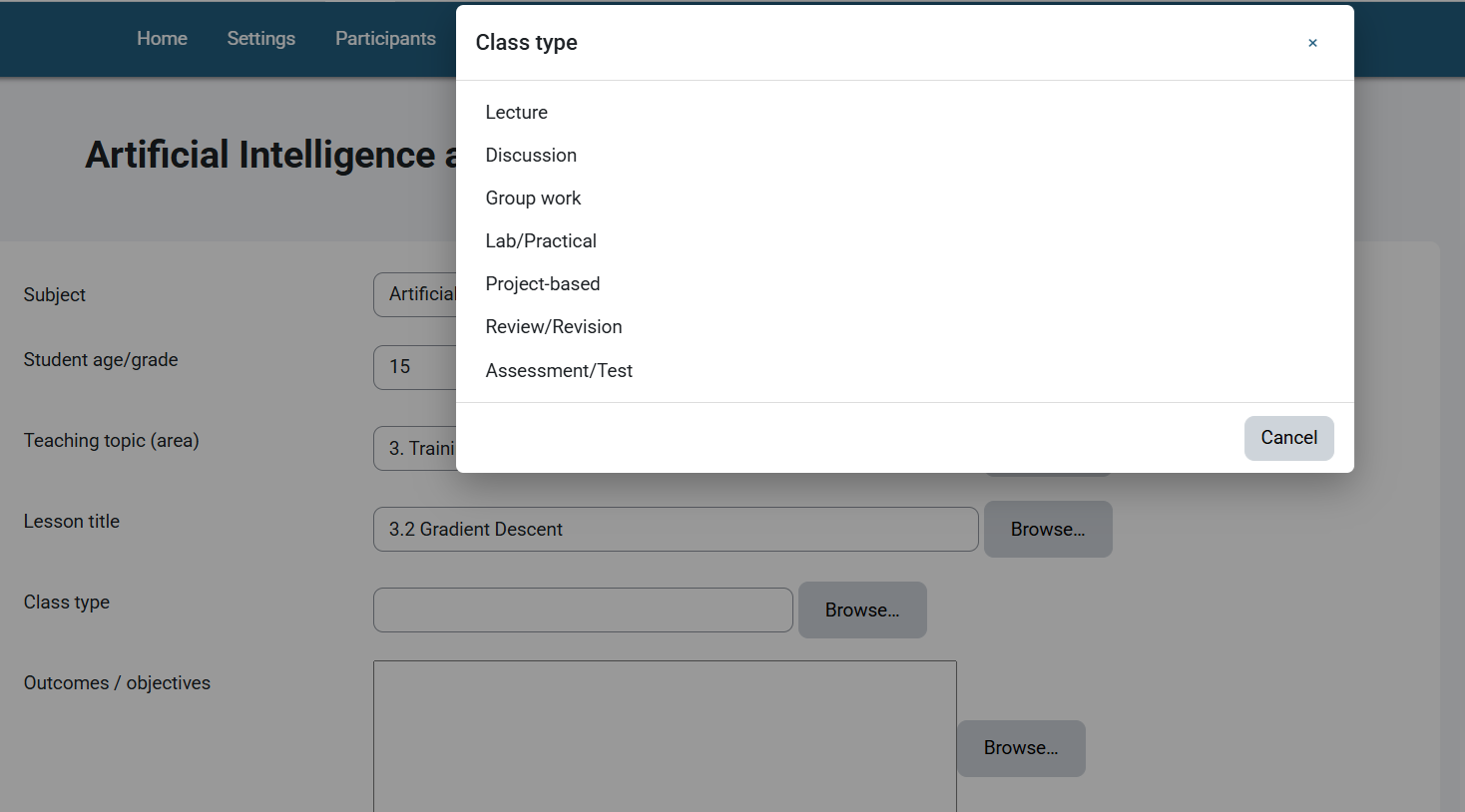
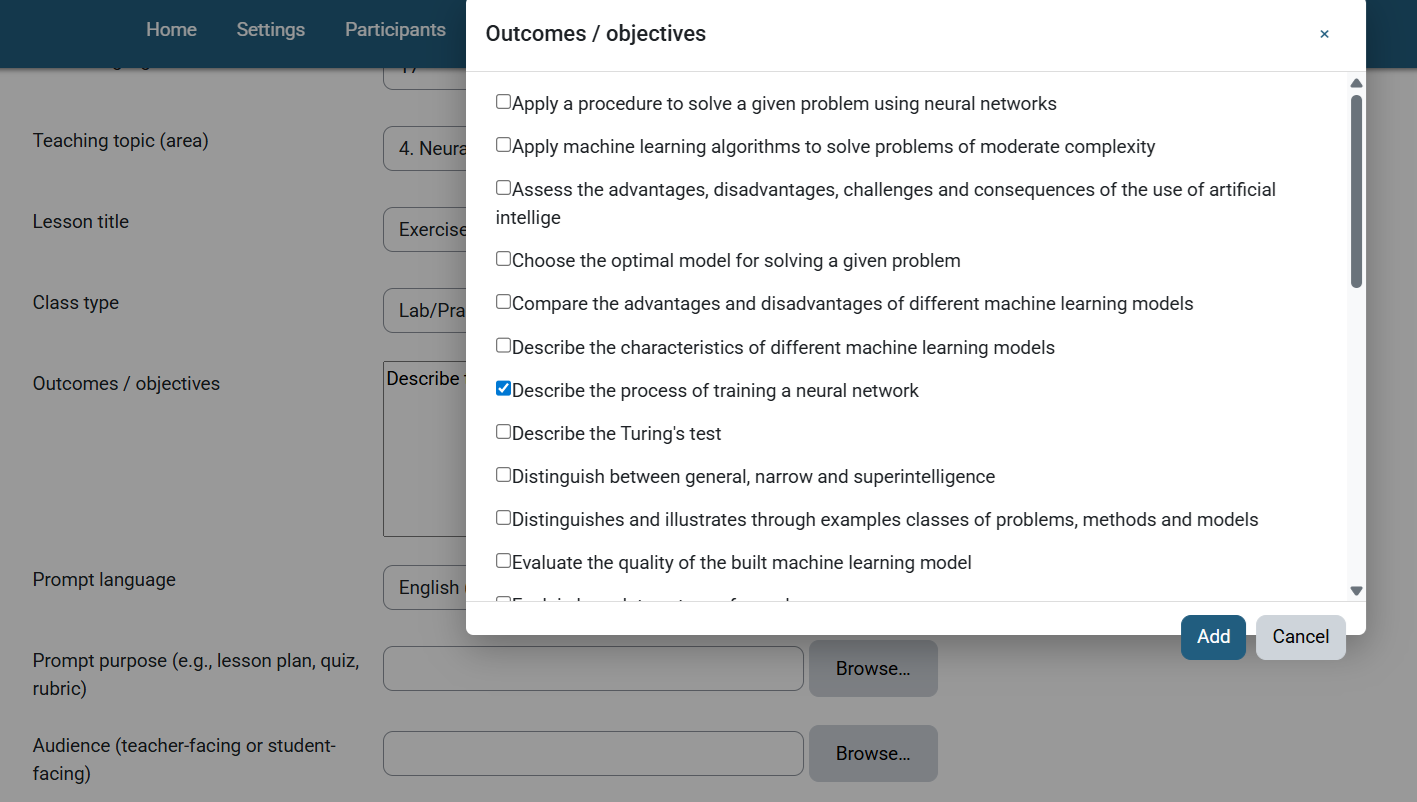
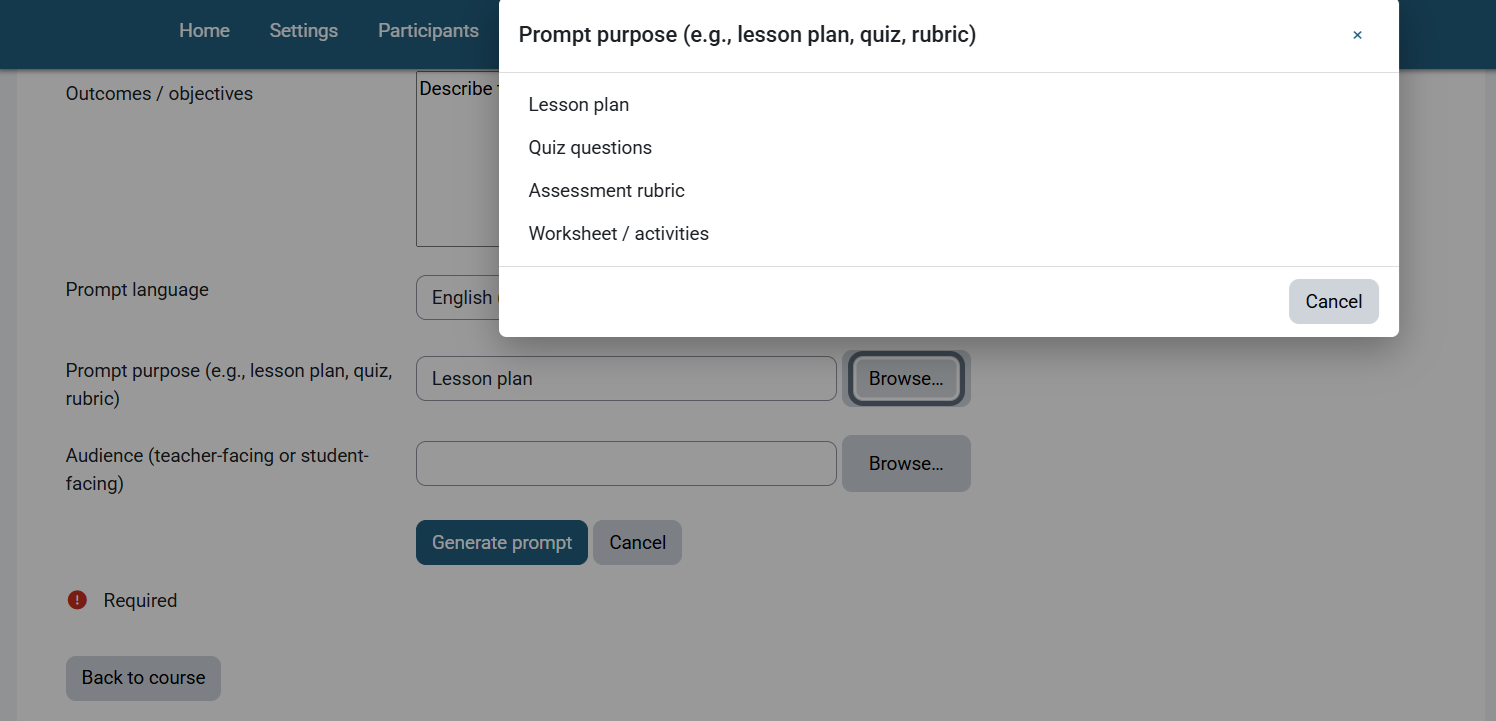
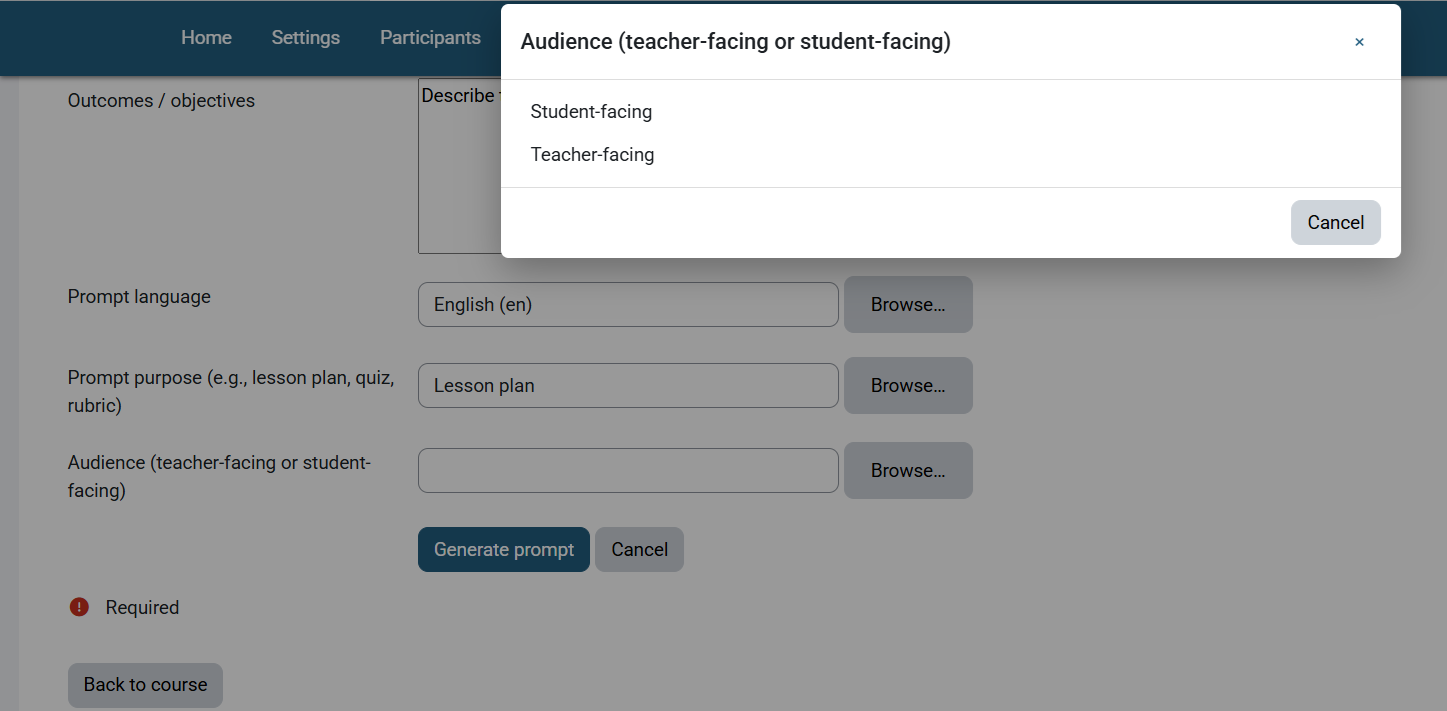
- Per'course prompt builder form with tooltips and Browse modals:
- Subject (prefilled with course name on first load if empty)
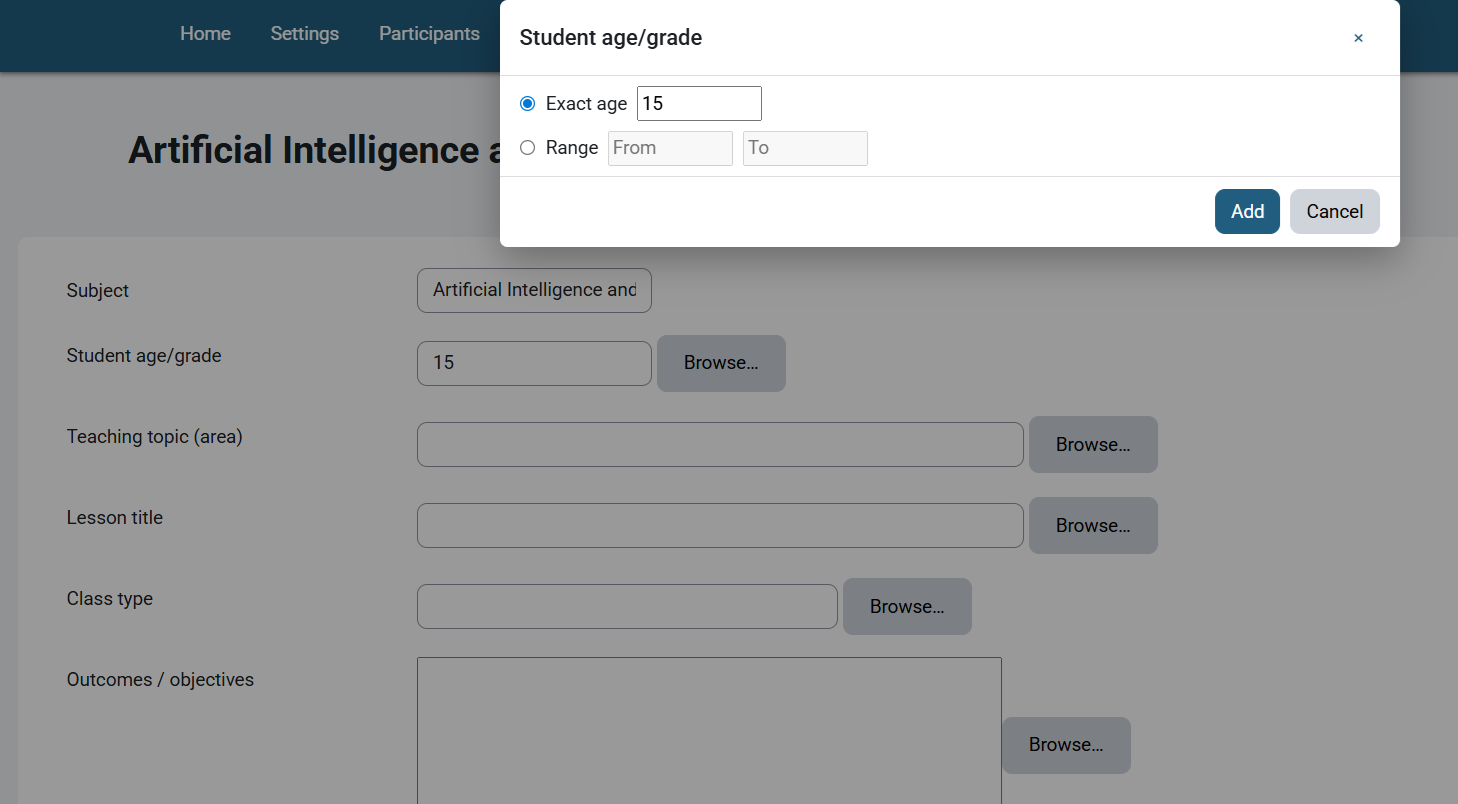
- Student age/grade
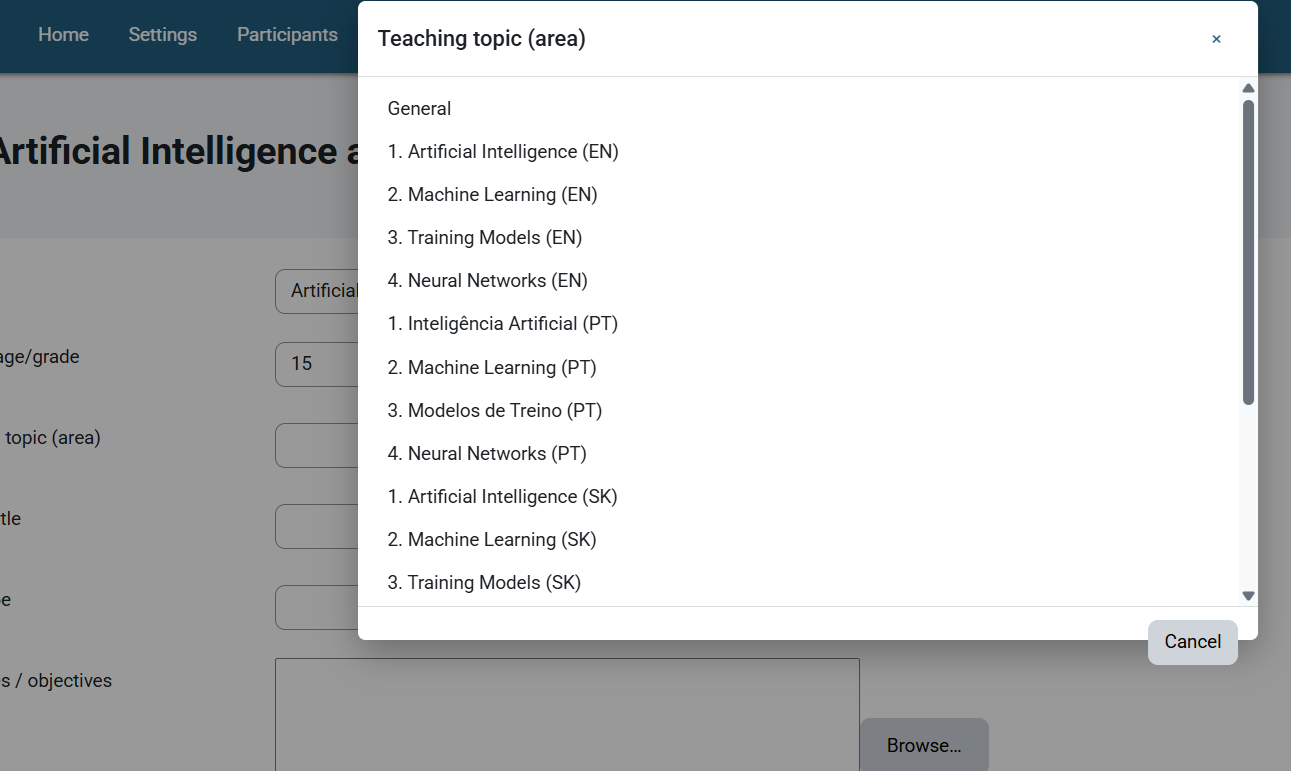
- Teaching topic (area) + Browse (course sections)
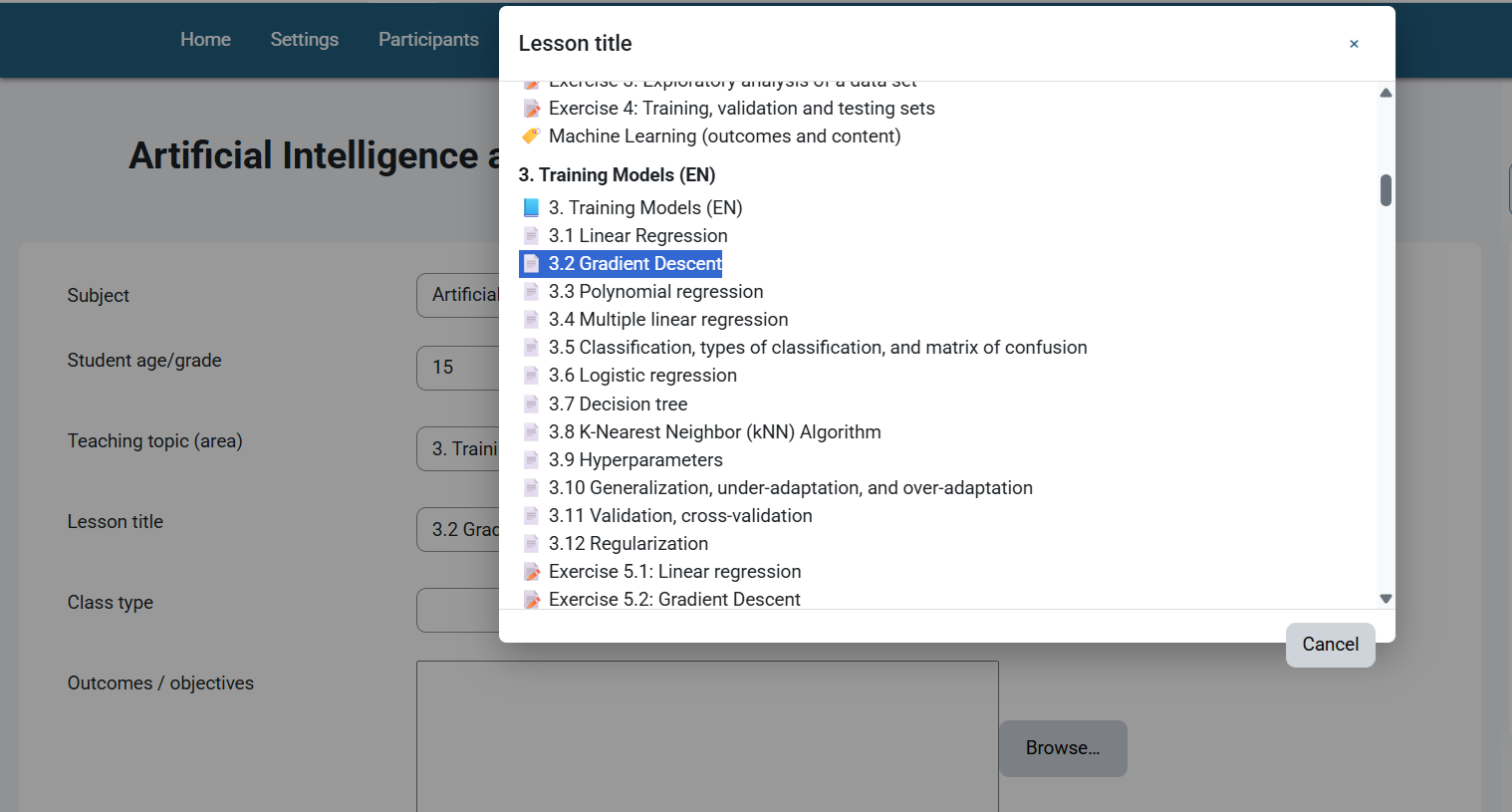
- Lesson title + Browse (sections/activities)
- Class type: text input + Browse (common class types)
- Outcomes/objectives: textarea + Browse (course competencies and, if enabled, gradebook outcomes; multi'select)
- Prompt language: text input + Browse
- Prompt purpose: text input + Browse (e.g., lesson plan, quiz, rubric)
- Audience: text input + Browse (teacher'facing or student'facing)
- Generated prompt reflects the selected Prompt language.
- Optional: AI send (unified): Generate prompt then use a single "Send to AI" button with provider select (OpenAI or local Ollama) to fetch an inline response.
- New in 1.2: Response modal features 3 view modes:
- RAW: Original Markdown from AI.
- TEXT: Clean plain text (lists normalized, markdown stripped).
- HTML: Professionally formatted view (lists, headers, paragraphs).
- New in 1.2: Smart "Copy to Clipboard" copies the text from the currently selected view.
- New in 1.2: Robust auto-formatting to handle clumped AI text.
- New in 1.2: Response modal features 3 view modes:
Install
- Place this folder under Moodle at
blocks/aipromptgen. - Visit Site administration ' Notifications to complete installation.
- (Optional) Enable:
- Competencies: Site administration ' Advanced features ' "Competencies".
- Outcomes: Site administration ' Advanced features ' "Enable outcomes".
Then link competencies to the course (Course ' More ' Competencies) and/or define local/global outcomes.
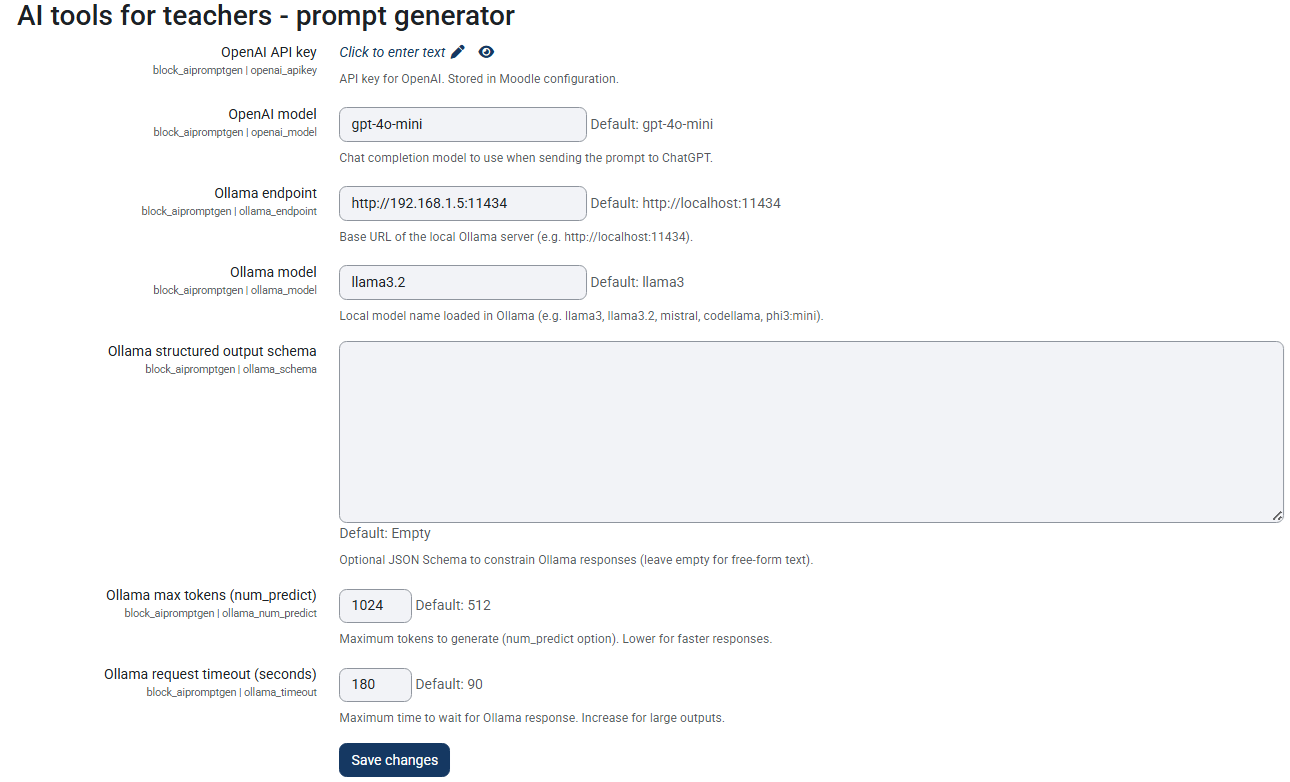
- (Optional) Configure AI providers (Site administration ' Plugins ' Blocks ' AI for Teachers):
- OpenAI: API key + model (default
gpt-4o-mini). - Ollama: Local endpoint base URL (e.g.
http://localhost:11434) + model name (e.g.llama3,mistral). - Increase Maximum tokens to generate and Maximum time to wait for Ollama response.
- Note: Connection to local private subnets (e.g.
192.168.x.x) is supported (requires HTTPS or configured proxy bypass).
- Note: Connection to local private subnets (e.g.
Usage
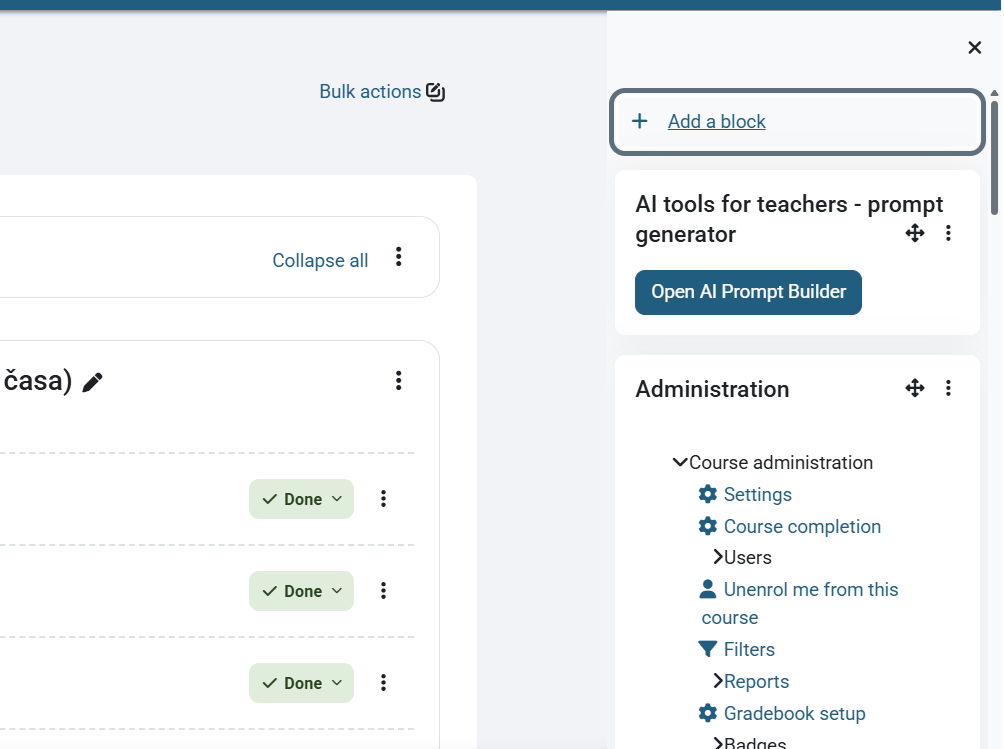
- Add the "AI for Teachers" block to a course page.
- Click "Open AI Prompt Builder".
- Fill the fields (use Browse buttons for quick selection).
- Click "Generate prompt" and copy or download the generated text.
- (Optional) Select a provider and click "Send to AI" to send the generated prompt and view the response inline (requires provider configuration).
Permissions
- Capability:
block/aipromptgen:manage(required to view the block and use the builder).
Notes
- Competencies/Outcomes Browse:
- If competencies are enabled and linked at course or activity level, they will appear in the modal.
- If Gradebook Outcomes are enabled, local and global outcomes will be listed too.
- Language field:
- The visible field accepts a language name (with optional code in parentheses). A hidden
languagecodeis maintained automatically when using Browse. - The generated prompt honors the selected language and appends a single normalized code to the displayed name.
- The visible field accepts a language name (with optional code in parentheses). A hidden
- Data cleaning/security:
- All inputs have explicit
$mform->setType(...)(e.g.,PARAM_TEXT,PARAM_INT,PARAM_ALPHANUMEXTfor codes). - Language string placeholders use single'quoted strings in lang files to avoid premature interpolation.
- All inputs have explicit
- Age/grade modal:
- Choose an exact age or a range. The prompt formats this as
15 godinaor15-16 godina(localized wording can vary by language pack).
- Choose an exact age or a range. The prompt formats this as
- AI provider integration:
- When configured, pressing "Send to AI" sends the generated prompt to the selected provider (OpenAI or Ollama) and displays the AI response on the page. Ensure institutional data/privacy compliance before sending data to external services (OpenAI). Local Ollama requests remain on your server.
Troubleshooting
- "A required parameter (courseid) was missing":
- Open the builder from within a course or ensure the action URL includes
courseid. The page also tries to infer it fromcmid/id/current course.
- Open the builder from within a course or ensure the action URL includes
- Outcomes modal shows "None":
- Ensure Competencies and/or Outcomes are enabled.
- Link competencies to the course or activities; define outcomes if needed.
- Check role permissions to view competencies.
- Ollama connection failed:
- Ensure the Moodle server can reach the Ollama endpoint.
- For local subnets (
192.168.x.x), SSL verification is automatically bypassed in v1.2+, but check firewall rules.
Roadmap
- Save user presets per course.
- AJAX (non'blocking) streaming responses.
- Additional localized strings and templates.
Changelog (summary)
- 1.2 (2025-12-06): Major UI enhancements and connectivity fixes.
- Added RAW / TEXT / HTML view modes for AI response.
- Added smart "Copy" button.
- Implemented client-side Markdown rendering and auto-fixing for clumped text.
- Fixed Ollama connection issues for local/private IP addresses (SSL bypass logic).
- 1.0 (2025-12-04): Stable release — updated plugin metadata and packaging, stability and polishing fixes. Includes prior features such as the unified "Send to AI" workflow, Ollama provider support, prompt builder refinements, and minor bug fixes.
- 0.3.0 (2025-08-31): Unified "Send to AI" button with provider select; added Ollama endpoint & model settings; added related language strings.
- 0.2.0 (2025-08-25): Initial OpenAI ChatGPT send support and prompt builder refinements.
- 0.1.0: First public prototype (prompt builder only).
0.3.2 (2025090100)
0.3.2
Plugin type: Blocks
Frankenstyle component name: block_aipromptgen
Version build number: 2025090100
Version release name: 0.3.2
Maturity: Stable
Supported Moodle versions: 3.10, 3.11, 3.9, 4.0, 4.1, 4.2, 4.3, 4.4, 4.5, 5.0, 5.1
Repository URL (Git): https://github.com/blagojevicboban/moodle-block_aipromptgen
Repository branch:
Repository tag:
Issue/bug tracker URL: https://github.com/blagojevicboban/moodle-block_aipromptgen/issues
AI Prompt Generator helps teachers create clear, structured prompts for AI tools directly from Moodle using course data. Configure defaults (model, API key), pick topic, objective, Student age/grade (with Browse modal for exact/range), language and output format, then generate a ready'to'use prompt.
Key features:
- Block for course page
- Age/grade picker modal (exact or range)
- Customizable prompt sections
- Admin settings for API/model
- No student data stored (privacy'friendly)
- The plugin is a product of Erasmus project:
- KA220-VET - Cooperation partnerships in vocational education and training
- Project Title: AI tools for VET schools
##Changelog (summary)
- 0.3.0 (2025-08-31): Unified "Send to AI" button with provider select; added Ollama endpoint & model settings; added related language strings.
- 0.2.0 (2025-08-25): Initial OpenAI ChatGPT send support and prompt builder refinements.
- 0.1.0: First public prototype (prompt builder only).
0.2.0 (2025082500)
0.2.0
Plugin type: Blocks
Frankenstyle component name: block_aipromptgen
Version build number: 2025082500
Version release name: 0.2.0
Maturity: Release Candidate
Supported Moodle versions: 3.10, 3.11, 3.9, 4.0, 4.1, 4.2, 4.3, 4.4, 4.5, 5.0
Repository URL (Git): https://github.com/blagojevicboban/moodle-block_aipromptgen
Repository branch:
Repository tag:
Issue/bug tracker URL: https://github.com/blagojevicboban/moodle-block_aipromptgen/issues
Missing Header and Copyright Information in JS Files
0.1.2 (2025082301)
0.1.2
Plugin type: Blocks
Frankenstyle component name: block_aipromptgen
Version build number: 2025082301
Version release name: 0.1.2
Maturity: Alpha
Supported Moodle versions: 3.10, 3.11, 3.9, 4.0, 4.1, 4.2, 4.3, 4.4, 4.5, 5.0
Repository URL (Git): https://github.com/blagojevicboban/moodle-block_aipromptgen
Repository branch:
Repository tag:
Issue/bug tracker URL: https://github.com/blagojevicboban/moodle-block_aipromptgen/issues
AI for Teachers (Moodle block)
A block plugin that provides an AI prompt builder for teachers on a per'course basis. Students cannot access it.
Compatibility
- Moodle 4.3+ and 5.x (tested with Moodle 5).
- Optional: Competencies (Learning plans) and Gradebook Outcomes.
Features
- Visible only to roles with capability
block/aipromptgen:manage(editing teachers/managers by default). - Per'course prompt builder form with tooltips and Browse modals:
- Subject (prefilled with course name on first load if empty)
- Student age/grade
- Teaching topic (area) + Browse (course sections)
- Lesson title + Browse (sections/activities)
- Class type: text input + Browse (common class types)
- Outcomes/objectives: textarea + Browse (course competencies and, if enabled, gradebook outcomes; multi'select)
- Prompt language: text input + Browse (installed languages; stores hidden language code)
- Prompt purpose: text input + Browse (e.g., lesson plan, quiz, rubric)
- Audience: text input + Browse (teacher'facing or student'facing)
- Generated prompt reflects the selected Prompt language. The visible language name is preserved and a single normalized code (e.g.,
sr_lt) is appended once: e.g.,Serbian (sr_lt). - Block header can show a comma'separated label of course Competencies/Outcomes when available.
- No session'based prefill: form does not restore previous session values.
- Optional: "Send to ChatGPT" button that submits the generated prompt to OpenAI and displays the response (when configured with an API key).
Install
- Place this folder under Moodle at
blocks/aipromptgen. - Visit Site administration ' Notifications to complete installation.
- (Optional) Enable:
- Competencies: Site administration ' Advanced features ' "Competencies".
- Outcomes: Site administration ' Advanced features ' "Enable outcomes".
Then link competencies to the course (Course ' More ' Competencies) and/or define local/global outcomes.
- (Optional) Configure OpenAI integration (to enable "Send to ChatGPT"):
- Site administration ' Plugins ' Blocks ' AI for Teachers
- Set the OpenAI API key and (optionally) the model (defaults to
gpt-4o-mini).
Usage
- Add the "AI for Teachers" block to a course page.
- Click "Open AI Prompt Builder".
- Fill the fields (use Browse buttons for quick selection).
- Click "Generate prompt" and copy or download the generated text.
- (Optional) Click "Send to ChatGPT" to send the generated prompt and view the response inline (requires API key configuration).
Permissions
- Capability:
block/aipromptgen:manage(required to view the block and use the builder).
Notes
- Competencies/Outcomes Browse:
- If competencies are enabled and linked at course or activity level, they will appear in the modal.
- If Gradebook Outcomes are enabled, local and global outcomes will be listed too.
- Language field:
- The visible field accepts a language name (with optional code in parentheses). A hidden
languagecodeis maintained automatically when using Browse. - The generated prompt honors the selected language and appends a single normalized code to the displayed name (e.g.,
Serbian (sr_lt)). If no meaningful code is available,(en)is only appended when the language is actually English.
- The visible field accepts a language name (with optional code in parentheses). A hidden
- Data cleaning/security:
- All inputs have explicit
$mform->setType(...)(e.g.,PARAM_TEXT,PARAM_INT,PARAM_ALPHANUMEXTfor codes). - Language string placeholders use single'quoted strings in lang files to avoid premature interpolation.
- All inputs have explicit
- Age/grade modal:
- Choose an exact age or a range. The prompt formats this as
15 godinaor15-16 godina(localized wording can vary by language pack).
- Choose an exact age or a range. The prompt formats this as
- OpenAI integration:
- When configured, pressing "Send to ChatGPT" sends the generated prompt to OpenAI and displays the AI response on the page. Ensure you have consent and comply with your institution’s data and privacy policies before sending any data to third'party services.
Troubleshooting
- "A required parameter (courseid) was missing":
- Open the builder from within a course or ensure the action URL includes
courseid. The page also tries to infer it fromcmid/id/current course.
- Open the builder from within a course or ensure the action URL includes
- Outcomes modal shows "None":
- Ensure Competencies and/or Outcomes are enabled.
- Link competencies to the course or activities; define outcomes if needed.
- Check role permissions to view competencies.
- Language appears wrong in prompt:
- Use the Browse list to set a known language and ensure the hidden
languagecodeis set. - Typed names are supported (with synonyms like "Serbian"), and the code is appended once. If you still see a mismatch, verify installed language packs and share the exact typed value to extend the mapping.
- Use the Browse list to set a known language and ensure the hidden
- "Send to ChatGPT" button not visible:
- Configure the OpenAI API key under Site administration ' Plugins ' Blocks ' AI for Teachers, then reload the page.
Roadmap
- Optional setting to "Force English output" regardless of selection.
- Save user presets per course.
- Integrations with external LLM providers (preview outputs).
- Additional localized strings and templates
0.1.1 (2025081700)
0.1.1
Plugin type: Blocks
Frankenstyle component name: block_aipromptgen
Version build number: 2025081700
Version release name: 0.1.1
Maturity: Alpha
Supported Moodle versions: 3.10, 3.11, 3.9, 4.0, 4.1, 4.2, 4.3, 4.4, 4.5, 5.0
Repository URL (Git): https://github.com/blagojevicboban/block_aipromptgen
Repository branch:
Repository tag:
Issue/bug tracker URL: https://github.com/blagojevicboban/moodle-block_aipromptgen/issues
AI for Teachers (Moodle block)
A block plugin that provides an AI prompt builder for teachers on a per'course basis. Students cannot access it.
Compatibility
- Moodle 4.3+ and 5.x (tested with Moodle 5).
- Optional: Competencies (Learning plans) and Gradebook Outcomes.
Features
- Visible only to roles with capability
block/aipromptgen:manage(editing teachers/managers by default). - Per'course prompt builder form with tooltips and Browse modals:
- Subject (prefilled with course name on first load if empty)
- Student age/grade
- Teaching topic (area) + Browse (course sections)
- Lesson title + Browse (sections/activities)
- Class type: text input + Browse (common class types)
- Outcomes/objectives: textarea + Browse (course competencies and, if enabled, gradebook outcomes; multi'select)
- Prompt language: text input + Browse (installed languages; stores hidden language code)
- Prompt purpose: text input + Browse (e.g., lesson plan, quiz, rubric)
- Audience: text input + Browse (teacher'facing or student'facing)
- Generated prompt reflects the selected Prompt language. The visible language name is preserved and a single normalized code (e.g.,
sr_lt) is appended once: e.g.,Serbian (sr_lt). - Block header can show a comma'separated label of course Competencies/Outcomes when available.
- No session'based prefill: form does not restore previous session values.
- Optional: "Send to ChatGPT" button that submits the generated prompt to OpenAI and displays the response (when configured with an API key).
Install
- Place this folder under Moodle at
blocks/aipromptgen. - Visit Site administration ' Notifications to complete installation.
- (Optional) Enable:
- Competencies: Site administration ' Advanced features ' "Competencies".
- Outcomes: Site administration ' Advanced features ' "Enable outcomes".
Then link competencies to the course (Course ' More ' Competencies) and/or define local/global outcomes.
- (Optional) Configure OpenAI integration (to enable "Send to ChatGPT"):
- Site administration ' Plugins ' Blocks ' AI for Teachers
- Set the OpenAI API key and (optionally) the model (defaults to
gpt-4o-mini).
Usage
- Add the "AI for Teachers" block to a course page.
- Click "Open AI Prompt Builder".
- Fill the fields (use Browse buttons for quick selection).
- Click "Generate prompt" and copy or download the generated text.
- (Optional) Click "Send to ChatGPT" to send the generated prompt and view the response inline (requires API key configuration).
Permissions
- Capability:
block/aipromptgen:manage(required to view the block and use the builder).
Notes
- Competencies/Outcomes Browse:
- If competencies are enabled and linked at course or activity level, they will appear in the modal.
- If Gradebook Outcomes are enabled, local and global outcomes will be listed too.
- Language field:
- The visible field accepts a language name (with optional code in parentheses). A hidden
languagecodeis maintained automatically when using Browse. - The generated prompt honors the selected language and appends a single normalized code to the displayed name (e.g.,
Serbian (sr_lt)). If no meaningful code is available,(en)is only appended when the language is actually English.
- The visible field accepts a language name (with optional code in parentheses). A hidden
- Data cleaning/security:
- All inputs have explicit
$mform->setType(...)(e.g.,PARAM_TEXT,PARAM_INT,PARAM_ALPHANUMEXTfor codes). - Language string placeholders use single'quoted strings in lang files to avoid premature interpolation.
- All inputs have explicit
- Age/grade modal:
- Choose an exact age or a range. The prompt formats this as
15 godinaor15-16 godina(localized wording can vary by language pack).
- Choose an exact age or a range. The prompt formats this as
- OpenAI integration:
- When configured, pressing "Send to ChatGPT" sends the generated prompt to OpenAI and displays the AI response on the page. Ensure you have consent and comply with your institution’s data and privacy policies before sending any data to third'party services.
Troubleshooting
- "A required parameter (courseid) was missing":
- Open the builder from within a course or ensure the action URL includes
courseid. The page also tries to infer it fromcmid/id/current course.
- Open the builder from within a course or ensure the action URL includes
- Outcomes modal shows "None":
- Ensure Competencies and/or Outcomes are enabled.
- Link competencies to the course or activities; define outcomes if needed.
- Check role permissions to view competencies.
- Language appears wrong in prompt:
- Use the Browse list to set a known language and ensure the hidden
languagecodeis set. - Typed names are supported (with synonyms like "Serbian"), and the code is appended once. If you still see a mismatch, verify installed language packs and share the exact typed value to extend the mapping.
- Use the Browse list to set a known language and ensure the hidden
- "Send to ChatGPT" button not visible:
- Configure the OpenAI API key under Site administration ' Plugins ' Blocks ' AI for Teachers, then reload the page.
Roadmap
- Optional setting to "Force English output" regardless of selection.
- Save user presets per course.
- Integrations with external LLM providers (preview outputs).
- Additional localized strings and templates
0.1.0 (2025080800)
0.1.0
Plugin type: Blocks
Frankenstyle component name: block_aipromptgen
Version build number: 2025080800
Version release name: 0.1.0
Maturity: Alpha
Supported Moodle versions: 3.10, 3.11, 3.9, 4.0, 4.1, 4.2, 4.3, 4.4, 4.5, 5.0
Repository URL (Git): https://github.com/blagojevicboban/block_aipromptgen
Repository branch:
Repository tag:
Issue/bug tracker URL: https://github.com/blagojevicboban/moodle-block_aipromptgen/issues
AI for Teachers (Moodle block)
A block plugin that provides an AI prompt builder for teachers on a per'course basis. Students cannot access it.
Compatibility
- Moodle 4.3+ and 5.x (tested with Moodle 5).
- Optional: Competencies (Learning plans) and Gradebook Outcomes.
Features
- Visible only to roles with capability
block/aipromptgen:manage(editing teachers/managers by default). - Per'course prompt builder form with tooltips and Browse modals:
- Subject (prefilled with course name on first load if empty)
- Student age/grade
- Teaching topic (area) + Browse (course sections)
- Lesson title + Browse (sections/activities)
- Class type: text input + Browse (common class types)
- Outcomes/objectives: textarea + Browse (course competencies and, if enabled, gradebook outcomes; multi'select)
- Prompt language: text input + Browse (installed languages; stores hidden language code)
- Prompt purpose: text input + Browse (e.g., lesson plan, quiz, rubric)
- Audience: text input + Browse (teacher'facing or student'facing)
- Generated prompt reflects the selected Prompt language. The visible language name is preserved and a single normalized code (e.g.,
sr_lt) is appended once: e.g.,Serbian (sr_lt). - Block header can show a comma'separated label of course Competencies/Outcomes when available.
- No session'based prefill: form does not restore previous session values.
- Optional: "Send to ChatGPT" button that submits the generated prompt to OpenAI and displays the response (when configured with an API key).
Install
- Place this folder under Moodle at
blocks/aipromptgen. - Visit Site administration ' Notifications to complete installation.
- (Optional) Enable:
- Competencies: Site administration ' Advanced features ' "Competencies".
- Outcomes: Site administration ' Advanced features ' "Enable outcomes".
Then link competencies to the course (Course ' More ' Competencies) and/or define local/global outcomes.
- (Optional) Configure OpenAI integration (to enable "Send to ChatGPT"):
- Site administration ' Plugins ' Blocks ' AI for Teachers
- Set the OpenAI API key and (optionally) the model (defaults to
gpt-4o-mini).
Usage
- Add the "AI for Teachers" block to a course page.
- Click "Open AI Prompt Builder".
- Fill the fields (use Browse buttons for quick selection).
- Click "Generate prompt" and copy or download the generated text.
- (Optional) Click "Send to ChatGPT" to send the generated prompt and view the response inline (requires API key configuration).
Permissions
- Capability:
block/aipromptgen:manage(required to view the block and use the builder).
Notes
- Competencies/Outcomes Browse:
- If competencies are enabled and linked at course or activity level, they will appear in the modal.
- If Gradebook Outcomes are enabled, local and global outcomes will be listed too.
- Language field:
- The visible field accepts a language name (with optional code in parentheses). A hidden
languagecodeis maintained automatically when using Browse. - The generated prompt honors the selected language and appends a single normalized code to the displayed name (e.g.,
Serbian (sr_lt)). If no meaningful code is available,(en)is only appended when the language is actually English.
- The visible field accepts a language name (with optional code in parentheses). A hidden
- Data cleaning/security:
- All inputs have explicit
$mform->setType(...)(e.g.,PARAM_TEXT,PARAM_INT,PARAM_ALPHANUMEXTfor codes). - Language string placeholders use single'quoted strings in lang files to avoid premature interpolation.
- All inputs have explicit
- Age/grade modal:
- Choose an exact age or a range. The prompt formats this as
15 godinaor15-16 godina(localized wording can vary by language pack).
- Choose an exact age or a range. The prompt formats this as
- OpenAI integration:
- When configured, pressing "Send to ChatGPT" sends the generated prompt to OpenAI and displays the AI response on the page. Ensure you have consent and comply with your institution’s data and privacy policies before sending any data to third'party services.
Troubleshooting
- "A required parameter (courseid) was missing":
- Open the builder from within a course or ensure the action URL includes
courseid. The page also tries to infer it fromcmid/id/current course.
- Open the builder from within a course or ensure the action URL includes
- Outcomes modal shows "None":
- Ensure Competencies and/or Outcomes are enabled.
- Link competencies to the course or activities; define outcomes if needed.
- Check role permissions to view competencies.
- Language appears wrong in prompt:
- Use the Browse list to set a known language and ensure the hidden
languagecodeis set. - Typed names are supported (with synonyms like "Serbian"), and the code is appended once. If you still see a mismatch, verify installed language packs and share the exact typed value to extend the mapping.
- Use the Browse list to set a known language and ensure the hidden
- "Send to ChatGPT" button not visible:
- Configure the OpenAI API key under Site administration ' Plugins ' Blocks ' AI for Teachers, then reload the page.