Smart Rules AI
The Smart Rules AI plugin enables administrators and teachers to automate course actions with intelligent rules based on conditions about activities, grades, and user behavior.
With Smart Rules AI you can sustain motivation and engagement, reduce inactivity, and personalize interventions at scale—from automated reminders to AI'generated reinforcement activities for those who need them most.
This plugin is part of the Datacurso AI Plugin Suite and is powered by the Datacurso AI Provider.
The Datacurso AI Plugin Suite
Transform Moodle into a smarter, faster, and more engaging platform with the Datacurso AI Plugin Suite — a collection of tools that bring AI directly into your LMS.
Ranking Activities AI
Let students rate activities while AI analyzes feedback and delivers insights to educators.
Forum AI
Bring an AI assistant to your forums to spark discussions and keep engagement high.
Assign AI
AI reviews submissions, suggests feedback, and supports grading.
Share Certificate AI
Celebrate achievements automatically with personalized social posts when students earn certificates.
Student Life Story AI
Get a holistic view of student performance with AI'generated summaries across all enrolled courses.
Key Features
Rule'based automation
Define rules with conditions and actions that run automatically per course.
Advanced conditions
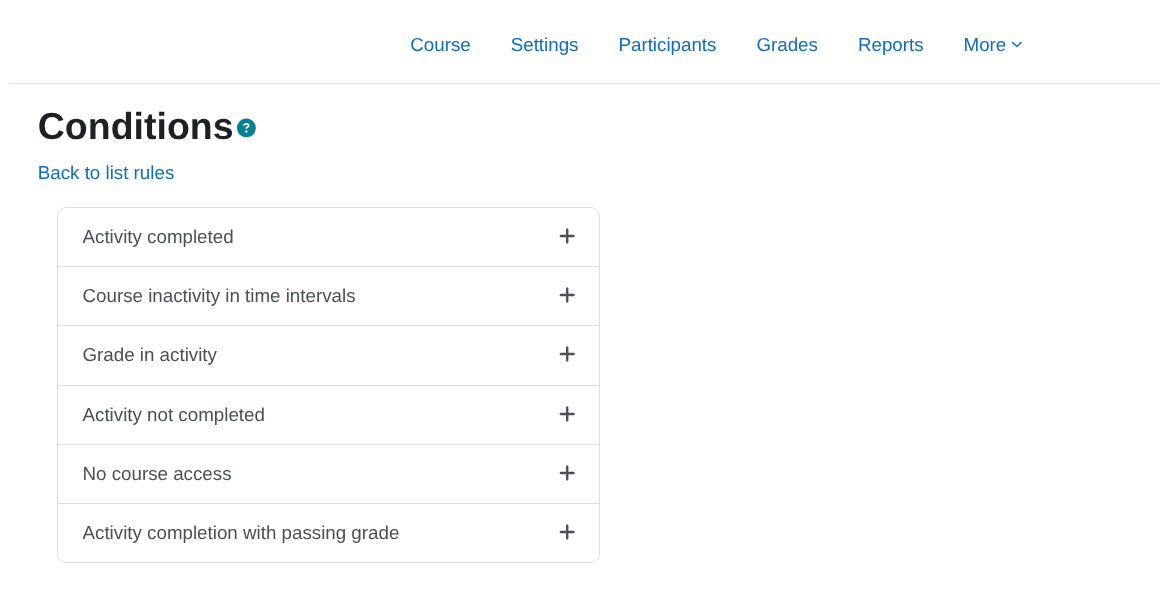
Activity completion, inactivity by intervals, grade in activity, no course access, completion with passing grade, and more.
Intelligent actions
Create AI reinforcement activities, enable activities for specific users, and send multichannel notifications.
Prerequisites
Have Moodle version 4.5.
Have Moodle cron configured and running correctly.
Have the Moodle plugin Restriction by user installed (required for the Create AI activity and Enable activity actions), which can be downloaded for free from the following link https://moodle.org/plugins/availability_user/versions.
Have the Moodle plugin Course Creator AI installed (required for the Create AI activity action), which can be downloaded for free from the following link https://moodle.org/plugins/local_coursegen.
Installing via uploaded ZIP file
- Log in to your Moodle site as an admin and go to
Site administration > Plugins > Install plugins.
- Upload the ZIP file with the plugin code. You should only be prompted to add
extra details if your plugin type is not automatically detected.
- Check the plugin validation report and finish the installation.
Installing manually
The plugin can be also installed by putting the contents of this directory to
{your/moodle/dirroot}/local/coursedynamicrules
Afterwards, log in to your Moodle site as an admin and go to Site administration > Notifications to complete the installation.
Alternatively, you can run
php admin/cli/upgrade.php
to complete the installation from the command line.
Adding rules to a course
Access the course in which you want to add smart rules and click on Smart rules in the course administration menu.
![Course administration]()
Click on Add rule.
![Add rule]()
Enter the name of the rule, the description and check the Active box.
![Rule configuration]()
Adding conditions to the rule
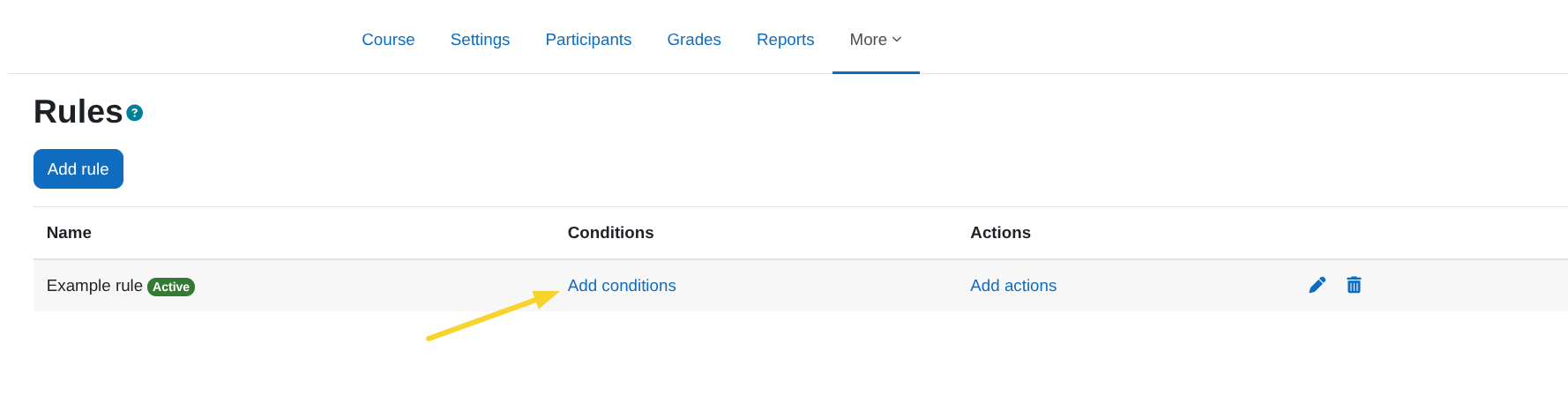
Click on the link Add conditions.
![Add conditions]()
A view similar to the following will appear with the list of available conditions from which we can select the one we want to add, the information about each condition can be found in the following section Available conditions.
![Conditions list]()
Available conditions
Activity completed
Description
This condition allows you to easily identify students who have completed a specific activity in the course. It can be configured to send automatic reminders to those who have completed the activity, helping you maintain their commitment and reduce inactivity.
Condition configuration
Search course activity modules: From this search field we can select the activity module that we want to verify that it has been completed.
![Activity completion search]()
Course inactivity at time intervals
Description
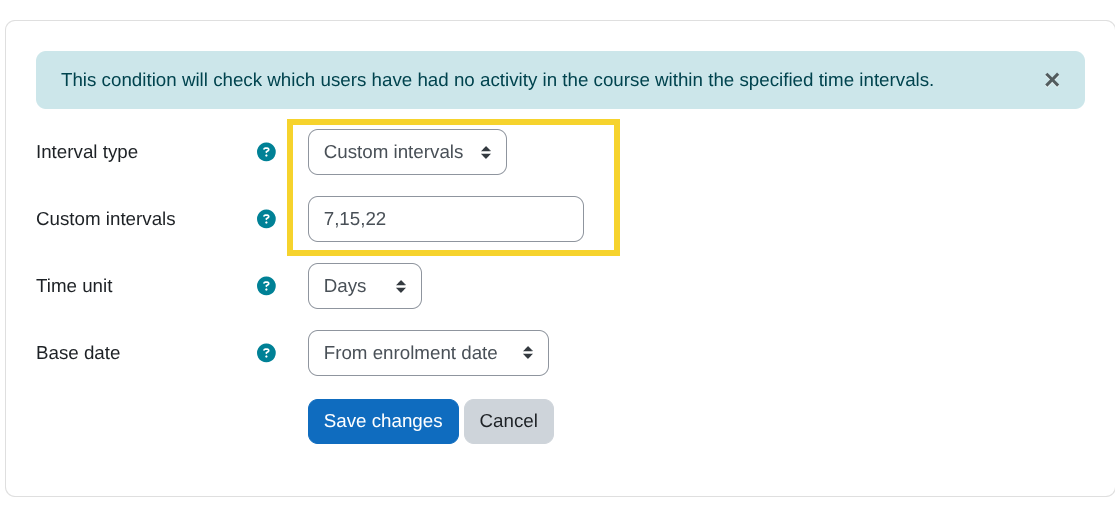
This condition makes it easy to identify students who have not accessed the course for specific periods of time from a base date, such as their enrolment date. You can configure it to send automatic reminders to those who have gone 7, 15, 22 days (or any desired interval) without entering the course, helping you maintain engagement and reduce inactivity.
Whether by evaluating custom intervals or by recurring monitoring at a fixed cadence, this condition helps keep students engaged and active in the course.
This condition runs recurrently every day at 00:00, 06:00, 12:00, and 18:00 via the scheduled task local_coursedynamicrules\task\course_inactivity_task.
IMPORTANT! Do not modify this scheduled task's execution times, as it may cause inconsistencies when evaluating the condition.
Condition configuration
Custom intervals:
Allows you to enter multiple time intervals separated by commas (,), for example: 7,15,22. The condition will be evaluated at each specified interval, in this case every 7, 15, and 22 days or weeks or months, depending on the selected time unit.
![Custom intervals]()
Recurring interval:
Allows you to enter a single interval so the condition is evaluated repeatedly at the specified cadence, for example: 7, which means the evaluation runs every 7 days or weeks or months, depending on the selected time unit.
![Recurrent intervals]()
Time unit:
Select the unit of time in which the condition will be evaluated. Available options: days, weeks, months.
![Time unit]()
Base date:
Select the base date from which the condition will be evaluated. Available options:
From enrolment date: Intervals are counted from each user's enrolment date in the course.
From course start date: Intervals are counted from the course start date.
From now: Intervals are counted from the date the rule is created.
![Base date]()
Grade in activity
Description
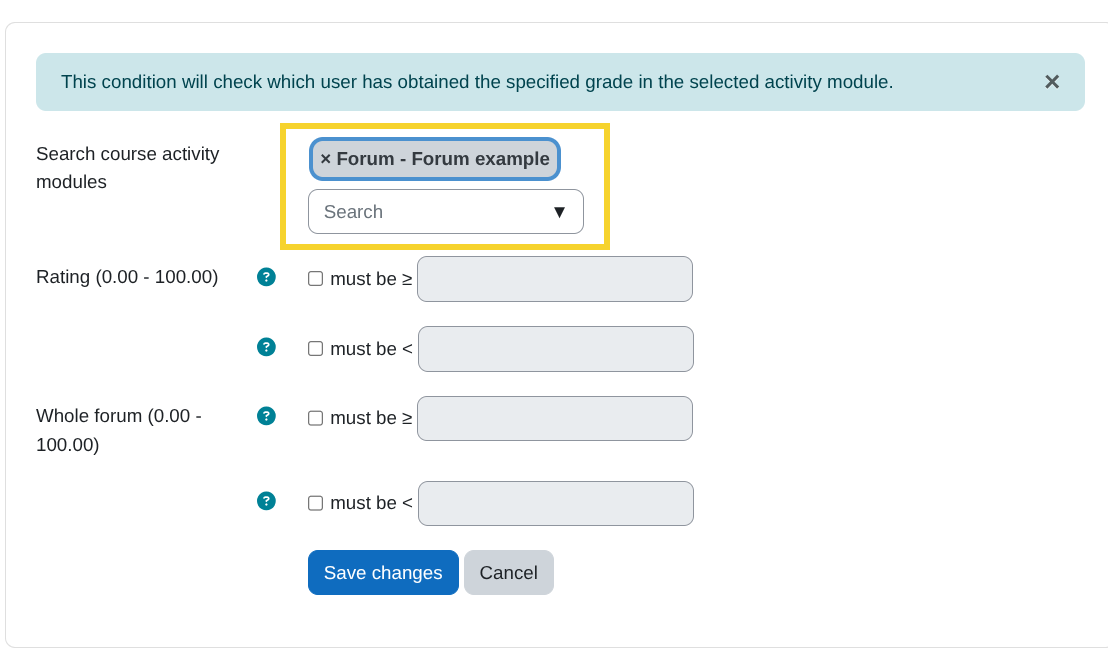
Use this condition to evaluate users' grades in a gradable activity. If the selected activity has multiple grade items, a dropdown will be shown with the available items.
For example, in the Forum module, available grade items may include:
- Whole forum grading
- Grades
![Forum whole forum item]()
![Forum grades item]()
Condition configuration
Search course activity modules:
From this search field, select the activity module where you want to check grades.
![Grade in activity search]()
Note: Only activity modules that have at least the following setting in the Activity completion section will appear:
![Activity completion with require grade]()
Comparison options:
After selecting the activity, define the comparison conditions based on the available grade items. Two options are provided:
Must be ≥: The condition is met if the user's grade is greater than or equal to the specified value.
Must be <: The condition is met if the user's grade is less than the specified value.
![Comparison options]()
Activity not completed
Description
Use this condition to evaluate whether a user has not completed a specific activity after a given period of time.
This condition runs recurrently via the scheduled task local_coursedynamicrules\task\no_complete_activity_task, which by default runs every minute.
The condition will only evaluate once when the time specified in the configuration has elapsed, as detailed in the section Condition configuration.
After the condition is evaluated and the rule's actions are executed, the rule will be automatically deactivated.
Condition configuration
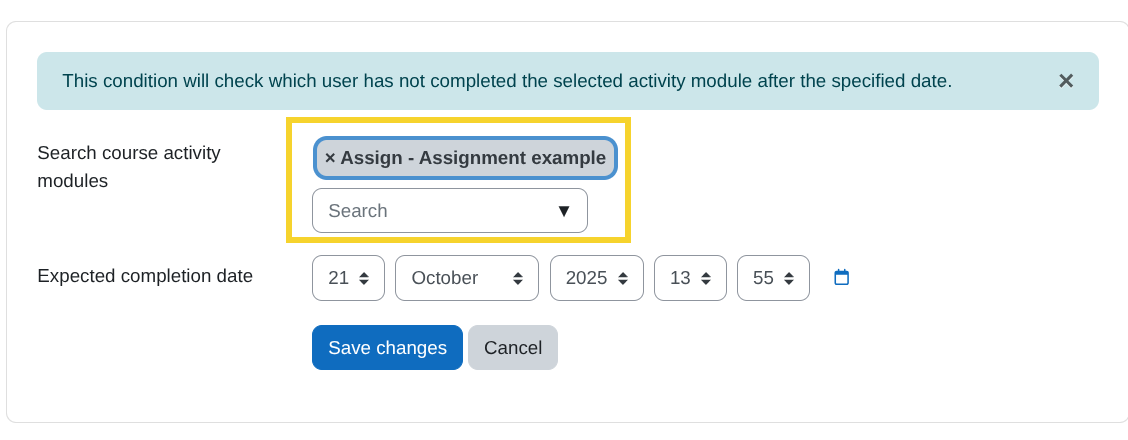
Search course activity modules:
From this search field, select the activity module you want to verify has not been completed.
![No complete activity search]()
Note: Only activity modules that have at least the following setting in the Activity completion section will appear:
![Activity completion automatic]()
Expected completion date:
Define the date by which you expect users to have completed the activity.
![Expected completion date]()
No course access
Description
Use this condition to evaluate which users have not accessed a course within a specified period of time.
This condition runs recurrently via the scheduled task local_coursedynamicrules\task\no_course_access_task, which by default runs every minute.
Once the condition is added to a rule, users matching the condition will start being evaluated and the rule's actions will be executed.
The condition will be re-evaluated each time the time period specified in the configuration has passed, as detailed in the following section Condition configuration.
Condition configuration
Period:
Define the time period in which you expect users to have accessed the course. Enter the numeric value in the first field and select the time unit in the second field.
![Time period]()
Activity completion with passing grade
Description
Use this condition to evaluate whether users have completed an activity with a passing grade.
Condition configuration
Search course activity modules:
From this search field, select the activity module where you want to verify grades.
![Pass grade search]()
Note: Only activity modules that have at least the following setting in the Activity completion section will appear:
![Pass grade search]()
Add actions to the rule
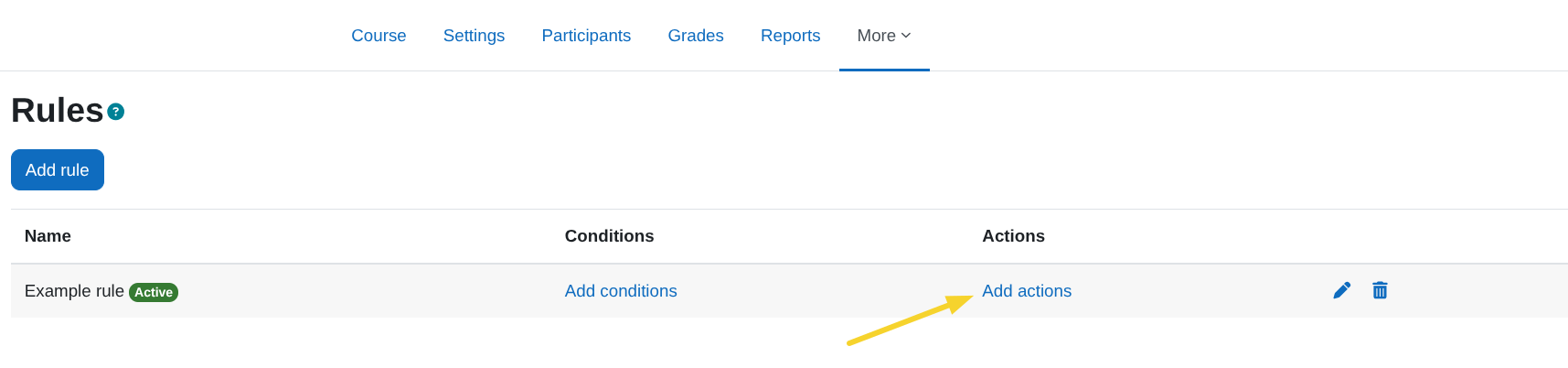
Click the Add actions link.
![Add actions]()
A view like the following will appear with the list of available actions. Select the one you want to add. Details of each action can be found in the next section Available actions.
![Actions list]()
Available actions
Create AI reinforcement activity (Only for moodle 4.5 or higher)
Description
This action will request the Datacurso AI service to generate a personalised reinforcement activity for users who meet the rule conditions.
Pre-requisites
- Moodle 4.5 or higher
- Have the
Restriction by user plugin installed and enabled, which can be downloaded for free from: https://moodle.org/plugins/availability_user.
- Have the
Course Creator AI plugin installed and enabled, which can be downloaded for free from: https://moodle.org/plugins/local_coursegen.
Action configuration
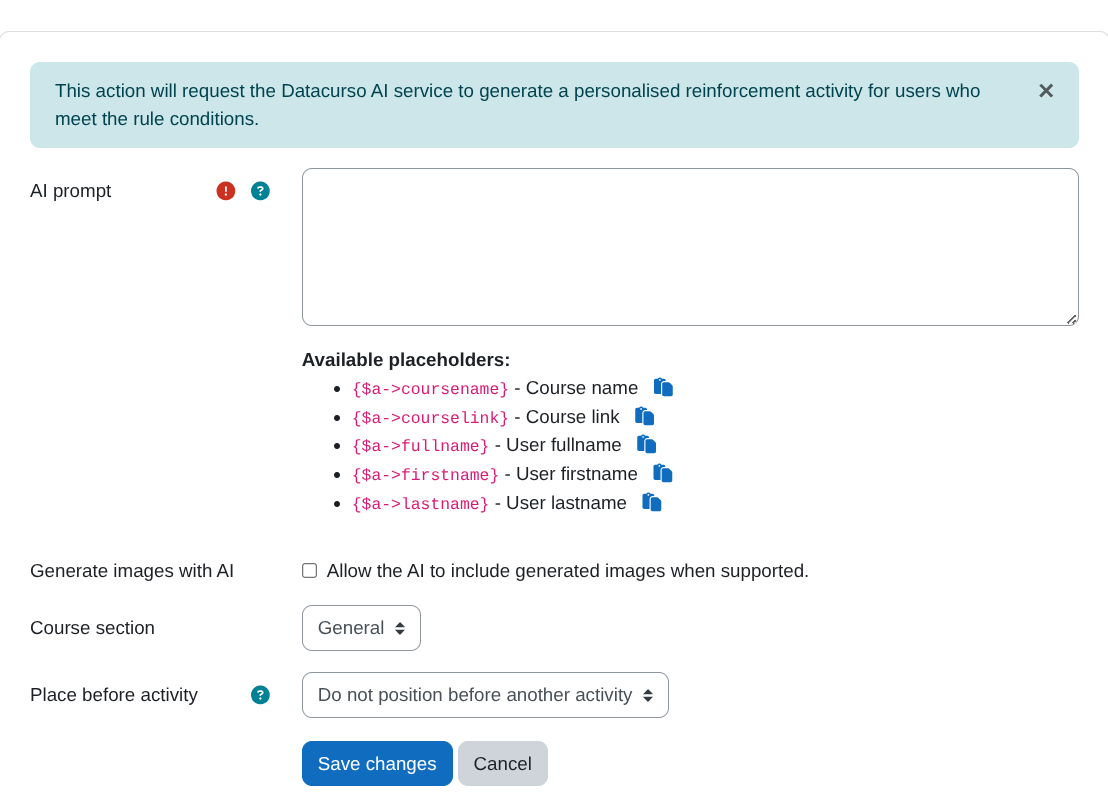
Prompt:
Enter the instruction that the AI will use to generate the reinforcement activity.
- You can include placeholders to personalise the prompt for each user. Available placeholders:
{$a->coursename} – Course name
{$a->courseurl} – Course URL
{$a->fullname} – User full name
{$a->firstname} – User first name
{$a->lastname} – User last name
Generate images:
If enabled, the AI may generate and include images in the created activity when supported by the target activity type.
Section:
Select the course section where the activity will be created.
Insert before:
Optionally choose an existing activity to insert the new activity before. If set to None, the new activity will be appended at the end of the selected section.
![Create AI activity]()
Enable activity
Description
Use this action to enable specific activities in the course for users who meet the rule's conditions.
Pre-requisites
- Have the
Restriction by user plugin installed and enabled, which can be downloaded for free from: https://moodle.org/plugins/availability_user.
Action configuration
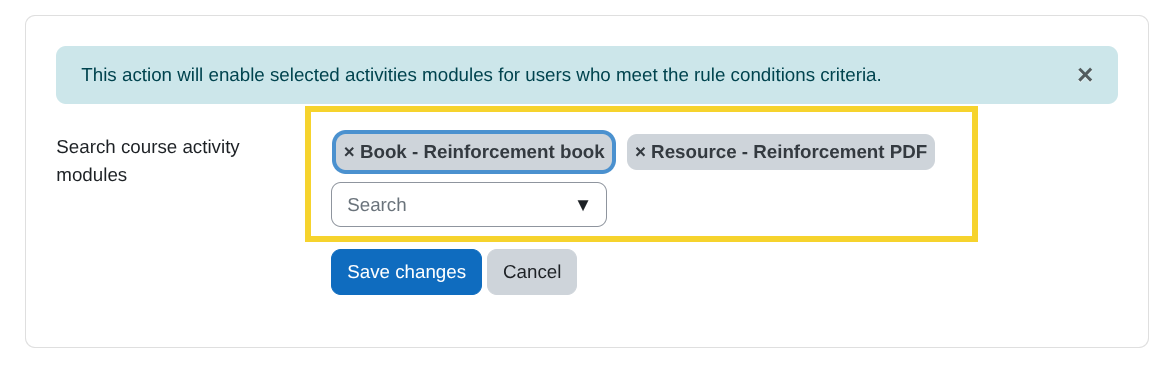
Search course activity modules:
From this search field, select the activity modules you want to enable.
![Enable activity search]()
The selected activities will only be available to users who meet the rule's conditions. In the course view for roles with the necessary permissions (teachers, administrators, etc.), the following information will be shown indicating the users for whom the activity is enabled:
![Restriction by user]()
Send notification
Description
Use this action to send notifications to users who meet the rule's conditions.
Improve notification delivery
Enhance your notifications with our Datacurso Message Hub plugins, which let you send notifications via WhatsApp and SMS using providers like Twilio. Click here to purchase and activate now!
For more information, visit the documentation page: https://docs.datacurso.com/index.php?title=Message_Hub
Configure notification sending (Required only if you have the Datacurso Message Hub plugins installed)
Go to Site administration > General > Messaging > Notification settings
![Notification settings]()
In the Default notification preferences section, find Smart Rules AI notification and enable the option for Datacurso Message Hub.
![Notification preferences]()
![Notification preferences]()
Action configuration
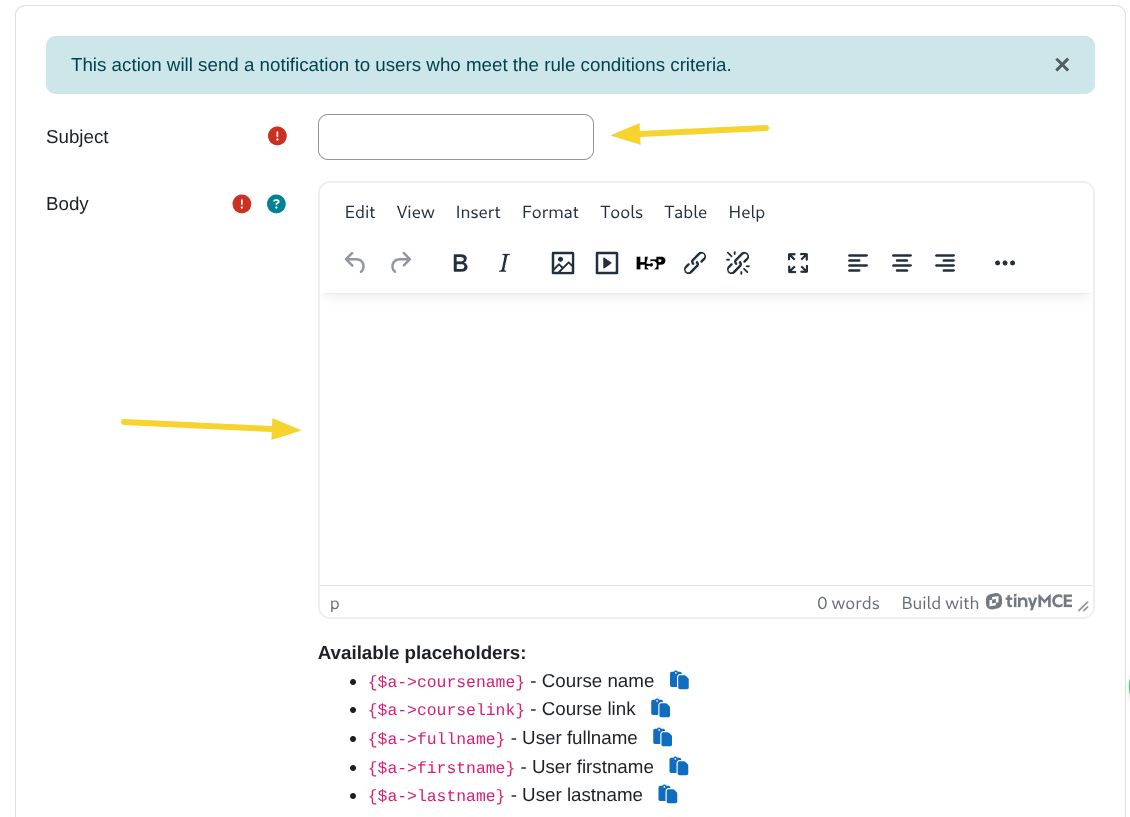
Subject:
Define the notification subject.
Body:
Define the notification body.
![Send notification]()
Placeholders
You can use placeholders in the notification body to personalize the message for each user. Available placeholders:
{$a->coursename} - Course name
{$a->courselink} - Course link
{$a->fullname} - User full name
{$a->firstname} - User first name
{$a->lastname} - User last name
![Notification placeholders]()
Roles to notify:
Choose the course roles that determine who receives the notification when the rule matches a user.
- The matched user receives the notification only if they hold at least one of the selected roles in the course.
- Additionally, other course users who hold any of the selected roles that the matched user does not hold will also receive the notification.
- Roles already held by the matched user are excluded from the "other recipients" search to avoid duplicate delivery.
Example:
- Selected roles:
Student, Teacher.