Benefit system
Versions
Current version
1.2 (2026021600)
1.2
Plugin type: Local plugins
Frankenstyle component name: local_benefitsystem
Version build number: 2026021600
Version release name: 1.2
Maturity: Stable
Supported Moodle versions: 5.0, 5.1
Repository URL (Git): https://github.com/bartszaflarski/moodle-local_benefitsystem
Repository branch:
Repository tag:
Issue/bug tracker URL: https://github.com/bartszaflarski/moodle-local_benefitsystem/issues
Benefit System Plugin
A comprehensive Moodle local plugin that implements a points-based reward system. Users earn points by completing activities and courses, and can exchange those points for rewards such as digital products (files, codes) or physical items.
Features
Points Management
- Activity Completion Points: Configure points for individual activities (assignments, quizzes, forums, etc.)
- Course Completion Points: Set points awarded when users complete entire courses
- Automatic Point Awards: Points are automatically added to user balances upon completion
- Point Notifications: Users receive notifications when they earn points
Rewards System
- Multiple Reward Types:
- Digital Rewards:
- File (ebook) - Upload files for users to download
- Code - Manage coupon/voucher codes (single or bulk via CSV)
- Physical Rewards: Track physical items that need to be shipped/delivered
- Digital Rewards:
- Quantity Management:
- Infinite quantity (unlimited availability)
- Limited quantity (stock tracking)
- For code-type rewards, quantity automatically equals number of available codes
- Reward Management:
- Create, edit, and delete rewards
- Upload reward images
- Set point costs
- Add redemption instructions ("How to Redeem")
- Mark rewards as available/unavailable
Exchange System
- Point Exchange: Users can exchange points for rewards
- Exchange Tracking: All exchanges are tracked with timestamps
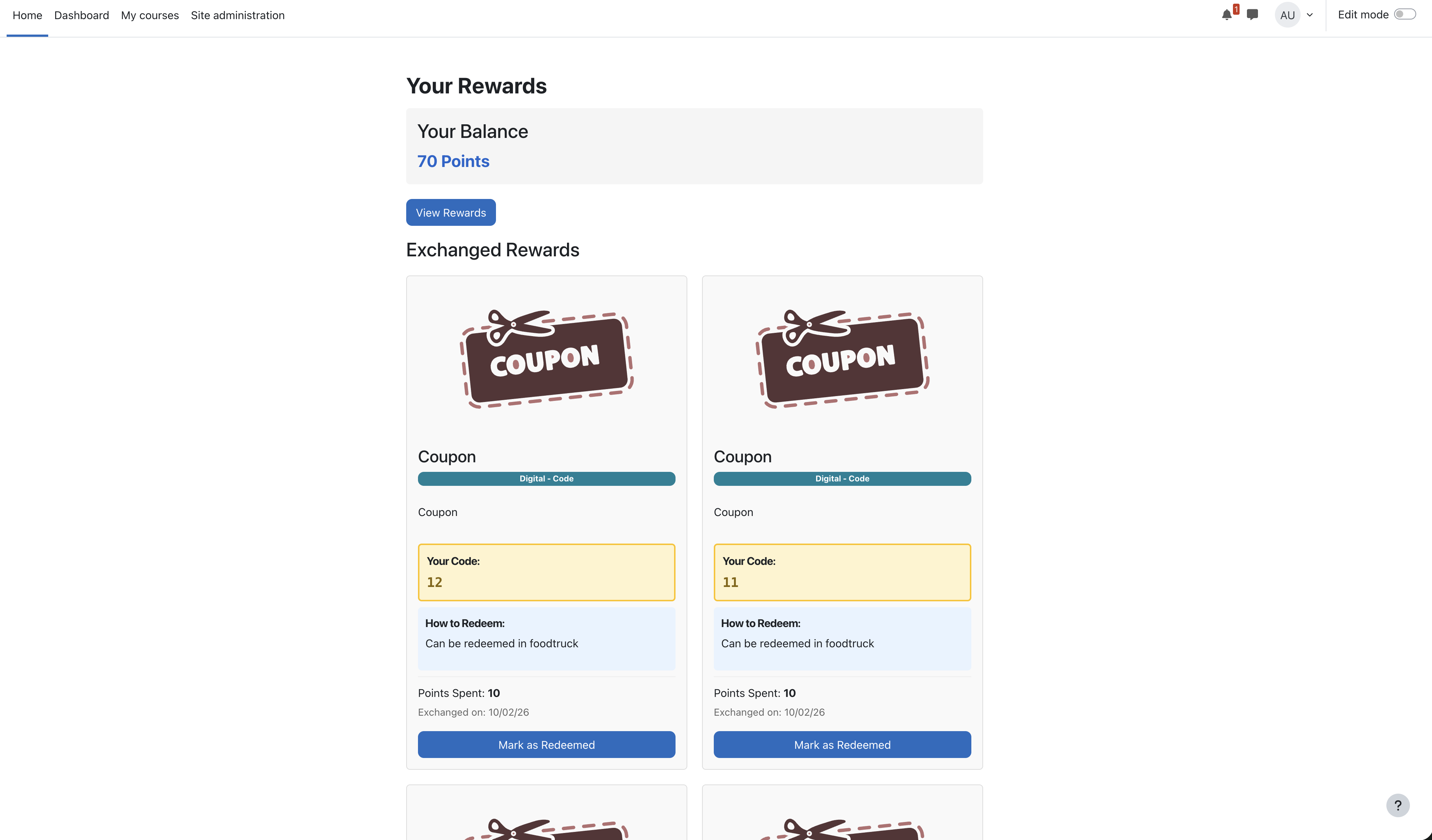
- Mark as Redeemed: Users can mark rewards as redeemed, moving them to exchange history
- Exchange History: Separate table for redeemed exchanges with redemption timestamps
Admin Features
- Purchase History: Site admins and managers can view all purchases from all users
- Comprehensive Reporting: View active exchanges and exchange history in table format
- User Management: See which users exchanged which rewards and when
User Interface
- Benefit System Block: Displays user avatar, name, and current point balance
- Quick Access: Links to view rewards, your rewards, and purchase history (admin only)
- Responsive Design: Grid layout for rewards, table layout for history
- Visual Feedback: Color-coded badges, status indicators, and notifications
Requirements
- Moodle 4.0 or later
- Completion tracking enabled at course level (for activity/course completion points)
Installation
Copy the plugin files:
cp -r benefitsystem /path/to/moodle/local/
Install via Moodle Admin:
- Log in as administrator
- Go to Site administration > Notifications
- Follow the upgrade prompts to install the plugin
- The database tables will be created automatically
Install the Block Plugin (optional but recommended):
cp -r blocks/benefitsystem /path/to/moodle/blocks/
- Go to Site administration > Plugins > Blocks > Manage blocks
- Find "Benefit system" and enable it
- Add the block to your dashboard or course pages
Configuration
Setting Up Activity Completion Points
- Edit any activity (Assignment, Quiz, Forum, etc.)
- Scroll to the Activity completion section
- Set the completion tracking method (Manual, Automatic, or None)
- Enter the number of Points in the points field
- Save the activity
Setting Up Course Completion Points
- Go to Course administration > Completion
- Enable course completion tracking
- Scroll to the Points field
- Enter the number of points to award upon course completion
- Save changes
Creating Rewards
- Navigate to the Rewards page (via block or
/local/benefitsystem/rewards.php) - Click Add Reward (admin only)
- Fill in the reward details:
- Name: Reward name
- Description: Detailed description
- Image: Upload an image (optional)
- Type: Digital or Physical
- Digital Subtype: File (ebook) or Code (for digital rewards)
- Quantity: Infinite or Limited (with number)
- Points: Cost in points
- How to Redeem: Instructions for users
- Codes: For code-type rewards, enter codes (one per line) or upload CSV
- Click Save
Managing Codes (for Code-Type Rewards)
Manual Entry:
- Enter codes one per line in the textarea
- Each code will be stored and assigned when users exchange points
CSV Upload:
- Upload a CSV file with codes
- Each line should contain one code
- Codes will be added to the existing list (duplicates are automatically skipped)
Database Schema
The plugin creates the following database tables:
mdl_local_benefitsystem_activity- Points configuration for activitiesmdl_local_benefitsystem_course- Points configuration for coursesmdl_local_benefitsystem_balance- User point balancesmdl_local_benefitsystem_history- History of points awardedmdl_local_benefitsystem_rewards- Available rewardsmdl_local_benefitsystem_codes- Codes for code-type rewardsmdl_local_benefitsystem_exchanges- Active exchanges (not yet redeemed)mdl_local_benefitsystem_exchange_history- Redeemed exchanges
API Functions
Point Management
local_benefitsystem_get_user_balance($userid)- Get user's current point balancelocal_benefitsystem_add_points($userid, $points, $coursemoduleid)- Add points to user's balance
Exchange Functions
local_benefitsystem_exchange_reward($userid, $rewardid)- Exchange points for a rewardlocal_benefitsystem_get_user_exchanges($userid)- Get user's active exchangeslocal_benefitsystem_get_user_exchange_history($userid)- Get user's redeemed exchangeslocal_benefitsystem_mark_as_redeemed($exchangeid, $userid)- Mark exchange as redeemed
Admin Functions
local_benefitsystem_get_all_exchanges()- Get all active exchanges from all userslocal_benefitsystem_get_all_exchange_history()- Get all redeemed exchanges from all userslocal_benefitsystem_get_available_code_count($rewardid)- Get count of available codes for a reward
Code Management
local_benefitsystem_parse_codes_from_text($text)- Parse codes from textarea (one per line)local_benefitsystem_parse_codes_from_csv($file)- Parse codes from CSV filelocal_benefitsystem_save_reward_codes($rewardid, $codes)- Save codes to database
Capabilities
local/benefitsystem:managerewards- Manage rewards (create, edit, delete)block/benefitsystem:addinstance- Add Benefit system block to pagesblock/benefitsystem:myaddinstance- Add Benefit system block to Dashboard
Pages
/local/benefitsystem/rewards.php- View available rewards and exchange points/local/benefitsystem/your_rewards.php- View your exchanged rewards and mark as redeemed/local/benefitsystem/manage_reward.php- Create/edit rewards (admin only)/local/benefitsystem/history.php- Purchase history for all users (admin only)
Usage Examples
Awarding Points Programmatically
require_once(__DIR__ . '/../../config.php');

require_once(__DIR__ . '/lib.php');


// Award 50 points to user ID 123 for completing activity ID 456

local_benefitsystem_add_points(123, 50, 456);
Checking User Balance
require_once(__DIR__ . '/../../config.php');

require_once(__DIR__ . '/lib.php');


$userid = 123;

$balance = local_benefitsystem_get_user_balance($userid);

echo "User has {$balance} points";
Creating a Reward Programmatically
global $DB;


$reward = new stdClass();

$reward->name = 'Free Coffee';

$reward->description = 'Redeem for a free coffee at the campus café';

$reward->type = 'physical';

$reward->digitalsubtype = null;

$reward->points = 100;

$reward->quantity = null; // Infinite

$reward->available = 1;

$reward->timecreated = time();

$reward->timemodified = time();


$rewardid = $DB->insert_record('local_benefitsystem_rewards', $reward);
Troubleshooting
Points Not Being Awarded
- Check that completion tracking is enabled at the course level
- Verify that points are configured for the activity/course
- Check that the activity/course completion criteria are met
- Review the event observer logs for errors
Exchange Button Disabled
- User doesn't have enough points
- Reward is out of stock (quantity = 0)
- No codes available (for code-type rewards)
- Reward is marked as unavailable
Codes Not Showing
- Ensure codes are saved when creating/editing the reward
- Check that the reward type is "Digital" and subtype is "Code"
- Verify codes exist in
mdl_local_benefitsystem_codestable
Upgrade Notes
The plugin includes automatic database upgrades. When updating:
- Copy new files over existing installation
- Go to Site administration > Notifications
- Follow upgrade prompts
- Database schema will be updated automatically
Version History
- 1.0 (2025-02-08)
- Initial release
- Activity and course completion points
- Reward system with digital and physical types
- Code management for code-type rewards
- Exchange tracking and history
- Admin purchase history
Support
For issues, feature requests, or contributions, please contact the plugin maintainer or submit issues through your Moodle installation's support channels.
License
GPL v3 or later
Credits
Developed for Moodle 4.0+
1.1 (2026020802)
1.1
Plugin type: Local plugins
Frankenstyle component name: local_benefitsystem
Version build number: 2026020802
Version release name: 1.1
Maturity: Stable
Supported Moodle versions: 5.0, 5.1
Repository URL (Git): https://github.com/bartszaflarski/moodle-local_benefitsystem
Repository branch:
Repository tag:
Issue/bug tracker URL: https://github.com/bartszaflarski/moodle-local_benefitsystem/issues
Benefit System Plugin
A comprehensive Moodle local plugin that implements a points-based reward system. Users earn points by completing activities and courses, and can exchange those points for rewards such as digital products (files, codes) or physical items.
Features
Points Management
- Activity Completion Points: Configure points for individual activities (assignments, quizzes, forums, etc.)
- Course Completion Points: Set points awarded when users complete entire courses
- Automatic Point Awards: Points are automatically added to user balances upon completion
- Point Notifications: Users receive notifications when they earn points
Rewards System
- Multiple Reward Types:
- Digital Rewards:
- File (ebook) - Upload files for users to download
- Code - Manage coupon/voucher codes (single or bulk via CSV)
- Physical Rewards: Track physical items that need to be shipped/delivered
- Digital Rewards:
- Quantity Management:
- Infinite quantity (unlimited availability)
- Limited quantity (stock tracking)
- For code-type rewards, quantity automatically equals number of available codes
- Reward Management:
- Create, edit, and delete rewards
- Upload reward images
- Set point costs
- Add redemption instructions ("How to Redeem")
- Mark rewards as available/unavailable
Exchange System
- Point Exchange: Users can exchange points for rewards
- Exchange Tracking: All exchanges are tracked with timestamps
- Mark as Redeemed: Users can mark rewards as redeemed, moving them to exchange history
- Exchange History: Separate table for redeemed exchanges with redemption timestamps
Admin Features
- Purchase History: Site admins and managers can view all purchases from all users
- Comprehensive Reporting: View active exchanges and exchange history in table format
- User Management: See which users exchanged which rewards and when
User Interface
- Benefit System Block: Displays user avatar, name, and current point balance
- Quick Access: Links to view rewards, your rewards, and purchase history (admin only)
- Responsive Design: Grid layout for rewards, table layout for history
- Visual Feedback: Color-coded badges, status indicators, and notifications
Requirements
- Moodle 4.0 or later
- Completion tracking enabled at course level (for activity/course completion points)
Installation
Copy the plugin files:
cp -r benefitsystem /path/to/moodle/local/
Install via Moodle Admin:
- Log in as administrator
- Go to Site administration > Notifications
- Follow the upgrade prompts to install the plugin
- The database tables will be created automatically
Install the Block Plugin (optional but recommended):
cp -r blocks/benefitsystem /path/to/moodle/blocks/
- Go to Site administration > Plugins > Blocks > Manage blocks
- Find "Benefit system" and enable it
- Add the block to your dashboard or course pages
Configuration
Setting Up Activity Completion Points
- Edit any activity (Assignment, Quiz, Forum, etc.)
- Scroll to the Activity completion section
- Set the completion tracking method (Manual, Automatic, or None)
- Enter the number of Points in the points field
- Save the activity
Setting Up Course Completion Points
- Go to Course administration > Completion
- Enable course completion tracking
- Scroll to the Points field
- Enter the number of points to award upon course completion
- Save changes
Creating Rewards
- Navigate to the Rewards page (via block or
/local/benefitsystem/rewards.php) - Click Add Reward (admin only)
- Fill in the reward details:
- Name: Reward name
- Description: Detailed description
- Image: Upload an image (optional)
- Type: Digital or Physical
- Digital Subtype: File (ebook) or Code (for digital rewards)
- Quantity: Infinite or Limited (with number)
- Points: Cost in points
- How to Redeem: Instructions for users
- Codes: For code-type rewards, enter codes (one per line) or upload CSV
- Click Save
Managing Codes (for Code-Type Rewards)
Manual Entry:
- Enter codes one per line in the textarea
- Each code will be stored and assigned when users exchange points
CSV Upload:
- Upload a CSV file with codes
- Each line should contain one code
- Codes will be added to the existing list (duplicates are automatically skipped)
Database Schema
The plugin creates the following database tables:
mdl_local_benefitsystem_activity- Points configuration for activitiesmdl_local_benefitsystem_course- Points configuration for coursesmdl_local_benefitsystem_balance- User point balancesmdl_local_benefitsystem_history- History of points awardedmdl_local_benefitsystem_rewards- Available rewardsmdl_local_benefitsystem_codes- Codes for code-type rewardsmdl_local_benefitsystem_exchanges- Active exchanges (not yet redeemed)mdl_local_benefitsystem_exchange_history- Redeemed exchanges
API Functions
Point Management
local_benefitsystem_get_user_balance($userid)- Get user's current point balancelocal_benefitsystem_add_points($userid, $points, $coursemoduleid)- Add points to user's balance
Exchange Functions
local_benefitsystem_exchange_reward($userid, $rewardid)- Exchange points for a rewardlocal_benefitsystem_get_user_exchanges($userid)- Get user's active exchangeslocal_benefitsystem_get_user_exchange_history($userid)- Get user's redeemed exchangeslocal_benefitsystem_mark_as_redeemed($exchangeid, $userid)- Mark exchange as redeemed
Admin Functions
local_benefitsystem_get_all_exchanges()- Get all active exchanges from all userslocal_benefitsystem_get_all_exchange_history()- Get all redeemed exchanges from all userslocal_benefitsystem_get_available_code_count($rewardid)- Get count of available codes for a reward
Code Management
local_benefitsystem_parse_codes_from_text($text)- Parse codes from textarea (one per line)local_benefitsystem_parse_codes_from_csv($file)- Parse codes from CSV filelocal_benefitsystem_save_reward_codes($rewardid, $codes)- Save codes to database
Capabilities
local/benefitsystem:managerewards- Manage rewards (create, edit, delete)block/benefitsystem:addinstance- Add Benefit system block to pagesblock/benefitsystem:myaddinstance- Add Benefit system block to Dashboard
Pages
/local/benefitsystem/rewards.php- View available rewards and exchange points/local/benefitsystem/your_rewards.php- View your exchanged rewards and mark as redeemed/local/benefitsystem/manage_reward.php- Create/edit rewards (admin only)/local/benefitsystem/history.php- Purchase history for all users (admin only)
Usage Examples
Awarding Points Programmatically
require_once(__DIR__ . '/../../config.php');

require_once(__DIR__ . '/lib.php');


// Award 50 points to user ID 123 for completing activity ID 456

local_benefitsystem_add_points(123, 50, 456);
Checking User Balance
require_once(__DIR__ . '/../../config.php');

require_once(__DIR__ . '/lib.php');


$userid = 123;

$balance = local_benefitsystem_get_user_balance($userid);

echo "User has {$balance} points";
Creating a Reward Programmatically
global $DB;


$reward = new stdClass();

$reward->name = 'Free Coffee';

$reward->description = 'Redeem for a free coffee at the campus café';

$reward->type = 'physical';

$reward->digitalsubtype = null;

$reward->points = 100;

$reward->quantity = null; // Infinite

$reward->available = 1;

$reward->timecreated = time();

$reward->timemodified = time();


$rewardid = $DB->insert_record('local_benefitsystem_rewards', $reward);
Troubleshooting
Points Not Being Awarded
- Check that completion tracking is enabled at the course level
- Verify that points are configured for the activity/course
- Check that the activity/course completion criteria are met
- Review the event observer logs for errors
Exchange Button Disabled
- User doesn't have enough points
- Reward is out of stock (quantity = 0)
- No codes available (for code-type rewards)
- Reward is marked as unavailable
Codes Not Showing
- Ensure codes are saved when creating/editing the reward
- Check that the reward type is "Digital" and subtype is "Code"
- Verify codes exist in
mdl_local_benefitsystem_codestable
Upgrade Notes
The plugin includes automatic database upgrades. When updating:
- Copy new files over existing installation
- Go to Site administration > Notifications
- Follow upgrade prompts
- Database schema will be updated automatically
Version History
- 1.0 (2025-02-08)
- Initial release
- Activity and course completion points
- Reward system with digital and physical types
- Code management for code-type rewards
- Exchange tracking and history
- Admin purchase history
Support
For issues, feature requests, or contributions, please contact the plugin maintainer or submit issues through your Moodle installation's support channels.
License
GPL v3 or later
Credits
Developed for Moodle 4.0+
1.1 (2026020801)
1.1
Plugin type: Local plugins
Frankenstyle component name: local_benefitsystem
Version build number: 2026020801
Version release name: 1.1
Maturity: Stable
Supported Moodle versions: 5.0, 5.1
Repository URL (Git): https://github.com/bartszaflarski/moodle-local_benefitsystem
Repository branch:
Repository tag:
Issue/bug tracker URL: https://github.com/bartszaflarski/moodle-local_benefitsystem/issues
Benefit System Plugin
A comprehensive Moodle local plugin that implements a points-based reward system. Users earn points by completing activities and courses, and can exchange those points for rewards such as digital products (files, codes) or physical items.
Features
Points Management
- Activity Completion Points: Configure points for individual activities (assignments, quizzes, forums, etc.)
- Course Completion Points: Set points awarded when users complete entire courses
- Automatic Point Awards: Points are automatically added to user balances upon completion
- Point Notifications: Users receive notifications when they earn points
Rewards System
- Multiple Reward Types:
- Digital Rewards:
- File (ebook) - Upload files for users to download
- Code - Manage coupon/voucher codes (single or bulk via CSV)
- Physical Rewards: Track physical items that need to be shipped/delivered
- Digital Rewards:
- Quantity Management:
- Infinite quantity (unlimited availability)
- Limited quantity (stock tracking)
- For code-type rewards, quantity automatically equals number of available codes
- Reward Management:
- Create, edit, and delete rewards
- Upload reward images
- Set point costs
- Add redemption instructions ("How to Redeem")
- Mark rewards as available/unavailable
Exchange System
- Point Exchange: Users can exchange points for rewards
- Exchange Tracking: All exchanges are tracked with timestamps
- Mark as Redeemed: Users can mark rewards as redeemed, moving them to exchange history
- Exchange History: Separate table for redeemed exchanges with redemption timestamps
Admin Features
- Purchase History: Site admins and managers can view all purchases from all users
- Comprehensive Reporting: View active exchanges and exchange history in table format
- User Management: See which users exchanged which rewards and when
User Interface
- Benefit System Block: Displays user avatar, name, and current point balance
- Quick Access: Links to view rewards, your rewards, and purchase history (admin only)
- Responsive Design: Grid layout for rewards, table layout for history
- Visual Feedback: Color-coded badges, status indicators, and notifications
Requirements
- Moodle 4.0 or later
- Completion tracking enabled at course level (for activity/course completion points)
Installation
Copy the plugin files:
cp -r benefitsystem /path/to/moodle/local/
Install via Moodle Admin:
- Log in as administrator
- Go to Site administration > Notifications
- Follow the upgrade prompts to install the plugin
- The database tables will be created automatically
Install the Block Plugin (optional but recommended):
cp -r blocks/benefitsystem /path/to/moodle/blocks/
- Go to Site administration > Plugins > Blocks > Manage blocks
- Find "Benefit system" and enable it
- Add the block to your dashboard or course pages
Configuration
Setting Up Activity Completion Points
- Edit any activity (Assignment, Quiz, Forum, etc.)
- Scroll to the Activity completion section
- Set the completion tracking method (Manual, Automatic, or None)
- Enter the number of Points in the points field
- Save the activity
Setting Up Course Completion Points
- Go to Course administration > Completion
- Enable course completion tracking
- Scroll to the Points field
- Enter the number of points to award upon course completion
- Save changes
Creating Rewards
- Navigate to the Rewards page (via block or
/local/benefitsystem/rewards.php) - Click Add Reward (admin only)
- Fill in the reward details:
- Name: Reward name
- Description: Detailed description
- Image: Upload an image (optional)
- Type: Digital or Physical
- Digital Subtype: File (ebook) or Code (for digital rewards)
- Quantity: Infinite or Limited (with number)
- Points: Cost in points
- How to Redeem: Instructions for users
- Codes: For code-type rewards, enter codes (one per line) or upload CSV
- Click Save
Managing Codes (for Code-Type Rewards)
Manual Entry:
- Enter codes one per line in the textarea
- Each code will be stored and assigned when users exchange points
CSV Upload:
- Upload a CSV file with codes
- Each line should contain one code
- Codes will be added to the existing list (duplicates are automatically skipped)
Database Schema
The plugin creates the following database tables:
mdl_local_benefitsystem_activity- Points configuration for activitiesmdl_local_benefitsystem_course- Points configuration for coursesmdl_local_benefitsystem_balance- User point balancesmdl_local_benefitsystem_history- History of points awardedmdl_local_benefitsystem_rewards- Available rewardsmdl_local_benefitsystem_codes- Codes for code-type rewardsmdl_local_benefitsystem_exchanges- Active exchanges (not yet redeemed)mdl_local_benefitsystem_exchange_history- Redeemed exchanges
API Functions
Point Management
local_benefitsystem_get_user_balance($userid)- Get user's current point balancelocal_benefitsystem_add_points($userid, $points, $coursemoduleid)- Add points to user's balance
Exchange Functions
local_benefitsystem_exchange_reward($userid, $rewardid)- Exchange points for a rewardlocal_benefitsystem_get_user_exchanges($userid)- Get user's active exchangeslocal_benefitsystem_get_user_exchange_history($userid)- Get user's redeemed exchangeslocal_benefitsystem_mark_as_redeemed($exchangeid, $userid)- Mark exchange as redeemed
Admin Functions
local_benefitsystem_get_all_exchanges()- Get all active exchanges from all userslocal_benefitsystem_get_all_exchange_history()- Get all redeemed exchanges from all userslocal_benefitsystem_get_available_code_count($rewardid)- Get count of available codes for a reward
Code Management
local_benefitsystem_parse_codes_from_text($text)- Parse codes from textarea (one per line)local_benefitsystem_parse_codes_from_csv($file)- Parse codes from CSV filelocal_benefitsystem_save_reward_codes($rewardid, $codes)- Save codes to database
Capabilities
local/benefitsystem:managerewards- Manage rewards (create, edit, delete)block/benefitsystem:addinstance- Add Benefit system block to pagesblock/benefitsystem:myaddinstance- Add Benefit system block to Dashboard
Pages
/local/benefitsystem/rewards.php- View available rewards and exchange points/local/benefitsystem/your_rewards.php- View your exchanged rewards and mark as redeemed/local/benefitsystem/manage_reward.php- Create/edit rewards (admin only)/local/benefitsystem/history.php- Purchase history for all users (admin only)
Usage Examples
Awarding Points Programmatically
require_once(__DIR__ . '/../../config.php');

require_once(__DIR__ . '/lib.php');


// Award 50 points to user ID 123 for completing activity ID 456

local_benefitsystem_add_points(123, 50, 456);
Checking User Balance
require_once(__DIR__ . '/../../config.php');

require_once(__DIR__ . '/lib.php');


$userid = 123;

$balance = local_benefitsystem_get_user_balance($userid);

echo "User has {$balance} points";
Creating a Reward Programmatically
global $DB;


$reward = new stdClass();

$reward->name = 'Free Coffee';

$reward->description = 'Redeem for a free coffee at the campus café';

$reward->type = 'physical';

$reward->digitalsubtype = null;

$reward->points = 100;

$reward->quantity = null; // Infinite

$reward->available = 1;

$reward->timecreated = time();

$reward->timemodified = time();


$rewardid = $DB->insert_record('local_benefitsystem_rewards', $reward);
Troubleshooting
Points Not Being Awarded
- Check that completion tracking is enabled at the course level
- Verify that points are configured for the activity/course
- Check that the activity/course completion criteria are met
- Review the event observer logs for errors
Exchange Button Disabled
- User doesn't have enough points
- Reward is out of stock (quantity = 0)
- No codes available (for code-type rewards)
- Reward is marked as unavailable
Codes Not Showing
- Ensure codes are saved when creating/editing the reward
- Check that the reward type is "Digital" and subtype is "Code"
- Verify codes exist in
mdl_local_benefitsystem_codestable
Upgrade Notes
The plugin includes automatic database upgrades. When updating:
- Copy new files over existing installation
- Go to Site administration > Notifications
- Follow upgrade prompts
- Database schema will be updated automatically
Version History
- 1.0 (2025-02-08)
- Initial release
- Activity and course completion points
- Reward system with digital and physical types
- Code management for code-type rewards
- Exchange tracking and history
- Admin purchase history
Support
For issues, feature requests, or contributions, please contact the plugin maintainer or submit issues through your Moodle installation's support channels.
License
GPL v3 or later
Credits
Developed for Moodle 4.0+
1.0 (2025020812)
1.0
Plugin type: Local plugins
Frankenstyle component name: local_benefitsystem
Version build number: 2025020812
Version release name: 1.0
Maturity: Stable
Supported Moodle versions: 5.0, 5.1
Repository URL (Git): https://github.com/bartszaflarski/moodle-local_benefitsystem
Repository branch:
Repository tag:
Issue/bug tracker URL: https://github.com/bartszaflarski/moodle-local_benefitsystem/issues
Benefit System Plugin
A comprehensive Moodle local plugin that implements a points-based reward system. Users earn points by completing activities and courses, and can exchange those points for rewards such as digital products (files, codes) or physical items.
Features
Points Management
- Activity Completion Points: Configure points for individual activities (assignments, quizzes, forums, etc.)
- Course Completion Points: Set points awarded when users complete entire courses
- Automatic Point Awards: Points are automatically added to user balances upon completion
- Point Notifications: Users receive notifications when they earn points
Rewards System
- Multiple Reward Types:
- Digital Rewards:
- File (ebook) - Upload files for users to download
- Code - Manage coupon/voucher codes (single or bulk via CSV)
- Physical Rewards: Track physical items that need to be shipped/delivered
- Digital Rewards:
- Quantity Management:
- Infinite quantity (unlimited availability)
- Limited quantity (stock tracking)
- For code-type rewards, quantity automatically equals number of available codes
- Reward Management:
- Create, edit, and delete rewards
- Upload reward images
- Set point costs
- Add redemption instructions ("How to Redeem")
- Mark rewards as available/unavailable
Exchange System
- Point Exchange: Users can exchange points for rewards
- Exchange Tracking: All exchanges are tracked with timestamps
- Mark as Redeemed: Users can mark rewards as redeemed, moving them to exchange history
- Exchange History: Separate table for redeemed exchanges with redemption timestamps
Admin Features
- Purchase History: Site admins and managers can view all purchases from all users
- Comprehensive Reporting: View active exchanges and exchange history in table format
- User Management: See which users exchanged which rewards and when
User Interface
- Benefit System Block: Displays user avatar, name, and current point balance
- Quick Access: Links to view rewards, your rewards, and purchase history (admin only)
- Responsive Design: Grid layout for rewards, table layout for history
- Visual Feedback: Color-coded badges, status indicators, and notifications
Requirements
- Moodle 4.0 or later
- Completion tracking enabled at course level (for activity/course completion points)
Installation
Copy the plugin files:
cp -r benefitsystem /path/to/moodle/local/
Install via Moodle Admin:
- Log in as administrator
- Go to Site administration > Notifications
- Follow the upgrade prompts to install the plugin
- The database tables will be created automatically
Install the Block Plugin (optional but recommended):
cp -r blocks/benefitsystem /path/to/moodle/blocks/
- Go to Site administration > Plugins > Blocks > Manage blocks
- Find "Benefit system" and enable it
- Add the block to your dashboard or course pages
Configuration
Setting Up Activity Completion Points
- Edit any activity (Assignment, Quiz, Forum, etc.)
- Scroll to the Activity completion section
- Set the completion tracking method (Manual, Automatic, or None)
- Enter the number of Points in the points field
- Save the activity
Setting Up Course Completion Points
- Go to Course administration > Completion
- Enable course completion tracking
- Scroll to the Points field
- Enter the number of points to award upon course completion
- Save changes
Creating Rewards
- Navigate to the Rewards page (via block or
/local/benefitsystem/rewards.php) - Click Add Reward (admin only)
- Fill in the reward details:
- Name: Reward name
- Description: Detailed description
- Image: Upload an image (optional)
- Type: Digital or Physical
- Digital Subtype: File (ebook) or Code (for digital rewards)
- Quantity: Infinite or Limited (with number)
- Points: Cost in points
- How to Redeem: Instructions for users
- Codes: For code-type rewards, enter codes (one per line) or upload CSV
- Click Save
Managing Codes (for Code-Type Rewards)
Manual Entry:
- Enter codes one per line in the textarea
- Each code will be stored and assigned when users exchange points
CSV Upload:
- Upload a CSV file with codes
- Each line should contain one code
- Codes will be added to the existing list (duplicates are automatically skipped)
Database Schema
The plugin creates the following database tables:
mdl_local_benefitsystem_activity- Points configuration for activitiesmdl_local_benefitsystem_course- Points configuration for coursesmdl_local_benefitsystem_balance- User point balancesmdl_local_benefitsystem_history- History of points awardedmdl_local_benefitsystem_rewards- Available rewardsmdl_local_benefitsystem_codes- Codes for code-type rewardsmdl_local_benefitsystem_exchanges- Active exchanges (not yet redeemed)mdl_local_benefitsystem_exchange_history- Redeemed exchanges
API Functions
Point Management
local_benefitsystem_get_user_balance($userid)- Get user's current point balancelocal_benefitsystem_add_points($userid, $points, $coursemoduleid)- Add points to user's balance
Exchange Functions
local_benefitsystem_exchange_reward($userid, $rewardid)- Exchange points for a rewardlocal_benefitsystem_get_user_exchanges($userid)- Get user's active exchangeslocal_benefitsystem_get_user_exchange_history($userid)- Get user's redeemed exchangeslocal_benefitsystem_mark_as_redeemed($exchangeid, $userid)- Mark exchange as redeemed
Admin Functions
local_benefitsystem_get_all_exchanges()- Get all active exchanges from all userslocal_benefitsystem_get_all_exchange_history()- Get all redeemed exchanges from all userslocal_benefitsystem_get_available_code_count($rewardid)- Get count of available codes for a reward
Code Management
local_benefitsystem_parse_codes_from_text($text)- Parse codes from textarea (one per line)local_benefitsystem_parse_codes_from_csv($file)- Parse codes from CSV filelocal_benefitsystem_save_reward_codes($rewardid, $codes)- Save codes to database
Capabilities
local/benefitsystem:managerewards- Manage rewards (create, edit, delete)block/benefitsystem:addinstance- Add Benefit system block to pagesblock/benefitsystem:myaddinstance- Add Benefit system block to Dashboard
Pages
/local/benefitsystem/rewards.php- View available rewards and exchange points/local/benefitsystem/your_rewards.php- View your exchanged rewards and mark as redeemed/local/benefitsystem/manage_reward.php- Create/edit rewards (admin only)/local/benefitsystem/history.php- Purchase history for all users (admin only)
Usage Examples
Awarding Points Programmatically
require_once(__DIR__ . '/../../config.php');

require_once(__DIR__ . '/lib.php');


// Award 50 points to user ID 123 for completing activity ID 456

local_benefitsystem_add_points(123, 50, 456);
Checking User Balance
require_once(__DIR__ . '/../../config.php');

require_once(__DIR__ . '/lib.php');


$userid = 123;

$balance = local_benefitsystem_get_user_balance($userid);

echo "User has {$balance} points";
Creating a Reward Programmatically
global $DB;


$reward = new stdClass();

$reward->name = 'Free Coffee';

$reward->description = 'Redeem for a free coffee at the campus café';

$reward->type = 'physical';

$reward->digitalsubtype = null;

$reward->points = 100;

$reward->quantity = null; // Infinite

$reward->available = 1;

$reward->timecreated = time();

$reward->timemodified = time();


$rewardid = $DB->insert_record('local_benefitsystem_rewards', $reward);
Troubleshooting
Points Not Being Awarded
- Check that completion tracking is enabled at the course level
- Verify that points are configured for the activity/course
- Check that the activity/course completion criteria are met
- Review the event observer logs for errors
Exchange Button Disabled
- User doesn't have enough points
- Reward is out of stock (quantity = 0)
- No codes available (for code-type rewards)
- Reward is marked as unavailable
Codes Not Showing
- Ensure codes are saved when creating/editing the reward
- Check that the reward type is "Digital" and subtype is "Code"
- Verify codes exist in
mdl_local_benefitsystem_codestable
Upgrade Notes
The plugin includes automatic database upgrades. When updating:
- Copy new files over existing installation
- Go to Site administration > Notifications
- Follow upgrade prompts
- Database schema will be updated automatically
Version History
- 1.0 (2025-02-08)
- Initial release
- Activity and course completion points
- Reward system with digital and physical types
- Code management for code-type rewards
- Exchange tracking and history
- Admin purchase history
Support
For issues, feature requests, or contributions, please contact the plugin maintainer or submit issues through your Moodle installation's support channels.
License
GPL v3 or later
Credits
Developed for Moodle 4.0+
1.0 (2026021000)
1.0
Plugin type: Local plugins
Frankenstyle component name: local_benefitsystem
Version build number: 2026021000
Version release name: 1.0
Maturity: Stable
Supported Moodle versions: 5.0, 5.1
Repository URL (Git): https://github.com/bartszaflarski/moodle-local_benefitsystem
Repository branch: main
Repository tag:
Issue/bug tracker URL: https://github.com/bartszaflarski/moodle-local_benefitsystem/issues
Benefit System Plugin
A comprehensive Moodle local plugin that implements a points-based reward system. Users earn points by completing activities and courses, and can exchange those points for rewards such as digital products (files, codes) or physical items.
Features
Points Management
- Activity Completion Points: Configure points for individual activities (assignments, quizzes, forums, etc.)
- Course Completion Points: Set points awarded when users complete entire courses
- Automatic Point Awards: Points are automatically added to user balances upon completion
- Point Notifications: Users receive notifications when they earn points
Rewards System
- Multiple Reward Types:
- Digital Rewards:
- File (ebook) - Upload files for users to download
- Code - Manage coupon/voucher codes (single or bulk via CSV)
- Physical Rewards: Track physical items that need to be shipped/delivered
- Digital Rewards:
- Quantity Management:
- Infinite quantity (unlimited availability)
- Limited quantity (stock tracking)
- For code-type rewards, quantity automatically equals number of available codes
- Reward Management:
- Create, edit, and delete rewards
- Upload reward images
- Set point costs
- Add redemption instructions ("How to Redeem")
- Mark rewards as available/unavailable
Exchange System
- Point Exchange: Users can exchange points for rewards
- Exchange Tracking: All exchanges are tracked with timestamps
- Mark as Redeemed: Users can mark rewards as redeemed, moving them to exchange history
- Exchange History: Separate table for redeemed exchanges with redemption timestamps
Admin Features
- Purchase History: Site admins and managers can view all purchases from all users
- Comprehensive Reporting: View active exchanges and exchange history in table format
- User Management: See which users exchanged which rewards and when
User Interface
- Benefit System Block: Displays user avatar, name, and current point balance
- Quick Access: Links to view rewards, your rewards, and purchase history (admin only)
- Responsive Design: Grid layout for rewards, table layout for history
- Visual Feedback: Color-coded badges, status indicators, and notifications
Requirements
- Moodle 5.0 or later
- Completion tracking enabled at course level (for activity/course completion points)
Installation
Copy the plugin files:
cp -r benefitsystem /path/to/moodle/local/
Install via Moodle Admin:
- Log in as administrator
- Go to Site administration > Notifications
- Follow the upgrade prompts to install the plugin
- The database tables will be created automatically
Install the Block Plugin (optional but recommended):
cp -r blocks/benefitsystem /path/to/moodle/blocks/
- Go to Site administration > Plugins > Blocks > Manage blocks
- Find "Benefit system" and enable it
- Add the block to your dashboard or course pages
Configuration
Setting Up Activity Completion Points
- Edit any activity (Assignment, Quiz, Forum, etc.)
- Scroll to the Activity completion section
- Set the completion tracking method (Manual, Automatic, or None)
- Enter the number of Points in the points field
- Save the activity
Setting Up Course Completion Points
- Go to Course administration > Completion
- Enable course completion tracking
- Scroll to the Points field
- Enter the number of points to award upon course completion
- Save changes
Creating Rewards
- Navigate to the Rewards page (via block or
/local/benefitsystem/rewards.php) - Click Add Reward (admin only)
- Fill in the reward details:
- Name: Reward name
- Description: Detailed description
- Image: Upload an image (optional)
- Type: Digital or Physical
- Digital Subtype: File (ebook) or Code (for digital rewards)
- Quantity: Infinite or Limited (with number)
- Points: Cost in points
- How to Redeem: Instructions for users
- Codes: For code-type rewards, enter codes (one per line) or upload CSV
- Click Save
Managing Codes (for Code-Type Rewards)
Manual Entry:
- Enter codes one per line in the textarea
- Each code will be stored and assigned when users exchange points
CSV Upload:
- Upload a CSV file with codes
- Each line should contain one code
- Codes will be added to the existing list (duplicates are automatically skipped)
Database Schema
The plugin creates the following database tables:
mdl_local_benefitsystem_activity- Points configuration for activitiesmdl_local_benefitsystem_course- Points configuration for coursesmdl_local_benefitsystem_balance- User point balancesmdl_local_benefitsystem_history- History of points awardedmdl_local_benefitsystem_rewards- Available rewardsmdl_local_benefitsystem_codes- Codes for code-type rewardsmdl_local_benefitsystem_exchanges- Active exchanges (not yet redeemed)mdl_local_benefitsystem_exchange_history- Redeemed exchanges
API Functions
Point Management
local_benefitsystem_get_user_balance($userid)- Get user's current point balancelocal_benefitsystem_add_points($userid, $points, $coursemoduleid)- Add points to user's balance
Exchange Functions
local_benefitsystem_exchange_reward($userid, $rewardid)- Exchange points for a rewardlocal_benefitsystem_get_user_exchanges($userid)- Get user's active exchangeslocal_benefitsystem_get_user_exchange_history($userid)- Get user's redeemed exchangeslocal_benefitsystem_mark_as_redeemed($exchangeid, $userid)- Mark exchange as redeemed
Admin Functions
local_benefitsystem_get_all_exchanges()- Get all active exchanges from all userslocal_benefitsystem_get_all_exchange_history()- Get all redeemed exchanges from all userslocal_benefitsystem_get_available_code_count($rewardid)- Get count of available codes for a reward
Code Management
local_benefitsystem_parse_codes_from_text($text)- Parse codes from textarea (one per line)local_benefitsystem_parse_codes_from_csv($file)- Parse codes from CSV filelocal_benefitsystem_save_reward_codes($rewardid, $codes)- Save codes to database
Capabilities
local/benefitsystem:managerewards- Manage rewards (create, edit, delete)block/benefitsystem:addinstance- Add Benefit system block to pagesblock/benefitsystem:myaddinstance- Add Benefit system block to Dashboard
Pages
/local/benefitsystem/rewards.php- View available rewards and exchange points/local/benefitsystem/your_rewards.php- View your exchanged rewards and mark as redeemed/local/benefitsystem/manage_reward.php- Create/edit rewards (admin only)/local/benefitsystem/history.php- Purchase history for all users (admin only)
Usage Examples
Awarding Points Programmatically
require_once(__DIR__ . '/../../config.php');

require_once(__DIR__ . '/lib.php');


// Award 50 points to user ID 123 for completing activity ID 456

local_benefitsystem_add_points(123, 50, 456);
Checking User Balance
require_once(__DIR__ . '/../../config.php');

require_once(__DIR__ . '/lib.php');


$userid = 123;

$balance = local_benefitsystem_get_user_balance($userid);

echo "User has {$balance} points";
Creating a Reward Programmatically
global $DB;


$reward = new stdClass();

$reward->name = 'Free Coffee';

$reward->description = 'Redeem for a free coffee at the campus café';

$reward->type = 'physical';

$reward->digitalsubtype = null;

$reward->points = 100;

$reward->quantity = null; // Infinite

$reward->available = 1;

$reward->timecreated = time();

$reward->timemodified = time();


$rewardid = $DB->insert_record('local_benefitsystem_rewards', $reward);
Troubleshooting
Points Not Being Awarded
- Check that completion tracking is enabled at the course level
- Verify that points are configured for the activity/course
- Check that the activity/course completion criteria are met
- Review the event observer logs for errors
Exchange Button Disabled
- User doesn't have enough points
- Reward is out of stock (quantity = 0)
- No codes available (for code-type rewards)
- Reward is marked as unavailable
Codes Not Showing
- Ensure codes are saved when creating/editing the reward
- Check that the reward type is "Digital" and subtype is "Code"
- Verify codes exist in
mdl_local_benefitsystem_codestable
Upgrade Notes
The plugin includes automatic database upgrades. When updating:
- Copy new files over existing installation
- Go to Site administration > Notifications
- Follow upgrade prompts
- Database schema will be updated automatically
Version History
- 1.0 (2025-02-08)
- Initial release
- Activity and course completion points
- Reward system with digital and physical types
- Code management for code-type rewards
- Exchange tracking and history
- Admin purchase history
Support
For issues, feature requests, or contributions, please contact the plugin maintainer or submit issues through your Moodle installation's support channels.
License
GPL v3 or later
Credits
Developed for Moodle 4.0+