
HACC Gen - AI Content Generator
Versions
Current version
1.6 (2026021707)
1.6
Plugin type: Local plugins
Frankenstyle component name: local_haccgen
Version build number: 2026021707
Version release name: 1.6
Maturity: Stable
Supported Moodle versions: 4.1, 4.2, 4.3, 4.4, 4.5, 5.0, 5.1, 5.2
Repository URL (Git): https://github.com/DPMSTeam/moodle-local_haccgen
Repository branch:
Repository tag:
Issue/bug tracker URL: https://github.com/DPMSTeam/moodle-local_haccgen/issues
HACC Gen – AI Course Generator for Moodle
Plugin name: HACC Gen
Component: local_haccgen
Version: 2026.01.23
Moodle compatibility: Moodle 3.9 – 4.4+ (tested up to Moodle 4.4)
Author: Dynamicpixel Multimedia Solutions
License: GNU GPL v3 or later
Overview
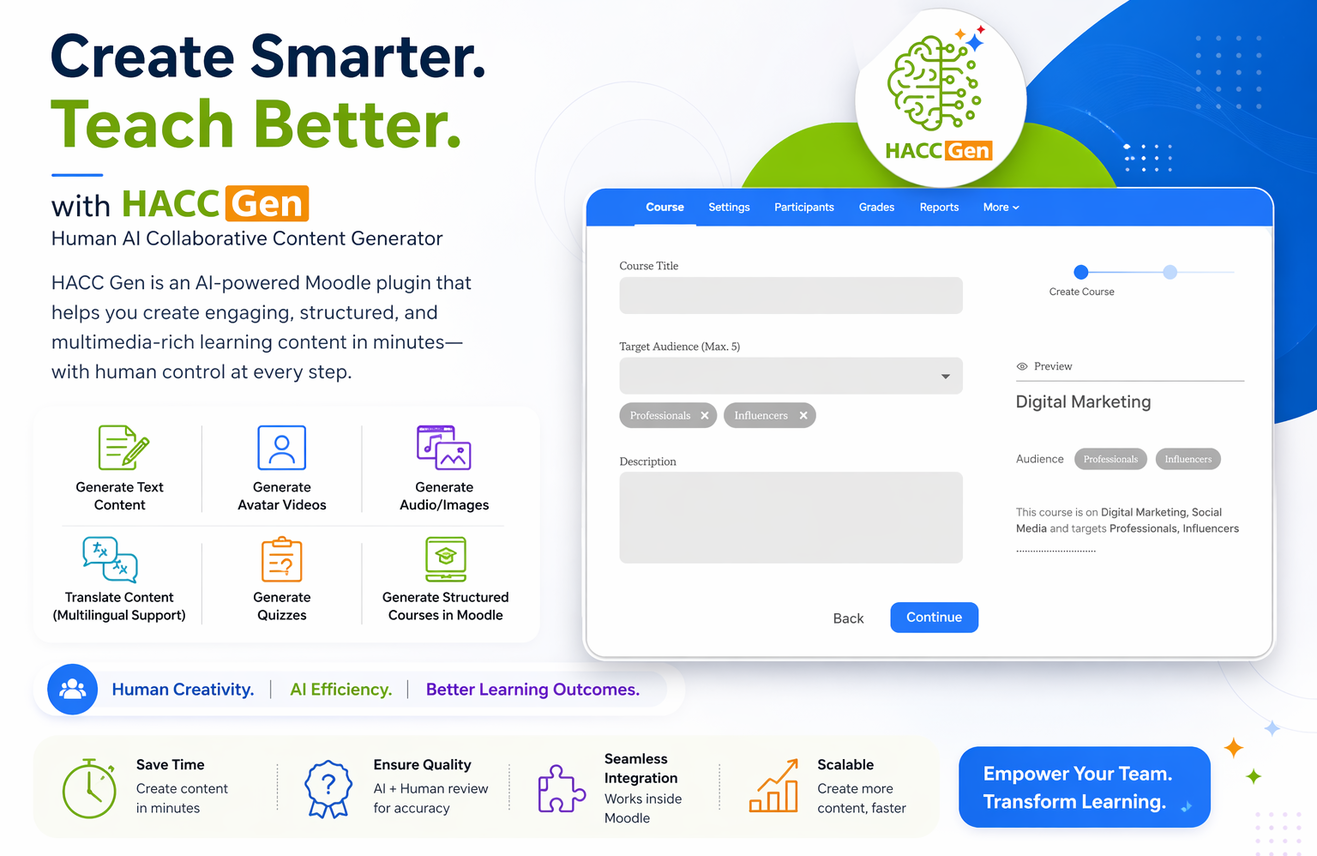
The HACC Gen local plugin is an AI-powered course content generator for Moodle that enables teachers and administrators to create fully structured courses in minutes.
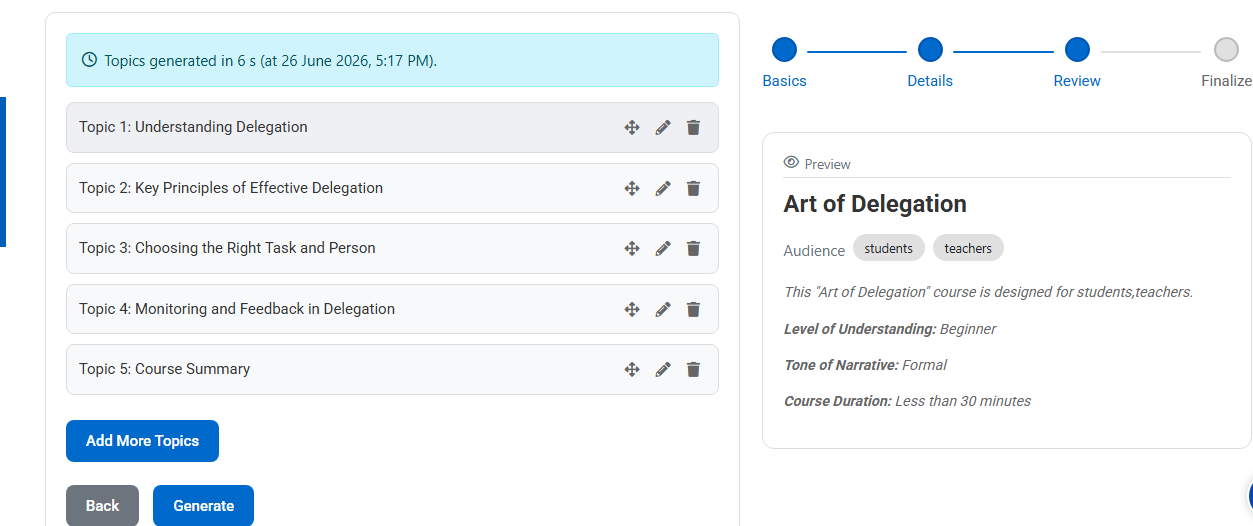
Using a guided 4-step workflow, the plugin generates:
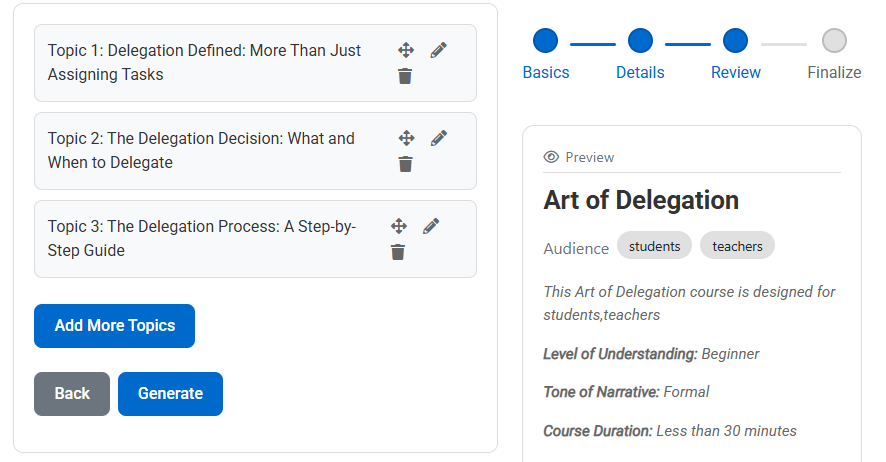
- Course topics
- Learning objectives
- Topic descriptions
- Subtopics
- Quiz questions
- AI-generated media (audio, images, video, transcripts)
Generated content can be saved as a draft or automatically created inside Moodle using Page and Quiz activities.
The plugin appears inside:
Course administration ' More ' HACC Gen
Perfect for:
- Rapid course creation
- Converting PDFs into structured Moodle courses
- AI-assisted instructional design
- Automatic quiz generation
- Multimedia content development
- Reducing course development time
Features
- Guided 4-step AI workflow
- Structured topic and subtopic generation
- Automatic learning objectives
- Optional quiz generation with configurable number of questions
- PDF-based content generation
- AI media generation:
- Audio narration
- AI-generated images
- AI-generated videos
- Transcripts
- Draft save/load system
- One-click Moodle Page & Quiz creation
- Course administration integration
- Configurable AI provider settings
How It Works
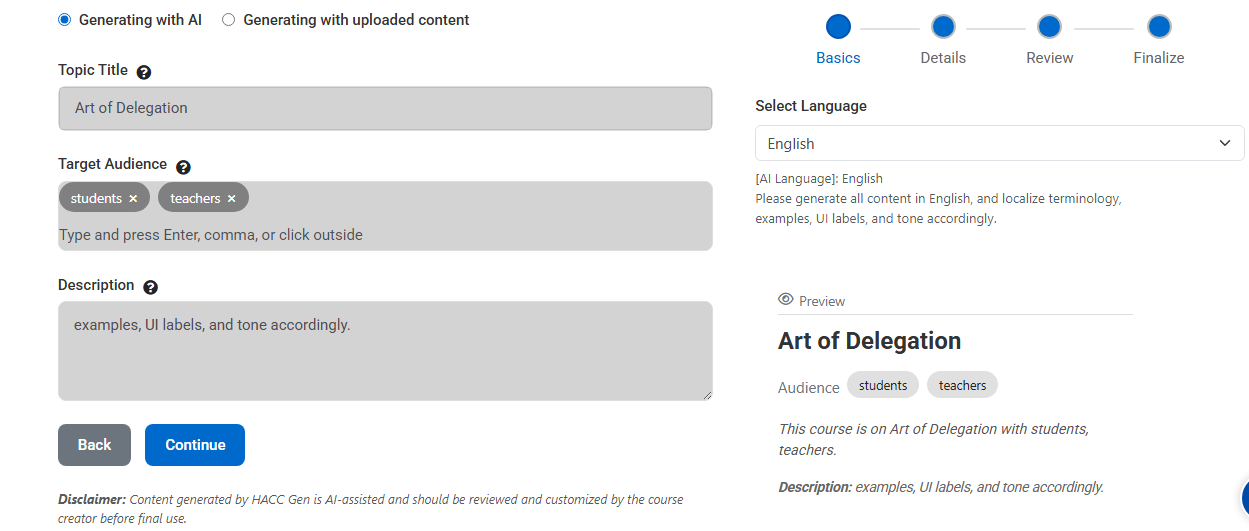
Step 1 – Course Details
Provide:
- Topic Title (required)
- Target Audience (required)
- Description (optional)
- PDF Upload (optional) – Generate content directly from an uploaded PDF document
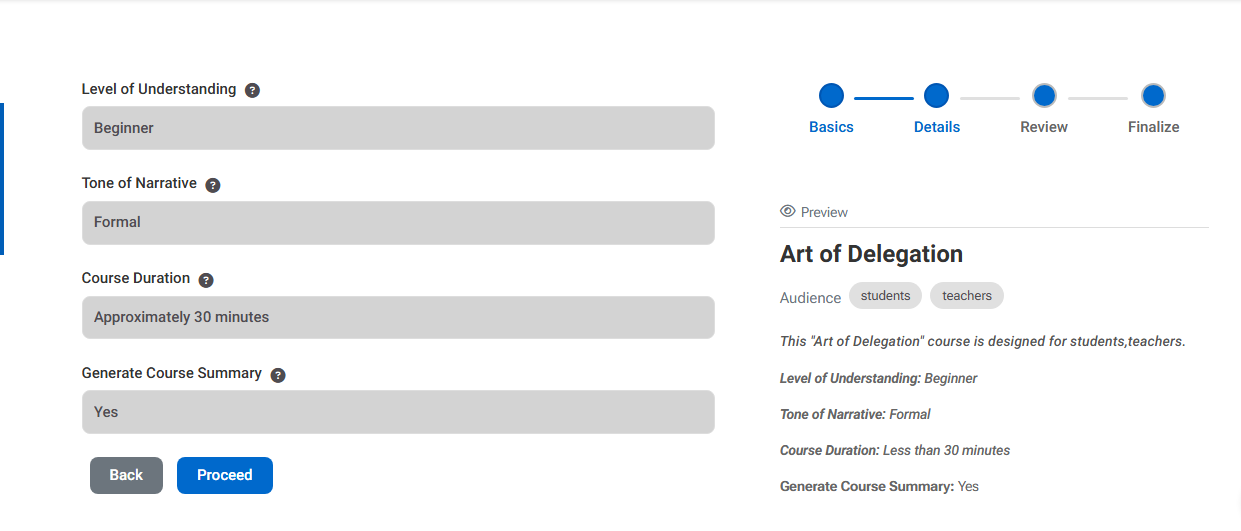
Step 2 – Learning Preferences
Configure:
Level of Understanding
- Beginner
- Intermediate
- Advanced
Tone of Narrative
- Formal
- Conversational
- Engaging
Course Duration
- 15 minutes
- 30 minutes
- 60 minutes
- 90 minutes
- 120 minutes
Course Summary
- No
- Yes
Step 3 – Topic Generation
The AI generates:
- Structured course topics
- Learning objectives
- Topic descriptions
Optional:
- Enable quiz generation
- Define number of quiz questions per topic
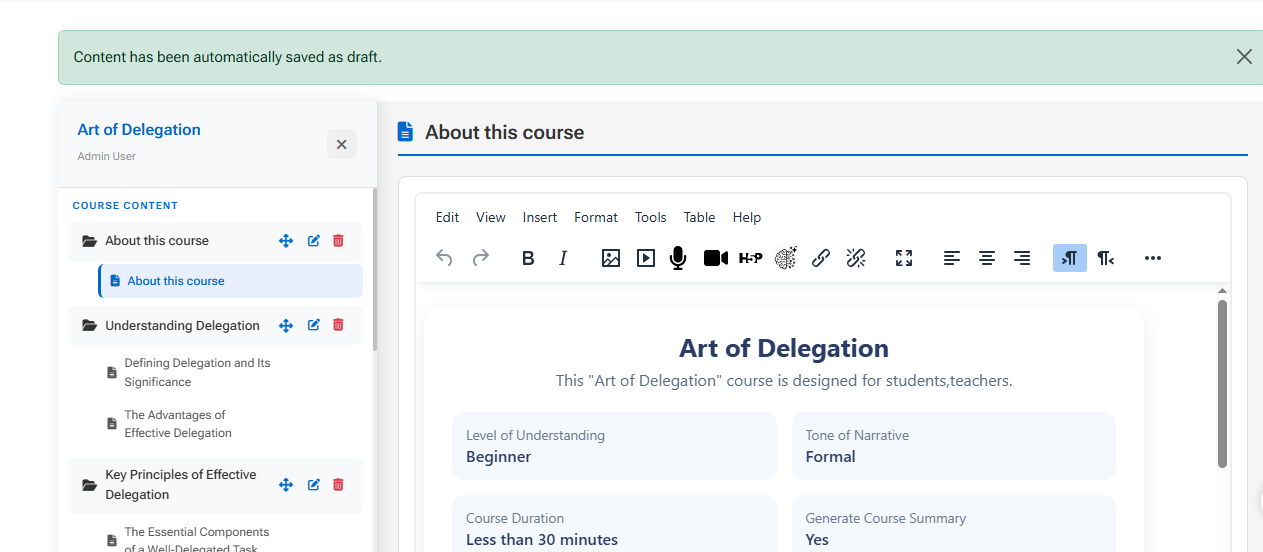
Step 4 – Final Content & Media Generation
The AI generates:
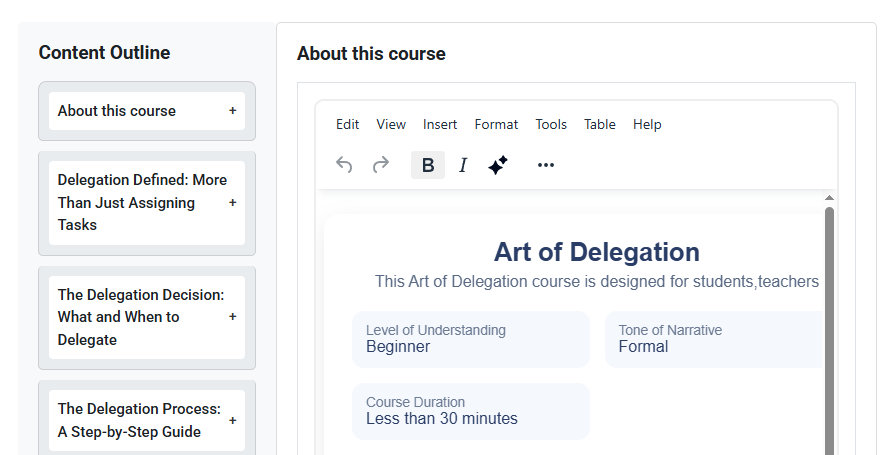
- Subtopics for each topic
- Detailed lesson content
- Quiz questions (if enabled)
Optional AI-generated media:
- Audio narration
- Images
- Video content
- Transcripts
After review, you can:
- Save content as Draft
- Or automatically create the course inside Moodle
Moodle Integration
HACC Gen automatically creates:
- Page activities (for lesson content)
- Quiz activities (for assessments)
Content is structured into Moodle course sections and topics.
Accessible via:
Course administration ' More ' HACC Gen
Draft System
- Save generated content as draft
- Load previous drafts
- Delete drafts
- Continue editing later
Installation
- Download the plugin folder named
haccgen - Place it inside your Moodle
/local/directory: - Log in as administrator
- Visit Site administration > Notifications
- Complete installation
Configuration
After installation, configure the plugin under:
Site administration ' Plugins ' Local plugins ' HACC Gen
Available settings include:
- API URL
- API Key
- API Secret
- API request timeout
- Media generation options
- Public link expiration settings
Requirements
- Moodle 3.9 or higher
- External AI API access
- Valid API credentials
- PHP file upload support (for PDF processing)
- Server timeout configuration compatible with AI processing
Known Limitations
- AI output depends on external API availability
- PDF extraction depends on server configuration
- Media generation requires supported AI provider
- Large content generation may be affected by timeout settings
Security & Permissions
- Accessible via course administration
- Controlled by Moodle capability system
- Requires appropriate course-level permissions
- API credentials stored securely in plugin settings
Changelog
2026.01.23
- Initial public release
- 4-step AI course generator
- PDF-based content generation
- Automatic quiz creation
- Draft save/load system
- AI media generation (audio, image, video, transcript)
- Automatic Moodle Page & Quiz creation
- Course administration integration
Support & Bug Reports
For support, customization, or enterprise deployment:
Dynamicpixel Multimedia Solutions
Email: info@dynamicpixel.co.in
License
This program is free software: you can redistribute it and/or modify it under the terms of the GNU General Public License as published by the Free Software Foundation, either version 3 of the License, or (at your option) any later version.
See LICENSE.txt for full details.
Made with "️ for the Moodle community
Dynamicpixel Multimedia Solutions
1.5 (2026021706)
1.5
Plugin type: Local plugins
Frankenstyle component name: local_haccgen
Version build number: 2026021706
Version release name: 1.5
Maturity: Stable
Supported Moodle versions: 4.1, 4.2, 4.3, 4.4, 4.5, 5.0, 5.1, 5.2
Repository URL (Git): https://github.com/DPMSTeam/moodle-local_haccgen
Repository branch:
Repository tag:
Issue/bug tracker URL: https://github.com/DPMSTeam/moodle-local_haccgen/issues
HACC Gen – AI Course Generator for Moodle
Plugin name: HACC Gen
Component: local_haccgen
Version: 2026.01.23
Moodle compatibility: Moodle 3.9 – 4.4+ (tested up to Moodle 4.4)
Author: Dynamicpixel Multimedia Solutions
License: GNU GPL v3 or later
Overview
The HACC Gen local plugin is an AI-powered course content generator for Moodle that enables teachers and administrators to create fully structured courses in minutes.
Using a guided 4-step workflow, the plugin generates:
- Course topics
- Learning objectives
- Topic descriptions
- Subtopics
- Quiz questions
- AI-generated media (audio, images, video, transcripts)
Generated content can be saved as a draft or automatically created inside Moodle using Page and Quiz activities.
The plugin appears inside:
Course administration ' More ' HACC Gen
Perfect for:
- Rapid course creation
- Converting PDFs into structured Moodle courses
- AI-assisted instructional design
- Automatic quiz generation
- Multimedia content development
- Reducing course development time
Features
- Guided 4-step AI workflow
- Structured topic and subtopic generation
- Automatic learning objectives
- Optional quiz generation with configurable number of questions
- PDF-based content generation
- AI media generation:
- Audio narration
- AI-generated images
- AI-generated videos
- Transcripts
- Draft save/load system
- One-click Moodle Page & Quiz creation
- Course administration integration
- Configurable AI provider settings
How It Works
Step 1 – Course Details
Provide:
- Topic Title (required)
- Target Audience (required)
- Description (optional)
- PDF Upload (optional) – Generate content directly from an uploaded PDF document
Step 2 – Learning Preferences
Configure:
Level of Understanding
- Beginner
- Intermediate
- Advanced
Tone of Narrative
- Formal
- Conversational
- Engaging
Course Duration
- 15 minutes
- 30 minutes
- 60 minutes
- 90 minutes
- 120 minutes
Course Summary
- No
- Yes
Step 3 – Topic Generation
The AI generates:
- Structured course topics
- Learning objectives
- Topic descriptions
Optional:
- Enable quiz generation
- Define number of quiz questions per topic
Step 4 – Final Content & Media Generation
The AI generates:
- Subtopics for each topic
- Detailed lesson content
- Quiz questions (if enabled)
Optional AI-generated media:
- Audio narration
- Images
- Video content
- Transcripts
After review, you can:
- Save content as Draft
- Or automatically create the course inside Moodle
Moodle Integration
HACC Gen automatically creates:
- Page activities (for lesson content)
- Quiz activities (for assessments)
Content is structured into Moodle course sections and topics.
Accessible via:
Course administration ' More ' HACC Gen
Draft System
- Save generated content as draft
- Load previous drafts
- Delete drafts
- Continue editing later
Installation
- Download the plugin folder named
haccgen - Place it inside your Moodle
/local/directory: - Log in as administrator
- Visit Site administration > Notifications
- Complete installation
Configuration
After installation, configure the plugin under:
Site administration ' Plugins ' Local plugins ' HACC Gen
Available settings include:
- API URL
- API Key
- API Secret
- API request timeout
- Media generation options
- Public link expiration settings
Requirements
- Moodle 3.9 or higher
- External AI API access
- Valid API credentials
- PHP file upload support (for PDF processing)
- Server timeout configuration compatible with AI processing
Known Limitations
- AI output depends on external API availability
- PDF extraction depends on server configuration
- Media generation requires supported AI provider
- Large content generation may be affected by timeout settings
Security & Permissions
- Accessible via course administration
- Controlled by Moodle capability system
- Requires appropriate course-level permissions
- API credentials stored securely in plugin settings
Changelog
2026.01.23
- Initial public release
- 4-step AI course generator
- PDF-based content generation
- Automatic quiz creation
- Draft save/load system
- AI media generation (audio, image, video, transcript)
- Automatic Moodle Page & Quiz creation
- Course administration integration
Support & Bug Reports
For support, customization, or enterprise deployment:
Dynamicpixel Multimedia Solutions
Email: info@dynamicpixel.co.in
License
This program is free software: you can redistribute it and/or modify it under the terms of the GNU General Public License as published by the Free Software Foundation, either version 3 of the License, or (at your option) any later version.
See LICENSE.txt for full details.
Made with "️ for the Moodle community
Dynamicpixel Multimedia Solutions
1.4 (2026021705)
1.4
Plugin type: Local plugins
Frankenstyle component name: local_haccgen
Version build number: 2026021705
Version release name: 1.4
Maturity: Stable
Supported Moodle versions: 4.1, 4.2, 4.3, 4.4, 4.5, 5.0, 5.1, 5.2
Repository URL (Git): https://github.com/DPMSTeam/moodle-local_haccgen
Repository branch:
Repository tag:
Issue/bug tracker URL: https://github.com/DPMSTeam/moodle-local_haccgen/issues
HACC Gen – AI Course Generator for Moodle
Plugin name: HACC Gen
Component: local_haccgen
Version: 2026.01.23
Moodle compatibility: Moodle 3.9 – 4.4+ (tested up to Moodle 4.4)
Author: Dynamicpixel Multimedia Solutions
License: GNU GPL v3 or later
Overview
The HACC Gen local plugin is an AI-powered course content generator for Moodle that enables teachers and administrators to create fully structured courses in minutes.
Using a guided 4-step workflow, the plugin generates:
- Course topics
- Learning objectives
- Topic descriptions
- Subtopics
- Quiz questions
- AI-generated media (audio, images, video, transcripts)
Generated content can be saved as a draft or automatically created inside Moodle using Page and Quiz activities.
The plugin appears inside:
Course administration ' More ' HACC Gen
Perfect for:
- Rapid course creation
- Converting PDFs into structured Moodle courses
- AI-assisted instructional design
- Automatic quiz generation
- Multimedia content development
- Reducing course development time
Features
- Guided 4-step AI workflow
- Structured topic and subtopic generation
- Automatic learning objectives
- Optional quiz generation with configurable number of questions
- PDF-based content generation
- AI media generation:
- Audio narration
- AI-generated images
- AI-generated videos
- Transcripts
- Draft save/load system
- One-click Moodle Page & Quiz creation
- Course administration integration
- Configurable AI provider settings
How It Works
Step 1 – Course Details
Provide:
- Topic Title (required)
- Target Audience (required)
- Description (optional)
- PDF Upload (optional) – Generate content directly from an uploaded PDF document
Step 2 – Learning Preferences
Configure:
Level of Understanding
- Beginner
- Intermediate
- Advanced
Tone of Narrative
- Formal
- Conversational
- Engaging
Course Duration
- 15 minutes
- 30 minutes
- 60 minutes
- 90 minutes
- 120 minutes
Step 3 – Topic Generation
The AI generates:
- Structured course topics
- Learning objectives
- Topic descriptions
Optional:
- Enable quiz generation
- Define number of quiz questions per topic
Step 4 – Final Content & Media Generation
The AI generates:
- Subtopics for each topic
- Detailed lesson content
- Quiz questions (if enabled)
Optional AI-generated media:
- Audio narration
- Images
- Video content
- Transcripts
After review, you can:
- Save content as Draft
- Or automatically create the course inside Moodle
Moodle Integration
HACC Gen automatically creates:
- Page activities (for lesson content)
- Quiz activities (for assessments)
Content is structured into Moodle course sections and topics.
Accessible via:
Course administration ' More ' HACC Gen
Draft System
- Save generated content as draft
- Load previous drafts
- Delete drafts
- Continue editing later
Installation
- Download the plugin folder named
haccgen - Place it inside your Moodle
/local/directory: - Log in as administrator
- Visit Site administration > Notifications
- Complete installation
Configuration
After installation, configure the plugin under:
Site administration ' Plugins ' Local plugins ' HACC Gen
Available settings include:
- API URL
- API Key
- API Secret
- API request timeout
- Media generation options
- Public link expiration settings
Requirements
- Moodle 3.9 or higher
- External AI API access
- Valid API credentials
- PHP file upload support (for PDF processing)
- Server timeout configuration compatible with AI processing
Known Limitations
- AI output depends on external API availability
- PDF extraction depends on server configuration
- Media generation requires supported AI provider
- Large content generation may be affected by timeout settings
Security & Permissions
- Accessible via course administration
- Controlled by Moodle capability system
- Requires appropriate course-level permissions
- API credentials stored securely in plugin settings
Changelog
2026.01.23
- Initial public release
- 4-step AI course generator
- PDF-based content generation
- Automatic quiz creation
- Draft save/load system
- AI media generation (audio, image, video, transcript)
- Automatic Moodle Page & Quiz creation
- Course administration integration
Support & Bug Reports
For support, customization, or enterprise deployment:
Dynamicpixel Multimedia Solutions
Email: info@dynamicpixel.co.in
License
This program is free software: you can redistribute it and/or modify it under the terms of the GNU General Public License as published by the Free Software Foundation, either version 3 of the License, or (at your option) any later version.
See LICENSE.txt for full details.
Made with "️ for the Moodle community
Dynamicpixel Multimedia Solutions
1.3 (2026021704)
1.3
Plugin type: Local plugins
Frankenstyle component name: local_haccgen
Version build number: 2026021704
Version release name: 1.3
Maturity: Stable
Supported Moodle versions: 4.1, 4.2, 4.3, 4.4, 4.5, 5.0, 5.1, 5.2
Repository URL (Git): https://github.com/DPMSTeam/moodle-local_haccgen
Repository branch:
Repository tag:
Issue/bug tracker URL: https://github.com/DPMSTeam/moodle-local_haccgen/issues
HACC Gen – AI Course Generator for Moodle
Plugin name: HACC Gen
Component: local_haccgen
Version: 2026.01.23
Moodle compatibility: Moodle 3.9 – 4.4+ (tested up to Moodle 4.4)
Author: Dynamicpixel Multimedia Solutions
License: GNU GPL v3 or later
Overview
The HACC Gen local plugin is an AI-powered course content generator for Moodle that enables teachers and administrators to create fully structured courses in minutes.
Using a guided 4-step workflow, the plugin generates:
- Course topics
- Learning objectives
- Topic descriptions
- Subtopics
- Quiz questions
- AI-generated media (audio, images, video, transcripts)
Generated content can be saved as a draft or automatically created inside Moodle using Page and Quiz activities.
The plugin appears inside:
Course administration ' More ' HACC Gen
Perfect for:
- Rapid course creation
- Converting PDFs into structured Moodle courses
- AI-assisted instructional design
- Automatic quiz generation
- Multimedia content development
- Reducing course development time
Features
- Guided 4-step AI workflow
- Structured topic and subtopic generation
- Automatic learning objectives
- Optional quiz generation with configurable number of questions
- PDF-based content generation
- AI media generation:
- Audio narration
- AI-generated images
- AI-generated videos
- Transcripts
- Draft save/load system
- One-click Moodle Page & Quiz creation
- Course administration integration
- Configurable AI provider settings
How It Works
Step 1 – Course Details
Provide:
- Topic Title (required)
- Target Audience (required)
- Description (optional)
- PDF Upload (optional) – Generate content directly from an uploaded PDF document
Step 2 – Learning Preferences
Configure:
Level of Understanding
- Beginner
- Intermediate
- Advanced
Tone of Narrative
- Formal
- Conversational
- Engaging
Course Duration
- 15 minutes
- 30 minutes
- 60 minutes
- 90 minutes
- 120 minutes
Step 3 – Topic Generation
The AI generates:
- Structured course topics
- Learning objectives
- Topic descriptions
Optional:
- Enable quiz generation
- Define number of quiz questions per topic
Step 4 – Final Content & Media Generation
The AI generates:
- Subtopics for each topic
- Detailed lesson content
- Quiz questions (if enabled)
Optional AI-generated media:
- Audio narration
- Images
- Video content
- Transcripts
After review, you can:
- Save content as Draft
- Or automatically create the course inside Moodle
Moodle Integration
HACC Gen automatically creates:
- Page activities (for lesson content)
- Quiz activities (for assessments)
Content is structured into Moodle course sections and topics.
Accessible via:
Course administration ' More ' HACC Gen
Draft System
- Save generated content as draft
- Load previous drafts
- Delete drafts
- Continue editing later
Installation
- Download the plugin folder named
haccgen - Place it inside your Moodle
/local/directory: - Log in as administrator
- Visit Site administration > Notifications
- Complete installation
Configuration
After installation, configure the plugin under:
Site administration ' Plugins ' Local plugins ' HACC Gen
Available settings include:
- API URL
- API Key
- API Secret
- API request timeout
- Media generation options
- Public link expiration settings
Requirements
- Moodle 3.9 or higher
- External AI API access
- Valid API credentials
- PHP file upload support (for PDF processing)
- Server timeout configuration compatible with AI processing
Known Limitations
- AI output depends on external API availability
- PDF extraction depends on server configuration
- Media generation requires supported AI provider
- Large content generation may be affected by timeout settings
Security & Permissions
- Accessible via course administration
- Controlled by Moodle capability system
- Requires appropriate course-level permissions
- API credentials stored securely in plugin settings
Changelog
2026.01.23
- Initial public release
- 4-step AI course generator
- PDF-based content generation
- Automatic quiz creation
- Draft save/load system
- AI media generation (audio, image, video, transcript)
- Automatic Moodle Page & Quiz creation
- Course administration integration
Support & Bug Reports
For support, customization, or enterprise deployment:
Dynamicpixel Multimedia Solutions
Email: info@dynamicpixel.co.in
License
This program is free software: you can redistribute it and/or modify it under the terms of the GNU General Public License as published by the Free Software Foundation, either version 3 of the License, or (at your option) any later version.
See LICENSE.txt for full details.
Made with "️ for the Moodle community
Dynamicpixel Multimedia Solutions
1.0.4 (2026021703)
1.0.4
Plugin type: Local plugins
Frankenstyle component name: local_haccgen
Version build number: 2026021703
Version release name: 1.0.4
Maturity: Stable
Supported Moodle versions: 4.1, 4.2, 4.3, 4.4, 4.5, 5.0, 5.1
Repository URL (Git): https://github.com/DPMSTeam/moodle-local_haccgen
Repository branch:
Repository tag:
Issue/bug tracker URL: https://github.com/DPMSTeam/moodle-local_haccgen/issues
HACC Gen – AI Course Generator for Moodle
Plugin name: HACC Gen
Component: local_haccgen
Version: 2026.01.23
Moodle compatibility: Moodle 3.9 – 4.4+ (tested up to Moodle 4.4)
Author: Dynamicpixel Multimedia Solutions
License: GNU GPL v3 or later
Overview
The HACC Gen local plugin is an AI-powered course content generator for Moodle that enables teachers and administrators to create fully structured courses in minutes.
Using a guided 4-step workflow, the plugin generates:
- Course topics
- Learning objectives
- Topic descriptions
- Subtopics
- Quiz questions
- AI-generated media (audio, images, video, transcripts)
Generated content can be saved as a draft or automatically created inside Moodle using Page and Quiz activities.
The plugin appears inside:
Course administration ' More ' HACC Gen
Perfect for:
- Rapid course creation
- Converting PDFs into structured Moodle courses
- AI-assisted instructional design
- Automatic quiz generation
- Multimedia content development
- Reducing course development time
Features
- Guided 4-step AI workflow
- Structured topic and subtopic generation
- Automatic learning objectives
- Optional quiz generation with configurable number of questions
- PDF-based content generation
- AI media generation:
- Audio narration
- AI-generated images
- AI-generated videos
- Transcripts
- Draft save/load system
- One-click Moodle Page & Quiz creation
- Course administration integration
- Configurable AI provider settings
How It Works
Step 1 – Course Details
Provide:
- Topic Title (required)
- Target Audience (required)
- Description (optional)
- PDF Upload (optional) – Generate content directly from an uploaded PDF document
Step 2 – Learning Preferences
Configure:
Level of Understanding
- Beginner
- Intermediate
- Advanced
Tone of Narrative
- Formal
- Conversational
- Engaging
Course Duration
- 15 minutes
- 30 minutes
- 60 minutes
- 90 minutes
- 120 minutes
Step 3 – Topic Generation
The AI generates:
- Structured course topics
- Learning objectives
- Topic descriptions
Optional:
- Enable quiz generation
- Define number of quiz questions per topic
Step 4 – Final Content & Media Generation
The AI generates:
- Subtopics for each topic
- Detailed lesson content
- Quiz questions (if enabled)
Optional AI-generated media:
- Audio narration
- Images
- Video content
- Transcripts
After review, you can:
- Save content as Draft
- Or automatically create the course inside Moodle
Moodle Integration
HACC Gen automatically creates:
- Page activities (for lesson content)
- Quiz activities (for assessments)
Content is structured into Moodle course sections and topics.
Accessible via:
Course administration ' More ' HACC Gen
Draft System
- Save generated content as draft
- Load previous drafts
- Delete drafts
- Continue editing later
Installation
- Download the plugin folder named
haccgen - Place it inside your Moodle
/local/directory: - Log in as administrator
- Visit Site administration > Notifications
- Complete installation
Configuration
After installation, configure the plugin under:
Site administration ' Plugins ' Local plugins ' HACC Gen
Available settings include:
- API URL
- API Key
- API Secret
- API request timeout
- Media generation options
- Public link expiration settings
Requirements
- Moodle 3.9 or higher
- External AI API access
- Valid API credentials
- PHP file upload support (for PDF processing)
- Server timeout configuration compatible with AI processing
Known Limitations
- AI output depends on external API availability
- PDF extraction depends on server configuration
- Media generation requires supported AI provider
- Large content generation may be affected by timeout settings
Security & Permissions
- Accessible via course administration
- Controlled by Moodle capability system
- Requires appropriate course-level permissions
- API credentials stored securely in plugin settings
Changelog
2026.01.23
- Initial public release
- 4-step AI course generator
- PDF-based content generation
- Automatic quiz creation
- Draft save/load system
- AI media generation (audio, image, video, transcript)
- Automatic Moodle Page & Quiz creation
- Course administration integration
Support & Bug Reports
For support, customization, or enterprise deployment:
Dynamicpixel Multimedia Solutions
Email: info@dynamicpixel.co.in
License
This program is free software: you can redistribute it and/or modify it under the terms of the GNU General Public License as published by the Free Software Foundation, either version 3 of the License, or (at your option) any later version.
See LICENSE.txt for full details.
Made with "️ for the Moodle community
Dynamicpixel Multimedia Solutions
1.0.3 (2026021702)
1.0.3
Plugin type: Local plugins
Frankenstyle component name: local_haccgen
Version build number: 2026021702
Version release name: 1.0.3
Maturity: Stable
Supported Moodle versions: 4.1, 4.2, 4.3, 4.4, 4.5, 5.0, 5.1
Repository URL (Git): https://github.com/DPMSTeam/moodle-local_haccgen
Repository branch:
Repository tag:
Issue/bug tracker URL: https://github.com/DPMSTeam/moodle-local_haccgen/issues
HACC Gen – AI Course Generator for Moodle
Plugin name: HACC Gen
Component: local_haccgen
Version: 2026.02.16
Moodle compatibility: Moodle 3.9 – 4.4+ (tested up to Moodle 4.4)
Author: Dynamicpixel Multimedia Solutions
License: GNU GPL v3 or later
Overview
The HACC Gen local plugin is an AI-powered course content generator for Moodle that enables teachers and administrators to create fully structured courses in minutes.
Using a guided 4-step workflow, the plugin generates:
- Course topics
- Learning objectives
- Topic descriptions
- Subtopics
- Quiz questions
- AI-generated text content
Generated content can be saved as a draft or automatically created inside Moodle using Page and Quiz activities.
The plugin appears inside:
Course administration ' More ' HACC Gen
Perfect for:
- Rapid course creation
- Converting PDFs into structured Moodle courses
- AI-assisted instructional design
- Automatic quiz generation
- Reducing course development time
Features
- Guided 4-step AI workflow
- Structured topic and subtopic generation
- Automatic learning objectives
- Optional quiz generation with configurable number of questions
- PDF-based content generation
- Draft save/load system
- One-click Moodle Page & Quiz creation
- Course administration integration
- Configurable AI provider settings
How It Works
Step 1 – Course Details
Provide:
- Topic Title (required)
- Target Audience (required)
- Description (optional)
- PDF Upload (optional) – Generate content directly from an uploaded PDF document
Step 2 – Learning Preferences
Configure:
Level of Understanding
- Beginner
- Intermediate
- Advanced
Tone of Narrative
- Formal
- Conversational
- Engaging
Course Duration
- 15 minutes
- 30 minutes
- 60 minutes
- 90 minutes
- 120 minutes
Step 3 – Topic Generation
The AI generates:
- Structured course topics
- Learning objectives
- Topic descriptions
Optional:
- Enable quiz generation
- Define number of quiz questions per topic
Step 4 – Final Content
The AI generates:
- Subtopics for each topic
- Detailed lesson content
- Quiz questions (if enabled)
After review, you can:
- Save content as Draft
- Or automatically create the course inside Moodle
Moodle Integration
HACC Gen automatically creates:
- Page activities (for lesson content)
- Quiz activities (for assessments)
Content is structured into Moodle course sections and topics.
Accessible via:
Course administration ' More ' HACC Gen
Draft System
- Save generated content as draft
- Load previous drafts
- Delete drafts
- Continue editing later
Installation
- Download the plugin folder named
haccgen - Place it inside your Moodle
/local/directory: - Log in as administrator
- Visit Site administration > Notifications
- Complete installation
Configuration
After installation, configure the plugin under:
Site administration ' Plugins ' Local plugins ' HACC Gen
Available settings include:
- API URL
- API Key
- API Secret
- API request timeout
- Public link expiration settings
Getting API Credentials
HACC Gen requires API credentials to function.
Step 1 – Open API Credentials Page
Go to:
Site administration ' Plugins ' Local plugins ' HACC Gen
Click:
Get API Credentials
This opens the API provider registration portal(https://subscription.dynamicpixel.co.in).
Step 2 – Create an Account
Register using your details:
- Name
- Password
- Company name (optional)
Step 3 – Select a Plan
Choose one of the available plans:
- Free
- Monthly
- Yearly
- Top-up
Plan features and limits may change over time.
Step 4 – Enter LMS and Billing Information
Provide:
LMS URL example:
Note: The API credentials will be securely locked to your LMS domain.
Also provide:
- Company or billing name
- GSTIN (optional)
- State
- Billing address
Step 5 – Complete Registration
- Free plan requires no payment.
- Paid plans require payment before activation.
Step 6 – Get API Credentials
After successful registration, you will receive:
- API URL
- API Key
- API Secret
These credentials will be available in your API dashboard.
Step 7 – Configure Credentials in Moodle
Return to:
Site administration ' Plugins ' Local plugins ' HACC Gen
Enter:
- API URL
- API Key
- API Secret
Save settings.
The plugin is now ready to use.
Requirements
- Moodle 4.0 or higher
- External AI API access
- Valid API credentials
- PHP file upload support (for PDF processing)
- Server timeout configuration compatible with AI processing
Known Limitations
- AI output depends on external API availability
- PDF extraction depends on server configuration
- Large content generation may be affected by timeout settings
Security & Permissions
- Accessible via course administration
- Controlled by Moodle capability system
- Requires appropriate course-level permissions
- API credentials stored securely in plugin settings
Changelog
2026.02.17
- Initial public release
- 4-step AI course generator
- PDF-based content generation
- Automatic quiz creation
- Draft save/load system
- Automatic Moodle Page & Quiz creation
- Course administration integration
Support & Bug Reports
For support, customization, or enterprise deployment:
Dynamicpixel Multimedia Solutions
Email: info@dynamicpixel.co.in
License
This program is free software: you can redistribute it and/or modify it under the terms of the GNU General Public License as published by the Free Software Foundation, either version 3 of the License, or (at your option) any later version.
See LICENSE.txt for full details.
Made with "️ for the Moodle community
Dynamicpixel Multimedia Solutions
1.0.2 (2026021701)
1.0.2
Plugin type: Local plugins
Frankenstyle component name: local_haccgen
Version build number: 2026021701
Version release name: 1.0.2
Maturity: Stable
Supported Moodle versions: 4.1, 4.2, 4.3, 4.4, 4.5, 5.0, 5.1
Repository URL (Git): https://github.com/DPMSTeam/haccgen
Repository branch:
Repository tag:
Issue/bug tracker URL: https://github.com/DPMSTeam/moodle-local_haccgen/issues
HACC Gen – AI Course Generator for Moodle
Plugin name: HACC Gen
Component: local_haccgen
Version: 2026.02.16
Moodle compatibility: Moodle 3.9 – 4.4+ (tested up to Moodle 4.4)
Author: Dynamicpixel Multimedia Solutions
License: GNU GPL v3 or later
Overview
The HACC Gen local plugin is an AI-powered course content generator for Moodle that enables teachers and administrators to create fully structured courses in minutes.
Using a guided 4-step workflow, the plugin generates:
- Course topics
- Learning objectives
- Topic descriptions
- Subtopics
- Quiz questions
- AI-generated text content
Generated content can be saved as a draft or automatically created inside Moodle using Page and Quiz activities.
The plugin appears inside:
Course administration ' More ' HACC Gen
Perfect for:
- Rapid course creation
- Converting PDFs into structured Moodle courses
- AI-assisted instructional design
- Automatic quiz generation
- Reducing course development time
Features
- Guided 4-step AI workflow
- Structured topic and subtopic generation
- Automatic learning objectives
- Optional quiz generation with configurable number of questions
- PDF-based content generation
- Draft save/load system
- One-click Moodle Page & Quiz creation
- Course administration integration
- Configurable AI provider settings
How It Works
Step 1 – Course Details
Provide:
- Topic Title (required)
- Target Audience (required)
- Description (optional)
- PDF Upload (optional) – Generate content directly from an uploaded PDF document
Step 2 – Learning Preferences
Configure:
Level of Understanding
- Beginner
- Intermediate
- Advanced
Tone of Narrative
- Formal
- Conversational
- Engaging
Course Duration
- 15 minutes
- 30 minutes
- 60 minutes
- 90 minutes
- 120 minutes
Step 3 – Topic Generation
The AI generates:
- Structured course topics
- Learning objectives
- Topic descriptions
Optional:
- Enable quiz generation
- Define number of quiz questions per topic
Step 4 – Final Content
The AI generates:
- Subtopics for each topic
- Detailed lesson content
- Quiz questions (if enabled)
After review, you can:
- Save content as Draft
- Or automatically create the course inside Moodle
Moodle Integration
HACC Gen automatically creates:
- Page activities (for lesson content)
- Quiz activities (for assessments)
Content is structured into Moodle course sections and topics.
Accessible via:
Course administration ' More ' HACC Gen
Draft System
- Save generated content as draft
- Load previous drafts
- Delete drafts
- Continue editing later
Installation
- Download the plugin folder named
haccgen - Place it inside your Moodle
/local/directory: - Log in as administrator
- Visit Site administration > Notifications
- Complete installation
Configuration
After installation, configure the plugin under:
Site administration ' Plugins ' Local plugins ' HACC Gen
Available settings include:
- API URL
- API Key
- API Secret
- API request timeout
- Public link expiration settings
Getting API Credentials
HACC Gen requires API credentials to function.
Step 1 – Open API Credentials Page
Go to:
Site administration ' Plugins ' Local plugins ' HACC Gen
Click:
Get API Credentials
This opens the API provider registration portal(https://subscription.dynamicpixel.co.in).
Step 2 – Create an Account
Register using your details:
- Name
- Password
- Company name (optional)
Step 3 – Select a Plan
Choose one of the available plans:
- Free
- Monthly
- Yearly
- Top-up
Plan features and limits may change over time.
Step 4 – Enter LMS and Billing Information
Provide:
LMS URL example:
Note: The API credentials will be securely locked to your LMS domain.
Also provide:
- Company or billing name
- GSTIN (optional)
- State
- Billing address
Step 5 – Complete Registration
- Free plan requires no payment.
- Paid plans require payment before activation.
Step 6 – Get API Credentials
After successful registration, you will receive:
- API URL
- API Key
- API Secret
These credentials will be available in your API dashboard.
Step 7 – Configure Credentials in Moodle
Return to:
Site administration ' Plugins ' Local plugins ' HACC Gen
Enter:
- API URL
- API Key
- API Secret
Save settings.
The plugin is now ready to use.
Requirements
- Moodle 4.0 or higher
- External AI API access
- Valid API credentials
- PHP file upload support (for PDF processing)
- Server timeout configuration compatible with AI processing
Known Limitations
- AI output depends on external API availability
- PDF extraction depends on server configuration
- Large content generation may be affected by timeout settings
Security & Permissions
- Accessible via course administration
- Controlled by Moodle capability system
- Requires appropriate course-level permissions
- API credentials stored securely in plugin settings
Changelog
2026.02.17
- Initial public release
- 4-step AI course generator
- PDF-based content generation
- Automatic quiz creation
- Draft save/load system
- Automatic Moodle Page & Quiz creation
- Course administration integration
Support & Bug Reports
For support, customization, or enterprise deployment:
Dynamicpixel Multimedia Solutions
Email: info@dynamicpixel.co.in
License
This program is free software: you can redistribute it and/or modify it under the terms of the GNU General Public License as published by the Free Software Foundation, either version 3 of the License, or (at your option) any later version.
See LICENSE.txt for full details.
Made with "️ for the Moodle community
Dynamicpixel Multimedia Solutions
1.0.1 (2026021700)
1.0.1
Plugin type: Local plugins
Frankenstyle component name: local_haccgen
Version build number: 2026021700
Version release name: 1.0.1
Maturity: Stable
Supported Moodle versions: 4.1, 4.2, 4.3, 4.4, 4.5, 5.0, 5.1
Repository URL (Git): https://github.com/DPMSTeam/haccgen
Repository branch:
Repository tag:
Issue/bug tracker URL: https://github.com/DPMSTeam/moodle-local_haccgen/issues
HACC Gen – AI Course Generator for Moodle
Plugin name: HACC Gen
Component: local_haccgen
Version: 2026.02.16
Moodle compatibility: Moodle 3.9 – 4.4+ (tested up to Moodle 4.4)
Author: Dynamicpixel Multimedia Solutions
License: GNU GPL v3 or later
Overview
The HACC Gen local plugin is an AI-powered course content generator for Moodle that enables teachers and administrators to create fully structured courses in minutes.
Using a guided 4-step workflow, the plugin generates:
- Course topics
- Learning objectives
- Topic descriptions
- Subtopics
- Quiz questions
- AI-generated text content
Generated content can be saved as a draft or automatically created inside Moodle using Page and Quiz activities.
The plugin appears inside:
Course administration ' More ' HACC Gen
Perfect for:
- Rapid course creation
- Converting PDFs into structured Moodle courses
- AI-assisted instructional design
- Automatic quiz generation
- Reducing course development time
Features
- Guided 4-step AI workflow
- Structured topic and subtopic generation
- Automatic learning objectives
- Optional quiz generation with configurable number of questions
- PDF-based content generation
- Draft save/load system
- One-click Moodle Page & Quiz creation
- Course administration integration
- Configurable AI provider settings
How It Works
Step 1 – Course Details
Provide:
- Topic Title (required)
- Target Audience (required)
- Description (optional)
- PDF Upload (optional) – Generate content directly from an uploaded PDF document
Step 2 – Learning Preferences
Configure:
Level of Understanding
- Beginner
- Intermediate
- Advanced
Tone of Narrative
- Formal
- Conversational
- Engaging
Course Duration
- 15 minutes
- 30 minutes
- 60 minutes
- 90 minutes
- 120 minutes
Step 3 – Topic Generation
The AI generates:
- Structured course topics
- Learning objectives
- Topic descriptions
Optional:
- Enable quiz generation
- Define number of quiz questions per topic
Step 4 – Final Content
The AI generates:
- Subtopics for each topic
- Detailed lesson content
- Quiz questions (if enabled)
After review, you can:
- Save content as Draft
- Or automatically create the course inside Moodle
Moodle Integration
HACC Gen automatically creates:
- Page activities (for lesson content)
- Quiz activities (for assessments)
Content is structured into Moodle course sections and topics.
Accessible via:
Course administration ' More ' HACC Gen
Draft System
- Save generated content as draft
- Load previous drafts
- Delete drafts
- Continue editing later
Installation
- Download the plugin folder named
haccgen - Place it inside your Moodle
/local/directory: - Log in as administrator
- Visit Site administration > Notifications
- Complete installation
Configuration
After installation, configure the plugin under:
Site administration ' Plugins ' Local plugins ' HACC Gen
Available settings include:
- API URL
- API Key
- API Secret
- API request timeout
- Public link expiration settings
Getting API Credentials
HACC Gen requires API credentials to function.
Step 1 – Open API Credentials Page
Go to:
Site administration ' Plugins ' Local plugins ' HACC Gen
Click:
Get API Credentials
This opens the API provider registration portal(https://subscription.dynamicpixel.co.in).
Step 2 – Create an Account
Register using your details:
- Name
- Password
- Company name (optional)
Step 3 – Select a Plan
Choose one of the available plans:
- Free
- Monthly
- Yearly
- Top-up
Plan features and limits may change over time.
Step 4 – Enter LMS and Billing Information
Provide:
LMS URL example:
Note: The API credentials will be securely locked to your LMS domain.
Also provide:
- Company or billing name
- GSTIN (optional)
- State
- Billing address
Step 5 – Complete Registration
- Free plan requires no payment.
- Paid plans require payment before activation.
Step 6 – Get API Credentials
After successful registration, you will receive:
- API URL
- API Key
- API Secret
These credentials will be available in your API dashboard.
Step 7 – Configure Credentials in Moodle
Return to:
Site administration ' Plugins ' Local plugins ' HACC Gen
Enter:
- API URL
- API Key
- API Secret
Save settings.
The plugin is now ready to use.
Requirements
- Moodle 4.0 or higher
- External AI API access
- Valid API credentials
- PHP file upload support (for PDF processing)
- Server timeout configuration compatible with AI processing
Known Limitations
- AI output depends on external API availability
- PDF extraction depends on server configuration
- Large content generation may be affected by timeout settings
Security & Permissions
- Accessible via course administration
- Controlled by Moodle capability system
- Requires appropriate course-level permissions
- API credentials stored securely in plugin settings
Changelog
2026.02.17
- Initial public release
- 4-step AI course generator
- PDF-based content generation
- Automatic quiz creation
- Draft save/load system
- Automatic Moodle Page & Quiz creation
- Course administration integration
Support & Bug Reports
For support, customization, or enterprise deployment:
Dynamicpixel Multimedia Solutions
Email: info@dynamicpixel.co.in
License
This program is free software: you can redistribute it and/or modify it under the terms of the GNU General Public License as published by the Free Software Foundation, either version 3 of the License, or (at your option) any later version.
See LICENSE.txt for full details.
Made with "️ for the Moodle community
Dynamicpixel Multimedia Solutions
1.0.0 (2026021600)
1.0.0
Plugin type: Local plugins
Frankenstyle component name: local_haccgen
Version build number: 2026021600
Version release name: 1.0.0
Maturity: Stable
Supported Moodle versions: 4.1, 4.2, 4.3, 4.4, 4.5, 5.0, 5.1
Repository URL (Git): https://github.com/DPMSTeam/haccgen
Repository branch:
Repository tag:
Issue/bug tracker URL: https://github.com/DPMSTeam/moodle-local_haccgen/issues
HACC Gen – AI Course Generator for Moodle
Plugin name: HACC Gen
Component: local_haccgen
Version: 2026.02.16
Moodle compatibility: Moodle 3.9 – 4.4+ (tested up to Moodle 4.4)
Author: Dynamicpixel Multimedia Solutions
License: GNU GPL v3 or later
Overview
The HACC Gen local plugin is an AI-powered course content generator for Moodle that enables teachers and administrators to create fully structured courses in minutes.
Using a guided 4-step workflow, the plugin generates:
- Course topics
- Learning objectives
- Topic descriptions
- Subtopics
- Quiz questions
- AI-generated media (audio, images, video, transcripts)
Generated content can be saved as a draft or automatically created inside Moodle using Page and Quiz activities.
The plugin appears inside:
Course administration ' More ' HACC Gen
Perfect for:
- Rapid course creation
- Converting PDFs into structured Moodle courses
- AI-assisted instructional design
- Automatic quiz generation
- Multimedia content development
- Reducing course development time
Features
- Guided 4-step AI workflow
- Structured topic and subtopic generation
- Automatic learning objectives
- Optional quiz generation with configurable number of questions
- PDF-based content generation
- AI media generation:
- Audio narration
- AI-generated images
- AI-generated videos
- Transcripts
- Draft save/load system
- One-click Moodle Page & Quiz creation
- Course administration integration
- Configurable AI provider settings
How It Works
Step 1 – Course Details
Provide:
- Topic Title (required)
- Target Audience (required)
- Description (optional)
- PDF Upload (optional) – Generate content directly from an uploaded PDF document
Step 2 – Learning Preferences
Configure:
Level of Understanding
- Beginner
- Intermediate
- Advanced
Tone of Narrative
- Formal
- Conversational
- Engaging
Course Duration
- 15 minutes
- 30 minutes
- 60 minutes
- 90 minutes
- 120 minutes
Step 3 – Topic Generation
The AI generates:
- Structured course topics
- Learning objectives
- Topic descriptions
Optional:
- Enable quiz generation
- Define number of quiz questions per topic
Step 4 – Final Content & Media Generation
The AI generates:
- Subtopics for each topic
- Detailed lesson content
- Quiz questions (if enabled)
Optional AI-generated media:
- Audio narration
- Images
- Video content
- Transcripts
After review, you can:
- Save content as Draft
- Or automatically create the course inside Moodle
Moodle Integration
HACC Gen automatically creates:
- Page activities (for lesson content)
- Quiz activities (for assessments)
Content is structured into Moodle course sections and topics.
Accessible via:
Course administration ' More ' HACC Gen
Draft System
- Save generated content as draft
- Load previous drafts
- Delete drafts
- Continue editing later
Installation
- Download the plugin folder named
haccgen - Place it inside your Moodle
/local/directory: - Log in as administrator
- Visit Site administration > Notifications
- Complete installation
Configuration
After installation, configure the plugin under:
Site administration ' Plugins ' Local plugins ' HACC Gen
Available settings include:
- API URL
- API Key
- API Secret
- API request timeout
- Media generation options
- Public link expiration settings
Requirements
- Moodle 3.9 or higher
- External AI API access
- Valid API credentials
- PHP file upload support (for PDF processing)
- Server timeout configuration compatible with AI processing
Known Limitations
- AI output depends on external API availability
- PDF extraction depends on server configuration
- Media generation requires supported AI provider
- Large content generation may be affected by timeout settings
Security & Permissions
- Accessible via course administration
- Controlled by Moodle capability system
- Requires appropriate course-level permissions
- API credentials stored securely in plugin settings
Changelog
2026.02.16
- Initial public release
- 4-step AI course generator
- PDF-based content generation
- Automatic quiz creation
- Draft save/load system
- AI media generation (audio, image, video, transcript)
- Automatic Moodle Page & Quiz creation
- Course administration integration
Support & Bug Reports
For support, customization, or enterprise deployment:
Dynamicpixel Multimedia Solutions
Email: info@dynamicpixel.co.in
License
This program is free software: you can redistribute it and/or modify it under the terms of the GNU General Public License as published by the Free Software Foundation, either version 3 of the License, or (at your option) any later version.
See LICENSE.txt for full details.
Made with "️ for the Moodle community
Dynamicpixel Multimedia Solutions