
Clear Messages (block_clearmessages)
Adds a block that lets a user clear (hide) their Moodle messages up to a selected date.
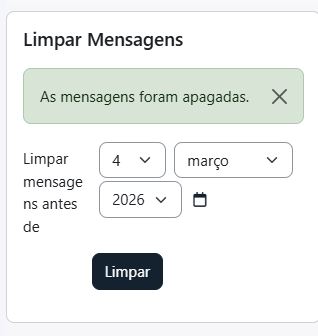
The block does not remove message records from the database. It marks messages as deleted for the current user by inserting entries into Moodle’s core table message_user_actions with action = 2 (deleted), for all message IDs found up to the selected cutoff date.
Requirements
Installation
- Copy this folder to:
blocks/clearmessages
- Visit Site administration ' Notifications
- Add the block to a page (as a user with permission to add blocks).
Features
- Date selector to choose a cutoff date
- Clears messages up to the end of the selected day (23:59:59)
- Processes:
- Messages sent by the user (
messages.useridfrom) up to the cutoff
- Messages with user actions for the current user (
message_user_actions.userid) up to the cutoff (excluding already deleted actions)
- Avoids duplicate "deleted" actions by checking existing records before inserting
- Shows success or "no messages found" notifications
Configuration
There is no global settings page in this plugin.
Access is controlled by capabilities/permissions. Grant the capability below to allow usage.
Capabilities
block/clearmessages:addinstance — Add the block to a page
block/clearmessages:myaddinstance — Add the block to Dashboard
block/clearmessages:clear — Use the block to clear messages (checked in system context)
Data and Privacy (GDPR)
No custom database tables are created.
The plugin does not store its own personal data. It only writes "deleted" actions into Moodle core messaging data (message_user_actions) for the current user.
Privacy API
Implements:
\core_privacy\local\metadata\null_provider