Multi-value

Versions
Current version
1.0.5 (2026042001)
1.0.5
Plugin type: Custom field
Frankenstyle component name: customfield_multivalue
Version build number: 2026042001
Version release name: 1.0.5
Maturity: Stable
Supported Moodle versions: 4.4, 4.5, 5.0, 5.1
Repository URL (Git): https://github.com/Darrel-Tenter/moodle-customfield_multivalue
Repository branch:
Repository tag:
Issue/bug tracker URL: https://github.com/Darrel-Tenter/moodle-customfield_multivalue/issues
Multi-Value Custom Field for Moodle
A Moodle plugin that adds a multi-value field type to Moodle's modern customfield_* API — available anywhere Moodle uses that API: courses, programs, certifications, and more.
The Problem
Moodle's built-in custom field types include text, number, checkbox, date, and single-select. There is no built-in option for selecting multiple values from a defined list. If you need to tag a course with multiple categories, topics, roles, or attributes from a fixed option list, the standard field types can't do it cleanly.
The Solution
customfield_multivalue adds a multi-value field type that integrates natively with Moodle's customfield_* API. Once installed, it appears alongside the built-in field types wherever custom fields are configured — course settings, Workplace programs, Workplace certifications, and any other component that uses the modern customfield system.
Features
- Select one or more values from an administrator-defined options list
- Options list is configured per-field (one option per line in the field settings)
- Stored as a JSON array — supports option values containing commas
- Supports empty selection (stores
[], not NULL) - Works anywhere Moodle's modern
customfield_*API is used - Compatible with Moodle 4.4+
Installation
Via git
Clone into the customfield/field/ directory of your Moodle installation:
git clone https://github.com/Darrel-Tenter/moodle-customfield_multivalue customfield/field/multivalue
Then log in as admin and go to Site Administration ' Notifications to trigger installation.
Via zip
- Download the zip from GitHub
- Unzip and rename the folder to
multivalue - Place it at
customfield/field/multivalue/in your Moodle root - Go to Site Administration ' Notifications to install
Deployment classification: Major Release — install on a dev/staging site first and verify field creation and storage before deploying to production.
Usage
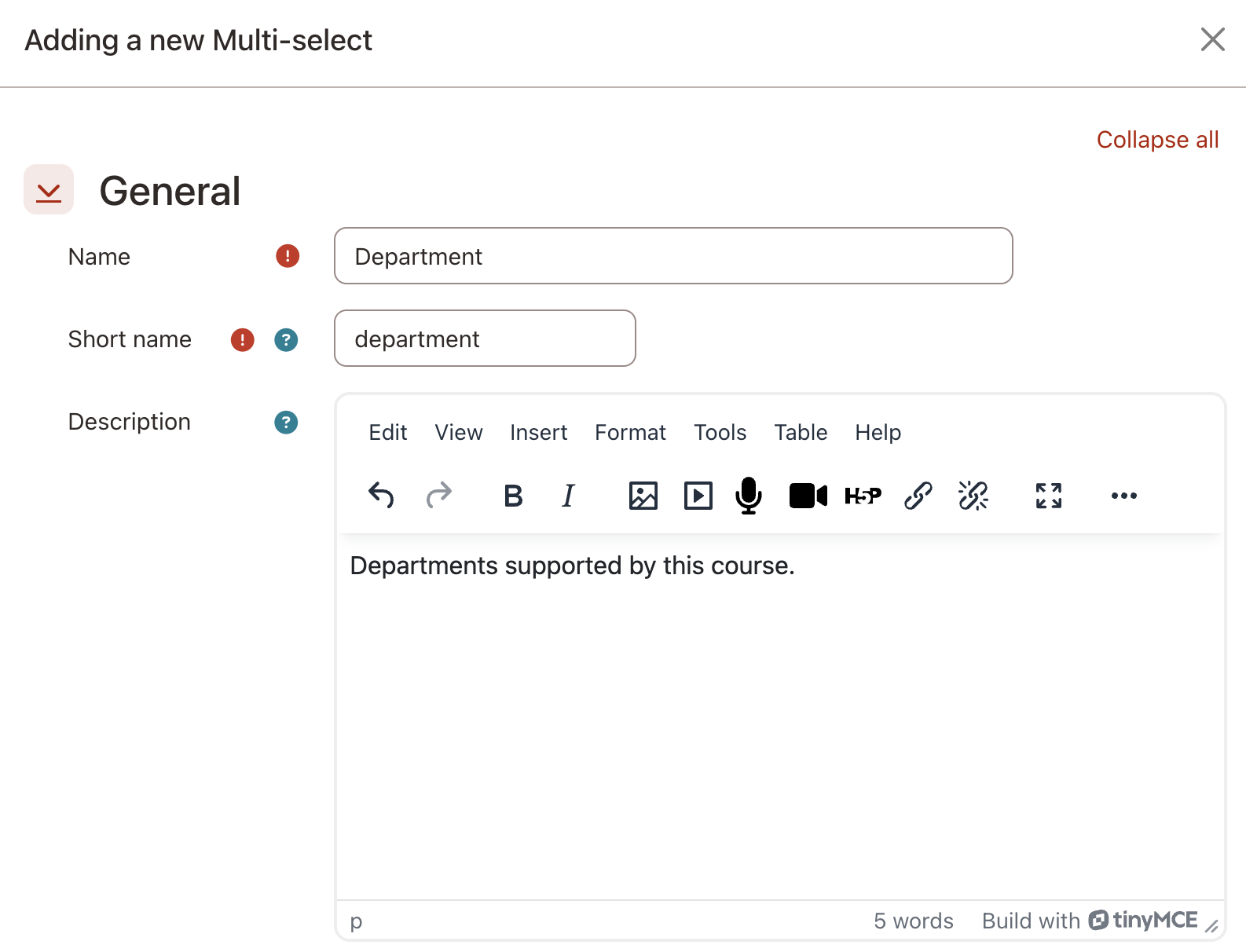
After installation, the Multi-value field type appears in the custom fields configuration UI (e.g., Site Administration ' Courses ' Course custom fields).
Creating a field
- Go to the relevant custom fields admin page
- Add a new field and select Multi-value as the type
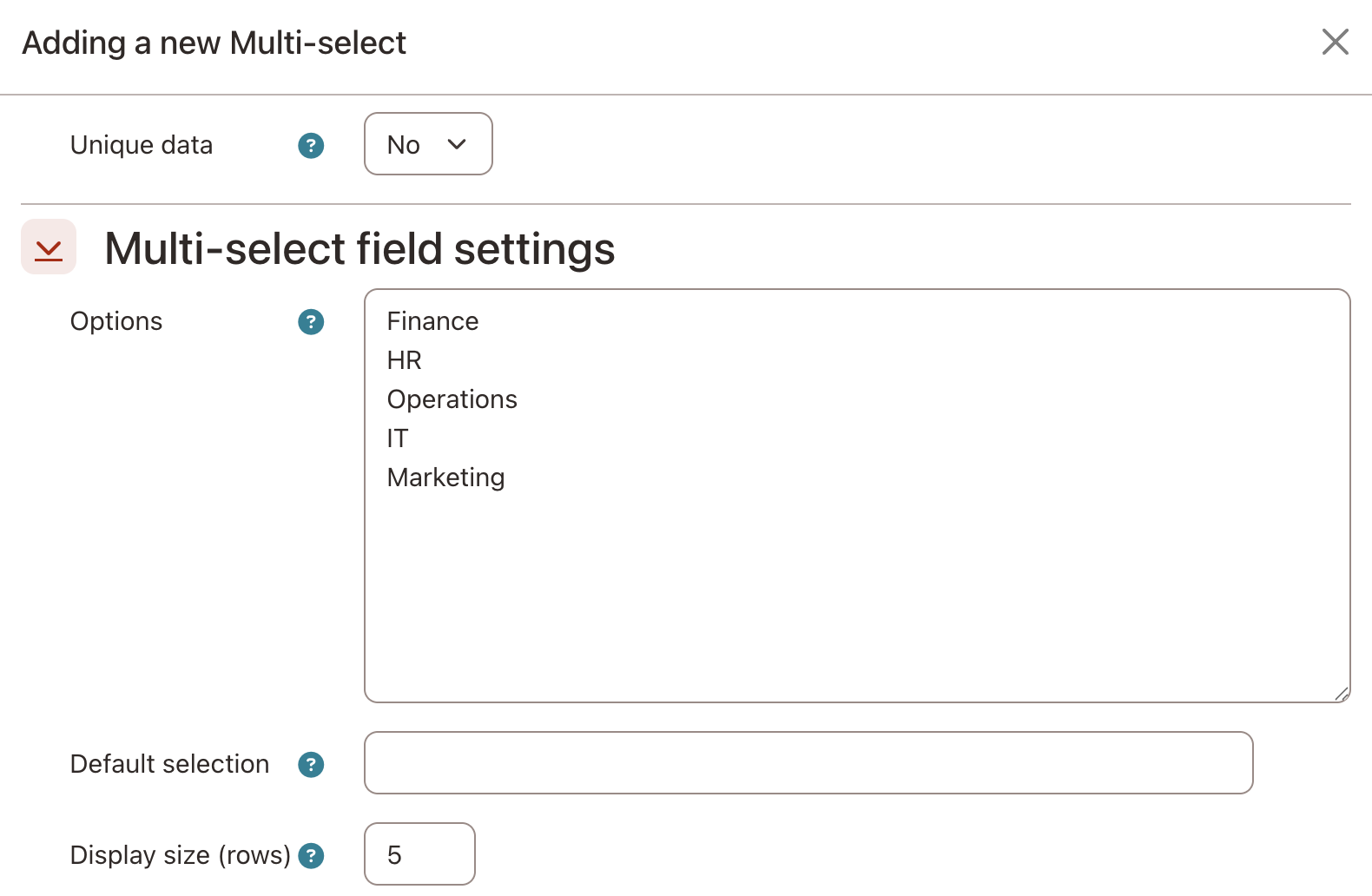
- Enter your options list — one option per line
- Optionally set a default selection (one option per line, must match the options list exactly) and display size
- Save
Using the field
The field renders as an autocomplete multi-select input on the relevant edit form (course settings, certification settings, etc.). Users can select one or more values from the configured options list.
Querying stored values
Values are stored as a JSON array in mdl_customfield_data.value. For example, selecting Option A and Option C stores:
["Option A","Option C"]
To query records tagged with a specific value, use MySQL's JSON_CONTAINS:
SELECT c.id, c.fullname

  FROM {course} c

  JOIN {customfield_data} cf ON cf.instanceid = c.id

   AND cf.fieldid = :fieldid

 WHERE JSON_CONTAINS(cf.value, JSON_QUOTE(:value))
File Structure
customfield_multivalue/

"── classes/

│   "── data_controller.php     # Saves/retrieves values; implements export_value()

│   "── field_controller.php    # Admin form: options list, default, display size

│   └── privacy/

│       └── provider.php        # null_provider — core customfield handles data storage

"── lang/

│   └── en/

│       └── customfield_multivalue.php   # All strings

└── version.php                 # Plugin metadata
Architecture Notes
API pattern
Moodle's customfield_* plugin type requires two classes:
field_controller— defines the admin configuration form for the field (the options list, default value, display size). Extends\core_customfield\field_controller. Configuration is stored as JSON inmdl_customfield_field.configdata.data_controller— handles saving and retrieving values for individual records. Extends\core_customfield\data_controller. Provides the form element shown to end users and implementsexport_value()for external output.
customfield_checkbox is the simplest reference implementation. customfield_select is the closest functional reference for option-list handling.
Storage contract
| Rule | Detail |
|---|---|
| Storage column | mdl_customfield_data.value (TEXT) |
| Format | JSON-encoded array of option text values |
| intvalue column | Not used — always set to 0 |
| Empty selection | Stored as [], not NULL |
| Whitespace | Trimmed from each value before encoding |
Example: selecting SE 49 and SE 51 stores ["SE 49","SE 51"].
What this plugin does NOT do
- Does not support the legacy
user_info_fieldsystem — Moodle has two separate custom field systems. This plugin works with the moderncustomfield_*API only (courses, programs, certifications). User profile fields use a different architecture and are not supported. - Does not use
intvalue— Unlikecustomfield_checkbox, this plugin stores all data in thevaluecolumn. Do not queryintvaluefor multi-value fields. - Does not validate options against the configured list on retrieval — If the options list changes after data has been saved, existing stored values are preserved as-is.
Compatibility
- Moodle: 4.4+ (tested on Moodle 4.5 and Moodle Workplace 5.1)
- PHP: 8.1+
- Database: MySQL / MariaDB (JSON_CONTAINS used for queries)
- Themes: All themes (field type has no theme-specific output)
Contributing
Bug reports and pull requests are welcome via GitHub Issues and Pull Requests.
License
GNU GPL v3 or later — https://www.gnu.org/copyleft/gpl.html
Version history
v1.0.5
- Fixed:
export_value()now returns a comma-separated string instead of an array, resolving "Array to string conversion" warnings in Moodle's report builder when this field type is used as a report column.
v1.0.4
- Fixed: default values were never applied on first edit —
get_stored_value()was returning the raw default string (not JSON), causingjson_decodeto silently fail - Improved: Default selection config field changed from text input to textarea (one value per line), matching the Options field format and supporting option values that contain commas
- Added:
field_controller::get_default_values()public helper
v1.0.3
- Fixed:
config_form_validation()$filesparameter type hint removed to match parent signature - Fixed:
get_default_value()implemented as required by Moodle 4.5 abstract method - Fixed:
get_value()override removed to avoid return type conflict with Moodle 5.x parent - Removed: empty
install.xmlthat caused addl_exceptionon installation - Removed: unnecessary backup/restore files
v1.0.2
- Fixed PHP 8.x compatibility issues
- Added missing files
v1.0.1
- Initial release
1.0.4 (2026032202)
1.0.4
Plugin type: Custom field
Frankenstyle component name: customfield_multivalue
Version build number: 2026032202
Version release name: 1.0.4
Maturity: Stable
Supported Moodle versions: 4.4, 4.5, 5.0, 5.1
Repository URL (Git): https://github.com/Darrel-Tenter/moodle-customfield_multivalue
Repository branch:
Repository tag:
Issue/bug tracker URL: https://github.com/Darrel-Tenter/moodle-customfield_multivalue/issues
Multi-Value Custom Field for Moodle
A Moodle plugin that adds a multi-value field type to Moodle's modern customfield_* API — available anywhere Moodle uses that API: courses, programs, certifications, and more.
The Problem
Moodle's built-in custom field types include text, number, checkbox, date, and single-select. There is no built-in option for selecting multiple values from a defined list. If you need to tag a course with multiple categories, topics, roles, or attributes from a fixed option list, the standard field types can't do it cleanly.
The Solution
customfield_multivalue adds a multi-value field type that integrates natively with Moodle's customfield_* API. Once installed, it appears alongside the built-in field types wherever custom fields are configured — course settings, Workplace programs, Workplace certifications, and any other component that uses the modern customfield system.
Features
- Select one or more values from an administrator-defined options list
- Options list is configured per-field (one option per line in the field settings)
- Stored as a JSON array — supports option values containing commas
- Supports empty selection (stores
[], not NULL) - Works anywhere Moodle's modern
customfield_*API is used - Compatible with Moodle 4.4+
Installation
Via git
Clone into the customfield/field/ directory of your Moodle installation:
git clone https://github.com/Darrel-Tenter/moodle-customfield_multivalue customfield/field/multivalue
Then log in as admin and go to Site Administration ' Notifications to trigger installation.
Via zip
- Download the zip from GitHub
- Unzip and rename the folder to
multivalue - Place it at
customfield/field/multivalue/in your Moodle root - Go to Site Administration ' Notifications to install
Deployment classification: Major Release — install on a dev/staging site first and verify field creation and storage before deploying to production.
Usage
After installation, the Multi-value field type appears in the custom fields configuration UI (e.g., Site Administration ' Courses ' Course custom fields).
Creating a field
- Go to the relevant custom fields admin page
- Add a new field and select Multi-value as the type
- Enter your options list — one option per line
- Optionally set a default selection (one option per line, must match the options list exactly) and display size
- Save
Using the field
The field renders as an autocomplete multi-select input on the relevant edit form (course settings, certification settings, etc.). Users can select one or more values from the configured options list.
Querying stored values
Values are stored as a JSON array in mdl_customfield_data.value. For example, selecting Option A and Option C stores:
["Option A","Option C"]
To query records tagged with a specific value, use MySQL's JSON_CONTAINS:
SELECT c.id, c.fullname

  FROM {course} c

  JOIN {customfield_data} cf ON cf.instanceid = c.id

   AND cf.fieldid = :fieldid

 WHERE JSON_CONTAINS(cf.value, JSON_QUOTE(:value))
File Structure
customfield_multivalue/

"── classes/

│   "── data_controller.php     # Saves/retrieves values; implements export_value()

│   "── field_controller.php    # Admin form: options list, default, display size

│   └── privacy/

│       └── provider.php        # null_provider — core customfield handles data storage

"── lang/

│   └── en/

│       └── customfield_multivalue.php   # All strings

└── version.php                 # Plugin metadata
Architecture Notes
API pattern
Moodle's customfield_* plugin type requires two classes:
field_controller— defines the admin configuration form for the field (the options list, default value, display size). Extends\core_customfield\field_controller. Configuration is stored as JSON inmdl_customfield_field.configdata.data_controller— handles saving and retrieving values for individual records. Extends\core_customfield\data_controller. Provides the form element shown to end users and implementsexport_value()for external output.
customfield_checkbox is the simplest reference implementation. customfield_select is the closest functional reference for option-list handling.
Storage contract
| Rule | Detail |
|---|---|
| Storage column | mdl_customfield_data.value (TEXT) |
| Format | JSON-encoded array of option text values |
| intvalue column | Not used — always set to 0 |
| Empty selection | Stored as [], not NULL |
| Whitespace | Trimmed from each value before encoding |
Example: selecting SE 49 and SE 51 stores ["SE 49","SE 51"].
What this plugin does NOT do
- Does not support the legacy
user_info_fieldsystem — Moodle has two separate custom field systems. This plugin works with the moderncustomfield_*API only (courses, programs, certifications). User profile fields use a different architecture and are not supported. - Does not use
intvalue— Unlikecustomfield_checkbox, this plugin stores all data in thevaluecolumn. Do not queryintvaluefor multi-value fields. - Does not validate options against the configured list on retrieval — If the options list changes after data has been saved, existing stored values are preserved as-is.
Compatibility
- Moodle: 4.4+ (tested on Moodle 4.5 and Moodle Workplace 5.1)
- PHP: 8.1+
- Database: MySQL / MariaDB (JSON_CONTAINS used for queries)
- Themes: All themes (field type has no theme-specific output)
Contributing
Bug reports and pull requests are welcome via GitHub Issues and Pull Requests.
License
GNU GPL v3 or later — https://www.gnu.org/copyleft/gpl.html
Version history
v1.0.4
- Fixed: default values were never applied on first edit —
get_stored_value()was returning the raw default string (not JSON), causingjson_decodeto silently fail - Improved: Default selection config field changed from text input to textarea (one value per line), matching the Options field format and supporting option values that contain commas
- Added:
field_controller::get_default_values()public helper
v1.0.3
- Fixed:
config_form_validation()$filesparameter type hint removed to match parent signature - Fixed:
get_default_value()implemented as required by Moodle 4.5 abstract method - Fixed:
get_value()override removed to avoid return type conflict with Moodle 5.x parent - Removed: empty
install.xmlthat caused addl_exceptionon installation - Removed: unnecessary backup/restore files
v1.0.2
- Fixed PHP 8.x compatibility issues
- Added missing files
v1.0.1
- Initial release
1.0.2 (2026030301)
1.0.2
Plugin type: Custom field
Frankenstyle component name: customfield_multivalue
Version build number: 2026030301
Version release name: 1.0.2
Maturity: Stable
Supported Moodle versions: 4.4, 4.5, 5.0, 5.1
Repository URL (Git):
Repository branch:
Repository tag:
Issue/bug tracker URL: https://github.com/Darrel-Tenter/moodle-customfield_multivalue/issues
Multi-Value Custom Field for Moodle
A Moodle plugin that adds a multi-value field type to Moodle's modern customfield_* API — available anywhere Moodle uses that API: courses, programs, certifications, and more.
The Problem
Moodle's built-in custom field types include text, number, checkbox, date, and single-select. There is no built-in option for selecting multiple values from a defined list. If you need to tag a course with multiple categories, topics, roles, or attributes from a fixed option list, the standard field types can't do it cleanly.
The Solution
customfield_multivalue adds a multi-value field type that integrates natively with Moodle's customfield_* API. Once installed, it appears alongside the built-in field types wherever custom fields are configured — course settings, Workplace programs, Workplace certifications, and any other component that uses the modern customfield system.
Features
- Select one or more values from an administrator-defined options list
- Options list is configured per-field (one option per line in the field settings)
- Stored as a comma-separated string — queryable with standard SQL (
FIND_IN_SET) - Supports empty selection (stores empty string, not NULL)
- Works anywhere Moodle's modern
customfield_*API is used - Compatible with Moodle 5.0+
Installation
Via git
Clone into the customfield directory of your Moodle installation:
git clone https://github.com/[your-org]/moodle-customfield_multivalue.git customfield/multivalue
Then log in as admin and go to Site Administration ' Notifications to trigger installation.
Via zip
- Download the zip from GitHub
- Unzip and rename the folder to
multivalue - Place it at
customfield/multivalue/in your Moodle root - Go to Site Administration ' Notifications to install
Deployment classification: Major Release — install on a dev/staging site first and verify field creation and storage before deploying to production.
Usage
After installation, the Multi-value field type appears in the custom fields configuration UI (e.g., Site Administration ' Courses ' Course custom fields).
Creating a field
- Go to the relevant custom fields admin page
- Add a new field and select Multi-value as the type
- Enter your options list — one option per line
- Optionally set a default value and display size
- Save
Using the field
The field renders as an autocomplete multi-select input on the relevant edit form (course settings, certification settings, etc.). Users can select one or more values from the configured options list.
Querying stored values
Values are stored as a comma-separated string in mdl_customfield_data.value. For example, selecting Option A and Option C stores:
Option A,Option C
To query records tagged with a specific value, use MySQL's FIND_IN_SET:
SELECT c.id, c.fullname

  FROM {course} c

  JOIN {customfield_data} cf ON cf.instanceid = c.id

   AND cf.fieldid = :fieldid

 WHERE FIND_IN_SET(:value, cf.value) > 0
File Structure
customfield_multivalue/

"── classes/

│   "── data_controller.php     # Saves/retrieves values; implements export_value()

│   "── field_controller.php    # Admin form: options list, default, display size

│   └── privacy/

│       └── provider.php        # null_provider — core customfield handles data storage

"── lang/

│   └── en/

│       └── customfield_multivalue.php   # All strings

└── version.php                 # Plugin metadata
Architecture Notes
API pattern
Moodle's customfield_* plugin type requires two classes:
field_controller— defines the admin configuration form for the field (the options list, default value, display size). Extends\core_customfield\field_controller. Configuration is stored as JSON inmdl_customfield_field.configdata.data_controller— handles saving and retrieving values for individual records. Extends\core_customfield\data_controller. Provides the form element shown to end users and implementsexport_value()for external output.
customfield_checkbox is the simplest reference implementation. customfield_select is the closest functional reference for option-list handling.
Storage contract
| Rule | Detail |
|---|---|
| Storage column | mdl_customfield_data.value (string) |
| Format | Comma-separated option text values, no spaces around commas |
| intvalue column | Not used — always set to 0 |
| Empty selection | Stored as empty string '', not NULL |
| Whitespace | Trimmed from each value before joining |
Example: selecting SE 49 and SE 51 stores SE 49,SE 51. FIND_IN_SET('SE 49', 'SE 49,SE 51') returns 1.
What this plugin does NOT do
- Does not support the legacy
user_info_fieldsystem — Moodle has two separate custom field systems. This plugin works with the moderncustomfield_*API only (courses, programs, certifications). User profile fields use a different architecture and are not supported. - Does not use
intvalue— Unlikecustomfield_checkbox, this plugin stores all data in thevaluecolumn. Do not queryintvaluefor multi-value fields. - Does not validate options against the configured list on retrieval — If the options list changes after data has been saved, existing stored values are preserved as-is.
Compatibility
- Moodle: 5.0+ (built and tested on Moodle Workplace 5.1.3)
- PHP: 8.2+
- Database: MySQL / MariaDB (uses
FIND_IN_SETfor queries — not available on PostgreSQL without modification) - Themes: All themes (field type has no theme-specific output)
Contributing
Bug reports and pull requests are welcome via GitHub Issues and Pull Requests.
License
GNU GPL v3 or later — https://www.gnu.org/copyleft/gpl.html
Version history
Moodle 4.5+ and 5.x compatible
Fixed: config_form_validation() $files parameter type hint removed to match parent signature
Fixed: get_default_value() implemented as required by Moodle 4.5 abstract method
Fixed: get_value() override removed to avoid return type conflict with Moodle 5.x parent