
EdFast Plagiarism Detector
Versions
Current version
1.4.15 (Moodle 4.0-5.1) (2026032800)
1.4.15 (Moodle 4.0-5.1)
Plugin type: Plagiarism
Frankenstyle component name: plagiarism_edfast
Version build number: 2026032800
Version release name: 1.4.15 (Moodle 4.0-5.1)
Maturity: Stable
Supported Moodle versions: 4.0, 4.1, 4.2, 4.3, 4.4, 4.5, 5.0, 5.1
Repository URL (Git): https://github.com/edfast-ai/moodle-plagiarism_edfast
Repository branch:
Repository tag:
Issue/bug tracker URL: https://github.com/edfast-ai/edfast-moodle-plugin/issues
EdFast Plagiarism & AI Detection Plugin for Moodle
Plugin name: plagiarism_edfast
Version: 1.4.13
Requires Moodle: 4.0 or later (4.x and 5.x)
Requires PHP: 8.0+
License: GPL v3
Maturity: Stable
Overview
EdFast is a plagiarism detection and AI content detection plugin for Moodle. It integrates with the EdFast cloud service to analyse student submissions and display results directly in the Moodle assignment interface.
What it does
- Plagiarism Detection — compares student work against internet sources and other students in the same course/batch
- AI Content Detection — identifies AI-generated writing (ChatGPT, Claude, Gemini, etc.) using a per-block RoBERTa model
- Cross-Batch Similarity — compares across all course assignments for comprehensive matching
- Seamless Report Access (SSO) — teachers and admins can view full EdFast reports without a separate login; students see read-only reports
- Real-time Webhooks — results are delivered instantly via secure HMAC-SHA256 signed callbacks
Requirements
- Moodle 4.0+ (tested on 4.5 LTS and 5.x)
- PHP 8.0+
- HTTPS enabled on your Moodle server (required for webhooks)
- An EdFast account with an institution API key — sign up at edfast.ai
Installation
Method 1: Upload ZIP (recommended)
- Download the latest release ZIP from the Releases page
- In Moodle: Site Administration ' Plugins ' Install plugins
- Upload the ZIP and follow the on-screen upgrade wizard
Method 2: Manual
cd /path/to/moodle/plagiarism

git clone https://github.com/edfastio/edfast-moodle-plugin edfast
Then go to Site Administration ' Notifications to run the database upgrade.
Configuration
Step 1: Get your EdFast API credentials
- Log in to edfast.ai as a School Admin
- Navigate to School Management ' Moodle LMS Integration
- Click Generate API Key
- Copy:
- API Key (the secret key value)
- API Key ID (the UUID shown alongside the key)
- Webhook Secret (shown when the key is generated — used to sign report links)
- Optionally add your Moodle server's IP to the whitelist
Step 2: Configure the plugin in Moodle
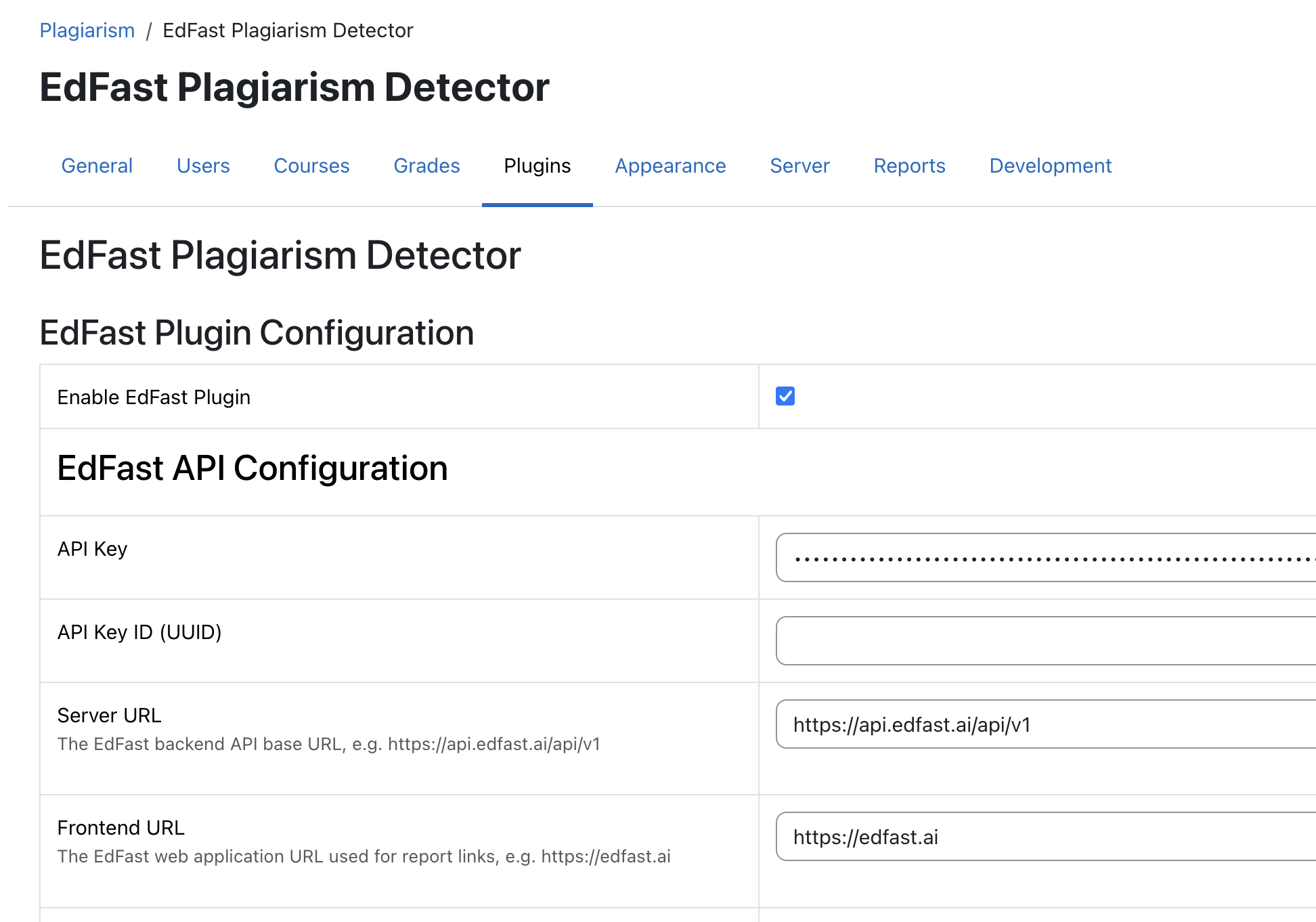
- Go to Site Administration ' Plugins ' Plagiarism ' EdFast
- Fill in:
| Field | Value |
|---|---|
| Enable EdFast | " Check |
| API Key | Paste from Step 1 |
| API Key ID | Paste from Step 1 |
| Server URL | https://api.edfast.ai/api/v1 |
| Frontend URL | https://edfast.ai |
| Webhook Secret | Paste from Step 1 |
Webhook Callback URL — leave blank to use your Moodle site URL automatically.
For local development behind a tunnel (e.g. ngrok), paste your public ngrok URL here.
Click Save changes
Step 3: Enable Seamless Report Access (SSO) — optional but recommended
When this setting is checked, Moodle passes your email address to EdFast when you click a report link. If an EdFast account with that email exists, you are automatically logged in as yourself. Teachers and admins get full access; students without an EdFast account get a read-only view.
| Setting | Effect |
|---|---|
| Checked | Report links auto-login matching EdFast accounts |
| Unchecked | All report links open in anonymous read-only viewer mode |
Step 4: Enable for an assignment
- Create or edit a Moodle Assignment
- In the assignment settings, find Plagiarism ' Enable EdFast plagiarism checking "
- Save the assignment
Usage
Teachers / Admins
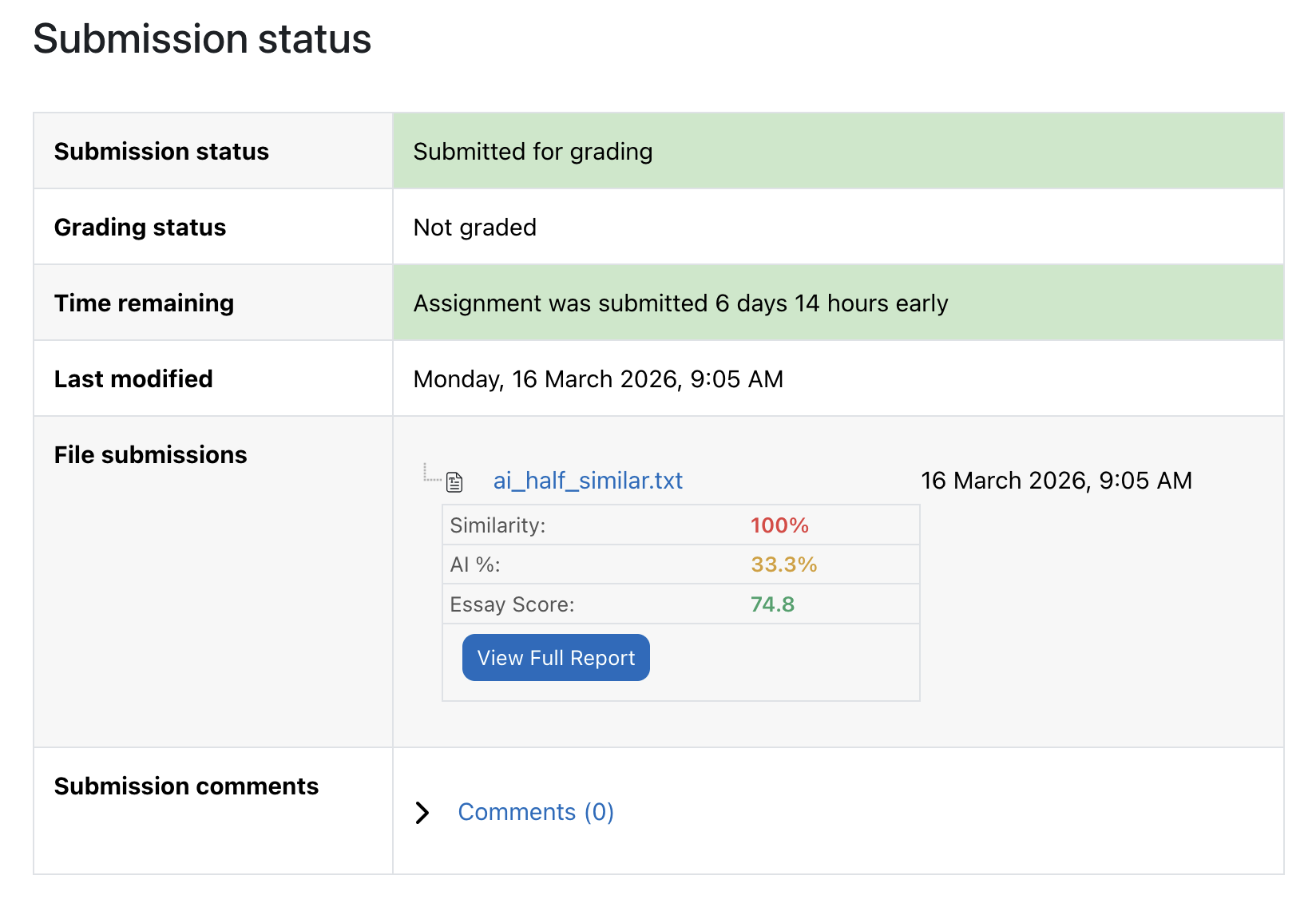
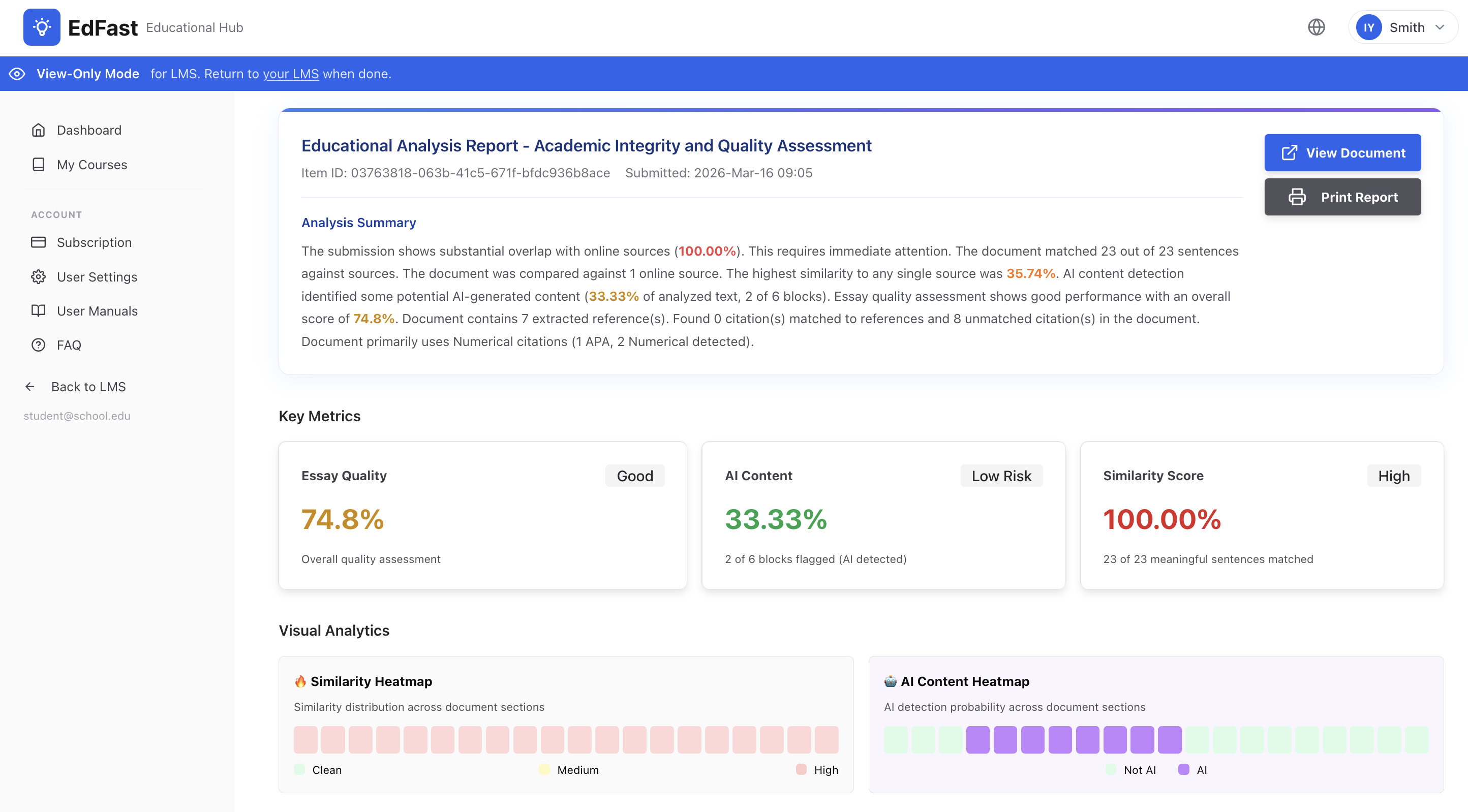
After students submit, EdFast scores appear in the assignment grading view:
- Similarity % — overlap with internet sources and other submissions
- AI % — fraction of text classified as AI-generated
- Essay Quality — readability and writing quality score
- View Full Report link — opens the detailed EdFast report
If SSO is enabled and your Moodle email matches your EdFast account, clicking the report link logs you in automatically.
Students
Students submit files as normal. After 30–90 seconds, their own scores appear on their submission page. Clicking View Full Report opens a read-only view of their report — no EdFast account required.
Supported File Types
| Format | Extension |
|---|---|
| PDF | .pdf |
| Microsoft Word | .doc, .docx |
| OpenDocument Text | .odt |
| Plain Text | .txt |
| Rich Text | .rtf |
Settings Reference
Plugin Settings
| Setting | Default | Description |
|---|---|---|
| Enable EdFast | Off | Master on/off switch |
| API Key | — | Institution API key from EdFast |
| API Key ID | — | UUID of the API key (for JWT signing) |
| Server URL | https://api.edfast.ai/api/v1 | Backend API base URL |
| Frontend URL | https://edfast.ai | Web app URL used in report links |
| Webhook Secret | — | HMAC secret for signing report tokens |
| Webhook Callback URL | auto | Override if behind NAT/tunnel |
| Enable Plagiarism Detection | On | Toggle similarity checking |
| Enable AI Detection | On | Toggle AI content detection |
| Enable Seamless SSO | Off | Auto-login by email match |
| Report Link Expiry | 30 min | How long a report link stays valid |
| LTI 1.3 Platform ID | blank | For full LTI 1.3 OIDC flow (advanced) |
| Debug Mode | Off | Verbose PHP logs |
Per-Assignment Settings (in assignment edit view)
| Setting | Default | Description |
|---|---|---|
| Enable EdFast | Off | Enable for this assignment |
| Similarity Threshold | 25% | Flag submissions above this % |
| AI Threshold | 20% | Flag submissions above this % |
How Report Access Works
Teacher clicks "View Full Report" in Moodle

  └── Plugin generates a short-lived JWT signed with Webhook Secret

        └── GET /api/v1/lms/viewer-token/{item_id}?lms_token=...

              "── SSO on + email matches EdFast account

              │     └── Full 8-hour session ' teacher sees full dashboard

              └── SSO off or no matching account

                    └── 30-min read-only viewer token ' student report only
The viewer token is scoped to a single item — it cannot be used to access any other part of EdFast.
LTI 1.3 (Advanced / Future)
The plugin includes an optional LTI 1.3 Platform ID field. When populated, report links use the LTI 1.3 OIDC flow instead of the JWT viewer-token approach.
For most institutions, this is not needed. Seamless SSO (JWT-based) covers all current use cases.
LTI 1.3 adds:
- Grade passback (AGS) — push EdFast scores to the Moodle gradebook
- Roster sync (NRPS)
- No API key setup for end users
See EdFast LTI Integration to register your Moodle instance as an LTI 1.3 platform.
Troubleshooting
No results appearing after submission
- Check Enable EdFast is checked in the assignment settings
- Verify the API key and API Key ID are correct
- Confirm your Moodle server can reach
https://api.edfast.ai(HTTPS port 443) - Check the Webhook Callback URL is publicly accessible from the internet
- Enable Debug Mode in plugin settings and review PHP error logs
"Plugin not configured" error
- API key is missing or the API key is revoked in EdFast
Webhook not received
- Moodle must have a public HTTPS URL — local-only installs need a tunnel (ngrok, Cloudflare Tunnel)
- Set the Webhook Callback URL in plugin settings to your public ngrok URL
Results appear but report link fails
- Check the Webhook Secret matches the value in EdFast institution settings
- Verify the Frontend URL is set to
https://edfast.ai - Check the report token has not expired (default 30 min — increase if needed)
SSO not working — still seeing read-only view
- Confirm Enable Seamless Report Access (SSO) is checked
- Confirm your Moodle account email matches your EdFast account email exactly
- Verify the Webhook Secret is set (required to sign the JWT that carries your email)
Changelog
v1.4.13 (2026-03-16)
Initial public release of the EdFast Moodle Plugin.
Plagiarism & AI Detection
- Automatic plagiarism detection on student file submissions — compares against internet sources and other submissions in the same course
- AI-generated content detection (ChatGPT, Claude, Gemini, etc.) — results appear alongside plagiarism scores in the Moodle grading view
- Per-submission scores: Similarity %, AI %, Essay Quality, and a direct link to the full EdFast report
Moodle Integration
- Supports Moodle 4.0–5.x (tested on 4.5 LTS and 5.x)
- Results appear directly in the Moodle assignment grading interface — no separate login required for teachers
- Students see their own scores and a read-only report link after submission
- Real-time result delivery via secure webhook callbacks
Seamless Report Access (SSO)
- Teachers and admins whose Moodle email matches their EdFast account are automatically logged in when clicking a report link
- Students without an EdFast account receive a secure read-only view of their own report
- All report links are time-limited (configurable, default 30 minutes) for security
Supported File Types
- PDF, Microsoft Word (.doc/.docx), OpenDocument Text (.odt), Plain Text (.txt), Rich Text (.rtf)
LTI 1.3 Support (optional)
- Optional LTI 1.3 integration for institutions that require grade passback to the Moodle gradebook and roster synchronisation
Support
- Documentation: edfast.ai
- Email: service@edfast.ai
- Issues: GitHub Issues
License
Copyright (C) 2026 EdFast
This program is free software: you can redistribute it and/or modify it under the terms of the GNU General Public License as published by the Free Software Foundation, either version 3 of the License, or (at your option) any later version.
This program is distributed in the hope that it will be useful, but WITHOUT ANY WARRANTY; without even the implied warranty of MERCHANTABILITY or FITNESS FOR A PARTICULAR PURPOSE. See the GNU General Public License for more details.
You should have received a copy of the GNU General Public License along with this program. If not, see https://www.gnu.org/licenses/.
1.4.14 (Moodle 4.0-5.1) (2026031800)
1.4.14 (Moodle 4.0-5.1)
Plugin type: Plagiarism
Frankenstyle component name: plagiarism_edfast
Version build number: 2026031800
Version release name: 1.4.14 (Moodle 4.0-5.1)
Maturity: Stable
Supported Moodle versions: 4.0, 4.1, 4.2, 4.3, 4.4, 4.5, 5.0, 5.1
Repository URL (Git): https://github.com/edfast-ai/edfast-moodle-plugin
Repository branch:
Repository tag:
Issue/bug tracker URL: https://github.com/edfast-ai/edfast-moodle-plugin/issues
EdFast Plagiarism & AI Detection Plugin for Moodle
Plugin name: plagiarism_edfast
Version: 1.4.13
Requires Moodle: 4.0 or later (4.x and 5.x)
Requires PHP: 8.0+
License: GPL v3
Maturity: Stable
Overview
EdFast is a plagiarism detection and AI content detection plugin for Moodle. It integrates with the EdFast cloud service to analyse student submissions and display results directly in the Moodle assignment interface.
What it does
- Plagiarism Detection — compares student work against internet sources and other students in the same course/batch
- AI Content Detection — identifies AI-generated writing (ChatGPT, Claude, Gemini, etc.) using a per-block RoBERTa model
- Cross-Batch Similarity — compares across all course assignments for comprehensive matching
- Seamless Report Access (SSO) — teachers and admins can view full EdFast reports without a separate login; students see read-only reports
- Real-time Webhooks — results are delivered instantly via secure HMAC-SHA256 signed callbacks
Requirements
- Moodle 4.0+ (tested on 4.5 LTS and 5.x)
- PHP 8.0+
- HTTPS enabled on your Moodle server (required for webhooks)
- An EdFast account with an institution API key — sign up at edfast.ai
Installation
Method 1: Upload ZIP (recommended)
- Download the latest release ZIP from the Releases page
- In Moodle: Site Administration ' Plugins ' Install plugins
- Upload the ZIP and follow the on-screen upgrade wizard
Method 2: Manual
cd /path/to/moodle/plagiarism

git clone https://github.com/edfastio/edfast-moodle-plugin edfast
Then go to Site Administration ' Notifications to run the database upgrade.
Configuration
Step 1: Get your EdFast API credentials
- Log in to edfast.ai as a School Admin
- Navigate to School Management ' Moodle LMS Integration
- Click Generate API Key
- Copy:
- API Key (the secret key value)
- API Key ID (the UUID shown alongside the key)
- Webhook Secret (shown when the key is generated — used to sign report links)
- Optionally add your Moodle server's IP to the whitelist
Step 2: Configure the plugin in Moodle
- Go to Site Administration ' Plugins ' Plagiarism ' EdFast
- Fill in:
| Field | Value |
|---|---|
| Enable EdFast | " Check |
| API Key | Paste from Step 1 |
| API Key ID | Paste from Step 1 |
| Server URL | https://api.edfast.ai/api/v1 |
| Frontend URL | https://edfast.ai |
| Webhook Secret | Paste from Step 1 |
Webhook Callback URL — leave blank to use your Moodle site URL automatically.
For local development behind a tunnel (e.g. ngrok), paste your public ngrok URL here.
Click Save changes
Step 3: Enable Seamless Report Access (SSO) — optional but recommended
When this setting is checked, Moodle passes your email address to EdFast when you click a report link. If an EdFast account with that email exists, you are automatically logged in as yourself. Teachers and admins get full access; students without an EdFast account get a read-only view.
| Setting | Effect |
|---|---|
| Checked | Report links auto-login matching EdFast accounts |
| Unchecked | All report links open in anonymous read-only viewer mode |
Step 4: Enable for an assignment
- Create or edit a Moodle Assignment
- In the assignment settings, find Plagiarism ' Enable EdFast plagiarism checking "
- Save the assignment
Usage
Teachers / Admins
After students submit, EdFast scores appear in the assignment grading view:
- Similarity % — overlap with internet sources and other submissions
- AI % — fraction of text classified as AI-generated
- Essay Quality — readability and writing quality score
- View Full Report link — opens the detailed EdFast report
If SSO is enabled and your Moodle email matches your EdFast account, clicking the report link logs you in automatically.
Students
Students submit files as normal. After 30–90 seconds, their own scores appear on their submission page. Clicking View Full Report opens a read-only view of their report — no EdFast account required.
Supported File Types
| Format | Extension |
|---|---|
| PDF | .pdf |
| Microsoft Word | .doc, .docx |
| OpenDocument Text | .odt |
| Plain Text | .txt |
| Rich Text | .rtf |
Settings Reference
Plugin Settings
| Setting | Default | Description |
|---|---|---|
| Enable EdFast | Off | Master on/off switch |
| API Key | — | Institution API key from EdFast |
| API Key ID | — | UUID of the API key (for JWT signing) |
| Server URL | https://api.edfast.ai/api/v1 | Backend API base URL |
| Frontend URL | https://edfast.ai | Web app URL used in report links |
| Webhook Secret | — | HMAC secret for signing report tokens |
| Webhook Callback URL | auto | Override if behind NAT/tunnel |
| Enable Plagiarism Detection | On | Toggle similarity checking |
| Enable AI Detection | On | Toggle AI content detection |
| Enable Seamless SSO | Off | Auto-login by email match |
| Report Link Expiry | 30 min | How long a report link stays valid |
| LTI 1.3 Platform ID | blank | For full LTI 1.3 OIDC flow (advanced) |
| Debug Mode | Off | Verbose PHP logs |
Per-Assignment Settings (in assignment edit view)
| Setting | Default | Description |
|---|---|---|
| Enable EdFast | Off | Enable for this assignment |
| Similarity Threshold | 25% | Flag submissions above this % |
| AI Threshold | 20% | Flag submissions above this % |
How Report Access Works
Teacher clicks "View Full Report" in Moodle

  └── Plugin generates a short-lived JWT signed with Webhook Secret

        └── GET /api/v1/lms/viewer-token/{item_id}?lms_token=...

              "── SSO on + email matches EdFast account

              │     └── Full 8-hour session ' teacher sees full dashboard

              └── SSO off or no matching account

                    └── 30-min read-only viewer token ' student report only
The viewer token is scoped to a single item — it cannot be used to access any other part of EdFast.
LTI 1.3 (Advanced / Future)
The plugin includes an optional LTI 1.3 Platform ID field. When populated, report links use the LTI 1.3 OIDC flow instead of the JWT viewer-token approach.
For most institutions, this is not needed. Seamless SSO (JWT-based) covers all current use cases.
LTI 1.3 adds:
- Grade passback (AGS) — push EdFast scores to the Moodle gradebook
- Roster sync (NRPS)
- No API key setup for end users
See EdFast LTI Integration to register your Moodle instance as an LTI 1.3 platform.
Troubleshooting
No results appearing after submission
- Check Enable EdFast is checked in the assignment settings
- Verify the API key and API Key ID are correct
- Confirm your Moodle server can reach
https://api.edfast.ai(HTTPS port 443) - Check the Webhook Callback URL is publicly accessible from the internet
- Enable Debug Mode in plugin settings and review PHP error logs
"Plugin not configured" error
- API key is missing or the API key is revoked in EdFast
Webhook not received
- Moodle must have a public HTTPS URL — local-only installs need a tunnel (ngrok, Cloudflare Tunnel)
- Set the Webhook Callback URL in plugin settings to your public ngrok URL
Results appear but report link fails
- Check the Webhook Secret matches the value in EdFast institution settings
- Verify the Frontend URL is set to
https://edfast.ai - Check the report token has not expired (default 30 min — increase if needed)
SSO not working — still seeing read-only view
- Confirm Enable Seamless Report Access (SSO) is checked
- Confirm your Moodle account email matches your EdFast account email exactly
- Verify the Webhook Secret is set (required to sign the JWT that carries your email)
Changelog
v1.4.13 (2026-03-16)
Initial public release of the EdFast Moodle Plugin.
Plagiarism & AI Detection
- Automatic plagiarism detection on student file submissions — compares against internet sources and other submissions in the same course
- AI-generated content detection (ChatGPT, Claude, Gemini, etc.) — results appear alongside plagiarism scores in the Moodle grading view
- Per-submission scores: Similarity %, AI %, Essay Quality, and a direct link to the full EdFast report
Moodle Integration
- Supports Moodle 4.0–5.x (tested on 4.5 LTS and 5.x)
- Results appear directly in the Moodle assignment grading interface — no separate login required for teachers
- Students see their own scores and a read-only report link after submission
- Real-time result delivery via secure webhook callbacks
Seamless Report Access (SSO)
- Teachers and admins whose Moodle email matches their EdFast account are automatically logged in when clicking a report link
- Students without an EdFast account receive a secure read-only view of their own report
- All report links are time-limited (configurable, default 30 minutes) for security
Supported File Types
- PDF, Microsoft Word (.doc/.docx), OpenDocument Text (.odt), Plain Text (.txt), Rich Text (.rtf)
LTI 1.3 Support (optional)
- Optional LTI 1.3 integration for institutions that require grade passback to the Moodle gradebook and roster synchronisation
Support
- Documentation: edfast.ai
- Email: service@edfast.ai
- Issues: GitHub Issues
License
Copyright (C) 2026 EdFast
This program is free software: you can redistribute it and/or modify it under the terms of the GNU General Public License as published by the Free Software Foundation, either version 3 of the License, or (at your option) any later version.
This program is distributed in the hope that it will be useful, but WITHOUT ANY WARRANTY; without even the implied warranty of MERCHANTABILITY or FITNESS FOR A PARTICULAR PURPOSE. See the GNU General Public License for more details.
You should have received a copy of the GNU General Public License along with this program. If not, see https://www.gnu.org/licenses/.