Anthropic API provider
Versions
Current version
1.0.1 (2026032201)
1.0.1
Plugin type: AI providers
Frankenstyle component name: aiprovider_anthropic
Version build number: 2026032201
Version release name: 1.0.1
Maturity: Stable
Supported Moodle versions: 5.1
Repository URL (Git): https://github.com/LucaDR1998/moodle-aiprovider_anthropic
Repository branch: moodle-5.1
Repository tag:
Issue/bug tracker URL: https://github.com/LucaDR1998/moodle-aiprovider_anthropic/issues
Anthropic API Provider for Moodle
Overview
The Anthropic API Provider plugin integrates Anthropic's Claude AI models into Moodle's AI framework, enabling powerful AI capabilities across your learning management system. This plugin supports text generation, text summarization, and text explanation using Anthropic's state-of-the-art Claude models.
Features
Supported AI Actions
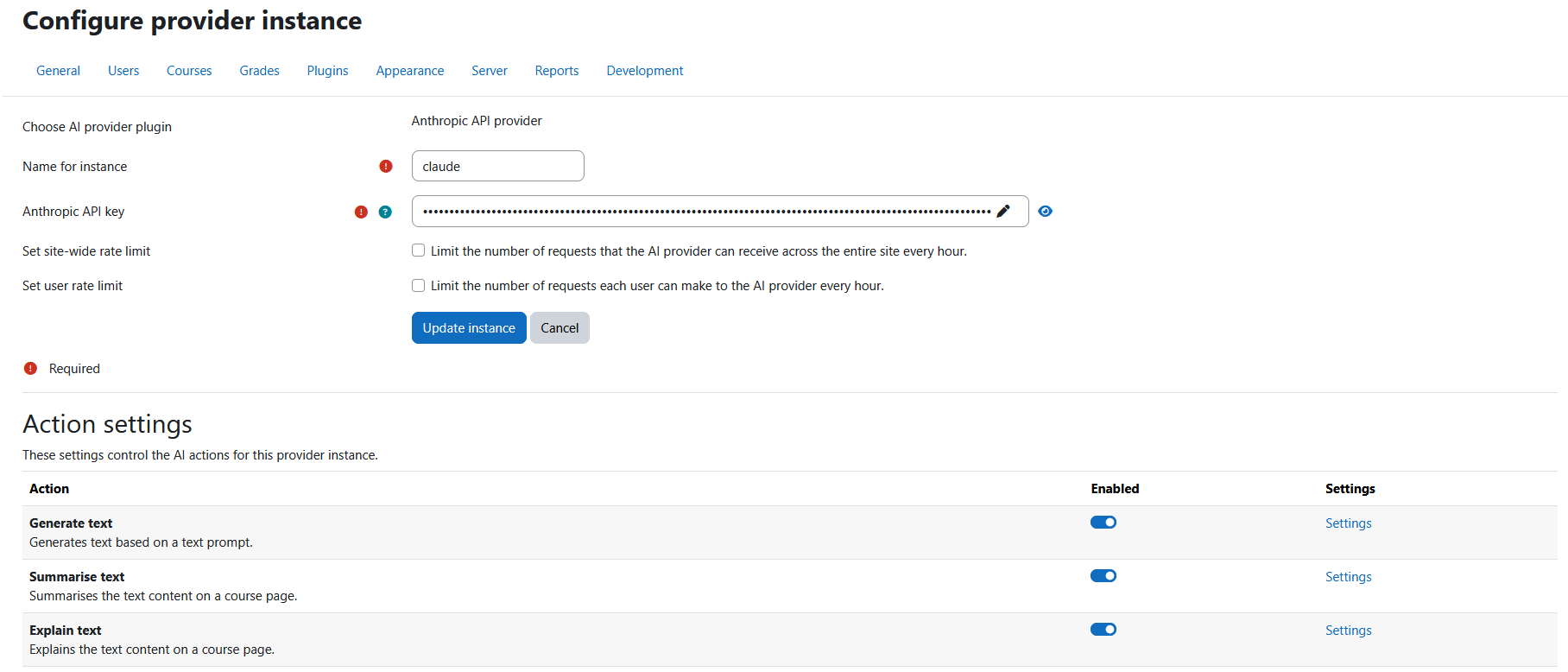
- Text Generation: Generate creative and informative text responses using Claude models
- Text Summarization: Automatically summarize long text content for better comprehension
- Explain Text: Ask the AI to explain complex text in simpler terms
Key Features
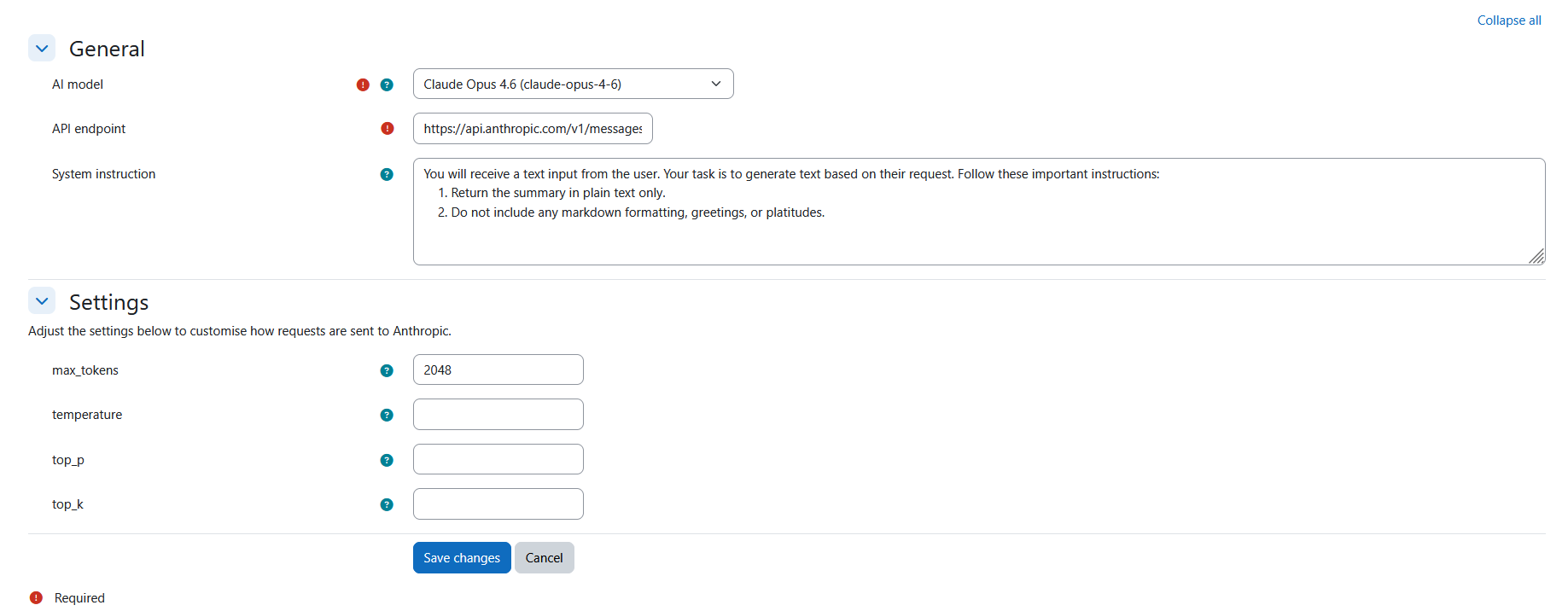
- Dynamic Model Discovery: Automatically fetches available Claude models from the Anthropic API with intelligent caching
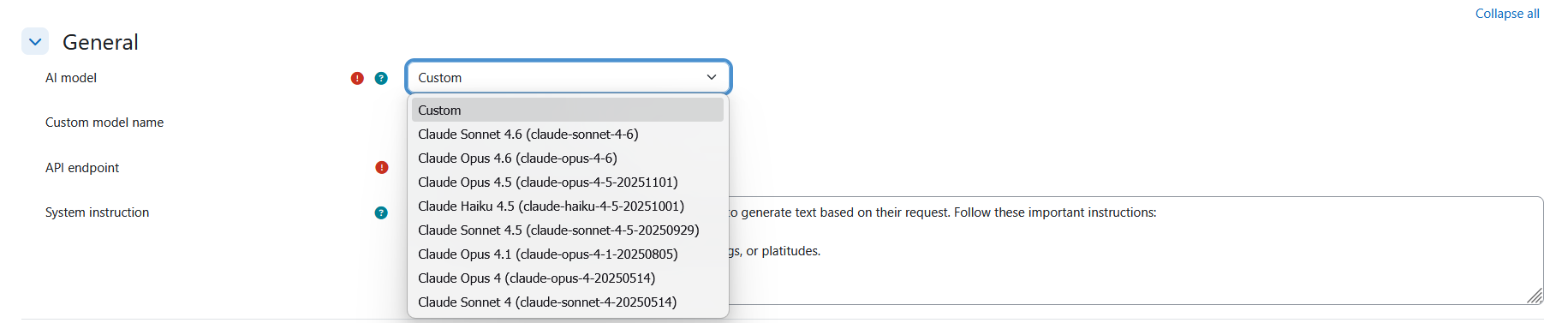
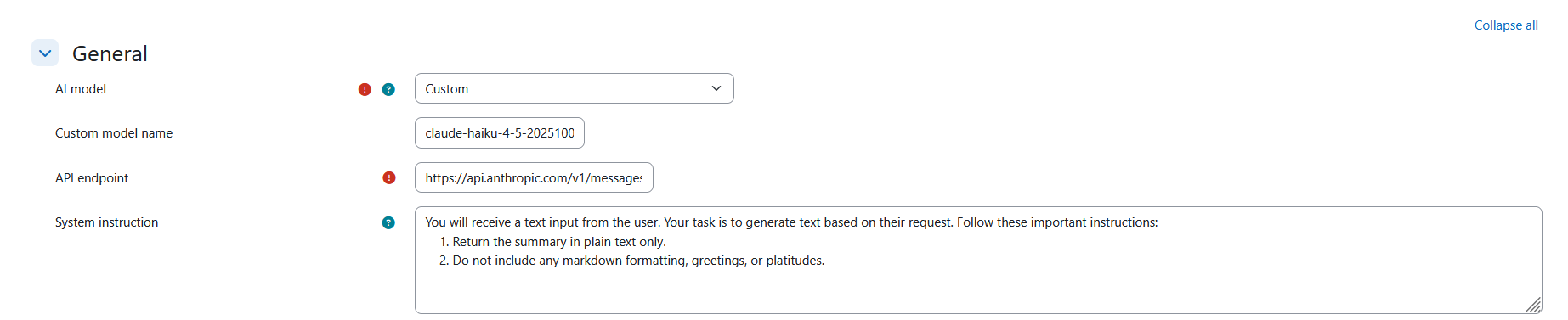
- Multiple Model Support: Choose from various Claude models (Opus, Sonnet, Haiku) or specify a custom model
- Privacy-First: No personal data is stored locally; user identification is anonymized
- Flexible Configuration: Customizable system instructions, API endpoints, and model parameters
- Moodle Integration: Seamlessly integrates with Moodle's core AI framework
Installation
Prerequisites
- Moodle 5.1+
- PHP 8.2 or higher
- Valid Anthropic API key
Installation Steps
Download the Plugin
- Download the plugin from the Moodle plugins directory
- Or clone from the GitHub repository
Install the Plugin
- Extract the plugin to your Moodle installation's
/ai/provider/directory - The final path should be:
/ai/provider/anthropic/
- Extract the plugin to your Moodle installation's
Install via Moodle Admin
- Log in to your Moodle site as an administrator
- Navigate to Site administration > Notifications
- Follow the installation prompts
Configure the Plugin
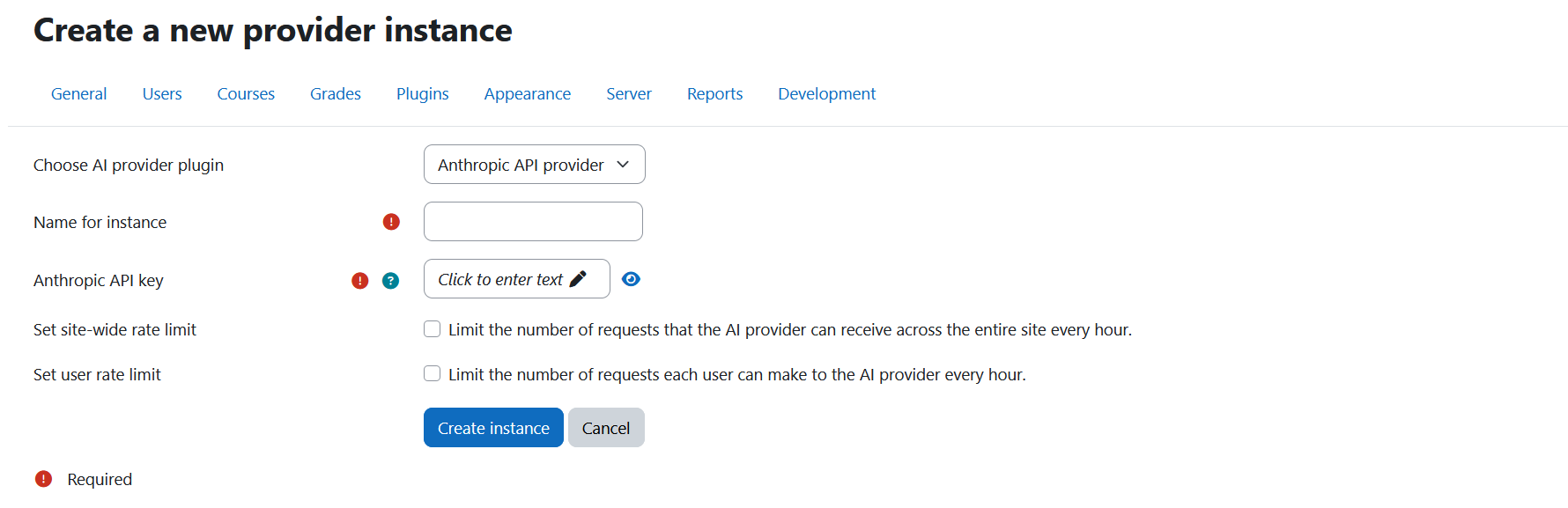
- Go to Site administration > Plugins > AI providers > Anthropic API provider
- Enter your Anthropic API key
- Configure model and rate limiting settings as needed
Configuration
API Key Setup
Get an Anthropic API Key
- Visit Claude Console API Keys
- Create a new API key
- Copy the key to your clipboard
Configure in Moodle
- Navigate to Site administration > Plugins > AI providers > Anthropic API provider
- Paste your API key in the "Anthropic API key" field
- Save changes
Model Configuration
Text Generation / Summarization / Explanation Models
- Default: First available model from API discovery
- Fallback Models: Claude Opus 4.6, Claude Sonnet 4.6, Claude Haiku 4.5
- Custom Models: Specify any model name not in the predefined list
- System Instructions: Customizable prompts for consistent AI behavior
Model Parameters
- max_tokens (default: 2048): Maximum number of tokens to generate
- temperature: Amount of randomness injected into the response
- top_p: Nucleus sampling parameter
- top_k: Top-K sampling parameter
- Extra Parameters: JSON-formatted additional parameters for advanced use cases
Usage
For Administrators
Enable AI Features
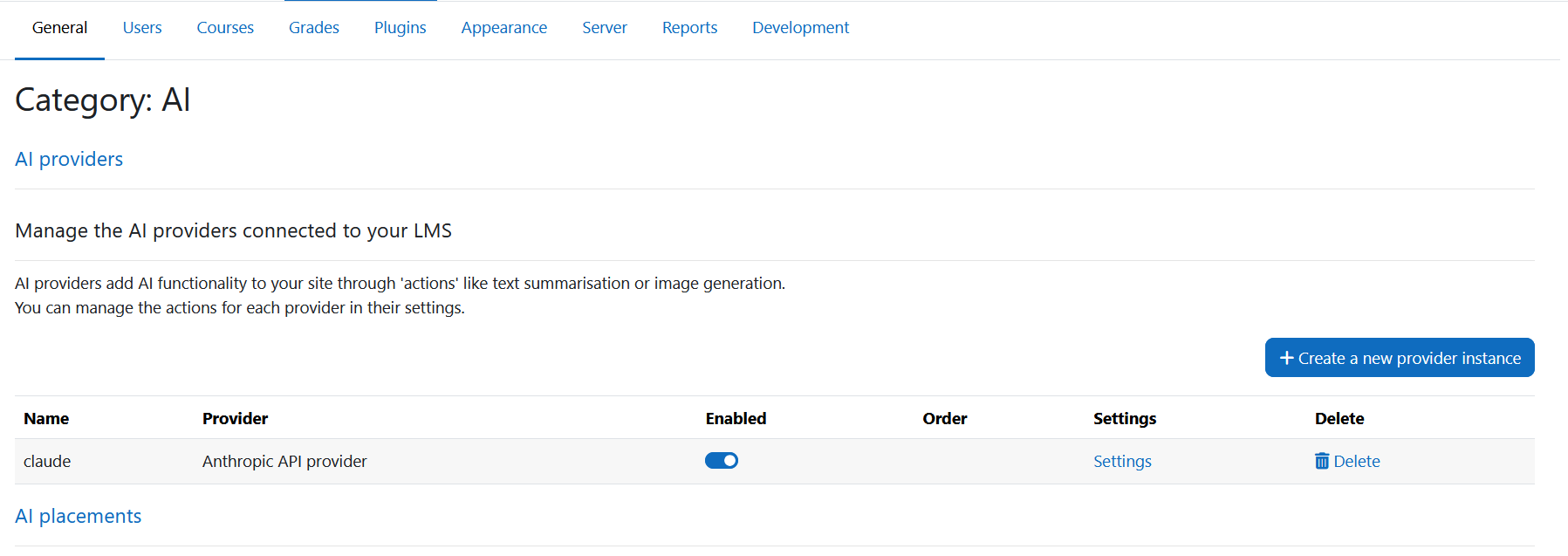
- Navigate to Site administration > Plugins > AI providers
- Enable the Anthropic API provider
- Configure global settings
Monitor Usage
- Check rate limiting status in the admin interface
- Monitor API usage through the Anthropic Console dashboard
For Teachers
- Access AI Features
- AI features are available in supported activities and resources
- Look for AI-powered options in content creation tools
Troubleshooting
Common Issues
API Key Errors
- Problem: Provider not configured or API errors
- Solution: Verify your API key is correctly entered in the plugin settings
Model Loading Issues
- Problem: Models not appearing in dropdown
- Solution: Verify your API key has access to the required models; the plugin will fall back to a static model list if the API is unreachable
Debug Information
Enable debugging in Moodle to get detailed error information:
- Go to Site administration > Development > Debugging
- Enable debugging and set appropriate levels
- Check the debug output for detailed error messages
Support
Getting Help
- Documentation: This README and inline help in Moodle
- Issue Tracker: GitHub Issues
Contributing
We welcome contributions! Please:
- Fork the repository
- Create a feature branch
- Make your changes
- Submit a pull request
License
This plugin is licensed under the GNU General Public License v3.0.
Credits
- Developer: Luca Demicheli Rubio (lucademichelirubio.portfolio@gmail.com)
- Copyright: 2026 Luca Demicheli Rubio
See Also
1.0.1 (2026032200)
1.0.1
Plugin type: AI providers
Frankenstyle component name: aiprovider_anthropic
Version build number: 2026032200
Version release name: 1.0.1
Maturity: Stable
Supported Moodle versions: 4.5
Repository URL (Git): https://github.com/LucaDR1998/moodle-aiprovider_anthropic
Repository branch: moodle-4.5
Repository tag:
Issue/bug tracker URL: https://github.com/LucaDR1998/moodle-aiprovider_anthropic/issues
Anthropic API Provider for Moodle
Overview
The Anthropic API Provider plugin integrates Anthropic's Claude AI models into Moodle's AI framework, enabling powerful AI capabilities across your learning management system. This plugin supports text generation, text summarization, and text explanation using Anthropic's state-of-the-art Claude models.
Features
Supported AI Actions
- Text Generation: Generate creative and informative text responses using Claude models
- Text Summarization: Automatically summarize long text content for better comprehension
- Explain Text: Ask the AI to explain complex text in simpler terms
Key Features
- Dynamic Model Discovery: Automatically fetches available Claude models from the Anthropic API with intelligent caching
- Multiple Model Support: Choose from various Claude models (Opus, Sonnet, Haiku) or specify a custom model
- Privacy-First: No personal data is stored locally; user identification is anonymized
- Flexible Configuration: Customizable system instructions, API endpoints, and model parameters
- Moodle Integration: Seamlessly integrates with Moodle's core AI framework
Installation
Prerequisites
- Moodle 4.5+
- PHP 8.0 or higher
- Valid Anthropic API key
Installation Steps
Download the Plugin
- Download the plugin from the Moodle plugins directory
- Or clone from the GitHub repository
Install the Plugin
- Extract the plugin to your Moodle installation's
/ai/provider/directory - The final path should be:
/ai/provider/anthropic/
- Extract the plugin to your Moodle installation's
Install via Moodle Admin
- Log in to your Moodle site as an administrator
- Navigate to Site administration > Notifications
- Follow the installation prompts
Configure the Plugin
- Go to Site administration > Plugins > AI providers > Anthropic API provider
- Enter your Anthropic API key
- Configure model and rate limiting settings as needed
Configuration
API Key Setup
Get an Anthropic API Key
- Visit Claude Console API Keys
- Create a new API key
- Copy the key to your clipboard
Configure in Moodle
- Navigate to Site administration > Plugins > AI providers > Anthropic API provider
- Paste your API key in the "Anthropic API key" field
- Save changes
Model Configuration
Text Generation / Summarization / Explanation Models
- Default: First available model from API discovery
- Fallback Models: Claude Opus 4.6, Claude Sonnet 4.6, Claude Haiku 4.5
- Custom Models: Specify any model name not in the predefined list
- System Instructions: Customizable prompts for consistent AI behavior
Model Parameters
- max_tokens (default: 2048): Maximum number of tokens to generate
- temperature: Amount of randomness injected into the response
- top_p: Nucleus sampling parameter
- top_k: Top-K sampling parameter
- Extra Parameters: JSON-formatted additional parameters for advanced use cases
Usage
For Administrators
Enable AI Features
- Navigate to Site administration > Plugins > AI providers
- Enable the Anthropic API provider
- Configure global settings
Monitor Usage
- Check rate limiting status in the admin interface
- Monitor API usage through the Anthropic Console dashboard
For Teachers
- Access AI Features
- AI features are available in supported activities and resources
- Look for AI-powered options in content creation tools
Troubleshooting
Common Issues
API Key Errors
- Problem: Provider not configured or API errors
- Solution: Verify your API key is correctly entered in the plugin settings
Model Loading Issues
- Problem: Models not appearing in dropdown
- Solution: Verify your API key has access to the required models; the plugin will fall back to a static model list if the API is unreachable
Debug Information
Enable debugging in Moodle to get detailed error information:
- Go to Site administration > Development > Debugging
- Enable debugging and set appropriate levels
- Check the debug output for detailed error messages
Support
Getting Help
- Documentation: This README and inline help in Moodle
- Issue Tracker: GitHub Issues
Contributing
We welcome contributions! Please:
- Fork the repository
- Create a feature branch
- Make your changes
- Submit a pull request
License
This plugin is licensed under the GNU General Public License v3.0.
Credits
- Developer: Luca Demicheli Rubio (lucademichelirubio.portfolio@gmail.com)
- Copyright: 2026 Luca Demicheli Rubio
See Also
1.0.0 (2026031900)
1.0.0
Plugin type: AI providers
Frankenstyle component name: aiprovider_anthropic
Version build number: 2026031900
Version release name: 1.0.0
Maturity: Stable
Supported Moodle versions: 4.5
Repository URL (Git): https://github.com/LucaDR1998/moodle-aiprovider_anthropic
Repository branch: moodle-4.5
Repository tag:
Issue/bug tracker URL: https://github.com/LucaDR1998/moodle-aiprovider_anthropic/issues
Anthropic API Provider for Moodle
Overview
The Anthropic API Provider plugin integrates Anthropic's Claude AI models into Moodle's AI framework, enabling powerful AI capabilities across your learning management system. This plugin supports text generation, text summarization, and text explanation using Anthropic's state-of-the-art Claude models.
Features
Supported AI Actions
- Text Generation: Generate creative and informative text responses using Claude models
- Text Summarization: Automatically summarize long text content for better comprehension
- Explain Text: Ask the AI to explain complex text in simpler terms
Key Features
- Dynamic Model Discovery: Automatically fetches available Claude models from the Anthropic API with intelligent caching
- Multiple Model Support: Choose from various Claude models (Opus, Sonnet, Haiku) or specify a custom model
- Privacy-First: No personal data is stored locally; user identification is anonymized
- Flexible Configuration: Customizable system instructions, API endpoints, and model parameters
- Moodle Integration: Seamlessly integrates with Moodle's core AI framework
Installation
Prerequisites
- Moodle 4.5+
- PHP 8.0 or higher
- Valid Anthropic API key
Installation Steps
Download the Plugin
- Download the plugin from the Moodle plugins directory
- Or clone from the GitHub repository
Install the Plugin
- Extract the plugin to your Moodle installation's
/ai/provider/directory - The final path should be:
/ai/provider/anthropic/
- Extract the plugin to your Moodle installation's
Install via Moodle Admin
- Log in to your Moodle site as an administrator
- Navigate to Site administration > Notifications
- Follow the installation prompts
Configure the Plugin
- Go to Site administration > Plugins > AI providers > Anthropic API provider
- Enter your Anthropic API key
- Configure model and rate limiting settings as needed
Configuration
API Key Setup
Get an Anthropic API Key
- Visit Claude Console API Keys
- Create a new API key
- Copy the key to your clipboard
Configure in Moodle
- Navigate to Site administration > Plugins > AI providers > Anthropic API provider
- Paste your API key in the "Anthropic API key" field
- Save changes
Model Configuration
Text Generation / Summarization / Explanation Models
- Default: First available model from API discovery
- Fallback Models: Claude Opus 4.6, Claude Sonnet 4.6, Claude Haiku 4.5
- Custom Models: Specify any model name not in the predefined list
- System Instructions: Customizable prompts for consistent AI behavior
Model Parameters
- max_tokens (default: 2048): Maximum number of tokens to generate
- temperature: Amount of randomness injected into the response
- top_p: Nucleus sampling parameter
- top_k: Top-K sampling parameter
- Extra Parameters: JSON-formatted additional parameters for advanced use cases
Usage
For Administrators
Enable AI Features
- Navigate to Site administration > Plugins > AI providers
- Enable the Anthropic API provider
- Configure global settings
Monitor Usage
- Check rate limiting status in the admin interface
- Monitor API usage through the Anthropic Console dashboard
For Teachers
- Access AI Features
- AI features are available in supported activities and resources
- Look for AI-powered options in content creation tools
Troubleshooting
Common Issues
API Key Errors
- Problem: Provider not configured or API errors
- Solution: Verify your API key is correctly entered in the plugin settings
Model Loading Issues
- Problem: Models not appearing in dropdown
- Solution: Verify your API key has access to the required models; the plugin will fall back to a static model list if the API is unreachable
Debug Information
Enable debugging in Moodle to get detailed error information:
- Go to Site administration > Development > Debugging
- Enable debugging and set appropriate levels
- Check the debug output for detailed error messages
Support
Getting Help
- Documentation: This README and inline help in Moodle
- Issue Tracker: GitHub Issues
Contributing
We welcome contributions! Please:
- Fork the repository
- Create a feature branch
- Make your changes
- Submit a pull request
License
This plugin is licensed under the GNU General Public License v3.0.
Credits
- Developer: Luca Demicheli Rubio (lucademichelirubio.portfolio@gmail.com)
- Copyright: 2026 Luca Demicheli Rubio
See Also
1.0.0 (2026031800)
1.0.0
Plugin type: AI providers
Frankenstyle component name: aiprovider_anthropic
Version build number: 2026031800
Version release name: 1.0.0
Maturity: Stable
Supported Moodle versions: 5.1
Repository URL (Git): https://github.com/LucaDR1998/moodle-aiprovider_anthropic.git
Repository branch: moodle-5.1
Repository tag:
Issue/bug tracker URL: https://github.com/LucaDR1998/moodle-aiprovider_anthropic/issues
Anthropic API Provider for Moodle
Overview
The Anthropic API Provider plugin integrates Anthropic's Claude AI models into Moodle's AI framework, enabling powerful AI capabilities across your learning management system. This plugin supports text generation, text summarization, and text explanation using Anthropic's state-of-the-art Claude models.
Features
Supported AI Actions
- Text Generation: Generate creative and informative text responses using Claude models
- Text Summarization: Automatically summarize long text content for better comprehension
- Explain Text: Ask the AI to explain complex text in simpler terms
Key Features
- Dynamic Model Discovery: Automatically fetches available Claude models from the Anthropic API with intelligent caching
- Multiple Model Support: Choose from various Claude models (Opus, Sonnet, Haiku) or specify a custom model
- Privacy-First: No personal data is stored locally; user identification is anonymized
- Flexible Configuration: Customizable system instructions, API endpoints, and model parameters
- Moodle Integration: Seamlessly integrates with Moodle's core AI framework
Installation
Prerequisites
- Moodle 5.1+
- PHP 8.2 or higher
- Valid Anthropic API key
Installation Steps
Download the Plugin
- Download the plugin from the Moodle plugins directory
- Or clone from the GitHub repository
Install the Plugin
- Extract the plugin to your Moodle installation's
/ai/provider/directory - The final path should be:
/ai/provider/anthropic/
- Extract the plugin to your Moodle installation's
Install via Moodle Admin
- Log in to your Moodle site as an administrator
- Navigate to Site administration > Notifications
- Follow the installation prompts
Configure the Plugin
- Go to Site administration > Plugins > AI providers > Anthropic API provider
- Enter your Anthropic API key
- Configure model and rate limiting settings as needed
Configuration
API Key Setup
Get an Anthropic API Key
- Visit Claude Console API Keys
- Create a new API key
- Copy the key to your clipboard
Configure in Moodle
- Navigate to Site administration > Plugins > AI providers > Anthropic API provider
- Paste your API key in the "Anthropic API key" field
- Save changes
Model Configuration
Text Generation / Summarization / Explanation Models
- Default: First available model from API discovery
- Fallback Models: Claude Opus 4.6, Claude Sonnet 4.6, Claude Haiku 4.5
- Custom Models: Specify any model name not in the predefined list
- System Instructions: Customizable prompts for consistent AI behavior
Model Parameters
- max_tokens (default: 2048): Maximum number of tokens to generate
- temperature: Amount of randomness injected into the response
- top_p: Nucleus sampling parameter
- top_k: Top-K sampling parameter
- Extra Parameters: JSON-formatted additional parameters for advanced use cases
Usage
For Administrators
Enable AI Features
- Navigate to Site administration > Plugins > AI providers
- Enable the Anthropic API provider
- Configure global settings
Monitor Usage
- Check rate limiting status in the admin interface
- Monitor API usage through the Anthropic Console dashboard
For Teachers
- Access AI Features
- AI features are available in supported activities and resources
- Look for AI-powered options in content creation tools
Troubleshooting
Common Issues
API Key Errors
- Problem: Provider not configured or API errors
- Solution: Verify your API key is correctly entered in the plugin settings
Model Loading Issues
- Problem: Models not appearing in dropdown
- Solution: Verify your API key has access to the required models; the plugin will fall back to a static model list if the API is unreachable
Debug Information
Enable debugging in Moodle to get detailed error information:
- Go to Site administration > Development > Debugging
- Enable debugging and set appropriate levels
- Check the debug output for detailed error messages
Support
Getting Help
- Documentation: This README and inline help in Moodle
- Issue Tracker: GitHub Issues
Contributing
We welcome contributions! Please:
- Fork the repository
- Create a feature branch
- Make your changes
- Submit a pull request
License
This plugin is licensed under the GNU General Public License v3.0.
Credits
- Developer: Luca Demicheli Rubio (lucademichelirubio.portfolio@gmail.com)
- Copyright: 2026 Luca Demicheli Rubio