Process Mining Log Builder (local_pmlog)
Overview
Process Mining Log Builder is a Moodle local plugin that extracts, normalizes, stores, and exports course event data for process-mining analysis.
The plugin converts Moodle standard log events into a structured activity log that can be reviewed inside Moodle and exported for use in external tools.
Main Features
- Manual log generation at course level
- Background processing through Moodle ad-hoc tasks
- Scheduled execution through Moodle scheduled tasks
- Sequential deduplication with configurable time windows
- Per-student timeline view inside Moodle
- Export in CSV and XES formats
- Export modes for generic, anonymized, and named output
Status
- Version:
1.0.1
- Maturity:
STABLE
- Component:
local_pmlog
Requirements
- Moodle
4.1 or later
- A PHP version supported by the target Moodle installation
- Moodle cron configured and running
Installation
- Copy the plugin to
local/pmlog.
- Open Site administration > Notifications.
- Complete the installation process.
Access
Course Access
Users with the capability local/pmlog:manage can access the plugin from course navigation.
Default allowed archetypes:
manager
editingteacher
teacher
Site Administration
The plugin adds a single administration entry under:
- Site administration > Plugins > Local plugins > Process Mining Log Builder
This page is used to configure scheduled builds.
Manual Processing
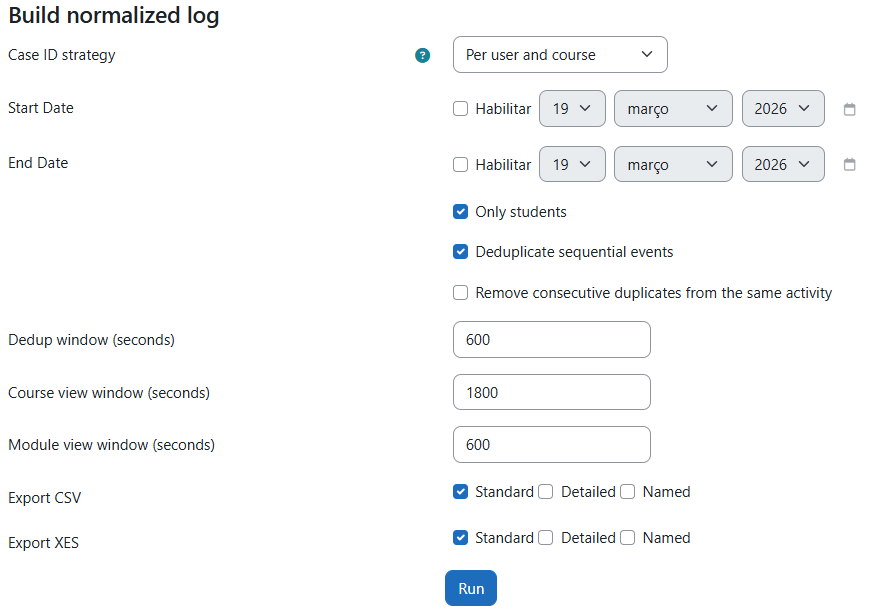
At course level, the plugin allows the user to:
- define optional start and end dates;
- limit processing to student actions only;
- enable sequential deduplication;
- enable stricter duplicate removal for the same activity;
- configure deduplication and view-collapse windows;
- generate CSV and XES files in generic, anonymized, and named modes.
When submitted, the process is queued as an ad-hoc task and executed by Moodle cron.
The course page also provides:
- execution status;
- links to the latest export artifacts;
- a summary of the latest run settings;
- event counts by student;
- links to individual student timelines.
Scheduled Processing
Scheduled execution is configured through the administration page described above.
Available options include:
- enabling or disabling scheduled builds;
- selecting the courses to be processed;
- enabling student-only filtering;
- configuring deduplication behavior;
- setting deduplication and view-collapse windows;
- enabling CSV and XES generation in generic, anonymized, and named modes.
The scheduled task is defined in db/tasks.php and, by default, runs daily at 02:00. The schedule can be adjusted through Moodle scheduled task administration.
Stored Data
Normalized events are stored in the {local_pmlog_events} table.
Relevant fields include:
courseid
userid
caseid
activity
activitygroup
timecreated
cmid
component
eventname
action
target
metajson
Case Definition
The plugin groups events by learner within the course. In practice, each exported trace represents one user in one course.
Export Formats
CSV
The CSV export contains:
caseid
activity
timestamp
userid
courseid
cmid
component
eventname
action
target
Available CSV modes:
Generic: exports the normalized activity label.
Anonymized: exports the normalized activity label enriched with an anonymized module marker, such as Quiz open [cmid:42].
Named: exports the normalized activity label enriched with the real activity name, such as Quiz open: Week 1 Quiz.
XES
The XES export uses one trace per caseid and one event per normalized log row.
Generic XES includes:
- log-level
concept:name using a neutral course identifier such as course:123
- trace-level
concept:name based on caseid
- event-level
concept:name based on the normalized activity
time:timestamp
org:resource derived from userid
userid
courseid
- optional
cmid, activitygroup, component, eventname, action, and target
Additional XES modes:
Anonymized: enriches the event-level concept:name with an anonymized module marker.
Named: uses real course names at log and trace level and enriches the event-level concept:name with the real activity name when available.
Privacy
This plugin processes personal data derived from Moodle activity logs.
- It reads event data from Moodle standard logs.
- It stores a normalized copy in
{local_pmlog_events}.
- It provides internal timeline views for authorized users.
- CSV and XES exports include numeric user and course identifiers.
- Named exports may include real course and activity names.
The plugin includes a Moodle Privacy API provider.
License
Copyright 2026 rafaxluz
Licensed under the GNU GPL v3 or later.