
Collaborative Match
Versions
Current version
0.2 Alpha (2026041700)
0.2 Alpha
Plugin type: Activities
Frankenstyle component name: mod_collabmatch
Version build number: 2026041700
Version release name: 0.2 Alpha
Maturity: Alpha
Supported Moodle versions: 4.4, 4.5, 5.0, 5.1, 5.2
Repository URL (Git): https://github.com/JohanMyF/collabmatch
Repository branch:
Repository tag:
Issue/bug tracker URL: https://github.com/JohanMyF/collabmatch/issues
CollabMatch (mod_collabmatch)
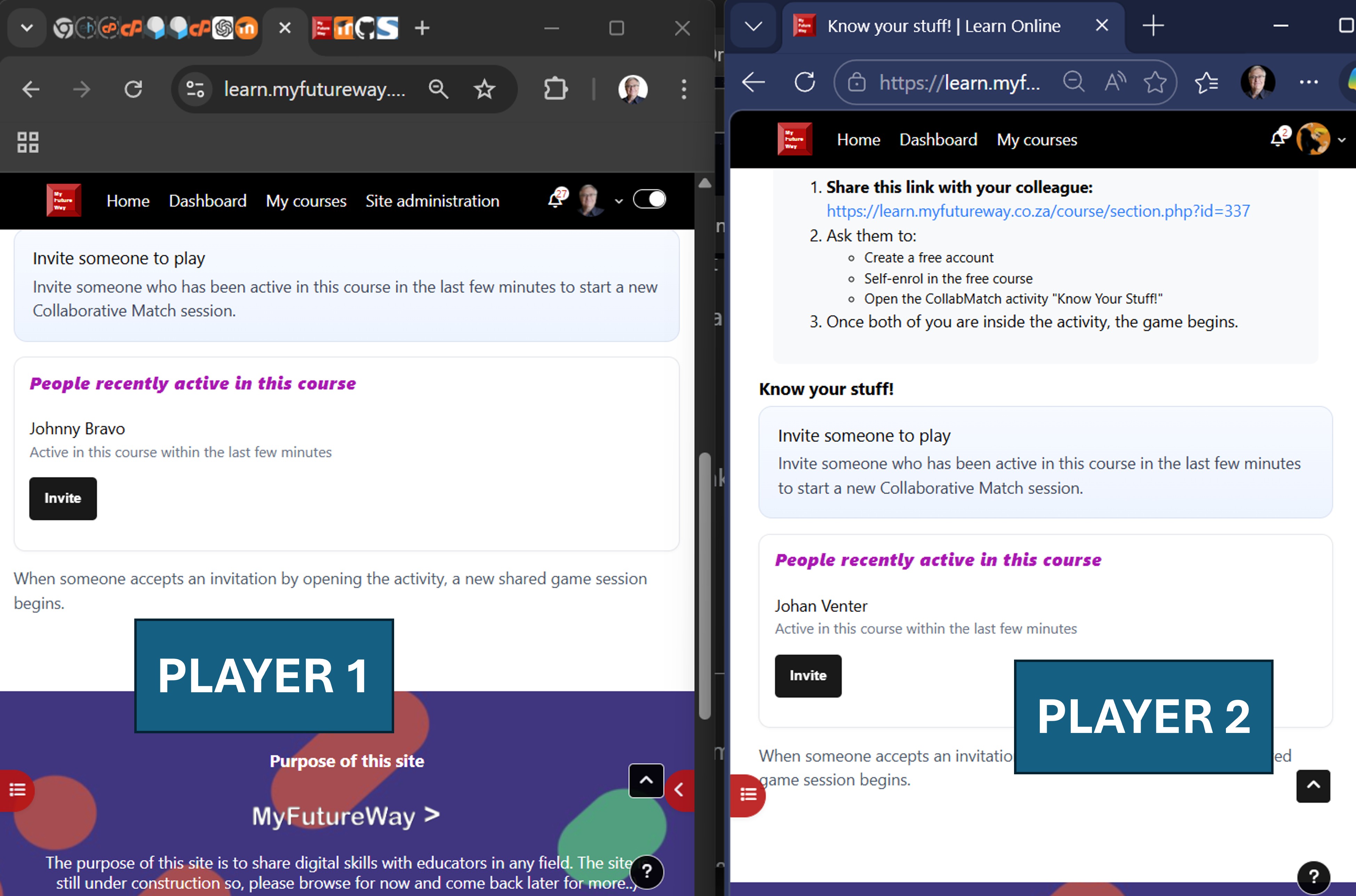
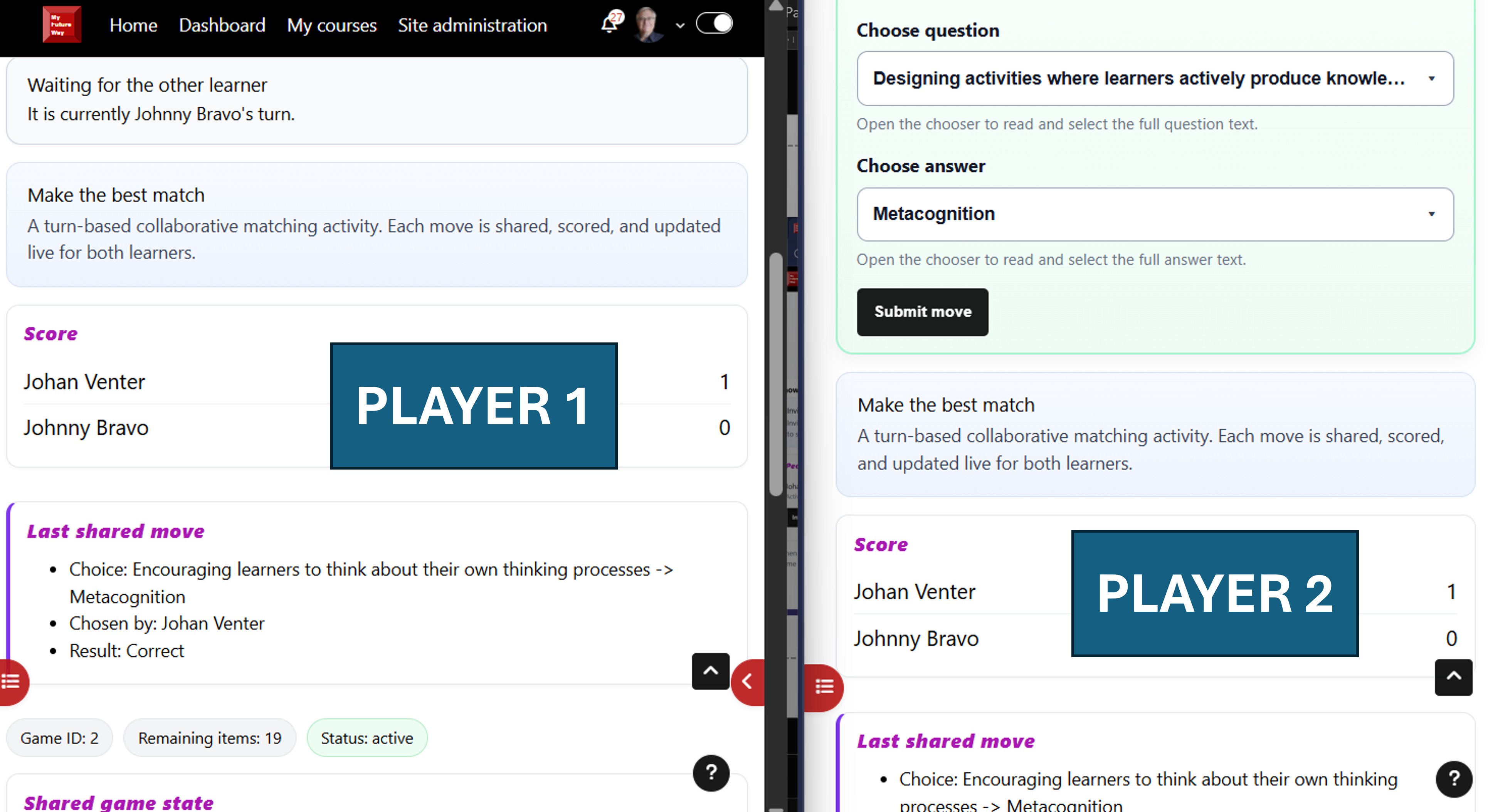
CollabMatch is a custom Moodle Activity module that enables turn-based, two-player collaborative matching games within a course.
It is designed to support pseudo-synchronous interaction, allowing learners to engage with one another even when they are not online at the same time.
🎯 Purpose
CollabMatch was created to explore a key limitation in many online learning environments:
Learners often work in isolation, even when enrolled in the same course.
This activity introduces a lightweight, structured way for learners to:
- interact directly,
- take turns,
- and engage cognitively through gameplay.
🧠 Pedagogical Rationale
CollabMatch supports:
- Active recall through matching tasks
- Social learning via peer interaction
- Motivation through game mechanics
- Reflection through turn-based pacing
The turn-based design is especially suited to:
- asynchronous courses
- low-bandwidth environments
- learners in different time zones
⚙️ Features
- Two-player turn-based gameplay
- Player invitation system (one learner invites another)
- AJAX polling for near real-time updates
- Persistent game state across sessions
- Integration with Moodle Gradebook
- Clean separation between activity configuration and gameplay data
-️ Architecture Overview
The plugin is built as a standard Moodle Activity module:
/public
/mod
/collabmatch
"── backup/
│ └── moodle2/
│ "── backup_collabmatch_activity_task.class.php
│ "── backup_collabmatch_stepslib.php
│ "── restore_collabmatch_activity_task.class.php
│ └── restore_collabmatch_stepslib.php
│
"── classes/
│ └── task/
│ └── cleanup_stale_games.php # Scheduled task logic (stale game cleanup)
│
"── db/
│ "── access.php # Capabilities / permissions
│ "── install.xml # Database schema
│ "── messages.php # Message provider definitions
│ "── tasks.php # Scheduled task registration
│ └── upgrade.php # Database upgrades
│
"── lang/
│ └── en/
│ └── collabmatch.php # Language strings
│
"── pix/
│ └── (standard plugin icons) # Activity icons and assets
│
"── index.php # Entry point for activity listing
"── lib.php # Core API functions (add/update/delete, grading, helpers)
"── mod_form.php # Activity settings form (teacher configuration)
"── view.php # Main gameplay + UI + AJAX handling
"── version.php # Plugin version and component metadata
"── README.md # Documentation
-️ Data Model
The plugin uses three core tables:
collabmatch
Stores activity configuration
collabmatch_game
Stores individual game instances between players
collabmatch_move
Stores turn-by-turn gameplay actions
This separation ensures:
- clean activity duplication
- safe backup and restore
- no unintended carryover of in-progress games
🔁 Backup and Restore
CollabMatch fully supports Moodle’s backup and restore framework.
Verified behaviour:
- Activity duplication works correctly
- Full course backup and restore succeed
- Activity settings are preserved
- Gradebook entries are restored
- Active gameplay sessions are NOT restored (intended behaviour)
Technical highlights:
- Proper use of
prepare_activity_structure() - Correct mapping via
set_mapping(..., true) - Activity instance registration using
apply_activity_instance() - Required restore task methods implemented:
define_decode_contents()define_decode_rules()
This ensures the plugin does not break course-level backup/restore processes.
📊 Gradebook Integration
CollabMatch writes to the Moodle gradebook.
- Grades are preserved during backup and restore
- Grade items are recreated correctly in restored courses
🔌 Installation
Copy the plugin folder into:
Log in to Moodle as an administrator
Navigate to:
Complete the installation process
🧪 Usage
Add the activity to a course:
Configure activity settings
Students:
- open the activity
- invite another participant
- take turns playing the matching game
⚠️ Design Notes
- The activity uses polling (AJAX) rather than WebSockets
- Gameplay is pseudo-synchronous, not real-time
- The invitation UX may require further refinement for clarity and visibility
🚧 Known Limitations / Future Improvements
- Stronger invitation notifications (more visible / assertive)
- Optional real-time updates (WebSocket-based)
- Expanded game types beyond matching
- Improved onboarding for first-time users
'🏫 Educational Context
This plugin was developed as part of a broader initiative to:
- empower educators to build Moodle extensions without deep coding experience
- demonstrate how AI can assist in software development
- show that meaningful interactivity can be achieved within Moodle’s architecture
🔄 Game Lifecycle and Data Cleanup
CollabMatch is designed to manage gameplay data responsibly over time.
Because the activity supports asynchronous, turn-based interaction, it is expected that some games may not be completed. To ensure system health and database efficiency, CollabMatch includes automatic cleanup of stale or abandoned games.
🧠 Why this matters
In real-world use:
learners may not respond to invitations
sessions may expire
games may be started but never completed
Without cleanup, these inactive records would accumulate and degrade system performance and clarity.
⚙️ Cleanup Strategy
CollabMatch uses a scheduled task (cron job) to periodically remove stale game data.
🔁 Automated cleanup rules
The system currently removes:
Unaccepted invitations
Games with status invited that are older than 48 hours
Games with no moves
Active or waiting games where no moves were ever made, older than 7 days
Stalled games
Active or waiting games where at least one move was made, but no activity occurred for 14 days
All cleanup operations are performed safely using a shared deletion function to ensure that:
related move records are removed
no orphaned database records remain
🧹 What gets deleted
When a stale game is removed:
the record in collabmatch_game is deleted
all associated records in collabmatch_move are also deleted
This ensures full data integrity and avoids residual or inconsistent data.
' When cleanup runs
Cleanup is handled by Moodle’s scheduled task system.
Runs automatically once per day
Typically executed during off-peak hours
Can also be triggered manually by an administrator
🧪 Administrative visibility
When the cleanup task runs, it logs its actions, including:
which games were deleted
how many records were affected
This allows administrators to monitor system behaviour and verify that cleanup is functioning correctly.
🎯 Design Philosophy
The cleanup system reflects a deliberate design choice:
CollabMatch preserves meaningful interaction—but removes abandoned or non-productive activity.
This balances:
learner flexibility (time to respond and complete games)
system clarity (removal of inactive or forgotten sessions)
🚧 Future Enhancements
Planned improvements to the lifecycle include:
marking games as stale before deletion
allowing learners to leave a game explicitly
improved messaging when returning to inactive games
optional retention of completed games for analytics
📌 Summary
CollabMatch is not only interactive—it is self-maintaining.
Through scheduled cleanup, the system ensures that:
only meaningful gameplay persists
database growth remains controlled
learners encounter a clean and relevant environment
" License
GNU GPL v3 or later
🙌 Acknowledgements
Developed with the assistance of AI as a collaborative tool, and guided by Moodle’s developer documentation and architecture principles.
📌 Final Note
CollabMatch is not just a plugin—it is a demonstration that:
With the right guidance and tools, non-professional developers can successfully build robust, production-capable Moodle activities.
0.2 Alpha (2026041300)
0.2 Alpha
Plugin type: Activities
Frankenstyle component name: mod_collabmatch
Version build number: 2026041300
Version release name: 0.2 Alpha
Maturity: Alpha
Supported Moodle versions: 4.4, 4.5, 5.0, 5.1, 5.2
Repository URL (Git): https://github.com/JohanMyF/moodle-mod_collabmatch
Repository branch:
Repository tag:
Issue/bug tracker URL: https://github.com/JohanMyF/collabmatch/issues
CollabMatch (mod_collabmatch)
CollabMatch is a custom Moodle Activity module that enables turn-based, two-player collaborative matching games within a course.
It is designed to support pseudo-synchronous interaction, allowing learners to engage with one another even when they are not online at the same time.
🎯 Purpose
CollabMatch was created to explore a key limitation in many online learning environments:
Learners often work in isolation, even when enrolled in the same course.
This activity introduces a lightweight, structured way for learners to:
- interact directly,
- take turns,
- and engage cognitively through gameplay.
🧠 Pedagogical Rationale
CollabMatch supports:
- Active recall through matching tasks
- Social learning via peer interaction
- Motivation through game mechanics
- Reflection through turn-based pacing
The turn-based design is especially suited to:
- asynchronous courses
- low-bandwidth environments
- learners in different time zones
⚙️ Features
- Two-player turn-based gameplay
- Player invitation system (one learner invites another)
- AJAX polling for near real-time updates
- Persistent game state across sessions
- Integration with Moodle Gradebook
- Clean separation between activity configuration and gameplay data
-️ Architecture Overview
The plugin is built as a standard Moodle Activity module:
/public
/mod
/collabmatch
"── backup/
│ └── moodle2/
│ "── backup_collabmatch_activity_task.class.php
│ "── backup_collabmatch_stepslib.php
│ "── restore_collabmatch_activity_task.class.php
│ └── restore_collabmatch_stepslib.php
│
"── classes/
│ └── task/
│ └── cleanup_stale_games.php # Scheduled task logic (stale game cleanup)
│
"── db/
│ "── access.php # Capabilities / permissions
│ "── install.xml # Database schema
│ "── messages.php # Message provider definitions
│ "── tasks.php # Scheduled task registration
│ └── upgrade.php # Database upgrades
│
"── lang/
│ └── en/
│ └── collabmatch.php # Language strings
│
"── pix/
│ └── (standard plugin icons) # Activity icons and assets
│
"── index.php # Entry point for activity listing
"── lib.php # Core API functions (add/update/delete, grading, helpers)
"── mod_form.php # Activity settings form (teacher configuration)
"── view.php # Main gameplay + UI + AJAX handling
"── version.php # Plugin version and component metadata
"── README.md # Documentation
-️ Data Model
The plugin uses three core tables:
collabmatch
Stores activity configuration
collabmatch_game
Stores individual game instances between players
collabmatch_move
Stores turn-by-turn gameplay actions
This separation ensures:
- clean activity duplication
- safe backup and restore
- no unintended carryover of in-progress games
🔁 Backup and Restore
CollabMatch fully supports Moodle’s backup and restore framework.
Verified behaviour:
- Activity duplication works correctly
- Full course backup and restore succeed
- Activity settings are preserved
- Gradebook entries are restored
- Active gameplay sessions are NOT restored (intended behaviour)
Technical highlights:
- Proper use of
prepare_activity_structure() - Correct mapping via
set_mapping(..., true) - Activity instance registration using
apply_activity_instance() - Required restore task methods implemented:
define_decode_contents()define_decode_rules()
This ensures the plugin does not break course-level backup/restore processes.
📊 Gradebook Integration
CollabMatch writes to the Moodle gradebook.
- Grades are preserved during backup and restore
- Grade items are recreated correctly in restored courses
🔌 Installation
Copy the plugin folder into:
Log in to Moodle as an administrator
Navigate to:
Complete the installation process
🧪 Usage
Add the activity to a course:
Configure activity settings
Students:
- open the activity
- invite another participant
- take turns playing the matching game
⚠️ Design Notes
- The activity uses polling (AJAX) rather than WebSockets
- Gameplay is pseudo-synchronous, not real-time
- The invitation UX may require further refinement for clarity and visibility
🚧 Known Limitations / Future Improvements
- Stronger invitation notifications (more visible / assertive)
- Optional real-time updates (WebSocket-based)
- Expanded game types beyond matching
- Improved onboarding for first-time users
'🏫 Educational Context
This plugin was developed as part of a broader initiative to:
- empower educators to build Moodle extensions without deep coding experience
- demonstrate how AI can assist in software development
- show that meaningful interactivity can be achieved within Moodle’s architecture
🔄 Game Lifecycle and Data Cleanup
CollabMatch is designed to manage gameplay data responsibly over time.
Because the activity supports asynchronous, turn-based interaction, it is expected that some games may not be completed. To ensure system health and database efficiency, CollabMatch includes automatic cleanup of stale or abandoned games.
🧠 Why this matters
In real-world use:
learners may not respond to invitations
sessions may expire
games may be started but never completed
Without cleanup, these inactive records would accumulate and degrade system performance and clarity.
⚙️ Cleanup Strategy
CollabMatch uses a scheduled task (cron job) to periodically remove stale game data.
🔁 Automated cleanup rules
The system currently removes:
Unaccepted invitations
Games with status invited that are older than 48 hours
Games with no moves
Active or waiting games where no moves were ever made, older than 7 days
Stalled games
Active or waiting games where at least one move was made, but no activity occurred for 14 days
All cleanup operations are performed safely using a shared deletion function to ensure that:
related move records are removed
no orphaned database records remain
🧹 What gets deleted
When a stale game is removed:
the record in collabmatch_game is deleted
all associated records in collabmatch_move are also deleted
This ensures full data integrity and avoids residual or inconsistent data.
' When cleanup runs
Cleanup is handled by Moodle’s scheduled task system.
Runs automatically once per day
Typically executed during off-peak hours
Can also be triggered manually by an administrator
🧪 Administrative visibility
When the cleanup task runs, it logs its actions, including:
which games were deleted
how many records were affected
This allows administrators to monitor system behaviour and verify that cleanup is functioning correctly.
🎯 Design Philosophy
The cleanup system reflects a deliberate design choice:
CollabMatch preserves meaningful interaction—but removes abandoned or non-productive activity.
This balances:
learner flexibility (time to respond and complete games)
system clarity (removal of inactive or forgotten sessions)
🚧 Future Enhancements
Planned improvements to the lifecycle include:
marking games as stale before deletion
allowing learners to leave a game explicitly
improved messaging when returning to inactive games
optional retention of completed games for analytics
📌 Summary
CollabMatch is not only interactive—it is self-maintaining.
Through scheduled cleanup, the system ensures that:
only meaningful gameplay persists
database growth remains controlled
learners encounter a clean and relevant environment
" License
GNU GPL v3 or later
🙌 Acknowledgements
Developed with the assistance of AI as a collaborative tool, and guided by Moodle’s developer documentation and architecture principles.
📌 Final Note
CollabMatch is not just a plugin—it is a demonstration that:
With the right guidance and tools, non-professional developers can successfully build robust, production-capable Moodle activities.
0.2 Alpha (2026032401)
0.2 Alpha
Plugin type: Activities
Frankenstyle component name: mod_collabmatch
Version build number: 2026032401
Version release name: 0.2 Alpha
Maturity: Alpha
Supported Moodle versions: 4.4, 4.5, 5.0, 5.1
Repository URL (Git):
Repository branch:
Repository tag:
Issue/bug tracker URL: https://github.com/JohanMyF/collabmatch/issues
CollabMatch (mod_collabmatch)
CollabMatch is a custom Moodle Activity module that enables turn-based, two-player collaborative matching games within a course.
It is designed to support pseudo-synchronous interaction, allowing learners to engage with one another even when they are not online at the same time.
🎯 Purpose
CollabMatch was created to explore a key limitation in many online learning environments:
Learners often work in isolation, even when enrolled in the same course.
This activity introduces a lightweight, structured way for learners to:
- interact directly,
- take turns,
- and engage cognitively through gameplay.
🧠 Pedagogical Rationale
CollabMatch supports:
- Active recall through matching tasks
- Social learning via peer interaction
- Motivation through game mechanics
- Reflection through turn-based pacing
The turn-based design is especially suited to:
- asynchronous courses
- low-bandwidth environments
- learners in different time zones
⚙️ Features
- Two-player turn-based gameplay
- Player invitation system (one learner invites another)
- AJAX polling for near real-time updates
- Persistent game state across sessions
- Integration with Moodle Gradebook
- Clean separation between activity configuration and gameplay data
-️ Architecture Overview
The plugin is built as a standard Moodle Activity module:
mod_collabmatch/
"── backup/
│ └── moodle2/
│ "── backup_collabmatch_activity_task.class.php
│ "── backup_collabmatch_stepslib.php
│ "── restore_collabmatch_activity_task.class.php
│ └── restore_collabmatch_stepslib.php
"── db/
│ "── install.xml
│ └── access.php
"── lang/
│ └── en/
│ └── collabmatch.php
"── lib.php
"── view.php
"── mod_form.php
"── version.php
└── README.md
-️ Data Model
The plugin uses three core tables:
collabmatch
Stores activity configuration
collabmatch_game
Stores individual game instances between players
collabmatch_move
Stores turn-by-turn gameplay actions
This separation ensures:
- clean activity duplication
- safe backup and restore
- no unintended carryover of in-progress games
🔁 Backup and Restore
CollabMatch fully supports Moodle’s backup and restore framework.
Verified behaviour:
- Activity duplication works correctly
- Full course backup and restore succeed
- Activity settings are preserved
- Gradebook entries are restored
- Active gameplay sessions are NOT restored (intended behaviour)
Technical highlights:
- Proper use of
prepare_activity_structure() - Correct mapping via
set_mapping(..., true) - Activity instance registration using
apply_activity_instance() - Required restore task methods implemented:
define_decode_contents()define_decode_rules()
This ensures the plugin does not break course-level backup/restore processes.
📊 Gradebook Integration
CollabMatch writes to the Moodle gradebook.
- Grades are preserved during backup and restore
- Grade items are recreated correctly in restored courses
🔌 Installation
Copy the plugin folder into:
Log in to Moodle as an administrator
Navigate to:
Complete the installation process
🧪 Usage
Add the activity to a course:
Configure activity settings
Students:
- open the activity
- invite another participant
- take turns playing the matching game
⚠️ Design Notes
- The activity uses polling (AJAX) rather than WebSockets
- Gameplay is pseudo-synchronous, not real-time
- The invitation UX may require further refinement for clarity and visibility
🚧 Known Limitations / Future Improvements
- Stronger invitation notifications (more visible / assertive)
- Optional real-time updates (WebSocket-based)
- Expanded game types beyond matching
- Improved onboarding for first-time users
'🏫 Educational Context
This plugin was developed as part of a broader initiative to:
- empower educators to build Moodle extensions without deep coding experience
- demonstrate how AI can assist in software development
- show that meaningful interactivity can be achieved within Moodle’s architecture
" License
GNU GPL v3 or later
🙌 Acknowledgements
Developed with the assistance of AI as a collaborative tool, and guided by Moodle’s developer documentation and architecture principles.
📌 Final Note
CollabMatch is not just a plugin—it is a demonstration that:
With the right guidance and tools, non-professional developers can successfully build robust, production-capable Moodle activities.