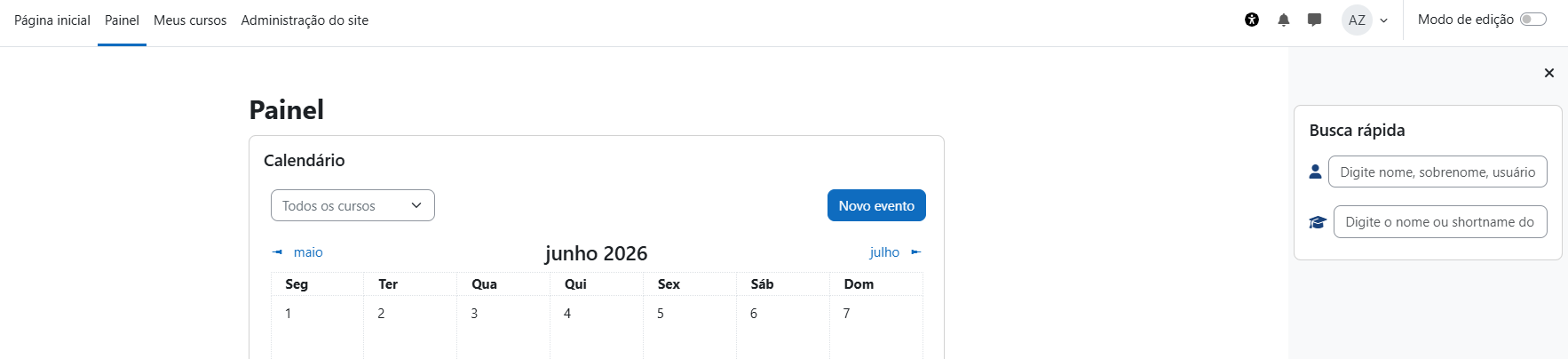
Quick search
Versions
Current version
2.1.2 (2026071301)
2.1.2
Plugin type: Blocks
Frankenstyle component name: block_quicksearch
Version build number: 2026071301
Version release name: 2.1.2
Maturity: Stable
Supported Moodle versions: 4.0, 4.1, 4.2, 4.3, 4.4, 4.5, 5.0, 5.1, 5.2
Repository URL (Git): https://github.com/m-jr-dev/moodle-block_quicksearch
Repository branch:
Repository tag:
Issue/bug tracker URL: https://github.com/m-jr-dev/moodle-block_quicksearch/issues
Quick Search (block_quicksearch)
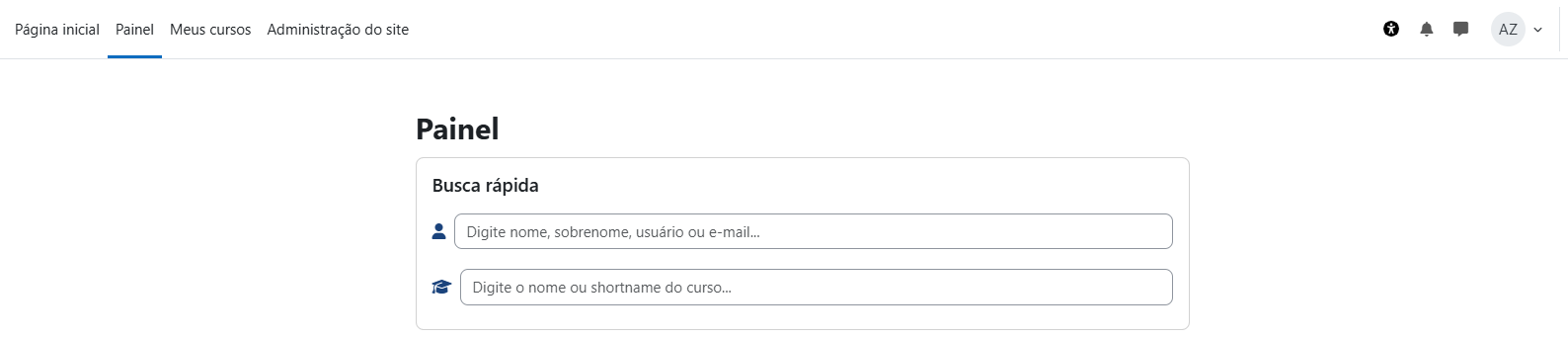
Adds a quick search block to Moodle, allowing authorised users to search users and courses from a single block interface.
Requirements
- Moodle 4.0+.
- Works with themes that support standard Moodle block regions.
Installation
- Copy this folder to:
blocks/quicksearch - Visit Site administration ' Notifications
- Complete the plugin installation
- Add the block to the desired Moodle page
- Configure the plugin at
Site administration ' Plugins ' Blocks ' Quick Search
Features
User Search
- Search active Moodle users
- Search by:
- First name
- Last name
- Full name
- Username
- Open user profile
- Open advanced user edit page
- Log in as user when the current user has the required Moodle capability
Course Search
- Search Moodle courses
- Search by:
- Full course name
- Course short name
- Open course page
- Open course participants page
- Open course settings page
Interface
- Single block interface
- AJAX-based search
- Debounced search requests
- Loading indicators
- Empty result messages
- Search term highlighting
- Mustache template rendering
- AMD JavaScript module
Configuration
The plugin can be configured at:
Site administration ' Plugins ' Blocks ' Quick Search
Available settings:
- Enable block
- Block title
- Result limit
Result limit
Defines the maximum number of users and courses returned by each search request.
The plugin validates the configured limit and falls back to a safe default when needed.
Capabilities
block/quicksearch:addinstance— Add a new Quick Search block instanceblock/quicksearch:myaddinstance— Add a new Quick Search block to the Dashboardblock/quicksearch:view— View and use the Quick Search block
Permission Requirements
The block only displays content to logged-in, non-guest users with:
block/quicksearch:view
The user search endpoint also requires:
moodle/user:viewdetails
The course search endpoint also requires:
moodle/course:viewhiddencourses
The "Log in as" action is only displayed when the current user has:
moodle/user:loginas
Security
The plugin uses Moodle security APIs and standards:
require_login()require_sesskey()require_capability()PARAM_TEXTPARAM_INT$DB->sql_like()$DB->sql_like_escape()- Moodle URL generation with
moodle_url - Output rendering through Mustache templates
- JavaScript loaded through AMD
Data and Privacy (GDPR)
The plugin does not create custom database tables and does not store personal data.
The block only displays existing Moodle user and course information to authorised users during search requests.
Displayed user data may include:
- Full name
- Username
- User profile link
- User edit link, when permitted
- Login as link, when permitted
Displayed course data may include:
- Course full name
- Course short name
- Course page link
- Participants page link
- Course settings link
No user preferences are stored by this plugin.
Privacy API
Implements:
\core_privacy\local\metadata\null_provider
Technical Structure
Main plugin files:
block_quicksearch.phpsettings.phpversion.phpdb/access.phpclasses/privacy/provider.phptemplates/content.mustacheamd/src/search.jsamd/build/search.min.jsajax_usuarios.phpajax_cursos.phpstyles.csspix/icon.png
License
This plugin is licensed under the GNU GPL v3 or later.
See LICENSE for full license details.

2.1.2 (2026070800)
2.1.2
Plugin type: Blocks
Frankenstyle component name: block_quicksearch
Version build number: 2026070800
Version release name: 2.1.2
Maturity: Stable
Supported Moodle versions: 5.2
Repository URL (Git): https://github.com/m-jr-dev/moodle-block_quicksearch
Repository branch:
Repository tag:
Issue/bug tracker URL: https://github.com/m-jr-dev/moodle-block_quicksearch/issues
Quick Search (block_quicksearch)
Adds a quick search block to Moodle, allowing authorised users to search users and courses from a single block interface.
Requirements
- Moodle 5.2+.
- PHP 8.3+ supported by Moodle 5.2.
- Works with themes that support standard Moodle block regions.
Installation
- Copy this folder to:
blocks/quicksearch - Visit Site administration ' Notifications
- Complete the plugin installation
- Add the block to the desired Moodle page
- Configure the plugin at Site administration ' Plugins ' Blocks ' Quick Search
Features
User Search
- Search active and confirmed Moodle users
- Search by:
- First name
- Last name
- Full name
- Username
- Email, only when the current user has permission to view user identity fields
- Open user profile when the current user can view the profile
- Open advanced user edit page when the current user can update users
- Log in as user when the current user has the required Moodle capability in the current course context
Course Search
- Search Moodle courses visible or accessible to the current user
- Search by:
- Full course name
- Course short name
- Open course page
- Open course participants page when the current user can view participants
- Open course settings page when the current user can update the course
Interface
- Single block interface
- AJAX-based search
- POST requests with sesskey validation
- Debounced search requests
- Loading indicators
- Empty result messages
- Search term highlighting without injecting result HTML
- Mustache template rendering
- AMD JavaScript module with built minified file
Configuration
The plugin can be configured at:
Site administration ' Plugins ' Blocks ' Quick Search
Available settings:
- Enable block
- Block title
- Result limit
Result limit
Defines the maximum number of users and courses returned by each search request.
The plugin validates the configured limit and falls back to a safe default when needed.
Capabilities
block/quicksearch:addinstance— Add a new Quick Search block instanceblock/quicksearch:myaddinstance— Add a new Quick Search block to the Dashboardblock/quicksearch:view— View and use the Quick Search block
Permission Requirements
The block only displays content to logged-in, non-guest users with:
block/quicksearch:view
The user search endpoint also requires:
moodle/user:viewdetails
The course search endpoint validates course visibility and item-level capabilities before returning action links.
The "Log in as" action is only displayed when the current user has:
moodle/user:loginas
Security
The plugin uses Moodle security APIs and standards:
AJAX_SCRIPTrequire_login()require_sesskey()require_capability()- Item-level permission checks before returning action links
PARAM_TEXTPARAM_INT$DB->sql_like()$DB->sql_like_escape()- Moodle URL generation with
moodle_url - Output rendering through Mustache templates
- DOM rendering with
textContentand text nodes for result data - JavaScript loaded through AMD
Data and Privacy (GDPR)
The plugin does not create custom database tables and does not store personal data.
The block only displays existing Moodle user and course information to authorised users during search requests.
Displayed user data may include:
- Full name
- Username
- User profile link, when permitted
- User edit link, when permitted
- Login as link, when permitted
Displayed course data may include:
- Course full name
- Course short name
- Course page link
- Participants page link, when permitted
- Course settings link, when permitted
No user preferences are stored by this plugin.
Privacy API
Implements:
\core_privacy\local\metadata\null_provider
Technical Structure
Main plugin files:
block_quicksearch.phpsettings.phpversion.phpdb/access.phpclasses/privacy/provider.phpclasses/local/search.phptemplates/content.mustacheamd/src/search.jsamd/build/search.min.jsajax_usuarios.phpajax_cursos.phpstyles.csspix/icon.png
License
This plugin is licensed under the GNU GPL v3 or later.
See LICENSE for full license details.
2.1.1 (2026060701)
2.1.1
Plugin type: Blocks
Frankenstyle component name: block_quicksearch
Version build number: 2026060701
Version release name: 2.1.1
Maturity: Stable
Supported Moodle versions: 4.0, 4.1, 4.2, 4.3, 4.4, 4.5, 5.0, 5.1, 5.2
Repository URL (Git): https://github.com/m-jr-dev/moodle-block_quicksearch
Repository branch: https://github.com/m-jr-dev/moodle-block_quicksearch/issues
Repository tag:
Issue/bug tracker URL: https://github.com/m-jr-dev/moodle-block_quicksearch/issues
Quick Search (block_quicksearch)
Adds a quick search block to Moodle, allowing authorised users to search users and courses from a single block interface.
Requirements
- Moodle 4.0+.
- Works with themes that support standard Moodle block regions.
Installation
- Copy this folder to:
blocks/quicksearch - Visit Site administration ' Notifications
- Complete the plugin installation
- Add the block to the desired Moodle page
- Configure the plugin at
Site administration ' Plugins ' Blocks ' Quick Search
Features
User Search
- Search active Moodle users
- Search by:
- First name
- Last name
- Full name
- Username
- Open user profile
- Open advanced user edit page
- Log in as user when the current user has the required Moodle capability
Course Search
- Search Moodle courses
- Search by:
- Full course name
- Course short name
- Open course page
- Open course participants page
- Open course settings page
Interface
- Single block interface
- AJAX-based search
- Debounced search requests
- Loading indicators
- Empty result messages
- Search term highlighting
- Mustache template rendering
- AMD JavaScript module
Configuration
The plugin can be configured at:
Site administration ' Plugins ' Blocks ' Quick Search
Available settings:
- Enable block
- Block title
- Result limit
Result limit
Defines the maximum number of users and courses returned by each search request.
The plugin validates the configured limit and falls back to a safe default when needed.
Capabilities
block/quicksearch:addinstance— Add a new Quick Search block instanceblock/quicksearch:myaddinstance— Add a new Quick Search block to the Dashboardblock/quicksearch:view— View and use the Quick Search block
Permission Requirements
The block only displays content to logged-in, non-guest users with:
block/quicksearch:view
The user search endpoint also requires:
moodle/user:viewdetails
The course search endpoint also requires:
moodle/course:viewhiddencourses
The "Log in as" action is only displayed when the current user has:
moodle/user:loginas
Security
The plugin uses Moodle security APIs and standards:
require_login()require_sesskey()require_capability()PARAM_TEXTPARAM_INT$DB->sql_like()$DB->sql_like_escape()- Moodle URL generation with
moodle_url - Output rendering through Mustache templates
- JavaScript loaded through AMD
Data and Privacy (GDPR)
The plugin does not create custom database tables and does not store personal data.
The block only displays existing Moodle user and course information to authorised users during search requests.
Displayed user data may include:
- Full name
- Username
- User profile link
- User edit link, when permitted
- Login as link, when permitted
Displayed course data may include:
- Course full name
- Course short name
- Course page link
- Participants page link
- Course settings link
No user preferences are stored by this plugin.
Privacy API
Implements:
\core_privacy\local\metadata\null_provider
Technical Structure
Main plugin files:
block_quicksearch.phpsettings.phpversion.phpdb/access.phpclasses/privacy/provider.phptemplates/content.mustacheamd/src/search.jsamd/build/search.min.jsajax_usuarios.phpajax_cursos.phpstyles.csspix/icon.png
License
This plugin is licensed under the GNU GPL v3 or later.
See LICENSE for full license details.