Pollinations AI provider
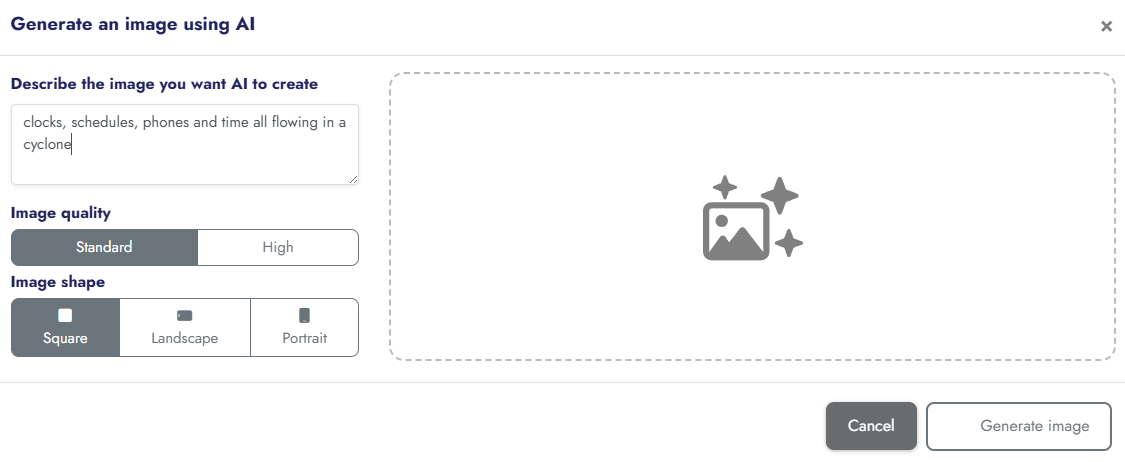
Versions
Current version
1.4.0 (2026062000)
1.4.0
Plugin type: AI providers
Frankenstyle component name: aiprovider_pollinations
Version build number: 2026062000
Version release name: 1.4.0
Maturity: Stable
Supported Moodle versions: 4.4, 4.5, 5.0, 5.1, 5.2
Repository URL (Git): https://github.com/ChunkyPanda29/moodle-aiprovider_pollinations
Repository branch:
Repository tag:
Issue/bug tracker URL: https://github.com/ChunkyPanda29/moodle-aiprovider-pollinations/issues

Pollinations AI Provider for Moodle






A free, open-source AI provider plugin for Moodle LMS that connects to the Pollinations AI platform via the BYOP (Bring Your Own Pollinations) device flow. Supports text generation, text summarisation, and image generation with automatic model discovery, per-user rate limiting, content safety filters, and pollen balance monitoring.

A Moodle AI provider plugin that integrates Pollinations.ai — the affordable, multi-model AI inference platform — into Moodle 4.5+ (and later).
Screenshots
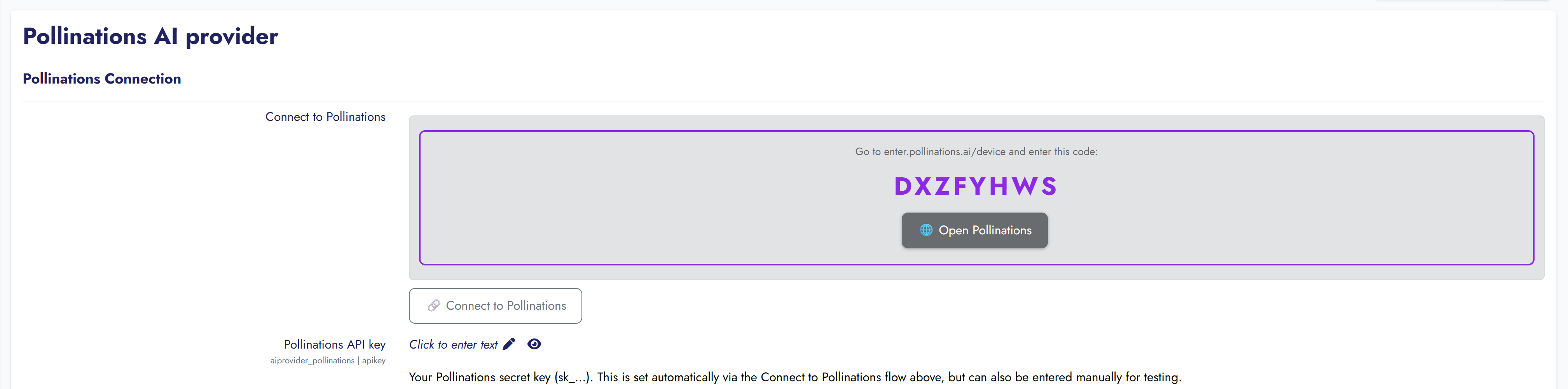
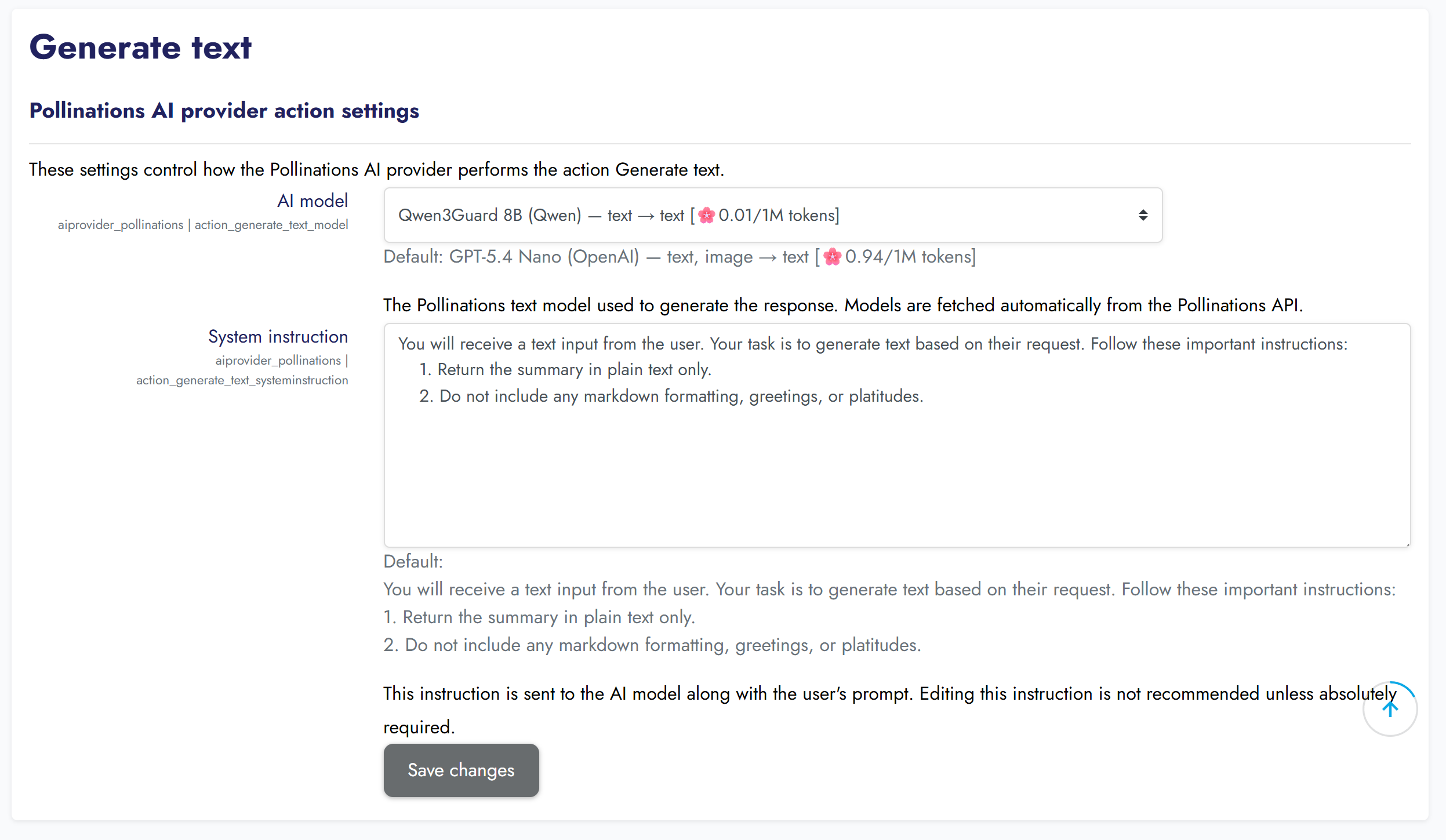
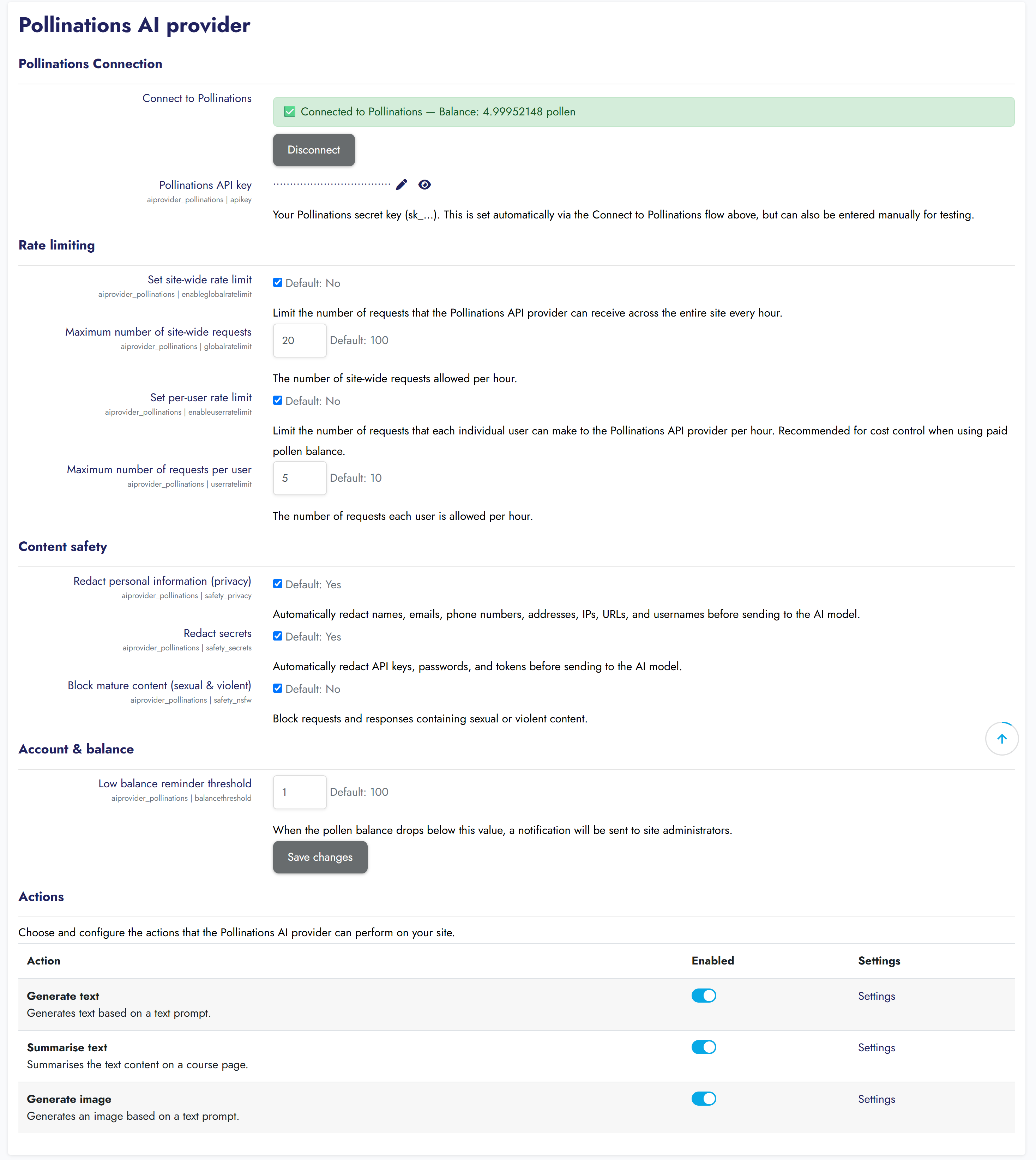
Settings Page
 |  |
BYOP Device Flow (Connect to Pollinations)
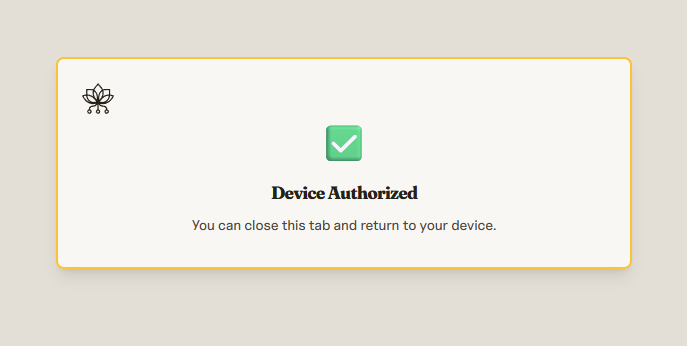
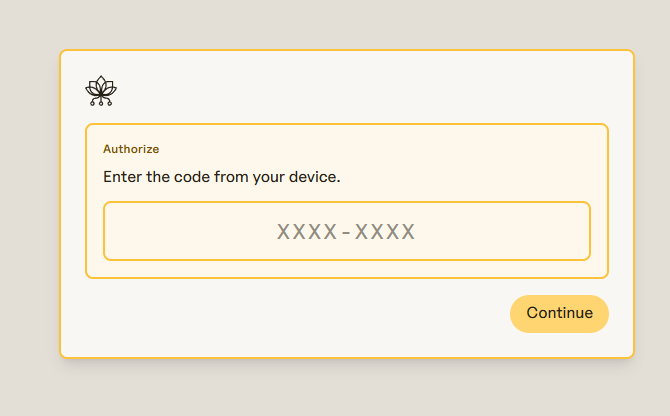
 Step 1: Click Connect |  Step 2: Enter code |
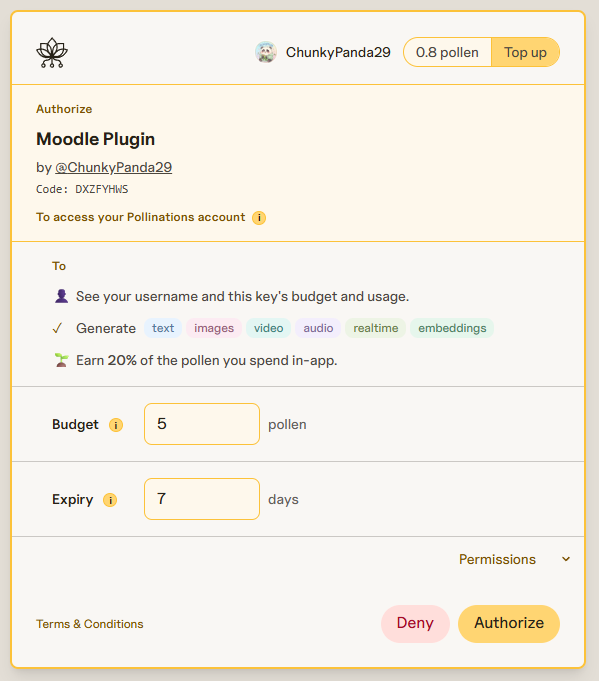
 Step 3: Authorising… |  Step 4: Connected! |
Model Picker
 Settings page |  Model dropdown |
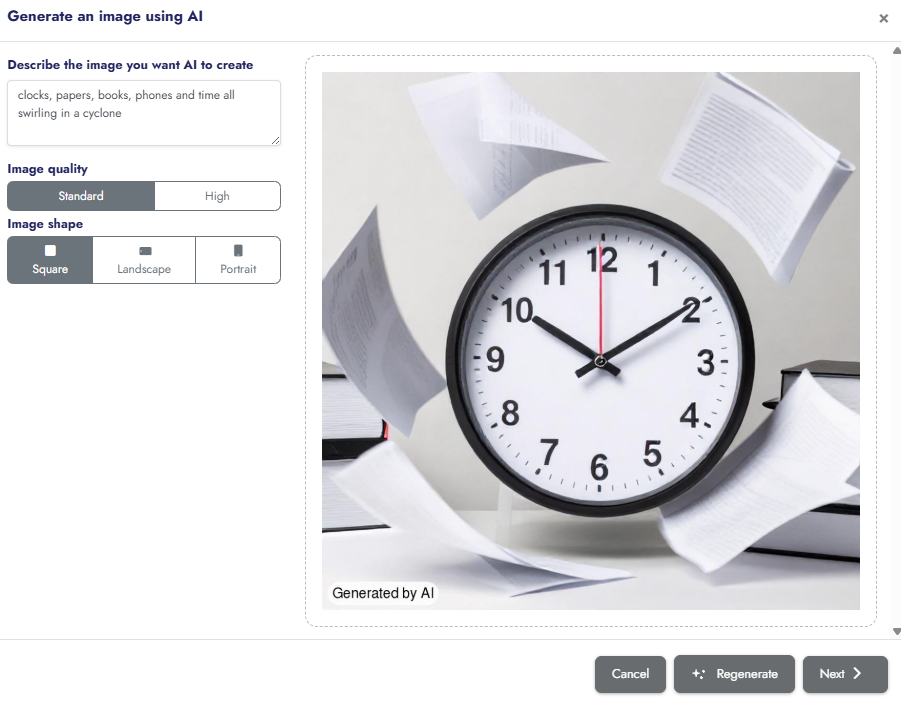
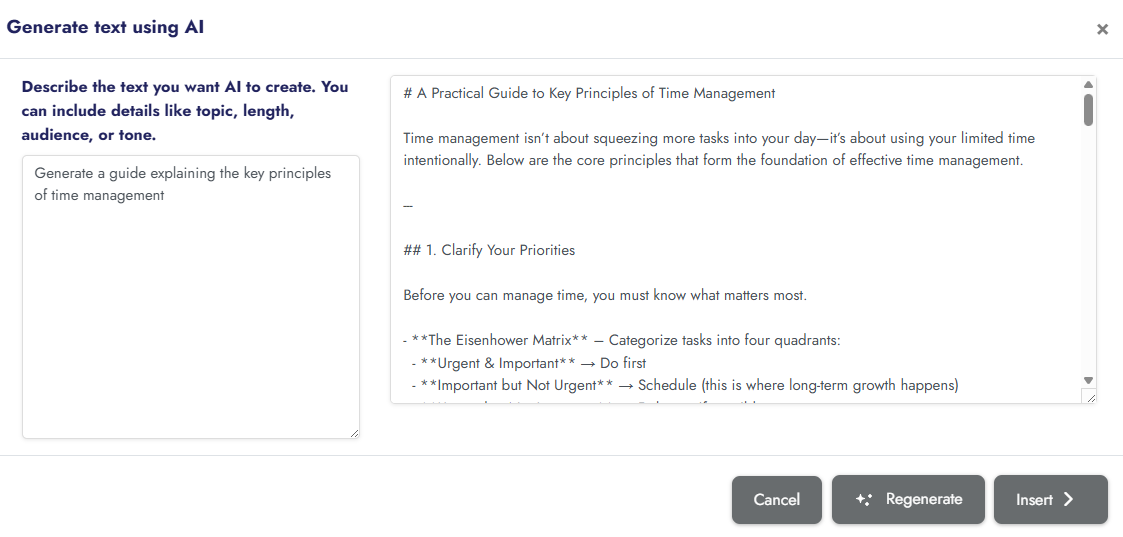
AI in Action
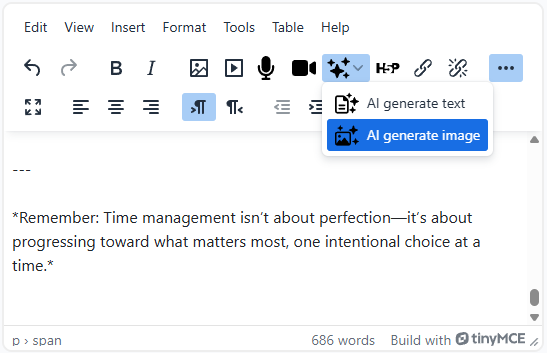
 Text generation in TinyMCE |  Image generation result |
This plugin enables text generation, text summarisation, and image generation through Moodle's native AI subsystem, powered by Pollinations' OpenAI-compatible API. With 60+ models from OpenAI, Anthropic, Google, ByteDance, Meta, Mistral, and more, Pollinations offers some of the most competitive AI pricing available.
Features
AI Actions
- Text generation — Generate text using any Pollinations text model (GPT-5.4, Claude, Gemini, DeepSeek, Qwen, Llama, Grok, and more)
- Text summarisation — Summarise course content and text using Pollinations models
- Image generation — Generate images from text prompts using FLUX, GPT-Image, Seedream, NanoBanana, and other models
Pollinations Integration
- BYOP device flow — One-click connection. Admin clicks "Connect to Pollinations", enters a code at enter.pollinations.ai, and the plugin handles the rest
- Automatic model discovery — Text and image models are fetched daily from the Pollinations API, with pollen pricing displayed inline (🌸 per 1M tokens / per image)
- Balance monitoring — Hourly scheduled task checks your pollen balance and notifies admins when it runs low
- Content safety — Optional safety filtering (privacy redaction, secrets redaction, NSFW blocking) via Pollinations' built-in safety service
- OpenAI-compatible — Uses the standard
/v1/chat/completionsendpoint for text, and the simpleGET /image/{prompt}endpoint for images
Rate Limiting & Cost Control
- Site-wide rate limiting — Cap total hourly requests across all users
- Per-user rate limiting — Limit individual user consumption (recommended for paid pollen balance)
Requirements
- Moodle 4.5.0 or later (Build: 2024100700)
- PHP 8.0+
- A Pollinations API key — get one free at enter.pollinations.ai
Installation
Clone or download this repository into
ai/provider/pollinations/in your Moodle directory:
cd /path/to/moodle/ai/provider/

git clone https://github.com/ChunkyPanda29/moodle-aiprovider_pollinations.git pollinations
Visit your Moodle site as an administrator to complete the installation.
Go to Site administration ' Plugins ' AI providers ' Pollinations AI provider and click Connect to Pollinations to authenticate via the BYOP device flow.
Configuration
Connecting Your Pollinations Account
The recommended way to configure the plugin is via the BYOP device flow:
- Click Connect to Pollinations in the plugin settings
- You'll receive a code — go to enter.pollinations.ai/device and enter it
- Authorise the application
- The plugin automatically receives your API key and stores it securely server-side
Alternatively, you can manually enter a Pollinations API key (sk_...) in the settings field. This is useful for development and testing.
Rate Limiting
| Setting | Description | Default |
|---------|-------------|---------|
| Site-wide rate limit | Maximum requests per hour across the entire site | Off (100) |
| Per-user rate limit | Maximum requests per hour per individual user | Off (10) |
Rate limiting is strongly recommended when using paid pollen balance to prevent unexpected costs.
Content Safety
Pollinations offers an optional safety service that runs before generation:
| Option | What it does |
|--------|-------------|
| Off | No filtering (default) |
| Privacy | Redacts personal information (names, emails, phone numbers, addresses, IPs, URLs, usernames) |
| Secrets | Redacts API keys, passwords, and tokens |
| Privacy + Secrets | Redacts both personal info and secrets |
| Block sexual/violent | Blocks requests containing sexual or violent content |
| Shield | Comprehensive content blocking |
Per-Action Settings
Each AI action has independent settings:
Text generation & summarisation:
- Model — Select from available Pollinations text models (auto-populated with pricing)
- Endpoint — The API endpoint URL (defaults to
https://gen.pollinations.ai/v1/chat/completions) - System instruction — The system prompt sent with each request
Image generation:
- Model — Select from available Pollinations image models (FLUX, GPT-Image, Seedream, etc.)
- Endpoint — The image API base URL (defaults to
https://gen.pollinations.ai) - Seed — Optional numeric seed for reproducible images
Balance Monitoring
- Low balance reminder threshold — When the pollen balance drops below this value, admins are notified via Moodle messaging
- The balance is checked hourly by a scheduled task
Scheduled Tasks
| Task | Schedule | Description |
|------|----------|-------------|
| Update Pollinations model list | Daily at 03:00 | Fetches the latest text and image model lists from the Pollinations API |
| Check Pollinations pollen balance | Hourly | Checks account balance and notifies admins if below threshold |
Available Models
Pollinations offers 60+ models across categories. Some highlights:
Text models: openai, openai-fast, openai-large, claude, claude-large, claude-opus, gemini, deepseek, grok, grok-large, kimi, mistral-large, qwen-large, llama, perplexity, and many more.
Image models: flux, gptimage, gptimage-large, seedream, nanobanana, kontext, zimage, qwen-image, grok-imagine, and more.
Model lists are fetched automatically and updated daily. Pricing is displayed in pollen (🌸) next to each model in the settings dropdown.
API Compatibility
This plugin uses the Pollinations OpenAI-compatible API:
Text generation:
POST https://gen.pollinations.ai/v1/chat/completions

Authorization: Bearer YOUR_API_KEY

Content-Type: application/json
Image generation:
GET https://gen.pollinations.ai/image/{prompt}?model=flux&width=1024&height=1024

Authorization: Bearer YOUR_API_KEY
Privacy
This plugin sends the following data to Pollinations:
- User prompt text
- System instruction
- Selected model name
No personal data is explicitly sent. User IDs are hashed (SHA-256 of site identifier + user ID) before transmission, meaning Pollinations cannot identify individual users.
See the privacy provider implementation for full details.
License
GNU General Public License v3.0 or later. See LICENSE for details.
Links
- Pollinations: https://pollinations.ai
- API docs: https://gen.pollinations.ai/docs
- Get an API key: https://enter.pollinations.ai
- Source code: https://github.com/ChunkyPanda29/moodle-aiprovider_pollinations
- Issue tracker: https://github.com/ChunkyPanda29/moodle-aiprovider_pollinations/issues
Changelog
v1.3.0 (2026-06-16)
- Added: Comprehensive PHPUnit test suite (provider, processors, tasks, external API)
- Added: Behat feature tests for admin settings UI (provider configuration, rate limiting, safety, balance)
- Changed: CI now enforces PHPUnit and Behat results — removed
|| trueguards so test failures fail the build - Changed: PHPMD no longer uses
continue-on-error - Goal: Qualifies plugin for Moodle Plugins Directory "Automated testing support" award
v1.2.0 (2026-06-15)
- Added: Auto-retry with exponential backoff for transient failures (429, 5xx) — up to 3 attempts with jitter
- Added: Honours
Retry-Afterheader for rate-limited responses - Added: User-friendly error messages for common HTTP errors (401, 402, 403, 429, 400, 5xx)
- Added: Request timeouts (60s request, 15s connect) to prevent infinite hangs
- Changed: All error messages now use
get_string()instead of hard-coded English text - Changed: Maturity set to STABLE for Moodle Plugins Directory submission
- Fixed: Plugin ZIP packaging now uses forward slashes for Linux compatibility
v1.1
1.3.0 (2026061600)
1.3.0
Plugin type: AI providers
Frankenstyle component name: aiprovider_pollinations
Version build number: 2026061600
Version release name: 1.3.0
Maturity: Stable
Supported Moodle versions: 4.5, 5.0, 5.1, 5.2
Repository URL (Git): https://github.com/ChunkyPanda29/moodle-aiprovider-pollinations
Repository branch:
Repository tag:
Issue/bug tracker URL: https://github.com/ChunkyPanda29/moodle-aiprovider-pollinations/issues
Pollinations AI Provider for Moodle


A free, open-source AI provider plugin for Moodle LMS that connects to the Pollinations AI platform via the BYOP (Bring Your Own Pollinations) device flow. Supports text generation, text summarisation, and image generation with automatic model discovery, per-user rate limiting, content safety filters, and pollen balance monitoring.

A Moodle AI provider plugin that integrates Pollinations.ai — the affordable, multi-model AI inference platform — into Moodle 4.5+ (and later).
Screenshots
Settings Page
 |  |
BYOP Device Flow (Connect to Pollinations)
 Step 1: Click Connect |  Step 2: Enter code |
 Step 3: Authorising… |  Step 4: Connected! |
Model Picker
 Settings page |  Model dropdown |
AI in Action
 Text generation in TinyMCE |  Image generation result |
This plugin enables text generation, text summarisation, and image generation through Moodle's native AI subsystem, powered by Pollinations' OpenAI-compatible API. With 60+ models from OpenAI, Anthropic, Google, ByteDance, Meta, Mistral, and more, Pollinations offers some of the most competitive AI pricing available.
Features
AI Actions
- Text generation — Generate text using any Pollinations text model (GPT-5.4, Claude, Gemini, DeepSeek, Qwen, Llama, Grok, and more)
- Text summarisation — Summarise course content and text using Pollinations models
- Image generation — Generate images from text prompts using FLUX, GPT-Image, Seedream, NanoBanana, and other models
Pollinations Integration
- BYOP device flow — One-click connection. Admin clicks "Connect to Pollinations", enters a code at enter.pollinations.ai, and the plugin handles the rest
- Automatic model discovery — Text and image models are fetched daily from the Pollinations API, with pollen pricing displayed inline (🌸 per 1M tokens / per image)
- Balance monitoring — Hourly scheduled task checks your pollen balance and notifies admins when it runs low
- Content safety — Optional safety filtering (privacy redaction, secrets redaction, NSFW blocking) via Pollinations' built-in safety service
- OpenAI-compatible — Uses the standard
/v1/chat/completionsendpoint for text, and the simpleGET /image/{prompt}endpoint for images
Rate Limiting & Cost Control
- Site-wide rate limiting — Cap total hourly requests across all users
- Per-user rate limiting — Limit individual user consumption (recommended for paid pollen balance)
Requirements
- Moodle 4.5.0 or later (Build: 2024100700)
- PHP 8.0+
- A Pollinations API key — get one free at enter.pollinations.ai
Installation
Clone or download this repository into
ai/provider/pollinations/in your Moodle directory:
cd /path/to/moodle/ai/provider/

git clone https://github.com/ChunkyPanda29/moodle-aiprovider-pollinations.git pollinations
Visit your Moodle site as an administrator to complete the installation.
Go to Site administration ' Plugins ' AI providers ' Pollinations AI provider and click Connect to Pollinations to authenticate via the BYOP device flow.
Configuration
Connecting Your Pollinations Account
The recommended way to configure the plugin is via the BYOP device flow:
- Click Connect to Pollinations in the plugin settings
- You'll receive a code — go to enter.pollinations.ai/device and enter it
- Authorise the application
- The plugin automatically receives your API key and stores it securely server-side
Alternatively, you can manually enter a Pollinations API key (sk_...) in the settings field. This is useful for development and testing.
Rate Limiting
| Setting | Description | Default |
|---------|-------------|---------|
| Site-wide rate limit | Maximum requests per hour across the entire site | Off (100) |
| Per-user rate limit | Maximum requests per hour per individual user | Off (10) |
Rate limiting is strongly recommended when using paid pollen balance to prevent unexpected costs.
Content Safety
Pollinations offers an optional safety service that runs before generation:
| Option | What it does |
|--------|-------------|
| Off | No filtering (default) |
| Privacy | Redacts personal information (names, emails, phone numbers, addresses, IPs, URLs, usernames) |
| Secrets | Redacts API keys, passwords, and tokens |
| Privacy + Secrets | Redacts both personal info and secrets |
| Block sexual/violent | Blocks requests containing sexual or violent content |
| Shield | Comprehensive content blocking |
Per-Action Settings
Each AI action has independent settings:
Text generation & summarisation:
- Model — Select from available Pollinations text models (auto-populated with pricing)
- Endpoint — The API endpoint URL (defaults to
https://gen.pollinations.ai/v1/chat/completions) - System instruction — The system prompt sent with each request
Image generation:
- Model — Select from available Pollinations image models (FLUX, GPT-Image, Seedream, etc.)
- Endpoint — The image API base URL (defaults to
https://gen.pollinations.ai) - Seed — Optional numeric seed for reproducible images
Balance Monitoring
- Low balance reminder threshold — When the pollen balance drops below this value, admins are notified via Moodle messaging
- The balance is checked hourly by a scheduled task
Scheduled Tasks
| Task | Schedule | Description |
|------|----------|-------------|
| Update Pollinations model list | Daily at 03:00 | Fetches the latest text and image model lists from the Pollinations API |
| Check Pollinations pollen balance | Hourly | Checks account balance and notifies admins if below threshold |
Available Models
Pollinations offers 60+ models across categories. Some highlights:
Text models: openai, openai-fast, openai-large, claude, claude-large, claude-opus, gemini, deepseek, grok, grok-large, kimi, mistral-large, qwen-large, llama, perplexity, and many more.
Image models: flux, gptimage, gptimage-large, seedream, nanobanana, kontext, zimage, qwen-image, grok-imagine, and more.
Model lists are fetched automatically and updated daily. Pricing is displayed in pollen (🌸) next to each model in the settings dropdown.
API Compatibility
This plugin uses the Pollinations OpenAI-compatible API:
Text generation:
POST https://gen.pollinations.ai/v1/chat/completions

Authorization: Bearer YOUR_API_KEY

Content-Type: application/json
Image generation:
GET https://gen.pollinations.ai/image/{prompt}?model=flux&width=1024&height=1024

Authorization: Bearer YOUR_API_KEY
Privacy
This plugin sends the following data to Pollinations:
- User prompt text
- System instruction
- Selected model name
No personal data is explicitly sent. User IDs are hashed (SHA-256 of site identifier + user ID) before transmission, meaning Pollinations cannot identify individual users.
See the privacy provider implementation for full details.
License
GNU General Public License v3.0 or later. See LICENSE for details.
Links
- Pollinations: https://pollinations.ai
- API docs: https://gen.pollinations.ai/docs
- Get an API key: https://enter.pollinations.ai
- Source code: https://github.com/ChunkyPanda29/moodle-aiprovider-pollinations
- Issue tracker: https://github.com/ChunkyPanda29/moodle-aiprovider-pollinations/issues
Changelog
v1.3.0 (2026-06-16)
- Added: Comprehensive PHPUnit test suite (provider, processors, tasks, external API)
- Added: Behat feature tests for admin settings UI (provider configuration, rate limiting, safety, balance)
- Changed: CI now enforces PHPUnit and Behat results — removed
|| trueguards so test failures fail the build - Changed: PHPMD no longer uses
continue-on-error - Goal: Qualifies plugin for Moodle Plugins Directory "Automated testing support" award
v1.2.0 (2026-06-15)
- Added: Auto-retry with exponential backoff for transient failures (429, 5xx) — up to 3 attempts with jitter
- Added: Honours
Retry-Afterheader for rate-limited responses - Added: User-friendly error messages for common HTTP errors (401, 402, 403, 429, 400, 5xx)
- Added: Request timeouts (60s request, 15s connect) to prevent infinite hangs
- Changed: All error messages now use
get_string()instead of hard-coded English text - Changed: Maturity set to STABLE for Moodle Plugins Directory submission
- Fixed: Plugin ZIP packaging now uses forward slashes for Linux compatibility
v1.1
1.2.0 (2026061502)
1.2.0
Plugin type: AI providers
Frankenstyle component name: aiprovider_pollinations
Version build number: 2026061502
Version release name: 1.2.0
Maturity: Stable
Supported Moodle versions: 4.5, 5.0, 5.1, 5.2
Repository URL (Git): https://github.com/ChunkyPanda29/moodle-aiprovider-pollinations
Repository branch:
Repository tag:
Issue/bug tracker URL: https://github.com/ChunkyPanda29/moodle-aiprovider-pollinations/issues
Pollinations AI Provider for Moodle
A free, open-source AI provider plugin for Moodle LMS that connects to the Pollinations AI platform via the BYOP (Bring Your Own Pollinations) device flow. Supports text generation, text summarisation, and image generation with automatic model discovery, per-user rate limiting, content safety filters, and pollen balance monitoring.
A Moodle AI provider plugin that integrates Pollinations.ai — the affordable, multi-model AI inference platform — into Moodle 4.5+ (and later).
Screenshots
Settings Page
| |
BYOP Device Flow (Connect to Pollinations)
Step 1: Click Connect | Step 2: Enter code |
Step 3: Authorising… | Step 4: Connected! |
Model Picker
Settings page | Model dropdown |
AI in Action
Text generation in TinyMCE | Image generation result |
This plugin enables text generation, text summarisation, and image generation through Moodle's native AI subsystem, powered by Pollinations' OpenAI-compatible API. With 60+ models from OpenAI, Anthropic, Google, ByteDance, Meta, Mistral, and more, Pollinations offers some of the most competitive AI pricing available.
Features
AI Actions
- Text generation — Generate text using any Pollinations text model (GPT-5.4, Claude, Gemini, DeepSeek, Qwen, Llama, Grok, and more)
- Text summarisation — Summarise course content and text using Pollinations models
- Image generation — Generate images from text prompts using FLUX, GPT-Image, Seedream, NanoBanana, and other models
Pollinations Integration
- BYOP device flow — One-click connection. Admin clicks "Connect to Pollinations", enters a code at enter.pollinations.ai, and the plugin handles the rest
- Automatic model discovery — Text and image models are fetched daily from the Pollinations API, with pollen pricing displayed inline (🌸 per 1M tokens / per image)
- Balance monitoring — Hourly scheduled task checks your pollen balance and notifies admins when it runs low
- Content safety — Optional safety filtering (privacy redaction, secrets redaction, NSFW blocking) via Pollinations' built-in safety service
- OpenAI-compatible — Uses the standard
/v1/chat/completionsendpoint for text, and the simpleGET /image/{prompt}endpoint for images
Rate Limiting & Cost Control
- Site-wide rate limiting — Cap total hourly requests across all users
- Per-user rate limiting — Limit individual user consumption (recommended for paid pollen balance)
Requirements
- Moodle 4.5.0 or later (Build: 2024100700)
- PHP 8.0+
- A Pollinations API key — get one free at enter.pollinations.ai
Installation
Clone or download this repository into
ai/provider/pollinations/in your Moodle directory:
cd /path/to/moodle/ai/provider/

git clone https://github.com/ChunkyPanda29/moodle-aiprovider-pollinations.git pollinations
Visit your Moodle site as an administrator to complete the installation.
Go to Site administration ' Plugins ' AI providers ' Pollinations AI provider and click Connect to Pollinations to authenticate via the BYOP device flow.
Configuration
Connecting Your Pollinations Account
The recommended way to configure the plugin is via the BYOP device flow:
- Click Connect to Pollinations in the plugin settings
- You'll receive a code — go to enter.pollinations.ai/device and enter it
- Authorise the application
- The plugin automatically receives your API key and stores it securely server-side
Alternatively, you can manually enter a Pollinations API key (sk_...) in the settings field. This is useful for development and testing.
Rate Limiting
| Setting | Description | Default |
|---------|-------------|---------|
| Site-wide rate limit | Maximum requests per hour across the entire site | Off (100) |
| Per-user rate limit | Maximum requests per hour per individual user | Off (10) |
Rate limiting is strongly recommended when using paid pollen balance to prevent unexpected costs.
Content Safety
Pollinations offers an optional safety service that runs before generation:
| Option | What it does |
|--------|-------------|
| Off | No filtering (default) |
| Privacy | Redacts personal information (names, emails, phone numbers, addresses, IPs, URLs, usernames) |
| Secrets | Redacts API keys, passwords, and tokens |
| Privacy + Secrets | Redacts both personal info and secrets |
| Block sexual/violent | Blocks requests containing sexual or violent content |
| Shield | Comprehensive content blocking |
Per-Action Settings
Each AI action has independent settings:
Text generation & summarisation:
- Model — Select from available Pollinations text models (auto-populated with pricing)
- Endpoint — The API endpoint URL (defaults to
https://gen.pollinations.ai/v1/chat/completions) - System instruction — The system prompt sent with each request
Image generation:
- Model — Select from available Pollinations image models (FLUX, GPT-Image, Seedream, etc.)
- Endpoint — The image API base URL (defaults to
https://gen.pollinations.ai) - Seed — Optional numeric seed for reproducible images
Balance Monitoring
- Low balance reminder threshold — When the pollen balance drops below this value, admins are notified via Moodle messaging
- The balance is checked hourly by a scheduled task
Scheduled Tasks
| Task | Schedule | Description |
|------|----------|-------------|
| Update Pollinations model list | Daily at 03:00 | Fetches the latest text and image model lists from the Pollinations API |
| Check Pollinations pollen balance | Hourly | Checks account balance and notifies admins if below threshold |
Available Models
Pollinations offers 60+ models across categories. Some highlights:
Text models: openai, openai-fast, openai-large, claude, claude-large, claude-opus, gemini, deepseek, grok, grok-large, kimi, mistral-large, qwen-large, llama, perplexity, and many more.
Image models: flux, gptimage, gptimage-large, seedream, nanobanana, kontext, zimage, qwen-image, grok-imagine, and more.
Model lists are fetched automatically and updated daily. Pricing is displayed in pollen (🌸) next to each model in the settings dropdown.
API Compatibility
This plugin uses the Pollinations OpenAI-compatible API:
Text generation:
POST https://gen.pollinations.ai/v1/chat/completions

Authorization: Bearer YOUR_API_KEY

Content-Type: application/json
Image generation:
GET https://gen.pollinations.ai/image/{prompt}?model=flux&width=1024&height=1024

Authorization: Bearer YOUR_API_KEY
Privacy
This plugin sends the following data to Pollinations:
- User prompt text
- System instruction
- Selected model name
No personal data is explicitly sent. User IDs are hashed (SHA-256 of site identifier + user ID) before transmission, meaning Pollinations cannot identify individual users.
See the privacy provider implementation for full details.
License
GNU General Public License v3.0 or later. See LICENSE for details.
Links
- Pollinations: https://pollinations.ai
- API docs: https://gen.pollinations.ai/docs
- Get an API key: https://enter.pollinations.ai
- Source code: https://github.com/ChunkyPanda29/moodle-aiprovider-pollinations
- Issue tracker: https://github.com/ChunkyPanda29/moodle-aiprovider-pollinations/issues
Changelog
v1.2.0 (2026-06-15)
- Added: Auto-retry with exponential backoff for transient failures (429, 5xx) — up to 3 attempts with jitter
- Added: Honours
Retry-Afterheader for rate-limited responses - Added: User-friendly error messages for common HTTP errors (401, 402, 403, 429, 400, 5xx)
- Added: Request timeouts (60s request, 15s connect) to prevent infinite hangs
- Changed: All error messages now use
get_string()instead of hard-coded English text - Changed: Maturity set to STABLE for Moodle Plugins Directory submission
- Fixed: Plugin ZIP packaging now uses forward slashes for Linux compatibility
v1.1.0 (2026-06-14)
- Added: Image generation support (
generate_imageaction) via Pollinations image API - Added: Per-user rate limiting (matching core Moodle AI provider pattern)
- Added: Content safety settings (privacy, secrets, NSFW blocking)
- Added: Image model discovery and caching from
/image/modelsendpoint - Added: Image-specific settings (model picker, seed, base URL)
- Changed: Balance check task now runs hourly (was daily at 09:30)
- Cha