Solin Streaks (mod_streak)
Solin Streaks adds a regular-practice learning streak to Moodle courses where learners
are expected to return and complete meaningful activity over time. Teachers add one
Solin Streaks activity to a course, choose a cadence such as daily practice, once a week,
or 3 days per week, and decide which course actions count.
Each learner gets a personal streak counter, streak freezes for occasional missed
periods, gentle make-or-break reminders, and a friendly per-course leaderboard. It turns
"I should keep up with this course" into a visible habit, and gives whoever runs the
course an at-a-glance picture of who is showing up consistently.
The streak counter and leaderboard render inline on the course page, so learners do
not need to open a separate activity page to use the plugin. The plugin ships no
JavaScript: everything is server-rendered HTML and CSS, themeable through templates and
CSS tokens.
Because every visual decision lives in the theme, the same plugin suits very different
audiences: recurring compliance programs, onboarding, professional development, schools,
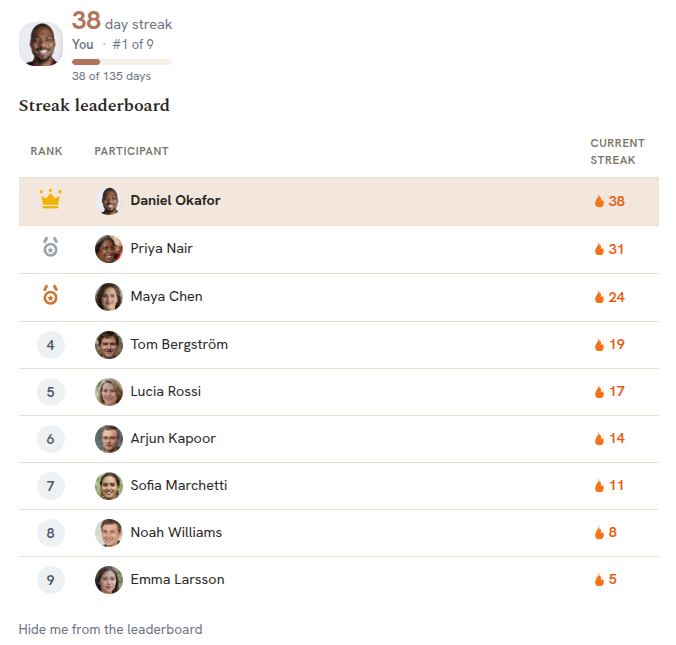
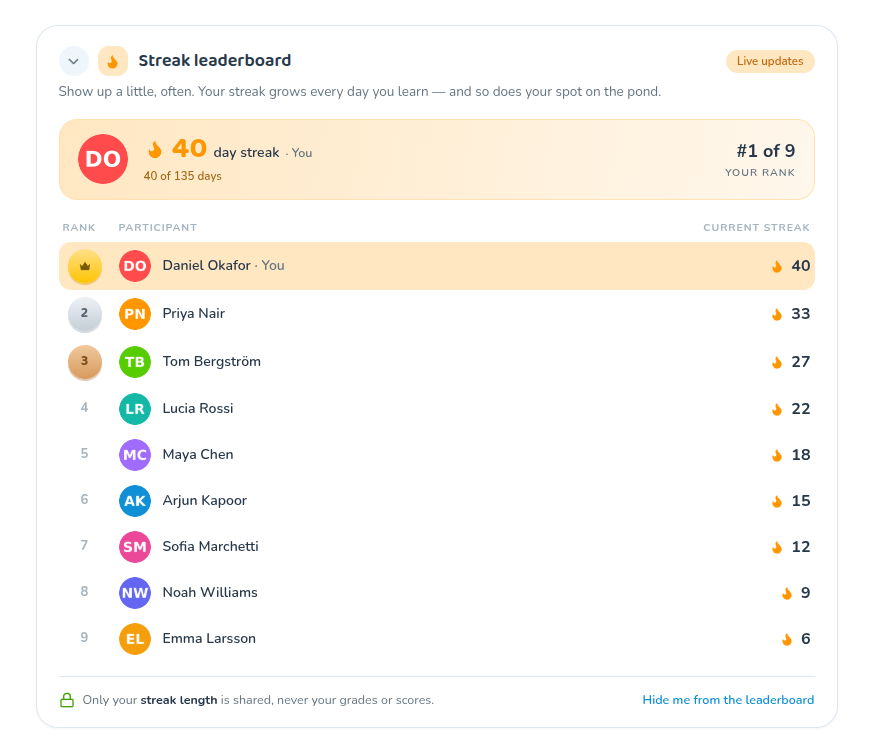
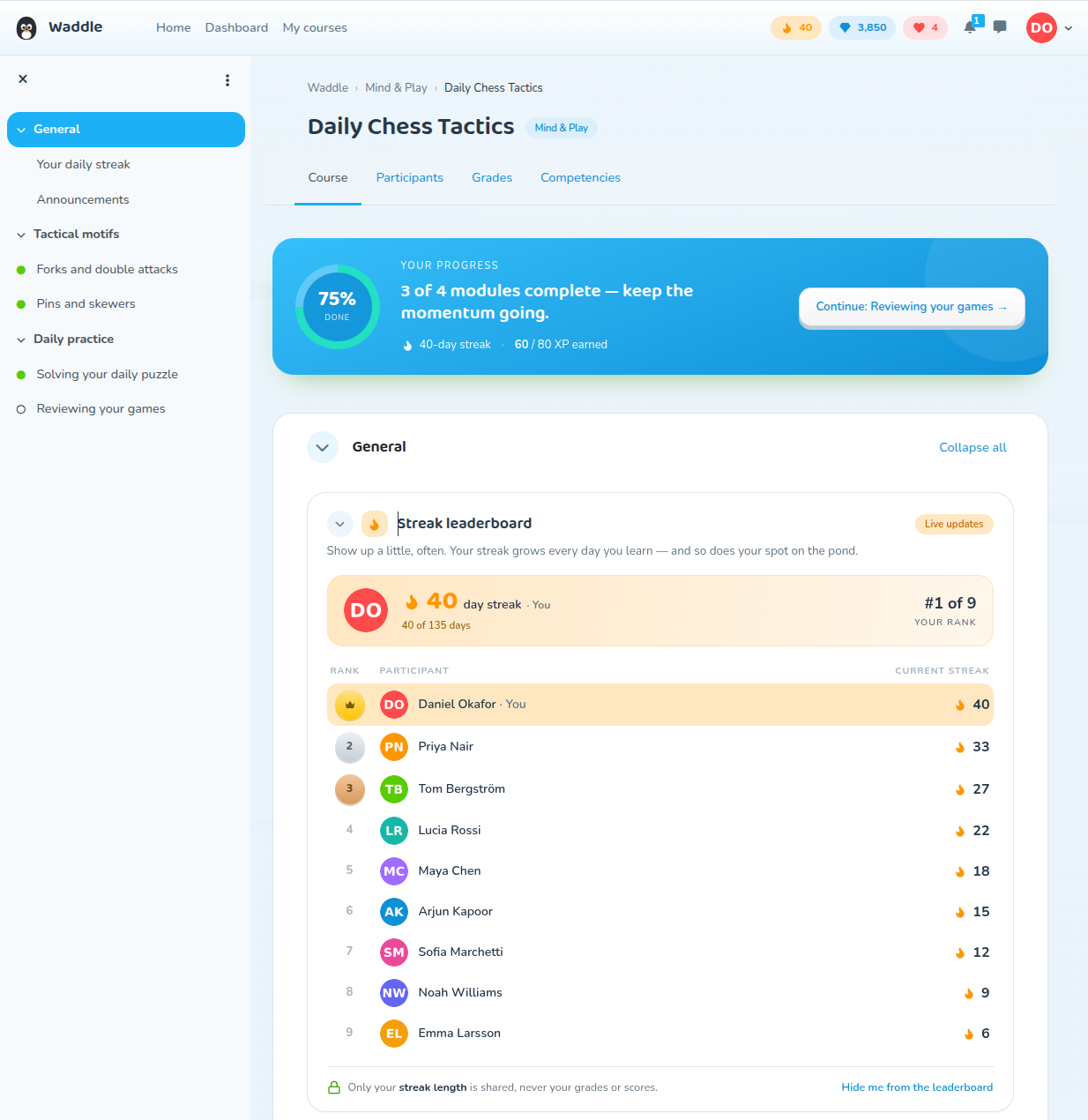
universities, and language learning. The two leaderboards below are the identical
activity — a corporate theme (Cadence) on the left, a playful educational theme
(Waddle) on the right.
![The Solin Streaks streak counter and per-course leaderboard shown side by side in two themes: a corporate theme (Cadence) on the left and a playful educational theme (Waddle) on the right — the same activity skinned for each audience]()
Maintainer: Solin (Onno Schuit)
Compatibility
The same plugin codebase supports Moodle 4.5 LTS through 5.2.
| Moodle | PHP | Plugin path |
|--------|-----|-------------|
| 5.2 | 8.3+ | public/mod/streak |
| 5.1 | 8.2+ | public/mod/streak |
| 5.0 | 8.2+ | mod/streak |
| 4.5 LTS | 8.1+ | mod/streak |
Any database supported by your Moodle version works (MySQL / MariaDB / PostgreSQL); the
plugin uses only the portable Moodle DML API. Moodle 5.1 moved the web root into a
public/ directory, which is the only reason the install path differs between versions.
What it does
- Per-learner streak counter. Current streak plus personal best, shown with the
branded flame on the course page.
- Configurable cadence. Daily by default, or Weekly / Fortnightly / Monthly with a
per-period goal ("3 of 7 days this week"), so the streak fits the course rhythm.
- Streak freeze. A configurable number of forgiven misses per period (with a cap),
so one bad day does not wipe out weeks of effort.
- Make-or-break reminders. Delivered through Moodle's Message API (email, web
notification, and mobile push where available), only when a streak is actually at
risk, and respecting each user's notification preferences.
- Per-course leaderboard. Course participants ranked by current streak, with photo
or colored-initials avatars and top-three medals. Ranking is privacy-aware: any learner
can opt out and is then removed from everyone else's view while still seeing their
own private counter.
- Streak lifecycle / end date. Use the course end date, a custom end date, or run
evergreen. At the end date the leaderboard freezes into a final standing ("You finished
with a 42-day streak, rank #3 of 60") instead of vanishing.
- Qualifying action. Choose what counts toward a day: any activity completion (the
default), a course-progress advance, or login only. See
Qualifying actions.
- Institutional breaks. A site holiday calendar so scheduled closures do not break
anyone's streak.
- Themeable and mobile-ready. Override templates, pix icons, CSS tokens, or the
renderer without forking; the activity also renders in the Moodle App.
When to use this plugin
Solin Streaks is designed for courses where regular activity is meaningful: daily
practice, weekly compliance tasks, recurring onboarding steps, exam preparation, spaced
repetition, micro-learning, language learning, or professional-development programs that
run over a longer period. It is especially useful where learners are expected to return
regularly — once a day, once a week, or several times a month.
It is usually not a good fit for one-off compliance modules, short courses where learners
only need to complete a single activity once, or courses without repeatable or
completion-tracked learner activity.
Why an activity module, not a block?
Solin Streaks is deliberately an activity module, even though it is not "content" you open
and work through in the usual sense. A block might look like the obvious choice; two
practical reasons ruled it out:
- Prominent placement. The streak counter and leaderboard render inline at the top of
the course's main column, where every learner sees them straight away. Moodle's default
themes have no block region at the top of the central column, so a block could only sit
in a side column — far less prominent, and easy to miss.
- Mobile app. Activity modules render directly in the course in the Moodle App, and
Solin Streaks ships app support. Blocks have limited, inconsistent visibility in the app
and are not shown inline with course content, so a block version would effectively
disappear on mobile.
How a streak works
A learner earns one qualifying day for each calendar day (in their own timezone) on
which they perform a qualifying action. Consecutive qualifying periods build the streak;
a missed period ends it unless a freeze is available. The number shown at the top of the
widget and the number on the leaderboard are always the same value (the cached
displaystreak), so what a learner sees about themselves and where they sit on the board
never disagree.
Installation
Via the admin UI (recommended): download the ZIP, then go to Site administration '
Plugins ' Install plugins, upload the ZIP, and follow the upgrade prompts.
Via Git: clone the repository into the module directory for your Moodle layout.
# Moodle 5.1+ (public/ layout)

cd /path/to/moodle/public/mod

git clone https://github.com/solin-repo/moodle-mod_streak.git streak


# Moodle 4.5 LTS and 5.0

cd /path/to/moodle/mod

git clone https://github.com/solin-repo/moodle-mod_streak.git streak
Then finish the install from Site administration ' Notifications, or on the command
line:
php admin/cli/upgrade.php --non-interactive

php admin/cli/purge_caches.php
This creates the plugin's three database tables and registers its scheduled task.
Using it
A teacher (or anyone with mod/streak:addinstance) adds one Solin Streaks activity
to a course, like any other activity. There is intentionally a single instance per
course: it represents that course's streak. The streak counter and leaderboard then
appear inline on the course page for every enrolled user. Learners need do nothing to
opt in; they simply keep doing the course, and may hide themselves from the leaderboard
at any time from the widget.
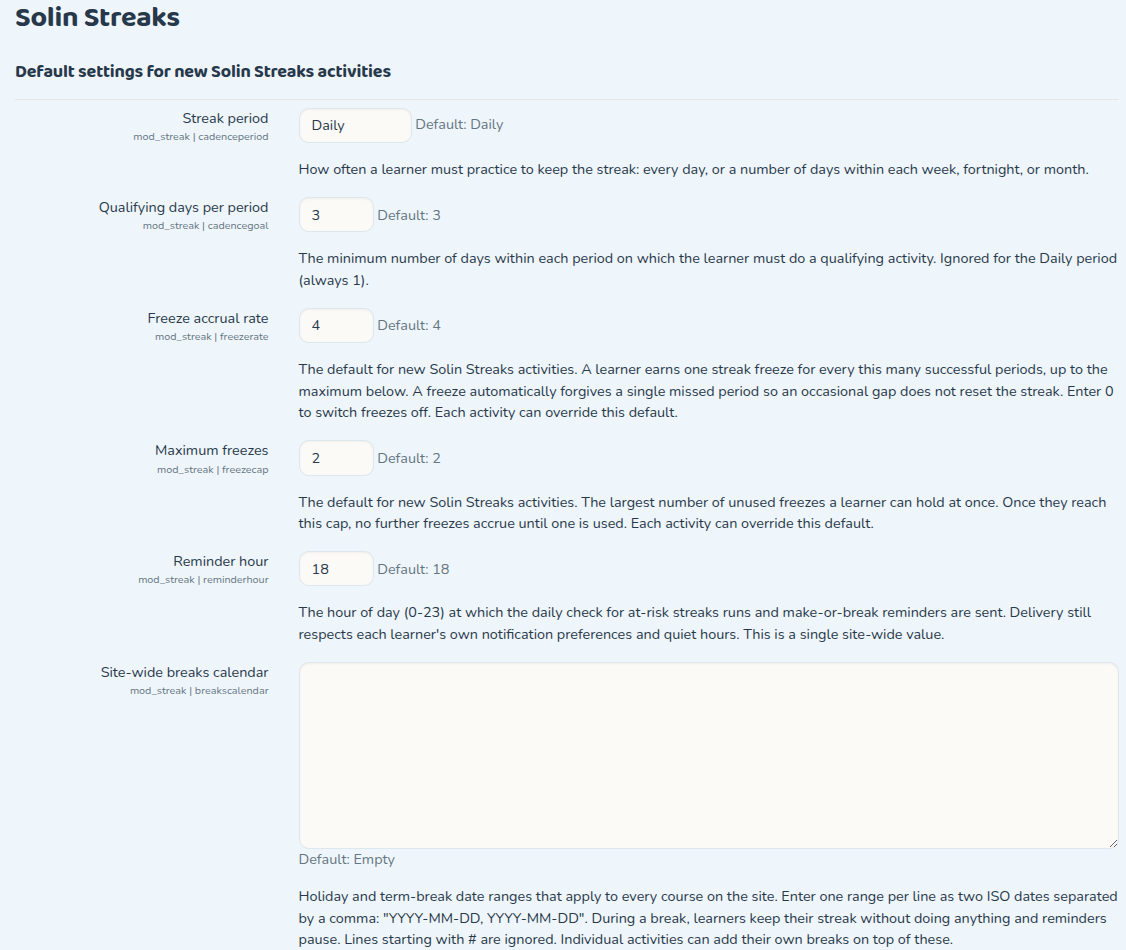
Configuration
Site defaults (Site administration ' Plugins ' Activity modules ' Solin Streaks):
| Setting | Purpose |
|---------|---------|
| cadenceperiod | Default period (Daily / Weekly / Fortnightly / Monthly) for new activities. |
| cadencegoal | Default minimum qualifying days per period. |
| freezerate | How often a freeze is granted (e.g. one per four successful periods). |
| freezecap | Maximum freezes a learner can bank. |
| reminderhour | Hour of day reminders are sent. |
| Breaks calendar | Site-wide holiday ranges that never break a streak. |
![Site-wide default settings for new Solin Streaks activities: freeze accrual rate, maximum freezes, reminder hour, and the site-wide breaks calendar, each with inline help text]()
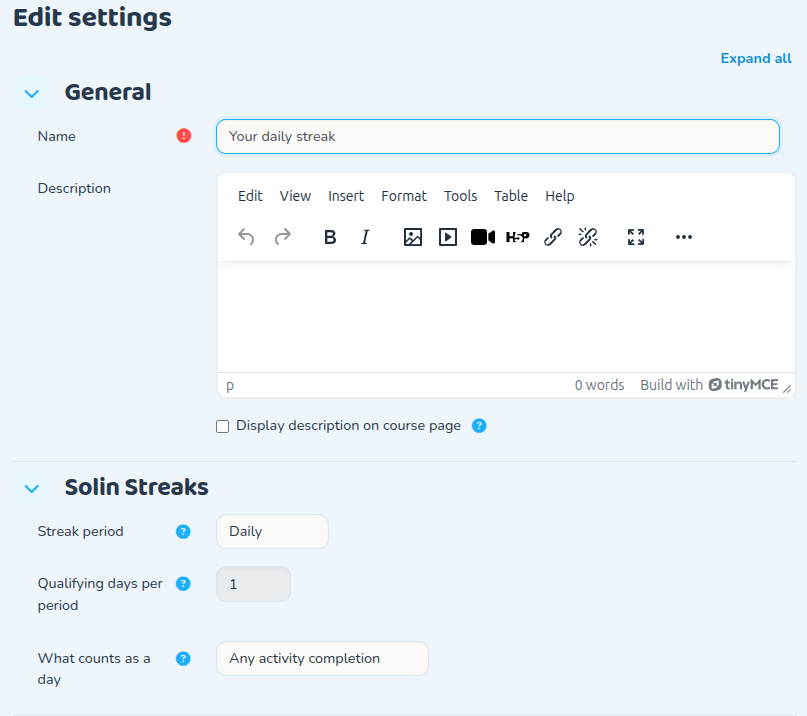
Per-activity settings (on the activity's settings form) let a teacher override the
cadence and goal, choose the qualifying action, set the end-date mode (course end /
custom / evergreen), tune the freeze policy and reward, and exclude staff or specific
roles from the leaderboard.
![The per-activity settings form, showing the Solin Streaks section: streak period, qualifying days per period, and what counts as a qualifying day]()
Qualifying actions
What counts as a qualifying day is set per activity, through the qualifying action
setting, in one of three modes:
- Any activity completion (the default): completing any completion-tracked activity
in the course credits the day.
- Course progress advanced: the day is credited only when the learner's
course-completion progress moves forward.
- Login only: any login while enrolled in the course credits the day. This is the
lightest and most easily gamed mode, and is best reserved for courses where completion
tracking is not available.
Capabilities
| Capability | Default roles | Allows |
|------------|---------------|--------|
| mod/streak:addinstance | editingteacher, manager | Add and configure the activity in a course. |
| mod/streak:view | student, teacher, editingteacher, manager | See the inline streak widget. |
| mod/streak:viewleaderboard | student, teacher, editingteacher, manager | See the per-course leaderboard. |
Leaderboard scope
The free plugin's leaderboard is per-course by design: it ranks a course's own
members by their streak in that course, which keeps it coherent and privacy-respecting.
Cross-course, cohort, and site-wide streak aggregation (institution-facing dashboards)
are intentionally out of scope for the free plugin.
Privacy and data
All processing happens inside your Moodle; nothing is sent to any external service. The
plugin stores three tables:
| Table | Contents |
|-------|----------|
| streak | Per-activity configuration (cadence, goal, freeze policy, end date, …). |
| streak_state | Per-user streak state (current and longest streak, freezes, opt-out, …). |
| streak_day | The per-user ledger of qualifying days. |
A full Privacy API provider is implemented: a user's streak data can be exported and
deleted, individually or in bulk, including the userlist (bulk) requests.
Backup and restore
Course backup and restore are fully supported. The activity's configuration is included
in every course backup. Each learner's streak state and credited-day history are included
only when the backup is taken with user data.
Theming
The widget is a templatable renderable that returns pure data, so every visual decision
lives in the templates and CSS. A theme can override, in increasing order of effort: the
CSS tokens (--streak-* custom properties), the pix icons (the flame and medals), the
Mustache templates (mod_streak/widget, mod_streak/avatar), or the plugin renderer. No
plugin changes are needed to restyle the streak or the board.
This is what lets the same streak serve a corporate intranet and a classroom equally
well: the two themes shown at the top of this page (Cadence and Waddle) are the same
activity with different CSS tokens, pix icons, and templates — the plugin code is
identical in both.
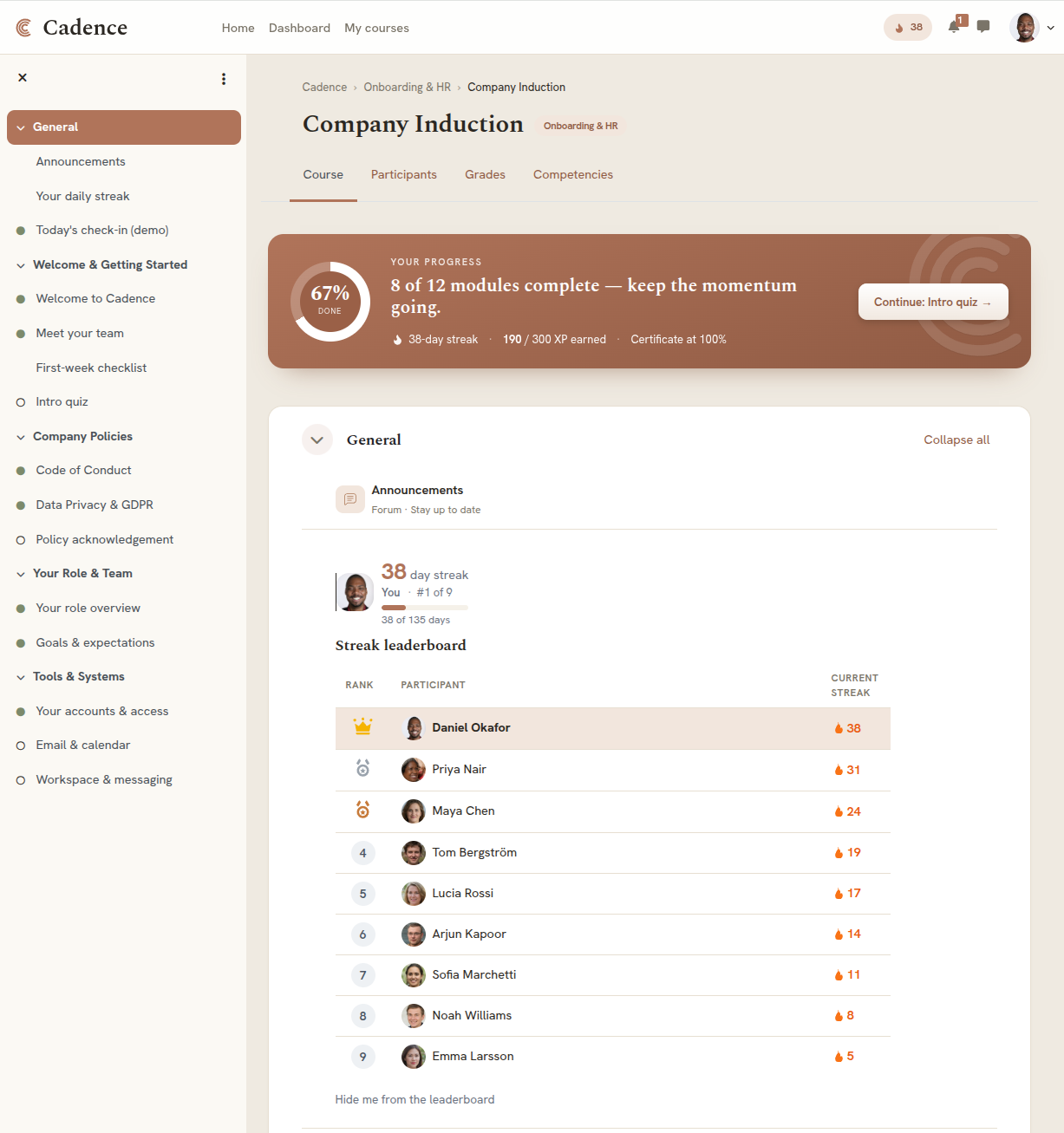
The two themes are full Moodle experiences, not just a restyled widget. The same streak
mechanics sit inside each — a warm, restrained corporate look (Cadence) and a playful,
game-like educational look (Waddle), shown below as both the logged-in dashboard and the
guest homepage:
![A 2x2 showcase of the two example themes: the Cadence corporate theme (dashboard and guest homepage) on the top row, and the Waddle educational theme (dashboard and guest homepage) on the bottom row, demonstrating the same Solin Streaks plugin skinned for very different audiences]()
Testing
The plugin ships a full automated test suite: 62 PHPUnit tests covering the streak
engine, cadence, evaluator, leaderboard, reminders, backup/restore, privacy, and the
output classes, plus 3 Behat scenarios for the inline display, leaderboard opt-out,
and the one-activity-per-course rule. The suite passes on Moodle 4.5 LTS, where the plugin
is actively developed; the same code targets 5.0, 5.1, and 5.2, with a CI matrix across
all supported versions planned.
php admin/tool/phpunit/cli/init.php

vendor/bin/phpunit --testsuite mod_streak_testsuite
Requirements
- Moodle and PHP versions per the compatibility table above.
- A working
cron (the streak roll-over, lifecycle freezing, and reminders run from a
scheduled task).
Issue tracker
Please report bugs and feature requests in GitHub Issues:
https://github.com/solin-repo/moodle-mod_streak/issues
Commercial extensions and support
The free plugin keeps the leaderboard per-course and ships a neutral, themable look.
Solin offers paid add-ons on top of it: branded theme skins that restyle the streak
counter and leaderboard to match a site's design (for example the corporate "Cadence" and
playful animal-mascot looks), plus additional gamification mechanics (extended reward
rules, badges, and cross-course, cohort, and site-wide streak aggregation with
institution-facing engagement dashboards). Fixed-price configuration and Moodle
development and support services are also available from Solin: https://solin.co.
Documentation
This README is the primary documentation. Additional material, including the screenshots
used here, lives in the docs/ directory.
License and credits
Copyright © Solin (Onno Schuit) and contributors, https://solin.co
Licensed under the GNU General Public License v3 or later. See
https://www.gnu.org/licenses/.