
Moodle welcome
Versions
Current version
3.1 (2026021701)
3.1
Plugin type: Local plugins
Frankenstyle component name: local_welcome
Version build number: 2026021701
Version release name: 3.1
Maturity: Stable
Supported Moodle versions: 4.4, 4.5, 5.0, 5.1
Repository URL (Git): https://github.com/bmbrands/moodle-local_welcome
Repository branch:
Repository tag: v3.1
Issue/bug tracker URL: https://github.com/bmbrands/moodle-local_welcome/issues
copyright 2017 Bas Brands, Basbrands.nl
author Bas Brands bas@sonsbeekmedia.nl
license http://www.gnu.org/copyleft/gpl.html GNU GPL v3 or later
CHANGES
version 2026021701 (Release 3.1):
- Added separate welcome messages per authentication method, allowing different
email templates for each auth plugin. Thanks to Andrei Bautu! - Added composer.json for Composer-based installations. Thanks to Andrei Bautu!
- Added GitHub Actions CI workflow (moodle-plugin-ci) for automated code
checking and testing. Thanks to Andrei Bautu! - Added GitHub Actions workflow for automatic plugin release to the Moodle
Plugins directory when a tag is pushed.
version 2026021700 (Release 3.0):
- Updated for Moodle 4.5 compatibility (requires Moodle 4.5+).
- Removed deprecated user fields (icq, skype, yahoo, aim, msn, url) that were
removed from Moodle core in Moodle 4.x. - Default user fields now sourced from core user_get_default_fields() instead
of a hardcoded list, ensuring future compatibility. - Fixed PHPDoc tags: replaced deprecated @package local / @subpackage welcome
with correct @package local_welcome across all files. - Fixed privacy provider class description (was referencing block_enrol_duration).
- Fixed typo in index.php URL (/local/welcome/index.php.php).
- Replaced is_siteadmin() check in index.php with require_capability() for
proper access control. - Removed return '' statements from void observer method.
- Flattened nested if-block in observer for better readability.
- Updated events.php to use modern short array syntax.
- Added return type declarations to all methods.
- Added comprehensive PHPDoc documentation to all classes and methods.
- Added PHPUnit test coverage for the message class.
version 2021082600:
Privacy provider implementation by Cameron Ball.
version 2017010400:
Updated to API event handlers version 2 for Moodle 3.1 and newer. Thanks to Nadav Kavalerchik!
version 2015100300:
All profile fields / custom profile fields are now available for usage. To see
the available fields navigate to /local/welcome/index.php
version 2015042900:
Added an option to select the authentication methods that will trigger a
welcome message. This way you can use the welcome plugin for manual authentication
and disable it for (for example) email based self registration.
ABOUT
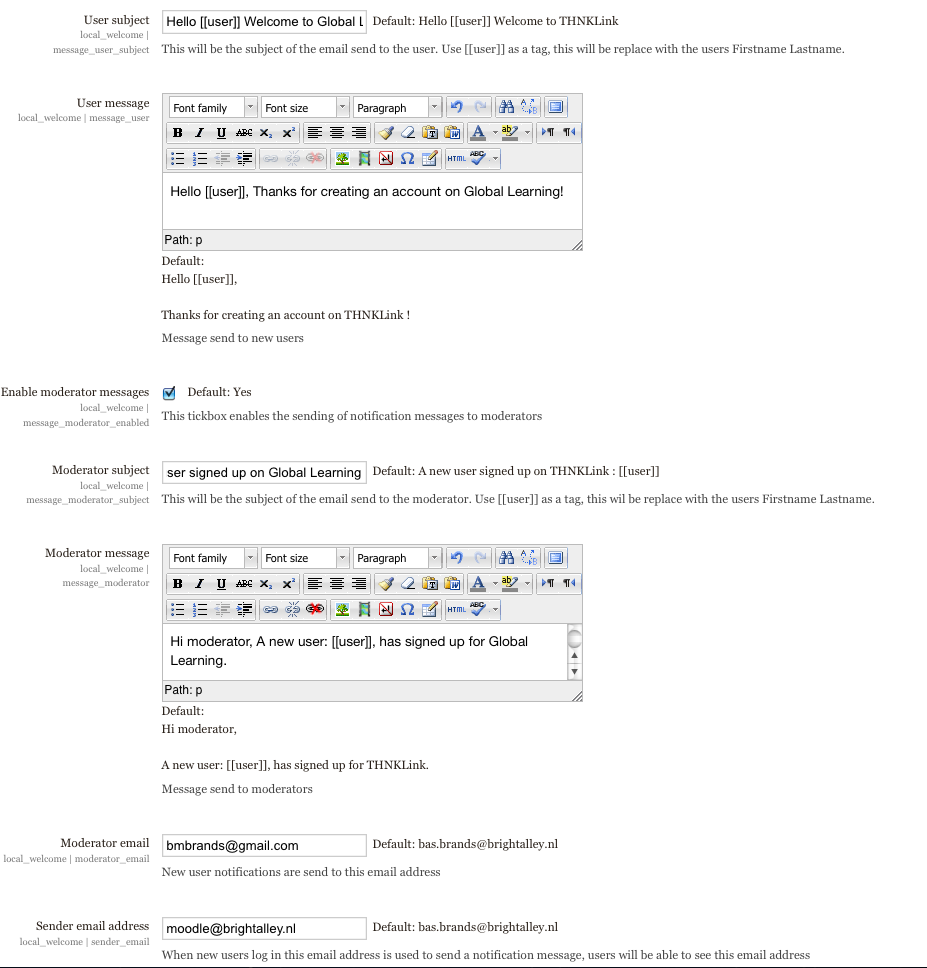
This plugin for Moodle sends a configurable welcome message to new users.
The plugin uses the event system in Moodle and will be triggered when a new
user is created, no matter if this was a manually created account or an
account created using self registration.
REQUIREMENTS
- Moodle 4.5 or later.
SETTINGS
This local plugin allows you to configure:
The email message / subject to the new user
The email message / subject for the moderator / admin
The email address for the moderator / admin
The firstname / lastname of the admin
The authentication plugins that trigger the welcome message
SAMPLE MESSAGE
Welcome [[fullname]]


Your Moodle account has been created and you're ready to go! Your account has

been created with the following details:


Name: [[fullname]],

Username: [[username]],

Firstname: [[firstname]],

Lastname: [[lastname]],

Email: [[email]],

City: [[city]],

Country: [[country]]


Feel free to reach out to us at any time through our email.


Cheers,
AVAILABLE TEMPLATE FIELDS
Default profile fields (sourced from core):
[[username]], [[fullname]], [[firstname]], [[lastname]], [[email]],
[[address]], [[phone1]], [[phone2]], [[department]], [[institution]],
[[interests]], [[idnumber]], [[lang]], [[timezone]], [[description]],
[[city]], [[country]]
Site fields:
[[sitelink]], [[sitename]], [[resetpasswordlink]]
Custom profile fields:
Any custom profile fields defined in your Moodle site are also available
using [[shortname]] syntax. Visit /local/welcome/index.php to see all
available fields and their current values.
TESTING
PHPUnit tests are included in the tests/ directory:
vendor/bin/phpunit local/welcome/tests/message_test.php
INSTALLATION
Just place the welcome directory inside your Moodle's local directory.
Install the plugin and browse to:
Site Administration -> Plugins -> Local plugins -> Moodle welcome
3.0 (2026021700)
3.0
Plugin type: Local plugins
Frankenstyle component name: local_welcome
Version build number: 2026021700
Version release name: 3.0
Maturity: Stable
Supported Moodle versions: 4.4, 4.5, 5.0, 5.1
Repository URL (Git): https://github.com/bmbrands/moodle-local_welcome
Repository branch:
Repository tag: v3.0
Issue/bug tracker URL: https://github.com/bmbrands/moodle-local_welcome/issues
copyright 2017 Bas Brands, Basbrands.nl
author Bas Brands bas@sonsbeekmedia.nl
license http://www.gnu.org/copyleft/gpl.html GNU GPL v3 or later
CHANGES
version 2026021700 (Release 3.0):
- Updated for Moodle 4.5 compatibility (requires Moodle 4.5+).
- Removed deprecated user fields (icq, skype, yahoo, aim, msn, url) that were
removed from Moodle core in Moodle 4.x. - Default user fields now sourced from core user_get_default_fields() instead
of a hardcoded list, ensuring future compatibility. - Fixed PHPDoc tags: replaced deprecated @package local / @subpackage welcome
with correct @package local_welcome across all files. - Fixed privacy provider class description (was referencing block_enrol_duration).
- Fixed typo in index.php URL (/local/welcome/index.php.php).
- Replaced is_siteadmin() check in index.php with require_capability() for
proper access control. - Removed return '' statements from void observer method.
- Flattened nested if-block in observer for better readability.
- Updated events.php to use modern short array syntax.
- Added return type declarations to all methods.
- Added comprehensive PHPDoc documentation to all classes and methods.
- Added PHPUnit test coverage for the message class.
version 2021082600:
Privacy provider implementation by Cameron Ball.
version 2017010400:
Updated to API event handlers version 2 for Moodle 3.1 and newer. Thanks to Nadav Kavalerchik!
version 2015100300:
All profile fields / custom profile fields are now available for usage. To see
the available fields navigate to /local/welcome/index.php
version 2015042900:
Added an option to select the authentication methods that will trigger a
welcome message. This way you can use the welcome plugin for manual authentication
and disable it for (for example) email based self registration.
ABOUT
This plugin for Moodle sends a configurable welcome message to new users.
The plugin uses the event system in Moodle and will be triggered when a new
user is created, no matter if this was a manually created account or an
account created using self registration.
REQUIREMENTS
- Moodle 4.5 or later.
SETTINGS
This local plugin allows you to configure:
The email message / subject to the new user
The email message / subject for the moderator / admin
The email address for the moderator / admin
The firstname / lastname of the admin
The authentication plugins that trigger the welcome message
SAMPLE MESSAGE
Welcome [[fullname]]


Your Moodle account has been created and you're ready to go! Your account has

been created with the following details:


Name: [[fullname]],

Username: [[username]],

Firstname: [[firstname]],

Lastname: [[lastname]],

Email: [[email]],

City: [[city]],

Country: [[country]]


Feel free to reach out to us at any time through our email.


Cheers,
AVAILABLE TEMPLATE FIELDS
Default profile fields (sourced from core):
[[username]], [[fullname]], [[firstname]], [[lastname]], [[email]],
[[address]], [[phone1]], [[phone2]], [[department]], [[institution]],
[[interests]], [[idnumber]], [[lang]], [[timezone]], [[description]],
[[city]], [[country]]
Site fields:
[[sitelink]], [[sitename]], [[resetpasswordlink]]
Custom profile fields:
Any custom profile fields defined in your Moodle site are also available
using [[shortname]] syntax. Visit /local/welcome/index.php to see all
available fields and their current values.
TESTING
PHPUnit tests are included in the tests/ directory:
vendor/bin/phpunit local/welcome/tests/message_test.php
INSTALLATION
Just place the welcome directory inside your Moodle's local directory.
Install the plugin and browse to:
Site Administration -> Plugins -> Local plugins -> Moodle welcome
2.1 (2021081600)
2.1
Plugin type: Local plugins
Frankenstyle component name: local_welcome
Version build number: 2021081600
Version release name: 2.1
Maturity: Stable
Supported Moodle versions: 2.5, 2.6, 2.7, 2.8, 2.9, 3.0, 3.1, 3.10, 3.11, 3.2, 3.3, 3.4, 3.5, 3.6, 3.7, 3.8, 3.9
Repository URL (Git): https://github.com/bmbrands/moodle-local_welcome
Repository branch:
Repository tag: 2.1
Issue/bug tracker URL: https://github.com/bmbrands/moodle-local_welcome/issues
copyright 2017 Bas Brands, Basbrands.nl
author Bas Brands bas@sonsbeekmedia.nl
license http://www.gnu.org/copyleft/gpl.html GNU GPL v3 or later
CHANGES
version 2021082600:
Privacy provider implementation by Cameron Ball.
version 2017010400:
Updated to API event handlers version 2 for Moodle 3.1 and newer. Thanks to Nadav Kavalerchik!
version 2015100300:
All profile fields / custom profile fields are now available for usage. To see
the available fields navigate to /local/welcome/index.php
version 2015042900:
Added an option to select the authentication methods that will trigger a
welcome message. This way you can use the welcome plugin for manual authentication
an disable it for (for example) email based self registration.
ABOUT
This plugin for Moodle sends a configurable welcome message to new users.
The plugin uses the event system in Moodle and will be triggerd when a new
user is created, no matter if this was a manually created account or an
account created using self registration.
SETTINGS
This local plugin allows you to configure:
The email message / subject to the new user
The email message / subject for the moderator / admin
The email address for the moderator / admin
The firstname / lastname of the admin
SAMPLE MESSAGE
Welcome [[fullname]]


Your Moodle account has been created and you're ready to go! Your account has

been created with the following details:


Name: [[fullname]],

Username: [[username]],

Firstname: [[firstname]],

Lastname: [[lastname]],

Email: [[email]],

City: [[city]],

Country: [[country]]


Feel free to reach out to us at any time through our email, on twitter or google+


Cheers,
INSTALLATION
Just place the welcome directory inside your Moodle's local directory.
Install the plugin and browse to:
Site Administration->Plugins->Local plugins->Moodle welcome
2 (2017010400)
2
Plugin type: Local plugins
Frankenstyle component name: local_welcome
Version build number: 2017010400
Version release name: 2
Maturity: Stable
Supported Moodle versions: 2.5, 2.6, 2.7, 2.8, 2.9, 3.0, 3.1, 3.2
Repository URL (Git): https://github.com/bmbrands/moodle-local_welcome
Repository branch:
Repository tag: v2
Issue/bug tracker URL: https://github.com/bmbrands/moodle-local_welcome/issues
copyright 2017 Bas Brands, Basbrands.nl
author Bas Brands bas@sonsbeekmedia.nl
license http://www.gnu.org/copyleft/gpl.html GNU GPL v3 or later
CHANGES
CHANGES
version 2017010400:
Updated to API event handlers version 2 for Moodle 3.1 and newer. Thanks to Nadav Kavalerchik!
version 2015100300:
All profile fields / custom profile fields are now available for usage. To see
the available fields navigate to /local/welcome/index.php
version 2015042900:
Added an option to select the authentication methods that will trigger a
welcome message. This way you can use the welcome plugin for manual authentication
an disable it for (for example) email based self registration.
ABOUT
This plugin for Moodle sends a configurable welcome message to new users.
The plugin uses the event system in Moodle and will be triggerd when a new
user is created, no matter if this was a manually created account or an
account created using self registration.
SETTINGS
This local plugin allows you to configure:
The email message / subject to the new user
The email message / subject for the moderator / admin
The email address for the moderator / admin
The firstname / lastname of the admin
SAMPLE MESSAGE
Welcome [[fullname]]


Your Moodle account has been created and you're ready to go! Your account has

been created with the following details:


Name: [[fullname]],

Username: [[username]],

Firstname: [[firstname]],

Lastname: [[lastname]],

Email: [[email]],

City: [[city]],

Country: [[country]]


Feel free to reach out to us at any time through our email, on twitter or google+


Cheers,
INSTALLATION
Just place the welcome directory inside your Moodle's local directory.
Install the plugin and browse to:
Site Administration->Plugins->Local plugins->Moodle welcome
1.2 (2015110300)
1.2
Plugin type: Local plugins
Frankenstyle component name: local_welcome
Version build number: 2015110300
Version release name: 1.2
Maturity: Stable
Supported Moodle versions: 2.6, 2.7, 2.8, 2.9, 3.0
Repository URL (Git): https://github.com/bmbrands/moodle-local_welcome
Repository branch:
Repository tag:
Issue/bug tracker URL: https://github.com/bmbrands/moodle-local_welcome/issues
copyright 2015 Bas Brands, Basbrands.nl
author Bas Brands bas@sonsbeekmedia.nl
license http://www.gnu.org/copyleft/gpl.html GNU GPL v3 or later
CHANGES
version 2015100300:
All profile fields / custom profile fields are now available for usage. To see
the available fields navigate to /local/welcome/index.php
version 2015042900:
Added an option to select the authentication methods that will trigger a
welcome message. This way you can use the welcome plugin for manual authentication
an disable it for (for example) email based self registration.
ABOUT
This plugin for Moodle sends a configurable welcome message to new users.
The plugin uses the event system in Moodle and will be triggerd when a new
user is created, no matter if this was a manually created account or an
account created using self registration.
SETTINGS
This local plugin allows you to configure:
The email message / subject to the new user
The email message / subject for the moderator / admin
The email address for the moderator / admin
The firstname / lastname of the admin
SAMPLE MESSAGE
Welcome [[fullname]]


Your Moodle account has been created and you're ready to go! Your account has

been created with the following details:


Name: [[fullname]],

Username: [[username]],

Firstname: [[firstname]],

Lastname: [[lastname]],

Email: [[email]],

City: [[city]],

Country: [[country]]


Feel free to reach out to us at any time through our email, on twitter or google+


Cheers,
INSTALLATION
Just place the welcome directory inside your Moodle's local directory.
Install the plugin and browse to:
Site Administration->Plugins->Local plugins->Moodle welcome
1.1 (Build: 2015042900) (2015042900)
1.1 (Build: 2015042900)
Plugin type: Local plugins
Frankenstyle component name: local_welcome
Version build number: 2015042900
Version release name: 1.1 (Build: 2015042900)
Maturity: Stable
Supported Moodle versions: 2.5, 2.6, 2.7, 2.8, 2.9
Repository URL (Git): https://github.com/bmbrands/moodle-local_welcome
Repository branch:
Repository tag: 2015042900
Issue/bug tracker URL: https://github.com/bmbrands/moodle-local_welcome/issues
copyright 2014 Bas Brands, Basbrands.nl
author Bas Brands bas@sonsbeekmedia.nl
license http://www.gnu.org/copyleft/gpl.html GNU GPL v3 or later
CHANGES
version 2015042900:
Added an option to select the authentication methods that will trigger a
welcome message. This way you can use the welcome plugin for manual authentication
an disable it for (for example) email based self registration.
ABOUT
This plugin for Moodle sends a configurable welcome message to new users.
The plugin uses the event system in Moodle and will be triggerd when a new
user is created, no matter if this was a manually created account or an
account created using self registration.
SETTINGS
This local plugin allows you to configure:
The email message / subject to the new user
The email message / subject for the moderator / admin
The email address for the moderator / admin
The firstname / lastname of the admin
SAMPLE MESSAGE
Welcome [[fullname]]


Your Moodle account has been created and you're ready to go! Your account has

been created with the following details:


Name: [[fullname]],

Username: [[username]],

Firstname: [[firstname]],

Lastname: [[lastname]],

Email: [[email]],

City: [[city]],

Country: [[country]]


Feel free to reach out to us at any time through our email, on twitter or google+


Cheers,
INSTALLATION
Just place the welcome directory inside your Moodle's local directory.
Install the plugin and browse to:
Site Administration->Plugins->Local plugins->Moodle welcome
1.0 (Build: 2013101100) (2014101300)
1.0 (Build: 2013101100)
Plugin type: Local plugins
Frankenstyle component name: local_welcome
Version build number: 2014101300
Version release name: 1.0 (Build: 2013101100)
Maturity: Stable
Supported Moodle versions: 2.4, 2.5, 2.6, 2.7, 2.8
Repository URL (Git): https://github.com/bmbrands/moodle-local_welcome
Repository branch:
Repository tag:
Issue/bug tracker URL: https://github.com/bmbrands/moodle-local_welcome/issues
copyright 2014 Bas Brands, Basbrands.nl
author Bas Brands bas@sonsbeekmedia.nl
license http://www.gnu.org/copyleft/gpl.html GNU GPL v3 or later
ABOUT
This plugin for Moodle sends a configurable welcome message to new users.
The plugin uses the event system in Moodle and will be triggerd when a new
user is created, no matter if this was a manually created account or an
account created using self registration.
SETTINGS
This local plugin allows you to configure:
The email message / subject to the new user
The email message / subject for the moderator / admin
The email address for the moderator / admin
The firstname / lastname of the admin
SAMPLE MESSAGE
Welcome [[fullname]]


Your Moodle account has been created and you're ready to go! Your account has

been created with the following details:


Name: [[fullname]],

Username: [[username]],

Firstname: [[firstname]],

Lastname: [[lastname]],

Email: [[email]],

City: [[city]],

Country: [[country]]


Feel free to reach out to us at any time through our email, on twitter or google+


Cheers,
INSTALLATION
Just place the welcome directory inside your Moodle's local directory.
Install the plugin and browse to:
Site Administration->Plugins->Local plugins->Moodle welcome
1.0 (Build: 2014022000) (2014022000)
1.0 (Build: 2014022000)
Plugin type: Local plugins
Frankenstyle component name: local_welcome
Version build number: 2014022000
Version release name: 1.0 (Build: 2014022000)
Maturity: Stable
Supported Moodle versions: 2.4, 2.5, 2.6
Repository URL (Git): https://github.com/bmbrands/moodle-local_welcome
Repository branch:
Repository tag:
Issue/bug tracker URL: https://github.com/bmbrands/moodle-local_welcome/issues
copyright 2013 Bas Brands, Basbrands.nl
author Bas Brands bas@sonsbeekmedia.nl
license http://www.gnu.org/copyleft/gpl.html GNU GPL v3 or later
ABOUT
This plugin for Moodle sends a configurable welcome message to new users.
The plugin uses the event system in Moodle and will be triggerd when a new
user is created, no matter if this was a manually created account or an
account created using self registration.
SETTINGS
This local plugin allows you to configure:
The email message / subject to the new user
The email message / subject for the moderator / admin
The email address for the moderator / admin
The firstname / lastname of the admin
SAMPLE MESSAGE
Welcome [[fullname]]


Your Moodle account has been created and you're ready to go! Your account has

been created with the following details:


Name: [[fullname]],

Username: [[username]],

Firstname: [[firstname]],

Lastname: [[lastname]],

Email: [[email]],

City: [[city]],

Country: [[country]]


Feel free to reach out to us at any time through our email, on twitter or google+


Cheers,
INSTALLATION
Just place the welcome directory inside your Moodle's local directory.
Install the plugin and browse to:
Site Administration->Plugins->Local plugins->Moodle welcome
1.0 (Build: 2013101100) (2014021000)
1.0 (Build: 2013101100)
Plugin type: Local plugins
Frankenstyle component name: local_welcome
Version build number: 2014021000
Version release name: 1.0 (Build: 2013101100)
Maturity: Stable
Supported Moodle versions: 2.4, 2.5, 2.6
Repository URL (Git): https://github.com/bmbrands/moodle-local_welcome
Repository branch:
Repository tag:
Issue/bug tracker URL: https://github.com/bmbrands/moodle-local_welcome/issues
copyright 2013 Bas Brands, Basbrands.nl
author Bas Brands bas@sonsbeekmedia.nl
license http://www.gnu.org/copyleft/gpl.html GNU GPL v3 or later
ABOUT
This plugin for Moodle sends a configurable welcome message to new users.
The plugin uses the event system in Moodle and will be triggerd when a new
user is created, no matter if this was a manually created account or an
account created using self registration.
SETTINGS
This local plugin allows you to configure:
The email message / subject to the new user
The email message / subject for the moderator / admin
The email address for the moderator / admin
The firstname / lastname of the admin
SAMPLE MESSAGE
Welcome [[fullname]]


Your Moodle account has been created and you're ready to go! Your account has

been created with the following details:


Name: [[fullname]],

Username: [[username]],

Firstname: [[firstname]],

Lastname: [[lastname]],

Email: [[email]],

City: [[city]],

Country: [[country]]


Feel free to reach out to us at any time through our email, on twitter or google+


Cheers,
INSTALLATION
Just place the welcome directory inside your Moodle's local directory.
Install the plugin and browse to:
Site Administration->Plugins->Local plugins->Moodle welcome
1.0 (Build: 2013101100) (2013101100)
1.0 (Build: 2013101100)
Plugin type: Local plugins
Frankenstyle component name: local_welcome
Version build number: 2013101100
Version release name: 1.0 (Build: 2013101100)
Maturity: Stable
Supported Moodle versions: 2.4, 2.5
Repository URL (Git): https://github.com/bmbrands/moodle-local_welcome
Repository branch:
Repository tag:
Issue/bug tracker URL: https://github.com/bmbrands/moodle-local_welcome/issues
copyright 2013 Bas Brands, Basbrands.nl
author Bas Brands bas@sonsbeekmedia.nl
license http://www.gnu.org/copyleft/gpl.html GNU GPL v3 or later
ABOUT
This plugin for Moodle sends a configurable welcome message to new users.
The plugin uses the event system in Moodle and will be triggerd when a new
user is created, no matter if this was a manually created account or an
account created using self registration.
SETTINGS
This local plugin allows you to configure:
The email message / subject to the new user
The email message / subject for the moderator / admin
The email address for the moderator / admin
The firstname / lastname of the admin
INSTALLATION
Just place the welcome directory inside your Moodle's local directory.
Install the plugin and browse to:
Site Administration->Plugins->Local plugins->Moodle welcome
1.0 (Build: 20122091900) (2012101800)
1.0 (Build: 20122091900)
Plugin type: Local plugins
Frankenstyle component name: local_welcome
Version build number: 2012101800
Version release name: 1.0 (Build: 20122091900)
Maturity: Beta
Supported Moodle versions: 2.1, 2.2, 2.3
Repository URL (Git):
Repository branch:
Repository tag:
Issue/bug tracker URL: https://github.com/bmbrands/moodle-local_welcome/issues
@package local
@subpackage welcome
@copyright 2012 Bas Brands
@copyright 2012 Bright Alley Knowledge and learning
@author Bas Brands bmbrands@gmail.com
@license http://www.gnu.org/copyleft/gpl.html GNU GPL v3 or later
Version 2012101800:
- Updated language files to enable AMOS translation
This plugin sends users a welcome message after logging in
and notify a moderator a new user has been added
it has a settings page that allow you to configure the messages send.
-- Installation --
Just place the welcome directory inside your Moodle's local directory. Install the plugin and browse to:
Site Administration->Plugins->Local plugins->Moodle welcome
Configure the settings page
This plugin will work for all types of authentication plugins, including manual.
1.0 (Build: 20122091900) (2012091900)
1.0 (Build: 20122091900)
Plugin type: Local plugins
Frankenstyle component name: local_welcome
Version build number: 2012091900
Version release name: 1.0 (Build: 20122091900)
Maturity: Beta
Supported Moodle versions: 2.1, 2.2, 2.3
Repository URL (Git):
Repository branch:
Repository tag:
Issue/bug tracker URL: https://github.com/bmbrands/moodle-local_welcome/issues
This plugin sends new users a welcome message after signing up for moodle and sends a configurable moderator a message when a new user signs up.
-This version adds the ability to set the "send from" email addres in the plugin's settings pages that is different from the email addres of the moderator
-You can now enable / disable the sending of email to a moderator and the sending of email to new users.
Site Administration->Plugins->Local plugins->Moodle welcome
Configure the settings page
This plugin will work for all types of authentication plugins, including manual.
1.0 (Build: 20122802500) (2012082200)
1.0 (Build: 20122802500)
Plugin type: Local plugins
Frankenstyle component name: local_welcome
Version build number: 2012082200
Version release name: 1.0 (Build: 20122802500)
Maturity: Beta
Supported Moodle versions: 2.1, 2.2, 2.3
Repository URL (Git):
Repository branch:
Repository tag:
Issue/bug tracker URL: https://github.com/bmbrands/moodle-local_welcome/issues
This plugin sends users a welcome message after logging in
and notify a moderator a new user has been added
it has a settings page that allow you to configure the messages send.
-- Installation --
Just place the welcome directory inside your Moodle's local directory. Install the plugin and browse to:
Site Administration->Plugins->Local plugins->Moodle welcome
Configure the settings page
This plugin will work for all types of authentication plugins, including manual.