Course Publishing Workflow
Versions
Current version
2.4.0 (Build 2013112400) (2013112400)
2.4.0 (Build 2013112400)
Plugin type: Blocks
Frankenstyle component name: block_publishflow
Version build number: 2013112400
Version release name: 2.4.0 (Build 2013112400)
Maturity: Beta
Supported Moodle versions: 2.4, 2.5
Repository URL (Git): http://github.com/vfremaux/moodle-block_publishflow
Repository branch: MOODLE_24_STABLE
Repository tag:
Issue/bug tracker URL: http://github.com/vfremaux/moodle-block_publishflow/issues
moodle-block_publishflow
Allows fast across MNET course publication strategy using Moodle Course Archive transport. Complement of VMoodle, but now works in any MNet organisation.
This version has been reviewed for 2.4 and 2.5 Moodle versions.
Check full documentation for complete setup. The module holds his own Course Publishing network services based on Moodle MNet implementation.
It provides a Course Factory/Course Catalog/Training Center model organisation of a Moodle networked assembly of Moodle instances with cross-publishing/deploying and back to factory retrofit course units.
On training center nodes, a Course opening/closing process enlightens course session handling in profesionnal developement environements.
2.2.0 (Build 2012112900) (2012112902)
2.2.0 (Build 2012112900)
Plugin type: Blocks
Frankenstyle component name: block_publishflow
Version build number: 2012112902
Version release name: 2.2.0 (Build 2012112900)
Maturity: Beta
Supported Moodle versions: 2.2, 2.3
Repository URL (Git): http://github.com/vfremaux/moodle-block_publishflow
Repository branch: master
Repository tag:
Issue/bug tracker URL: http://github.com/vfremaux/moodle-block_publishflow/issues
Publishflow Block
###############################
This is an upgraded version of the Publishflow block from Pairformance/Intel TAO
moodle implementations organising a course transportation layer over MNET between
moodle nodes bound together in a coherent content installation.
Publishflow tags Moodle instances in a "Factory/Course Catalog/Training Center"
concept, each of one will provide a distinct behaviour to the block, and has induction
upon how courses and categories are managed in Moodle.
Read http://docs.moodle.org/23/en/Course_Publishing_block_%28publishflow%29 for complete documentation
Installation
##################################
Unzip the bloc into the folder
Setup
#################################
For initiating operations you need :
identifying parts of your course distribution system :
- which Moodle node acts as a Catalog, or at least Factory and Catalog combined, which ones are Training Centers.
- Enable Moodle between Catalog and Training Centers as required
- Activate both publishing and subcribing to the publishflow infrastructure service
Browse on each platform and setup the site wide settings of the publishflow block, from the
Admin > PLugins > Blocks menu.
You will mostly :
choose the Moodle Node Type in "factory, catalog, combined factory and catalog, training center' list.
once this is done for all Moodles, you can ask each node to discover the network environement. This is done in the
central settings for publishflow block, by clicking the link to the publishing environnement setup and discovery page.
Update the environement to guess what moodle nodes you have in your networking neighbourhood. You'll see that each MNET
host will be known with its "role" regarding to publishing architecture.
At the same time, this procedure will proxy the remote category organisation, so some course transfers can point to
designated categories at deploy time.
- you SHOULD till further releases choose the local filesystem delivery : Actual remote delivery is performed
by XML-RPC secured transport layer that may have strong limitations in volume (< 40 Mo). A new transportation
layer using simple HTTP or HTTPS link is under developement.
Till further informaiton, THE ACTUAL BLOCK IS FOR USE BETWEEN MOODLE RUNNING ON THE SAME HOSTING SYSTEM.
- There are several settings that are usefull to know for setting up precise behaviour of each node type so
check the mentionned documentation carefully. - check publishflow capabilities related to your role settings. All publishflow operations are fine for Moodle
administrator, but can be accurately delegated to consistant users.
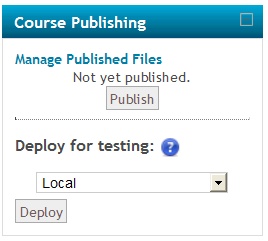
Publishing a course (Factory)
######################################
Publishing a course is an operation between a Factory Node and a Catalog Node. If you only setup a combined
Factory + Catalog node in your network, you will only be allowed to deploy and retrofit.
For course publishing operation, you need :
- having a publishflow in the course. this block will hide from students and non-editing teachers.
- having publishing capabilities in this course
- having stored a deployable backup in this block (let the block tell you what is needed)
- having an IDNumber setup for the course.
- having a remote acocunt (MNET identity) valid for operations : you'll need probably jump to the other Moodle to activate it at first time.
- having remore capability to publish in the publishing category.
If all this is complied, the publish flow will let you push the publishing button.
Once published, you'll be asked to return to the original course, or jump to the remote published copy.
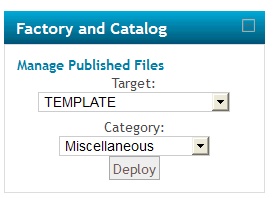
Deploying a course
######################################
Deploying a course is basically the same operation of material tranportation than publishing. The most important differences are:
- when deploying several times, you make several copies of the course content.
- you may be able to choose the target remote category at deploying time (and not a system defined default)
- you may define a key for deployment, allowing any people having the key (and remotely capable to import courses) to deploy, independently from
having adequate lcoal capability for it. - you may deploy to local moodle (some kind of fast course duplication) or to any remote Moodle you are allowed to
- you may deploy everywhere without any limitation if you have "deployeverywhere" capability.
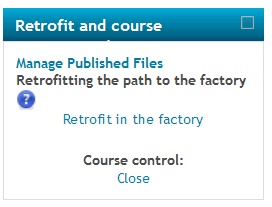
Retrofitting a course
######################################
Some effective course content might be severely altered or changed by teachers. If this needs the courses to be
updated back to Courseware Catalog, you can use the Retrofit deployment to push back the course from a Training Center
to a Factory, and initiate the life cycle again....
Retrofitting the course will address a remote category in Factory choosen by global settings.
Other Training Center operations
##########################################
On Training Center nodes, the block will handle a simple Open/Close workflow on the course,
moving to adequate categories and showing/hiding the course. The students will also be shifted
to an disabledstudent role so they are not allowed to change material inside the course, while
in some conditions still being allowed to view content.
1.9.0 (Build 2012112900) (2012112900)
1.9.0 (Build 2012112900)
Plugin type: Blocks
Frankenstyle component name: block_publishflow
Version build number: 2012112900
Version release name: 1.9.0 (Build 2012112900)
Maturity: Release Candidate
Supported Moodle versions: 1.9
Repository URL (Git): http://github.com/vfremaux/moodle-block_publishflow
Repository branch: MOODLE_19_STABLE
Repository tag:
Issue/bug tracker URL: http://github.com/vfremaux/moodle-block_publishflow/issues
Publishflow Block
###############################
Moodle 1.9 version
This is an upgraded version of the Publishflow block from Pairformance/Intel TAO
moodle implementations organising a course transportation layer over MNET between
moodle nodes bound together in a coherent content installation.
Publishflow tags Moodle instances in a "Factory/Course Catalog/Training Center"
concept, each of one will provide a distinct behaviour to the block, and has induction
upon how courses and categories are managed in Moodle.
Read http://docs.moodle.org/19/en/Course_Publishing_block_%28publishflow%29 for complete documentation
Requirements
##################################
Using Publishflow block needs to add a MNET patch in order to allow blocks to register and use XML-RPC
just as Moodle activity do. This is known as following :
Add possibility for blocks to handle xmlrpc the same way Moodle modules do :
################################################################################
This is an important patch needed for the PublishFlow block to invoke XML-RPC functions
between Moodle instances. It fixes an inconsistancy of the MNET implementation was
lacking blocks to exchange information using network communications.
Patch point is :
file : /mnet/xmlrpc/server.php
line : near 478
location : before (or after, no case, but an additional case) the handling of modules.
// PATCH : Add RPC support to blocks
////////////////////////////////////// STRICT BLOCKS/*
} elseif ($callstack[0] == 'blocks') {
list($base, $block, $filename, $functionname) = $callstack;
$includefile = '/blocks/'.$block.'/rpclib.php';
$response = mnet_server_invoke_method($includefile, $functionname, $method, $payload);
$response = mnet_server_prepare_response($response);
echo $response;
// /PATCH
////////////////////////////////////// STRICT MOD/*
} elseif ($callstack[0] == 'mod' || 'dangerous' == $CFG->mnet_dispatcher_mode) {
list($base, $module, $filename, $functionname) = $callstack;
Installation
##################################
Unzip the bloc into the folder
Setup
#################################
For initiating operations you need :
identifying parts of your course distribution system :
- which Moodle node acts as a Catalog, or at least Factory and Catalog combined, which ones are Training Centers.
- Enable Moodle between Catalog and Training Centers as required
- Activate both publishing and subcribing to the publishflow infrastructure service
Browse on each platform and setup the site wide settings of the publishflow block, from the
Admin > PLugins > Blocks menu.
You will mostly :
choose the Moodle Node Type in "factory, catalog, combined factory and catalog, training center' list.
once this is done for all Moodles, you can ask each node to discover the network environement. This is done in the
central settings for publishflow block, by clicking the link to the publishing environnement setup and discovery page.
Update the environement to guess what moodle nodes you have in your networking neighbourhood. You'll see that each MNET
host will be known with its "role" regarding to publishing architecture.
At the same time, this procedure will proxy the remote category organisation, so some course transfers can point to
designated categories at deploy time.
- you SHOULD till further releases choose the local filesystem delivery : Actual remote delivery is performed
by XML-RPC secured transport layer that may have strong limitations in volume (< 40 Mo). A new transportation
layer using simple HTTP or HTTPS link is under developement.
Till further informaiton, THE ACTUAL BLOCK IS FOR USE BETWEEN MOODLE RUNNING ON THE SAME HOSTING SYSTEM.
- There are several settings that are usefull to know for setting up precise behaviour of each node type so
check the mentionned documentation carefully. - check publishflow capabilities related to your role settings. All publishflow operations are fine for Moodle
administrator, but can be accurately delegated to consistant users.
Publishing a course (Factory)
######################################
Publishing a course is an operation between a Factory Node and a Catalog Node. If you only setup a combined
Factory + Catalog node in your network, you will only be allowed to deploy and retrofit.
For course publishing operation, you need :
- having a publishflow in the course. this block will hide from students and non-editing teachers.
- having publishing capabilities in this course
- having stored a deployable backup in this block (let the block tell you what is needed)
- having an IDNumber setup for the course.
- having a remote acocunt (MNET identity) valid for operations : you'll need probably jump to the other Moodle to activate it at first time.
- having remore capability to publish in the publishing category.
If all this is complied, the publish flow will let you push the publishing button.
Once published, you'll be asked to return to the original course, or jump to the remote published copy.
Deploying a course
######################################
Deploying a course is basically the same operation of material tranportation than publishing. The most important differences are:
- when deploying several times, you make several copies of the course content.
- you may be able to choose the target remote category at deploying time (and not a system defined default)
- you may define a key for deployment, allowing any people having the key (and remotely capable to import courses) to deploy, independently from
having adequate lcoal capability for it. - you may deploy to local moodle (some kind of fast course duplication) or to any remote Moodle you are allowed to
- you may deploy everywhere without any limitation if you have "deployeverywhere" capability.
Retrofitting a course
######################################
Some effective course content might be severely altered or changed by teachers. If this needs the courses to be
updated back to Courseware Catalog, you can use the Retrofit deployment to push back the course from a Training Center
to a Factory, and initiate the life cycle again....
Retrofitting the course will address a remote category in Factory choosen by global settings.
Other Training Center operations
##########################################
On Training Center nodes, the block will handle a simple Open/Close workflow on the course,
moving to adequate categories and showing/hiding the course. The students will also be shifted
to an disabledstudent role so they are not allowed to change material inside the course, while
in some conditions still being allowed to view content.