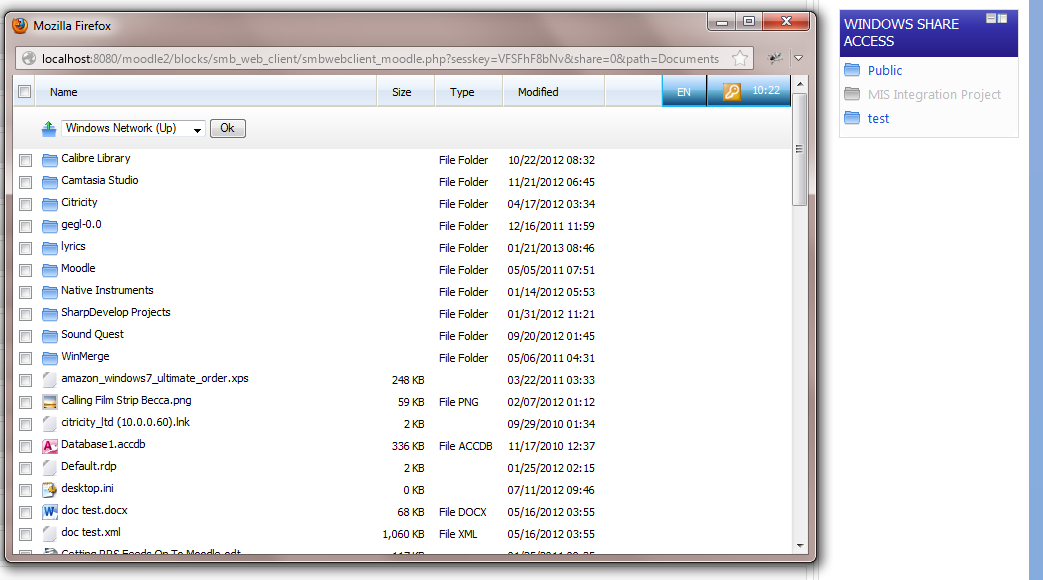
Windows Share access (AKA Network Drive Access, SMB Web Client)
Versions
Current version
2014122000 (2014122000)
2014122000
Plugin type: Blocks
Frankenstyle component name: block_smb_web_client
Version build number: 2014122000
Version release name: 2014122000
Maturity: Stable
Supported Moodle versions: 2.2, 2.3, 2.4, 2.5, 2.6, 2.7
Repository URL (Git):
Repository branch:
Repository tag:
Issue/bug tracker URL:
LICENCE
GPL See LICENCE.TXT for details
DEVELOPMENT OF VERSION 2013101400 WAS SPONSORED BY OVERNET DATA LTD www.overnetdata.com
IMPORTANT CHANGES 2013021300
Shares should now be entered in regular windows share format - e.g.
\myserver\myshare
You do not need to configure any home directory share translations anymore, the
home directory should work out of the box providing you have a homedirectory
field populated in your AD account (LDAP account).
IMPORTANT CHANGES 2013012300
Works with Moodle 2.4
Modified to work with latest version of ldapcapture 2013012300
IMPORTANT CHANGES 2012100800
Works with Moodle 2.3
IMPORTANT CHANGES 2012030612
All Configuration moved out of config_smb_web_client.php and into
Moodle2.2 Administration system.
LIMITATIONS
You will need a Linux server with SMBClient installed to use this block
OR
You will need a Windows server with a CygWin installation and SMBClient
installed to use this block.
NOTE: This version will only work with Moodle 2.2+
PRE-INSTALL PREPARATION
Manually test SMBClient from your linux console and make sure you can access your window shares.
Can be used in conjunction with LDAPCapture Auth plugin - although this is not a mandatory requirement.
INSTALLATION
Unzip and upload entire smb_web_client folder to your Moodle installation's /blocks folder.
As an admin From Moodle, select 'Notifications' under the Site Administration block. This will set db tables up for this block.
Head to Site Administration > Plugins > Blocks > Network Drive Access to configure.
Enter the location of smbclient on your web server
Configure your shares - enter them in regular windows format - e.g. \myserver\myshare
Configure the block's remaining settings, save.
SITE USAGE
- Add the block to your moodle front page (site)
2014032400 (2014032400)
2014032400
Plugin type: Blocks
Frankenstyle component name: block_smb_web_client
Version build number: 2014032400
Version release name: 2014032400
Maturity: Stable
Supported Moodle versions: 2.4, 2.5, 2.6
Repository URL (Git):
Repository branch:
Repository tag:
Issue/bug tracker URL:
LICENCE
GPL See LICENCE.TXT for details
DEVELOPMENT OF VERSION 2013101400 WAS SPONSORED BY OVERNET DATA LTD www.overnetdata.com
IMPORTANT CHANGES 2013021300
Shares should now be entered in regular windows share format - e.g.
\myserver\myshare
You do not need to configure any home directory share translations anymore, the
home directory should work out of the box providing you have a homedirectory
field populated in your AD account (LDAP account).
IMPORTANT CHANGES 2013012300
Works with Moodle 2.4
Modified to work with latest version of ldapcapture 2013012300
IMPORTANT CHANGES 2012100800
Works with Moodle 2.3
IMPORTANT CHANGES 2012030612
All Configuration moved out of config_smb_web_client.php and into
Moodle2.2 Administration system.
LIMITATIONS
You will need a Linux server with SMBClient installed to use this block
OR
You will need a Windows server with a CygWin installation and SMBClient
installed to use this block.
NOTE: This version will only work with Moodle 2.2+
PRE-INSTALL PREPARATION
Manually test SMBClient from your linux console and make sure you can access your window shares.
Can be used in conjunction with LDAPCapture Auth plugin - although this is not a mandatory requirement.
INSTALLATION
Unzip and upload entire smb_web_client folder to your Moodle installation's /blocks folder.
As an admin From Moodle, select 'Notifications' under the Site Administration block. This will set db tables up for this block.
Head to Site Administration > Plugins > Blocks > Network Drive Access to configure.
Enter the location of smbclient on your web server
Configure your shares - enter them in regular windows format - e.g. \myserver\myshare
Configure the block's remaining settings, save.
SITE USAGE
- Add the block to your moodle front page (site)
2013101600 (2013101600)
2013101600
Plugin type: Blocks
Frankenstyle component name: block_smb_web_client
Version build number: 2013101600
Version release name: 2013101600
Maturity: Stable
Supported Moodle versions: 2.2, 2.3, 2.4, 2.5
Repository URL (Git):
Repository branch:
Repository tag:
Issue/bug tracker URL:
LICENCE
GPL See LICENCE.TXT for details
DEVELOPMENT OF VERSION 2013101400 WAS SPONSORED BY OVERNET DATA LTD www.overnetdata.com
IMPORTANT CHANGES 2013021300
Shares should now be entered in regular windows share format - e.g.
\myserver\myshare
You do not need to configure any home directory share translations anymore, the
home directory should work out of the box providing you have a homedirectory
field populated in your AD account (LDAP account).
IMPORTANT CHANGES 2013012300
Works with Moodle 2.4
Modified to work with latest version of ldapcapture 2013012300
IMPORTANT CHANGES 2012100800
Works with Moodle 2.3
IMPORTANT CHANGES 2012030612
All Configuration moved out of config_smb_web_client.php and into
Moodle2.2 Administration system.
LIMITATIONS
You will need a Linux server with SMBClient installed to use this block
OR
You will need a Windows server with a CygWin installation and SMBClient
installed to use this block.
NOTE: This version will only work with Moodle 2.2+
PRE-INSTALL PREPARATION
Manually test SMBClient from your linux console and make sure you can access your window shares.
Can be used in conjunction with LDAPCapture Auth plugin - although this is not a mandatory requirement.
INSTALLATION
Unzip and upload entire smb_web_client folder to your Moodle installation's /blocks folder.
As an admin From Moodle, select 'Notifications' under the Site Administration block. This will set db tables up for this block.
Head to Site Administration > Plugins > Blocks > Network Drive Access to configure.
Enter the location of smbclient on your web server
Configure your shares - enter them in regular windows format - e.g. \myserver\myshare
Configure the block's remaining settings, save.
SITE USAGE
- Add the block to your moodle front page (site)
2013101500 (2013101500)
2013101500
Plugin type: Blocks
Frankenstyle component name: block_smb_web_client
Version build number: 2013101500
Version release name: 2013101500
Maturity: Stable
Supported Moodle versions: 2.2, 2.3, 2.4, 2.5
Repository URL (Git):
Repository branch:
Repository tag:
Issue/bug tracker URL:
LICENCE
GPL See LICENCE.TXT for details
DEVELOPMENT OF VERSION 2013101400 WAS SPONSORED BY OVERNET DATA LTD www.overnetdata.com
IMPORTANT CHANGES 2013021300
Shares should now be entered in regular windows share format - e.g.
\myserver\myshare
You do not need to configure any home directory share translations anymore, the
home directory should work out of the box providing you have a homedirectory
field populated in your AD account (LDAP account).
IMPORTANT CHANGES 2013012300
Works with Moodle 2.4
Modified to work with latest version of ldapcapture 2013012300
IMPORTANT CHANGES 2012100800
Works with Moodle 2.3
IMPORTANT CHANGES 2012030612
All Configuration moved out of config_smb_web_client.php and into
Moodle2.2 Administration system.
LIMITATIONS
You will need a Linux server with SMBClient installed to use this block
OR
You will need a Windows server with a CygWin installation and SMBClient
installed to use this block.
NOTE: This version will only work with Moodle 2.2+
PRE-INSTALL PREPARATION
Manually test SMBClient from your linux console and make sure you can access your window shares.
Can be used in conjunction with LDAPCapture Auth plugin - although this is not a mandatory requirement.
INSTALLATION
Unzip and upload entire smb_web_client folder to your Moodle installation's /blocks folder.
As an admin From Moodle, select 'Notifications' under the Site Administration block. This will set db tables up for this block.
Head to Site Administration > Plugins > Blocks > Network Drive Access to configure.
Enter the location of smbclient on your web server
Configure your shares - enter them in regular windows format - e.g. \myserver\myshare
Configure the block's remaining settings, save.
SITE USAGE
- Add the block to your moodle front page (site)
2013101400 (2013101400)
2013101400
Plugin type: Blocks
Frankenstyle component name: block_smb_web_client
Version build number: 2013101400
Version release name: 2013101400
Maturity: Release Candidate
Supported Moodle versions: 2.2, 2.3, 2.4, 2.5
Repository URL (Git):
Repository branch:
Repository tag:
Issue/bug tracker URL:
LICENCE
GPL See LICENCE.TXT for details
DEVELOPMENT OF VERSION 2013101400 WAS SPONSORED BY OVERNET DATA LTD www.overnetdata.com
IMPORTANT CHANGES 2013021300
Shares should now be entered in regular windows share format - e.g.
\myserver\myshare
You do not need to configure any home directory share translations anymore, the
home directory should work out of the box providing you have a homedirectory
field populated in your AD account (LDAP account).
IMPORTANT CHANGES 2013012300
Works with Moodle 2.4
Modified to work with latest version of ldapcapture 2013012300
IMPORTANT CHANGES 2012100800
Works with Moodle 2.3
IMPORTANT CHANGES 2012030612
All Configuration moved out of config_smb_web_client.php and into
Moodle2.2 Administration system.
LIMITATIONS
You will need a Linux server with SMBClient installed to use this block
OR
You will need a Windows server with a CygWin installation and SMBClient
installed to use this block.
NOTE: This version will only work with Moodle 2.2+
PRE-INSTALL PREPARATION
Manually test SMBClient from your linux console and make sure you can access your window shares.
Can be used in conjunction with LDAPCapture Auth plugin - although this is not a mandatory requirement.
INSTALLATION
Unzip and upload entire smb_web_client folder to your Moodle installation's /blocks folder.
As an admin From Moodle, select 'Notifications' under the Site Administration block. This will set db tables up for this block.
Head to Site Administration > Plugins > Blocks > Network Drive Access to configure.
Enter the location of smbclient on your web server
Configure your shares - enter them in regular windows format - e.g. \myserver\myshare
Configure the block's remaining settings, save.
SITE USAGE
- Add the block to your moodle front page (site)
2013090300 (2013090300)
2013090300
Plugin type: Blocks
Frankenstyle component name: block_smb_web_client
Version build number: 2013090300
Version release name: 2013090300
Maturity: Release Candidate
Supported Moodle versions:
Repository URL (Git):
Repository branch:
Repository tag:
Issue/bug tracker URL:
LICENCE
GPL See LICENCE.TXT for details
IMPORTANT CHANGES 2013021300
Shares should now be entered in regular windows share format - e.g.
\myserver\myshare
You do not need to configure any home directory share translations anymore, the
home directory should work out of the box providing you have a homedirectory
field populated in your AD account (LDAP account).
IMPORTANT CHANGES 2013012300
Works with Moodle 2.4
Modified to work with latest version of ldapcapture 2013012300
IMPORTANT CHANGES 2012100800
Works with Moodle 2.3
IMPORTANT CHANGES 2012030612
All Configuration moved out of config_smb_web_client.php and into
Moodle2.2 Administration system.
LIMITATIONS
You will need a Linux server with SMBClient installed to use this block
OR
You will need a Windows server with a CygWin installation and SMBClient
installed to use this block.
NOTE: This version will only work with Moodle 2.2+
PRE-INSTALL PREPARATION
Manually test SMBClient from your linux console and make sure you can access your window shares.
Can be used in conjunction with LDAPCapture Auth plugin - although this is not a mandatory requirement.
INSTALLATION
Unzip and upload entire smb_web_client folder to your Moodle installation's /blocks folder.
As an admin From Moodle, select 'Notifications' under the Site Administration block. This will set db tables up for this block.
Head to Site Administration > Plugins > Blocks > Network Drive Access to configure.
Enter the location of smbclient on your web server
Configure your shares - enter them in regular windows format - e.g. \myserver\myshare
Configure the block's remaining settings, save.
SITE USAGE
- Add the block to your moodle front page (site)
2013060602 (2013060602)
2013060602
Plugin type: Blocks
Frankenstyle component name: block_smb_web_client
Version build number: 2013060602
Version release name: 2013060602
Maturity: Release Candidate
Supported Moodle versions: 2.2, 2.3, 2.4, 2.5
Repository URL (Git):
Repository branch:
Repository tag:
Issue/bug tracker URL:
LICENCE ======================================== GPL See LICENCE.TXT for details IMPORTANT CHANGES 2013021300 Shares should now be entered in regular windows share format - e.g. \\myserver\myshare You do not need to configure any home directory share translations anymore, the home directory should work out of the box providing you have a homedirectory field populated in your AD account (LDAP account). ======================================== IMPORTANT CHANGES 2013012300 Works with Moodle 2.4 Modified to work with latest version of ldapcapture 2013012300 ======================================== IMPORTANT CHANGES 2012100800 ======================================== Works with Moodle 2.3 IMPORTANT CHANGES 2012030612 ======================================== All Configuration moved out of config_smb_web_client.php and into Moodle2.2 Administration system. LIMITATIONS ======================================== You will need a Linux server with SMBClient installed to use this block OR You will need a Windows server with a CygWin installation and SMBClient installed to use this block. NOTE: This version will only work with Moodle 2.2+ PRE-INSTALL PREPARATION ======================================== Manually test SMBClient from your linux console and make sure you can access your window shares. Can be used in conjunction with LDAPCapture Auth plugin - although this is not a mandatory requirement. INSTALLATION ======================================== 1) Unzip and upload entire smb_web_client folder to your Moodle installation's /blocks folder. 2) As an admin From Moodle, select 'Notifications' under the Site Administration block. This will set db tables up for this block. 3) Head to Site Administration > Plugins > Blocks > Network Drive Access to configure. 4) Enter the location of smbclient on your web server 5) Configure your shares - enter them in regular windows format - e.g. \\myserver\myshare 6) Configure the block's remaining settings, save. SITE USAGE ======================================== 1) Add the block to your moodle front page (site)
2013060601 (2013060601)
2013060601
Plugin type: Blocks
Frankenstyle component name: block_smb_web_client
Version build number: 2013060601
Version release name: 2013060601
Maturity: Beta
Supported Moodle versions: 2.2, 2.3, 2.4, 2.5
Repository URL (Git):
Repository branch:
Repository tag:
Issue/bug tracker URL:
LICENCE ======================================== GPL See LICENCE.TXT for details IMPORTANT CHANGES 2013021300 Shares should now be entered in regular windows share format - e.g. \\myserver\myshare You do not need to configure any home directory share translations anymore, the home directory should work out of the box providing you have a homedirectory field populated in your AD account (LDAP account). ======================================== IMPORTANT CHANGES 2013012300 Works with Moodle 2.4 Modified to work with latest version of ldapcapture 2013012300 ======================================== IMPORTANT CHANGES 2012100800 ======================================== Works with Moodle 2.3 IMPORTANT CHANGES 2012030612 ======================================== All Configuration moved out of config_smb_web_client.php and into Moodle2.2 Administration system. LIMITATIONS ======================================== You will need a Linux server with SMBClient installed to use this block OR You will need a Windows server with a CygWin installation and SMBClient installed to use this block. NOTE: This version will only work with Moodle 2.2+ PRE-INSTALL PREPARATION ======================================== Manually test SMBClient from your linux console and make sure you can access your window shares. Can be used in conjunction with LDAPCapture Auth plugin - although this is not a mandatory requirement. INSTALLATION ======================================== 1) Unzip and upload entire smb_web_client folder to your Moodle installation's /blocks folder. 2) As an admin From Moodle, select 'Notifications' under the Site Administration block. This will set db tables up for this block. 3) Head to Site Administration > Plugins > Blocks > Network Drive Access to configure. 4) Enter the location of smbclient on your web server 5) Configure your shares - enter them in regular windows format - e.g. \\myserver\myshare 6) Configure the block's remaining settings, save. SITE USAGE ======================================== 1) Add the block to your moodle front page (site)
2013060600 (2013060600)
2013060600
Plugin type: Blocks
Frankenstyle component name: block_smb_web_client
Version build number: 2013060600
Version release name: 2013060600
Maturity: Beta
Supported Moodle versions: 2.2, 2.3, 2.4, 2.5
Repository URL (Git):
Repository branch:
Repository tag:
Issue/bug tracker URL:
LICENCE ======================================== GPL See LICENCE.TXT for details IMPORTANT CHANGES 2013021300 Shares should now be entered in regular windows share format - e.g. \\myserver\myshare You do not need to configure any home directory share translations anymore, the home directory should work out of the box providing you have a homedirectory field populated in your AD account (LDAP account). ======================================== IMPORTANT CHANGES 2013012300 Works with Moodle 2.4 Modified to work with latest version of ldapcapture 2013012300 ======================================== IMPORTANT CHANGES 2012100800 ======================================== Works with Moodle 2.3 IMPORTANT CHANGES 2012030612 ======================================== All Configuration moved out of config_smb_web_client.php and into Moodle2.2 Administration system. LIMITATIONS ======================================== You will need a Linux server with SMBClient installed to use this block OR You will need a Windows server with a CygWin installation and SMBClient installed to use this block. NOTE: This version will only work with Moodle 2.2+ PRE-INSTALL PREPARATION ======================================== Manually test SMBClient from your linux console and make sure you can access your window shares. Can be used in conjunction with LDAPCapture Auth plugin - although this is not a mandatory requirement. INSTALLATION ======================================== 1) Unzip and upload entire smb_web_client folder to your Moodle installation's /blocks folder. 2) As an admin From Moodle, select 'Notifications' under the Site Administration block. This will set db tables up for this block. 3) Head to Site Administration > Plugins > Blocks > Network Drive Access to configure. 4) Enter the location of smbclient on your web server 5) Configure your shares - enter them in regular windows format - e.g. \\myserver\myshare 6) Configure the block's remaining settings, save. SITE USAGE ======================================== 1) Add the block to your moodle front page (site)
2013043000 (2013043000)
2013043000
Plugin type: Blocks
Frankenstyle component name: block_smb_web_client
Version build number: 2013043000
Version release name: 2013043000
Maturity: Beta
Supported Moodle versions: 2.2, 2.3, 2.4
Repository URL (Git):
Repository branch:
Repository tag:
Issue/bug tracker URL:
LICENCE
GPL See LICENCE.TXT for details
IMPORTANT CHANGES 2013021300
Shares should now be entered in regular windows share format - e.g.
\myserver\myshare
You do not need to configure any home directory share translations anymore, the
home directory should work out of the box providing you have a homedirectory
field populated in your AD account (LDAP account).
IMPORTANT CHANGES 2013012300
Works with Moodle 2.4
Modified to work with latest version of ldapcapture 2013012300
IMPORTANT CHANGES 2012100800
Works with Moodle 2.3
IMPORTANT CHANGES 2012030612
All Configuration moved out of config_smb_web_client.php and into
Moodle2.2 Administration system.
LIMITATIONS
You will need a Linux server with SMBClient installed to use this block
OR
You will need a Windows server with a CygWin installation and SMBClient
installed to use this block.
NOTE: This version will only work with Moodle 2.2+
PRE-INSTALL PREPARATION
Manually test SMBClient from your linux console and make sure you can access your window shares.
Can be used in conjunction with LDAPCapture Auth plugin - although this is not a mandatory requirement.
INSTALLATION
Unzip and upload entire smb_web_client folder to your Moodle installation's /blocks folder.
As an admin From Moodle, select 'Notifications' under the Site Administration block. This will set db tables up for this block.
Head to Site Administration > Plugins > Blocks > Network Drive Access to configure.
Enter the location of smbclient on your web server
Configure your shares - enter them in regular windows format - e.g. \myserver\myshare
Configure the block's remaining settings, save.
SITE USAGE
- Add the block to your moodle front page (site)
2013021900 (2013021900)
2013021900
Plugin type: Blocks
Frankenstyle component name: block_smb_web_client
Version build number: 2013021900
Version release name: 2013021900
Maturity: Beta
Supported Moodle versions: 2.2, 2.3, 2.4
Repository URL (Git):
Repository branch:
Repository tag:
Issue/bug tracker URL:
LICENCE
GPL See LICENCE.TXT for details
IMPORTANT CHANGES 2013021300
Shares should now be entered in regular windows share format - e.g.
\myserver\myshare
You do not need to configure any home directory share translations anymore, the
home directory should work out of the box providing you have a homedirectory
field populated in your AD account (LDAP account).
IMPORTANT CHANGES 2013012300
Works with Moodle 2.4
Modified to work with latest version of ldapcapture 2013012300
IMPORTANT CHANGES 2012100800
Works with Moodle 2.3
IMPORTANT CHANGES 2012030612
All Configuration moved out of config_smb_web_client.php and into
Moodle2.2 Administration system.
LIMITATIONS
You will need a Linux server with SMBClient installed to use this block
OR
You will need a Windows server with a CygWin installation and SMBClient
installed to use this block.
NOTE: This version will only work with Moodle 2.2+
PRE-INSTALL PREPARATION
Manually test SMBClient from your linux console and make sure you can access your window shares.
Can be used in conjunction with LDAPCapture Auth plugin - although this is not a mandatory requirement.
INSTALLATION
Unzip and upload entire smb_web_client folder to your Moodle installation's /blocks folder.
As an admin From Moodle, select 'Notifications' under the Site Administration block. This will set db tables up for this block.
Head to Site Administration > Plugins > Blocks > Network Drive Access to configure.
Enter the location of smbclient on your web server
Configure your shares - enter them in regular windows format - e.g. \myserver\myshare
Configure the block's remaining settings, save.
SITE USAGE
- Add the block to your moodle front page (site)
2013021300 (2013021300)
2013021300
Plugin type: Blocks
Frankenstyle component name: block_smb_web_client
Version build number: 2013021300
Version release name: 2013021300
Maturity: Beta
Supported Moodle versions: 2.2, 2.3, 2.4
Repository URL (Git):
Repository branch:
Repository tag:
Issue/bug tracker URL:
LICENCE
GPL See LICENCE.TXT for details
IMPORTANT CHANGES 2013021300
Shares should now be entered in regular windows share format - e.g. \myserver\myshare
You do not need to configure any home directory share translations anymore, the home directory should work out of the box providing you have a homedirectory field populated in your AD account (LDAP account).
IMPORTANT CHANGES 2013012300
Works with Moodle 2.4
Modified to work with latest version of ldapcapture 2013012300
IMPORTANT CHANGES 2012100800
Works with Moodle 2.3
IMPORTANT CHANGES 2012030612
All Configuration moved out of config_smb_web_client.php and into
Moodle2.2 Administration system.
LIMITATIONS
You will need a Linux server with SMBClient installed to use this block
OR
You will need a Windows server with a CygWin installation and SMBClient
installed to use this block.
NOTE: This version will only work with Moodle 2.2+
PRE-INSTALL PREPARATION
Manually test SMBClient from your linux console and make sure you can access your window shares.
Can be used in conjunction with LDAPCapture Auth plugin - although this is not a mandatory requirement.
INSTALLATION
Unzip and upload entire smb_web_client folder to your Moodle installation's /blocks folder.
As an admin From Moodle, select 'Notifications' under the Site Administration block. This will set db tables up for this block.
Head to Site Administration > Plugins > Blocks > Network Drive Access to configure.
Enter the location of smbclient on your web server
Configure your shares - enter them in regular windows format - e.g. \myserver\myshare
Configure the block's remaining settings, save.
SITE USAGE
- Add the block to your moodle front page (site)