
Masonry Topics format
Versions
Current version
v5.1.1 (2026050400)
v5.1.1
Plugin type: Course formats
Frankenstyle component name: format_masonry
Version build number: 2026050400
Version release name: v5.1.1
Maturity: Stable
Supported Moodle versions: 5.1, 5.2
Repository URL (Git): https://github.com/ewallah/moodle-format_masonry
Repository branch:
Repository tag: v5.1.1
Issue/bug tracker URL: https://github.com/ewallah/moodle-format_masonry/issues
Description
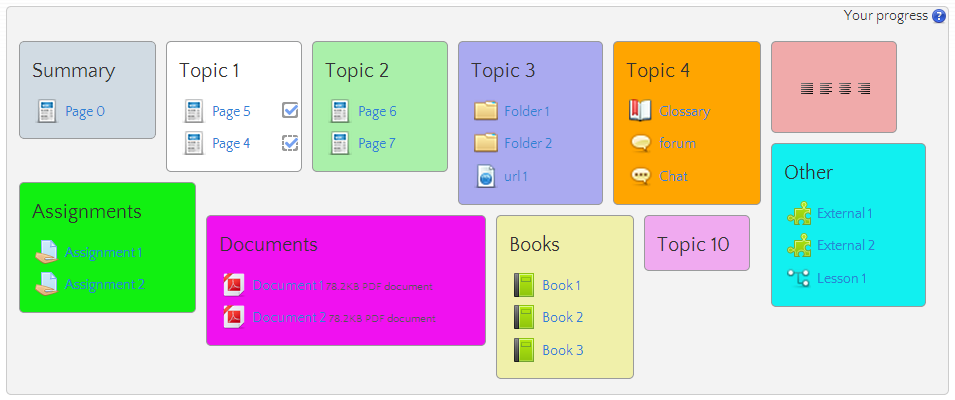
This course format displays all sections like a masonry build brick wall. Using
YUI (http://yui-masonry.appspot.com/), every section is dynamically placed into
a fluent style page. Each section can have a different background color.
Warning
The order of the topics can vary from screen to screen.
Dependencies
Course Format topics
Installation
- Copy the folder named "masonry" into the moodle/course/format folder.
- Login to Moodle with admin rights.
- The notification for the installation of the new course format is shown
- Click on Install
- Decide which default backcolor you want to use
Todo
- Verify color input
- Re-layout on drawer events
Done
- Re-layout on docking events
- Travis integration
- PHP 7.0
- Behat integration
- Docking event removed
- Prepare for PHPUnit 9
- PHP 8.0
- PHP 8.1
- PHP 8.2
- PHP 8.3
- Infection testing
v5.1.1 (2025042600)
v5.1.1
Plugin type: Course formats
Frankenstyle component name: format_masonry
Version build number: 2025042600
Version release name: v5.1.1
Maturity: Stable
Supported Moodle versions: 4.5, 5.0
Repository URL (Git): https://github.com/ewallah/moodle-format_masonry
Repository branch:
Repository tag: v5.0.1
Issue/bug tracker URL: https://github.com/ewallah/moodle-format_masonry/issues
Description
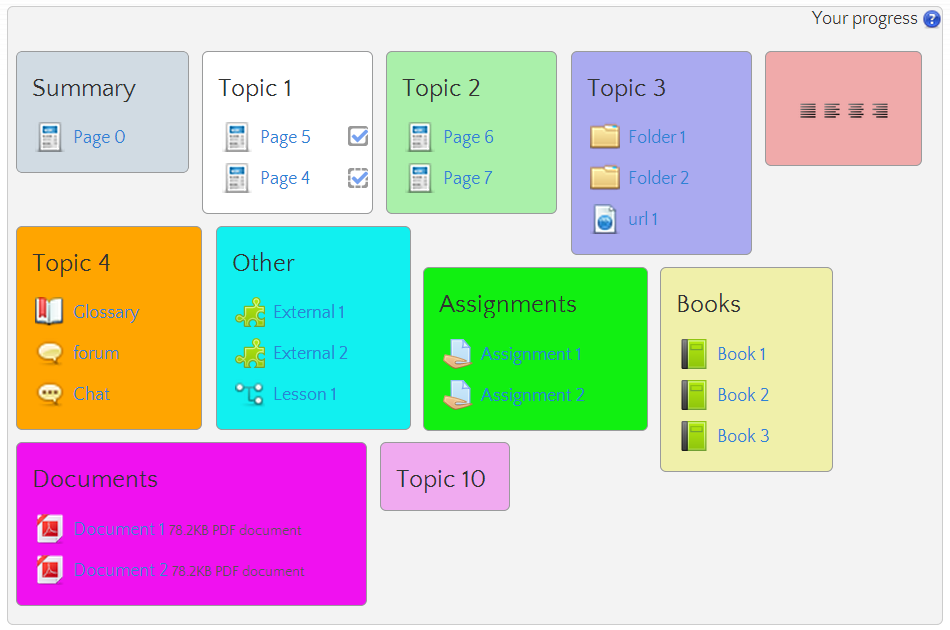
This course format displays all sections like a masonry build brick wall. Using
YUI (http://yui-masonry.appspot.com/), every section is dynamically placed into
a fluent style page. Each section can have a different background color.
Warning
The order of the topics can vary from screen to screen.
Dependencies
Course Format topics
Installation
- Copy the folder named "masonry" into the moodle/course/format folder.
- Login to Moodle with admin rights.
- The notification for the installation of the new course format is shown
- Click on Install
- Decide which default backcolor you want to use
Todo
- Verify color input
- Re-layout on drawer events
Done
- Re-layout on docking events
- Travis integration
- PHP 7.0
- Behat integration
- Docking event removed
- Prepare for PHPUnit 9
- PHP 8.0
- PHP 8.1
- PHP 8.2
- PHP 8.3
- Infection testing
v4.5.4 (2025021200)
v4.5.4
Plugin type: Course formats
Frankenstyle component name: format_masonry
Version build number: 2025021200
Version release name: v4.5.4
Maturity: Stable
Supported Moodle versions: 4.4, 4.5
Repository URL (Git): https://github.com/ewallah/moodle-format_masonry
Repository branch:
Repository tag: v4.5.4
Issue/bug tracker URL: https://github.com/ewallah/moodle-format_masonry/issues
Description
This course format displays all sections like a masonry build brick wall. Using
YUI (http://yui-masonry.appspot.com/), every section is dynamically placed into
a fluent style page. Each section can have a different background color.
Warning
The order of the topics can vary from screen to screen.
Dependencies
Course Format topics
Installation
- Copy the folder named "masonry" into the moodle/course/format folder.
- Login to Moodle with admin rights.
- The notification for the installation of the new course format is shown
- Click on Install
- Decide which default backcolor you want to use
Todo
- Verify color input
- Re-layout on drawer events
Done
- Re-layout on docking events
- Travis integration
- PHP 7.0
- Behat integration
- Docking event removed
- Prepare for PHPUnit 9
- PHP 8.0
- PHP 8.1
- PHP 8.2
- PHP 8.3
- Infection testing
v4.5.3 (2024101501)
v4.5.3
Plugin type: Course formats
Frankenstyle component name: format_masonry
Version build number: 2024101501
Version release name: v4.5.3
Maturity: Stable
Supported Moodle versions: 4.4, 4.5
Repository URL (Git): https://github.com/ewallah/moodle-format_masonry
Repository branch:
Repository tag: v4.5.3
Issue/bug tracker URL: https://github.com/ewallah/moodle-format_masonry/issues
Description
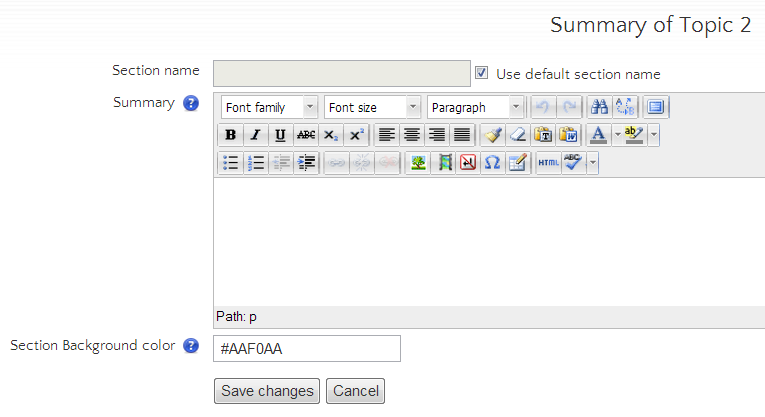
This course format displays all sections like a masonry build brick wall. Using
YUI (http://yui-masonry.appspot.com/), every section is dynamically placed into
a fluent style page. Each section can have a different background color.
Warning
The order of the topics can vary from screen to screen.
Dependencies
Course Format topics
Installation
- Copy the folder named "masonry" into the moodle/course/format folder.
- Login to Moodle with admin rights.
- The notification for the installation of the new course format is shown
- Click on Install
- Decide which default backcolor you want to use
Todo
- Verify color input
- Re-layout on drawer events
Done
- Re-layout on docking events
- Travis integration
- PHP 7.0
- Behat integration
- Docking event removed
- Prepare for PHPUnit 9
- PHP 8.0
- PHP 8.1
- PHP 8.2
- PHP 8.3
- Infection testing
v4.4.1 (2024042901)
v4.4.1
Plugin type: Course formats
Frankenstyle component name: format_masonry
Version build number: 2024042901
Version release name: v4.4.1
Maturity: Stable
Supported Moodle versions: 4.4
Repository URL (Git): https://github.com/ewallah/moodle-format_masonry
Repository branch:
Repository tag: v4.4.1
Issue/bug tracker URL: https://github.com/ewallah/moodle-format_masonry/issues
Description
This course format displays all sections like a masonry build brick wall. Using
YUI (http://yui-masonry.appspot.com/), every section is dynamically placed into
a fluent style page. Each section can have a different background color.
Warning
The order of the topics can vary from screen to screen.
Dependencies
Course Format topics
Installation
- Copy the folder named "masonry" into the moodle/course/format folder.
- Login to Moodle with admin rights.
- The notification for the installation of the new course format is shown
- Click on Install
- Decide which default backcolor you want to use
Todo
- Verify color input
- Re-layout on drawer events
Done
- Re-layout on docking events
- Travis integration
- PHP 7.0
- Behat integration
- Docking event removed
- Prepare for PHPUnit 9
- PHP 8.0
- PHP 8.1
- PHP 8.2
- PHP 8.3
- Infection testing
v4.0.7 (2023101300)
v4.0.7
Plugin type: Course formats
Frankenstyle component name: format_masonry
Version build number: 2023101300
Version release name: v4.0.7
Maturity: Stable
Supported Moodle versions: 4.0, 4.1, 4.2, 4.3
Repository URL (Git): https://github.com/ewallah/moodle-format_masonry
Repository branch:
Repository tag: v4.0.7
Issue/bug tracker URL: https://github.com/ewallah/moodle-format_masonry/issues
Description
This course format displays all sections like a masonry build brick wall. Using
YUI (http://yui-masonry.appspot.com/), every section is dynamically placed into
a fluent style page. Each section can have a different background color.
Warning
The order of the topics can vary from screen to screen.
Dependencies
Course Format topics
Installation
- Copy the folder named "masonry" into the moodle/course/format folder.
- Login to Moodle with admin rights.
- The notification for the installation of the new course format is shown
- Click on Install
- Decide which default backcolor you want to use
Todo
- Verify color input
Done
- Re-layout on docking events
- Travis integration
- PHP 7.0
- Behat integration
- Docking event removed
- Prepare for PHPUnit 9
- PHP 8.0
- PHP 8.1
v4.0.6 (2023073000)
v4.0.6
Plugin type: Course formats
Frankenstyle component name: format_masonry
Version build number: 2023073000
Version release name: v4.0.6
Maturity: Stable
Supported Moodle versions: 4.0, 4.1, 4.2
Repository URL (Git): https://github.com/ewallah/moodle-format_masonry
Repository branch:
Repository tag: v4.0.6
Issue/bug tracker URL: https://github.com/ewallah/moodle-format_masonry/issues
Description
This course format displays all sections like a masonry build brick wall. Using
YUI (http://yui-masonry.appspot.com/), every section is dynamically placed into
a fluent style page. Each section can have a different background color.
Warning
The order of the topics can vary from screen to screen.
Dependencies
Course Format topics
Installation
- copy the folder named "masonry" into the moodle/course/format folder.
- Login to Moodle with admin rights.
- The notification for the installation of the new course format is shown
- Click on Install
- Decide which default backcolor you want to use
Todo
- Verify color input
Done
- Re-layout on docking events
- Travis integration
- PHP 7.0
- Behat integration
- Docking event removed
- Prepare for PHPUnit 9
- PHP 8.0
v4.0.5 (2022102500)
v4.0.5
Plugin type: Course formats
Frankenstyle component name: format_masonry
Version build number: 2022102500
Version release name: v4.0.5
Maturity: Stable
Supported Moodle versions: 4.0, 4.1
Repository URL (Git): https://github.com/ewallah/moodle-format_masonry
Repository branch:
Repository tag: v4.0.5
Issue/bug tracker URL: https://github.com/ewallah/moodle-format_masonry/issues
Description
This course format displays all sections like a masonry build brick wall. Using
YUI (http://yui-masonry.appspot.com/), every section is dynamically placed into
a fluent style page. Each section can have a different background color.
Warning
The order of the topics can vary from screen to screen.
Dependencies
Course Format topics
Installation
- copy the folder named "masonry" into the moodle/course/format folder.
- Login to Moodle with admin rights.
- The notification for the installation of the new course format is shown
- Click on Install
- Decide which default backcolor you want to use
Todo
- Verify color input
Done
- Re-layout on docking events
- Travis integration
- PHP 7.0
- Behat integration
- Docking event removed
- Prepare for PHPUnit 9
- PHP 8.0
v4.0.3 (2022072100)
v4.0.3
Plugin type: Course formats
Frankenstyle component name: format_masonry
Version build number: 2022072100
Version release name: v4.0.3
Maturity: Stable
Supported Moodle versions: 4.0
Repository URL (Git): https://github.com/ewallah/moodle-format_masonry
Repository branch:
Repository tag: v4.0.3
Issue/bug tracker URL: https://github.com/ewallah/moodle-format_masonry/issues
Description
This course format displays all sections like a masonry build brick wall. Using
YUI (http://yui-masonry.appspot.com/), every section is dynamically placed into
a fluent style page. Each section can have a different background color.
Warning
The order of the topics can vary from screen to screen.
Dependencies
Course Format topics
Installation
- copy the folder named "masonry" into the moodle/course/format folder.
- Login to Moodle with admin rights.
- The notification for the installation of the new course format is shown
- Click on Install
- Decide which default backcolor you want to use
Todo
- Verify color input
Done
- Re-layout on docking events
- Travis integration
- PHP 7.0
- Behat integration
- Docking event removed
- Prepare for PHPUnit 9
- PHP 8.0
v4.0.2 (2022051600)
v4.0.2
Plugin type: Course formats
Frankenstyle component name: format_masonry
Version build number: 2022051600
Version release name: v4.0.2
Maturity: Stable
Supported Moodle versions: 4.0
Repository URL (Git): https://github.com/ewallah/moodle-format_masonry
Repository branch:
Repository tag: v4.0.2
Issue/bug tracker URL: https://github.com/ewallah/moodle-format_masonry/issues
Description
This course format displays all sections like a masonry build brick wall. Using
YUI (http://yui-masonry.appspot.com/), every section is dynamically placed into
a fluent style page. Each section can have a different background color.
Warning
The order of the topics can vary from screen to screen.
Dependencies
Course Format topics
Installation
- copy the folder named "masonry" into the moodle/course/format folder.
- Login to Moodle with admin rights.
- The notification for the installation of the new course format is shown
- Click on Install
- Decide which default backcolor you want to use
Todo
- Verify color input
Done
- Re-layout on docking events
- Travis integration
- PHP 7.0
- Behat integration
- Docking event removed
- Prepare for PHPUnit 9
- PHP 8.0
v4.0.1 (2022042500)
v4.0.1
Plugin type: Course formats
Frankenstyle component name: format_masonry
Version build number: 2022042500
Version release name: v4.0.1
Maturity: Stable
Supported Moodle versions: 4.0
Repository URL (Git): https://github.com/ewallah/moodle-format_masonry
Repository branch:
Repository tag: v4.0.1
Issue/bug tracker URL: https://github.com/ewallah/moodle-format_masonry/issues
Description
This course format displays all sections like a masonry build brick wall. Using
YUI (http://yui-masonry.appspot.com/), every section is dynamically placed into
a fluent style page. Each section can have a different background color.
Warning
The order of the topics can vary from screen to screen.
Dependencies
Course Format topics
Installation
- copy the folder named "masonry" into the moodle/course/format folder.
- Login to Moodle with admin rights.
- The notification for the installation of the new course format is shown
- Click on Install
- Decide which default backcolor you want to use
Todo
- Verify color input
Done
- Re-layout on docking events
- Travis integration
- PHP 7.0
- Behat integration
- Docking event removed
- Prepare for PHPUnit 9
- PHP 8.0
v3.9.1 (2022012300)
v3.9.1
Plugin type: Course formats
Frankenstyle component name: format_masonry
Version build number: 2022012300
Version release name: v3.9.1
Maturity: Stable
Supported Moodle versions: 3.10, 3.11, 3.9
Repository URL (Git): https://github.com/ewallah/moodle-format_masonry
Repository branch:
Repository tag: v3.9.2
Issue/bug tracker URL: https://github.com/ewallah/moodle-format_masonry/issues
Description
This course format displays all sections like a masonry build brick wall. Using
YUI (http://yui-masonry.appspot.com/), every section is dynamically placed into
a fluent style page. Each section can have a different background color.
Warning
The order of the topics can vary from screen to screen.
Dependencies
Course Format topics
Installation
- copy the folder named "masonry" into the moodle/course/format folder.
- Login to Moodle with admin rights.
- The notification for the installation of the new course format is shown
- Click on Install
- Decide which default backcolor you want to use
Todo
- Verify color input
Done
- Re-layout on docking events
- Travis integration
- PHP 7.0
- Behat integration
- Docking event removed
- Prepare for PHPUnit 9
- PHP 8.0
3.9+ (2021072500)
3.9+
Plugin type: Course formats
Frankenstyle component name: format_masonry
Version build number: 2021072500
Version release name: 3.9+
Maturity: Stable
Supported Moodle versions: 3.10, 3.11, 3.9
Repository URL (Git): https://github.com/ewallah/moodle-format_masonry
Repository branch:
Repository tag: v3.9.0
Issue/bug tracker URL: https://github.com/ewallah/moodle-format_masonry/issues
Description
This course format displays all sections like a masonry build brick wall. Using
YUI (http://yui-masonry.appspot.com/), every section is dynamically placed into
a fluent style page. Each section can have a different background color.
Warning
The order of the topics can vary from screen to screen.
Dependencies
Course Format topics
Installation
- copy the folder named "masonry" into the moodle/course/format folder.
- Login to Moodle with admin rights.
- The notification for the installation of the new course format is shown
- Click on Install
- Decide which default backcolor you want to use
Todo
- Verify color input
Done
- Re-layout on docking events
- Travis integration
- PHP 7.0
- Behat integration
- Docking event removed
- Prepare for PHPUnit 9
- PHP 8.0
3.9+ (2021051500)
3.9+
Plugin type: Course formats
Frankenstyle component name: format_masonry
Version build number: 2021051500
Version release name: 3.9+
Maturity: Stable
Supported Moodle versions: 3.10, 3.11, 3.9
Repository URL (Git): https://github.com/ewallah/moodle-format_masonry
Repository branch: main
Repository tag:
Issue/bug tracker URL: https://github.com/ewallah/moodle-format_masonry/issues
Description
This course format displays all sections like a masonry build brick wall. Using
YUI (http://yui-masonry.appspot.com/), every section is dynamically placed into
a fluent style page. Each section can have a different background color.
Warning
The order of the topics can vary from screen to screen.
Dependencies
Course Format topics
Installation
- copy the folder named "masonry" into the moodle/course/format folder.
- Login to Moodle with admin rights.
- The notification for the installation of the new course format is shown
- Click on Install
- Decide which default backcolor you want to use
Todo
- Move to AMD
- Verify input
Done
- Re-layout on docking events
- Travis integration
- PHP 7.0
- Behat integration
- Docking event removed
- Prepare for PHPUnit 9
3.9+ (2021020700)
3.9+
Plugin type: Course formats
Frankenstyle component name: format_masonry
Version build number: 2021020700
Version release name: 3.9+
Maturity: Stable
Supported Moodle versions: 3.10, 3.9
Repository URL (Git): https://github.com/ewallah/moodle-format_masonry
Repository branch: main
Repository tag:
Issue/bug tracker URL: https://github.com/ewallah/moodle-format_masonry/issues
Description
This course format displays all sections like a masonry build brick wall. Using
YUI (http://yui-masonry.appspot.com/), every section is dynamically placed into
a fluent style page. Each section can have a different background color.
Warning
The order of the topics can vary from screen to screen.
Dependencies
Course Format topics
Installation
- copy the folder named "masonry" into the moodle/course/format folder.
- Login to Moodle with admin rights.
- The notification for the installation of the new course format is shown
- Click on Install
- Decide which default backcolor you want to use
Todo
- Move to AMD
- Verify input
Done
- Re-layout on docking events
- Travis integration
- PHP 7.0
- Behat integration
- Docking event removed
- Prepare for PHPUnit 9
3.8+ (2020110300)
3.8+
Plugin type: Course formats
Frankenstyle component name: format_masonry
Version build number: 2020110300
Version release name: 3.8+
Maturity: Stable
Supported Moodle versions: 3.10, 3.8, 3.9
Repository URL (Git): https://github.com/ewallah/moodle-format_masonry
Repository branch: main
Repository tag:
Issue/bug tracker URL: https://github.com/ewallah/moodle-format_masonry/issues
Description
This course format displays all sections like a masonry build brick wall. Using
YUI (http://yui-masonry.appspot.com/), every section is dynamically placed into
a fluent style page. Each section can have a different background color.
Warning
The order of the topics can vary from screen to screen.
Dependencies
Course Format topics
Installation
- copy the folder named "masonry" into the moodle/course/format folder.
- Login to Moodle with admin rights.
- The notification for the installation of the new course format is shown
- Click on Install
- Decide which default backcolor you want to use
Todo
- Move to AMD
- Verify input
Done
- Re-layout on docking events
- Travis integration
- PHP 7.0
- Behat integration
- Docking event removed
3.8+ (2020102300)
3.8+
Plugin type: Course formats
Frankenstyle component name: format_masonry
Version build number: 2020102300
Version release name: 3.8+
Maturity: Stable
Supported Moodle versions: 3.8, 3.9
Repository URL (Git): https://github.com/ewallah/moodle-format_masonry
Repository branch:
Repository tag: v3.8+
Issue/bug tracker URL: https://github.com/ewallah/moodle-format_masonry/issues
Description
This course format displays all sections like a masonry build brick wall. Using
YUI (http://yui-masonry.appspot.com/), every section is dynamically placed into
a fluent style page. Each section can have a different background color.
Warning
The order of the topics can vary from screen to screen.
Dependencies
Course Format topics
Installation
- copy the folder named "masonry" into the moodle/course/format folder.
- Login to Moodle with admin rights.
- The notification for the installation of the new course format is shown
- Click on Install
- Decide which default backcolor you want to use
Todo
- Move to AMD
- Verify input
Done
- Re-layout on docking events
- Travis integration
- PHP 7.0
- Behat integration
- Docking event removed
3.7+ (2020072700)
3.7+
Plugin type: Course formats
Frankenstyle component name: format_masonry
Version build number: 2020072700
Version release name: 3.7+
Maturity: Stable
Supported Moodle versions: 3.7, 3.8, 3.9
Repository URL (Git): https://github.com/ewallah/moodle-format_masonry
Repository branch:
Repository tag:
Issue/bug tracker URL: https://github.com/ewallah/moodle-format_masonry/issues
Description
This course format displays all sections like a masonry build brick wall. Using
YUI (http://yui-masonry.appspot.com/), every section is dynamically placed into
a fluent style page. Each section can have a different background color.
Warning
The order of the topics can vary from screen to screen.
Dependencies
Course Format topics
Installation
- copy the folder named "masonry" into the moodle/course/format folder.
- Login to Moodle with admin rights.
- The notification for the installation of the new course format is shown
- Click on Install
- Decide which default backcolor you want to use
Todo
- Move to AMD
- Verify input
Done
- Re-layout on docking events
- Travis integration
- PHP 7.0
- Behat integration
- Docking event removed
- Editing of sections
3.7+ (2020061200)
3.7+
Plugin type: Course formats
Frankenstyle component name: format_masonry
Version build number: 2020061200
Version release name: 3.7+
Maturity: Stable
Supported Moodle versions: 3.7, 3.8, 3.9
Repository URL (Git): https://github.com/ewallah/moodle-format_masonry
Repository branch: master
Repository tag:
Issue/bug tracker URL: https://github.com/ewallah/moodle-format_masonry/issues
Description
This course format displays all sections like a masonry build brick wall. Using
YUI (http://yui-masonry.appspot.com/), every section is dynamically placed into
a fluent style page. Each section can have a different background color.
Warning
The order of the topics can vary from screen to screen.
Dependencies
Course Format topics
Installation
- copy the folder named "masonry" into the moodle/course/format folder.
- Login to Moodle with admin rights.
- The notification for the installation of the new course format is shown
- Click on Install
- Decide which default backcolor you want to use
Todo
- Move to AMD
- Verify input
Done
- Re-layout on docking events
- Travis integration
- PHP 7.0
- Behat integration
- Docking event removed
3.7+ (2020051800)
3.7+
Plugin type: Course formats
Frankenstyle component name: format_masonry
Version build number: 2020051800
Version release name: 3.7+
Maturity: Stable
Supported Moodle versions: 3.7, 3.8
Repository URL (Git): https://github.com/ewallah/moodle-format_masonry
Repository branch:
Repository tag: v3.7+
Issue/bug tracker URL: https://github.com/ewallah/moodle-format_masonry/issues
Description
This course format displays all sections like a masonry build brick wall. Using
YUI (http://yui-masonry.appspot.com/), every section is dynamically placed into
a fluent style page. Each section can have a different background color.
Warning
The order of the topics can vary from screen to screen.
Dependencies
Course Format topics
Installation
- copy the folder named "masonry" into the moodle/course/format folder.
- Login to Moodle with admin rights.
- The notification for the installation of the new course format is shown
- Click on Install
- Decide which default backcolor you want to use
Todo
- Move to AMD (when Moodle docking events are AMD)
- Verify input
Done
- Re-layout on docking events
- Travis integration
- PHP 7.0
- Behat integration
3.7+ (2019111708)
3.7+
Plugin type: Course formats
Frankenstyle component name: format_masonry
Version build number: 2019111708
Version release name: 3.7+
Maturity: Stable
Supported Moodle versions: 3.7, 3.8
Repository URL (Git): https://github.com/ewallah/moodle-format_masonry
Repository branch:
Repository tag:
Issue/bug tracker URL: https://github.com/ewallah/moodle-format_masonry/issues
Description
This course format displays all sections like a masonry build brick wall. Using
YUI (http://yui-masonry.appspot.com/), every section is dynamically placed into
a fluent style page. Each section can have a different background color.
Warning
The order of the topics can vary from screen to screen.
Dependencies
Course Format topics
Installation
- copy the folder named "masonry" into the moodle/course/format folder.
- Login to Moodle with admin rights.
- The notification for the installation of the new course format is shown
- Click on Install
- Decide which default backcolor you want to use
Todo
- Move to AMD (when Moodle docking events are AMD)
- Verify input
Done
- Re-layout on docking events
- Travis integration
- PHP 7.0
- Behat integration
3.7+ (2019051707)
3.7+
Plugin type: Course formats
Frankenstyle component name: format_masonry
Version build number: 2019051707
Version release name: 3.7+
Maturity: Stable
Supported Moodle versions: 3.7, 3.8
Repository URL (Git): https://github.com/ewallah/moodle-format_masonry
Repository branch:
Repository tag:
Issue/bug tracker URL: https://github.com/ewallah/moodle-format_masonry/issues
Description
This course format displays all sections like a masonry build brick wall. Using
YUI (http://yui-masonry.appspot.com/), every section is dynamically placed into
a fluent style page. Each section can have a different background color.
Warning
The order of the topics can vary from screen to screen.
Dependencies
Course Format topics
Installation
- copy the folder named "masonry" into the moodle/course/format folder.
- Login to Moodle with admin rights.
- The notification for the installation of the new course format is shown
- Click on Install
- Decide which default backcolor you want to use
Todo
- Move to AMD (when Moodle docking events are AMD)
- Verify input
Done
- Re-layout on docking events
- Travis integration
- PHP 7.0
- Behat integration
3.4+ (2018111801)
3.4+
Plugin type: Course formats
Frankenstyle component name: format_masonry
Version build number: 2018111801
Version release name: 3.4+
Maturity: Stable
Supported Moodle versions: 3.4, 3.5, 3.6
Repository URL (Git): https://github.com/ewallah/moodle-format_masonry
Repository branch:
Repository tag:
Issue/bug tracker URL: https://github.com/ewallah/moodle-format_masonry/issues
Description
This course format displays all sections like a masonry build brick wall. Using
YUI (http://yui-masonry.appspot.com/), every section is dynamically placed into
a fluent style page. Each section can have a different background color.
Warning
The order of the topics can vary from screen to screen.
Dependencies
Course Format topics
Installation
- copy the folder named "masonry" into the moodle/course/format folder.
- Login to Moodle with admin rights.
- The notification for the installation of the new course format is shown
- Click on Install
- Decide which default backcolor you want to use
Todo
- Move to AMD (when Moodle docking events are AMD)
- Verify input
Done
- Re-layout on docking events
- Travis integration
- PHP 7.0
- Behat integration
3.3+ (2017110300)
3.3+
Plugin type: Course formats
Frankenstyle component name: format_masonry
Version build number: 2017110300
Version release name: 3.3+
Maturity: Stable
Supported Moodle versions: 3.3, 3.4
Repository URL (Git): https://github.com/ewallah/moodle-format_masonry
Repository branch: master
Repository tag:
Issue/bug tracker URL: https://github.com/ewallah/moodle-format_masonry/issues
Description
This course format displays all sections like a masonry build brick wall. Using
YUI (http://yui-masonry.appspot.com/), every section is dynamically placed into
a fluent style page. Each section can have a different background color.
Warning
The order of the topics can vary from screen to screen.
Dependencies
Course Format topics
Installation
- copy the folder named "masonry" into the moodle/course/format folder.
- Login to Moodle with admin rights.
- The notification for the installation of the new course format is shown
- Click on Install
- Decide which default backcolor you want to use
Todo
- Move to AMD (when Moodle docking events are AMD)
- Verify input
Done
- Re-layout on docking events
- Travis integration
- PHP 7.0
- Behat integration
3.3 (2017061000)
3.3
Plugin type: Course formats
Frankenstyle component name: format_masonry
Version build number: 2017061000
Version release name: 3.3
Maturity: Stable
Supported Moodle versions: 3.3
Repository URL (Git): https://github.com/ewallah/moodle-format_masonry
Repository branch: MOODLE_33_STABLE
Repository tag:
Issue/bug tracker URL: https://github.com/ewallah/moodle-format_masonry/issues
Description
This course format displays all sections like a masonry build brick wall. Using
YUI (http://yui-masonry.appspot.com/), every section is dynamically placed into
a fluent style page. Each section can have a different background color.
Warning
The order of the topics can vary from screen to screen.
Dependencies
Course Format topics
Installation
- copy the folder named "masonry" into the moodle/course/format folder.
- Login to Moodle with admin rights.
- The notification for the installation of the new course format is shown
- Click on Install
- Decide which default backcolor you want to use
Todo
- Move to AMD (when Moodle docking events are AMD)
- Verify input
Done
- Re-layout on docking events
- Travis integration
- PHP 7.0
- Behat integration
- PHPunit integration
3.2 (2016111700)
3.2
Plugin type: Course formats
Frankenstyle component name: format_masonry
Version build number: 2016111700
Version release name: 3.2
Maturity: Stable
Supported Moodle versions: 3.1, 3.2
Repository URL (Git): https://github.com/ewallah/format_masonry
Repository branch: MOODLE_32_STABLE
Repository tag:
Issue/bug tracker URL: https://github.com/ewallah/moodle-format_masonry/issues
Description
This course format displays all sections like a masonry build brick wall. Using
YUI (http://yui-masonry.appspot.com/), every section is dynamically placed into
a fluent style page. Each section can have a different background color.
Warning
The order of the topics can vary from screen to screen.
Dependencies
Course Format topics
Installation
- copy the folder named "masonry" into the moodle/course/format folder.
- Login to Moodle with admin rights.
- The notification for the installation of the new course format is shown
- Click on Install
- Decide which default backcolor you want to use
Todo
- Move to AMD (when Moodle docking events are AMD)
- Verify input
Done
- Re-layout on docking events
- Travis integration
- PHP 7.0
- Behat integration
3.1 (2016110600)
3.1
Plugin type: Course formats
Frankenstyle component name: format_masonry
Version build number: 2016110600
Version release name: 3.1
Maturity: Stable
Supported Moodle versions: 3.1
Repository URL (Git): https://github.com/ewallah/format_masonry
Repository branch:
Repository tag:
Issue/bug tracker URL: https://github.com/ewallah/moodle-format_masonry/issues
Description
This course format displays all sections like a masonry build brick wall. Using
YUI (http://yui-masonry.appspot.com/), every section is dynamically placed into
a fluent style page. Each section can have a different background color.
Warning
The order of the topics can vary from screen to screen.
Dependencies
Course Format topics
Installation
- copy the folder named "masonry" into the moodle/course/format folder.
- Login to Moodle with admin rights.
- The notification for the installation of the new course format is shown
- Click on Install
- Decide which default backcolor you want to use
Todo
- Move to AMD (when Moodle docking events are AMD)
- Verify input
Done
- Re-layout on docking events
- Travis integration
- PHP 7.0
- Behat integration
2.0 (2015092101)
2.0
Plugin type: Course formats
Frankenstyle component name: format_masonry
Version build number: 2015092101
Version release name: 2.0
Maturity: Release Candidate
Supported Moodle versions: 2.9, 3.0
Repository URL (Git): https://github.com/ewallah/format_masonry
Repository branch:
Repository tag:
Issue/bug tracker URL: https://github.com/ewallah/moodle-format_masonry/issues
Description
This course format displays all sections like a masonry build brick wall. Using
YUI (http://yui-masonry.appspot.com/), every section is dynamically placed into
a fluent style page. Each section can have a different background color.
Warning
The order of the topics can vary from screen to screen.
Dependencies
Course Format topics
Installation
- copy the folder named "masonry" into the moodle/course/format folder.
- Login to Moodle with admin rights.
- The notification for the installation of the new course format is shown
- Click on Install
- Decide which default backcolor you want to use
Todo
- Re-layout on docking events
1.3 (2013120100)
1.3
Plugin type: Course formats
Frankenstyle component name: format_masonry
Version build number: 2013120100
Version release name: 1.3
Maturity: Stable
Supported Moodle versions: 2.6, 2.7, 2.8
Repository URL (Git): https://github.com/ewallah/masonry
Repository branch:
Repository tag:
Issue/bug tracker URL: https://github.com/ewallah/moodle-format_masonry/issues
Description
This course format displays all sections like a masonry build brick wall. Using
YUI (http://yui-masonry.appspot.com/), every section is dynamically placed into
a fluent style page. Each section can have a different background color.
Warning
The order of the topics can vary from screen to screen.
Dependencies
Course Format topics
Installation
- copy the folder named "masonry" into the moodle/course/format folder.
- Login to Moodle with admin rights.
- The notification for the installation of the new course format is shown
- Click on Install
- Decide which default backcolor you want to use
Todo
- Re-layout on docking events
1.1 (2013031600)
1.1
Plugin type: Course formats
Frankenstyle component name: format_masonry
Version build number: 2013031600
Version release name: 1.1
Maturity: Release Candidate
Supported Moodle versions: 2.4, 2.5
Repository URL (Git): https://github.com/ewallah/masonry
Repository branch:
Repository tag:
Issue/bug tracker URL: https://github.com/ewallah/moodle-format_masonry/issues
Description
This course format displays all sections like a masonry build brick wall. Using
YUI (http://yui-masonry.appspot.com/), every section is dynamically placed into
a fluent style page. Each section can have a different background color.
Warning
The order of the topics can vary from screen to screen.
Dependencies
Course Format topics
Installation
- copy the folder named "masonry" into the moodle/course/format folder.
- Login to Moodle with admin rights.
- The notification for the installation of the new course format is shown
- Click on Install
- Decide which default backcolor you want to use
Todo
- Re-layout on docking events
