
Drag-and-Drop Matching
Versions
Current version
2.5.4 (Build: 2025051900) (2025051900)
2.5.4 (Build: 2025051900)
Plugin type: Question types
Frankenstyle component name: qtype_ddmatch
Version build number: 2025051900
Version release name: 2.5.4 (Build: 2025051900)
Maturity: Stable
Supported Moodle versions: 4.4, 4.5, 5.0
Repository URL (Git): https://github.com/dualcube/moodle-qtype_ddmatch
Repository branch:
Repository tag:
Issue/bug tracker URL: https://tracker.moodle.org/issues/?jql=project%20%3D%20CONTRIB%20AND%20component%20%3D%20%22Question+type%3A+Drag-and-drop+matching%22
Drag-and-Drop Matching Question [This block is written by DualCubeadmin@dualcube.com.]
Installation:-
Go to [ Site administration > Plugins(Plugins) > Install plugins ] and just upload or drag & drop downloaed ZIP file.
To install, place all downloaded files in /question/type/ddmatch and visit /admin/index.php in your browser.
Setup:-
On Course > Create new Quiz > Add Question > Drag-and-Drop Matching
Overview:-
The drag-and-drop question is adapted from the existing matching question.
The teacher editing interface and the grading have not been modified. The
fallback looks identical to the original matching question.
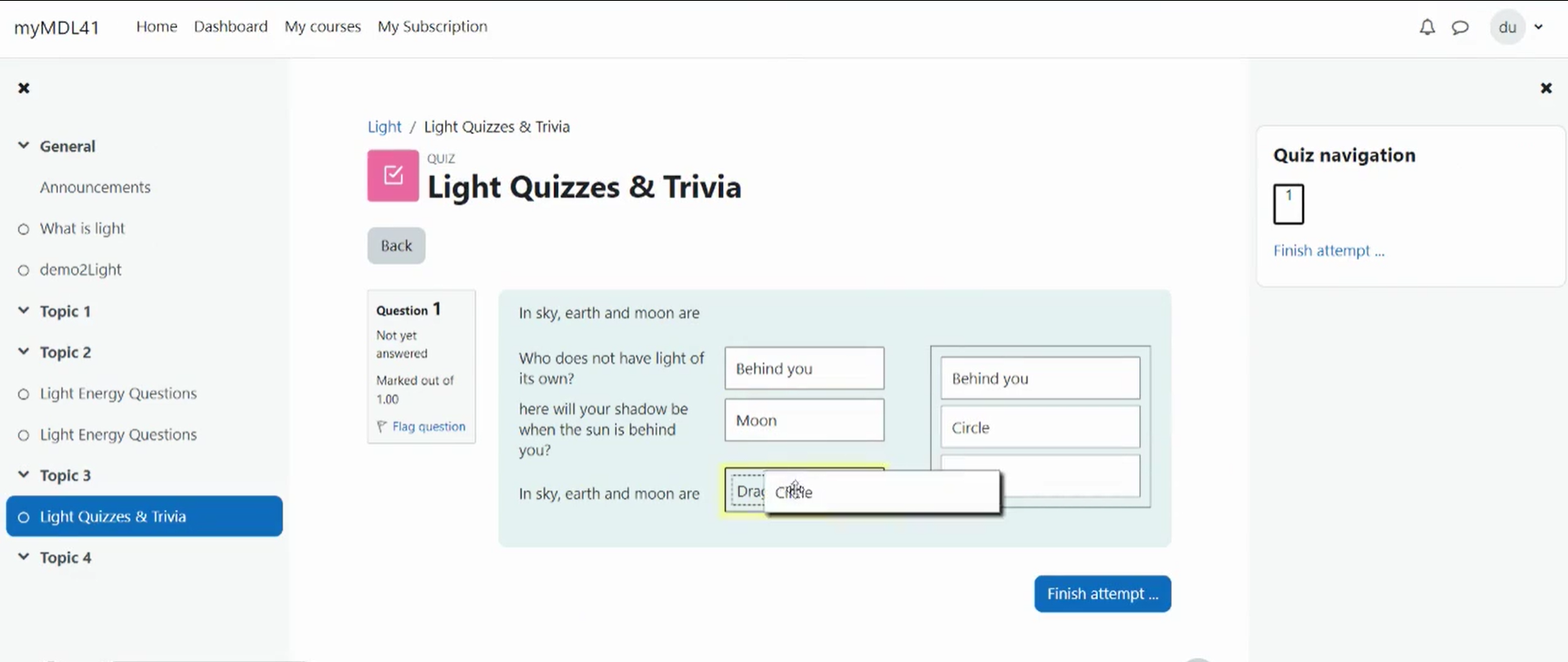
The drag-and-drop version of the student interface provides all the
answers in a list to the right of the question table. Answers can be
dragged from the list to each of the question targets. The current target
is highlighted to show where the answer will be dropped. To allow answers
to be used multiple times, dragging an answer from the list on the right
to a target puts the answer in the target. The current answer
for a question can be changed by dragging the answer off the target or by
dropping another answer on the target.
This version can be used with Moodle 3.9.0 and ulterior versions.
Grading:-
The grading is identical to the original matching question.
Requirements
- Moodle 2.4.1 - 4.1
Uninstall
Admin can uninstall this admin tool from- Administration > Site Administration > Plugins > Plugins overview [Roshni Lite] > uninstall
2.5.3 (Build: 2025010801) (2025010801)
2.5.3 (Build: 2025010801)
Plugin type: Question types
Frankenstyle component name: qtype_ddmatch
Version build number: 2025010801
Version release name: 2.5.3 (Build: 2025010801)
Maturity: Stable
Supported Moodle versions: 4.1, 4.2, 4.3, 4.4, 4.5
Repository URL (Git): https://github.com/dualcube/moodle-qtype_ddmatch
Repository branch:
Repository tag:
Issue/bug tracker URL: https://tracker.moodle.org/issues/?jql=project%20%3D%20CONTRIB%20AND%20component%20%3D%20%22Question+type%3A+Drag-and-drop+matching%22
Drag-and-Drop Matching Question [This block is written by DualCubeadmin@dualcube.com.]
Installation:-
Go to [ Site administration > Plugins(Plugins) > Install plugins ] and just upload or drag & drop downloaed ZIP file.
To install, place all downloaded files in /question/type/ddmatch and visit /admin/index.php in your browser.
Setup:-
On Course > Create new Quiz > Add Question > Drag-and-Drop Matching
Overview:-
The drag-and-drop question is adapted from the existing matching question.
The teacher editing interface and the grading have not been modified. The
fallback looks identical to the original matching question.
The drag-and-drop version of the student interface provides all the
answers in a list to the right of the question table. Answers can be
dragged from the list to each of the question targets. The current target
is highlighted to show where the answer will be dropped. To allow answers
to be used multiple times, dragging an answer from the list on the right
to a target puts the answer in the target. The current answer
for a question can be changed by dragging the answer off the target or by
dropping another answer on the target.
This version can be used with Moodle 3.9.0 and ulterior versions.
Grading:-
The grading is identical to the original matching question.
Requirements
- Moodle 2.4.1 - 4.1
Uninstall
Admin can uninstall this admin tool from- Administration > Site Administration > Plugins > Plugins overview [Roshni Lite] > uninstall
2.5.3 (Build: 2025010800) (2025010800)
2.5.3 (Build: 2025010800)
Plugin type: Question types
Frankenstyle component name: qtype_ddmatch
Version build number: 2025010800
Version release name: 2.5.3 (Build: 2025010800)
Maturity: Stable
Supported Moodle versions: 4.3, 4.4, 4.5
Repository URL (Git): https://github.com/dualcube/moodle-qtype_ddmatch
Repository branch:
Repository tag:
Issue/bug tracker URL: https://tracker.moodle.org/issues/?jql=project%20%3D%20CONTRIB%20AND%20component%20%3D%20%22Question+type%3A+Drag-and-drop+matching%22
Drag-and-Drop Matching Question [This block is written by DualCubeadmin@dualcube.com.]
Installation:-
Go to [ Site administration > Plugins(Plugins) > Install plugins ] and just upload or drag & drop downloaed ZIP file.
To install, place all downloaded files in /question/type/ddmatch and visit /admin/index.php in your browser.
Setup:-
On Course > Create new Quiz > Add Question > Drag-and-Drop Matching
Overview:-
The drag-and-drop question is adapted from the existing matching question.
The teacher editing interface and the grading have not been modified. The
fallback looks identical to the original matching question.
The drag-and-drop version of the student interface provides all the
answers in a list to the right of the question table. Answers can be
dragged from the list to each of the question targets. The current target
is highlighted to show where the answer will be dropped. To allow answers
to be used multiple times, dragging an answer from the list on the right
to a target puts the answer in the target. The current answer
for a question can be changed by dragging the answer off the target or by
dropping another answer on the target.
This version can be used with Moodle 3.9.0 and ulterior versions.
Grading:-
The grading is identical to the original matching question.
Requirements
- Moodle 2.4.1 - 4.1
Uninstall
Admin can uninstall this admin tool from- Administration > Site Administration > Plugins > Plugins overview [Roshni Lite] > uninstall
2.5.2 (Build: 2023101300) (2023101300)
2.5.2 (Build: 2023101300)
Plugin type: Question types
Frankenstyle component name: qtype_ddmatch
Version build number: 2023101300
Version release name: 2.5.2 (Build: 2023101300)
Maturity: Stable
Supported Moodle versions: 3.9, 3.10, 3.11, 4.0, 4.1, 4.2, 4.3
Repository URL (Git): https://github.com/dualcube/ddmatch
Repository branch:
Repository tag:
Issue/bug tracker URL: https://tracker.moodle.org/issues/?jql=project%20%3D%20CONTRIB%20AND%20component%20%3D%20%22Question+type%3A+Drag-and-drop+matching%22
Drag-and-Drop Matching Question [This block is written by DualCubeadmin@dulacube.com.]
Installation:-
Go to [ Site administration > Plugins(Plugins) > Install plugins ] and just upload or drag & drop downloaed ZIP file.
To install, place all downloaded files in /question/type/ddmatch and visit /admin/index.php in your browser.
Setup:-
On Course > Create new Quiz > Add Question > Drag-and-Drop Matching
Overview:-
The drag-and-drop question is adapted from the existing matching question.
The teacher editing interface and the grading have not been modified. The
fallback looks identical to the original matching question.
The drag-and-drop version of the student interface provides all the
answers in a list to the right of the question table. Answers can be
dragged from the list to each of the question targets. The current target
is highlighted to show where the answer will be dropped. To allow answers
to be used multiple times, dragging an answer from the list on the right
to a target puts the answer in the target. The current answer
for a question can be changed by dragging the answer off the target or by
dropping another answer on the target.
This version can be used with Moodle 3.9.0 and ulterior versions.
Grading:-
The grading is identical to the original matching question.
Requirements
- Moodle 3.9+
Uninstall
Admin can uninstall this admin tool from- Administration > Site Administration > Plugins > Plugins overview [Roshni Lite] > uninstall
2.5.1 (Build: 2023101000) (2023101000)
2.5.1 (Build: 2023101000)
Plugin type: Question types
Frankenstyle component name: qtype_ddmatch
Version build number: 2023101000
Version release name: 2.5.1 (Build: 2023101000)
Maturity: Stable
Supported Moodle versions: 2.4, 2.5, 2.6, 2.7, 2.8, 2.9, 3.0, 3.1, 3.2, 3.3, 3.4, 3.5, 3.6, 3.7, 3.8, 3.9, 3.10, 3.11, 4.0, 4.1, 4.2, 4.3
Repository URL (Git): https://github.com/dualcube/Drag-and-Drop-Matching
Repository branch:
Repository tag:
Issue/bug tracker URL: https://tracker.moodle.org/issues/?jql=project%20%3D%20CONTRIB%20AND%20component%20%3D%20%22Question+type%3A+Drag-and-drop+matching%22
Drag-and-Drop Matching Question [This block is written by DualCubeadmin@dulacube.com.]
Installation:-
Go to [ Site administration > Plugins(Plugins) > Install plugins ] and just upload or drag & drop downloaed ZIP file.
To install, place all downloaded files in /question/type/ddmatch and visit /admin/index.php in your browser.
Setup:-
On Course > Create new Quiz > Add Question > Drag-and-Drop Matching
Overview:-
The drag-and-drop question is adapted from the existing matching question.
The teacher editing interface and the grading have not been modified. The
fallback looks identical to the original matching question.
The drag-and-drop version of the student interface provides all the
answers in a list to the right of the question table. Answers can be
dragged from the list to each of the question targets. The current target
is highlighted to show where the answer will be dropped. To allow answers
to be used multiple times, dragging an answer from the list on the right
to a target puts the answer in the target. The current answer
for a question can be changed by dragging the answer off the target or by
dropping another answer on the target.
This version can be used with Moodle 2.4.1 and ulterior versions.
Grading:-
The grading is identical to the original matching question.
Requirements
- Moodle 2.4.1 - 4.3
Uninstall
Admin can uninstall this admin tool from- Administration > Site Administration > Plugins > Plugins overview [Roshni Lite] > uninstall
2.5 (Build: 2023042500) (2023042500)
2.5 (Build: 2023042500)
Plugin type: Question types
Frankenstyle component name: qtype_ddmatch
Version build number: 2023042500
Version release name: 2.5 (Build: 2023042500)
Maturity: Stable
Supported Moodle versions: 2.4, 2.5, 2.6, 2.7, 2.8, 2.9, 3.0, 3.1, 3.2, 3.3, 3.4, 3.5, 3.6, 3.7, 3.8, 3.9, 3.10, 3.11, 4.0, 4.1, 4.2
Repository URL (Git): https://github.com/dualcube/Drag-and-Drop-Matching
Repository branch:
Repository tag:
Issue/bug tracker URL: https://tracker.moodle.org/issues/?jql=project%20%3D%20CONTRIB%20AND%20component%20%3D%20%22Question+type%3A+Drag-and-drop+matching%22
Drag-and-Drop Matching Question [This block is written by DualCubeadmin@dulacube.com.]
Installation:-
Go to [ Site administration > Plugins(Plugins) > Install plugins ] and just upload or drag & drop downloaed ZIP file.
To install, place all downloaded files in /question/type/ddmatch and visit /admin/index.php in your browser.
Setup:-
On Course > Create new Quiz > Add Question > Drag-and-Drop Matching
Overview:-
The drag-and-drop question is adapted from the existing matching question.
The teacher editing interface and the grading have not been modified. The
fallback looks identical to the original matching question.
The drag-and-drop version of the student interface provides all the
answers in a list to the right of the question table. Answers can be
dragged from the list to each of the question targets. The current target
is highlighted to show where the answer will be dropped. To allow answers
to be used multiple times, dragging an answer from the list on the right
to a target puts the answer in the target. The current answer
for a question can be changed by dragging the answer off the target or by
dropping another answer on the target.
This version can be used with Moodle 2.4.1 and ulterior versions.
Grading:-
The grading is identical to the original matching question.
Requirements
- Moodle 2.4.1 - 4.2
Uninstall
Admin can uninstall this admin tool from- Administration > Site Administration > Plugins > Plugins overview [Roshni Lite] > uninstall
2.4 (Build: 2023031700) (2023031700)
2.4 (Build: 2023031700)
Plugin type: Question types
Frankenstyle component name: qtype_ddmatch
Version build number: 2023031700
Version release name: 2.4 (Build: 2023031700)
Maturity: Stable
Supported Moodle versions: 2.4, 2.5, 2.6, 2.7, 2.8, 2.9, 3.0, 3.1, 3.2, 3.3, 3.4, 3.5, 3.6, 3.7, 3.8, 3.9, 3.10, 3.11, 4.0, 4.1
Repository URL (Git): https://github.com/dualcube/Drag-and-Drop-Matching
Repository branch:
Repository tag:
Issue/bug tracker URL: https://tracker.moodle.org/issues/?jql=project%20%3D%20CONTRIB%20AND%20component%20%3D%20%22Question+type%3A+Drag-and-drop+matching%22
Drag-and-Drop Matching Question [This block is written by DualCubeadmin@dulacube.com.]
Installation:-
Go to [ Site administration > Plugins(Plugins) > Install plugins ] and just upload or drag & drop downloaed ZIP file.
To install, place all downloaded files in /question/type/ddmatch and visit /admin/index.php in your browser.
Setup:-
On Course > Create new Quiz > Add Question > Drag-and-Drop Matching
Overview:-
The drag-and-drop question is adapted from the existing matching question.
The teacher editing interface and the grading have not been modified. The
fallback looks identical to the original matching question.
The drag-and-drop version of the student interface provides all the
answers in a list to the right of the question table. Answers can be
dragged from the list to each of the question targets. The current target
is highlighted to show where the answer will be dropped. To allow answers
to be used multiple times, dragging an answer from the list on the right
to a target puts the answer in the target. The current answer
for a question can be changed by dragging the answer off the target or by
dropping another answer on the target.
This version can be used with Moodle 2.4.1 and ulterior versions.
Grading:-
The grading is identical to the original matching question.
Requirements
- Moodle 2.4.1 - 4.1
Uninstall
Admin can uninstall this admin tool from- Administration > Site Administration > Plugins > Plugins overview [Roshni Lite] > uninstall
2.3 (Build: 2023021700) (2023022200)
2.3 (Build: 2023021700)
Plugin type: Question types
Frankenstyle component name: qtype_ddmatch
Version build number: 2023022200
Version release name: 2.3 (Build: 2023021700)
Maturity: Stable
Supported Moodle versions: 2.4, 2.5, 2.6, 2.7, 2.8, 2.9, 3.0, 3.1, 3.2, 3.3, 3.4, 3.5, 3.6, 3.7, 3.8, 3.9, 3.10, 3.11, 4.0, 4.1
Repository URL (Git): https://github.com/dualcube/Drag-and-Drop-Matching
Repository branch:
Repository tag:
Issue/bug tracker URL: https://tracker.moodle.org/issues/?jql=project%20%3D%20CONTRIB%20AND%20component%20%3D%20%22Question+type%3A+Drag-and-drop+matching%22
Drag-and-Drop Matching Question [This block is written by DualCubeadmin@dulacube.com.]
Installation:-
Go to [ Site administration > Plugins(Plugins) > Install plugins ] and just upload or drag & drop downloaed ZIP file.
To install, place all downloaded files in /question/type/ddmatch and visit /admin/index.php in your browser.
Overview:-
The drag-and-drop question is adapted from the existing matching question.
The teacher editing interface and the grading have not been modified. The
fallback looks identical to the original matching question.
The drag-and-drop version of the student interface provides all the
answers in a list to the right of the question table. Answers can be
dragged from the list to each of the question targets. The current target
is highlighted to show where the answer will be dropped. To allow answers
to be used multiple times, dragging an answer from the list on the right
to a target puts the answer in the target. The current answer
for a question can be changed by dragging the answer off the target or by
dropping another answer on the target.
This version can be used with Moodle 2.4.1 and ulterior versions.
Grading:-
The grading is identical to the original matching question.
Uninstall
Admin can uninstall this admin tool from- Administration > Site Administration > Plugins > Plugins overview [Roshni Lite] > uninstall
2.1 (Build: 2023011600) (2023011600)
2.1 (Build: 2023011600)
Plugin type: Question types
Frankenstyle component name: qtype_ddmatch
Version build number: 2023011600
Version release name: 2.1 (Build: 2023011600)
Maturity: Stable
Supported Moodle versions: 2.4, 2.5, 2.6, 2.7, 2.8, 2.9, 3.0, 3.1, 3.2, 3.3, 3.4, 3.5, 3.6, 3.7, 3.8, 3.9, 3.10, 3.11, 4.0, 4.1
Repository URL (Git): https://github.com/dualcube/Drag-and-Drop-Matching
Repository branch:
Repository tag:
Issue/bug tracker URL: https://tracker.moodle.org/issues/?jql=project%20%3D%20CONTRIB%20AND%20component%20%3D%20%22Question+type%3A+Drag-and-drop+matching%22
Drag-and-Drop Matching Question [This block is written by DualCube.]
Installation:-
Go to [ Site administration > Plugins(Plugins) > Install plugins ] and just upload or drag & drop downloaed ZIP file.
To install, place all downloaded files in /question/type/ddmatch and visit /admin/index.php in your browser.
Overview:-
The drag-and-drop question is adapted from the existing matching question.
The teacher editing interface and the grading have not been modified. The
fallback looks identical to the original matching question.
The drag-and-drop version of the student interface provides all the
answers in a list to the right of the question table. Answers can be
dragged from the list to each of the question targets. The current target
is highlighted to show where the answer will be dropped. To allow answers
to be used multiple times, dragging an answer from the list on the right
to a target puts the answer in the target. The current answer
for a question can be changed by dragging the answer off the target or by
dropping another answer on the target.
This version can be used with Moodle 2.4.1 and ulterior versions.
Grading:-
The grading is identical to the original matching question.
Uninstall
Admin can uninstall this admin tool from- Administration > Site Administration > Plugins > Plugins overview [Drag-and-Drop Matching] > uninstall
2.0 Drag and drop matching question for Moodle 3.6, 3.7, 3.8, 3.9 (2020071100)
2.0 Drag and drop matching question for Moodle 3.6, 3.7, 3.8, 3.9
Plugin type: Question types
Frankenstyle component name: qtype_ddmatch
Version build number: 2020071100
Version release name: 2.0 Drag and drop matching question for Moodle 3.6, 3.7, 3.8, 3.9
Maturity: Stable
Supported Moodle versions: 3.5, 3.6, 3.7, 3.8, 3.9
Repository URL (Git): https://github.com/dualcube/Drag-and-Drop-Matching
Repository branch:
Repository tag:
Issue/bug tracker URL: https://tracker.moodle.org/issues/?jql=project%20%3D%20CONTRIB%20AND%20component%20%3D%20%22Question+type%3A+Drag-and-drop+matching%22
Drag-and-Drop Matching Question
Author: Adriane Boyd (adrianeboyd@gmail.com)
Description:
The drag-and-drop question is adapted from the existing matching question.
The teacher editing interface and the grading have not been modified. The
fallback looks identical to the original matching question.
The drag-and-drop version of the student interface provides all the
answers in a list to the right of the question table. Answers can be
dragged from the list to each of the question targets. The current target
is highlighted to show where the answer will be dropped. To allow answers
to be used multiple times, dragging an answer from the list on the right
to a target puts a copy of the answer in the target. The current answer
for a question can be changed by dragging the answer off the target or by
dropping another answer on the target.
Grading:
The grading is identical to the original matching question.
This version can be used with Moodle 2.4.1 and ulterior versions.
= Change log =
- Moodle 3.9 - Compatible
- minor CSS. - Fixed
2.0 Drag and drop matching question for Moodle 3.6, 3.7, 3.8 (2020060200)
2.0 Drag and drop matching question for Moodle 3.6, 3.7, 3.8
Plugin type: Question types
Frankenstyle component name: qtype_ddmatch
Version build number: 2020060200
Version release name: 2.0 Drag and drop matching question for Moodle 3.6, 3.7, 3.8
Maturity: Stable
Supported Moodle versions: 3.5, 3.6, 3.7, 3.8
Repository URL (Git): https://github.com/dualcube/Drag-and-Drop-Matching
Repository branch:
Repository tag:
Issue/bug tracker URL: https://tracker.moodle.org/issues/?jql=project%20%3D%20CONTRIB%20AND%20component%20%3D%20%22Question+type%3A+Drag-and-drop+matching%22
Drag-and-Drop Matching Question
Author: Adriane Boyd (adrianeboyd@gmail.com)
Description:
The drag-and-drop question is adapted from the existing matching question.
The teacher editing interface and the grading have not been modified. The
fallback looks identical to the original matching question.
The drag-and-drop version of the student interface provides all the
answers in a list to the right of the question table. Answers can be
dragged from the list to each of the question targets. The current target
is highlighted to show where the answer will be dropped. To allow answers
to be used multiple times, dragging an answer from the list on the right
to a target puts a copy of the answer in the target. The current answer
for a question can be changed by dragging the answer off the target or by
dropping another answer on the target.
Grading:
The grading is identical to the original matching question.
This version can be used with Moodle 2.4.1 and ulterior versions.
= Change log =
- relocates the activity chooser link displayed - Fixed
- ddmatch did not fit on the screen - Fixed
- Responsive
2.0 Drag and drop matching question for Moodle 3.6, 3.7, 3.8 (2020052700)
2.0 Drag and drop matching question for Moodle 3.6, 3.7, 3.8
Plugin type: Question types
Frankenstyle component name: qtype_ddmatch
Version build number: 2020052700
Version release name: 2.0 Drag and drop matching question for Moodle 3.6, 3.7, 3.8
Maturity: Stable
Supported Moodle versions: 3.5, 3.6, 3.7, 3.8
Repository URL (Git): https://github.com/dualcube/Drag-and-Drop-Matching
Repository branch:
Repository tag:
Issue/bug tracker URL: https://tracker.moodle.org/issues/?jql=project%20%3D%20CONTRIB%20AND%20component%20%3D%20%22Question+type%3A+Drag-and-drop+matching%22
Drag-and-Drop Matching Question
Author: Adriane Boyd (adrianeboyd@gmail.com)
Description:
The drag-and-drop question is adapted from the existing matching question.
The teacher editing interface and the grading have not been modified. The
fallback looks identical to the original matching question.
The drag-and-drop version of the student interface provides all the
answers in a list to the right of the question table. Answers can be
dragged from the list to each of the question targets. The current target
is highlighted to show where the answer will be dropped. To allow answers
to be used multiple times, dragging an answer from the list on the right
to a target puts a copy of the answer in the target. The current answer
for a question can be changed by dragging the answer off the target or by
dropping another answer on the target.
Grading:
The grading is identical to the original matching question.
This version can be used with Moodle 2.4.1 and ulterior versions.
= Change log =
- relocates the activity chooser link displayed - Fixed
- ddmatch did not fit on the screen - Fixed
- Responsive
2.0 Drag and drop matching question for Moodle 3.5, 3.6, 3.7, 3.8 ( stable versions ) (2020041701)
2.0 Drag and drop matching question for Moodle 3.5, 3.6, 3.7, 3.8 ( stable versions )
Plugin type: Question types
Frankenstyle component name: qtype_ddmatch
Version build number: 2020041701
Version release name: 2.0 Drag and drop matching question for Moodle 3.5, 3.6, 3.7, 3.8 ( stable versions )
Maturity: Stable
Supported Moodle versions: 3.5, 3.6, 3.7, 3.8
Repository URL (Git): https://github.com/jmvedrine/moodle-qtype_ddmatch
Repository branch:
Repository tag:
Issue/bug tracker URL: https://tracker.moodle.org/issues/?jql=project%20%3D%20CONTRIB%20AND%20component%20%3D%20%22Question+type%3A+Drag-and-drop+matching%22
Drag-and-Drop Matching Question
Author: Adriane Boyd (adrianeboyd@gmail.com)
Description:
The drag-and-drop question is adapted from the existing matching question.
The teacher editing interface and the grading have not been modified. The
fallback looks identical to the original matching question.
The drag-and-drop version of the student interface provides all the
answers in a list to the right of the question table. Answers can be
dragged from the list to each of the question targets. The current target
is highlighted to show where the answer will be dropped. To allow answers
to be used multiple times, dragging an answer from the list on the right
to a target puts a copy of the answer in the target. The current answer
for a question can be changed by dragging the answer off the target or by
dropping another answer on the target.
Grading:
The grading is identical to the original matching question.
This version can be used from Moodle 3.5 and the latest stable versions.
= Change log =
- relocates the activity chooser link displayed - Fixed
- ddmatch did not fit on the screen - Fixed
- Responsive
2.0 Drag and drop matching question for Moodle 3.6, 3.7, 3.8 (2020041700)
2.0 Drag and drop matching question for Moodle 3.6, 3.7, 3.8
Plugin type: Question types
Frankenstyle component name: qtype_ddmatch
Version build number: 2020041700
Version release name: 2.0 Drag and drop matching question for Moodle 3.6, 3.7, 3.8
Maturity: Stable
Supported Moodle versions: 3.6, 3.7, 3.8
Repository URL (Git): https://github.com/jmvedrine/moodle-qtype_ddmatch
Repository branch:
Repository tag:
Issue/bug tracker URL: https://tracker.moodle.org/issues/?jql=project%20%3D%20CONTRIB%20AND%20component%20%3D%20%22Question+type%3A+Drag-and-drop+matching%22
Drag-and-Drop Matching Question
Author: Adriane Boyd (adrianeboyd@gmail.com)
Description:
The drag-and-drop question is adapted from the existing matching question.
The teacher editing interface and the grading have not been modified. The
fallback looks identical to the original matching question.
The drag-and-drop version of the student interface provides all the
answers in a list to the right of the question table. Answers can be
dragged from the list to each of the question targets. The current target
is highlighted to show where the answer will be dropped. To allow answers
to be used multiple times, dragging an answer from the list on the right
to a target puts a copy of the answer in the target. The current answer
for a question can be changed by dragging the answer off the target or by
dropping another answer on the target.
Grading:
The grading is identical to the original matching question.
This version can be used with Moodle 2.4.1 and ulterior versions.
= Change log =
- relocates the activity chooser link displayed - Fixed
- ddmatch did not fit on the screen - Fixed
- Responsive
2.0 Drag and drop matching question for Moodle 3.6, 3.7, 3.8 (2020041500)
2.0 Drag and drop matching question for Moodle 3.6, 3.7, 3.8
Plugin type: Question types
Frankenstyle component name: qtype_ddmatch
Version build number: 2020041500
Version release name: 2.0 Drag and drop matching question for Moodle 3.6, 3.7, 3.8
Maturity: Stable
Supported Moodle versions: 3.6, 3.7, 3.8
Repository URL (Git): https://github.com/jmvedrine/moodle-qtype_ddmatch
Repository branch:
Repository tag:
Issue/bug tracker URL: https://tracker.moodle.org/issues/?jql=project%20%3D%20CONTRIB%20AND%20component%20%3D%20%22Question+type%3A+Drag-and-drop+matching%22
Drag-and-Drop Matching Question
Author: Adriane Boyd (adrianeboyd@gmail.com)
Description:
The drag-and-drop question is adapted from the existing matching question.
The teacher editing interface and the grading have not been modified. The
fallback looks identical to the original matching question.
The drag-and-drop version of the student interface provides all the
answers in a list to the right of the question table. Answers can be
dragged from the list to each of the question targets. The current target
is highlighted to show where the answer will be dropped. To allow answers
to be used multiple times, dragging an answer from the list on the right
to a target puts a copy of the answer in the target. The current answer
for a question can be changed by dragging the answer off the target or by
dropping another answer on the target.
Grading:
The grading is identical to the original matching question.
This version can be used with Moodle 2.4.1 and ulterior versions.
= Change log =
- ddmatch did not fit on the screen - Fixed
- Responsive
2.0 Drag and drop matching question for Moodle 3.6.5, 3.7, 3.8 (2019122000)
2.0 Drag and drop matching question for Moodle 3.6.5, 3.7, 3.8
Plugin type: Question types
Frankenstyle component name: qtype_ddmatch
Version build number: 2019122000
Version release name: 2.0 Drag and drop matching question for Moodle 3.6.5, 3.7, 3.8
Maturity: Stable
Supported Moodle versions: 3.6, 3.7, 3.8
Repository URL (Git): https://github.com/jmvedrine/moodle-qtype_ddmatch
Repository branch:
Repository tag:
Issue/bug tracker URL: https://tracker.moodle.org/issues/?jql=project%20%3D%20CONTRIB%20AND%20component%20%3D%20%22Question+type%3A+Drag-and-drop+matching%22
Drag-and-Drop Matching Question
Author: Adriane Boyd (adrianeboyd@gmail.com)
Description:
The drag-and-drop question is adapted from the existing matching question.
The teacher editing interface and the grading have not been modified. The
fallback looks identical to the original matching question.
The drag-and-drop version of the student interface provides all the
answers in a list to the right of the question table. Answers can be
dragged from the list to each of the question targets. The current target
is highlighted to show where the answer will be dropped. To allow answers
to be used multiple times, dragging an answer from the list on the right
to a target puts a copy of the answer in the target. The current answer
for a question can be changed by dragging the answer off the target or by
dropping another answer on the target.
Grading:
The grading is identical to the original matching question.
This version can be used with Moodle 2.4.1 and ulterior versions.
1.6 Drag and drop matching question for Moodle 2.6, 2.7, 2.8, 2.9, 3.0, 3.1, 3.2, 3.3, 3.4, 3.5, 3.6 (2019111900)
1.6 Drag and drop matching question for Moodle 2.6, 2.7, 2.8, 2.9, 3.0, 3.1, 3.2, 3.3, 3.4, 3.5, 3.6
Plugin type: Question types
Frankenstyle component name: qtype_ddmatch
Version build number: 2019111900
Version release name: 1.6 Drag and drop matching question for Moodle 2.6, 2.7, 2.8, 2.9, 3.0, 3.1, 3.2, 3.3, 3.4, 3.5, 3.6
Maturity: Stable
Supported Moodle versions: 2.5, 2.6, 2.7, 2.8, 2.9, 3.0, 3.1, 3.2, 3.3, 3.4, 3.5, 3.6
Repository URL (Git): https://github.com/jmvedrine/moodle-qtype_ddmatch
Repository branch:
Repository tag:
Issue/bug tracker URL: https://tracker.moodle.org/issues/?jql=project%20%3D%20CONTRIB%20AND%20component%20%3D%20%22Question+type%3A+Drag-and-drop+matching%22
Drag-and-Drop Matching Question
Author: Adriane Boyd (adrianeboyd@gmail.com)
Description:
The drag-and-drop question is adapted from the existing matching question.
The teacher editing interface and the grading have not been modified. The
fallback looks identical to the original matching question.
The drag-and-drop version of the student interface provides all the
answers in a list to the right of the question table. Answers can be
dragged from the list to each of the question targets. The current target
is highlighted to show where the answer will be dropped. To allow answers
to be used multiple times, dragging an answer from the list on the right
to a target puts a copy of the answer in the target. The current answer
for a question can be changed by dragging the answer off the target or by
dropping another answer on the target.
Grading:
The grading is identical to the original matching question.
This version can be used with Moodle 2.4.1 and ulterior versions.
1.6 Drag and drop matching question for Moodle 2.6, 2.7, 2.8, 2.9, 3.0, 3.1, 3.2, 3.3, 3.4, 3.6, 3.7 (2019062100)
1.6 Drag and drop matching question for Moodle 2.6, 2.7, 2.8, 2.9, 3.0, 3.1, 3.2, 3.3, 3.4, 3.6, 3.7
Plugin type: Question types
Frankenstyle component name: qtype_ddmatch
Version build number: 2019062100
Version release name: 1.6 Drag and drop matching question for Moodle 2.6, 2.7, 2.8, 2.9, 3.0, 3.1, 3.2, 3.3, 3.4, 3.6, 3.7
Maturity: Stable
Supported Moodle versions: 3.7
Repository URL (Git): https://github.com/jmvedrine/moodle-qtype_ddmatch
Repository branch:
Repository tag:
Issue/bug tracker URL: https://tracker.moodle.org/issues/?jql=project%20%3D%20CONTRIB%20AND%20component%20%3D%20%22Question+type%3A+Drag-and-drop+matching%22
Drag-and-Drop Matching Question
Author: Adriane Boyd (adrianeboyd@gmail.com)
Description:
The drag-and-drop question is adapted from the existing matching question.
The teacher editing interface and the grading have not been modified. The
fallback looks identical to the original matching question.
The drag-and-drop version of the student interface provides all the
answers in a list to the right of the question table. Answers can be
dragged from the list to each of the question targets. The current target
is highlighted to show where the answer will be dropped. To allow answers
to be used multiple times, dragging an answer from the list on the right
to a target puts a copy of the answer in the target. The current answer
for a question can be changed by dragging the answer off the target or by
dropping another answer on the target.
Grading:
The grading is identical to the original matching question.
This version can be used with Moodle 2.4.1 and ulterior versions.
1.6 Drag and drop matching question for Moodle 2.6, 2.7, 2.8, 2.9, 3.0, 3.1, 3.2, 3.3, 3.4 (2019040900)
1.6 Drag and drop matching question for Moodle 2.6, 2.7, 2.8, 2.9, 3.0, 3.1, 3.2, 3.3, 3.4
Plugin type: Question types
Frankenstyle component name: qtype_ddmatch
Version build number: 2019040900
Version release name: 1.6 Drag and drop matching question for Moodle 2.6, 2.7, 2.8, 2.9, 3.0, 3.1, 3.2, 3.3, 3.4
Maturity: Stable
Supported Moodle versions: 2.8, 2.9, 3.0, 3.1, 3.2, 3.3, 3.4, 3.5, 3.6
Repository URL (Git): https://github.com/jmvedrine/moodle-qtype_ddmatch
Repository branch:
Repository tag:
Issue/bug tracker URL: https://tracker.moodle.org/issues/?jql=project%20%3D%20CONTRIB%20AND%20component%20%3D%20%22Question+type%3A+Drag-and-drop+matching%22
Drag-and-Drop Matching Question
Author: Adriane Boyd (adrianeboyd@gmail.com)
Description:
The drag-and-drop question is adapted from the existing matching question.
The teacher editing interface and the grading have not been modified. The
fallback looks identical to the original matching question.
The drag-and-drop version of the student interface provides all the
answers in a list to the right of the question table. Answers can be
dragged from the list to each of the question targets. The current target
is highlighted to show where the answer will be dropped. To allow answers
to be used multiple times, dragging an answer from the list on the right
to a target puts a copy of the answer in the target. The current answer
for a question can be changed by dragging the answer off the target or by
dropping another answer on the target.
Grading:
The grading is identical to the original matching question.
This version can be used with Moodle 2.4.1 and ulterior versions.
1.6 Drag and drop matching question for Moodle 2.6, 2.7, 2.8, 2.9, 3.0, 3.1, 3.2, 3.3, 3.4 (2019040400)
1.6 Drag and drop matching question for Moodle 2.6, 2.7, 2.8, 2.9, 3.0, 3.1, 3.2, 3.3, 3.4
Plugin type: Question types
Frankenstyle component name: qtype_ddmatch
Version build number: 2019040400
Version release name: 1.6 Drag and drop matching question for Moodle 2.6, 2.7, 2.8, 2.9, 3.0, 3.1, 3.2, 3.3, 3.4
Maturity: Stable
Supported Moodle versions: 2.8, 2.9, 3.0, 3.1, 3.2, 3.3, 3.4, 3.5, 3.6
Repository URL (Git): https://github.com/jmvedrine/moodle-qtype_ddmatch
Repository branch:
Repository tag:
Issue/bug tracker URL: https://tracker.moodle.org/issues/?jql=project%20%3D%20CONTRIB%20AND%20component%20%3D%20%22Question+type%3A+Drag-and-drop+matching%22
Drag-and-Drop Matching Question
Author: Adriane Boyd (adrianeboyd@gmail.com)
Description:
The drag-and-drop question is adapted from the existing matching question.
The teacher editing interface and the grading have not been modified. The
fallback looks identical to the original matching question.
The drag-and-drop version of the student interface provides all the
answers in a list to the right of the question table. Answers can be
dragged from the list to each of the question targets. The current target
is highlighted to show where the answer will be dropped. To allow answers
to be used multiple times, dragging an answer from the list on the right
to a target puts a copy of the answer in the target. The current answer
for a question can be changed by dragging the answer off the target or by
dropping another answer on the target.
Grading:
The grading is identical to the original matching question.
This version can be used with Moodle 2.4.1 and ulterior versions.
1.6 Drag and drop matching question for Moodle 2.6, 2.7, 2.8, 2.9, 3.0, 3.1, 3.2, 3.3, 3.4 (2019040200)
1.6 Drag and drop matching question for Moodle 2.6, 2.7, 2.8, 2.9, 3.0, 3.1, 3.2, 3.3, 3.4
Plugin type: Question types
Frankenstyle component name: qtype_ddmatch
Version build number: 2019040200
Version release name: 1.6 Drag and drop matching question for Moodle 2.6, 2.7, 2.8, 2.9, 3.0, 3.1, 3.2, 3.3, 3.4
Maturity: Stable
Supported Moodle versions: 2.8, 2.9, 3.0, 3.1, 3.2, 3.3, 3.4, 3.5, 3.6
Repository URL (Git): https://github.com/jmvedrine/moodle-qtype_ddmatch
Repository branch:
Repository tag:
Issue/bug tracker URL: https://tracker.moodle.org/issues/?jql=project%20%3D%20CONTRIB%20AND%20component%20%3D%20%22Question+type%3A+Drag-and-drop+matching%22
Drag-and-Drop Matching Question
Author: Adriane Boyd (adrianeboyd@gmail.com)
Description:
The drag-and-drop question is adapted from the existing matching question.
The teacher editing interface and the grading have not been modified. The
fallback looks identical to the original matching question.
The drag-and-drop version of the student interface provides all the
answers in a list to the right of the question table. Answers can be
dragged from the list to each of the question targets. The current target
is highlighted to show where the answer will be dropped. To allow answers
to be used multiple times, dragging an answer from the list on the right
to a target puts a copy of the answer in the target. The current answer
for a question can be changed by dragging the answer off the target or by
dropping another answer on the target.
Grading:
The grading is identical to the original matching question.
This version can be used with Moodle 2.4.1 and ulterior versions.
1.31 Drag and drop matching question for Moodle 1.9 (2007081400)
1.31 Drag and drop matching question for Moodle 1.9
Plugin type: Question types
Frankenstyle component name: qtype_ddmatch
Version build number: 2007081400
Version release name: 1.31 Drag and drop matching question for Moodle 1.9
Maturity: Stable
Supported Moodle versions: 1.9
Repository URL (Git):
Repository branch:
Repository tag:
Issue/bug tracker URL: https://tracker.moodle.org/issues/?jql=project%20%3D%20CONTRIB%20AND%20component%20%3D%20%22Question+type%3A+Drag-and-drop+matching%22
Drag-and-Drop Matching Question
Author: Adriane Boyd (adrianeboyd@gmail.com)
Credits for 1.31 Drag and drop matching question for Moodle 1.9 : Konrád L'rinczi
Description:
The drag-and-drop question is adapted from the existing matching question.
The teacher editing interface and the grading have not been modified. The
fallback looks identical to the original matching question.
The drag-and-drop version of the student interface provides all the
answers in a list to the right of the question table. Answers can be
dragged from the list to each of the question targets. The current target
is highlighted to show where the answer will be dropped. To allow answers
to be used multiple times, dragging an answer from the list on the right
to a target puts a copy of the answer in the target. The current answer
for a question can be changed by dragging the answer off the target or by
dropping another answer on the target.
Grading:
The grading is identical to the original matching question.
1.6 Drag and drop matching question for Moodle 2.6, 2.7, 2.8, 2.9, 3.0, 3.1, 3.2 (2016012300)
1.6 Drag and drop matching question for Moodle 2.6, 2.7, 2.8, 2.9, 3.0, 3.1, 3.2
Plugin type: Question types
Frankenstyle component name: qtype_ddmatch
Version build number: 2016012300
Version release name: 1.6 Drag and drop matching question for Moodle 2.6, 2.7, 2.8, 2.9, 3.0, 3.1, 3.2
Maturity: Stable
Supported Moodle versions: 2.8, 2.9, 3.0, 3.1, 3.2, 3.3
Repository URL (Git): https://github.com/jmvedrine/moodle-qtype_ddmatch
Repository branch:
Repository tag:
Issue/bug tracker URL: https://tracker.moodle.org/issues/?jql=project%20%3D%20CONTRIB%20AND%20component%20%3D%20%22Question+type%3A+Drag-and-drop+matching%22
Maintenance release. This is just to keep ddmatch code inline with the core match question code.
1.5 Drag and drop matching question for Moodle 2.5, 2.6, 2.7, 2.8 (2014110900)
1.5 Drag and drop matching question for Moodle 2.5, 2.6, 2.7, 2.8
Plugin type: Question types
Frankenstyle component name: qtype_ddmatch
Version build number: 2014110900
Version release name: 1.5 Drag and drop matching question for Moodle 2.5, 2.6, 2.7, 2.8
Maturity: Stable
Supported Moodle versions: 2.5, 2.6, 2.7, 2.8
Repository URL (Git): https://github.com/jmvedrine/moodle-qtype_ddmatch
Repository branch:
Repository tag:
Issue/bug tracker URL: https://tracker.moodle.org/issues/?jql=project%20%3D%20CONTRIB%20AND%20component%20%3D%20%22Question+type%3A+Drag-and-drop+matching%22
Drag-and-Drop Matching Question
This version add compatibility with Moodle 2.7 and 2.8
1.41 Drag and drop matching question for Moodle 2.5 (2013062410)
1.41 Drag and drop matching question for Moodle 2.5
Plugin type: Question types
Frankenstyle component name: qtype_ddmatch
Version build number: 2013062410
Version release name: 1.41 Drag and drop matching question for Moodle 2.5
Maturity: Stable
Supported Moodle versions: 2.5, 2.6, 2.7
Repository URL (Git): https://github.com/jmvedrine/moodle-qtype_ddmatch
Repository branch:
Repository tag:
Issue/bug tracker URL: https://tracker.moodle.org/issues/?jql=project%20%3D%20CONTRIB%20AND%20component%20%3D%20%22Question+type%3A+Drag-and-drop+matching%22
Drag-and-Drop Matching Question
Author: Adriane Boyd (adrianeboyd@gmail.com)
Description:
The drag-and-drop question is adapted from the existing matching question.
The teacher editing interface and the grading have not been modified. The
fallback looks identical to the original matching question.
The drag-and-drop version of the student interface provides all the
answers in a list to the right of the question table. Answers can be
dragged from the list to each of the question targets. The current target
is highlighted to show where the answer will be dropped. To allow answers
to be used multiple times, dragging an answer from the list on the right
to a target puts a copy of the answer in the target. The current answer
for a question can be changed by dragging the answer off the target or by
dropping another answer on the target.
Grading:
The grading is identical to the original matching question.
This version can be used with Moodle 2.4.1 and ulterior versions.
This version (1.41) is a maintenance release for Moodle 2.5. It correct a bug in the backup code. All users of the previous version (1.4) should upgrade as soon as possible because backups of drag and drop questions created by the previous version are incomplete and there is a risk of dataloss. Thanks to Martin O'Mahony for reporting the problem.
1.4 Drag and drop matching question for Moodle 2.5 (2013062409)
1.4 Drag and drop matching question for Moodle 2.5
Plugin type: Question types
Frankenstyle component name: qtype_ddmatch
Version build number: 2013062409
Version release name: 1.4 Drag and drop matching question for Moodle 2.5
Maturity: Stable
Supported Moodle versions: 2.5
Repository URL (Git): https://github.com/jmvedrine/moodle-qtype_ddmatch
Repository branch:
Repository tag:
Issue/bug tracker URL: https://tracker.moodle.org/issues/?jql=project%20%3D%20CONTRIB%20AND%20component%20%3D%20%22Question+type%3A+Drag-and-drop+matching%22
This version has been upgraded for Moodle 2.5. The main change is that the question edit page has been changed to be compatible with short forms.
1.31 Drag and drop matching question for Moodle 2.4.1 (2013042701)
1.31 Drag and drop matching question for Moodle 2.4.1
Plugin type: Question types
Frankenstyle component name: qtype_ddmatch
Version build number: 2013042701
Version release name: 1.31 Drag and drop matching question for Moodle 2.4.1
Maturity: Stable
Supported Moodle versions: 2.4
Repository URL (Git): https://github.com/jmvedrine/moodle-qtype_ddmatch
Repository branch:
Repository tag:
Issue/bug tracker URL: https://tracker.moodle.org/issues/?jql=project%20%3D%20CONTRIB%20AND%20component%20%3D%20%22Question+type%3A+Drag-and-drop+matching%22
This release correct the bug in restore of backups found by rui ruas (see https://tracker.moodle.org/browse/CONTRIB-4437 for details).
All users of the drag and drop question type for Moodle 2.4 should upgrade to this new version.
Drag and drop matching question for Moodle 2.4.1 (2013042700)
Drag and drop matching question for Moodle 2.4.1
Plugin type: Question types
Frankenstyle component name: qtype_ddmatch
Version build number: 2013042700
Version release name: Drag and drop matching question for Moodle 2.4.1
Maturity: Stable
Supported Moodle versions: 2.4, 2.5
Repository URL (Git): https://github.com/jmvedrine/moodle-qtype_ddmatch
Repository branch:
Repository tag:
Issue/bug tracker URL: https://tracker.moodle.org/issues/?jql=project%20%3D%20CONTRIB%20AND%20component%20%3D%20%22Question+type%3A+Drag-and-drop+matching%22
Drag-and-Drop Matching Question
Description:
The drag-and-drop question is adapted from the existing matching question.
The teacher editing interface and the grading have not been modified. The
fallback looks identical to the original matching question.
The drag-and-drop version of the student interface provides all the
answers in a list to the right of the question table. Answers can be
dragged from the list to each of the question targets. The current target
is highlighted to show where the answer will be dropped. To allow answers
to be used multiple times, dragging an answer from the list on the right
to a target puts a copy of the answer in the target. The current answer
for a question can be changed by dragging the answer off the target or by
dropping another answer on the target.
Grading:
The grading is identical to the original matching question.
This version can be used with Moodle 2.4.1 and ulterior versions.