Roster
Versions
Current version
v4.1.1 (2024050101)
v4.1.1
Plugin type: Reports
Frankenstyle component name: report_roster
Version build number: 2024050101
Version release name: v4.1.1
Maturity: Stable
Supported Moodle versions: 4.1, 4.2, 4.3, 4.4, 4.5, 5.0, 5.1, 5.2
Repository URL (Git): https://github.com/LafColITS/moodle-report_roster
Repository branch:
Repository tag: v4.1.1
Issue/bug tracker URL: https://github.com/LafColITS/moodle-report_roster/issues
Changelog
4.1.1 (June 4, 2024)
- [Bugfix] Actually exclude
fullnamefrom enrolled user query
4.1.0 (May 1, 2024)
- [Bugfix] Explicitly exclude
fullnamefrom enrolled user query - Dropped support for Moodle 4.0
4.0.1 (April 12, 2022)
- Fixup version information (thanks @jrm-unamur)
- Updated tests for MDL-74276
4.0.0 (March 29, 2022)
- Remove support for flat navigation
- Added support for Moodle 4.0 and dropped support for Moodle 3.11
3.11.0 (May 19, 2021)
- [Bugfix] Update internal API in light of MDL-45242
- Change default branch to "main"
- Update CI tool to version 3
- Dropped support for Moodle 3.6-Moodle 3.10
- Added support for Moodle 3.11
- Move testing to Github Actions
3.6.3 (July 22, 2020)
- [Improvement] Support showing a user's timezone
3.6.2 (June 15, 2020)
- Code cleanup
- Streamlined unit testing matrix
3.6.1 (January 15, 2020)
- [Improvement] More robust user image size defaulting
- [Bugfix] All fields now display, not just the last one
3.6.0 (January 10, 2020)
- Dropped support for Moodle 3.5
- [Feature] Make the displayed user fields configurable
3.5.0 (September 16, 2019)
- Dropped support for Moodle 3.4
- [Feature] Add role filtering
- [Feature] Add image size setting
3.4.2 (May 17, 2019)
- Add support for flat navigation
- Add option to display username in report
3.4.1 (November 26, 2018)
- Replaced the YUI Javascript module with an AMD module
3.4.0 (May 13, 2018)
- Updated for GDPR compliance
3.3.0 (January 10, 2018)
- Changed version numbering to match stable version
- [Bugfix] Updated the "All users" display in light of MDL-60675
1.1.2 (April 24, 2017)
- [Tests] Update Behat tests for Moodle 3.3
1.1.1 (November 17, 2015)
- [Tests] Add Behat test coverage
- [Bugfix] Code cleanup
1.1.0 (January 6, 2015)
- [Feature] Add groups filtering
- [Bugfix] Only show active enrollments
1.0.0 (May 29, 2013)
- Initial release
v4.1.0 (2024050100)
v4.1.0
Plugin type: Reports
Frankenstyle component name: report_roster
Version build number: 2024050100
Version release name: v4.1.0
Maturity: Stable
Supported Moodle versions: 4.1, 4.2, 4.3, 4.4
Repository URL (Git): https://github.com/LafColITS/moodle-report_roster
Repository branch: main
Repository tag: v4.1.0
Issue/bug tracker URL: https://github.com/LafColITS/moodle-report_roster/issues
Changelog
4.1.0 (May 1, 2024)
- [Bugfix] Explicitly exclude
fullnamefrom enrolled user query - Dropped support for Moodle 4.0
4.0.1 (April 12, 2022)
- Fixup version information (thanks @jrm-unamur)
- Updated tests for MDL-74276
4.0.0 (March 29, 2022)
- Remove support for flat navigation
- Added support for Moodle 4.0 and dropped support for Moodle 3.11
3.11.0 (May 19, 2021)
- [Bugfix] Update internal API in light of MDL-45242
- Change default branch to "main"
- Update CI tool to version 3
- Dropped support for Moodle 3.6-Moodle 3.10
- Added support for Moodle 3.11
- Move testing to Github Actions
3.6.3 (July 22, 2020)
- [Improvement] Support showing a user's timezone
3.6.2 (June 15, 2020)
- Code cleanup
- Streamlined unit testing matrix
3.6.1 (January 15, 2020)
- [Improvement] More robust user image size defaulting
- [Bugfix] All fields now display, not just the last one
3.6.0 (January 10, 2020)
- Dropped support for Moodle 3.5
- [Feature] Make the displayed user fields configurable
3.5.0 (September 16, 2019)
- Dropped support for Moodle 3.4
- [Feature] Add role filtering
- [Feature] Add image size setting
3.4.2 (May 17, 2019)
- Add support for flat navigation
- Add option to display username in report
3.4.1 (November 26, 2018)
- Replaced the YUI Javascript module with an AMD module
3.4.0 (May 13, 2018)
- Updated for GDPR compliance
3.3.0 (January 10, 2018)
- Changed version numbering to match stable version
- [Bugfix] Updated the "All users" display in light of MDL-60675
1.1.2 (April 24, 2017)
- [Tests] Update Behat tests for Moodle 3.3
1.1.1 (November 17, 2015)
- [Tests] Add Behat test coverage
- [Bugfix] Code cleanup
1.1.0 (January 6, 2015)
- [Feature] Add groups filtering
- [Bugfix] Only show active enrollments
1.0.0 (May 29, 2013)
- Initial release
v4.0.1 (2022041200)
v4.0.1
Plugin type: Reports
Frankenstyle component name: report_roster
Version build number: 2022041200
Version release name: v4.0.1
Maturity: Stable
Supported Moodle versions: 4.0, 4.1, 4.2, 4.3, 4.4
Repository URL (Git): https://github.com/LafColITS/moodle-report_roster
Repository branch:
Repository tag: v4.0.1
Issue/bug tracker URL: https://github.com/LafColITS/moodle-report_roster/issues
Changelog
4.0.1 (April 12, 2022)
- Fixup version information (thanks @jrm-unamur)
- Updated tests for MDL-74276
4.0.0 (March 29, 2022)
- Remove support for flat navigation
- Added support for Moodle 4.0 and dropped support for Moodle 3.11
3.11.0 (May 19, 2021)
- [Bugfix] Update internal API in light of MDL-45242
- Change default branch to "main"
- Update CI tool to version 3
- Dropped support for Moodle 3.6-Moodle 3.10
- Added support for Moodle 3.11
- Move testing to Github Actions
3.6.3 (July 22, 2020)
- [Improvement] Support showing a user's timezone
3.6.2 (June 15, 2020)
- Code cleanup
- Streamlined unit testing matrix
3.6.1 (January 15, 2020)
- [Improvement] More robust user image size defaulting
- [Bugfix] All fields now display, not just the last one
3.6.0 (January 10, 2020)
- Dropped support for Moodle 3.5
- [Feature] Make the displayed user fields configurable
3.5.0 (September 16, 2019)
- Dropped support for Moodle 3.4
- [Feature] Add role filtering
- [Feature] Add image size setting
3.4.2 (May 17, 2019)
- Add support for flat navigation
- Add option to display username in report
3.4.1 (November 26, 2018)
- Replaced the YUI Javascript module with an AMD module
3.4.0 (May 13, 2018)
- Updated for GDPR compliance
3.3.0 (January 10, 2018)
- Changed version numbering to match stable version
- [Bugfix] Updated the "All users" display in light of MDL-60675
1.1.2 (April 24, 2017)
- [Tests] Update Behat tests for Moodle 3.3
1.1.1 (November 17, 2015)
- [Tests] Add Behat test coverage
- [Bugfix] Code cleanup
1.1.0 (January 6, 2015)
- [Feature] Add groups filtering
- [Bugfix] Only show active enrollments
1.0.0 (May 29, 2013)
- Initial release
v4.0.0 (2022032900)
v4.0.0
Plugin type: Reports
Frankenstyle component name: report_roster
Version build number: 2022032900
Version release name: v4.0.0
Maturity: Stable
Supported Moodle versions: 4.0
Repository URL (Git): https://github.com/LafColITS/moodle-report_roster
Repository branch:
Repository tag: v4.0.0
Issue/bug tracker URL: https://github.com/LafColITS/moodle-report_roster/issues
Changelog
4.0.0 (March 29, 2022)
- Remove support for flat navigation
- Added support for Moodle 4.0 and dropped support for Moodle 3.11
3.11.0 (May 19, 2021)
- [Bugfix] Update internal API in light of MDL-45242
- Change default branch to "main"
- Update CI tool to version 3
- Dropped support for Moodle 3.6-Moodle 3.10
- Added support for Moodle 3.11
- Move testing to Github Actions
3.6.3 (July 22, 2020)
- [Improvement] Support showing a user's timezone
3.6.2 (June 15, 2020)
- Code cleanup
- Streamlined unit testing matrix
3.6.1 (January 15, 2020)
- [Improvement] More robust user image size defaulting
- [Bugfix] All fields now display, not just the last one
3.6.0 (January 10, 2020)
- Dropped support for Moodle 3.5
- [Feature] Make the displayed user fields configurable
3.5.0 (September 16, 2019)
- Dropped support for Moodle 3.4
- [Feature] Add role filtering
- [Feature] Add image size setting
3.4.2 (May 17, 2019)
- Add support for flat navigation
- Add option to display username in report
3.4.1 (November 26, 2018)
- Replaced the YUI Javascript module with an AMD module
3.4.0 (May 13, 2018)
- Updated for GDPR compliance
3.3.0 (January 10, 2018)
- Changed version numbering to match stable version
- [Bugfix] Updated the "All users" display in light of MDL-60675
1.1.2 (April 24, 2017)
- [Tests] Update Behat tests for Moodle 3.3
1.1.1 (November 17, 2015)
- [Tests] Add Behat test coverage
- [Bugfix] Code cleanup
1.1.0 (January 6, 2015)
- [Feature] Add groups filtering
- [Bugfix] Only show active enrollments
1.0.0 (May 29, 2013)
- Initial release
v3.11.0 (2021051900)
v3.11.0
Plugin type: Reports
Frankenstyle component name: report_roster
Version build number: 2021051900
Version release name: v3.11.0
Maturity: Stable
Supported Moodle versions: 3.11
Repository URL (Git): https://github.com/LafColITS/moodle-report_roster
Repository branch: main
Repository tag: v3.11.0
Issue/bug tracker URL: https://github.com/LafColITS/moodle-report_roster/issues
Changelog
3.11.0 (May 19, 2021)
- [Bugfix] Update internal API in light of MDL-45242
- Change default branch to "main"
- Update CI tool to version 3
- Dropped support for Moodle 3.6-Moodle 3.10
- Added support for Moodle 3.11
- Move testing to Github Actions
3.6.3 (July 22, 2020)
- [Improvement] Support showing a user's timezone
3.6.2 (June 15, 2020)
- Code cleanup
- Streamlined unit testing matrix
3.6.1 (January 15, 2020)
- [Improvement] More robust user image size defaulting
- [Bugfix] All fields now display, not just the last one
3.6.0 (January 10, 2020)
- Dropped support for Moodle 3.5
- [Feature] Make the displayed user fields configurable
3.5.0 (September 16, 2019)
- Dropped support for Moodle 3.4
- [Feature] Add role filtering
- [Feature] Add image size setting
3.4.2 (May 17, 2019)
- Add support for flat navigation
- Add option to display username in report
3.4.1 (November 26, 2018)
- Replaced the YUI Javascript module with an AMD module
3.4.0 (May 13, 2018)
- Updated for GDPR compliance
3.3.0 (January 10, 2018)
- Changed version numbering to match stable version
- [Bugfix] Updated the "All users" display in light of MDL-60675
1.1.2 (April 24, 2017)
- [Tests] Update Behat tests for Moodle 3.3
1.1.1 (November 17, 2015)
- [Tests] Add Behat test coverage
- [Bugfix] Code cleanup
1.1.0 (January 6, 2015)
- [Feature] Add groups filtering
- [Bugfix] Only show active enrollments
1.0.0 (May 29, 2013)
- Initial release
v3.6.3 (2020072200)
v3.6.3
Plugin type: Reports
Frankenstyle component name: report_roster
Version build number: 2020072200
Version release name: v3.6.3
Maturity: Stable
Supported Moodle versions: 3.10, 3.6, 3.7, 3.8, 3.9
Repository URL (Git): https://github.com/LafColITS/moodle-report_roster
Repository branch: main
Repository tag: v3.6.3
Issue/bug tracker URL: https://github.com/LafColITS/moodle-report_roster/issues
Roster

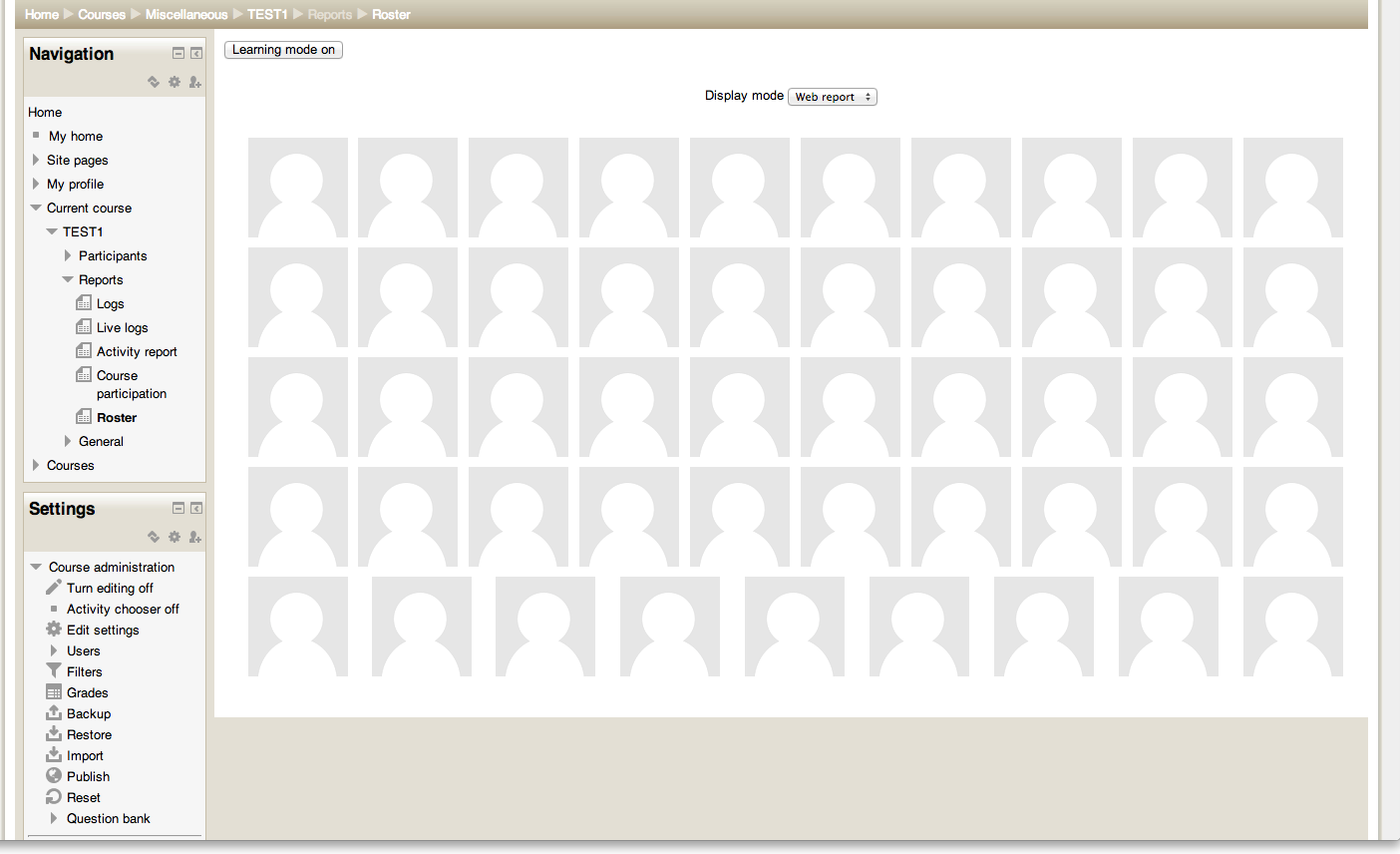
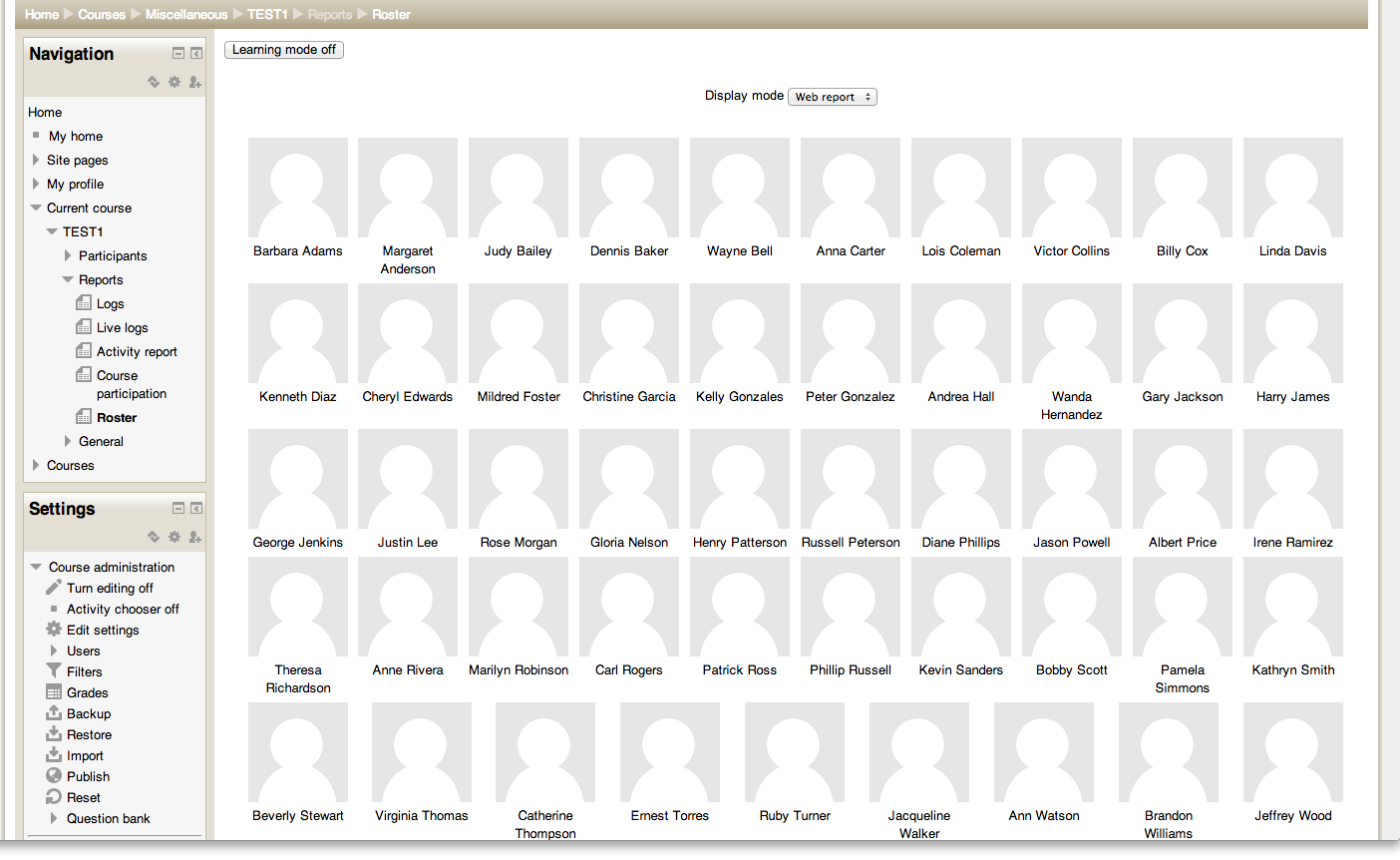
This is a simple report which displays the user pictures for everyone enrolled in the given course.
Requirements
- Moodle 3.6 (build 2018120300 or later)
Installation
Copy the roster folder into your /report directory and visit your Admin Notification page to complete the installation.
Administration
There are several options available to the admin from the Roster Report settings page.
General
Profile fields to display: A newline separated list of profile fields to display. Note that custom profile fields must be entered as profile_field_{shortname}. The following special values are also supported:
fullname- displays fullname according to site settings.currenttime- displays date/time in user's configured timezone (you can specify PHP strftime style formatting like so:currenttime %l:%M %p)
Display name: The display string used by the Roster Report on the front end. Will appear in the flat navigation (if enabled) and on the Roster Report page.
Flat Navigation
Display in flat navigation: If enabled, the plugin will attempt to display a link to the Roster Report in the Boost flat navigation menu (left sidebar).
Position in flat navigation: A newline separated list of flat navigation link identifiers. A link to the Roster Report will be added above the link at the top of this list. If not found, the next link down will be tried, and so on. The first word on each line is the link identifier; everything afterward is ignored (so that the identifiers can be labeled). The main course navigation nodes are included by default; the identifiers for additional nodes can be obtained by looking at the data-key property of the relevant <a>.
User Image Size
Any size set to 0 will not display in the drop-down on the report page. If there is only one non-zero size option, the drop-down will not be displayed.
On initial load of the report page, the report will attempt to use the size configured as default. If this size is 0, the report will fall back to the next highest size option. If all three size options are 0, the size will hard default to 100.
Default size: The default size of the user images in the Roster Report.
Size: Small: The size, in pixels, of the user images when the user has selected "Small".
Size: Medium: ...when the user has selected "Medium".
Size: Large: ... when the user has selected "Large".
Usage
Once the plugin is installed, you can access the functionality by going to
Reports > Roster within the course, or by going to the URL /report/roster/index.php?id=.
There are several options available when viewing the Roster Report:
Learning mode turns the display of names on and off
Group filtering to display only users in the selected group
Role filtering to display only users with the selected role
Size changes the display size of the user images based on levels configured in the admin settings (see above)
Display mode which toggles between the regular web view and a version of the report suitable for printing
Author
Charles Fulton (fultonc@lafayette.edu)
v3.6.2 (2020061500)
v3.6.2
Plugin type: Reports
Frankenstyle component name: report_roster
Version build number: 2020061500
Version release name: v3.6.2
Maturity: Stable
Supported Moodle versions: 3.6, 3.7, 3.8, 3.9
Repository URL (Git): https://github.com/LafColITS/moodle-report_roster
Repository branch: master
Repository tag: v3.6.2
Issue/bug tracker URL: https://github.com/LafColITS/moodle-report_roster/issues
Roster
This is a simple report which displays the user pictures for everyone enrolled in the given course.
Requirements
- Moodle 3.6 (build 2018120300 or later)
Installation
Copy the roster folder into your /report directory and visit your Admin Notification page to complete the installation.
Administration
There are several options available to the admin from the Roster Report settings page.
General
Profile fields to display: A newline separated list of profile fields to display. fullname is also supported. Note that custom profile fields must be entered as profile_field_{shortname}.
Display name: The display string used by the Roster Report on the front end. Will appear in the flat navigation (if enabled) and on the Roster Report page.
Flat Navigation
Display in flat navigation: If enabled, the plugin will attempt to display a link to the Roster Report in the Boost flat navigation menu (left sidebar).
Position in flat navigation: A newline separated list of flat navigation link identifiers. A link to the Roster Report will be added above the link at the top of this list. If not found, the next link down will be tried, and so on. The first word on each line is the link identifier; everything afterward is ignored (so that the identifiers can be labeled). The main course navigation nodes are included by default; the identifiers for additional nodes can be obtained by looking at the data-key property of the relevant <a>.
User Image Size
Any size set to 0 will not display in the drop-down on the report page. If there is only one non-zero size option, the drop-down will not be displayed.
On initial load of the report page, the report will attempt to use the size configured as default. If this size is 0, the report will fall back to the next highest size option. If all three size options are 0, the size will hard default to 100.
Default size: The default size of the user images in the Roster Report.
Size: Small: The size, in pixels, of the user images when the user has selected "Small".
Size: Medium: ...when the user has selected "Medium".
Size: Large: ... when the user has selected "Large".
Usage
Once the plugin is installed, you can access the functionality by going to
Reports > Roster within the course, or by going to the URL <mymoodle>/report/roster/index.php?id=<courseid>.
There are several options available when viewing the Roster Report:
Learning mode turns the display of names on and off
Group filtering to display only users in the selected group
Role filtering to display only users with the selected role
Size changes the display size of the user images based on levels configured in the admin settings (see above)
Display mode which toggles between the regular web view and a version of the report suitable for printing
Author
Charles Fulton (fultonc@lafayette.edu)
v3.6.1 (2020011001)
v3.6.1
Plugin type: Reports
Frankenstyle component name: report_roster
Version build number: 2020011001
Version release name: v3.6.1
Maturity: Stable
Supported Moodle versions: 3.6, 3.7, 3.8
Repository URL (Git): https://github.com/LafColITS/moodle-report_roster
Repository branch: master
Repository tag: v3.6.1
Issue/bug tracker URL: https://github.com/LafColITS/moodle-report_roster/issues
Roster
This is a simple report which displays the user pictures for everyone enrolled in the given course.
Requirements
- Moodle 3.6 (build 2018120300 or later)
Installation
Copy the roster folder into your /report directory and visit your Admin Notification page to complete the installation.
Administration
There are several options available to the admin from the Roster Report settings page.
General
Profile fields to display: A newline separated list of profile fields to display. fullname is also supported. Note that custom profile fields must be entered as profile_field_{shortname}.
Display name: The display string used by the Roster Report on the front end. Will appear in the flat navigation (if enabled) and on the Roster Report page.
Flat Navigation
Display in flat navigation: If enabled, the plugin will attempt to display a link to the Roster Report in the Boost flat navigation menu (left sidebar).
Position in flat navigation: A newline separated list of flat navigation link identifiers. A link to the Roster Report will be added above the link at the top of this list. If not found, the next link down will be tried, and so on. The first word on each line is the link identifier; everything afterward is ignored (so that the identifiers can be labeled). The main course navigation nodes are included by default; the identifiers for additional nodes can be obtained by looking at the data-key property of the relevant <a>.
User Image Size
Any size set to 0 will not display in the drop-down on the report page. If there is only one non-zero size option, the drop-down will not be displayed.
On initial load of the report page, the report will attempt to use the size configured as default. If this size is 0, the report will fall back to the next highest size option. If all three size options are 0, the size will hard default to 100.
Default size: The default size of the user images in the Roster Report.
Size: Small: The size, in pixels, of the user images when the user has selected "Small".
Size: Medium: ...when the user has selected "Medium".
Size: Large: ... when the user has selected "Large".
Usage
Once the plugin is installed, you can access the functionality by going to
Reports > Roster within the course, or by going to the URL <mymoodle>/report/roster/index.php?id=<courseid>.
There are several options available when viewing the Roster Report:
Learning mode turns the display of names on and off
Group filtering to display only users in the selected group
Role filtering to display only users with the selected role
Size changes the display size of the user images based on levels configured in the admin settings (see above)
Display mode which toggles between the regular web view and a version of the report suitable for printing
Author
Charles Fulton (fultonc@lafayette.edu)
v3.6.0 (2020011000)
v3.6.0
Plugin type: Reports
Frankenstyle component name: report_roster
Version build number: 2020011000
Version release name: v3.6.0
Maturity: Stable
Supported Moodle versions: 3.6, 3.7, 3.8
Repository URL (Git): https://github.com/LafColITS/moodle-report_roster
Repository branch: master
Repository tag: v3.6.0
Issue/bug tracker URL: https://github.com/LafColITS/moodle-report_roster/issues
Roster
This is a simple report which displays the user pictures for everyone enrolled in the given course.
Requirements
- Moodle 3.6 (build 2018120300 or later)
Installation
Copy the roster folder into your /report directory and visit your Admin Notification page to complete the installation.
Administration
There are several options available to the admin from the Roster Report settings page.
General
Profile fields to display: A newline separated list of profile fields to display. fullname is also supported. Note that custom profile fields must be entered as profile_field_{shortname}.
Display name: The display string used by the Roster Report on the front end. Will appear in the flat navigation (if enabled) and on the Roster Report page.
Flat Navigation
Display in flat navigation: If enabled, the plugin will attempt to display a link to the Roster Report in the Boost flat navigation menu (left sidebar).
Position in flat navigation: A newline separated list of flat navigation link identifiers. A link to the Roster Report will be added above the link at the top of this list. If not found, the next link down will be tried, and so on. The first word on each line is the link identifier; everything afterward is ignored (so that the identifiers can be labeled). The main course navigation nodes are included by default; the identifiers for additional nodes can be obtained by looking at the data-key property of the relevant <a>.
User Image Size
Default size: The default size, in pixels, of the user images in the Roster Report. Should match one of the three size level options below. This is the size that will be used when a user first navigates to the report and has not requested a specific size yet.
Size: Small: The size, in pixels, of the user images when the user has selected "Small".
Size: Medium: ...when the user has selected "Medium".
Size: Large: ... when the user has selected "Large".
Usage
Once the plugin is installed, you can access the functionality by going to
Reports > Roster within the course, or by going to the URL <mymoodle>/report/roster/index.php?id=<courseid>.
There are several options available when viewing the Roster Report:
Learning mode turns the display of names on and off
Group filtering to display only users in the selected group
Role filtering to display only users with the selected role
Size changes the display size of the user images based on levels configured in the admin settings (see above)
Display mode which toggles between the regular web view and a version of the report suitable for printing
Author
Charles Fulton (fultonc@lafayette.edu)
v3.5.0 (2019091600)
v3.5.0
Plugin type: Reports
Frankenstyle component name: report_roster
Version build number: 2019091600
Version release name: v3.5.0
Maturity: Stable
Supported Moodle versions: 3.5, 3.6, 3.7, 3.8
Repository URL (Git): https://github.com/LafColITS/moodle-report_roster
Repository branch:
Repository tag: v3.5.0
Issue/bug tracker URL: https://github.com/LafColITS/moodle-report_roster/issues
Roster
This is a simple report which displays the user pictures for everyone enrolled in the given course.
Requirements
- Moodle 3.5 (build 2018051700 or later)
Installation
Copy the roster folder into your /report directory and visit your Admin Notification page to complete the installation.
Administration
There are several options available to the admin from the Roster Report settings page.
General
Show username: If enabled, username will be shown below full name in the Roster Report.
Display name: The display string used by the Roster Report on the front end. Will appear in the flat navigation (if enabled) and on the Roster Report page.
Flat Navigation
Display in flat navigation: If enabled, the plugin will attempt to display a link to the Roster Report in the Boost flat navigation menu (left sidebar).
Position in flat navigation: A newline separated list of flat navigation link identifiers. A link to the Roster Report will be added above the link at the top of this list. If not found, the next link down will be tried, and so on. The first word on each line is the link identifier; everything afterward is ignored (so that the identifiers can be labeled). The main course navigation nodes are included by default; the identifiers for additional nodes can be obtained by looking at the data-key property of the relevant <a>.
User Image Size
Default size: The default size, in pixels, of the user images in the Roster Report. Should match one of the three size level options below. This is the size that will be used when a user first navigates to the report and has not requested a specific size yet.
Size: Small: The size, in pixels, of the user images when the user has selected "Small".
Size: Medium: ...when the user has selected "Medium".
Size: Large: ... when the user has selected "Large".
Usage
Once the plugin is installed, you can access the functionality by going to
Reports > Roster within the course, or by going to the URL /report/roster/index.php?id=.
There are several options available when viewing the Roster Report:
Learning mode turns the display of names on and off
Group filtering to display only users in the selected group
Role filtering to display only users with the selected role
Size changes the display size of the user images based on levels configured in the admin settings (see above)
Display mode which toggles between the regular web view and a version of the report suitable for printing
Author
Charles Fulton (fultonc@lafayette.edu)
v3.4.2 (2018112601)
v3.4.2
Plugin type: Reports
Frankenstyle component name: report_roster
Version build number: 2018112601
Version release name: v3.4.2
Maturity: Stable
Supported Moodle versions: 3.4, 3.5, 3.6, 3.7
Repository URL (Git): https://github.com/LafColITS/moodle-report_roster
Repository branch: master
Repository tag: v3.4.2
Issue/bug tracker URL: https://github.com/LafColITS/moodle-report_roster/issues
Roster
This is a simple report which displays the user pictures for everyone enrolled in the given course.
Requirements
- Moodle 3.4 (build 2017111300 or later)
Installation
Copy the roster folder into your /report directory and visit your Admin Notification page to complete the installation.
Usage
Once the plugin is installed, you can access the functionality by going to
Reports > Roster within the course.
There are three options when viewing the roster:
- "Learning mode," which turns the display of names on and off
- "Printable" view, which brings up a version of the report suitable for printing.
- A "Groups" filtering option
Author
Charles Fulton (fultonc@lafayette.edu)
v3.4.1 (2018112600)
v3.4.1
Plugin type: Reports
Frankenstyle component name: report_roster
Version build number: 2018112600
Version release name: v3.4.1
Maturity: Stable
Supported Moodle versions: 3.4, 3.5, 3.6
Repository URL (Git): https://github.com/LafColITS/moodle-report_roster
Repository branch:
Repository tag: v3.4.1
Issue/bug tracker URL: https://github.com/LafColITS/moodle-report_roster/issues
Roster
This is a simple report which displays the user pictures for everyone enrolled in the given course.
Requirements
- Moodle 3.4 (build 2017111300 or later)
Installation
Copy the roster folder into your /report directory and visit your Admin Notification page to complete the installation.
Usage
Once the plugin is installed, you can access the functionality by going to
Reports > Roster within the course.
There are three options when viewing the roster:
- "Learning mode," which turns the display of names on and off
- "Printable" view, which brings up a version of the report suitable for printing.
- A "Groups" filtering option
Author
Charles Fulton (fultonc@lafayette.edu)
v3.4.0 (2018051300)
v3.4.0
Plugin type: Reports
Frankenstyle component name: report_roster
Version build number: 2018051300
Version release name: v3.4.0
Maturity: Stable
Supported Moodle versions: 3.4, 3.5
Repository URL (Git): https://github.com/LafColITS/moodle-report_roster
Repository branch:
Repository tag: v3.4.0
Issue/bug tracker URL: https://github.com/LafColITS/moodle-report_roster/issues
Roster
This is a simple report which displays the user pictures for everyone enrolled in the given course.
Requirements
- Moodle 3.4 (build 2017111300 or later)
Installation
Copy the roster folder into your /report directory and visit your Admin Notification page to complete the installation.
Usage
Once the plugin is installed, you can access the functionality by going to
Reports > Roster within the course.
There are three options when viewing the roster:
- "Learning mode," which turns the display of names on and off
- "Printable" view, which brings up a version of the report suitable for printing.
- A "Groups" filtering option
Author
Charles Fulton (fultonc@lafayette.edu)
v3.3.1 (2018011001)
v3.3.1
Plugin type: Reports
Frankenstyle component name: report_roster
Version build number: 2018011001
Version release name: v3.3.1
Maturity: Stable
Supported Moodle versions: 3.3
Repository URL (Git): https://github.com/LafColITS/moodle-report_roster
Repository branch:
Repository tag: v3.3.1
Issue/bug tracker URL: https://github.com/LafColITS/moodle-report_roster/issues
Roster report
This is a simple report which displays the user pictures for everyone enrolled in the given course.
You can install it using git. In the top-level folder of your
Moodle install, type the command:
git clone git://github.com/LafColITS/moodle-report_roster.git report/roster
Then visit the admin screen to allow the install to complete.
Once the plugin is installed, you can access the functionality by going to
Reports > Roster within the course.
There are three options when viewing the roster:
- "Learning mode," which turns the display of names on and off
- "Printable" view, which brings up a version of the report suitable for printing.
- A "Groups" filtering option
v3.3.0 (2018011000)
v3.3.0
Plugin type: Reports
Frankenstyle component name: report_roster
Version build number: 2018011000
Version release name: v3.3.0
Maturity: Stable
Supported Moodle versions: 3.3, 3.4
Repository URL (Git): https://github.com/LafColITS/moodle-report_roster
Repository branch: master
Repository tag: v3.3.0
Issue/bug tracker URL: https://github.com/LafColITS/moodle-report_roster/issues
Roster report
This is a simple report which displays the user pictures for everyone enrolled in the given course.
You can install it using git. In the top-level folder of your
Moodle install, type the command:
git clone git://github.com/LafColITS/moodle-report_roster.git report/roster
Then visit the admin screen to allow the install to complete.
Once the plugin is installed, you can access the functionality by going to
Reports > Roster within the course.
There are three options when viewing the roster:
- "Learning mode," which turns the display of names on and off
- "Printable" view, which brings up a version of the report suitable for printing.
- A "Groups" filtering option
v1.1.2 (2017042400)
v1.1.2
Plugin type: Reports
Frankenstyle component name: report_roster
Version build number: 2017042400
Version release name: v1.1.2
Maturity: Stable
Supported Moodle versions: 3.3, 3.4
Repository URL (Git): https://github.com/LafColITS/moodle-report_roster
Repository branch: MOODLE_33_STABLE
Repository tag: v1.1.2
Issue/bug tracker URL: https://github.com/LafColITS/moodle-report_roster/issues
Roster report
This is a simple report which displays the user pictures for everyone enrolled in the given course.
You can install it using git. In the top-level folder of your
Moodle install, type the command:
git clone git://github.com/LafColITS/moodle-report_roster.git report/roster
Then visit the admin screen to allow the install to complete.
Once the plugin is installed, you can access the functionality by going to
Reports > Roster within the course.
There are three options when viewing the roster:
- "Learning mode," which turns the display of names on and off
- "Printable" view, which brings up a version of the report suitable for printing.
- A "Groups" filtering option
v1.1.1 (2015111700)
v1.1.1
Plugin type: Reports
Frankenstyle component name: report_roster
Version build number: 2015111700
Version release name: v1.1.1
Maturity: Stable
Supported Moodle versions: 2.6, 2.7, 2.8, 2.9, 3.0, 3.1, 3.2
Repository URL (Git): https://github.com/LafColITS/moodle-report_roster
Repository branch: MOODLE_26_STABLE
Repository tag: v1.1.1
Issue/bug tracker URL: https://github.com/LafColITS/moodle-report_roster/issues
Roster report
This is a simple report which displays the user pictures for everyone enrolled in the given course.
You can install it using git. In the top-level folder of your
Moodle install, type the command:
git clone git://github.com/LafColITS/moodle-report_roster.git report/roster
Then visit the admin screen to allow the install to complete.
Once the plugin is installed, you can access the functionality by going to
Reports > Roster within the course.
There are three options when viewing the roster:
- "Learning mode," which turns the display of names on and off
- "Printable" view, which brings up a version of the report suitable for printing.
- A "Groups" filtering option
v1.1.0 (2015010600)
v1.1.0
Plugin type: Reports
Frankenstyle component name: report_roster
Version build number: 2015010600
Version release name: v1.1.0
Maturity: Stable
Supported Moodle versions: 2.6, 2.7, 2.8, 2.9, 3.0
Repository URL (Git): https://github.com/LafColITS/moodle-report_roster
Repository branch: MOODLE_26_STABLE
Repository tag: v1.1.0
Issue/bug tracker URL: https://github.com/LafColITS/moodle-report_roster/issues
Roster report
This is a simple report which displays the user pictures for everyone enrolled in the given course.
You can install it using git. In the top-level folder of your
Moodle install, type the command:
git clone git://github.com/LafColITS/moodle-report_roster.git report/roster
Then visit the admin screen to allow the install to complete.
Once the plugin is installed, you can access the functionality by going to
Reports > Roster within the course.
There are three options when viewing the roster:
- "Learning mode," which turns the display of names on and off
- "Printable" view, which brings up a version of the report suitable for printing.
- A "Groups" filtering option
v1.0 (2014010200)
v1.0
Plugin type: Reports
Frankenstyle component name: report_roster
Version build number: 2014010200
Version release name: v1.0
Maturity: Stable
Supported Moodle versions: 2.6, 2.7, 2.8
Repository URL (Git): https://github.com/LafColITS/moodle-report_roster
Repository branch: MOODLE_26_STABLE
Repository tag: v1.0-2.6
Issue/bug tracker URL: https://github.com/LafColITS/moodle-report_roster/issues
Roster report
This is a simple report which displays the user pictures for everyone enrolled in the given course.
You can install it using git. In the top-level folder of your
Moodle install, type the command:
git clone git://github.com/LafColITS/moodle-report_roster.git report/roster
Then visit the admin screen to allow the install to complete.
Once the plugin is installed, you can access the functionality by going to
Reports > Roster within the course.
There are two options when viewing the roster. One is to toggle the "Learning mode," which turns
the display of names on and off. The other is a "Printable" view, which brings up a version of
the report suitable for printing.
v1.0 (2013052000)
v1.0
Plugin type: Reports
Frankenstyle component name: report_roster
Version build number: 2013052000
Version release name: v1.0
Maturity: Stable
Supported Moodle versions: 2.2, 2.3, 2.4, 2.5
Repository URL (Git): https://github.com/LafColITS/moodle-report_roster
Repository branch: MOODLE_23_STABLE
Repository tag: v1.0
Issue/bug tracker URL: https://github.com/LafColITS/moodle-report_roster/issues
Roster report
This is a simple report which displays the user pictures for everyone enrolled in the given course. You can install it using git. In the top-level folder of your Moodle install, type the command: git clone git://github.com/LafColITS/moodle-report_roster.git report/roster Then visit the admin screen to allow the install to complete. Once the plugin is installed, you can access the functionality by going to Reports > Roster within the course. There are two options when viewing the roster. One is to toggle the "Learning mode," which turns the display of names on and off. The other is a "Printable" view, which brings up a version of the report suitable for printing.