Grade Me
Maintained by
Tyler Bannister, Logan Reynolds, James McQuillan
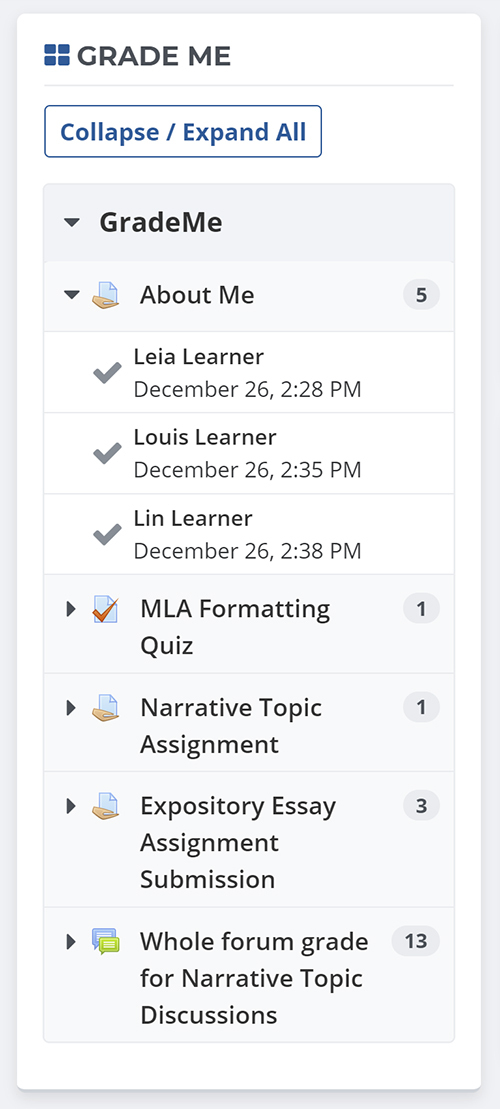
Shows a teacher all of the assignments and manual quiz questions (essays and file responses) that have been submitted, but not graded.
Comments
Comments are no longer open for new posts. Existing comments remain available to read.
First, I had to purge cache after I installed it otherwise some errors occurred.
Turning on debugging I got:
Capability "mod/assignment:grade" was not found! This has to be fixed in code.
line 389 of /lib/accesslib.php: call to debugging()
line 102 of /blocks/grade_me/block_grade_me.php: call to has_capability()
line 294 of /blocks/moodleblock.class.php: call to block_grade_me->get_content()
line 236 of /blocks/moodleblock.class.php: call to block_base->formatted_contents()
line 993 of /lib/blocklib.php: call to block_base->get_content_for_output()
line 1045 of /lib/blocklib.php: call to block_manager->create_block_contents()
line 361 of /lib/outputrenderers.php: call to block_manager->ensure_content_created()
line 34 of /theme/clean/layout/columns2.php: call to core_renderer->standard_head_html()
line 877 of /lib/outputrenderers.php: call to include()
line 807 of /lib/outputrenderers.php: call to core_renderer->render_page_layout()
line 1513 of /lib/blocklib.php: call to core_renderer->header()
line 1169 of /lib/blocklib.php: call to block_manager->process_url_edit()
line 1457 of /lib/pagelib.php: call to block_manager->process_url_actions()
line 888 of /lib/pagelib.php: call to moodle_page->starting_output()
line 802 of /lib/outputrenderers.php: call to moodle_page->set_state()
line 101 of /index.php: call to core_renderer->header()
Not exactly sure what that means, but maybe there is something up in the latest version for 2.7. More troubleshooting if needed.
Actually, I can confirm now that it doesn't show at all quizzes waiting to be graded, but only some that are already graded (as described in previous comment). And I can't see any pattern on how/why it shows these already graded quizzes (it looks completely random).
There are no errors in the output, except that one when block is on the front page..
I'm having problems with 2.7 version.
When I put block on the front page it throws error:
Fatal error: Class 'question_state' not found in /xxx/public_html/blocks/grade_me/plugins/quiz/quiz_plugin.php on line 39
but when the block is inside any course it works fine.
The other issue I'm having is that it's showing some of the automatically graded quizzes (even the ones where students have finished them and passed), and the same thing happens with some quizzes where one question is of "essay" type (which requires manual grading) and other questions are automatically graded.
So basically, it shows bunch of already graded quizzes.
I haven't test it with assignments (only with quiz).
Any help is much appreciated.
I'm still having problem showing the attempted manual grading quiz on the grade me block - May I know the solution that you have attained to be able to show the quiz ?
thanks and regards,
Riady Santoso
Have just installed Grade me 2.6.1.2 and am loving it. We were previously using Ad Hoc reports, which is just too limited for this kind of thing.
I have experienced an issue where a teacher had an empty list in her 'Grade me' block when we knew that there were many ungraded assignments in her course.
This was being caused by the assignments using a custom scale for grading and the assignment plugin in the 'Grade me' block will only return items where the grade field in the assign database table is greater than 0.
As custom grade scales are stored as negative numbers (i.e. -1 to -7) in the assignment table, these were not showing up due to the line in the assign_plugin.php file:
WHERE asgn_sub.userid $insql AND a.grade > 0
To fix this I simply commented out the 'AND a.grade > 0' so the line in the code now looks like this:
WHERE asgn_sub.userid $insql /* AND a.grade > 0*/
We also have some formative activities in this course that have the grade set to 'No grade' so we want to show all assignments. Alternatively, if you want to exclude any assignments that you are not grading (No grade), then you could use this:
WHERE asgn_sub.userid $insql AND (a.grade > 0 OR a.grade < 0)
I think it would be great if there was a setting in the 'Configure Grade me block' settings where you could tick a box that included assignments with custom scales (possibly this should be enabled by default) and include assignments with no grade.
Hope this helps.
AND qa.state = '".question_state::$finished."'"."
thank you for the instruction. i have just tried the steps u mention above but still no luck. then i realise that I can not access to admin/... page any more with the error message of "Fatal error: Class 'question_state' not found in /home/xxx/public_html/xxx/blocks/grade_me/plugins/quiz/quiz_plugin.php on line 39".
I havent touch or change any code in grade me plugin by the way. so the line number should be same as released version.
@Tim Dyer
Thank you for the reply. I prob need to find a solution to be able to access admin/... or even block/.. otherwise i am totally stuck.
1. First, navigate to Site administration > Plugins > Blocks > Grade Me and ensure that the option "Show Quizzes" is checked.
2. As admin, add an instance of the Grade Me block to the test course page
3. Turn on page editing and click on "Add an activity or resource" and select the Quiz activity
4. Enter a name for the quiz and click "Save and display"
5. Click on the "Edit quiz" button
6. Click on the "Add a question" button
7. Select "Essay" and click "Add"
8. Enter the essay name and text and click "Save changes"
9. Log in as the test user and click on the quiz from the test course page. Attempt the quiz and submit it when finished.
10. As admin, run the Moodle cron (visit http:///admin/cron.php in your browser)
11. As admin, navigate to the test course page
12. From the Grade Me block, expand the listing of the essay quiz you created and click on the red checkmark icon