
Cursive
Versions
Current version
2.1.6 (2026052200)
2.1.6
Plugin type: TinyMCE
Frankenstyle component name: tiny_cursive
Version build number: 2026052200
Version release name: 2.1.6
Maturity: Stable
Supported Moodle versions: 4.2, 4.3, 4.4, 4.5, 5.0
Issue/bug tracker URL: https://moodle.org/mod/forum/discuss.php?d=463738
2.1.5 (2026041700)
2.1.5
Plugin type: TinyMCE
Frankenstyle component name: tiny_cursive
Version build number: 2026041700
Version release name: 2.1.5
Maturity: Stable
Supported Moodle versions: 4.4, 4.5, 5.0, 5.1
Issue/bug tracker URL: https://moodle.org/mod/forum/discuss.php?d=463738
Cursive Moodle TinyMCE Plugin
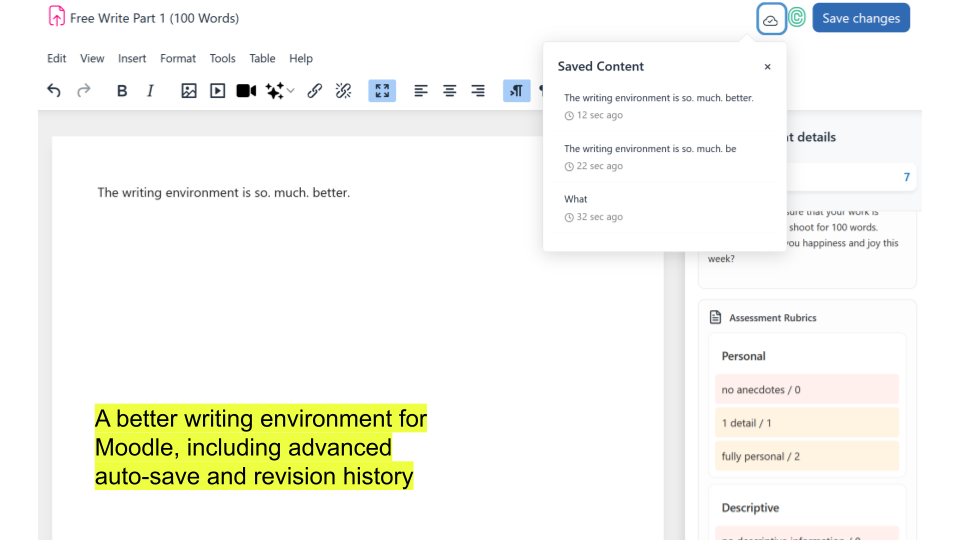
At Cursive Technology, Inc., we're focused on the writing process. By capturing key event data (also known by the scary euphemism "key logging"), we can make new opportunities for teaching, learning, and research in a low-cost, low-effort way, all in the existing workflows of your course and site.
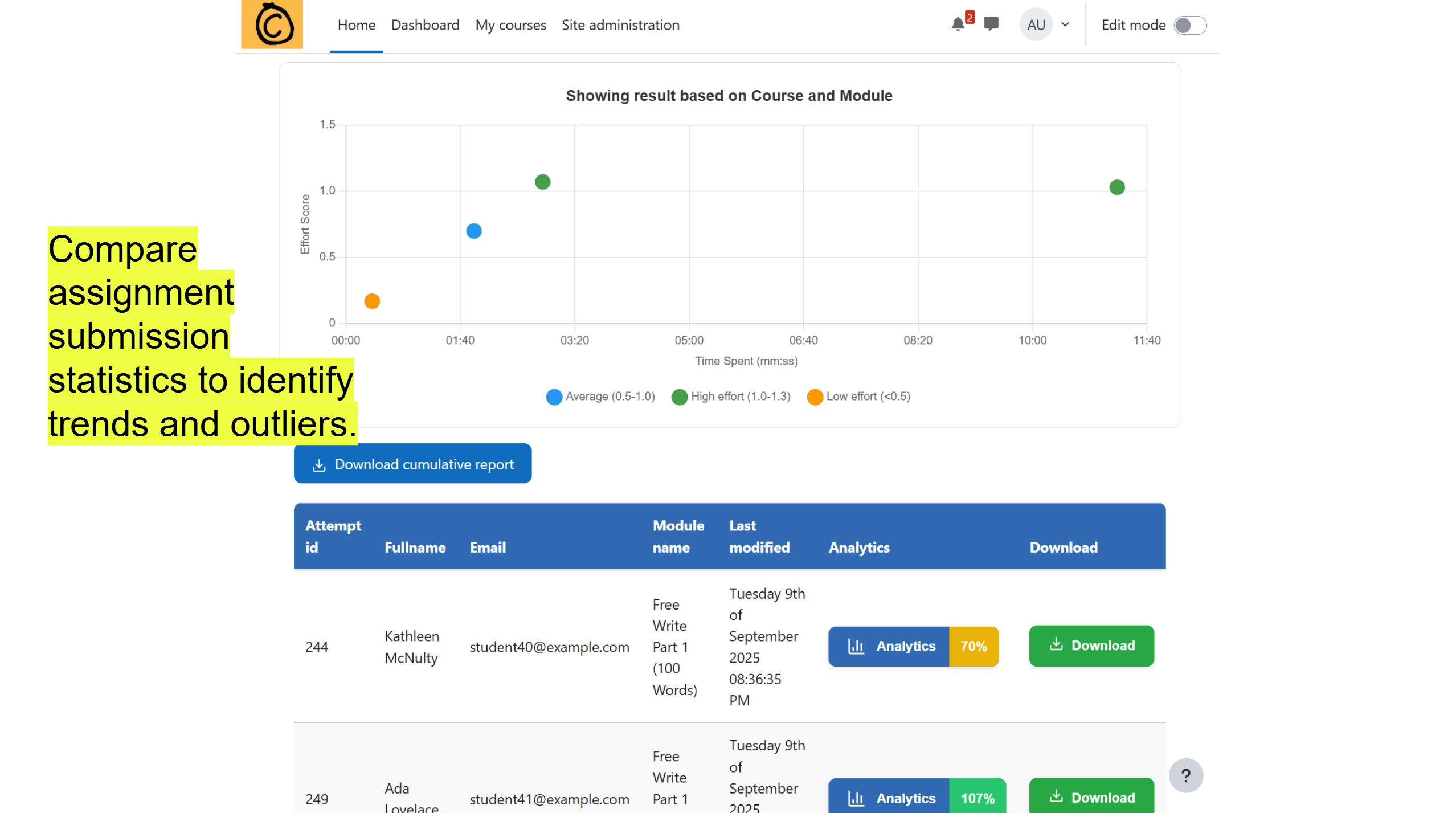
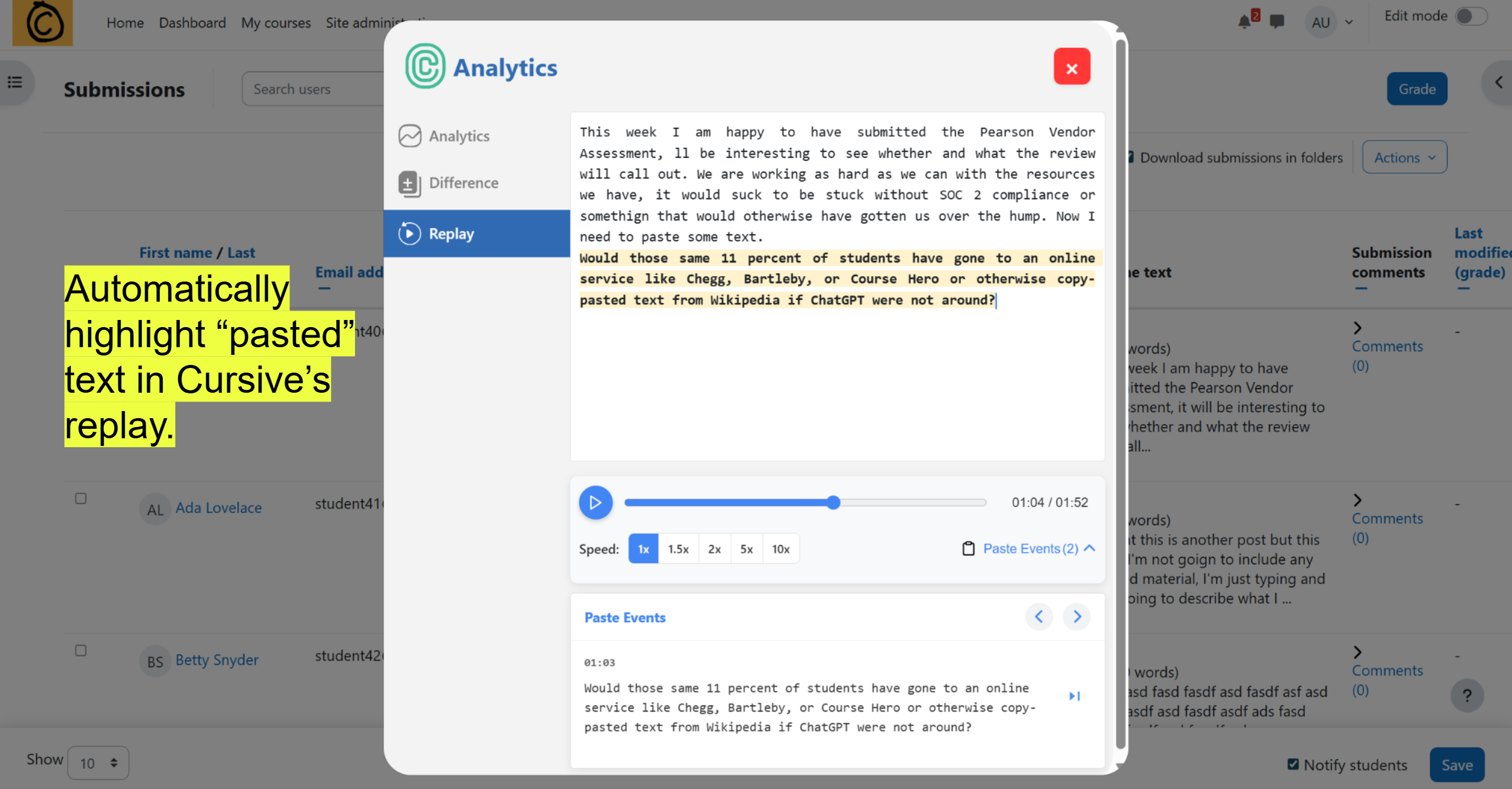
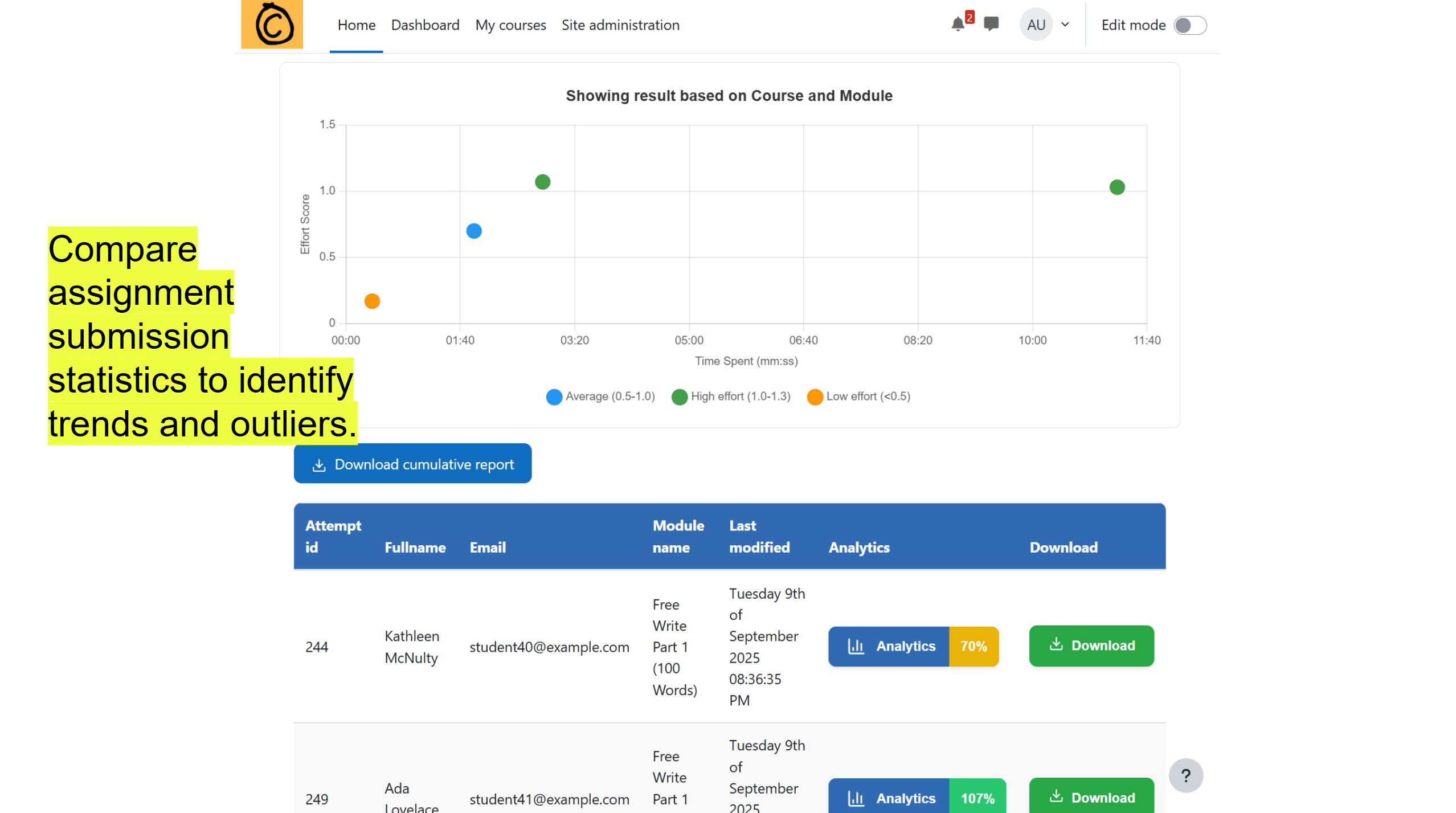
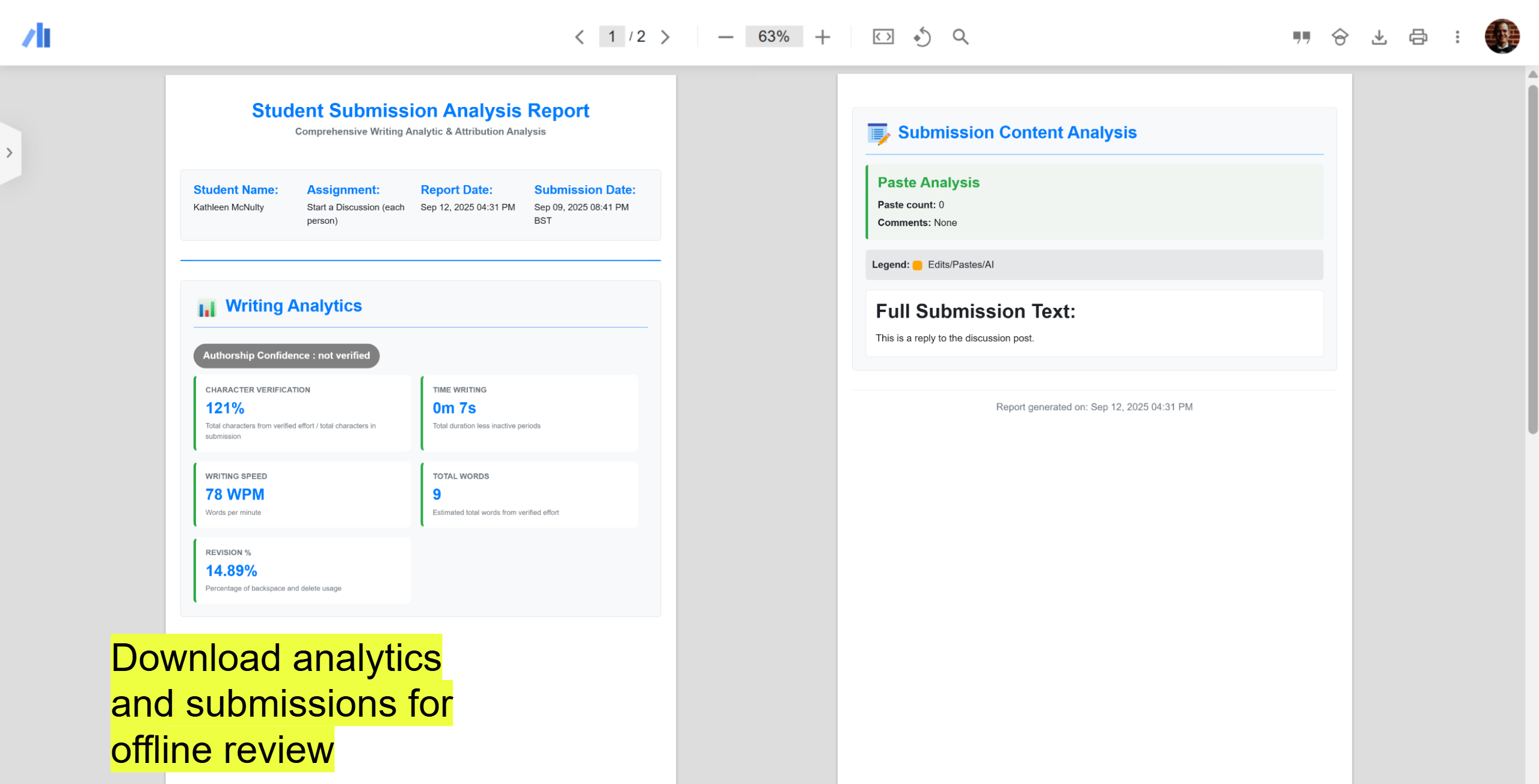
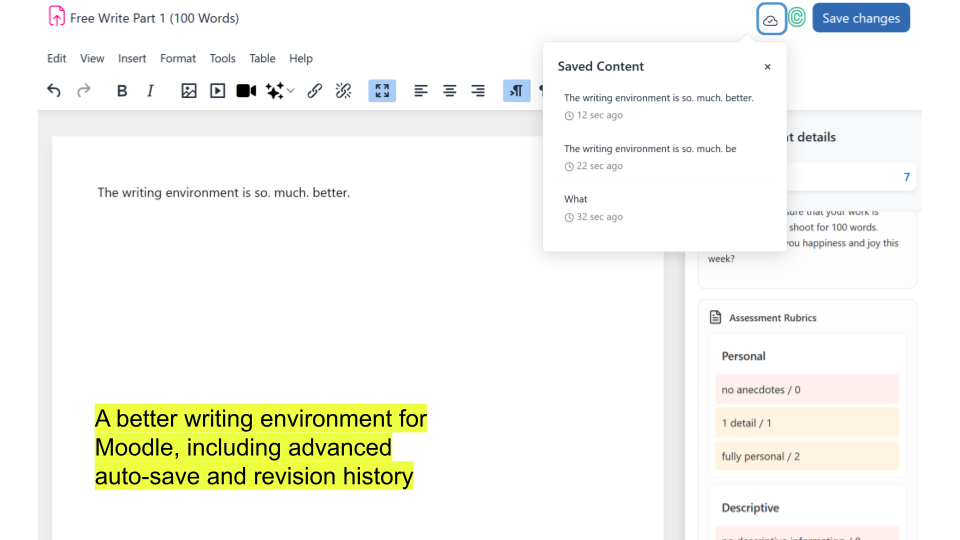
Currently, the extension captures key event data in a structured JSON object, which a teacher or administrator can download and review. This is for each use of the TinyMCE text editor by a student, sortable by course, assignment, student, and attempt. This data can be utilized with the shared Excel or Google document which provide analysis that may help determine the level of effort by a student.
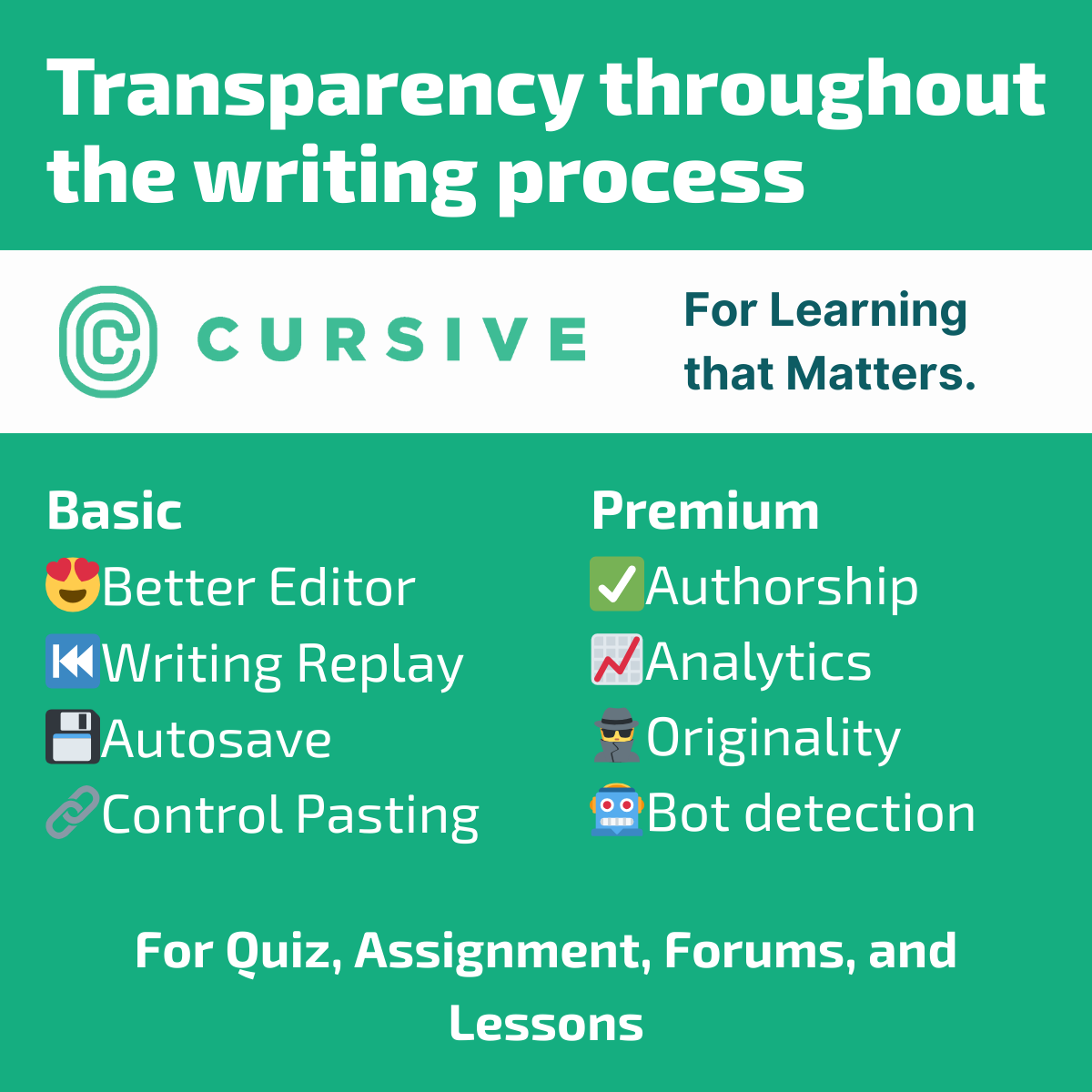
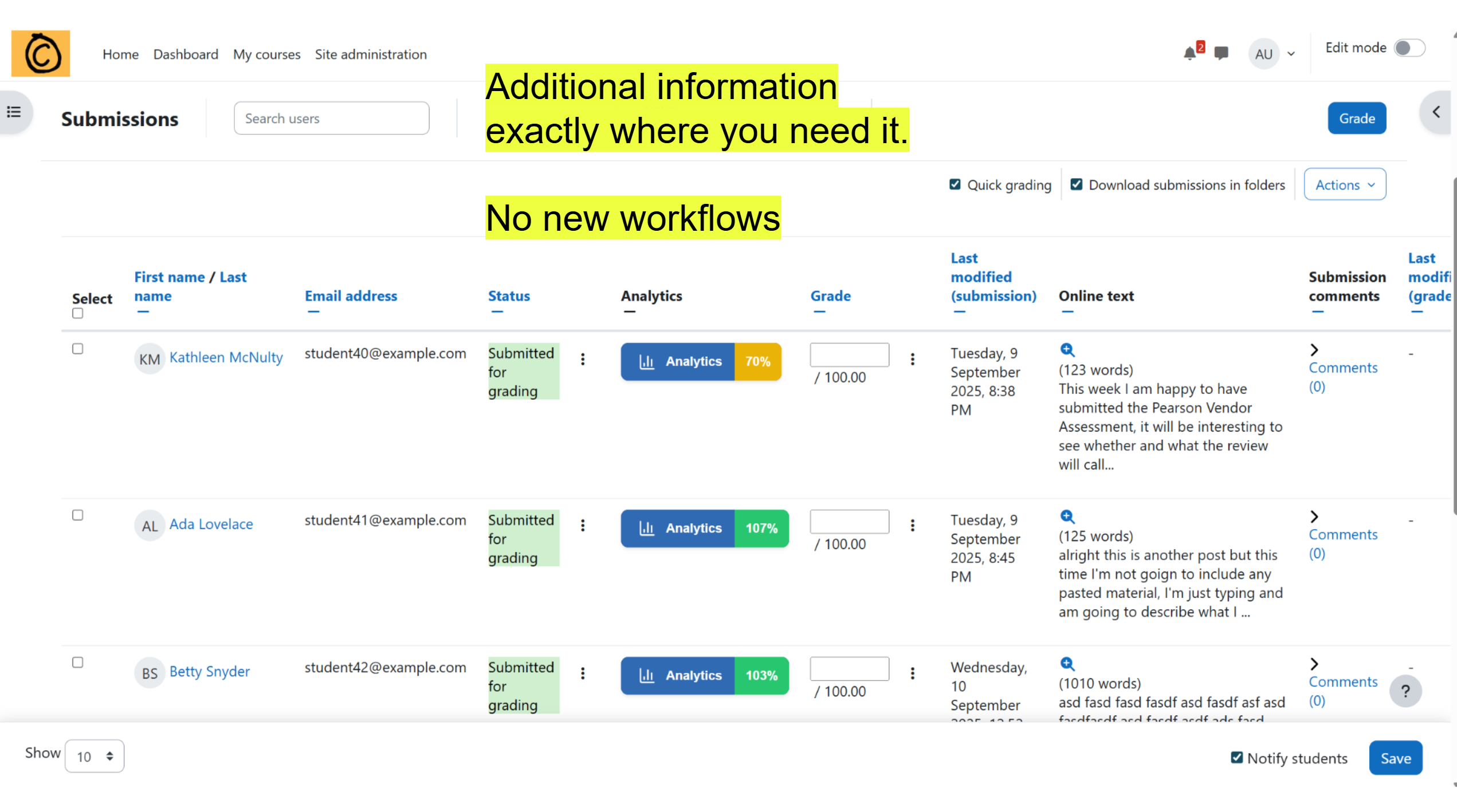
Premium/Subscription: Cursive's plugin is designed to interact with our ML server as a paid service. This integration is optional and adds the following capabilities:
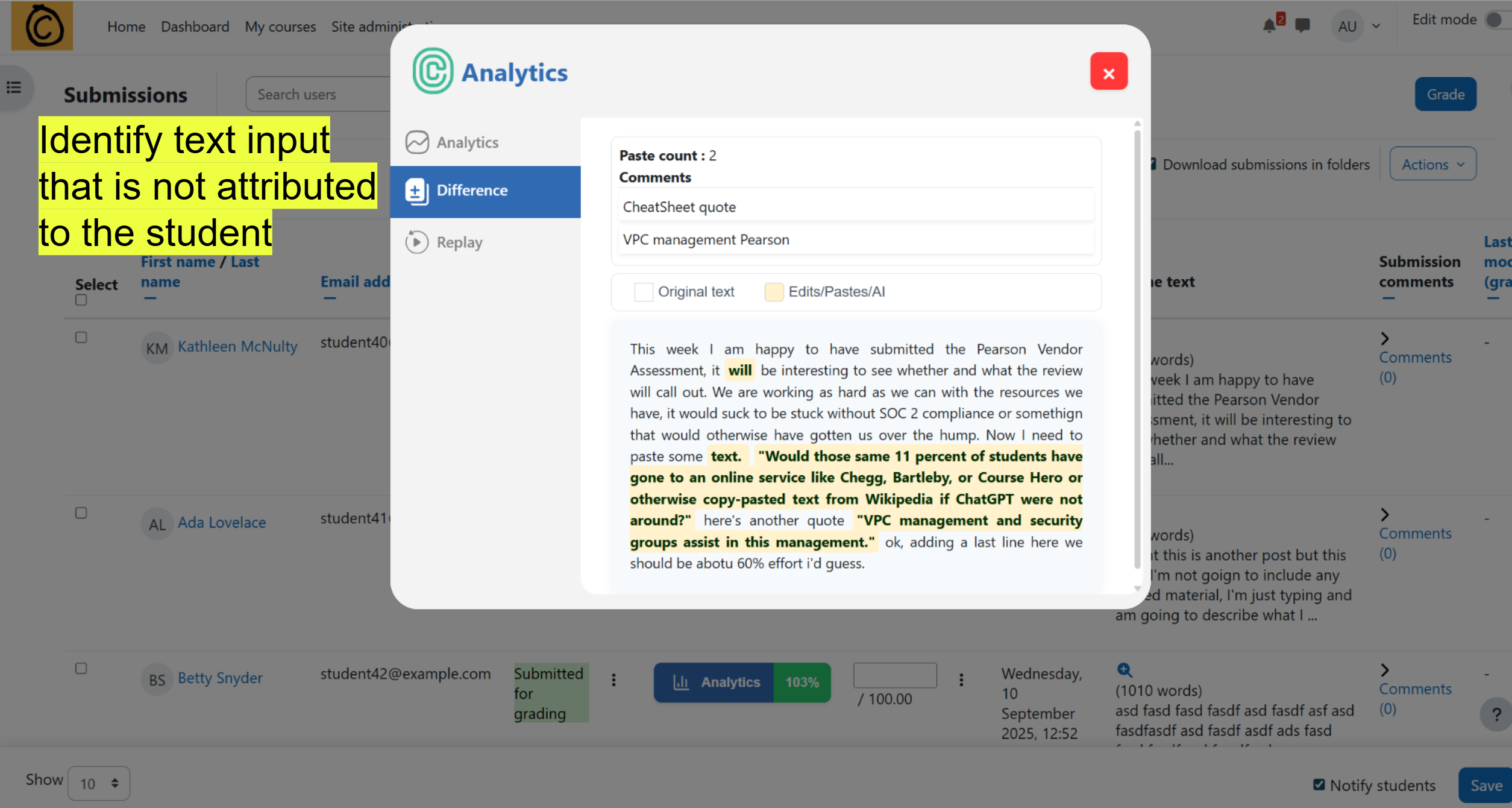
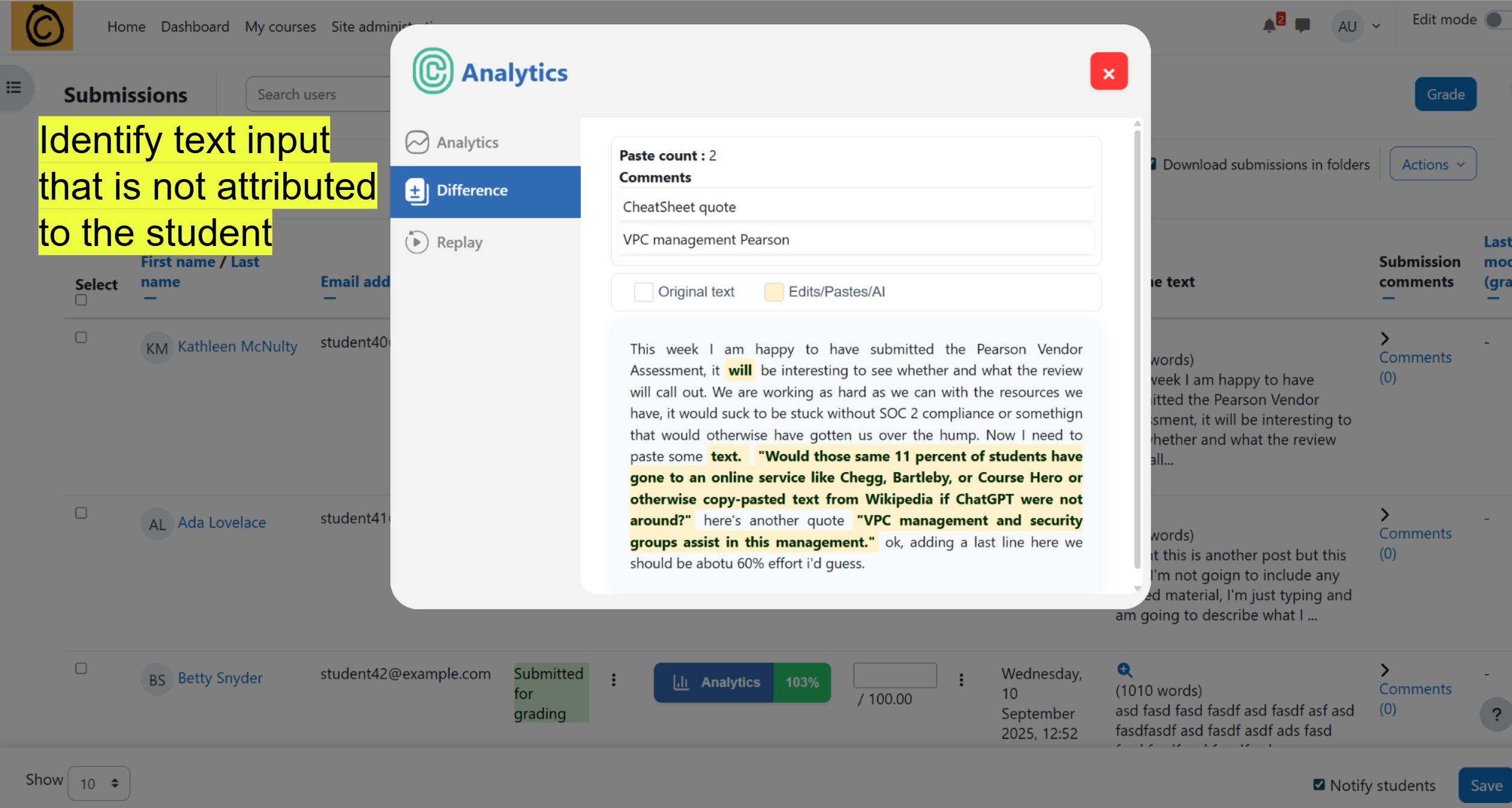
- identify student authorship across their submissions,
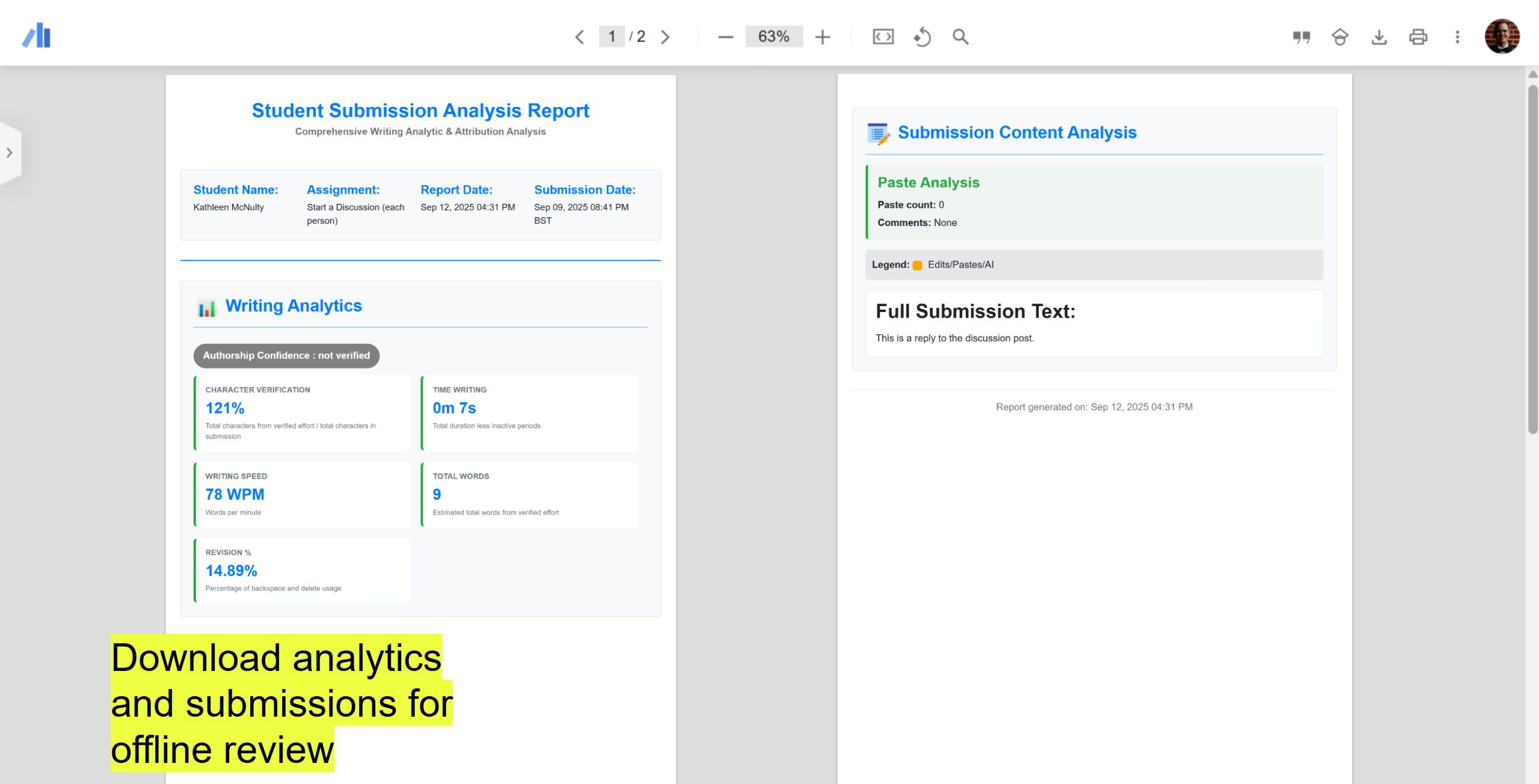
- provide writing analytics automatically,
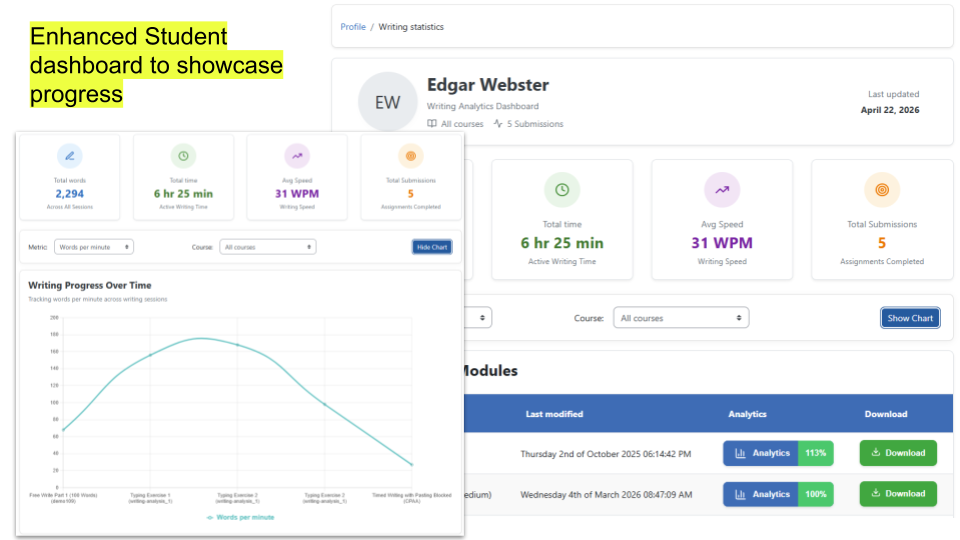
- provide students a running total of their words, pages, typing speed, and assignments across their courses.
Ultimately, we believe in human contribution as captured through the writing process, the beautiful production of written work expressing your individual thoughts that cannot be completed by a third party nor replicated by generative AI. We're excited to work with you.
If you have questions, comments, or would like to request a trial API key, please reach out to us at contact@cursivetechnology.com
Installation
Install by downloading the ZIP file
- Install by downloading the ZIP file from the Moodle plugins directory
- Download the zip file from GitHub
- Unzip the zip file in /path/to/moodle/lib/editor/tiny/plugins/cursive folder or upload the zip file in the install plugins options from site administration: Site Administration -> Plugins -> Install Plugins -> Upload zip file
Install using git clone
Go to Moodle Project root/lib/editor/tiny/plugins/cursive directory and clone code by using the following commands:
git clone https://github.com/cursiveinc/moodle-tinymce_cursive.git cursive
- In your Moodle site (as admin), Visit site administration to finish the installation.
Alternatively, you can run
$ php admin/cli/upgrade.php
to complete the installation from the command line.
Configuration
After installing the plugin, you can update the settings.
To update the plugin settings, navigate to plugin settings:
Site Administration->Plugins->Cursive
If you want to use Analytics And Diff feature then you need to fill up that informations.
for subscription please reach out to us at contact@cursivetechnology.com.
There are several configuration options for the plugin. The free version allows you the following features:
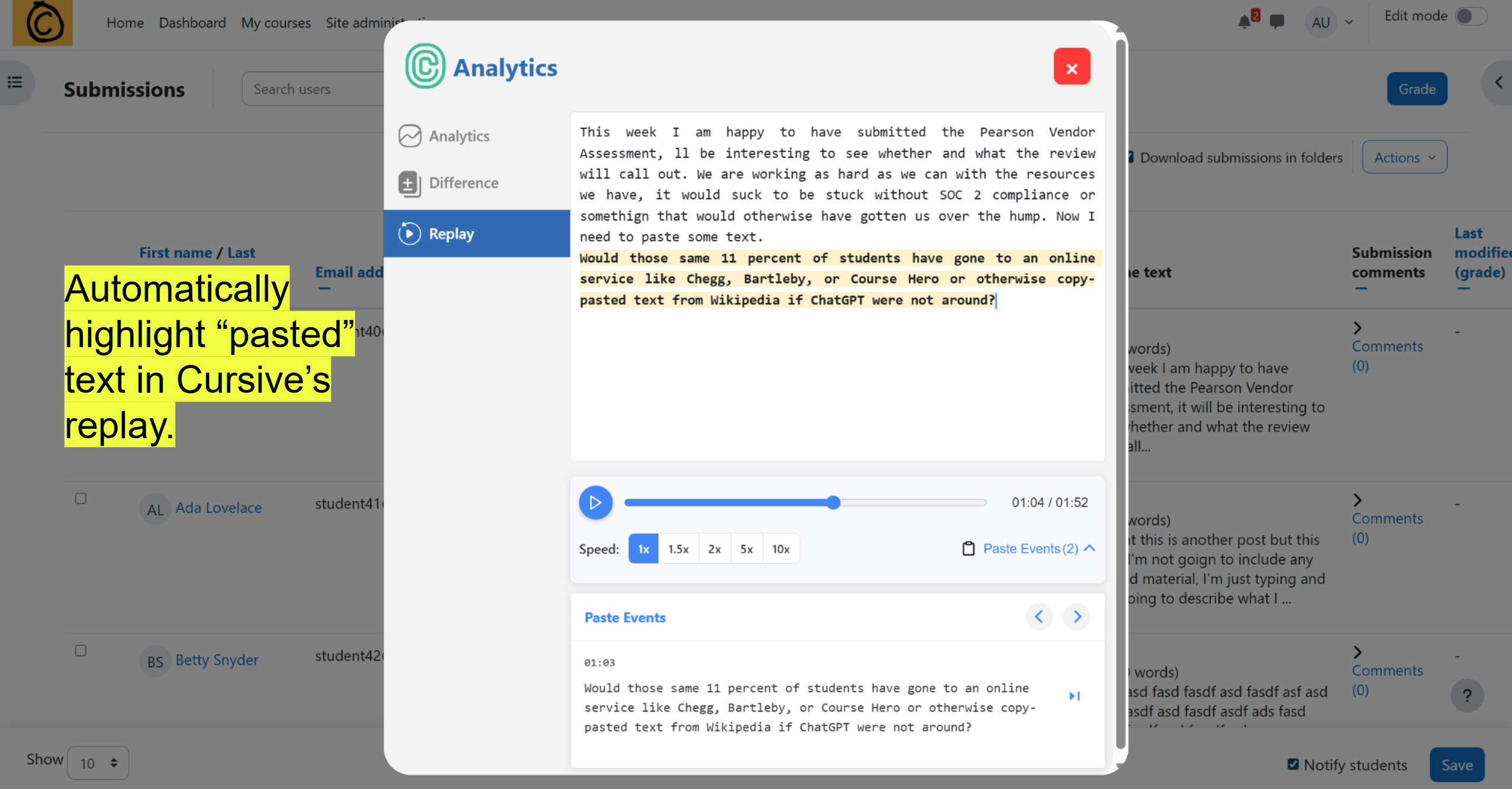
- Enable or disable "Cite Source" student copy/paste comment features.
- Data Sync Interval with your moodle server to reduce the number of http requests.
- Global settings for Enabling or Disabling cursive for all courses.
By entering an agreement with Cursive, an API URL and key will be provided to manage the premium ML features. A custom threshold for API-generated values of identify verification is also available to tune the threshold for displaying a green check verification.
Supported Activity Modules
Our plugin is designed to work with activities where students provide written text responses.
It supports only text-based inputs such as Online text submissions and Essay-type questions.
Other formats, like file uploads or multiple-choice questions, are not supported.
Currently supported Moodle activity modules:
| # | Activity | Supported Type |
|:-:|-----------|----------------|
| 1 | Assignment | Online text submissions only |
| 2 | Quiz | Essay question types only |
| 3 | Forum | Posts and discussion entries |
| 4 | Lesson | Essay-style lesson questions |
| 5 | OU Blog | Blog posts and entries |
Note: Across all modules, only essay-type responses are supported. And supported both MySQL and PostgreSQL Database.
Note: Users who want to use and get Cursive support in the OU Blog plugin must install the support plugin. Check for more updates about it at https://cursivetechnology.com.
License
2025 Cursive Technology, Inc.
This program is free software: you can redistribute it and/or modify it under the terms of the GNU General Public License as published by the Free Software Foundation, either version 3 of the License, or (at your option) any later version.
This program is distributed in the hope that it will be useful, but WITHOUT ANY WARRANTY; without even the implied warranty of MERCHANTABILITY or FITNESS FOR A PARTICULAR PURPOSE. See the GNU General Public License for more details.
You should have received a copy of the GNU General Public License along with this program. If not, see https://www.gnu.org/licenses/.
2.1.4 (2026022000)
2.1.4
Plugin type: TinyMCE
Frankenstyle component name: tiny_cursive
Version build number: 2026022000
Version release name: 2.1.4
Maturity: Stable
Supported Moodle versions: 4.4, 4.5, 5.0, 5.1
Issue/bug tracker URL: https://moodle.org/mod/forum/discuss.php?d=463738
Cursive Moodle TinyMCE Plugin
At Cursive Technology, Inc., we're focused on the writing process. By capturing key event data (also known by the scary euphemism "key logging"), we can make new opportunities for teaching, learning, and research in a low-cost, low-effort way, all in the existing workflows of your course and site.
Currently, the extension captures key event data in a structured JSON object, which a teacher or administrator can download and review. This is for each use of the TinyMCE text editor by a student, sortable by course, assignment, student, and attempt. This data can be utilized with the shared Excel or Google document which provide analysis that may help determine the level of effort by a student.
Premium/Subscription: Cursive's plugin is designed to interact with our ML server as a paid service. This integration is optional and adds the following capabilities:
- identify student authorship across their submissions,
- provide writing analytics automatically,
- provide students a running total of their words, pages, typing speed, and assignments across their courses.
Ultimately, we believe in human contribution as captured through the writing process, the beautiful production of written work expressing your individual thoughts that cannot be completed by a third party nor replicated by generative AI. We're excited to work with you.
If you have questions, comments, or would like to request a trial API key, please reach out to us at contact@cursivetechnology.com
Installation
Install by downloading the ZIP file
- Install by downloading the ZIP file from the Moodle plugins directory
- Download the zip file from GitHub
- Unzip the zip file in /path/to/moodle/lib/editor/tiny/plugins/cursive folder or upload the zip file in the install plugins options from site administration: Site Administration -> Plugins -> Install Plugins -> Upload zip file
Install using git clone
Go to Moodle Project root/lib/editor/tiny/plugins/cursive directory and clone code by using the following commands:
git clone https://github.com/cursiveinc/moodle-tinymce_cursive.git cursive
- In your Moodle site (as admin), Visit site administration to finish the installation.
Alternatively, you can run
$ php admin/cli/upgrade.php
to complete the installation from the command line.
Configuration
After installing the plugin, you can update the settings.
To update the plugin settings, navigate to plugin settings:
Site Administration->Plugins->Cursive
If you want to use Analytics And Diff feature then you need to fill up that informations.
for subscription please reach out to us at contact@cursivetechnology.com.
There are several configuration options for the plugin. The free version allows you the following features:
- Enable or disable "Cite Source" student copy/paste comment features.
- Data Sync Interval with your moodle server to reduce the number of http requests.
- Global settings for Enabling or Disabling cursive for all courses.
By entering an agreement with Cursive, an API URL and key will be provided to manage the premium ML features. A custom threshold for API-generated values of identify verification is also available to tune the threshold for displaying a green check verification.
Supported Activity Modules
Our plugin is designed to work with activities where students provide written text responses.
It supports only text-based inputs such as Online text submissions and Essay-type questions.
Other formats, like file uploads or multiple-choice questions, are not supported.
Currently supported Moodle activity modules:
| # | Activity | Supported Type |
|:-:|-----------|----------------|
| 1 | Assignment | Online text submissions only |
| 2 | Quiz | Essay question types only |
| 3 | Forum | Posts and discussion entries |
| 4 | Lesson | Essay-style lesson questions |
| 5 | OU Blog | Blog posts and entries |
Note: Across all modules, only essay-type responses are supported. And supported both MySQL and PostgreSQL Database.
Note: Users who want to use and get Cursive support in the OU Blog plugin must install the support plugin. Check for more updates about it at https://cursivetechnology.com.
License
2025 Cursive Technology, Inc.
This program is free software: you can redistribute it and/or modify it under the terms of the GNU General Public License as published by the Free Software Foundation, either version 3 of the License, or (at your option) any later version.
This program is distributed in the hope that it will be useful, but WITHOUT ANY WARRANTY; without even the implied warranty of MERCHANTABILITY or FITNESS FOR A PARTICULAR PURPOSE. See the GNU General Public License for more details.
You should have received a copy of the GNU General Public License along with this program. If not, see https://www.gnu.org/licenses/.
2.1.3 (2026013000)
2.1.3
Plugin type: TinyMCE
Frankenstyle component name: tiny_cursive
Version build number: 2026013000
Version release name: 2.1.3
Maturity: Stable
Supported Moodle versions: 4.4, 4.5, 5.0
Issue/bug tracker URL: https://moodle.org/mod/forum/discuss.php?d=463738
Cursive Moodle TinyMCE Plugin
At Cursive Technology, Inc., we're focused on the writing process. By capturing key event data (also known by the scary euphemism "key logging"), we can make new opportunities for teaching, learning, and research in a low-cost, low-effort way, all in the existing workflows of your course and site.
Currently, the extension captures key event data in a structured JSON object, which a teacher or administrator can download and review. This is for each use of the TinyMCE text editor by a student, sortable by course, assignment, student, and attempt. This data can be utilized with the shared Excel or Google document which provide analysis that may help determine the level of effort by a student.
Premium/Subscription: Cursive's plugin is designed to interact with our ML server as a paid service. This integration is optional and adds the following capabilities:
- identify student authorship across their submissions,
- provide writing analytics automatically,
- provide students a running total of their words, pages, typing speed, and assignments across their courses.
Ultimately, we believe in human contribution as captured through the writing process, the beautiful production of written work expressing your individual thoughts that cannot be completed by a third party nor replicated by generative AI. We're excited to work with you.
If you have questions, comments, or would like to request a trial API key, please reach out to us at contact@cursivetechnology.com
Installation
Install by downloading the ZIP file
- Install by downloading the ZIP file from the Moodle plugins directory
- Download the zip file from GitHub
- Unzip the zip file in /path/to/moodle/lib/editor/tiny/plugins/cursive folder or upload the zip file in the install plugins options from site administration: Site Administration -> Plugins -> Install Plugins -> Upload zip file
Install using git clone
Go to Moodle Project root/lib/editor/tiny/plugins/cursive directory and clone code by using the following commands:
git clone https://github.com/cursiveinc/moodle-tinymce_cursive.git cursive
- In your Moodle site (as admin), Visit site administration to finish the installation.
Alternatively, you can run
$ php admin/cli/upgrade.php
to complete the installation from the command line.
Configuration
After installing the plugin, you can update the settings.
To update the plugin settings, navigate to plugin settings:
Site Administration->Plugins->Cursive
If you want to use Analytics And Diff feature then you need to fill up that informations.
for subscription please reach out to us at contact@cursivetechnology.com.
There are several configuration options for the plugin. The free version allows you the following features:
- Enable or disable "Cite Source" student copy/paste comment features.
- Data Sync Interval with your moodle server to reduce the number of http requests.
- Global settings for Enabling or Disabling cursive for all courses.
By entering an agreement with Cursive, an API URL and key will be provided to manage the premium ML features. A custom threshold for API-generated values of identify verification is also available to tune the threshold for displaying a green check verification.
Supported Activity Modules
Our plugin is designed to work with activities where students provide written text responses.
It supports only text-based inputs such as Online text submissions and Essay-type questions.
Other formats, like file uploads or multiple-choice questions, are not supported.
Currently supported Moodle activity modules:
| # | Activity | Supported Type |
|:-:|-----------|----------------|
| 1 | Assignment | Online text submissions only |
| 2 | Quiz | Essay question types only |
| 3 | Forum | Posts and discussion entries |
| 4 | Lesson | Essay-style lesson questions |
| 5 | PDF Annotation | Comments |
Note: Across all modules, only essay-type responses are supported. And supported both MySQL and PostgreSQL Database.
License
2026 Cursive Technology, Inc.
This program is free software: you can redistribute it and/or modify it under the terms of the GNU General Public License as published by the Free Software Foundation, either version 3 of the License, or (at your option) any later version.
This program is distributed in the hope that it will be useful, but WITHOUT ANY WARRANTY; without even the implied warranty of MERCHANTABILITY or FITNESS FOR A PARTICULAR PURPOSE. See the GNU General Public License for more details.
You should have received a copy of the GNU General Public License along with this program. If not, see https://www.gnu.org/licenses/.
2.1.2 (2025121900)
2.1.2
Plugin type: TinyMCE
Frankenstyle component name: tiny_cursive
Version build number: 2025121900
Version release name: 2.1.2
Maturity: Stable
Supported Moodle versions: 4.4, 4.5, 5.0, 5.1
Issue/bug tracker URL: https://moodle.org/mod/forum/discuss.php?d=463738
Cursive Moodle TinyMCE Plugin
At Cursive Technology, Inc., we're focused on the writing process. By capturing key event data (also known by the scary euphemism "key logging"), we can make new opportunities for teaching, learning, and research in a low-cost, low-effort way, all in the existing workflows of your course and site.
Currently, the extension captures key event data in a structured JSON object, which a teacher or administrator can download and review. This is for each use of the TinyMCE text editor by a student, sortable by course, assignment, student, and attempt. This data can be utilized with the shared Excel or Google document which provide analysis that may help determine the level of effort by a student.
Premium/Subscription: Cursive's plugin is designed to interact with our ML server as a paid service. This integration is optional and adds the following capabilities:
- identify student authorship across their submissions,
- provide writing analytics automatically,
- provide students a running total of their words, pages, typing speed, and assignments across their courses.
Ultimately, we believe in human contribution as captured through the writing process, the beautiful production of written work expressing your individual thoughts that cannot be completed by a third party nor replicated by generative AI. We're excited to work with you.
If you have questions, comments, or would like to request a trial API key, please reach out to us at contact@cursivetechnology.com
Installation
Install by downloading the ZIP file
- Install by downloading the ZIP file from the Moodle plugins directory
- Download the zip file from GitHub
- Unzip the zip file in /path/to/moodle/lib/editor/tiny/plugins/cursive folder or upload the zip file in the install plugins options from site administration: Site Administration -> Plugins -> Install Plugins -> Upload zip file
Install using git clone
Go to Moodle Project root/lib/editor/tiny/plugins/cursive directory and clone code by using the following commands:
git clone https://github.com/cursiveinc/moodle-tinymce_cursive.git cursive
- In your Moodle site (as admin), Visit site administration to finish the installation.
Alternatively, you can run
$ php admin/cli/upgrade.php
to complete the installation from the command line.
Configuration
After installing the plugin, you can update the settings.
To update the plugin settings, navigate to plugin settings:
Site Administration->Plugins->Cursive
If you want to use Analytics And Diff feature then you need to fill up that informations.
for subscription please reach out to us at contact@cursivetechnology.com.
There are several configuration options for the plugin. The free version allows you the following features:
- Enable or disable "Cite Source" student copy/paste comment features.
- Data Sync Interval with your moodle server to reduce the number of http requests.
- Global settings for Enabling or Disabling cursive for all courses.
By entering an agreement with Cursive, an API URL and key will be provided to manage the premium ML features. A custom threshold for API-generated values of identify verification is also available to tune the threshold for displaying a green check verification.
Supported Activity Modules
Our plugin is designed to work with activities where students provide written text responses.
It supports only text-based inputs such as Online text submissions and Essay-type questions.
Other formats, like file uploads or multiple-choice questions, are not supported.
Currently supported Moodle activity modules:
| # | Activity | Supported Type |
|:-:|-----------|----------------|
| 1 | Assignment | Online text submissions only |
| 2 | Quiz | Essay question types only |
| 3 | Forum | Posts and discussion entries |
| 4 | Lesson | Essay-style lesson questions |
| 5 | OU Blog | Blog posts and entries |
Note: Across all modules, only essay-type responses are supported. And supported both MySQL and PostgreSQL Database.
Note: Users who want to use and get Cursive support in the OU Blog plugin must install the support plugin. Check for more updates about it at https://cursivetechnology.com.
License
2025 Cursive Technology, Inc.
This program is free software: you can redistribute it and/or modify it under the terms of the GNU General Public License as published by the Free Software Foundation, either version 3 of the License, or (at your option) any later version.
This program is distributed in the hope that it will be useful, but WITHOUT ANY WARRANTY; without even the implied warranty of MERCHANTABILITY or FITNESS FOR A PARTICULAR PURPOSE. See the GNU General Public License for more details.
You should have received a copy of the GNU General Public License along with this program. If not, see https://www.gnu.org/licenses/.
2.1.0 (2025091000)
2.1.0
Plugin type: TinyMCE
Frankenstyle component name: tiny_cursive
Version build number: 2025091000
Version release name: 2.1.0
Maturity: Stable
Supported Moodle versions: 4.4, 4.5, 5.0
Issue/bug tracker URL: https://moodle.org/mod/forum/discuss.php?d=463738
Cursive Moodle TinyMCE Plugin
At Cursive Technology, Inc., we're focused on the writing process. By capturing key event data (also known by the scary euphemism "key logging"), we can make new opportunities for teaching, learning, and research in a low-cost, low-effort way, all in the existing workflows of your course and site.
Currently, the extension captures key event data in a structured JSON object, which a teacher or administrator can download and review. This is for each use of the TinyMCE text editor by a student, sortable by course, assignment, student, and attempt. This data can be utilized with the shared Excel or Google document which provide analysis that may help determine the level of effort by a student.
Premium/Subscription: Cursive's plugin is designed to interact with our ML server as a paid service. This integration is optional and adds the following capabilities:
- identify student authorship across their submissions,
- provide writing analytics automatically,
- provide students a running total of their words, pages, typing speed, and assignments across their courses.
Ultimately, we believe in human contribution as captured through the writing process, the beautiful production of written work expressing your individual thoughts that cannot be completed by a third party nor replicated by generative AI. We're excited to work with you.
If you have questions, comments, or would like to request a trial API key, please reach out to us at contact@cursivetechnology.com
Installation
Install by downloading the ZIP file
- Install by downloading the ZIP file from the Moodle plugins directory
- Download the zip file from GitHub
- Unzip the zip file in /path/to/moodle/lib/editor/tiny/plugins/cursive folder or upload the zip file in the install plugins options from site administration: Site Administration -> Plugins -> Install Plugins -> Upload zip file
Install using git clone
Go to Moodle Project root/lib/editor/tiny/plugins/cursive directory and clone code by using the following commands:
git clone https://github.com/cursiveinc/moodle-tinymce_cursive.git cursive
- In your Moodle site (as admin), Visit site administration to finish the installation.
Alternatively, you can run
$ php admin/cli/upgrade.php
to complete the installation from the command line.
Configuration
After installing the plugin, you can update the settings.
To update the plugin settings, navigate to plugin settings:
Site Administration->Plugins->Cursive
If you want to use Analytics And Diff feature then you need to fill up that informations.
for subscription please reach out to us at contact@cursivetechnology.com.
There are several configuration options for the plugin. The free version allows you the following features:
- Enable or disable "Cite Source" student copy/paste comment features.
- Data Sync Interval with your moodle server to reduce the number of http requests.
- Global settings for Enabling or Disabling cursive for all courses.
By entering an agreement with Cursive, an API URL and key will be provided to manage the premium ML features. A custom threshold for API-generated values of identify verification is also available to tune the threshold for displaying a green check verification.
Supported Activity Modules
Our plugin is designed to work with activities where students provide written text responses.
It supports only text-based inputs such as Online text submissions and Essay-type questions.
Other formats, like file uploads or multiple-choice questions, are not supported.
Currently supported Moodle activity modules:
| # | Activity | Supported Type |
|:-:|-----------|----------------|
| 1 | Assignment | Online text submissions only |
| 2 | Quiz | Essay question types only |
| 3 | Forum | Posts and discussion entries |
| 4 | Lesson | Essay-style lesson questions |
| 5 | OU Blog | Blog posts and entries |
Note: Across all modules, only essay-type responses are supported. And supported both MySQL and PostgreSQL Database.
Note: Users who want to use and get Cursive support in the OU Blog plugin must install the support plugin. Check for more updates about it at https://cursivetechnology.com.
License
2025 Cursive Technology, Inc.
This program is free software: you can redistribute it and/or modify it under the terms of the GNU General Public License as published by the Free Software Foundation, either version 3 of the License, or (at your option) any later version.
This program is distributed in the hope that it will be useful, but WITHOUT ANY WARRANTY; without even the implied warranty of MERCHANTABILITY or FITNESS FOR A PARTICULAR PURPOSE. See the GNU General Public License for more details.
You should have received a copy of the GNU General Public License along with this program. If not, see https://www.gnu.org/licenses/.
2.0.0 (2025070800)
2.0.0
Plugin type: TinyMCE
Frankenstyle component name: tiny_cursive
Version build number: 2025070800
Version release name: 2.0.0
Maturity: Stable
Supported Moodle versions: 4.4, 4.5, 5.0
Issue/bug tracker URL: https://moodle.org/mod/forum/discuss.php?d=463738
Cursive Moodle TinyMCE Plugin
At Cursive Technology, Inc., we're focused on the writing process. By capturing key event data (also known by the scary euphemism "key logging"), we can make new opportunities for teaching, learning, and research in a low-cost, low-effort way, all in the existing workflows of your course and site.
Currently, the extension captures key event data in a structured JSON object, which a teacher or administrator can download and review. This is for each use of the TinyMCE text editor by a student, sortable by course, assignment, student, and attempt. This data can be utilized with the shared Excel or Google document which provide analysis that may help determine the level of effort by a student.
Premium/Subscription: Cursive's plugin is designed to interact with our ML server as a paid service. This integration is optional and adds the following capabilities:
- identify student authorship across their submissions,
- provide writing analytics automatically,
- provide students a running total of their words, pages, typing speed, and assignments across their courses.
Ultimately, we believe in human contribution as captured through the writing process, the beautiful production of written work expressing your individual thoughts that cannot be completed by a third party nor replicated by generative AI. We're excited to work with you.
If you have questions, comments, or would like to request a trial API key, please reach out to us at contact@cursivetechnology.com
Installation
Install by downloading the ZIP file
- Install by downloading the ZIP file from the Moodle plugins directory
- Download the zip file from GitHub
- Unzip the zip file in /path/to/moodle/lib/editor/tiny/plugins/cursive folder or upload the zip file in the install plugins options from site administration: Site Administration -> Plugins -> Install Plugins -> Upload zip file
Install using git clone
Go to Moodle Project root/lib/editor/tiny/plugins/cursive directory and clone code by using the following commands:
git clone https://github.com/cursiveinc/moodle-tinymce_cursive.git cursive
- In your Moodle site (as admin), Visit site administration to finish the installation.
Alternatively, you can run
$ php admin/cli/upgrade.php
to complete the installation from the command line.
Configuration
After installing the plugin, you can update the settings.
To update the plugin settings, navigate to plugin settings:
Site Administration->Plugins->Cursive
If you want to use Analytics And Diff feature then you need to fill up that informations.
for subscription please reach out to us at contact@cursivetechnology.com.
There are several configuration options for the plugin. The free version allows you the following features:
- Enable or disable "Cite Source" student copy/paste comment features.
- Data Sync Interval with your moodle server to reduce the number of http requests.
- Global settings for Enabling or Disabling cursive for all courses.
By entering an agreement with Cursive, an API URL and key will be provided to manage the premium ML features. A custom threshold for API-generated values of identify verification is also available to tune the threshold for displaying a green check verification.
Supported Activity Modules
Our plugin is designed to work with activities where students provide written text responses.
It supports only text-based inputs such as Online text submissions and Essay-type questions.
Other formats, like file uploads or multiple-choice questions, are not supported.
Currently supported Moodle activity modules:
| # | Activity | Supported Type |
|:-:|-----------|----------------|
| 1 | Assignment | Online text submissions only |
| 2 | Quiz | Essay question types only |
| 3 | Forum | Posts and discussion entries |
| 4 | Lesson | Essay-style lesson questions |
| 5 | OU Blog | Blog posts and entries |
Note: Across all modules, only essay-type responses are supported. And supported both MySQL and PostgreSQL Database.
Note: Users who want to use and get Cursive support in the OU Blog plugin must install the support plugin. Check for more updates about it at https://cursivetechnology.com.
License
2025 Cursive Technology, Inc.
This program is free software: you can redistribute it and/or modify it under the terms of the GNU General Public License as published by the Free Software Foundation, either version 3 of the License, or (at your option) any later version.
This program is distributed in the hope that it will be useful, but WITHOUT ANY WARRANTY; without even the implied warranty of MERCHANTABILITY or FITNESS FOR A PARTICULAR PURPOSE. See the GNU General Public License for more details.
You should have received a copy of the GNU General Public License along with this program. If not, see https://www.gnu.org/licenses/.
1.4.4 (2025061000)
1.4.4
Plugin type: TinyMCE
Frankenstyle component name: tiny_cursive
Version build number: 2025061000
Version release name: 1.4.4
Maturity: Stable
Supported Moodle versions: 4.4, 4.5, 5.0
Issue/bug tracker URL: https://moodle.org/mod/forum/discuss.php?d=463738
Cursive Moodle TinyMCE Plugin
At Cursive Technology, Inc., we're focused on the writing process. By capturing key event data (also known by the scary euphemism "key logging"), we can make new opportunities for teaching, learning, and research in a low-cost, low-effort way, all in the existing workflows of your course and site.
Currently, the extension captures key event data in a structured JSON object, which a teacher or administrator can download and review. This is for each use of the TinyMCE text editor by a student, sortable by course, assignment, student, and attempt. This data can be utilized with the shared Excel or Google document which provide analysis that may help determine the level of effort by a student.
Premium/Subscription: Cursive's plugin is designed to interact with our ML server as a paid service. This integration is optional and adds the following capabilities:
- identify student authorship across their submissions,
- provide writing analytics automatically,
- provide students a running total of their words, pages, typing speed, and assignments across their courses.
Ultimately, we believe in human contribution as captured through the writing process, the beautiful production of written work expressing your individual thoughts that cannot be completed by a third party nor replicated by generative AI. We're excited to work with you.
If you have questions, comments, or would like to request a trial API key, please reach out to us at contact@cursivetechnology.com
Installation
Install by downloading the ZIP file
- Install by downloading the ZIP file from the Moodle plugins directory
- Download the zip file from GitHub
- Unzip the zip file in /path/to/moodle/lib/editor/tiny/plugins/cursive folder or upload the zip file in the install plugins options from site administration: Site Administration -> Plugins -> Install Plugins -> Upload zip file
Install using git clone
Go to Moodle Project root/lib/editor/tiny/plugins/cursive directory and clone code by using the following commands:
git clone https://github.com/cursiveinc/moodle-tinymce_cursive.git cursive
- In your Moodle site (as admin), Visit site administration to finish the installation.
Alternatively, you can run
$ php admin/cli/upgrade.php
to complete the installation from the command line.
Configuration
After installing the plugin, you can update the settings.
To update the plugin settings, navigate to plugin settings:
Site Administration->Plugins->Cursive
If you want to use Analytics And Diff feature then you need to fill up that informations.
for subscription please reach out to us at contact@cursivetechnology.com.
There are several configuration options for the plugin. The free version allows you the following features:
- Enable or disable "Cite Source" student copy/paste comment features.
- Data Sync Interval with your moodle server to reduce the number of http requests.
- Global settings for Enabling or Disabling cursive for all courses.
By entering an agreement with Cursive, an API URL and key will be provided to manage the premium ML features. A custom threshold for API-generated values of identify verification is also available to tune the threshold for displaying a green check verification.
Supported Activity Modules
Our plugin is designed to work with activities where students provide written text responses.
It supports only text-based inputs such as Online text submissions and Essay-type questions.
Other formats, like file uploads or multiple-choice questions, are not supported.
Currently supported Moodle activity modules:
| # | Activity | Supported Type |
|:-:|-----------|----------------|
| 1 | Assignment | Online text submissions only |
| 2 | Quiz | Essay question types only |
| 3 | Forum | Posts and discussion entries |
| 4 | Lesson | Essay-style lesson questions |
| 5 | OU Blog | Blog posts and entries |
Note: Across all modules, only essay-type responses are supported. And supported both MySQL and PostgreSQL Database.
Note: Users who want to use and get Cursive support in the OU Blog plugin must install the support plugin. Check for more updates about it at https://cursivetechnology.com.
License
2025 Cursive Technology, Inc.
This program is free software: you can redistribute it and/or modify it under the terms of the GNU General Public License as published by the Free Software Foundation, either version 3 of the License, or (at your option) any later version.
This program is distributed in the hope that it will be useful, but WITHOUT ANY WARRANTY; without even the implied warranty of MERCHANTABILITY or FITNESS FOR A PARTICULAR PURPOSE. See the GNU General Public License for more details.
You should have received a copy of the GNU General Public License along with this program. If not, see https://www.gnu.org/licenses/.
1.4.4 (2025043007)
1.4.4
Plugin type: TinyMCE
Frankenstyle component name: tiny_cursive
Version build number: 2025043007
Version release name: 1.4.4
Maturity: Stable
Supported Moodle versions: 4.4, 4.5, 5.0
Issue/bug tracker URL: https://moodle.org/mod/forum/discuss.php?d=463738
Cursive Moodle TinyMCE Plugin
At Cursive Technology, Inc., we're focused on the writing process. By capturing key event data (also known by the scary euphemism "key logging"), we can make new opportunities for teaching, learning, and research in a low-cost, low-effort way, all in the existing workflows of your course and site.
Currently, the extension captures key event data in a structured JSON object, which a teacher or administrator can download and review. This is for each use of the TinyMCE text editor by a student, sortable by course, assignment, student, and attempt. This data can be utilized with the shared Excel or Google document which provide analysis that may help determine the level of effort by a student.
Premium/Subscription: Cursive's plugin is designed to interact with our ML server as a paid service. This integration is optional and adds the following capabilities:
- identify student authorship across their submissions,
- provide writing analytics automatically,
- provide students a running total of their words, pages, typing speed, and assignments across their courses.
Ultimately, we believe in human contribution as captured through the writing process, the beautiful production of written work expressing your individual thoughts that cannot be completed by a third party nor replicated by generative AI. We're excited to work with you.
If you have questions, comments, or would like to request a trial API key, please reach out to us at contact@cursivetechnology.com
Installation
Install by downloading the ZIP file
- Install by downloading the ZIP file from the Moodle plugins directory
- Download the zip file from GitHub
- Unzip the zip file in /path/to/moodle/lib/editor/tiny/plugins/cursive folder or upload the zip file in the install plugins options from site administration: Site Administration -> Plugins -> Install Plugins -> Upload zip file
Install using git clone
Go to Moodle Project root/lib/editor/tiny/plugins/cursive directory and clone code by using the following commands:
git clone https://github.com/cursiveinc/moodle-tinymce_cursive.git cursive
- In your Moodle site (as admin), Visit site administration to finish the installation.
Alternatively, you can run
$ php admin/cli/upgrade.php
to complete the installation from the command line.
Configuration
After installing the plugin, you can update the settings.
To update the plugin settings, navigate to plugin settings:
Site Administration->Plugins->Cursive
If you want to use Analytics And Diff feature then you need to fill up that informations.
for subscription please reach out to us at contact@cursivetechnology.com.
There are several configuration options for the plugin. The free version allows you the following features:
- Enable or disable "Cite Source" student copy/paste comment features.
- Data Sync Interval with your moodle server to reduce the number of http requests.
- Global settings for Enabling or Disabling cursive for all courses.
By entering an agreement with Cursive, an API URL and key will be provided to manage the premium ML features. A custom threshold for API-generated values of identify verification is also available to tune the threshold for displaying a green check verification.
Supported Activity Modules
Our plugin is designed to work with activities where students provide written text responses.
It supports only text-based inputs such as Online text submissions and Essay-type questions.
Other formats, like file uploads or multiple-choice questions, are not supported.
Currently supported Moodle activity modules:
| # | Activity | Supported Type |
|:-:|-----------|----------------|
| 1 | Assignment | Online text submissions only |
| 2 | Quiz | Essay question types only |
| 3 | Forum | Posts and discussion entries |
| 4 | Lesson | Essay-style lesson questions |
| 5 | OU Blog | Blog posts and entries |
Note: Across all modules, only essay-type responses are supported.
Note: Users who want to use and get Cursive support in the OU Blog plugin must install the support plugin. Check for more updates about it at https://cursivetechnology.com.
License
2025 Cursive Technology, Inc.
This program is free software: you can redistribute it and/or modify it under the terms of the GNU General Public License as published by the Free Software Foundation, either version 3 of the License, or (at your option) any later version.
This program is distributed in the hope that it will be useful, but WITHOUT ANY WARRANTY; without even the implied warranty of MERCHANTABILITY or FITNESS FOR A PARTICULAR PURPOSE. See the GNU General Public License for more details.
You should have received a copy of the GNU General Public License along with this program. If not, see https://www.gnu.org/licenses/.
1.4.4 (2025043005)
1.4.4
Plugin type: TinyMCE
Frankenstyle component name: tiny_cursive
Version build number: 2025043005
Version release name: 1.4.4
Maturity: Stable
Supported Moodle versions: 4.4, 4.5, 5.0
Issue/bug tracker URL: https://moodle.org/mod/forum/discuss.php?d=463738
Cursive Moodle TinyMCE Plugin
At Cursive Technology, Inc., we're focused on the writing process. By capturing key event data (also known by the scary euphemism "key logging"), we can make new opportunities for teaching, learning, and research in a low-cost, low-effort way, all in the existing workflows of your course and site.
Currently, the extension captures key event data in a structured JSON object, which a teacher or administrator can download and review. This is for each use of the TinyMCE text editor by a student, sortable by course, assignment, student, and attempt. This data can be utilized with the shared Excel or Google document which provide analysis that may help determine the level of effort by a student.
Premium/Subscription: Cursive's plugin is designed to interact with our ML server as a paid service. This integration is optional and adds the following capabilities:
- identify student authorship across their submissions,
- provide writing analytics automatically,
- provide students a running total of their words, pages, typing speed, and assignments across their courses.
Ultimately, we believe in human contribution as captured through the writing process, the beautiful production of written work expressing your individual thoughts that cannot be completed by a third party nor replicated by generative AI. We're excited to work with you.
If you have questions, comments, or would like to request a trial API key, please reach out to us at contact@cursivetechnology.com
Installation
Install by downloading the ZIP file
- Install by downloading the ZIP file from the Moodle plugins directory
- Download the zip file from GitHub
- Unzip the zip file in /path/to/moodle/lib/editor/tiny/plugins/cursive folder or upload the zip file in the install plugins options from site administration: Site Administration -> Plugins -> Install Plugins -> Upload zip file
Install using git clone
Go to Moodle Project root/lib/editor/tiny/plugins/cursive directory and clone code by using the following commands:
git clone https://github.com/cursiveinc/moodle-tinymce_cursive.git cursive
- In your Moodle site (as admin), Visit site administration to finish the installation.
Alternatively, you can run
$ php admin/cli/upgrade.php
to complete the installation from the command line.
Configuration
After installing the plugin, you can update the settings.
To update the plugin settings, navigate to plugin settings:
Site Administration->Plugins->Cursive
If you want to use Analytics And Diff feature then you need to fill up that informations.
for subscription please reach out to us at contact@cursivetechnology.com.
There are several configuration options for the plugin.
- Enable or disable "Cite Source" student copy/paste comment features.
- Data Sync Interval with your moodle server to reduce the number of http requests.
- Global settings for Enabling or Disabling cursive for all courses.
The free version allows you the following features:
- Enable or disable "Cite Source" student copy/paste comment features.
- Replay of writing process
- Enable or disable Cursive by course
By entering an agreement with Cursive, an API URL and key will be provided to manage the premium ML features. A custom threshold for API-generated values of identify verification is also available to tune the threshold for displaying a green check verification.
Supported Activity Modules
Our plugin is designed to work with activities where students provide written text responses.
It supports only text-based inputs such as Online text submissions and Essay-type questions.
Other formats, like file uploads or multiple-choice questions, are not supported.
Currently supported Moodle activity modules:
| # | Activity | Supported Type |
|:-:|-----------|----------------|
| 1 | Assignment | Online text submissions only |
| 2 | Quiz | Essay question types only |
| 3 | Forum | Posts and discussion entries |
| 4 | Lesson | Essay-style lesson questions |
| 5 | OU Blog | Blog posts and entries |
Note: Across all modules, only essay-type responses are supported.
License
2025 Cursive Technology, Inc.
This program is free software: you can redistribute it and/or modify it under the terms of the GNU General Public License as published by the Free Software Foundation, either version 3 of the License, or (at your option) any later version.
This program is distributed in the hope that it will be useful, but WITHOUT ANY WARRANTY; without even the implied warranty of MERCHANTABILITY or FITNESS FOR A PARTICULAR PURPOSE. See the GNU General Public License for more details.
You should have received a copy of the GNU General Public License along with this program. If not, see https://www.gnu.org/licenses/.
0.1.2 (2024062005)
0.1.2
Plugin type: TinyMCE
Frankenstyle component name: tiny_cursive
Version build number: 2024062005
Version release name: 0.1.2
Maturity: Stable
Supported Moodle versions: 4.4, 4.5
Issue/bug tracker URL: https://moodle.org/mod/forum/discuss.php?d=463738
Cursive Moodle TinyMCE Plugin
At Cursive Technology, Inc., we're focused on the writing process. By capturing key event data (also known by the scary euphemism "key logging"), we can make new opportunities for teaching, learning, and research in a low-cost, low-effort way, all in the existing workflows of your course and site.
Currently, the extension captures key event data in a structured JSON file, which a teacher or administrator can download and review. This is for each use of the TinyMCE text editor by a student, sortable by course, assignment, student, and attempt. This data can be utilized with the shared Excel or Google document which provide analysis that may help determine the level of effort by a student.
Premium/Subscription: Cursive's plugin is designed to interact with our ML server as a paid service. This integration is optional and adds the following capabilities: 1 identify student authorship across their submissions, 2 provide writing analytics automatically, 3 provide students a running total of their words, pages, typing speed, and assignments across their courses.
Ultimately, we believe in human contribution as captured through the writing process, the beautiful production of written work expressing your individual thoughts that cannot be completed by a third party nor replicated by generative AI. We're excited to work with you.
If you have questions, comments, or would like to request a trial API key, please reach out to us at contact@cursivetechnology.com
Instatllation
Install by downloading the ZIP file
- Install by downloading the ZIP file from the Moodle plugins directory
- Download the zip file from GitHub
- Unzip the zip file in /path/to/moodle/lib/editor/tiny/plugins/cursive folder or upload the zip file in the install plugins options from site administration: Site Administration -> Plugins -> Install Plugins -> Upload zip file
Install using git clone
Go to Moodle Project root/lib/editor/tiny/plugins/cursive directory and clone code by using the following commands:
git clone https://github.com/cursiveinc/moodle-tinymce_cursive.git cursive
- In your Moodle site (as admin), Visit site administration to finish the installation.
Alternatively, you can run
$ php admin/cli/upgrade.php
to complete the installation from the command line.
Configuration
After installing the plugin, you can update the settings.
To update the plugin settings, navigate to plugin settings:
Site Administration->Plugins->Cursive
If you want to use Analytics And Diff feature then you need to fill up that informations.
for subscription please reach out to us at contact@cursivetechnology.com
There are several configuration options for the plugin. The free version allows you to enable or disable "Cite Source" student copy/paste comment features. By entering an agreement with Cursive, an API URL and key will be provided to manage the premium ML features. A custom threshold for API-generated values of identify verification is also available to tune the threshold for displaying a green check verification.
License
2023 Cursive Technology, Inc.
This program is free software: you can redistribute it and/or modify it under the terms of the GNU General Public License as published by the Free Software Foundation, either version 3 of the License, or (at your option) any later version.
This program is distributed in the hope that it will be useful, but WITHOUT ANY WARRANTY; without even the implied warranty of MERCHANTABILITY or FITNESS FOR A PARTICULAR PURPOSE. See the GNU General Public License for more details.
You should have received a copy of the GNU General Public License along with this program. If not, see https://www.gnu.org/licenses/.
0.1.2 (2024060401)
0.1.2
Plugin type: TinyMCE
Frankenstyle component name: tiny_cursive
Version build number: 2024060401
Version release name: 0.1.2
Maturity: Stable
Supported Moodle versions: 4.1
Issue/bug tracker URL: https://moodle.org/mod/forum/discuss.php?d=463738
Cursive Moodle TinyMCE Plugin
At Cursive Technology, Inc., we're focused on the writing process. By capturing key event data (also known by the scary euphemism "key logging"), we can make new opportunities for teaching, learning, and research in a low-cost, low-effort way, all in the existing workflows of your course and site.
Currently, the extension captures key event data in a structured JSON file, which a teacher or administrator can download and review. This is for each use of the TinyMCE text editor by a student, sortable by course, assignment, student, and attempt. This data can be utilized with the shared Excel or Google document which provide analysis that may help determine the level of effort by a student.
Premium/Subscription: Cursive's plugin is designed to interact with our ML server as a paid service. This integration is optional and adds the following capabilities: 1 identify student authorship across their submissions, 2 provide writing analytics automatically, 3 provide students a running total of their words, pages, typing speed, and assignments across their courses.
Ultimately, we believe in human contribution as captured through the writing process, the beautiful production of written work expressing your individual thoughts that cannot be completed by a third party nor replicated by generative AI. We're excited to work with you.
If you have questions, or comments, or would like to request a trial API key, please reach out to us at contact@cursivetechnology.com
Instatllation
Install by downloading the ZIP file
- Install by downloading the ZIP file from the Moodle plugins directory
- Download the zip file from GitHub
- Unzip the zip file in /path/to/moodle/lib/editor/tiny/plugins/cursive folder or upload the zip file in the install plugins options from site administration: Site Administration -> Plugins -> Install Plugins -> Upload zip file
Install using git clone
Go to Moodle Project root/lib/editor/tiny/plugins/cursive directory and clone code by using the following commands:
git clone https://github.com/cursiveinc/moodle-tinymce_cursive.git cursive
- In your Moodle site (as admin), Visit site administration to finish the installation.
Alternatively, you can run
$ php admin/cli/upgrade.php
Instatllation
Install by downloading the ZIP file
- Install by downloading the ZIP file from the Moodle plugins directory
- Download the zip file from GitHub
- Unzip the zip file in /path/to/moodle/lib/editor/tiny/plugins/cursive folder or upload the zip file in the install plugins options from site administration: Site Administration -> Plugins -> Install Plugins -> Upload zip file
Install using git clone
Go to Moodle Project root/lib/editor/tiny/plugins/cursive directory and clone code by using the following commands:
git clone https://github.com/cursiveinc/moodle-tinymce_cursive.git cursive
- In your Moodle site (as admin), Visit site administration to finish the installation.
Alternatively, you can run
$ php admin/cli/upgrade.php
to complete the installation from the command line.
How to Set TinyMCE as the Default Editor in Moodle 4.1
Moodle 4.1 allows administrators to switch the default editor from Atto to TinyMCE. Follow the steps below to set TinyMCE as the default editor:
Steps
1. Log in as Admin
- Navigate to your Moodle site and log in with your Administrator credentials.
2. Go to Site Administration
- In the menu, click on Site administration.
- Then go to Plugins > Text editors > Manage editors.
3. Rearrange Editors
- You will see a list of available editors, with Atto set as the default.
- Drag TinyMCE to the top of the list to make it the default editor.
4. Save Changes
- Scroll down and click Save changes.
- TinyMCE is now set as the default editor for all users on the platform.
5. Optional: User-Specific Setting
- Users can individually select TinyMCE as their preferred editor by going to their Profile settings.
Note: If you need to install additional plugins like the Cursive Plugin for TinyMCE, make sure TinyMCE is set as the default or preferred editor before doing so.
Configuration
After installing the plugin, you can update the settings.
To update the plugin settings, navigate to plugin settings:
Site Administration->Plugins->Cursive
If you want to use the Analytics And Diff feature then you need to fill up those informations.
for subscription please reach out to us at contact@cursivetechnology.com
There are several configuration options for the plugin. The free version allows you to enable or disable "Cite Source" student copy/paste comment features. By entering an agreement with Cursive, an API URL and key will be provided to manage the premium ML features. A custom threshold for API-generated values of identify verification is also available to tune the threshold to display a green check verification.
License
2023 Cursive Technology, Inc.
This program is free software: you can redistribute it and/or modify it under the terms of the GNU General Public License as published by the Free Software Foundation, either version 3 of the License, or (at your option) any later version.
This program is distributed in the hope that it will be useful, but WITHOUT ANY WARRANTY; without even the implied warranty of MERCHANTABILITY or FITNESS FOR A PARTICULAR PURPOSE. See the GNU General Public License for more details.
You should have received a copy of the GNU General Public License along with this program. If not, see https://www.gnu.org/licenses/.
0.1.2 (2024060402)
0.1.2
Plugin type: TinyMCE
Frankenstyle component name: tiny_cursive
Version build number: 2024060402
Version release name: 0.1.2
Maturity: Stable
Supported Moodle versions: 4.2
Issue/bug tracker URL: https://moodle.org/mod/forum/discuss.php?d=463738
Cursive Moodle TinyMCE Plugin
At Cursive Technology, Inc., we're focused on the writing process. By capturing key event data (also known by the scary euphemism "key logging"), we can make new opportunities for teaching, learning, and research in a low-cost, low-effort way, all in the existing workflows of your course and site.
Currently, the extension captures key event data in a structured JSON file, which a teacher or administrator can download and review. This is for each use of the TinyMCE text editor by a student, sortable by course, assignment, student, and attempt. This data can be utilized with the shared Excel or Google document which provide analysis that may help determine the level of effort by a student.
Premium/Subscription: Cursive's plugin is designed to interact with our ML server as a paid service. This integration is optional and adds the following capabilities: 1 identify student authorship across their submissions, 2 provide writing analytics automatically, 3 provide students a running total of their words, pages, typing speed, and assignments across their courses.
Ultimately, we believe in human contribution as captured through the writing process, the beautiful production of written work expressing your individual thoughts that cannot be completed by a third party nor replicated by generative AI. We're excited to work with you.
If you have questions, comments, or would like to request a trial API key, please reach out to us at contact@cursivetechnology.com
Instatllation
Install by downloading the ZIP file
- Install by downloading the ZIP file from the Moodle plugins directory
- Download the zip file from GitHub
- Unzip the zip file in /path/to/moodle/lib/editor/tiny/plugins/cursive folder or upload the zip file in the install plugins options from site administration: Site Administration -> Plugins -> Install Plugins -> Upload zip file
Install using git clone
Go to Moodle Project root/lib/editor/tiny/plugins/cursive directory and clone code by using the following commands:
git clone https://github.com/cursiveinc/moodle-tinymce_cursive.git cursive
- In your Moodle site (as admin), Visit site administration to finish the installation.
Alternatively, you can run
$ php admin/cli/upgrade.php
to complete the installation from the command line.
Configuration
After installing the plugin, you can update the settings.
To update the plugin settings, navigate to plugin settings:
Site Administration->Plugins->Cursive
If you want to use Analytics And Diff feature then you need to fill up that informations.
for subscription please reach out to us at contact@cursivetechnology.com
There are several configuration options for the plugin. The free version allows you to enable or disable "Cite Source" student copy/paste comment features. By entering an agreement with Cursive, an API URL and key will be provided to manage the premium ML features. A custom threshold for API-generated values of identify verification is also available to tune the threshold for displaying a green check verification.
License
2023 Cursive Technology, Inc.
This program is free software: you can redistribute it and/or modify it under the terms of the GNU General Public License as published by the Free Software Foundation, either version 3 of the License, or (at your option) any later version.
This program is distributed in the hope that it will be useful, but WITHOUT ANY WARRANTY; without even the implied warranty of MERCHANTABILITY or FITNESS FOR A PARTICULAR PURPOSE. See the GNU General Public License for more details.
You should have received a copy of the GNU General Public License along with this program. If not, see https://www.gnu.org/licenses/.
0.1.2 (2024060403)
0.1.2
Plugin type: TinyMCE
Frankenstyle component name: tiny_cursive
Version build number: 2024060403
Version release name: 0.1.2
Maturity: Stable
Supported Moodle versions: 4.3
Issue/bug tracker URL: https://moodle.org/mod/forum/discuss.php?d=463738
Cursive Moodle TinyMCE Plugin
At Cursive Technology, Inc., we're focused on the writing process. By capturing key event data (also known by the scary euphemism "key logging"), we can make new opportunities for teaching, learning, and research in a low-cost, low-effort way, all in the existing workflows of your course and site.
Currently, the extension captures key event data in a structured JSON file, which a teacher or administrator can download and review. This is for each use of the TinyMCE text editor by a student, sortable by course, assignment, student, and attempt. This data can be utilized with the shared Excel or Google document which provide analysis that may help determine the level of effort by a student.
Premium/Subscription: Cursive's plugin is designed to interact with our ML server as a paid service. This integration is optional and adds the following capabilities: 1 identify student authorship across their submissions, 2 provide writing analytics automatically, 3 provide students a running total of their words, pages, typing speed, and assignments across their courses.
Ultimately, we believe in human contribution as captured through the writing process, the beautiful production of written work expressing your individual thoughts that cannot be completed by a third party nor replicated by generative AI. We're excited to work with you.
If you have questions, comments, or would like to request a trial API key, please reach out to us at contact@cursivetechnology.com
Instatllation
Install by downloading the ZIP file
- Install by downloading the ZIP file from the Moodle plugins directory
- Download the zip file from GitHub
- Unzip the zip file in /path/to/moodle/lib/editor/tiny/plugins/cursive folder or upload the zip file in the install plugins options from site administration: Site Administration -> Plugins -> Install Plugins -> Upload zip file
Install using git clone
Go to Moodle Project root/lib/editor/tiny/plugins/cursive directory and clone code by using the following commands:
git clone https://github.com/cursiveinc/moodle-tinymce_cursive.git cursive
- In your Moodle site (as admin), Visit site administration to finish the installation.
Alternatively, you can run
$ php admin/cli/upgrade.php
to complete the installation from the command line.
Configuration
After installing the plugin, you can update the settings.
To update the plugin settings, navigate to plugin settings:
Site Administration->Plugins->Cursive
If you want to use Analytics And Diff feature then you need to fill up that informations.
for subscription please reach out to us at contact@cursivetechnology.com
There are several configuration options for the plugin. The free version allows you to enable or disable "Cite Source" student copy/paste comment features. By entering an agreement with Cursive, an API URL and key will be provided to manage the premium ML features. A custom threshold for API-generated values of identify verification is also available to tune the threshold for displaying a green check verification.
License
2023 Cursive Technology, Inc.
This program is free software: you can redistribute it and/or modify it under the terms of the GNU General Public License as published by the Free Software Foundation, either version 3 of the License, or (at your option) any later version.
This program is distributed in the hope that it will be useful, but WITHOUT ANY WARRANTY; without even the implied warranty of MERCHANTABILITY or FITNESS FOR A PARTICULAR PURPOSE. See the GNU General Public License for more details.
You should have received a copy of the GNU General Public License along with this program. If not, see https://www.gnu.org/licenses/.
0.1.2 (2024060404)
0.1.2
Plugin type: TinyMCE
Frankenstyle component name: tiny_cursive
Version build number: 2024060404
Version release name: 0.1.2
Maturity: Stable
Supported Moodle versions: 4.4, 4.5
Issue/bug tracker URL: https://moodle.org/mod/forum/discuss.php?d=463738
Cursive Moodle TinyMCE Plugin
At Cursive Technology, Inc., we're focused on the writing process. By capturing key event data (also known by the scary euphemism "key logging"), we can make new opportunities for teaching, learning, and research in a low-cost, low-effort way, all in the existing workflows of your course and site.
Currently, the extension captures key event data in a structured JSON file, which a teacher or administrator can download and review. This is for each use of the TinyMCE text editor by a student, sortable by course, assignment, student, and attempt. This data can be utilized with the shared Excel or Google document which provide analysis that may help determine the level of effort by a student.
Premium/Subscription: Cursive's plugin is designed to interact with our ML server as a paid service. This integration is optional and adds the following capabilities: 1 identify student authorship across their submissions, 2 provide writing analytics automatically, 3 provide students a running total of their words, pages, typing speed, and assignments across their courses.
Ultimately, we believe in human contribution as captured through the writing process, the beautiful production of written work expressing your individual thoughts that cannot be completed by a third party nor replicated by generative AI. We're excited to work with you.
If you have questions, comments, or would like to request a trial API key, please reach out to us at contact@cursivetechnology.com
Instatllation
Install by downloading the ZIP file
- Install by downloading the ZIP file from the Moodle plugins directory
- Download the zip file from GitHub
- Unzip the zip file in /path/to/moodle/lib/editor/tiny/plugins/cursive folder or upload the zip file in the install plugins options from site administration: Site Administration -> Plugins -> Install Plugins -> Upload zip file
Install using git clone
Go to Moodle Project root/lib/editor/tiny/plugins/cursive directory and clone code by using the following commands:
git clone https://github.com/cursiveinc/moodle-tinymce_cursive.git cursive
- In your Moodle site (as admin), Visit site administration to finish the installation.
Alternatively, you can run
$ php admin/cli/upgrade.php
to complete the installation from the command line.
Configuration
After installing the plugin, you can update the settings.
To update the plugin settings, navigate to plugin settings:
Site Administration->Plugins->Cursive
If you want to use Analytics And Diff feature then you need to fill up that informations.
for subscription please reach out to us at contact@cursivetechnology.com
There are several configuration options for the plugin. The free version allows you to enable or disable "Cite Source" student copy/paste comment features. By entering an agreement with Cursive, an API URL and key will be provided to manage the premium ML features. A custom threshold for API-generated values of identify verification is also available to tune the threshold for displaying a green check verification.
License
2023 Cursive Technology, Inc.
This program is free software: you can redistribute it and/or modify it under the terms of the GNU General Public License as published by the Free Software Foundation, either version 3 of the License, or (at your option) any later version.
This program is distributed in the hope that it will be useful, but WITHOUT ANY WARRANTY; without even the implied warranty of MERCHANTABILITY or FITNESS FOR A PARTICULAR PURPOSE. See the GNU General Public License for more details.
You should have received a copy of the GNU General Public License along with this program. If not, see https://www.gnu.org/licenses/.
0.1.2 (2024060303)
0.1.2
Plugin type: TinyMCE
Frankenstyle component name: tiny_cursive
Version build number: 2024060303
Version release name: 0.1.2
Maturity: Stable
Supported Moodle versions: 4.4, 4.5
Issue/bug tracker URL: https://moodle.org/mod/forum/discuss.php?d=463738
Cursive Moodle TinyMCE Plugin
At Cursive Technology, Inc., we're focused on the writing process. By capturing key event data (also known by the scary euphemism "key logging"), we can make new opportunities for teaching, learning, and research in a low-cost, low-effort way, all in the existing workflows of your course and site.
Currently, the extension captures key event data in a structured JSON file, which a teacher or administrator can download and review. This is for each use of the TinyMCE text editor by a student, sortable by course, assignment, student, and attempt. This data can be utilized with the shared Excel or Google document which provide analysis that may help determine the level of effort by a student.
Premium/Subscription: Cursive's plugin is designed to interact with our ML server as a paid service. This integration is optional and adds the following capabilities: 1 identify student authorship across their submissions, 2 provide writing analytics automatically, 3 provide students a running total of their words, pages, typing speed, and assignments across their courses.
Ultimately, we believe in human contribution as captured through the writing process, the beautiful production of written work expressing your individual thoughts that cannot be completed by a third party nor replicated by generative AI. We're excited to work with you.
If you have questions, comments, or would like to request a trial API key, please reach out to us at contact@cursivetechnology.com
Instatllation
Install by downloading the ZIP file
- Install by downloading the ZIP file from the Moodle plugins directory
- Download the zip file from GitHub
- Unzip the zip file in /path/to/moodle/lib/editor/tiny/plugins/cursive folder or upload the zip file in the install plugins options from site administration: Site Administration -> Plugins -> Install Plugins -> Upload zip file
Install using git clone
Go to Moodle Project root/lib/editor/tiny/plugins/cursive directory and clone code by using the following commands:
git clone https://github.com/cursiveinc/moodle-tinymce_cursive.git cursive
- In your Moodle site (as admin), Visit site administration to finish the installation.
Alternatively, you can run
$ php admin/cli/upgrade.php
to complete the installation from the command line.
Configuration
After installing the plugin, you can update the settings.
To update the plugin settings, navigate to plugin settings:
Site Administration->Plugins->Cursive
If you want to use Analytics And Diff feature then you need to fill up that informations.
for subscription please reach out to us at contact@cursivetechnology.com
There are several configuration options for the plugin. The free version allows you to enable or disable "Cite Source" student copy/paste comment features. By entering an agreement with Cursive, an API URL and key will be provided to manage the premium ML features. A custom threshold for API-generated values of identify verification is also available to tune the threshold for displaying a green check verification.
License
2023 Cursive Technology, Inc.
This program is free software: you can redistribute it and/or modify it under the terms of the GNU General Public License as published by the Free Software Foundation, either version 3 of the License, or (at your option) any later version.
This program is distributed in the hope that it will be useful, but WITHOUT ANY WARRANTY; without even the implied warranty of MERCHANTABILITY or FITNESS FOR A PARTICULAR PURPOSE. See the GNU General Public License for more details.
You should have received a copy of the GNU General Public License along with this program. If not, see https://www.gnu.org/licenses/.
0.1.2 (2024060302)
0.1.2
Plugin type: TinyMCE
Frankenstyle component name: tiny_cursive
Version build number: 2024060302
Version release name: 0.1.2
Maturity: Stable
Supported Moodle versions: 4.3
Issue/bug tracker URL: https://moodle.org/mod/forum/discuss.php?d=463738
Cursive Moodle TinyMCE Plugin
At Cursive Technology, Inc., we're focused on the writing process. By capturing key event data (also known by the scary euphemism "key logging"), we can make new opportunities for teaching, learning, and research in a low-cost, low-effort way, all in the existing workflows of your course and site.
Currently, the extension captures key event data in a structured JSON file, which a teacher or administrator can download and review. This is for each use of the TinyMCE text editor by a student, sortable by course, assignment, student, and attempt. This data can be utilized with the shared Excel or Google document which provide analysis that may help determine the level of effort by a student.
Premium/Subscription: Cursive's plugin is designed to interact with our ML server as a paid service. This integration is optional and adds the following capabilities: 1 identify student authorship across their submissions, 2 provide writing analytics automatically, 3 provide students a running total of their words, pages, typing speed, and assignments across their courses.
Ultimately, we believe in human contribution as captured through the writing process, the beautiful production of written work expressing your individual thoughts that cannot be completed by a third party nor replicated by generative AI. We're excited to work with you.
If you have questions, comments, or would like to request a trial API key, please reach out to us at contact@cursivetechnology.com
Instatllation
Install by downloading the ZIP file
- Install by downloading the ZIP file from the Moodle plugins directory
- Download the zip file from GitHub
- Unzip the zip file in /path/to/moodle/lib/editor/tiny/plugins/cursive folder or upload the zip file in the install plugins options from site administration: Site Administration -> Plugins -> Install Plugins -> Upload zip file
Install using git clone
Go to Moodle Project root/lib/editor/tiny/plugins/cursive directory and clone code by using the following commands:
git clone https://github.com/cursiveinc/moodle-tinymce_cursive.git cursive
- In your Moodle site (as admin), Visit site administration to finish the installation.
Alternatively, you can run
$ php admin/cli/upgrade.php
to complete the installation from the command line.
Configuration
After installing the plugin, you can update the settings.
To update the plugin settings, navigate to plugin settings:
Site Administration->Plugins->Cursive
If you want to use Analytics And Diff feature then you need to fill up that informations.
for subscription please reach out to us at contact@cursivetechnology.com
There are several configuration options for the plugin. The free version allows you to enable or disable "Cite Source" student copy/paste comment features. By entering an agreement with Cursive, an API URL and key will be provided to manage the premium ML features. A custom threshold for API-generated values of identify verification is also available to tune the threshold for displaying a green check verification.
License
2023 Cursive Technology, Inc.
This program is free software: you can redistribute it and/or modify it under the terms of the GNU General Public License as published by the Free Software Foundation, either version 3 of the License, or (at your option) any later version.
This program is distributed in the hope that it will be useful, but WITHOUT ANY WARRANTY; without even the implied warranty of MERCHANTABILITY or FITNESS FOR A PARTICULAR PURPOSE. See the GNU General Public License for more details.
You should have received a copy of the GNU General Public License along with this program. If not, see https://www.gnu.org/licenses/.
0.1.2 (2024060301)
0.1.2
Plugin type: TinyMCE
Frankenstyle component name: tiny_cursive
Version build number: 2024060301
Version release name: 0.1.2
Maturity: Stable
Supported Moodle versions: 4.2
Issue/bug tracker URL: https://moodle.org/mod/forum/discuss.php?d=463738
Cursive Moodle TinyMCE Plugin
At Cursive Technology, Inc., we're focused on the writing process. By capturing key event data (also known by the scary euphemism "key logging"), we can make new opportunities for teaching, learning, and research in a low-cost, low-effort way, all in the existing workflows of your course and site.
Currently, the extension captures key event data in a structured JSON file, which a teacher or administrator can download and review. This is for each use of the TinyMCE text editor by a student, sortable by course, assignment, student, and attempt. This data can be utilized with the shared Excel or Google document which provide analysis that may help determine the level of effort by a student.
Premium/Subscription: Cursive's plugin is designed to interact with our ML server as a paid service. This integration is optional and adds the following capabilities: 1 identify student authorship across their submissions, 2 provide writing analytics automatically, 3 provide students a running total of their words, pages, typing speed, and assignments across their courses.
Ultimately, we believe in human contribution as captured through the writing process, the beautiful production of written work expressing your individual thoughts that cannot be completed by a third party nor replicated by generative AI. We're excited to work with you.
If you have questions, comments, or would like to request a trial API key, please reach out to us at contact@cursivetechnology.com
Instatllation
Install by downloading the ZIP file
- Install by downloading the ZIP file from the Moodle plugins directory
- Download the zip file from GitHub
- Unzip the zip file in /path/to/moodle/lib/editor/tiny/plugins/cursive folder or upload the zip file in the install plugins options from site administration: Site Administration -> Plugins -> Install Plugins -> Upload zip file
Install using git clone
Go to Moodle Project root/lib/editor/tiny/plugins/cursive directory and clone code by using the following commands:
git clone https://github.com/cursiveinc/moodle-tinymce_cursive.git cursive
- In your Moodle site (as admin), Visit site administration to finish the installation.
Alternatively, you can run
$ php admin/cli/upgrade.php
to complete the installation from the command line.
Configuration
After installing the plugin, you can update the settings.
To update the plugin settings, navigate to plugin settings:
Site Administration->Plugins->Cursive
If you want to use Analytics And Diff feature then you need to fill up that informations.
for subscription please reach out to us at contact@cursivetechnology.com
There are several configuration options for the plugin. The free version allows you to enable or disable "Cite Source" student copy/paste comment features. By entering an agreement with Cursive, an API URL and key will be provided to manage the premium ML features. A custom threshold for API-generated values of identify verification is also available to tune the threshold for displaying a green check verification.
License
2023 Cursive Technology, Inc.
This program is free software: you can redistribute it and/or modify it under the terms of the GNU General Public License as published by the Free Software Foundation, either version 3 of the License, or (at your option) any later version.
This program is distributed in the hope that it will be useful, but WITHOUT ANY WARRANTY; without even the implied warranty of MERCHANTABILITY or FITNESS FOR A PARTICULAR PURPOSE. See the GNU General Public License for more details.
You should have received a copy of the GNU General Public License along with this program. If not, see https://www.gnu.org/licenses/.
0.1.2 (2024060300)
0.1.2
Plugin type: TinyMCE
Frankenstyle component name: tiny_cursive
Version build number: 2024060300
Version release name: 0.1.2
Maturity: Stable
Supported Moodle versions: 4.1
Issue/bug tracker URL: https://moodle.org/mod/forum/discuss.php?d=463738
Cursive Moodle TinyMCE Plugin
At Cursive Technology, Inc., we're focused on the writing process. By capturing key event data (also known by the scary euphemism "key logging"), we can make new opportunities for teaching, learning, and research in a low-cost, low-effort way, all in the existing workflows of your course and site.
Currently, the extension captures key event data in a structured JSON file, which a teacher or administrator can download and review. This is for each use of the TinyMCE text editor by a student, sortable by course, assignment, student, and attempt. This data can be utilized with the shared Excel or Google document which provide analysis that may help determine the level of effort by a student.
Premium/Subscription: Cursive's plugin is designed to interact with our ML server as a paid service. This integration is optional and adds the following capabilities: 1 identify student authorship across their submissions, 2 provide writing analytics automatically, 3 provide students a running total of their words, pages, typing speed, and assignments across their courses.
Ultimately, we believe in human contribution as captured through the writing process, the beautiful production of written work expressing your individual thoughts that cannot be completed by a third party nor replicated by generative AI. We're excited to work with you.
If you have questions, or comments, or would like to request a trial API key, please reach out to us at contact@cursivetechnology.com
Instatllation
Install by downloading the ZIP file
- Install by downloading the ZIP file from the Moodle plugins directory
- Download the zip file from GitHub
- Unzip the zip file in /path/to/moodle/lib/editor/tiny/plugins/cursive folder or upload the zip file in the install plugins options from site administration: Site Administration -> Plugins -> Install Plugins -> Upload zip file
Install using git clone
Go to Moodle Project root/lib/editor/tiny/plugins/cursive directory and clone code by using the following commands:
git clone https://github.com/cursiveinc/moodle-tinymce_cursive.git cursive
- In your Moodle site (as admin), Visit site administration to finish the installation.
Alternatively, you can run
$ php admin/cli/upgrade.php
Instatllation
Install by downloading the ZIP file
- Install by downloading the ZIP file from the Moodle plugins directory
- Download the zip file from GitHub
- Unzip the zip file in /path/to/moodle/lib/editor/tiny/plugins/cursive folder or upload the zip file in the install plugins options from site administration: Site Administration -> Plugins -> Install Plugins -> Upload zip file
Install using git clone
Go to Moodle Project root/lib/editor/tiny/plugins/cursive directory and clone code by using the following commands:
git clone https://github.com/cursiveinc/moodle-tinymce_cursive.git cursive
- In your Moodle site (as admin), Visit site administration to finish the installation.
Alternatively, you can run
$ php admin/cli/upgrade.php
to complete the installation from the command line.
How to Set TinyMCE as the Default Editor in Moodle 4.1
Moodle 4.1 allows administrators to switch the default editor from Atto to TinyMCE. Follow the steps below to set TinyMCE as the default editor:
Steps
1. Log in as Admin
- Navigate to your Moodle site and log in with your Administrator credentials.
2. Go to Site Administration
- In the menu, click on Site administration.
- Then go to Plugins > Text editors > Manage editors.
3. Rearrange Editors
- You will see a list of available editors, with Atto set as the default.
- Drag TinyMCE to the top of the list to make it the default editor.
4. Save Changes
- Scroll down and click Save changes.
- TinyMCE is now set as the default editor for all users on the platform.
5. Optional: User-Specific Setting
- Users can individually select TinyMCE as their preferred editor by going to their Profile settings.
Note: If you need to install additional plugins like the Cursive Plugin for TinyMCE, make sure TinyMCE is set as the default or preferred editor before doing so.
Configuration
After installing the plugin, you can update the settings.
To update the plugin settings, navigate to plugin settings:
Site Administration->Plugins->Cursive
If you want to use the Analytics And Diff feature then you need to fill up those informations.
for subscription please reach out to us at contact@cursivetechnology.com
There are several configuration options for the plugin. The free version allows you to enable or disable "Cite Source" student copy/paste comment features. By entering an agreement with Cursive, an API URL and key will be provided to manage the premium ML features. A custom threshold for API-generated values of identify verification is also available to tune the threshold to display a green check verification.
License
2023 Cursive Technology, Inc.
This program is free software: you can redistribute it and/or modify it under the terms of the GNU General Public License as published by the Free Software Foundation, either version 3 of the License, or (at your option) any later version.
This program is distributed in the hope that it will be useful, but WITHOUT ANY WARRANTY; without even the implied warranty of MERCHANTABILITY or FITNESS FOR A PARTICULAR PURPOSE. See the GNU General Public License for more details.
You should have received a copy of the GNU General Public License along with this program. If not, see https://www.gnu.org/licenses/.
0.1.2 (2024060278)
0.1.2
Plugin type: TinyMCE
Frankenstyle component name: tiny_cursive
Version build number: 2024060278
Version release name: 0.1.2
Maturity: Stable
Supported Moodle versions: 4.4, 4.5
Issue/bug tracker URL: https://moodle.org/mod/forum/discuss.php?d=463738
Cursive Moodle TinyMCE Plugin
At Cursive Technology, Inc., we're focused on the writing process. By capturing key event data (also known by the scary euphemism "key logging"), we can make new opportunities for teaching, learning, and research in a low-cost, low-effort way, all in the existing workflows of your course and site.
Currently, the extension captures key event data in a structured JSON file, which a teacher or administrator can download and review. This is for each use of the TinyMCE text editor by a student, sortable by course, assignment, student, and attempt. This data can be utilized with the shared Excel or Google document which provide analysis that may help determine the level of effort by a student.
Premium/Subscription: Cursive's plugin is designed to interact with our ML server as a paid service. This integration is optional and adds the following capabilities: 1 identify student authorship across their submissions, 2 provide writing analytics automatically, 3 provide students a running total of their words, pages, typing speed, and assignments across their courses.
Ultimately, we believe in human contribution as captured through the writing process, the beautiful production of written work expressing your individual thoughts that cannot be completed by a third party nor replicated by generative AI. We're excited to work with you.
If you have questions, comments, or would like to request a trial API key, please reach out to us at contact@cursivetechnology.com
Instatllation
Install by downloading the ZIP file
- Install by downloading the ZIP file from the Moodle plugins directory
- Download the zip file from GitHub
- Unzip the zip file in /path/to/moodle/lib/editor/tiny/plugins/cursive folder or upload the zip file in the install plugins options from site administration: Site Administration -> Plugins -> Install Plugins -> Upload zip file
Install using git clone
Go to Moodle Project root/lib/editor/tiny/plugins/cursive directory and clone code by using the following commands:
git clone https://github.com/cursiveinc/moodle-tinymce_cursive.git cursive
- In your Moodle site (as admin), Visit site administration to finish the installation.
Alternatively, you can run
$ php admin/cli/upgrade.php
to complete the installation from the command line.
Configuration
After installing the plugin, you can update the settings.
To update the plugin settings, navigate to plugin settings:
Site Administration->Plugins->Cursive
If you want to use Analytics And Diff feature then you need to fill up that informations.
for subscription please reach out to us at contact@cursivetechnology.com
There are several configuration options for the plugin. The free version allows you to enable or disable "Cite Source" student copy/paste comment features. By entering an agreement with Cursive, an API URL and key will be provided to manage the premium ML features. A custom threshold for API-generated values of identify verification is also available to tune the threshold for displaying a green check verification.
License
2023 Cursive Technology, Inc.
This program is free software: you can redistribute it and/or modify it under the terms of the GNU General Public License as published by the Free Software Foundation, either version 3 of the License, or (at your option) any later version.
This program is distributed in the hope that it will be useful, but WITHOUT ANY WARRANTY; without even the implied warranty of MERCHANTABILITY or FITNESS FOR A PARTICULAR PURPOSE. See the GNU General Public License for more details.
You should have received a copy of the GNU General Public License along with this program. If not, see https://www.gnu.org/licenses/.
0.1.2 (2024060274)
0.1.2
Plugin type: TinyMCE
Frankenstyle component name: tiny_cursive
Version build number: 2024060274
Version release name: 0.1.2
Maturity: Stable
Supported Moodle versions: 4.4, 4.5
Issue/bug tracker URL: https://moodle.org/mod/forum/discuss.php?d=463738
Cursive Moodle TinyMCE Plugin
At Cursive Technology, Inc., we're focused on the writing process. By capturing key event data (also known by the scary euphemism "key logging"), we can make new opportunities for teaching, learning, and research in a low-cost, low-effort way, all in the existing workflows of your course and site.
Currently, the extension captures key event data in a structured JSON file, which a teacher or administrator can download and review. This is for each use of the TinyMCE text editor by a student, sortable by course, assignment, student, and attempt. This data can be utilized with the shared Excel or Google document which provide analysis that may help determine the level of effort by a student.
Premium/Subscription: Cursive's plugin is designed to interact with our ML server as a paid service. This integration is optional and adds the following capabilities: 1 identify student authorship across their submissions, 2 provide writing analytics automatically, 3 provide students a running total of their words, pages, typing speed, and assignments across their courses.
Ultimately, we believe in human contribution as captured through the writing process, the beautiful production of written work expressing your individual thoughts that cannot be completed by a third party nor replicated by generative AI. We're excited to work with you.
If you have questions, comments, or would like to request a trial API key, please reach out to us at contact@cursivetechnology.com
Instatllation
Install by downloading the ZIP file
- Install by downloading the ZIP file from the Moodle plugins directory
- Download the zip file from GitHub
- Unzip the zip file in /path/to/moodle/lib/editor/tiny/plugins/cursive folder or upload the zip file in the install plugins options from site administration: Site Administration -> Plugins -> Install Plugins -> Upload zip file
Install using git clone
Go to Moodle Project root/lib/editor/tiny/plugins/cursive directory and clone code by using the following commands:
git clone https://github.com/cursiveinc/moodle-tinymce_cursive.git cursive
- In your Moodle site (as admin), Visit site administration to finish the installation.
Alternatively, you can run
$ php admin/cli/upgrade.php
to complete the installation from the command line.
Configuration
After installing the plugin, you can update the settings.
To update the plugin settings, navigate to plugin settings:
Site Administration->Plugins->Cursive
If you want to use Analytics And Diff feature then you need to fill up that informations.
for subscription please reach out to us at contact@cursivetechnology.com
There are several configuration options for the plugin. The free version allows you to enable or disable "Cite Source" student copy/paste comment features. By entering an agreement with Cursive, an API URL and key will be provided to manage the premium ML features. A custom threshold for API-generated values of identify verification is also available to tune the threshold for displaying a green check verification.
License
2023 Cursive Technology, Inc.
This program is free software: you can redistribute it and/or modify it under the terms of the GNU General Public License as published by the Free Software Foundation, either version 3 of the License, or (at your option) any later version.
This program is distributed in the hope that it will be useful, but WITHOUT ANY WARRANTY; without even the implied warranty of MERCHANTABILITY or FITNESS FOR A PARTICULAR PURPOSE. See the GNU General Public License for more details.
You should have received a copy of the GNU General Public License along with this program. If not, see https://www.gnu.org/licenses/.
0.1.2 (2024060263)
0.1.2
Plugin type: TinyMCE
Frankenstyle component name: tiny_cursive
Version build number: 2024060263
Version release name: 0.1.2
Maturity: Stable
Supported Moodle versions: 4.4, 4.5
Issue/bug tracker URL: https://moodle.org/mod/forum/discuss.php?d=463738
Cursive Moodle TinyMCE Plugin
At Cursive Technology, Inc., we're focused on the writing process. By capturing key event data (also known by the scary euphemism "key logging"), we can make new opportunities for teaching, learning, and research in a low-cost, low-effort way, all in the existing workflows of your course and site.
Currently, the extension captures key event data in a structured JSON file, which a teacher or administrator can download and review. This is for each use of the TinyMCE text editor by a student, sortable by course, assignment, student, and attempt. This data can be utilized with the shared Excel or Google document which provide analysis that may help determine the level of effort by a student.
Premium/Subscription: Cursive's plugin is designed to interact with our ML server as a paid service. This integration is optional and adds the following capabilities: 1 identify student authorship across their submissions, 2 provide writing analytics automatically, 3 provide students a running total of their words, pages, typing speed, and assignments across their courses.
Ultimately, we believe in human contribution as captured through the writing process, the beautiful production of written work expressing your individual thoughts that cannot be completed by a third party nor replicated by generative AI. We're excited to work with you.
If you have questions, comments, or would like to request a trial API key, please reach out to us at contact@cursivetechnology.com
Instatllation
Install by downloading the ZIP file
- Install by downloading the ZIP file from the Moodle plugins directory
- Download the zip file from GitHub
- Unzip the zip file in /path/to/moodle/lib/editor/tiny/plugins/cursive folder or upload the zip file in the install plugins options from site administration: Site Administration -> Plugins -> Install Plugins -> Upload zip file
Install using git clone
Go to Moodle Project root/lib/editor/tiny/plugins/cursive directory and clone code by using the following commands:
git clone https://github.com/cursiveinc/moodle-tinymce_cursive.git cursive
- In your Moodle site (as admin), Visit site administration to finish the installation.
Alternatively, you can run
$ php admin/cli/upgrade.php
to complete the installation from the command line.
Configuration
After installing the plugin, you can update the settings.
To update the plugin settings, navigate to plugin settings:
Site Administration->Plugins->Cursive
If you want to use Analytics And Diff feature then you need to fill up that information.
for subscription please reach out to us at contact@cursivetechnology.com
There are several configuration options for the plugin. The free version allows you to enable or disable "Cite Source" student copy/paste comment features. By entering an agreement with Cursive, an API URL and key will be provided to manage the premium ML features. A custom threshold for API-generated values of identify verification is also available to tune the threshold for displaying a green check verification.
License
2023 Cursive Technology, Inc.
This program is free software: you can redistribute it and/or modify it under the terms of the GNU General Public License as published by the Free Software Foundation, either version 3 of the License, or (at your option) any later version.
This program is distributed in the hope that it will be useful, but WITHOUT ANY WARRANTY; without even the implied warranty of MERCHANTABILITY or FITNESS FOR A PARTICULAR PURPOSE. See the GNU General Public License for more details.
You should have received a copy of the GNU General Public License along with this program. If not, see https://www.gnu.org/licenses/.
0.1.2 (2024060262)
0.1.2
Plugin type: TinyMCE
Frankenstyle component name: tiny_cursive
Version build number: 2024060262
Version release name: 0.1.2
Maturity: Stable
Supported Moodle versions: 4.4, 4.5
Issue/bug tracker URL: https://moodle.org/mod/forum/discuss.php?d=463738
Cursive Moodle TinyMCE Plugin
At Cursive Technology, Inc., we're focused on the writing process. By capturing key event data (also known by the scary euphemism "key logging"), we can make new opportunities for teaching, learning, and research in a low-cost, low-effort way, all in the existing workflows of your course and site.
Currently, the extension captures key event data in a structured JSON file, which a teacher or administrator can download and review. This is for each use of the TinyMCE text editor by a student, sortable by course, assignment, student, and attempt. This data can be utilized with the shared Excel or Google document which provide analysis that may help determine the level of effort by a student.
We also provide an optional integration via the plugin to our Machine Learning/AI server and ML models, which can: 1 identify student authorship across their submissions, 2 provide writing analytics automatically, 3 provide students a running total of their words, pages, typing speed, and assignments across their courses.
Ultimately, we believe in human contribution as captured through the writing process, the beautiful production of written work expressing your individual thoughts that cannot be completed by a third party nor replicated by generative AI. We're excited to work with you.
If you have questions or comments, please reach out to us at contact@cursivetechnology.com
Instatllation
Install by downloading the ZIP file
- Install by downloading the ZIP file from the Moodle plugins directory
- Download the zip file from GitHub
- Unzip the zip file in /path/to/moodle/lib/editor/tiny/plugins/cursive folder or upload the zip file in the install plugins options from site administration: Site Administration -> Plugins -> Install Plugins -> Upload zip file
Install using git clone
Go to Moodle Project root/lib/editor/tiny/plugins/cursive directory and clone code by using the following commands:
git clone https://github.com/cursiveinc/moodle-tinymce_cursive.git cursive
- In your Moodle site (as admin), Visit site administration to finish the installation.
Alternatively, you can run
$ php admin/cli/upgrade.php
to complete the installation from the command line.
Configuration
After installing the plugin, you can update the settings.
To update the plugin settings, navigate to plugin settings:
Site Administration->Plugins->Cursive
If you want to use Analytics And Diff feature then you need to fill up that informations.
for subscription please reach out to us at **contact@cursivetechnology.com**
License
2023 Cursive Technology, Inc.
This program is free software: you can redistribute it and/or modify it under the terms of the GNU General Public License as published by the Free Software Foundation, either version 3 of the License, or (at your option) any later version.
This program is distributed in the hope that it will be useful, but WITHOUT ANY WARRANTY; without even the implied warranty of MERCHANTABILITY or FITNESS FOR A PARTICULAR PURPOSE. See the GNU General Public License for more details.
You should have received a copy of the GNU General Public License along with this program. If not, see https://www.gnu.org/licenses/.
0.1.2 (2024060261)
0.1.2
Plugin type: TinyMCE
Frankenstyle component name: tiny_cursive
Version build number: 2024060261
Version release name: 0.1.2
Maturity: Stable
Supported Moodle versions: 4.4
Issue/bug tracker URL: https://moodle.org/mod/forum/discuss.php?d=463738
Cursive Moodle TinyMCE Plugin
At Cursive Technology, Inc., we're focused on the writing process. By capturing key event data (also known by the scary euphemism "key logging"), we can make new opportunities for teaching, learning, and research in a low-cost, low-effort way, all in the existing workflows of your course and site.
Currently, the extension captures key event data in a structured JSON file, which a teacher or administrator can download and review. This is for each use of the TinyMCE text editor by a student, sortable by course, assignment, student, and attempt. This data can be utilized with the shared Excel or Google document which provide analysis that may help determine the level of effort by a student.
We also provide an optional integration via the plugin to our Machine Learning/AI server and ML models, which can: 1 identify student authorship across their submissions, 2 provide writing analytics automatically, 3 provide students a running total of their words, pages, typing speed, and assignments across their courses.
Ultimately, we believe in human contribution as captured through the writing process, the beautiful production of written work expressing your individual thoughts that cannot be completed by a third party nor replicated by generative AI. We're excited to work with you.
If you have questions or comments, please reach out to us at contact@cursivetechnology.com
Installing via uploaded ZIP file
Log in to your Moodle site as an admin and go to Site Administration > Plugins > Install plugins.
Upload the ZIP file with the plugin code. You should only be prompted to add extra details if your plugin type is not automatically detected.
Check the plugin validation report and finish the installation.
Installing manually
The plugin can also be installed by putting the contents of this directory to
{your/moodle/dirroot}/lib/editor/tiny/plugins/cursive
Afterward, log in to your Moodle site as an admin and go to Site Administration > Notifications to complete the installation.
Alternatively, you can run
$ php admin/cli/upgrade.php
to complete the installation from the command line.
License
2023 Cursive Technology, Inc.
This program is free software: you can redistribute it and/or modify it under the terms of the GNU General Public License as published by the Free Software Foundation, either version 3 of the License, or (at your option) any later version.
This program is distributed in the hope that it will be useful, but WITHOUT ANY WARRANTY; without even the implied warranty of MERCHANTABILITY or FITNESS FOR A PARTICULAR PURPOSE. See the GNU General Public License for more details.
You should have received a copy of the GNU General Public License along with this program. If not, see https://www.gnu.org/licenses/.
0.1.2 (2024060251)
0.1.2
Plugin type: TinyMCE
Frankenstyle component name: tiny_cursive
Version build number: 2024060251
Version release name: 0.1.2
Maturity: Stable
Supported Moodle versions: 4.4
Issue/bug tracker URL: https://moodle.org/mod/forum/discuss.php?d=463738
Cursive Moodle TinyMCE Plugin
At Cursive Technology, Inc., we're focused on the writing process. By capturing key event data (also known by the scary euphemism "key logging"), we can make new opportunities for teaching, learning, and research in a low-cost, low-effort way, all in the existing workflows of your course and site.
Currently, the extension captures key event data in a structured JSON file, which a teacher or administrator can download and review. This is for each use of the TinyMCE text editor by a student, sortable by course, assignment, student, and attempt. This data can be utilized with the shared Excel or Google document which provide analysis that may help determine the level of effort by a student.
We also provide an optional integration via the plugin to our Machine Learning/AI server and ML models, which can: 1 identify student authorship across their submissions, 2 provide writing analytics automatically, 3 provide students a running total of their words, pages, typing speed, and assignments across their courses.
Ultimately, we believe in human contribution as captured through the writing process, the beautiful production of written work expressing your individual thoughts that cannot be completed by a third party nor replicated by generative AI. We're excited to work with you.
If you have questions or comments, please reach out to us at contact@cursivetechnology.com
Installing via uploaded ZIP file
Log in to your Moodle site as an admin and go to Site Administration > Plugins > Install plugins.
Upload the ZIP file with the plugin code. You should only be prompted to add extra details if your plugin type is not automatically detected.
Check the plugin validation report and finish the installation.
Installing manually
The plugin can also be installed by putting the contents of this directory to
{your/moodle/dirroot}/lib/editor/tiny/plugins/cursive
Afterward, log in to your Moodle site as an admin and go to Site Administration > Notifications to complete the installation.
Alternatively, you can run
$ php admin/cli/upgrade.php
to complete the installation from the command line.
License
2023 Cursive Technology, Inc.
This program is free software: you can redistribute it and/or modify it under the terms of the GNU General Public License as published by the Free Software Foundation, either version 3 of the License, or (at your option) any later version.
This program is distributed in the hope that it will be useful, but WITHOUT ANY WARRANTY; without even the implied warranty of MERCHANTABILITY or FITNESS FOR A PARTICULAR PURPOSE. See the GNU General Public License for more details.
You should have received a copy of the GNU General Public License along with this program. If not, see https://www.gnu.org/licenses/.