Etherpad Lite
Versions
Current version
v5.0.3 (2026012300) (2025041602)
v5.0.3 (2026012300)
Plugin type: Activities
Frankenstyle component name: mod_etherpadlite
Version build number: 2025041602
Version release name: v5.0.3 (2026012300)
Maturity: Stable
Supported Moodle versions: 5.0, 5.1, 5.2
Repository URL (Git): https://github.com/moodlehu/moodle-mod_etherpadlite
Repository branch:
Repository tag: v5.0.3
Issue/bug tracker URL: https://github.com/moodlehu/moodle-mod_etherpadlite/issues
moodle-mod_etherpadlite
Changes
v5.0.3
- Activity information for Moodle 5.1 activity chooser (#87 and #88)
- Improved URL checking in the test tool, suitable for installations in a subdirectory
v5.0.2
- Support course overview - thanks to Luca Bösch (#85 and #86)
- Comply to Moodle Code checker - thanks to Luca Bösch (#86)
v5.0.1
- Introduce dedicated connection testing tool by André Menrath (#79)
- Fix unchecked check_ssl option not being honored by Ilja Rozhko
- Fix unittest mod_etherpadlite
v5.0
- Tint monologo icon with dark grey as standard, resolves (#77)
- adjust code for Moodle 5.0 using Bootstrap 5.3
v4.4
- 2024-07-10 - Requires now Moodle 4.4
- 2024-07-10 - Optimize github actions
- 2024-07-10 - Fix some smaller coding style issues
- 2024-07-10 - All recent Moodle and PHP versions (Luca Bösch) #75
- 2024-05-26 - Smaller monologo icon for Moodle ≥ 4.4 (Luca Bösch) #74
v4.3.1
- 2023-11-09 - Fix client construtor #73 (Thank to Daniil Fajnberg)
v4.3
- 2023-10-15 - Add close button to the etherpad page
- 2023-10-15 - Optimize error handling
- 2023-10-15 - Adjust coding style to new rules
v4.2-r5
- 2023-05-10 - Added provider.php to pass test (Thanks to Karl Michael Reyes from Catalyst IT Canada LTD)
v4.2-r4
- 2023-06-12 - add new settings to adjust CURLOPT_CONNECTTIMEOUT and CURLOPT_TIMEOUT (Thanks to Vincent Schneider)
v4.2-r3
- 2023-05-10 - add missing slash
v4.2-r2
- 2023-05-10 - Fix require_once into stable path
v4.2-r1
- 2023-04-27 - Switch to testing mode if etherpadlite|url is empty
v4.0-r7
- 2022-12-15 - Add support for course reset
- 2022-12-15 - Add backup/restore for group pads
v4.0-r6
- 2022-11-16 - Add testing support for behat and phpunit test
- 2022-11-16 - Add CHANGES.md
v4.0-r5
- 2022-11-14 - fix upgrade.php.
- 2022-11-07 - Fix event classes abstraction.
v4.0-r5
- 2022-11-07 - Fix coding style and add phpdoc comments.
v4.0-r4
- 2022-11-03 - Add new monologo.
v4.0-r1
- 2022-05-14 - First stable version for Moodle 4.0.
v4.0-beta2
- 2022-04-14 - Seperate Groups Feature (#34).
v4.0-beta1
- 2022-03-14 - Start optimizing for Moodle 4.0.
v4.4.3 (2026012300) (2024071101)
v4.4.3 (2026012300)
Plugin type: Activities
Frankenstyle component name: mod_etherpadlite
Version build number: 2024071101
Version release name: v4.4.3 (2026012300)
Maturity: Stable
Supported Moodle versions: 4.4, 4.5
Repository URL (Git): https://github.com/moodlehu/moodle-mod_etherpadlite
Repository branch:
Repository tag: v4.4.3
Issue/bug tracker URL: https://github.com/moodlehu/moodle-mod_etherpadlite/issues
moodle-mod_etherpadlite
Changes
v4.4.3
- Improved URL checking in the test tool, suitable for installations in a subdirectory
- Apply moodle coding style
v4.4.2
- Introduce dedicated connection testing tool by André Menrath (#79)
- Fix unchecked check_ssl option not being honored by Ilja Rozhko
- Fix unittest mod_etherpadlite
v4.4.1
- Tint monologo icon with dark grey as standard, resolves (#77)
v4.4
- 2024-07-10 - Requires now Moodle 4.4
- 2024-07-10 - Optimize github actions
- 2024-07-10 - Fix some smaller coding style issues
- 2024-07-10 - All recent Moodle and PHP versions (Luca Bösch) #75
- 2024-05-26 - Smaller monologo icon for Moodle ≥ 4.4 (Luca Bösch) #74
v4.3.1
- 2023-11-09 - Fix client construtor #73 (Thank to Daniil Fajnberg)
v4.3
- 2023-10-15 - Add close button to the etherpad page
- 2023-10-15 - Optimize error handling
- 2023-10-15 - Adjust coding style to new rules
v4.2-r5
- 2023-05-10 - Added provider.php to pass test (Thanks to Karl Michael Reyes from Catalyst IT Canada LTD)
v4.2-r4
- 2023-06-12 - add new settings to adjust CURLOPT_CONNECTTIMEOUT and CURLOPT_TIMEOUT (Thanks to Vincent Schneider)
v4.2-r3
- 2023-05-10 - add missing slash
v4.2-r2
- 2023-05-10 - Fix require_once into stable path
v4.2-r1
- 2023-04-27 - Switch to testing mode if etherpadlite|url is empty
v4.0-r7
- 2022-12-15 - Add support for course reset
- 2022-12-15 - Add backup/restore for group pads
v4.0-r6
- 2022-11-16 - Add testing support for behat and phpunit test
- 2022-11-16 - Add CHANGES.md
v4.0-r5
- 2022-11-14 - fix upgrade.php.
- 2022-11-07 - Fix event classes abstraction.
v4.0-r5
- 2022-11-07 - Fix coding style and add phpdoc comments.
v4.0-r4
- 2022-11-03 - Add new monologo.
v4.0-r1
- 2022-05-14 - First stable version for Moodle 4.0.
v4.0-beta2
- 2022-04-14 - Seperate Groups Feature (#34).
v4.0-beta1
- 2022-03-14 - Start optimizing for Moodle 4.0.
v5.0.2 (2025122100) (2025041601)
v5.0.2 (2025122100)
Plugin type: Activities
Frankenstyle component name: mod_etherpadlite
Version build number: 2025041601
Version release name: v5.0.2 (2025122100)
Maturity: Stable
Supported Moodle versions: 5.0, 5.1
Repository URL (Git): https://github.com/moodlehu/moodle-mod_etherpadlite
Repository branch:
Repository tag: v5.0.2
Issue/bug tracker URL: https://github.com/moodlehu/moodle-mod_etherpadlite/issues
moodle-mod_etherpadlite
Changes
v5.0.2
- Support course overview - thanks to Luca Bösch (#85 and #86)
- Comply to Moodle Code checker - thanks to Luca Bösch (#86)
v5.0.1
- Introduce dedicated connection testing tool by André Menrath (#79)
- Fix unchecked check_ssl option not being honored by Ilja Rozhko
- Fix unittest mod_etherpadlite
v5.0
- Tint monologo icon with dark grey as standard, resolves (#77)
- adjust code for Moodle 5.0 using Bootstrap 5.3
v4.4
- 2024-07-10 - Requires now Moodle 4.4
- 2024-07-10 - Optimize github actions
- 2024-07-10 - Fix some smaller coding style issues
- 2024-07-10 - All recent Moodle and PHP versions (Luca Bösch) #75
- 2024-05-26 - Smaller monologo icon for Moodle ≥ 4.4 (Luca Bösch) #74
v4.3.1
- 2023-11-09 - Fix client construtor #73 (Thank to Daniil Fajnberg)
v4.3
- 2023-10-15 - Add close button to the etherpad page
- 2023-10-15 - Optimize error handling
- 2023-10-15 - Adjust coding style to new rules
v4.2-r5
- 2023-05-10 - Added provider.php to pass test (Thanks to Karl Michael Reyes from Catalyst IT Canada LTD)
v4.2-r4
- 2023-06-12 - add new settings to adjust CURLOPT_CONNECTTIMEOUT and CURLOPT_TIMEOUT (Thanks to Vincent Schneider)
v4.2-r3
- 2023-05-10 - add missing slash
v4.2-r2
- 2023-05-10 - Fix require_once into stable path
v4.2-r1
- 2023-04-27 - Switch to testing mode if etherpadlite|url is empty
v4.0-r7
- 2022-12-15 - Add support for course reset
- 2022-12-15 - Add backup/restore for group pads
v4.0-r6
- 2022-11-16 - Add testing support for behat and phpunit test
- 2022-11-16 - Add CHANGES.md
v4.0-r5
- 2022-11-14 - fix upgrade.php.
- 2022-11-07 - Fix event classes abstraction.
v4.0-r5
- 2022-11-07 - Fix coding style and add phpdoc comments.
v4.0-r4
- 2022-11-03 - Add new monologo.
v4.0-r1
- 2022-05-14 - First stable version for Moodle 4.0.
v4.0-beta2
- 2022-04-14 - Seperate Groups Feature (#34).
v4.0-beta1
- 2022-03-14 - Start optimizing for Moodle 4.0.
v5.0.1 (2025090700) (2025041600)
v5.0.1 (2025090700)
Plugin type: Activities
Frankenstyle component name: mod_etherpadlite
Version build number: 2025041600
Version release name: v5.0.1 (2025090700)
Maturity: Stable
Supported Moodle versions: 5.0
Repository URL (Git): https://github.com/moodlehu/moodle-mod_etherpadlite
Repository branch:
Repository tag: v5.0.1
Issue/bug tracker URL: https://github.com/moodlehu/moodle-mod_etherpadlite/issues
moodle-mod_etherpadlite
Changes
v5.0.1
- Introduce dedicated connection testing tool by André Menrath (#79)
- Fix unchecked check_ssl option not being honored by Ilja Rozhko
- Fix unittest mod_etherpadlite
v5.0
- Tint monologo icon with dark grey as standard, resolves (#77)
- adjust code for Moodle 5.0 using Bootstrap 5.3
v4.4
- 2024-07-10 - Requires now Moodle 4.4
- 2024-07-10 - Optimize github actions
- 2024-07-10 - Fix some smaller coding style issues
- 2024-07-10 - All recent Moodle and PHP versions (Luca Bösch) #75
- 2024-05-26 - Smaller monologo icon for Moodle ≥ 4.4 (Luca Bösch) #74
v4.3.1
- 2023-11-09 - Fix client construtor #73 (Thank to Daniil Fajnberg)
v4.3
- 2023-10-15 - Add close button to the etherpad page
- 2023-10-15 - Optimize error handling
- 2023-10-15 - Adjust coding style to new rules
v4.2-r5
- 2023-05-10 - Added provider.php to pass test (Thanks to Karl Michael Reyes from Catalyst IT Canada LTD)
v4.2-r4
- 2023-06-12 - add new settings to adjust CURLOPT_CONNECTTIMEOUT and CURLOPT_TIMEOUT (Thanks to Vincent Schneider)
v4.2-r3
- 2023-05-10 - add missing slash
v4.2-r2
- 2023-05-10 - Fix require_once into stable path
v4.2-r1
- 2023-04-27 - Switch to testing mode if etherpadlite|url is empty
v4.0-r7
- 2022-12-15 - Add support for course reset
- 2022-12-15 - Add backup/restore for group pads
v4.0-r6
- 2022-11-16 - Add testing support for behat and phpunit test
- 2022-11-16 - Add CHANGES.md
v4.0-r5
- 2022-11-14 - fix upgrade.php.
- 2022-11-07 - Fix event classes abstraction.
v4.0-r5
- 2022-11-07 - Fix coding style and add phpdoc comments.
v4.0-r4
- 2022-11-03 - Add new monologo.
v4.0-r1
- 2022-05-14 - First stable version for Moodle 4.0.
v4.0-beta2
- 2022-04-14 - Seperate Groups Feature (#34).
v4.0-beta1
- 2022-03-14 - Start optimizing for Moodle 4.0.
v4.4.2 (2025090700) (2024071100)
v4.4.2 (2025090700)
Plugin type: Activities
Frankenstyle component name: mod_etherpadlite
Version build number: 2024071100
Version release name: v4.4.2 (2025090700)
Maturity: Stable
Supported Moodle versions: 4.4, 4.5
Repository URL (Git): https://github.com/moodlehu/moodle-mod_etherpadlite
Repository branch:
Repository tag: v4.4.2
Issue/bug tracker URL: https://github.com/moodlehu/moodle-mod_etherpadlite/issues
moodle-mod_etherpadlite
Changes
v4.4.2
- Introduce dedicated connection testing tool by André Menrath (#79)
- Fix unchecked check_ssl option not being honored by Ilja Rozhko
- Fix unittest mod_etherpadlite
v4.4.1
- Tint monologo icon with dark grey as standard, resolves (#77)
v4.4
- 2024-07-10 - Requires now Moodle 4.4
- 2024-07-10 - Optimize github actions
- 2024-07-10 - Fix some smaller coding style issues
- 2024-07-10 - All recent Moodle and PHP versions (Luca Bösch) #75
- 2024-05-26 - Smaller monologo icon for Moodle ≥ 4.4 (Luca Bösch) #74
v4.3.1
- 2023-11-09 - Fix client construtor #73 (Thank to Daniil Fajnberg)
v4.3
- 2023-10-15 - Add close button to the etherpad page
- 2023-10-15 - Optimize error handling
- 2023-10-15 - Adjust coding style to new rules
v4.2-r5
- 2023-05-10 - Added provider.php to pass test (Thanks to Karl Michael Reyes from Catalyst IT Canada LTD)
v4.2-r4
- 2023-06-12 - add new settings to adjust CURLOPT_CONNECTTIMEOUT and CURLOPT_TIMEOUT (Thanks to Vincent Schneider)
v4.2-r3
- 2023-05-10 - add missing slash
v4.2-r2
- 2023-05-10 - Fix require_once into stable path
v4.2-r1
- 2023-04-27 - Switch to testing mode if etherpadlite|url is empty
v4.0-r7
- 2022-12-15 - Add support for course reset
- 2022-12-15 - Add backup/restore for group pads
v4.0-r6
- 2022-11-16 - Add testing support for behat and phpunit test
- 2022-11-16 - Add CHANGES.md
v4.0-r5
- 2022-11-14 - fix upgrade.php.
- 2022-11-07 - Fix event classes abstraction.
v4.0-r5
- 2022-11-07 - Fix coding style and add phpdoc comments.
v4.0-r4
- 2022-11-03 - Add new monologo.
v4.0-r1
- 2022-05-14 - First stable version for Moodle 4.0.
v4.0-beta2
- 2022-04-14 - Seperate Groups Feature (#34).
v4.0-beta1
- 2022-03-14 - Start optimizing for Moodle 4.0.
v4.3.3 (2025090700) (2023101503)
v4.3.3 (2025090700)
Plugin type: Activities
Frankenstyle component name: mod_etherpadlite
Version build number: 2023101503
Version release name: v4.3.3 (2025090700)
Maturity: Stable
Supported Moodle versions: 4.1, 4.2, 4.3
Repository URL (Git): https://github.com/moodlehu/moodle-mod_etherpadlite
Repository branch:
Repository tag: v4.3.3
Issue/bug tracker URL: https://github.com/moodlehu/moodle-mod_etherpadlite/issues
moodle-mod_etherpadlite
Changes
v4.3.3
- Fix unchecked check_ssl option not being honored by Ilja Rozhko
- Fix unittest mod_etherpadlite
v4.3.2
- 2024-07-10 - Optimize github actions
- 2024-07-10 - Fix some smaller coding style issues
v4.3.1
- 2023-11-09 - Fix client construtor #73 (Thank to Daniil Fajnberg)
v4.3
- 2023-10-15 - Add close button to the etherpad page
- 2023-10-15 - Optimize error handling
- 2023-10-15 - Adjust coding style to new rules
v4.2-r5
- 2023-05-10 - Added provider.php to pass test (Thanks to Karl Michael Reyes from Catalyst IT Canada LTD)
v4.2-r4
- 2023-06-12 - add new settings to adjust CURLOPT_CONNECTTIMEOUT and CURLOPT_TIMEOUT (Thanks to Vincent Schneider)
v4.2-r3
- 2023-05-10 - add missing slash
v4.2-r2
- 2023-05-10 - Fix require_once into stable path
v4.2-r1
- 2023-04-27 - Switch to testing mode if etherpadlite|url is empty
v4.0-r7
- 2022-12-15 - Add support for course reset
- 2022-12-15 - Add backup/restore for group pads
v4.0-r6
- 2022-11-16 - Add testing support for behat and phpunit test
- 2022-11-16 - Add CHANGES.md
v4.0-r5
- 2022-11-14 - fix upgrade.php.
- 2022-11-07 - Fix event classes abstraction.
v4.0-r5
- 2022-11-07 - Fix coding style and add phpdoc comments.
v4.0-r4
- 2022-11-03 - Add new monologo.
v4.0-r1
- 2022-05-14 - First stable version for Moodle 4.0.
v4.0-beta2
- 2022-04-14 - Seperate Groups Feature (#34).
v4.0-beta1
- 2022-03-14 - Start optimizing for Moodle 4.0.
v5.0 (2025041500) (2025041500)
v5.0 (2025041500)
Plugin type: Activities
Frankenstyle component name: mod_etherpadlite
Version build number: 2025041500
Version release name: v5.0 (2025041500)
Maturity: Stable
Supported Moodle versions: 5.0
Repository URL (Git): https://github.com/moodlehu/moodle-mod_etherpadlite
Repository branch:
Repository tag: v5.0
Issue/bug tracker URL: https://github.com/moodlehu/moodle-mod_etherpadlite/issues
moodle-mod_etherpadlite
Changes
v5.0
- Tint monologo icon with dark grey as standard, resolves (#77)
- adjust code for Moodle 5.0 using Bootstrap 5.3
v4.4
- 2024-07-10 - Requires now Moodle 4.4
- 2024-07-10 - Optimize github actions
- 2024-07-10 - Fix some smaller coding style issues
- 2024-07-10 - All recent Moodle and PHP versions (Luca Bösch) #75
- 2024-05-26 - Smaller monologo icon for Moodle ≥ 4.4 (Luca Bösch) #74
v4.3.1
- 2023-11-09 - Fix client construtor #73 (Thank to Daniil Fajnberg)
v4.3
- 2023-10-15 - Add close button to the etherpad page
- 2023-10-15 - Optimize error handling
- 2023-10-15 - Adjust coding style to new rules
v4.2-r5
- 2023-05-10 - Added provider.php to pass test (Thanks to Karl Michael Reyes from Catalyst IT Canada LTD)
v4.2-r4
- 2023-06-12 - add new settings to adjust CURLOPT_CONNECTTIMEOUT and CURLOPT_TIMEOUT (Thanks to Vincent Schneider)
v4.2-r3
- 2023-05-10 - add missing slash
v4.2-r2
- 2023-05-10 - Fix require_once into stable path
v4.2-r1
- 2023-04-27 - Switch to testing mode if etherpadlite|url is empty
v4.0-r7
- 2022-12-15 - Add support for course reset
- 2022-12-15 - Add backup/restore for group pads
v4.0-r6
- 2022-11-16 - Add testing support for behat and phpunit test
- 2022-11-16 - Add CHANGES.md
v4.0-r5
- 2022-11-14 - fix upgrade.php.
- 2022-11-07 - Fix event classes abstraction.
v4.0-r5
- 2022-11-07 - Fix coding style and add phpdoc comments.
v4.0-r4
- 2022-11-03 - Add new monologo.
v4.0-r1
- 2022-05-14 - First stable version for Moodle 4.0.
v4.0-beta2
- 2022-04-14 - Seperate Groups Feature (#34).
v4.0-beta1
- 2022-03-14 - Start optimizing for Moodle 4.0.
v4.4 (2024071000) (2024071000)
v4.4 (2024071000)
Plugin type: Activities
Frankenstyle component name: mod_etherpadlite
Version build number: 2024071000
Version release name: v4.4 (2024071000)
Maturity: Stable
Supported Moodle versions: 4.4, 4.5
Repository URL (Git): https://github.com/moodlehu/moodle-mod_etherpadlite
Repository branch:
Repository tag: v4.4
Issue/bug tracker URL: https://github.com/moodlehu/moodle-mod_etherpadlite/issues
moodle-mod_etherpadlite
Changes
v4.4
- 2024-07-10 - Requires now Moodle 4.4
- 2024-07-10 - Optimize github actions
- 2024-07-10 - Fix some smaller coding style issues
- 2024-07-10 - All recent Moodle and PHP versions (Luca Bösch) #75
- 2024-05-26 - Smaller monologo icon for Moodle ≥ 4.4 (Luca Bösch) #74
v4.3.1
- 2023-11-09 - Fix client construtor #73 (Thank to Daniil Fajnberg)
v4.3
- 2023-10-15 - Add close button to the etherpad page
- 2023-10-15 - Optimize error handling
- 2023-10-15 - Adjust coding style to new rules
v4.2-r5
- 2023-05-10 - Added provider.php to pass test (Thanks to Karl Michael Reyes from Catalyst IT Canada LTD)
v4.2-r4
- 2023-06-12 - add new settings to adjust CURLOPT_CONNECTTIMEOUT and CURLOPT_TIMEOUT (Thanks to Vincent Schneider)
v4.2-r3
- 2023-05-10 - add missing slash
v4.2-r2
- 2023-05-10 - Fix require_once into stable path
v4.2-r1
- 2023-04-27 - Switch to testing mode if etherpadlite|url is empty
v4.0-r7
- 2022-12-15 - Add support for course reset
- 2022-12-15 - Add backup/restore for group pads
v4.0-r6
- 2022-11-16 - Add testing support for behat and phpunit test
- 2022-11-16 - Add CHANGES.md
v4.0-r5
- 2022-11-14 - fix upgrade.php.
- 2022-11-07 - Fix event classes abstraction.
v4.0-r5
- 2022-11-07 - Fix coding style and add phpdoc comments.
v4.0-r4
- 2022-11-03 - Add new monologo.
v4.0-r1
- 2022-05-14 - First stable version for Moodle 4.0.
v4.0-beta2
- 2022-04-14 - Seperate Groups Feature (#34).
v4.0-beta1
- 2022-03-14 - Start optimizing for Moodle 4.0.
v4.3.2 (2024071000) (2023101502)
v4.3.2 (2024071000)
Plugin type: Activities
Frankenstyle component name: mod_etherpadlite
Version build number: 2023101502
Version release name: v4.3.2 (2024071000)
Maturity: Stable
Supported Moodle versions: 4.1, 4.2, 4.3
Repository URL (Git): https://github.com/moodlehu/moodle-mod_etherpadlite
Repository branch:
Repository tag: v4.3.2
Issue/bug tracker URL: https://github.com/moodlehu/moodle-mod_etherpadlite/issues
moodle-mod_etherpadlite
Changes
v4.3.2
- 2024-07-10 - Optimize github actions
- 2024-07-10 - Fix some smaller coding style issues
v4.3.1
- 2023-11-09 - Fix client construtor #73 (Thank to Daniil Fajnberg)
v4.3
- 2023-10-15 - Add close button to the etherpad page
- 2023-10-15 - Optimize error handling
- 2023-10-15 - Adjust coding style to new rules
v4.2-r5
- 2023-05-10 - Added provider.php to pass test (Thanks to Karl Michael Reyes from Catalyst IT Canada LTD)
v4.2-r4
- 2023-06-12 - add new settings to adjust CURLOPT_CONNECTTIMEOUT and CURLOPT_TIMEOUT (Thanks to Vincent Schneider)
v4.2-r3
- 2023-05-10 - add missing slash
v4.2-r2
- 2023-05-10 - Fix require_once into stable path
v4.2-r1
- 2023-04-27 - Switch to testing mode if etherpadlite|url is empty
v4.0-r7
- 2022-12-15 - Add support for course reset
- 2022-12-15 - Add backup/restore for group pads
v4.0-r6
- 2022-11-16 - Add testing support for behat and phpunit test
- 2022-11-16 - Add CHANGES.md
v4.0-r5
- 2022-11-14 - fix upgrade.php.
- 2022-11-07 - Fix event classes abstraction.
v4.0-r5
- 2022-11-07 - Fix coding style and add phpdoc comments.
v4.0-r4
- 2022-11-03 - Add new monologo.
v4.0-r1
- 2022-05-14 - First stable version for Moodle 4.0.
v4.0-beta2
- 2022-04-14 - Seperate Groups Feature (#34).
v4.0-beta1
- 2022-03-14 - Start optimizing for Moodle 4.0.
v4.3 (2023110900) (2023101501)
v4.3 (2023110900)
Plugin type: Activities
Frankenstyle component name: mod_etherpadlite
Version build number: 2023101501
Version release name: v4.3 (2023110900)
Maturity: Stable
Supported Moodle versions: 4.0, 4.1, 4.2, 4.3, 4.4
Repository URL (Git): https://github.com/moodlehu/moodle-mod_etherpadlite
Repository branch:
Repository tag: v4.3.1
Issue/bug tracker URL: https://github.com/moodlehu/moodle-mod_etherpadlite/issues
moodle-mod_etherpadlite
Changes
v4.3.1
- 2023-11-09 - Fix client construtor #73 (Thank to Daniil Fajnberg)
v4.3
- 2023-10-15 - Add close button to the etherpad page
- 2023-10-15 - Optimize error handling
- 2023-10-15 - Adjust coding style to new rules
v4.2-r5
- 2023-05-10 - Added provider.php to pass test (Thanks to Karl Michael Reyes from Catalyst IT Canada LTD)
v4.2-r4
- 2023-06-12 - add new settings to adjust CURLOPT_CONNECTTIMEOUT and CURLOPT_TIMEOUT (Thanks to Vincent Schneider)
v4.2-r3
- 2023-05-10 - add missing slash
v4.2-r2
- 2023-05-10 - Fix require_once into stable path
v4.2-r1
- 2023-04-27 - Switch to testing mode if etherpadlite|url is empty
v4.0-r7
- 2022-12-15 - Add support for course reset
- 2022-12-15 - Add backup/restore for group pads
v4.0-r6
- 2022-11-16 - Add testing support for behat and phpunit test
- 2022-11-16 - Add CHANGES.md
v4.0-r5
- 2022-11-14 - fix upgrade.php.
- 2022-11-07 - Fix event classes abstraction.
v4.0-r5
- 2022-11-07 - Fix coding style and add phpdoc comments.
v4.0-r4
- 2022-11-03 - Add new monologo.
v4.0-r1
- 2022-05-14 - First stable version for Moodle 4.0.
v4.0-beta2
- 2022-04-14 - Seperate Groups Feature (#34).
v4.0-beta1
- 2022-03-14 - Start optimizing for Moodle 4.0.
v4.3 (2023101500) (2023101500)
v4.3 (2023101500)
Plugin type: Activities
Frankenstyle component name: mod_etherpadlite
Version build number: 2023101500
Version release name: v4.3 (2023101500)
Maturity: Stable
Supported Moodle versions: 4.0, 4.1, 4.2, 4.3
Repository URL (Git): https://github.com/moodlehu/moodle-mod_etherpadlite
Repository branch:
Repository tag: v4.3
Issue/bug tracker URL: https://github.com/moodlehu/moodle-mod_etherpadlite/issues
moodle-mod_etherpadlite
Changes
v4.3
- 2023-10-15 - Add close button to the etherpad page
- 2023-10-15 - Optimize error handling
- 2023-10-15 - Adjust coding style to new rules
v4.2-r5
- 2023-05-10 - Added provider.php to pass test (Thanks to Karl Michael Reyes from Catalyst IT Canada LTD)
v4.2-r4
- 2023-06-12 - add new settings to adjust CURLOPT_CONNECTTIMEOUT and CURLOPT_TIMEOUT (Thanks to Vincent Schneider)
v4.2-r3
- 2023-05-10 - add missing slash
v4.2-r2
- 2023-05-10 - Fix require_once into stable path
v4.2-r1
- 2023-04-27 - Switch to testing mode if etherpadlite|url is empty
v4.0-r7
- 2022-12-15 - Add support for course reset
- 2022-12-15 - Add backup/restore for group pads
v4.0-r6
- 2022-11-16 - Add testing support for behat and phpunit test
- 2022-11-16 - Add CHANGES.md
v4.0-r5
- 2022-11-14 - fix upgrade.php.
- 2022-11-07 - Fix event classes abstraction.
v4.0-r5
- 2022-11-07 - Fix coding style and add phpdoc comments.
v4.0-r4
- 2022-11-03 - Add new monologo.
v4.0-r1
- 2022-05-14 - First stable version for Moodle 4.0.
v4.0-beta2
- 2022-04-14 - Seperate Groups Feature (#34).
v4.0-beta1
- 2022-03-14 - Start optimizing for Moodle 4.0.
v4.2-r5 (2023-07-27) (2023072700)
v4.2-r5 (2023-07-27)
Plugin type: Activities
Frankenstyle component name: mod_etherpadlite
Version build number: 2023072700
Version release name: v4.2-r5 (2023-07-27)
Maturity: Stable
Supported Moodle versions: 4.0, 4.1, 4.2
Repository URL (Git): https://github.com/moodlehu/moodle-mod_etherpadlite
Repository branch:
Repository tag: v4.2-r5
Issue/bug tracker URL: https://github.com/moodlehu/moodle-mod_etherpadlite/issues
moodle-mod_etherpadlite
Changes
v4.2-r5
- 2023-05-10 - Added provider.php to pass test (Thanks to Karl Michael Reyes from Catalyst IT Canada LTD)
v4.2-r4
- 2023-06-12 - add new settings to adjust CURLOPT_CONNECTTIMEOUT and CURLOPT_TIMEOUT (Thanks to Vincent Schneider)
v4.2-r3
- 2023-05-10 - add missing slash
v4.2-r2
- 2023-05-10 - Fix require_once into stable path
v4.2-r1
- 2023-04-27 - Switch to testing mode if etherpadlite|url is empty
v4.0-r7
- 2022-12-15 - Add support for course reset
- 2022-12-15 - Add backup/restore for group pads
v4.0-r6
- 2022-11-16 - Add testing support for behat and phpunit test
- 2022-11-16 - Add CHANGES.md
v4.0-r5
- 2022-11-14 - fix upgrade.php.
- 2022-11-07 - Fix event classes abstraction.
v4.0-r5
- 2022-11-07 - Fix coding style and add phpdoc comments.
v4.0-r4
- 2022-11-03 - Add new monologo.
v4.0-r1
- 2022-05-14 - First stable version for Moodle 4.0.
v4.0-beta2
- 2022-04-14 - Seperate Groups Feature (#34).
v4.0-beta1
- 2022-03-14 - Start optimizing for Moodle 4.0.
v4.2-r4 (2023-06-12) (2023061200)
v4.2-r4 (2023-06-12)
Plugin type: Activities
Frankenstyle component name: mod_etherpadlite
Version build number: 2023061200
Version release name: v4.2-r4 (2023-06-12)
Maturity: Stable
Supported Moodle versions: 4.0, 4.1, 4.2
Repository URL (Git): https://github.com/moodlehu/moodle-mod_etherpadlite
Repository branch:
Repository tag: v4.2-r4
Issue/bug tracker URL: https://github.com/moodlehu/moodle-mod_etherpadlite/issues
moodle-mod_etherpadlite
Changes
v4.2-r4
- 2023-06-12 - add new settings to adjust CURLOPT_CONNECTTIMEOUT and CURLOPT_TIMEOUT (Thanks to Vincent Schneider)
v4.2-r3
- 2023-05-10 - add missing slash
v4.2-r2
- 2023-05-10 - Fix require_once into stable path
v4.2-r1
- 2023-04-27 - Switch to testing mode if etherpadlite|url is empty
v4.0-r7
- 2022-12-15 - Add support for course reset
- 2022-12-15 - Add backup/restore for group pads
v4.0-r6
- 2022-11-16 - Add testing support for behat and phpunit test
- 2022-11-16 - Add CHANGES.md
v4.0-r5
- 2022-11-14 - fix upgrade.php.
- 2022-11-07 - Fix event classes abstraction.
v4.0-r5
- 2022-11-07 - Fix coding style and add phpdoc comments.
v4.0-r4
- 2022-11-03 - Add new monologo.
v4.0-r1
- 2022-05-14 - First stable version for Moodle 4.0.
v4.0-beta2
- 2022-04-14 - Seperate Groups Feature (#34).
v4.0-beta1
- 2022-03-14 - Start optimizing for Moodle 4.0.
v4.2-r3 (2023-05-10) (2023042702)
v4.2-r3 (2023-05-10)
Plugin type: Activities
Frankenstyle component name: mod_etherpadlite
Version build number: 2023042702
Version release name: v4.2-r3 (2023-05-10)
Maturity: Stable
Supported Moodle versions: 4.0, 4.1, 4.2
Repository URL (Git): https://github.com/moodlehu/moodle-mod_etherpadlite
Repository branch:
Repository tag: v4.2-r3
Issue/bug tracker URL: https://github.com/moodlehu/moodle-mod_etherpadlite/issues
moodle-mod_etherpadlite
Changes
v4.2-r3
- 2023-05-10 - add missing slash
v4.2-r2
- 2023-05-10 - Fix require_once into stable path
v4.2-r1
- 2023-04-27 - Switch to testing mode if etherpadlite|url is empty
v4.0-r7
- 2022-12-15 - Add support for course reset
- 2022-12-15 - Add backup/restore for group pads
v4.0-r6
- 2022-11-16 - Add testing support for behat and phpunit test
- 2022-11-16 - Add CHANGES.md
v4.0-r5
- 2022-11-14 - fix upgrade.php.
- 2022-11-07 - Fix event classes abstraction.
v4.0-r5
- 2022-11-07 - Fix coding style and add phpdoc comments.
v4.0-r4
- 2022-11-03 - Add new monologo.
v4.0-r1
- 2022-05-14 - First stable version for Moodle 4.0.
v4.0-beta2
- 2022-04-14 - Seperate Groups Feature (#34).
v4.0-beta1
- 2022-03-14 - Start optimizing for Moodle 4.0.
v3.11-r8 (2023-05-10) (2022022509)
v3.11-r8 (2023-05-10)
Plugin type: Activities
Frankenstyle component name: mod_etherpadlite
Version build number: 2022022509
Version release name: v3.11-r8 (2023-05-10)
Maturity: Stable
Supported Moodle versions: 3.10, 3.11, 3.9
Repository URL (Git): https://github.com/moodlehu/moodle-mod_etherpadlite
Repository branch:
Repository tag: v3.11-r8
Issue/bug tracker URL: https://github.com/moodlehu/moodle-mod_etherpadlite/issues
moodle-mod_etherpadlite
Changes
v3.11-r8
- 2023-05-10 - add missing slash
v3.11-r7
- 2023-05-10 - Fix require_once into stable path
v3.11-r6
- 2022-12-15 - Add support for course reset
- 2022-12-15 - Add backup/restore for group pads
v4.2-r2 (2023-05-10) (2023042701)
v4.2-r2 (2023-05-10)
Plugin type: Activities
Frankenstyle component name: mod_etherpadlite
Version build number: 2023042701
Version release name: v4.2-r2 (2023-05-10)
Maturity: Stable
Supported Moodle versions: 4.0, 4.1, 4.2
Repository URL (Git): https://github.com/moodlehu/moodle-mod_etherpadlite
Repository branch:
Repository tag: v4.2-r2
Issue/bug tracker URL: https://github.com/moodlehu/moodle-mod_etherpadlite/issues
moodle-mod_etherpadlite
Changes
v4.2-r2
- 2023-05-10 - Fix require_once into stable path
v4.2-r1
- 2023-04-27 - Switch to testing mode if etherpadlite|url is empty
v4.0-r7
- 2022-12-15 - Add support for course reset
- 2022-12-15 - Add backup/restore for group pads
v4.0-r6
- 2022-11-16 - Add testing support for behat and phpunit test
- 2022-11-16 - Add CHANGES.md
v4.0-r5
- 2022-11-14 - fix upgrade.php.
- 2022-11-07 - Fix event classes abstraction.
v4.0-r5
- 2022-11-07 - Fix coding style and add phpdoc comments.
v4.0-r4
- 2022-11-03 - Add new monologo.
v4.0-r1
- 2022-05-14 - First stable version for Moodle 4.0.
v4.0-beta2
- 2022-04-14 - Seperate Groups Feature (#34).
v4.0-beta1
- 2022-03-14 - Start optimizing for Moodle 4.0.
v3.11-r7 (2023-05-10) (2022022508)
v3.11-r7 (2023-05-10)
Plugin type: Activities
Frankenstyle component name: mod_etherpadlite
Version build number: 2022022508
Version release name: v3.11-r7 (2023-05-10)
Maturity: Stable
Supported Moodle versions: 3.10, 3.11, 3.9
Repository URL (Git): https://github.com/moodlehu/moodle-mod_etherpadlite
Repository branch:
Repository tag: v3.11-r7
Issue/bug tracker URL: https://github.com/moodlehu/moodle-mod_etherpadlite/issues
moodle-mod_etherpadlite
Changes
v3.11-r7
- 2023-05-10 - Fix require_once into stable path
v3.11-r6
- 2022-12-15 - Add support for course reset
- 2022-12-15 - Add backup/restore for group pads
v4.2-r1 (2023-04-27) (2023042700)
v4.2-r1 (2023-04-27)
Plugin type: Activities
Frankenstyle component name: mod_etherpadlite
Version build number: 2023042700
Version release name: v4.2-r1 (2023-04-27)
Maturity: Stable
Supported Moodle versions: 4.0, 4.1, 4.2
Repository URL (Git): https://github.com/moodlehu/moodle-mod_etherpadlite
Repository branch:
Repository tag: v4.2-r1
Issue/bug tracker URL: https://github.com/moodlehu/moodle-mod_etherpadlite/issues
moodle-mod_etherpadlite
Changes
v4.2-r1
- 2023-04-27 - Switch to testing mode if etherpadlite|url is empty
v4.0-r7
- 2022-12-15 - Add support for course reset
- 2022-12-15 - Add backup/restore for group pads
v4.0-r6
- 2022-11-16 - Add testing support for behat and phpunit test
- 2022-11-16 - Add CHANGES.md
v4.0-r5
- 2022-11-14 - fix upgrade.php.
- 2022-11-07 - Fix event classes abstraction.
v4.0-r5
- 2022-11-07 - Fix coding style and add phpdoc comments.
v4.0-r4
- 2022-11-03 - Add new monologo.
v4.0-r1
- 2022-05-14 - First stable version for Moodle 4.0.
v4.0-beta2
- 2022-04-14 - Seperate Groups Feature (#34).
v4.0-beta1
- 2022-03-14 - Start optimizing for Moodle 4.0.
v4.0-r7 (2022-12-15) (2022083104)
v4.0-r7 (2022-12-15)
Plugin type: Activities
Frankenstyle component name: mod_etherpadlite
Version build number: 2022083104
Version release name: v4.0-r7 (2022-12-15)
Maturity: Stable
Supported Moodle versions: 4.0, 4.1
Repository URL (Git): https://github.com/moodlehu/moodle-mod_etherpadlite
Repository branch:
Repository tag: v4.0-r7
Issue/bug tracker URL: https://github.com/moodlehu/moodle-mod_etherpadlite/issues
moodle-mod_etherpadlite
Changes
v4.0-r7
- 2022-12-15 - Add support for course reset
- 2022-12-15 - Add backup/restore for group pads
v4.0-r6
- 2022-11-16 - Add testing support for behat and phpunit test
- 2022-11-16 - Add CHANGES.md
v4.0-r5
- 2022-11-14 - fix upgrade.php.
- 2022-11-07 - Fix event classes abstraction.
v4.0-r5
- 2022-11-07 - Fix coding style and add phpdoc comments.
v4.0-r4
- 2022-11-03 - Add new monologo.
v4.0-r1
- 2022-05-14 - First stable version for Moodle 4.0.
v4.0-beta2
- 2022-04-14 - Seperate Groups Feature (#34).
v4.0-beta1
- 2022-03-14 - Start optimizing for Moodle 4.0.
v3.11-r6 (2022-12-15) (2022022507)
v3.11-r6 (2022-12-15)
Plugin type: Activities
Frankenstyle component name: mod_etherpadlite
Version build number: 2022022507
Version release name: v3.11-r6 (2022-12-15)
Maturity: Stable
Supported Moodle versions: 3.10, 3.11, 3.9
Repository URL (Git): https://github.com/moodlehu/moodle-mod_etherpadlite
Repository branch:
Repository tag: v3.11-r6
Issue/bug tracker URL: https://github.com/moodlehu/moodle-mod_etherpadlite/issues
moodle-mod_etherpadlite
Changes
v3.11-r6
- 2022-12-15 - Add support for course reset
- 2022-12-15 - Add backup/restore for group pads
v4.0-r6 (2022-11-16) (2022083103)
v4.0-r6 (2022-11-16)
Plugin type: Activities
Frankenstyle component name: mod_etherpadlite
Version build number: 2022083103
Version release name: v4.0-r6 (2022-11-16)
Maturity: Stable
Supported Moodle versions: 4.0, 4.1
Repository URL (Git): https://github.com/moodlehu/moodle-mod_etherpadlite
Repository branch:
Repository tag: v4.0-r6
Issue/bug tracker URL: https://github.com/moodlehu/moodle-mod_etherpadlite/issues
moodle-mod_etherpadlite
Changes
v4.0-r6
- 2022-11-16 - Add testing support for behat and phpunit test
- 2022-11-16 - Add CHANGES.md
- 2022-11-15 - Add keepalive for Moodle session while working with etherpad-lite
v4.0-r5
- 2022-11-14 - fix upgrade.php.
- 2022-11-07 - Fix event classes abstraction.
v4.0-r5
- 2022-11-07 - Fix coding style and add phpdoc comments.
v4.0-r4
- 2022-11-03 - Add new monologo.
v4.0-r1
- 2022-05-14 - First stable version for Moodle 4.0.
v4.0-beta2
- 2022-04-14 - Seperate Groups Feature (#34).
v4.0-beta1
- 2022-03-14 - Start optimizing for Moodle 4.0.
v3.11-r5 (2022-11-14) (2022022506)
v3.11-r5 (2022-11-14)
Plugin type: Activities
Frankenstyle component name: mod_etherpadlite
Version build number: 2022022506
Version release name: v3.11-r5 (2022-11-14)
Maturity: Stable
Supported Moodle versions: 3.10, 3.11, 3.9
Repository URL (Git): https://github.com/moodlehu/moodle-mod_etherpadlite
Repository branch:
Repository tag: v3.11-r5
Issue/bug tracker URL: https://github.com/moodlehu/moodle-mod_etherpadlite/issues
About
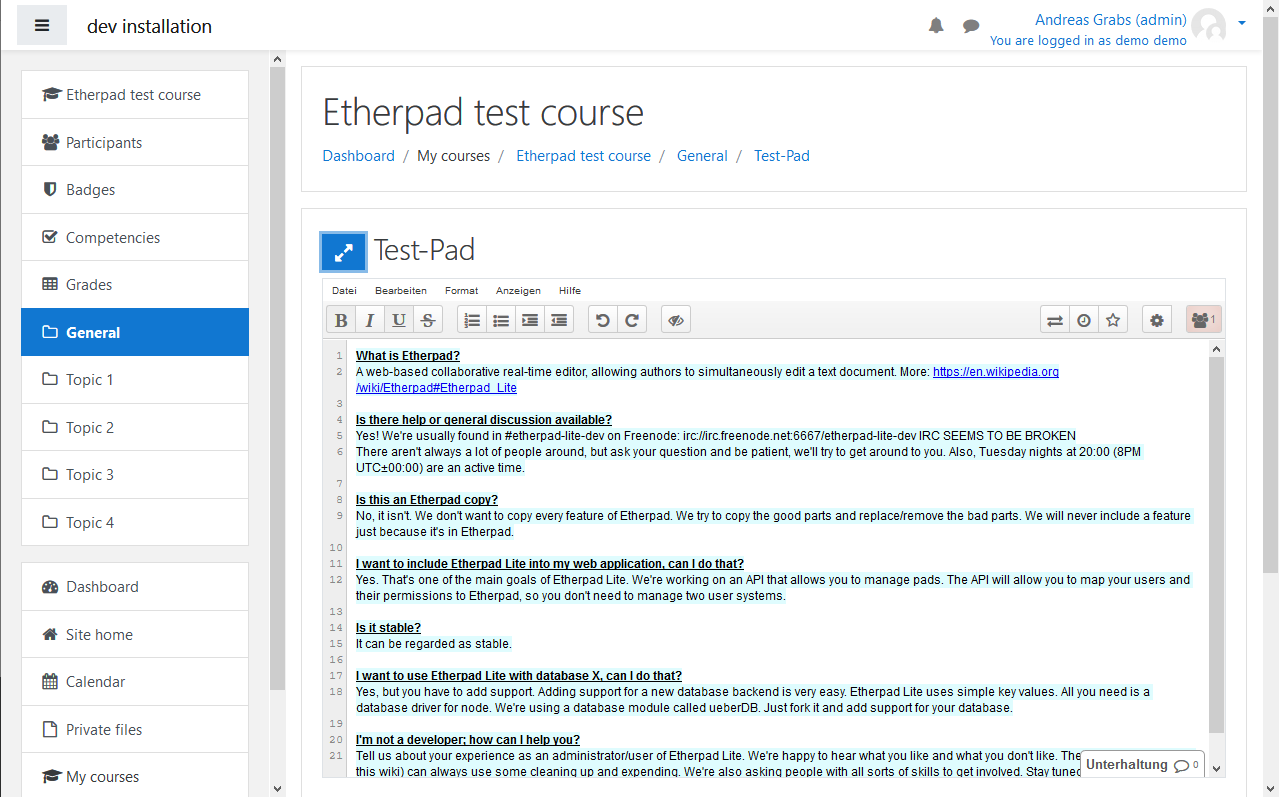
This is a module, which integrates etherpad-lite in Moodle 3.5 or higher
Features:
- Add / View / Delete Pads
- Users have the same name & writing color in all pads
- Moodle Import / Export support
- optional guest allowance
- It supports etherpad-lite servers, which can only be accessed through the API (access only through Moodle)
- It can check the HTTPS certificate of the ep-lite server for full security (man in the middle attacks)
Prerequirement
You need an etherpad-lite server, which is running on at least the same 2nd-level-domain as your moodle server.
On the github page you'll find all information you need, to install the server: https://github.com/ether/etherpad-lite
We recommend to use the etherpad-lite version 1.8.0 or higher
It's also recommended to use the latest stable release of nodejs
(http://nodejs.org/)
we are using nodejs 0.8.26. But we test new ep-lite versions always with this node version, before updating productive
When you want, that the server is only accessible via Moodle, then I recommend to install ep_remove_embed over the ep-lite admin interface. This removes the embed link.
To access the admin area, uncomment the user section in settings.json
Working ep-lite installation
- Ubuntu 12.04
- apt-get git, nginx, abiword, make, g++
- donwload nodejs from nodejs.org and compile it (you can use 'n' to switch between versions https://www.npmjs.org/package/n)
- etherpad-lite from git
- ep-lite settings.json:
- "requireSession":true
- "editOnly":true
- "abiword": "/usr/bin/abiword"
- ep-lite plugin: ep_remove_embed via admin interface
- upstart script
- logrotate
- nginx as reverse proxy with https
INSTALLATION
Copy this repository to the moodle subfolder: mod/etherpadlite
open your admin/index.php page and follow the instructions
Configuration
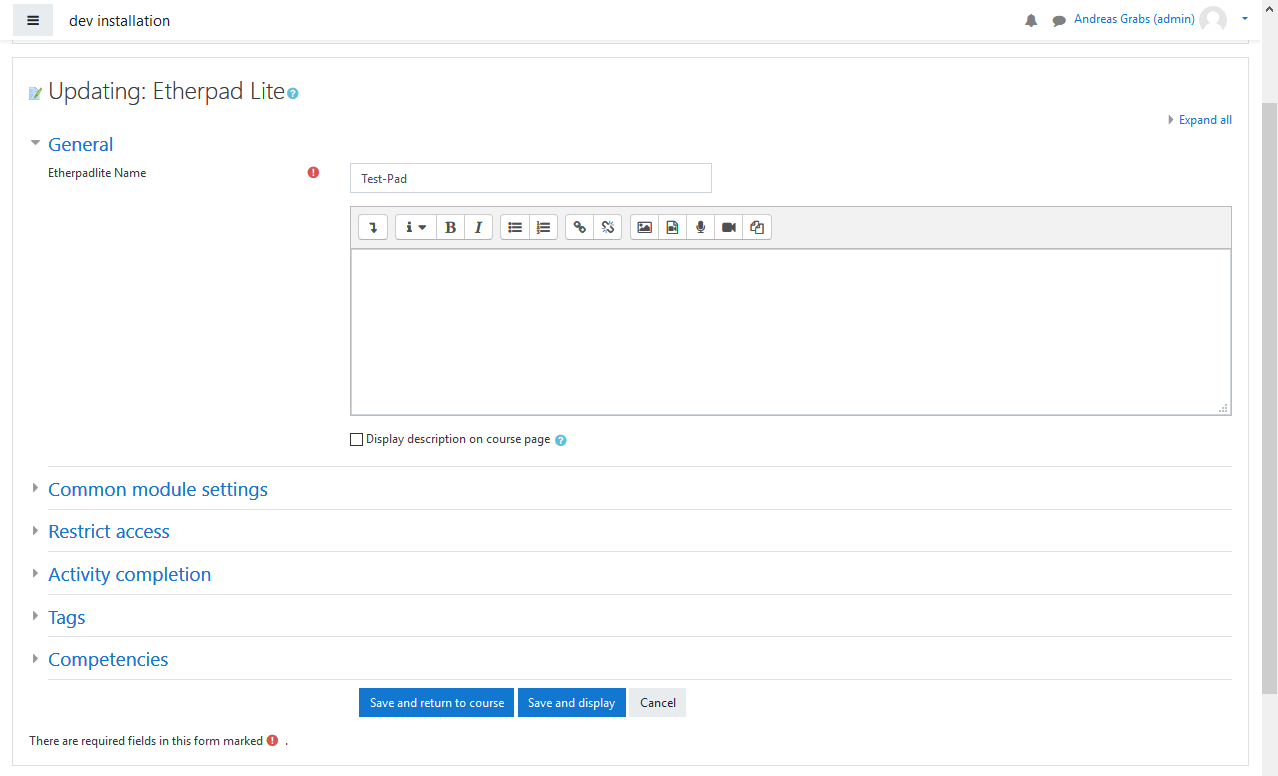
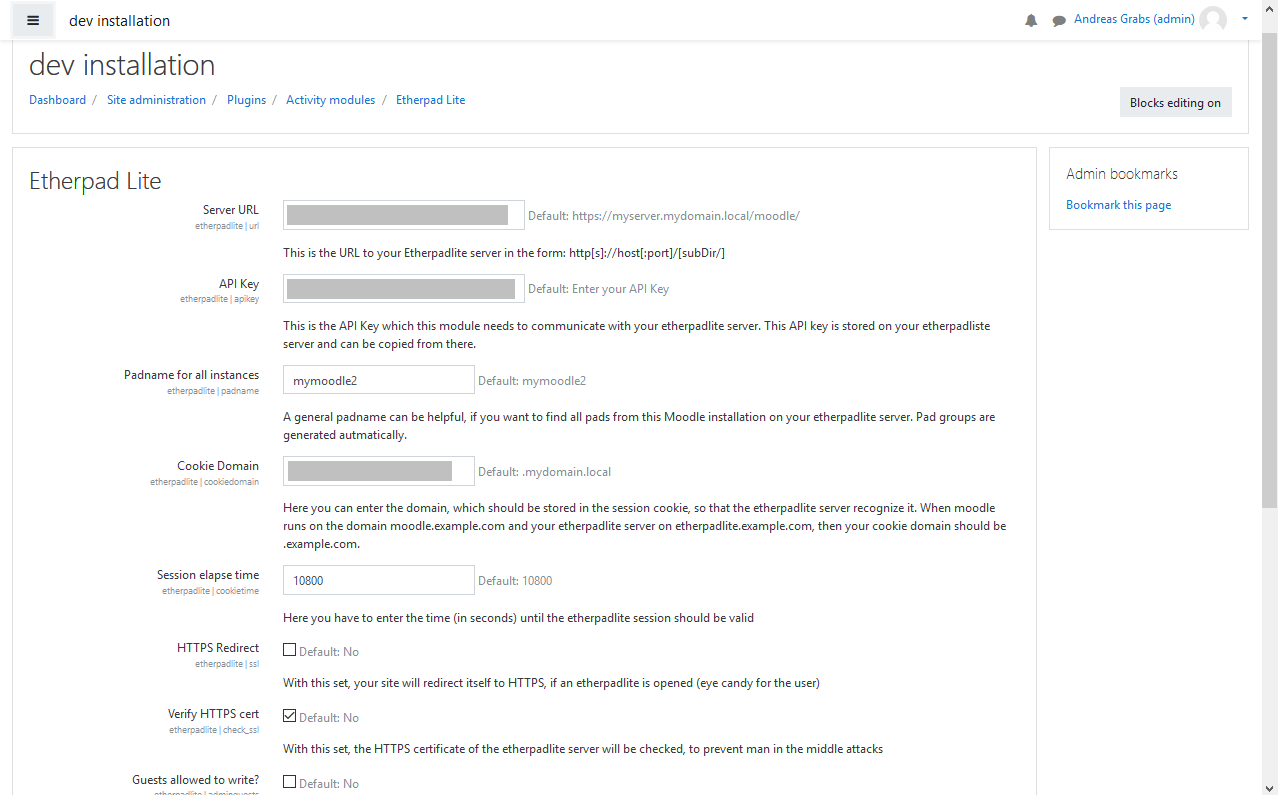
- Server Url from your etherpadlite server Make sure, that your moodle server can access this URL (don't forget to include a trailing slash!)
- ApiKey: this is stored in the file:
APIKEY.txton your etherpadlite server - Padname: this is optional and maybe just for debugging the databse
- Cookie Domain: Enter the domain as described
- Session elapse time: How long should one session be valid?
- Https Redirect: This redirects moodle to https, so that the user feels secure
(later this should be used to delete sessions on the etherpadlite server) - Verify HTTPS cert: This lets curl check, if the https cert of the etherpadlite server is valid, to prevent man in the middle attacks
- Guests allowed to write?: As described
Sponsors
Browsertesting is kindly provided by BrowserStack
v4.0-r5 (2022-11-14) (2022083102)
v4.0-r5 (2022-11-14)
Plugin type: Activities
Frankenstyle component name: mod_etherpadlite
Version build number: 2022083102
Version release name: v4.0-r5 (2022-11-14)
Maturity: Stable
Supported Moodle versions: 4.0
Repository URL (Git): https://github.com/moodlehu/moodle-mod_etherpadlite
Repository branch:
Repository tag: v4.0-r5
Issue/bug tracker URL: https://github.com/moodlehu/moodle-mod_etherpadlite/issues
About
This is a module, which integrates etherpad-lite in Moodle 3.5 or higher
Features:
- Add / View / Delete Pads
- Users have the same name & writing color in all pads
- Moodle Import / Export support
- optional guest allowance
- It supports etherpad-lite servers, which can only be accessed through the API (access only through Moodle)
- It can check the HTTPS certificate of the ep-lite server for full security (man in the middle attacks)
Prerequirement
You need an etherpad-lite server, which is running on at least the same 2nd-level-domain as your moodle server.
On the github page you'll find all information you need, to install the server: https://github.com/ether/etherpad-lite
We recommend to use the etherpad-lite version 1.8.0 or higher
It's also recommended to use the latest stable release of nodejs
(http://nodejs.org/)
we are using nodejs 0.8.26. But we test new ep-lite versions always with this node version, before updating productive
When you want, that the server is only accessible via Moodle, then I recommend to install ep_remove_embed over the ep-lite admin interface. This removes the embed link.
To access the admin area, uncomment the user section in settings.json
Working ep-lite installation
- Ubuntu 12.04
- apt-get git, nginx, abiword, make, g++
- donwload nodejs from nodejs.org and compile it (you can use 'n' to switch between versions https://www.npmjs.org/package/n)
- etherpad-lite from git
- ep-lite settings.json:
- "requireSession":true
- "editOnly":true
- "abiword": "/usr/bin/abiword"
- ep-lite plugin: ep_remove_embed via admin interface
- upstart script
- logrotate
- nginx as reverse proxy with https
INSTALLATION
Copy this repository to the moodle subfolder: mod/etherpadlite
open your admin/index.php page and follow the instructions
Configuration
- Server Url from your etherpadlite server Make sure, that your moodle server can access this URL (don't forget to include a trailing slash!)
- ApiKey: this is stored in the file:
APIKEY.txton your etherpadlite server - Padname: this is optional and maybe just for debugging the databse
- Cookie Domain: Enter the domain as described
- Session elapse time: How long should one session be valid?
- Https Redirect: This redirects moodle to https, so that the user feels secure
(later this should be used to delete sessions on the etherpadlite server) - Verify HTTPS cert: This lets curl check, if the https cert of the etherpadlite server is valid, to prevent man in the middle attacks
- Guests allowed to write?: As described
Sponsors
Browsertesting is kindly provided by BrowserStack
v4.0-r4 (2022-11-03) (2022083101)
v4.0-r4 (2022-11-03)
Plugin type: Activities
Frankenstyle component name: mod_etherpadlite
Version build number: 2022083101
Version release name: v4.0-r4 (2022-11-03)
Maturity: Stable
Supported Moodle versions: 4.0
Repository URL (Git): https://github.com/moodlehu/moodle-mod_etherpadlite
Repository branch:
Repository tag: v4.0-r4
Issue/bug tracker URL: https://github.com/moodlehu/moodle-mod_etherpadlite/issues
About
This is a module, which integrates etherpad-lite in Moodle 3.5 or higher
Features:
- Add / View / Delete Pads
- Users have the same name & writing color in all pads
- Moodle Import / Export support
- optional guest allowance
- It supports etherpad-lite servers, which can only be accessed through the API (access only through Moodle)
- It can check the HTTPS certificate of the ep-lite server for full security (man in the middle attacks)
Prerequirement
You need an etherpad-lite server, which is running on at least the same 2nd-level-domain as your moodle server.
On the github page you'll find all information you need, to install the server: https://github.com/ether/etherpad-lite
We recommend to use the etherpad-lite version 1.8.0 or higher
It's also recommended to use the latest stable release of nodejs
(http://nodejs.org/)
we are using nodejs 0.8.26. But we test new ep-lite versions always with this node version, before updating productive
When you want, that the server is only accessible via Moodle, then I recommend to install ep_remove_embed over the ep-lite admin interface. This removes the embed link.
To access the admin area, uncomment the user section in settings.json
Working ep-lite installation
- Ubuntu 12.04
- apt-get git, nginx, abiword, make, g++
- donwload nodejs from nodejs.org and compile it (you can use 'n' to switch between versions https://www.npmjs.org/package/n)
- etherpad-lite from git
- ep-lite settings.json:
- "requireSession":true
- "editOnly":true
- "abiword": "/usr/bin/abiword"
- ep-lite plugin: ep_remove_embed via admin interface
- upstart script
- logrotate
- nginx as reverse proxy with https
INSTALLATION
Copy this repository to the moodle subfolder: mod/etherpadlite
open your admin/index.php page and follow the instructions
Configuration
- Server Url from your etherpadlite server Make sure, that your moodle server can access this URL (don't forget to include a trailing slash!)
- ApiKey: this is stored in the file:
APIKEY.txton your etherpadlite server - Padname: this is optional and maybe just for debugging the databse
- Cookie Domain: Enter the domain as described
- Session elapse time: How long should one session be valid?
- Https Redirect: This redirects moodle to https, so that the user feels secure
(later this should be used to delete sessions on the etherpadlite server) - Verify HTTPS cert: This lets curl check, if the https cert of the etherpadlite server is valid, to prevent man in the middle attacks
- Guests allowed to write?: As described
Sponsors
Browsertesting is kindly provided by BrowserStack
v4.0-r3 (2022-08-31) (2022083100)
v4.0-r3 (2022-08-31)
Plugin type: Activities
Frankenstyle component name: mod_etherpadlite
Version build number: 2022083100
Version release name: v4.0-r3 (2022-08-31)
Maturity: Stable
Supported Moodle versions: 4.0
Repository URL (Git): https://github.com/moodlehu/moodle-mod_etherpadlite
Repository branch:
Repository tag: v4.0-r3
Issue/bug tracker URL: https://github.com/moodlehu/moodle-mod_etherpadlite/issues
About
This is a module, which integrates etherpad-lite in Moodle 3.5 or higher
Features:
- Add / View / Delete Pads
- Users have the same name & writing color in all pads
- Moodle Import / Export support
- optional guest allowance
- It supports etherpad-lite servers, which can only be accessed through the API (access only through Moodle)
- It can check the HTTPS certificate of the ep-lite server for full security (man in the middle attacks)
Prerequirement
You need an etherpad-lite server, which is running on at least the same 2nd-level-domain as your moodle server.
On the github page you'll find all information you need, to install the server: https://github.com/ether/etherpad-lite
We recommend to use the etherpad-lite version 1.8.0 or higher
It's also recommended to use the latest stable release of nodejs
(http://nodejs.org/)
we are using nodejs 0.8.26. But we test new ep-lite versions always with this node version, before updating productive
When you want, that the server is only accessible via Moodle, then I recommend to install ep_remove_embed over the ep-lite admin interface. This removes the embed link.
To access the admin area, uncomment the user section in settings.json
Working ep-lite installation
- Ubuntu 12.04
- apt-get git, nginx, abiword, make, g++
- donwload nodejs from nodejs.org and compile it (you can use 'n' to switch between versions https://www.npmjs.org/package/n)
- etherpad-lite from git
- ep-lite settings.json:
- "requireSession":true
- "editOnly":true
- "abiword": "/usr/bin/abiword"
- ep-lite plugin: ep_remove_embed via admin interface
- upstart script
- logrotate
- nginx as reverse proxy with https
INSTALLATION
Copy this repository to the moodle subfolder: mod/etherpadlite
open your admin/index.php page and follow the instructions
Configuration
- Server Url from your etherpadlite server Make sure, that your moodle server can access this URL (don't forget to include a trailing slash!)
- ApiKey: this is stored in the file:
APIKEY.txton your etherpadlite server - Padname: this is optional and maybe just for debugging the databse
- Cookie Domain: Enter the domain as described
- Session elapse time: How long should one session be valid?
- Https Redirect: This redirects moodle to https, so that the user feels secure
(later this should be used to delete sessions on the etherpadlite server) - Verify HTTPS cert: This lets curl check, if the https cert of the etherpadlite server is valid, to prevent man in the middle attacks
- Guests allowed to write?: As described
Sponsors
Browsertesting is kindly provided by BrowserStack
v3.11-r4 (2022-08-31) (2022022505)
v3.11-r4 (2022-08-31)
Plugin type: Activities
Frankenstyle component name: mod_etherpadlite
Version build number: 2022022505
Version release name: v3.11-r4 (2022-08-31)
Maturity: Stable
Supported Moodle versions: 3.10, 3.11, 3.9
Repository URL (Git): https://github.com/moodlehu/moodle-mod_etherpadlite
Repository branch:
Repository tag: v3.11-r4
Issue/bug tracker URL: https://github.com/moodlehu/moodle-mod_etherpadlite/issues
About
This is a module, which integrates etherpad-lite in Moodle 3.5 or higher
Features:
- Add / View / Delete Pads
- Users have the same name & writing color in all pads
- Moodle Import / Export support
- optional guest allowance
- It supports etherpad-lite servers, which can only be accessed through the API (access only through Moodle)
- It can check the HTTPS certificate of the ep-lite server for full security (man in the middle attacks)
Prerequirement
You need an etherpad-lite server, which is running on at least the same 2nd-level-domain as your moodle server.
On the github page you'll find all information you need, to install the server: https://github.com/ether/etherpad-lite
We recommend to use the etherpad-lite version 1.8.0 or higher
It's also recommended to use the latest stable release of nodejs
(http://nodejs.org/)
we are using nodejs 0.8.26. But we test new ep-lite versions always with this node version, before updating productive
When you want, that the server is only accessible via Moodle, then I recommend to install ep_remove_embed over the ep-lite admin interface. This removes the embed link.
To access the admin area, uncomment the user section in settings.json
Working ep-lite installation
- Ubuntu 12.04
- apt-get git, nginx, abiword, make, g++
- donwload nodejs from nodejs.org and compile it (you can use 'n' to switch between versions https://www.npmjs.org/package/n)
- etherpad-lite from git
- ep-lite settings.json:
- "requireSession":true
- "editOnly":true
- "abiword": "/usr/bin/abiword"
- ep-lite plugin: ep_remove_embed via admin interface
- upstart script
- logrotate
- nginx as reverse proxy with https
INSTALLATION
Copy this repository to the moodle subfolder: mod/etherpadlite
open your admin/index.php page and follow the instructions
Configuration
- Server Url from your etherpadlite server Make sure, that your moodle server can access this URL (don't forget to include a trailing slash!)
- ApiKey: this is stored in the file:
APIKEY.txton your etherpadlite server - Padname: this is optional and maybe just for debugging the databse
- Cookie Domain: Enter the domain as described
- Session elapse time: How long should one session be valid?
- Https Redirect: This redirects moodle to https, so that the user feels secure
(later this should be used to delete sessions on the etherpadlite server) - Verify HTTPS cert: This lets curl check, if the https cert of the etherpadlite server is valid, to prevent man in the middle attacks
- Guests allowed to write?: As described
Sponsors
Browsertesting is kindly provided by BrowserStack
v4.0-r2 (2022-06-08) (2022051401)
v4.0-r2 (2022-06-08)
Plugin type: Activities
Frankenstyle component name: mod_etherpadlite
Version build number: 2022051401
Version release name: v4.0-r2 (2022-06-08)
Maturity: Stable
Supported Moodle versions: 4.0
Repository URL (Git): https://github.com/moodlehu/moodle-mod_etherpadlite
Repository branch:
Repository tag: v4.0-r2
Issue/bug tracker URL: https://github.com/moodlehu/moodle-mod_etherpadlite/issues
About
This is a module, which integrates etherpad-lite in Moodle 3.5 or higher
Features:
- Add / View / Delete Pads
- Users have the same name & writing color in all pads
- Moodle Import / Export support
- optional guest allowance
- It supports etherpad-lite servers, which can only be accessed through the API (access only through Moodle)
- It can check the HTTPS certificate of the ep-lite server for full security (man in the middle attacks)
Prerequirement
You need an etherpad-lite server, which is running on at least the same 2nd-level-domain as your moodle server.
On the github page you'll find all information you need, to install the server: https://github.com/ether/etherpad-lite
We recommend to use the etherpad-lite version 1.8.0 or higher
It's also recommended to use the latest stable release of nodejs
(http://nodejs.org/)
we are using nodejs 0.8.26. But we test new ep-lite versions always with this node version, before updating productive
When you want, that the server is only accessible via Moodle, then I recommend to install ep_remove_embed over the ep-lite admin interface. This removes the embed link.
To access the admin area, uncomment the user section in settings.json
Working ep-lite installation
- Ubuntu 12.04
- apt-get git, nginx, abiword, make, g++
- donwload nodejs from nodejs.org and compile it (you can use 'n' to switch between versions https://www.npmjs.org/package/n)
- etherpad-lite from git
- ep-lite settings.json:
- "requireSession":true
- "editOnly":true
- "abiword": "/usr/bin/abiword"
- ep-lite plugin: ep_remove_embed via admin interface
- upstart script
- logrotate
- nginx as reverse proxy with https
INSTALLATION
Copy this repository to the moodle subfolder: mod/etherpadlite
open your admin/index.php page and follow the instructions
Configuration
- Server Url from your etherpadlite server Make sure, that your moodle server can access this URL (don't forget to include a trailing slash!)
- ApiKey: this is stored in the file:
APIKEY.txton your etherpadlite server - Padname: this is optional and maybe just for debugging the databse
- Cookie Domain: Enter the domain as described
- Session elapse time: How long should one session be valid?
- Https Redirect: This redirects moodle to https, so that the user feels secure
(later this should be used to delete sessions on the etherpadlite server) - Verify HTTPS cert: This lets curl check, if the https cert of the etherpadlite server is valid, to prevent man in the middle attacks
- Guests allowed to write?: As described
Sponsors
Browsertesting is kindly provided by BrowserStack
v4.0-r1 (2022-05-14) (2022051400)
v4.0-r1 (2022-05-14)
Plugin type: Activities
Frankenstyle component name: mod_etherpadlite
Version build number: 2022051400
Version release name: v4.0-r1 (2022-05-14)
Maturity: Stable
Supported Moodle versions: 4.0
Repository URL (Git): https://github.com/moodlehu/moodle-mod_etherpadlite
Repository branch:
Repository tag: v4.0-r1
Issue/bug tracker URL: https://github.com/moodlehu/moodle-mod_etherpadlite/issues
About
This is a module, which integrates etherpad-lite in Moodle 3.5 or higher
Features:
- Add / View / Delete Pads
- Users have the same name & writing color in all pads
- Moodle Import / Export support
- optional guest allowance
- It supports etherpad-lite servers, which can only be accessed through the API (access only through Moodle)
- It can check the HTTPS certificate of the ep-lite server for full security (man in the middle attacks)
Prerequirement
You need an etherpad-lite server, which is running on at least the same 2nd-level-domain as your moodle server.
On the github page you'll find all information you need, to install the server: https://github.com/ether/etherpad-lite
We recommend to use the etherpad-lite version 1.8.0 or higher
It's also recommended to use the latest stable release of nodejs
(http://nodejs.org/)
we are using nodejs 0.8.26. But we test new ep-lite versions always with this node version, before updating productive
When you want, that the server is only accessible via Moodle, then I recommend to install ep_remove_embed over the ep-lite admin interface. This removes the embed link.
To access the admin area, uncomment the user section in settings.json
Working ep-lite installation
- Ubuntu 12.04
- apt-get git, nginx, abiword, make, g++
- donwload nodejs from nodejs.org and compile it (you can use 'n' to switch between versions https://www.npmjs.org/package/n)
- etherpad-lite from git
- ep-lite settings.json:
- "requireSession":true
- "editOnly":true
- "abiword": "/usr/bin/abiword"
- ep-lite plugin: ep_remove_embed via admin interface
- upstart script
- logrotate
- nginx as reverse proxy with https
INSTALLATION
Copy this repository to the moodle subfolder: mod/etherpadlite
open your admin/index.php page and follow the instructions
Configuration
- Server Url from your etherpadlite server Make sure, that your moodle server can access this URL (don't forget to include a trailing slash!)
- ApiKey: this is stored in the file:
APIKEY.txton your etherpadlite server - Padname: this is optional and maybe just for debugging the databse
- Cookie Domain: Enter the domain as described
- Session elapse time: How long should one session be valid?
- Https Redirect: This redirects moodle to https, so that the user feels secure
(later this should be used to delete sessions on the etherpadlite server) - Verify HTTPS cert: This lets curl check, if the https cert of the etherpadlite server is valid, to prevent man in the middle attacks
- Guests allowed to write?: As described
Sponsors
Browsertesting is kindly provided by BrowserStack
v3.11-r3 (2022-05-14) (2022022504)
v3.11-r3 (2022-05-14)
Plugin type: Activities
Frankenstyle component name: mod_etherpadlite
Version build number: 2022022504
Version release name: v3.11-r3 (2022-05-14)
Maturity: Stable
Supported Moodle versions: 3.10, 3.11, 3.9
Repository URL (Git): https://github.com/moodlehu/moodle-mod_etherpadlite
Repository branch:
Repository tag: v3.11-r3
Issue/bug tracker URL: https://github.com/moodlehu/moodle-mod_etherpadlite/issues
About
This is a module, which integrates etherpad-lite in Moodle 3.5 or higher
Features:
- Add / View / Delete Pads
- Users have the same name & writing color in all pads
- Moodle Import / Export support
- optional guest allowance
- It supports etherpad-lite servers, which can only be accessed through the API (access only through Moodle)
- It can check the HTTPS certificate of the ep-lite server for full security (man in the middle attacks)
Prerequirement
You need an etherpad-lite server, which is running on at least the same 2nd-level-domain as your moodle server.
On the github page you'll find all information you need, to install the server: https://github.com/ether/etherpad-lite
We recommend to use the etherpad-lite version 1.8.0 or higher
It's also recommended to use the latest stable release of nodejs
(http://nodejs.org/)
we are using nodejs 0.8.26. But we test new ep-lite versions always with this node version, before updating productive
When you want, that the server is only accessible via Moodle, then I recommend to install ep_remove_embed over the ep-lite admin interface. This removes the embed link.
To access the admin area, uncomment the user section in settings.json
Working ep-lite installation
- Ubuntu 12.04
- apt-get git, nginx, abiword, make, g++
- donwload nodejs from nodejs.org and compile it (you can use 'n' to switch between versions https://www.npmjs.org/package/n)
- etherpad-lite from git
- ep-lite settings.json:
- "requireSession":true
- "editOnly":true
- "abiword": "/usr/bin/abiword"
- ep-lite plugin: ep_remove_embed via admin interface
- upstart script
- logrotate
- nginx as reverse proxy with https
INSTALLATION
Copy this repository to the moodle subfolder: mod/etherpadlite
open your admin/index.php page and follow the instructions
Configuration
- Server Url from your etherpadlite server Make sure, that your moodle server can access this URL (don't forget to include a trailing slash!)
- ApiKey: this is stored in the file:
APIKEY.txton your etherpadlite server - Padname: this is optional and maybe just for debugging the databse
- Cookie Domain: Enter the domain as described
- Session elapse time: How long should one session be valid?
- Https Redirect: This redirects moodle to https, so that the user feels secure
(later this should be used to delete sessions on the etherpadlite server) - Verify HTTPS cert: This lets curl check, if the https cert of the etherpadlite server is valid, to prevent man in the middle attacks
- Guests allowed to write?: As described
Sponsors
Browsertesting is kindly provided by BrowserStack
v4.0-beta2 (2022-04-14) (2022041400)
v4.0-beta2 (2022-04-14)
Plugin type: Activities
Frankenstyle component name: mod_etherpadlite
Version build number: 2022041400
Version release name: v4.0-beta2 (2022-04-14)
Maturity: Beta
Supported Moodle versions: 4.0
Repository URL (Git): https://github.com/moodlehu/moodle-mod_etherpadlite
Repository branch:
Repository tag: v4.0-beta2
Issue/bug tracker URL: https://github.com/moodlehu/moodle-mod_etherpadlite/issues
About
This is a module, which integrates etherpad-lite in Moodle 3.5 or higher
Features:
- Add / View / Delete Pads
- Users have the same name & writing color in all pads
- Moodle Import / Export support
- optional guest allowance
- It supports etherpad-lite servers, which can only be accessed through the API (access only through Moodle)
- It can check the HTTPS certificate of the ep-lite server for full security (man in the middle attacks)
Prerequirement
You need an etherpad-lite server, which is running on at least the same 2nd-level-domain as your moodle server.
On the github page you'll find all information you need, to install the server: https://github.com/ether/etherpad-lite
We recommend to use the etherpad-lite version 1.8.0 or higher
It's also recommended to use the latest stable release of nodejs
(http://nodejs.org/)
we are using nodejs 0.8.26. But we test new ep-lite versions always with this node version, before updating productive
When you want, that the server is only accessible via Moodle, then I recommend to install ep_remove_embed over the ep-lite admin interface. This removes the embed link.
To access the admin area, uncomment the user section in settings.json
Working ep-lite installation
- Ubuntu 12.04
- apt-get git, nginx, abiword, make, g++
- donwload nodejs from nodejs.org and compile it (you can use 'n' to switch between versions https://www.npmjs.org/package/n)
- etherpad-lite from git
- ep-lite settings.json:
- "requireSession":true
- "editOnly":true
- "abiword": "/usr/bin/abiword"
- ep-lite plugin: ep_remove_embed via admin interface
- upstart script
- logrotate
- nginx as reverse proxy with https
INSTALLATION
Copy this repository to the moodle subfolder: mod/etherpadlite
open your admin/index.php page and follow the instructions
Configuration
- Server Url from your etherpadlite server Make sure, that your moodle server can access this URL (don't forget to include a trailing slash!)
- ApiKey: this is stored in the file:
APIKEY.txton your etherpadlite server - Padname: this is optional and maybe just for debugging the databse
- Cookie Domain: Enter the domain as described
- Session elapse time: How long should one session be valid?
- Https Redirect: This redirects moodle to https, so that the user feels secure
(later this should be used to delete sessions on the etherpadlite server) - Verify HTTPS cert: This lets curl check, if the https cert of the etherpadlite server is valid, to prevent man in the middle attacks
- Guests allowed to write?: As described
Sponsors
Browsertesting is kindly provided by BrowserStack
v3.11-r2 (2022-04-14) (2022022503)
v3.11-r2 (2022-04-14)
Plugin type: Activities
Frankenstyle component name: mod_etherpadlite
Version build number: 2022022503
Version release name: v3.11-r2 (2022-04-14)
Maturity: Stable
Supported Moodle versions: 3.10, 3.11, 3.9
Repository URL (Git): https://github.com/moodlehu/moodle-mod_etherpadlite
Repository branch:
Repository tag: v3.11-r2
Issue/bug tracker URL: https://github.com/moodlehu/moodle-mod_etherpadlite/issues
About
This is a module, which integrates etherpad-lite in Moodle 3.5 or higher
Features:
- Add / View / Delete Pads
- Users have the same name & writing color in all pads
- Moodle Import / Export support
- optional guest allowance
- It supports etherpad-lite servers, which can only be accessed through the API (access only through Moodle)
- It can check the HTTPS certificate of the ep-lite server for full security (man in the middle attacks)
Prerequirement
You need an etherpad-lite server, which is running on at least the same 2nd-level-domain as your moodle server.
On the github page you'll find all information you need, to install the server: https://github.com/ether/etherpad-lite
We recommend to use the etherpad-lite version 1.8.0 or higher
It's also recommended to use the latest stable release of nodejs
(http://nodejs.org/)
we are using nodejs 0.8.26. But we test new ep-lite versions always with this node version, before updating productive
When you want, that the server is only accessible via Moodle, then I recommend to install ep_remove_embed over the ep-lite admin interface. This removes the embed link.
To access the admin area, uncomment the user section in settings.json
Working ep-lite installation
- Ubuntu 12.04
- apt-get git, nginx, abiword, make, g++
- donwload nodejs from nodejs.org and compile it (you can use 'n' to switch between versions https://www.npmjs.org/package/n)
- etherpad-lite from git
- ep-lite settings.json:
- "requireSession":true
- "editOnly":true
- "abiword": "/usr/bin/abiword"
- ep-lite plugin: ep_remove_embed via admin interface
- upstart script
- logrotate
- nginx as reverse proxy with https
INSTALLATION
Copy this repository to the moodle subfolder: mod/etherpadlite
open your admin/index.php page and follow the instructions
Configuration
- Server Url from your etherpadlite server Make sure, that your moodle server can access this URL (don't forget to include a trailing slash!)
- ApiKey: this is stored in the file:
APIKEY.txton your etherpadlite server - Padname: this is optional and maybe just for debugging the databse
- Cookie Domain: Enter the domain as described
- Session elapse time: How long should one session be valid?
- Https Redirect: This redirects moodle to https, so that the user feels secure
(later this should be used to delete sessions on the etherpadlite server) - Verify HTTPS cert: This lets curl check, if the https cert of the etherpadlite server is valid, to prevent man in the middle attacks
- Guests allowed to write?: As described
Sponsors
Browsertesting is kindly provided by BrowserStack
v4.0-beta1 (2022-03-14) (2022031401)
v4.0-beta1 (2022-03-14)
Plugin type: Activities
Frankenstyle component name: mod_etherpadlite
Version build number: 2022031401
Version release name: v4.0-beta1 (2022-03-14)
Maturity: Beta
Supported Moodle versions: 4.0
Repository URL (Git): https://github.com/moodlehu/moodle-mod_etherpadlite
Repository branch:
Repository tag: v4.0-beta1
Issue/bug tracker URL: https://github.com/moodlehu/moodle-mod_etherpadlite/issues
About
This is a module, which integrates etherpad-lite in Moodle 3.5 or higher
Features:
- Add / View / Delete Pads
- Users have the same name & writing color in all pads
- Moodle Import / Export support
- optional guest allowance
- It supports etherpad-lite servers, which can only be accessed through the API (access only through Moodle)
- It can check the HTTPS certificate of the ep-lite server for full security (man in the middle attacks)
Prerequirement
You need an etherpad-lite server, which is running on at least the same 2nd-level-domain as your moodle server.
On the github page you'll find all information you need, to install the server: https://github.com/ether/etherpad-lite
We recommend to use the etherpad-lite version 1.8.0 or higher
It's also recommended to use the latest stable release of nodejs
(http://nodejs.org/)
we are using nodejs 0.8.26. But we test new ep-lite versions always with this node version, before updating productive
When you want, that the server is only accessible via Moodle, then I recommend to install ep_remove_embed over the ep-lite admin interface. This removes the embed link.
To access the admin area, uncomment the user section in settings.json
Working ep-lite installation
- Ubuntu 12.04
- apt-get git, nginx, abiword, make, g++
- donwload nodejs from nodejs.org and compile it (you can use 'n' to switch between versions https://www.npmjs.org/package/n)
- etherpad-lite from git
- ep-lite settings.json:
- "requireSession":true
- "editOnly":true
- "abiword": "/usr/bin/abiword"
- ep-lite plugin: ep_remove_embed via admin interface
- upstart script
- logrotate
- nginx as reverse proxy with https
INSTALLATION
Copy this repository to the moodle subfolder: mod/etherpadlite
open your admin/index.php page and follow the instructions
Configuration
- Server Url from your etherpadlite server Make sure, that your moodle server can access this URL (don't forget to include a trailing slash!)
- ApiKey: this is stored in the file:
APIKEY.txton your etherpadlite server - Padname: this is optional and maybe just for debugging the databse
- Cookie Domain: Enter the domain as described
- Session elapse time: How long should one session be valid?
- Https Redirect: This redirects moodle to https, so that the user feels secure
(later this should be used to delete sessions on the etherpadlite server) - Verify HTTPS cert: This lets curl check, if the https cert of the etherpadlite server is valid, to prevent man in the middle attacks
- Guests allowed to write?: As described
Sponsors
Browsertesting is kindly provided by BrowserStack
v3.11-r1 (2022-03-13) (2022022502)
v3.11-r1 (2022-03-13)
Plugin type: Activities
Frankenstyle component name: mod_etherpadlite
Version build number: 2022022502
Version release name: v3.11-r1 (2022-03-13)
Maturity: Stable
Supported Moodle versions: 3.10, 3.11, 3.9
Repository URL (Git): https://github.com/moodlehu/moodle-mod_etherpadlite
Repository branch:
Repository tag: v3.11-r1
Issue/bug tracker URL: https://github.com/moodlehu/moodle-mod_etherpadlite/issues
About
This is a module, which integrates etherpad-lite in Moodle 3.5 or higher
Features:
- Add / View / Delete Pads
- Users have the same name & writing color in all pads
- Moodle Import / Export support
- optional guest allowance
- It supports etherpad-lite servers, which can only be accessed through the API (access only through Moodle)
- It can check the HTTPS certificate of the ep-lite server for full security (man in the middle attacks)
Prerequirement
You need an etherpad-lite server, which is running on at least the same 2nd-level-domain as your moodle server.
On the github page you'll find all information you need, to install the server: https://github.com/ether/etherpad-lite
We recommend to use the etherpad-lite version 1.8.0 or higher
It's also recommended to use the latest stable release of nodejs
(http://nodejs.org/)
we are using nodejs 0.8.26. But we test new ep-lite versions always with this node version, before updating productive
When you want, that the server is only accessible via Moodle, then I recommend to install ep_remove_embed over the ep-lite admin interface. This removes the embed link.
To access the admin area, uncomment the user section in settings.json
Working ep-lite installation
- Ubuntu 12.04
- apt-get git, nginx, abiword, make, g++
- donwload nodejs from nodejs.org and compile it (you can use 'n' to switch between versions https://www.npmjs.org/package/n)
- etherpad-lite from git
- ep-lite settings.json:
- "requireSession":true
- "editOnly":true
- "abiword": "/usr/bin/abiword"
- ep-lite plugin: ep_remove_embed via admin interface
- upstart script
- logrotate
- nginx as reverse proxy with https
INSTALLATION
Copy this repository to the moodle subfolder: mod/etherpadlite
open your admin/index.php page and follow the instructions
Configuration
- Server Url from your etherpadlite server Make sure, that your moodle server can access this URL (don't forget to include a trailing slash!)
- ApiKey: this is stored in the file:
APIKEY.txton your etherpadlite server - Padname: this is optional and maybe just for debugging the databse
- Cookie Domain: Enter the domain as described
- Session elapse time: How long should one session be valid?
- Https Redirect: This redirects moodle to https, so that the user feels secure
(later this should be used to delete sessions on the etherpadlite server) - Verify HTTPS cert: This lets curl check, if the https cert of the etherpadlite server is valid, to prevent man in the middle attacks
- Guests allowed to write?: As described
Sponsors
Browsertesting is kindly provided by BrowserStack
(2022022500)
Plugin type: Activities
Frankenstyle component name: mod_etherpadlite
Version build number: 2022022500
Version release name:
Maturity: Beta
Supported Moodle versions: 3.10, 3.11, 3.9
Repository URL (Git): https://github.com/moodlehu/moodle-mod_etherpadlite
Repository branch:
Repository tag: MDL_311_2022030200
Issue/bug tracker URL: https://github.com/moodlehu/moodle-mod_etherpadlite/issues
About
This is a module, which integrates etherpad-lite in Moodle 3.5 or higher
Features:
- Add / View / Delete Pads
- Users have the same name & writing color in all pads
- Moodle Import / Export support
- optional guest allowance
- It supports etherpad-lite servers, which can only be accessed through the API (access only through Moodle)
- It can check the HTTPS certificate of the ep-lite server for full security (man in the middle attacks)
Prerequirement
You need an etherpad-lite server, which is running on at least the same 2nd-level-domain as your moodle server.
On the github page you'll find all information you need, to install the server: https://github.com/ether/etherpad-lite
We recommend to use the etherpad-lite version 1.8.0 or higher
It's also recommended to use the latest stable release of nodejs
(http://nodejs.org/)
we are using nodejs 0.8.26. But we test new ep-lite versions always with this node version, before updating productive
When you want, that the server is only accessible via Moodle, then I recommend to install ep_remove_embed over the ep-lite admin interface. This removes the embed link.
To access the admin area, uncomment the user section in settings.json
Working ep-lite installation
- Ubuntu 12.04
- apt-get git, nginx, abiword, make, g++
- donwload nodejs from nodejs.org and compile it (you can use 'n' to switch between versions https://www.npmjs.org/package/n)
- etherpad-lite from git
- ep-lite settings.json:
- "requireSession":true
- "editOnly":true
- "abiword": "/usr/bin/abiword"
- ep-lite plugin: ep_remove_embed via admin interface
- upstart script
- logrotate
- nginx as reverse proxy with https
INSTALLATION
Copy this repository to the moodle subfolder: mod/etherpadlite
open your admin/index.php page and follow the instructions
Configuration
- Server Url from your etherpadlite server Make sure, that your moodle server can access this URL (don't forget to include a trailing slash!)
- ApiKey: this is stored in the file:
APIKEY.txton your etherpadlite server - Padname: this is optional and maybe just for debugging the databse
- Cookie Domain: Enter the domain as described
- Session elapse time: How long should one session be valid?
- Https Redirect: This redirects moodle to https, so that the user feels secure
(later this should be used to delete sessions on the etherpadlite server) - Verify HTTPS cert: This lets curl check, if the https cert of the etherpadlite server is valid, to prevent man in the middle attacks
- Guests allowed to write?: As described
Sponsors
Browsertesting is kindly provided by BrowserStack
(2021073000)
Plugin type: Activities
Frankenstyle component name: mod_etherpadlite
Version build number: 2021073000
Version release name:
Maturity: Beta
Supported Moodle versions: 3.10, 3.11, 3.5, 3.6, 3.7, 3.8, 3.9
Repository URL (Git): https://github.com/moodlehu/moodle-mod_etherpadlite
Repository branch:
Repository tag: MDL_311_2021073000
Issue/bug tracker URL: https://github.com/moodlehu/moodle-mod_etherpadlite/issues
About
This is a module, which integrates etherpad-lite in Moodle 3.5 or higher
Features:
- Add / View / Delete Pads
- Users have the same name & writing color in all pads
- Moodle Import / Export support
- optional guest allowance
- It supports etherpad-lite servers, which can only be accessed through the API (access only through Moodle)
- It can check the HTTPS certificate of the ep-lite server for full security (man in the middle attacks)
Prerequirement
You need an etherpad-lite server, which is running on at least the same 2nd-level-domain as your moodle server.
On the github page you'll find all information you need, to install the server: https://github.com/ether/etherpad-lite
We recommend to use the etherpad-lite version 1.8.0 or higher
It's also recommended to use the latest stable release of nodejs
(http://nodejs.org/)
we are using nodejs 0.8.26. But we test new ep-lite versions always with this node version, before updating productive
When you want, that the server is only accessible via Moodle, then I recommend to install ep_remove_embed over the ep-lite admin interface. This removes the embed link.
To access the admin area, uncomment the user section in settings.json
Working ep-lite installation
- Ubuntu 12.04
- apt-get git, nginx, abiword, make, g++
- donwload nodejs from nodejs.org and compile it (you can use 'n' to switch between versions https://www.npmjs.org/package/n)
- etherpad-lite from git
- ep-lite settings.json:
- "requireSession":true
- "editOnly":true
- "abiword": "/usr/bin/abiword"
- ep-lite plugin: ep_remove_embed via admin interface
- upstart script
- logrotate
- nginx as reverse proxy with https
INSTALLATION
Copy this repository to the moodle subfolder: mod/etherpadlite
open your admin/index.php page and follow the instructions
Configuration
- Server Url from your etherpadlite server Make sure, that your moodle server can access this URL (don't forget to include a trailing slash!)
- ApiKey: this is stored in the file:
APIKEY.txton your etherpadlite server - Padname: this is optional and maybe just for debugging the databse
- Cookie Domain: Enter the domain as described
- Session elapse time: How long should one session be valid?
- Https Redirect: This redirects moodle to https, so that the user feels secure
(later this should be used to delete sessions on the etherpadlite server) - Verify HTTPS cert: This lets curl check, if the https cert of the etherpadlite server is valid, to prevent man in the middle attacks
- Guests allowed to write?: As described
Sponsors
Browsertesting is kindly provided by BrowserStack
(2019013100)
Plugin type: Activities
Frankenstyle component name: mod_etherpadlite
Version build number: 2019013100
Version release name:
Maturity: Beta
Supported Moodle versions: 3.10, 3.11, 3.5, 3.6, 3.7, 3.8, 3.9
Repository URL (Git): https://github.com/moodlehu/moodle-mod_etherpadlite
Repository branch:
Repository tag:
Issue/bug tracker URL: https://github.com/moodlehu/moodle-mod_etherpadlite/issues
About
This is a module, which integrates etherpad-lite in Moodle 2.5 - 2.x
Features:
- Add / View / Delete Pads
- Users have the same name & writing color in all pads
- Moodle Import / Export support
- optional guest allowance
- It supports etherpad-lite servers, which can only be accessed through the API (access only through Moodle)
- It can check the HTTPS certificate of the ep-lite server for full security (man in the middle attacks)
Prerequirement
You need an etherpad-lite server, which is running on at least the same 2nd-level-domain as your moodle server.
On the github page you'll find all information you need, to install the server: https://github.com/ether/etherpad-lite
We recommend to use the etherpad-lite version 1.3.0
It's also recommended to use the latest stable release of nodejs
(http://nodejs.org/)
we are using nodejs 0.8.26. But we test new ep-lite versions always with this node version, before updating productive
When you want, that the server is only accessible via Moodle, then I recommend to install ep_remove_embed over the ep-lite admin interface. This removes the embed link.
To access the admin area, uncomment the user section in settings.json
Working ep-lite installation
- Ubuntu 12.04
- apt-get git, nginx, abiword, make, g++
- donwload nodejs from nodejs.org and compile it (you can use 'n' to switch between versions )
- etherpad-lite from git
- ep-lite settings.json:
- "requireSession":true
- "editOnly":true
- "abiword": "/usr/bin/abiword"
- ep-lite plugin: ep_remove_embed via admin interface
- upstart script
- logrotate
- nginx as reverse proxy with https
INSTALLATION
Copy this repository to the moodle subfolder: mod/etherpadlite
open your admin/index.php page and follow the instructions
Configuration
- Server Url from your etherpadlite server Make sure, that your moodle server can access this URL (don't forget to include a trailing slash!)
- ApiKey: this is stored in the file:
APIKEY.txton your etherpadlite server - Padname: this is optional and maybe just for debugging the databse
- Cookie Domain: Enter the domain as described
- Session elapse time: How long should one session be valid?
- Https Redirect: This redirects moodle to https, so that the user feels secure
(later this should be used to delete sessions on the etherpadlite server) - Verify HTTPS cert: This lets curl check, if the https cert of the etherpadlite server is valid, to prevent man in the middle attacks
- Guests allowed to write?: As described
Sponsors
Browsertesting is kindly provided by BrowserStack
3.5.0 (Build: 2018112500) (2018112500)
3.5.0 (Build: 2018112500)
Plugin type: Activities
Frankenstyle component name: mod_etherpadlite
Version build number: 2018112500
Version release name: 3.5.0 (Build: 2018112500)
Maturity: Stable
Supported Moodle versions: 3.5
Repository URL (Git): https://github.com/moodlehu/moodle-mod_etherpadlite
Repository branch:
Repository tag:
Issue/bug tracker URL: https://github.com/moodlehu/moodle-mod_etherpadlite/issues
About
This is a module, which integrates etherpad-lite in Moodle 2.5 - 2.x
Features:
- Add / View / Delete Pads
- Users have the same name & writing color in all pads
- Moodle Import / Export support
- optional guest allowance
- It supports etherpad-lite servers, which can only be accessed through the API (access only through Moodle)
- It can check the HTTPS certificate of the ep-lite server for full security (man in the middle attacks)
Prerequirement
You need an etherpad-lite server, which is running on at least the same 2nd-level-domain as your moodle server.
On the github page you'll find all information you need, to install the server: https://github.com/ether/etherpad-lite
We recommend to use the etherpad-lite version 1.3.0
It's also recommended to use the latest stable release of nodejs
(http://nodejs.org/)
we are using nodejs 0.8.26. But we test new ep-lite versions always with this node version, before updating productive
When you want, that the server is only accessible via Moodle, then I recommend to install ep_remove_embed over the ep-lite admin interface. This removes the embed link.
To access the admin area, uncomment the user section in settings.json
Working ep-lite installation
- Ubuntu 12.04
- apt-get git, nginx, abiword, make, g++
- donwload nodejs from nodejs.org and compile it (you can use 'n' to switch between versions https://www.npmjs.org/package/n)
- etherpad-lite from git
- ep-lite settings.json:
- "requireSession":true
- "editOnly":true
- "abiword": "/usr/bin/abiword"
- ep-lite plugin: ep_remove_embed via admin interface
- upstart script
- logrotate
- nginx as reverse proxy with https
INSTALLATION
Copy this repository to the moodle subfolder: mod/etherpadlite
open your admin/index.php page and follow the instructions
Configuration
- Server Url from your etherpadlite server Make sure, that your moodle server can access this URL (don't forget to include a trailing slash!)
- ApiKey: this is stored in the file:
APIKEY.txton your etherpadlite server - Padname: this is optional and maybe just for debugging the databse
- Cookie Domain: Enter the domain as described
- Session elapse time: How long should one session be valid?
- Https Redirect: This redirects moodle to https, so that the user feels secure
(later this should be used to delete sessions on the etherpadlite server) - Verify HTTPS cert: This lets curl check, if the https cert of the etherpadlite server is valid, to prevent man in the middle attacks
- Guests allowed to write?: As described
Sponsors
Browsertesting is kindly provided by BrowserStack
2.7.0 (Build: 2015060301) (2015060301)
2.7.0 (Build: 2015060301)
Plugin type: Activities
Frankenstyle component name: mod_etherpadlite
Version build number: 2015060301
Version release name: 2.7.0 (Build: 2015060301)
Maturity: Stable
Supported Moodle versions: 2.7, 2.8
Repository URL (Git): https://github.com/moodlehu/moodle-mod_etherpadlite
Repository branch:
Repository tag: MOODLE27.2
Issue/bug tracker URL: https://github.com/moodlehu/moodle-mod_etherpadlite/issues
- NEW SVG Icon (Thanks abias)
- Improved english language and expanded german translation (Also on AMOS now)
- Include a heading
2.7.0 (Build: 2015021100) (2015021101)
2.7.0 (Build: 2015021100)
Plugin type: Activities
Frankenstyle component name: mod_etherpadlite
Version build number: 2015021101
Version release name: 2.7.0 (Build: 2015021100)
Maturity: Stable
Supported Moodle versions: 2.7
Repository URL (Git): https://github.com/moodlehu/moodle-mod_etherpadlite
Repository branch:
Repository tag:
Issue/bug tracker URL: https://github.com/moodlehu/moodle-mod_etherpadlite/issues
About
This is a module, which integrates etherpad-lite in Moodle 2.5 - 2.x
Features:
- Add / View / Delete Pads
- Users have the same name & writing color in all pads
- Moodle Import / Export support
- optional guest allowance
- It supports etherpad-lite servers, which can only be accessed through the API (access only through Moodle)
- It can check the HTTPS certificate of the ep-lite server for full security (man in the middle attacks)
Prerequirement
You need an etherpad-lite server, which is running on at least the same 2nd-level-domain as your moodle server.
On the github page you'll find all information you need, to install the server: https://github.com/ether/etherpad-lite
We recommend to use the etherpad-lite version 1.3.0
It's also recommended to use the latest stable release of nodejs
(http://nodejs.org/)
we are using nodejs 0.8.26. But we test new ep-lite versions always with this node version, before updating productive
When you want, that the server is only accessible via Moodle, then I recommend to install ep_remove_embed over the ep-lite admin interface. This removes the embed link.
To access the admin area, uncomment the user section in settings.json
Working ep-lite installation
- Ubuntu 12.04
- apt-get git, nginx, abiword, make, g++
- donwload nodejs from nodejs.org and compile it (you can use 'n' to switch between versions https://www.npmjs.org/package/n)
- etherpad-lite from git
- ep-lite settings.json:
- "requireSession":true
- "editOnly":true
- "abiword": "/usr/bin/abiword"
- ep-lite plugin: ep_remove_embed via admin interface
- upstart script
- logrotate
- nginx as reverse proxy with https
INSTALLATION
Copy this repository to the moodle subfolder: mod/etherpadlite
open your admin/index.php page and follow the instructions
Configuration
- Server Url from your etherpadlite server Make sure, that your moodle server can access this URL
- ApiKey: this is stored in the file:
APIKEY.txton your etherpadlite server - Padname: this is optional and maybe just for debugging the databse
- Cookie Domain: Enter the domain as described
- Session elapse time: How long should one session be valid?
- Https Redirect: This redirects moodle to https, so that the user feels secure
(later this should be used to delete sessions on the etherpadlite server) - Verify HTTPS cert: This lets curl check, if the https cert of the etherpadlite server is valid, to prevent man in the middle attacks
- Guests allowed to write?: As described
2.5.0 (Build: 2014051300) (2014051300)
2.5.0 (Build: 2014051300)
Plugin type: Activities
Frankenstyle component name: mod_etherpadlite
Version build number: 2014051300
Version release name: 2.5.0 (Build: 2014051300)
Maturity: Stable
Supported Moodle versions: 2.5, 2.6
Repository URL (Git): https://github.com/moodlehu/moodle-mod_etherpadlite
Repository branch:
Repository tag:
Issue/bug tracker URL: https://github.com/moodlehu/moodle-mod_etherpadlite/issues
About
This is a module, which integrates etherpad-lite in Moodle 2.5 - 2.x
Features:
- Add / View / Delete Pads
- Users have the same name & writing color in all pads
- Moodle Import / Export support
- optional guest allowance
- It supports etherpad-lite servers, which can only be accessed through the API (access only through Moodle)
- It can check the HTTPS certificate of the ep-lite server for full security (man in the middle attacks)
Prerequirement
You need an etherpad-lite server, which is running on at least the same 2nd-level-domain as your moodle server.
On the github page you'll find all information you need, to install the server: https://github.com/ether/etherpad-lite
We recommend to use the etherpad-lite version 1.3.0
It's also recommended to use the latest stable release of nodejs
(http://nodejs.org/)
we are using nodejs 0.8.26. But we test new ep-lite versions always with this node version, before updating productive
When you want, that the server is only accessible via Moodle, then I recommend to install ep_remove_embed over the ep-lite admin interface. This removes the embed link.
To access the admin area, uncomment the user section in settings.json
Working ep-lite installation
- Ubuntu 12.04
- apt-get git, nginx, abiword, make, g++
- donwload nodejs from nodejs.org and compile it (you can use 'n' to switch between versions https://www.npmjs.org/package/n)
- etherpad-lite from git
- ep-lite settings.json:
- "requireSession":true
- "editOnly":true
- "abiword": "/usr/bin/abiword"
- ep-lite plugin: ep_remove_embed via admin interface
- upstart script
- logrotate
- nginx as reverse proxy with https
INSTALLATION
Copy this repository to the moodle subfolder: mod/etherpadlite
open your admin/index.php page and follow the instructions
Configuration
- Server Url from your etherpadlite server Make sure, that your moodle server can access this URL
- ApiKey: this is stored in the file:
APIKEY.txton your etherpadlite server - Padname: this is optional and maybe just for debugging the databse
- Cookie Domain: Enter the domain as described
- Session elapse time: How long should one session be valid?
- Https Redirect: This redirects moodle to https, so that the user feels secure
(later this should be used to delete sessions on the etherpadlite server) - Verify HTTPS cert: This lets curl check, if the https cert of the etherpadlite server is valid, to prevent man in the middle attacks
- Guests allowed to write?: As described
2.4.0 (2013042901)
2.4.0
Plugin type: Activities
Frankenstyle component name: mod_etherpadlite
Version build number: 2013042901
Version release name: 2.4.0
Maturity: Stable
Supported Moodle versions: 2.3, 2.4
Repository URL (Git): https://github.com/moodlehu/moodle-mod_etherpadlite
Repository branch:
Repository tag:
Issue/bug tracker URL: https://github.com/moodlehu/moodle-mod_etherpadlite/issues
About
This is a module, which integrates etherpad-lite in Moodle 2.3 - 2.4
Features:
- Add / View / Delete Pads
- Users have the same name & writing color in all pads
- Moodle Import / Export support
- optional guest allowance
- It supports etherpad-lite servers, which can only be accessed through the API (access only through Moodle)
- It can check the HTTPS certificate of the ep-lite server for full security (man in the middle attacks)
Prerequirement
You need an etherpad-lite server, which is running on at least the same 2nd-level-domain as your moodle server.
On the github page you'll find all information you need, to install the server: https://github.com/ether/etherpad-lite
We recommend to use the etherpad-lite version 1.2.7
It's also recommended to use the latest stable release of nodejs
(http://nodejs.org/)
we are using nodejs 0.6.12, installed over apt-get for our productive server. But we test new ep-lite versions always with this node version, before updating productive
When you want, that the server is only accessible via Moodle, then i recommend to install ep_remove_embed over the ep-lite admin interface. This removes the embed link.
To access the admin area, uncomment the user section in settings.json
Working ep-lite installation
- Ubuntu 12.04
- apt-get nodejs, npm, git, nginx, abiword, make, g++
- etherpad-lite from git (v1.2.7)
- ep-lite settings.json:
- "requireSession":true
- "editOnly":true
- "abiword": "/usr/bin/abiword"
- ep-lite plugin: ep_remove_embed via admin interface
- upstart script
- logrotate
- nginx as reverse proxy with https
INSTALLATION
Copy this repository to the moodle subfolder: mod/etherpadlite
open your admin/index.php page and follow the instructions
Configuration
- Server Url from your etherpadlite server Make sure, that your moodle server can access this URL
- ApiKey: this is stored in the file:
APIKEY.txton your etherpadlite server - Padname: this is optional and maybe just for debugging the databse
- Cookie Domain: Enter the domain as described
- Session elapse time: How long should one session be valid?
- Https Redirect: This redirects moodle to https, so that the user feels secure
(later this should be used to delete sessions on the etherpadlite server) - Verify HTTPS cert: This lets curl check, if the https cert of the etherpadlite server is valid, to prevent man in the middle attacks
- Guests allowed to write?: As described
tested with Moodle 2.3-2.4