IPA
Versions
Current version
v1.1.15 (Build: 2022032700) (2022032700)
v1.1.15 (Build: 2022032700)
Plugin type: Filters
Frankenstyle component name: filter_ipa
Version build number: 2022032700
Version release name: v1.1.15 (Build: 2022032700)
Maturity: Stable
Supported Moodle versions: 3.10, 3.11, 3.9
Repository URL (Git): https://github.com/kwiliarty/moodle-filter_ipa
Repository branch:
Repository tag: v1.1.15
Issue/bug tracker URL: https://github.com/kwiliarty/moodle-filter_ipa/issues
Moodle IPA Filter

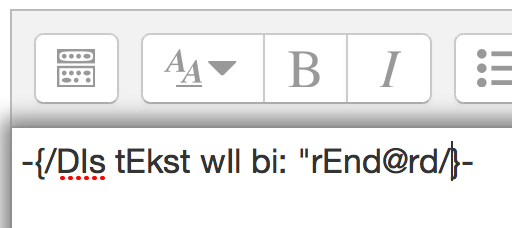
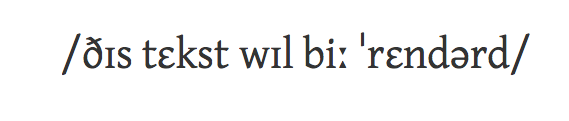
The Moodle IPA Filter displays X-SAMPA as unicode IPA. The intent is to
offer an easy and fast way to display the International Phonetic Alphabet in Moodle.
Installing the filter
Download the latest version of the Moodle IPA Filter and put the ipa folder in Moodle at /filter/ipa.
OR... From your main Moodle directory:
git clone https://github.com/kwiliarty/moodle-filter_ipa.git filter/ipa
In Moodle go to Site administration > Notifications and install the filter
Next go to Site Administration > Plugins > Filters > Manage Filters
Enable the IPA filter (or set it to "Off but available")
Test the filter by entering a string such as the following to the content of a label:
-{D@ "fIlt@r Iz "w@rkIN}-
Fonts
In order to ensure that the IPA displays correctly -- especially the combining marks (diacritics) -- you will want to be
loading at least one fully compatible web font. The Moodle IPA filter ships with two fonts that you can call, or you can
use a carefully selected Google Web Font. In each case you will need to add a link to a particular style sheet in the HEAD
area of Site administration > Appearance > Additional HTML.
Gentium
Gentium is the first font listed in the 'font-family' so it is the font that will display even if you call more than one.
Gentium is a slightly fanciful serif font that is very readable even at smaller sizes -- important when you are using
unusual glyphs. Sample
To use Gentium add something like this to your Additional HTML:
<link rel="stylesheet" href="URL_TO_YOUR_MOODLE/filter/ipa/gentium.css" type="text/css">
You will need to provide the URL to your own Moodle site as the first part of the href.
Doulos
Doulos is a somewhat compact serif font without unnecessary flourishes. Doulos is listed second in the 'font-family'.
Sample
To use Doulos add a line like this to your Additional HTML:
<link rel="stylesheet" href="URL_TO_YOUR_MOODLE/filter/ipa/doulos.css" type="text/css">
Tinos
Tinos is a stylish serif font and one of only a couple Google Web Fonts that handles the spacing for the combining marks
well. To use Tinos you would add a line like this to your Additional HTML:
<link rel="stylesheet" href="URL_TO_YOUR_MOODLE/filter/ipa/tinos.css" type="text/css">
Usage
Enclose X-SAMPA in curly braces with hyphens outermost: "-{" opens a stretch of X-SAMPA, and "}-" closes the stretch.
v1.1.14 (Build: 2020111100) (2020111100)
v1.1.14 (Build: 2020111100)
Plugin type: Filters
Frankenstyle component name: filter_ipa
Version build number: 2020111100
Version release name: v1.1.14 (Build: 2020111100)
Maturity: Stable
Supported Moodle versions: 3.10, 3.8, 3.9
Repository URL (Git): https://github.com/kwiliarty/moodle-filter_ipa
Repository branch:
Repository tag: v1.1.14
Issue/bug tracker URL: https://github.com/kwiliarty/moodle-filter_ipa/issues
Moodle IPA Filter
The Moodle IPA Filter displays X-SAMPA as unicode IPA. The intent is to
offer an easy and fast way to display the International Phonetic Alphabet in Moodle.
Installing the filter
Download the latest version of the Moodle IPA Filter and put the ipa folder in Moodle at /filter/ipa.
OR... From your main Moodle directory:
git clone https://github.com/kwiliarty/moodle-filter_ipa.git filter/ipa
In Moodle go to Site administration > Notifications and install the filter
Next go to Site Administration > Plugins > Filters > Manage Filters
Enable the IPA filter (or set it to "Off but available")
Test the filter by entering a string such as the following to the content of a label:
-{D@ "fIlt@r Iz "w@rkIN}-
Fonts
In order to ensure that the IPA displays correctly -- especially the combining marks (diacritics) -- you will want to be
loading at least one fully compatible web font. The Moodle IPA filter ships with two fonts that you can call, or you can
use a carefully selected Google Web Font. In each case you will need to add a link to a particular style sheet in the HEAD
area of Site administration > Appearance > Additional HTML.
Gentium
Gentium is the first font listed in the 'font-family' so it is the font that will display even if you call more than one.
Gentium is a slightly fanciful serif font that is very readable even at smaller sizes -- important when you are using
unusual glyphs. Sample
To use Gentium add something like this to your Additional HTML:
<link rel="stylesheet" href="URL_TO_YOUR_MOODLE/filter/ipa/gentium.css" type="text/css">
You will need to provide the URL to your own Moodle site as the first part of the href.
Doulos
Doulos is a somewhat compact serif font without unnecessary flourishes. Doulos is listed second in the 'font-family'.
Sample
To use Doulos add a line like this to your Additional HTML:
<link rel="stylesheet" href="URL_TO_YOUR_MOODLE/filter/ipa/doulos.css" type="text/css">
Tinos
Tinos is a stylish serif font and one of only a couple Google Web Fonts that handles the spacing for the combining marks
well. To use Tinos you would add a line like this to your Additional HTML:
<link rel="stylesheet" href="URL_TO_YOUR_MOODLE/filter/ipa/tinos.css" type="text/css">
Usage
Enclose X-SAMPA in curly braces with hyphens outermost: "-{" opens a stretch of X-SAMPA, and "}-" closes the stretch.
v1.1.13 (Build: 2020061800) (2020061800)
v1.1.13 (Build: 2020061800)
Plugin type: Filters
Frankenstyle component name: filter_ipa
Version build number: 2020061800
Version release name: v1.1.13 (Build: 2020061800)
Maturity: Stable
Supported Moodle versions: 3.7, 3.8, 3.9
Repository URL (Git): https://github.com/kwiliarty/moodle-filter_ipa
Repository branch: master
Repository tag: v1.1.13
Issue/bug tracker URL: https://github.com/kwiliarty/moodle-filter_ipa/issues
Moodle IPA Filter
The Moodle IPA Filter displays X-SAMPA as unicode IPA. The intent is to
offer an easy and fast way to display the International Phonetic Alphabet in Moodle.
Installing the filter
Download the latest version of the Moodle IPA Filter and put the ipa folder in Moodle at /filter/ipa.
OR... From your main Moodle directory:
git clone https://github.com/kwiliarty/moodle-filter_ipa.git filter/ipa
In Moodle go to Site administration > Notifications and install the filter
Next go to Site Administration > Plugins > Filters > Manage Filters
Enable the IPA filter (or set it to "Off but available")
Test the filter by entering a string such as the following to the content of a label:
-{D@ "fIlt@r Iz "w@rkIN}-
Fonts
In order to ensure that the IPA displays correctly -- especially the combining marks (diacritics) -- you will want to be
loading at least one fully compatible web font. The Moodle IPA filter ships with two fonts that you can call, or you can
use a carefully selected Google Web Font. In each case you will need to add a link to a particular style sheet in the HEAD
area of Site administration > Appearance > Additional HTML.
Gentium
Gentium is the first font listed in the 'font-family' so it is the font that will display even if you call more than one.
Gentium is a slightly fanciful serif font that is very readable even at smaller sizes -- important when you are using
unusual glyphs. Sample
To use Gentium add something like this to your Additional HTML:
<link rel="stylesheet" href="URL_TO_YOUR_MOODLE/filter/ipa/gentium.css" type="text/css">
You will need to provide the URL to your own Moodle site as the first part of the href.
Doulos
Doulos is a somewhat compact serif font without unnecessary flourishes. Doulos is listed second in the 'font-family'.
Sample
To use Doulos add a line like this to your Additional HTML:
<link rel="stylesheet" href="URL_TO_YOUR_MOODLE/filter/ipa/doulos.css" type="text/css">
Tinos
Tinos is a stylish serif font and one of only a couple Google Web Fonts that handles the spacing for the combining marks
well. To use Tinos you would add a line like this to your Additional HTML:
<link rel="stylesheet" href="URL_TO_YOUR_MOODLE/filter/ipa/tinos.css" type="text/css">
Usage
Enclose X-SAMPA in curly braces with hyphens outermost: "-{" opens a stretch of X-SAMPA, and "}-" closes the stretch.
v1.1.12 (Build: 2019111800) (2019111800)
v1.1.12 (Build: 2019111800)
Plugin type: Filters
Frankenstyle component name: filter_ipa
Version build number: 2019111800
Version release name: v1.1.12 (Build: 2019111800)
Maturity: Stable
Supported Moodle versions: 3.5, 3.6, 3.7, 3.8
Repository URL (Git): https://github.com/kwiliarty/moodle-filter_ipa
Repository branch:
Repository tag: v1.1.12
Issue/bug tracker URL: https://github.com/kwiliarty/moodle-filter_ipa/issues
Moodle IPA Filter
The Moodle IPA Filter displays X-SAMPA as unicode IPA. The intent is to
offer an easy and fast way to display the International Phonetic Alphabet in Moodle.
Installing the filter
Download the latest version of the Moodle IPA Filter and put the ipa folder in Moodle at /filter/ipa.
OR... From your main Moodle directory:
git clone https://github.com/kwiliarty/moodle-filter_ipa.git filter/ipa
In Moodle go to Site administration > Notifications and install the filter
Next go to Site Administration > Plugins > Filters > Manage Filters
Enable the IPA filter (or set it to "Off but available")
Test the filter by entering a string such as the following to the content of a label:
-{D@ "fIlt@r Iz "w@rkIN}-
Fonts
In order to ensure that the IPA displays correctly -- especially the combining marks (diacritics) -- you will want to be
loading at least one fully compatible web font. The Moodle IPA filter ships with two fonts that you can call, or you can
use a carefully selected Google Web Font. In each case you will need to add a link to a particular style sheet in the HEAD
area of Site administration > Appearance > Additional HTML.
Gentium
Gentium is the first font listed in the 'font-family' so it is the font that will display even if you call more than one.
Gentium is a slightly fanciful serif font that is very readable even at smaller sizes -- important when you are using
unusual glyphs. Sample
To use Gentium add something like this to your Additional HTML:
<link rel="stylesheet" href="URL_TO_YOUR_MOODLE/filter/ipa/gentium.css" type="text/css">
You will need to provide the URL to your own Moodle site as the first part of the href.
Doulos
Doulos is a somewhat compact serif font without unnecessary flourishes. Doulos is listed second in the 'font-family'.
Sample
To use Doulos add a line like this to your Additional HTML:
<link rel="stylesheet" href="URL_TO_YOUR_MOODLE/filter/ipa/doulos.css" type="text/css">
Tinos
Tinos is a stylish serif font and one of only a couple Google Web Fonts that handles the spacing for the combining marks
well. To use Tinos you would add a line like this to your Additional HTML:
<link rel="stylesheet" href="URL_TO_YOUR_MOODLE/filter/ipa/tinos.css" type="text/css">
Usage
Enclose X-SAMPA in curly braces with hyphens outermost: "-{" opens a stretch of X-SAMPA, and "}-" closes the stretch.
v1.1.11 (Build: 2019052300) (2019052300)
v1.1.11 (Build: 2019052300)
Plugin type: Filters
Frankenstyle component name: filter_ipa
Version build number: 2019052300
Version release name: v1.1.11 (Build: 2019052300)
Maturity: Stable
Supported Moodle versions: 3.4, 3.5, 3.6, 3.7
Repository URL (Git): https://github.com/kwiliarty/moodle-filter_ipa
Repository branch: master
Repository tag: v1.1.11
Issue/bug tracker URL: https://github.com/kwiliarty/moodle-filter_ipa/issues
Moodle IPA Filter
The Moodle IPA Filter displays X-SAMPA as unicode IPA. The intent is to
offer an easy and fast way to display the International Phonetic Alphabet in Moodle.
Installing the filter
Download the latest version of the Moodle IPA Filter and put the ipa folder in Moodle at /filter/ipa.
OR... From your main Moodle directory:
git clone https://github.com/kwiliarty/moodle-filter_ipa.git filter/ipa
In Moodle go to Site administration > Notifications and install the filter
Next go to Site Administration > Plugins > Filters > Manage Filters
Enable the IPA filter (or set it to "Off but available")
Test the filter by entering a string such as the following to the content of a label:
-{D@ "fIlt@r Iz "w@rkIN}-
Fonts
In order to ensure that the IPA displays correctly -- especially the combining marks (diacritics) -- you will want to be
loading at least one fully compatible web font. The Moodle IPA filter ships with two fonts that you can call, or you can
use a carefully selected Google Web Font. In each case you will need to add a link to a particular style sheet in the HEAD
area of Site administration > Appearance > Additional HTML.
Gentium
Gentium is the first font listed in the 'font-family' so it is the font that will display even if you call more than one.
Gentium is a slightly fanciful serif font that is very readable even at smaller sizes -- important when you are using
unusual glyphs. Sample
To use Gentium add something like this to your Additional HTML:
<link rel="stylesheet" href="URL_TO_YOUR_MOODLE/filter/ipa/gentium.css" type="text/css">
You will need to provide the URL to your own Moodle site as the first part of the href.
Doulos
Doulos is a somewhat compact serif font without unnecessary flourishes. Doulos is listed second in the 'font-family'.
Sample
To use Doulos add a line like this to your Additional HTML:
<link rel="stylesheet" href="URL_TO_YOUR_MOODLE/filter/ipa/doulos.css" type="text/css">
Tinos
Tinos is a stylish serif font and one of only a couple Google Web Fonts that handles the spacing for the combining marks
well. To use Tinos you would add a line like this to your Additional HTML:
<link rel="stylesheet" href="URL_TO_YOUR_MOODLE/filter/ipa/tinos.css" type="text/css">
Usage
Enclose X-SAMPA in curly braces with hyphens outermost: "-{" opens a stretch of X-SAMPA, and "}-" closes the stretch.
v1.1.10 (Build: 2018060600) (2018060600)
v1.1.10 (Build: 2018060600)
Plugin type: Filters
Frankenstyle component name: filter_ipa
Version build number: 2018060600
Version release name: v1.1.10 (Build: 2018060600)
Maturity: Stable
Supported Moodle versions: 3.2, 3.3, 3.4, 3.5
Repository URL (Git): https://github.com/kwiliarty/moodle-filter_ipa
Repository branch:
Repository tag: v1.1.10
Issue/bug tracker URL: https://github.com/kwiliarty/moodle-filter_ipa/issues
Moodle IPA Filter
The Moodle IPA Filter displays X-SAMPA as unicode IPA. The intent is to
offer an easy and fast way to display the International Phonetic Alphabet in Moodle.
Installing the filter
Download the latest version of the Moodle IPA Filter and put the ipa folder in Moodle at /filter/ipa.
OR... From your main Moodle directory:
git clone https://github.com/kwiliarty/moodle-filter_ipa.git filter/ipa
In Moodle go to Site administration > Notifications and install the filter
Next go to Site Administration > Plugins > Filters > Manage Filters
Enable the IPA filter (or set it to "Off but available")
Test the filter by entering a string such as the following to the content of a label:
-{D@ "fIlt@r Iz "w@rkIN}-
Fonts
In order to ensure that the IPA displays correctly -- especially the combining marks (diacritics) -- you will want to be
loading at least one fully compatible web font. The Moodle IPA filter ships with two fonts that you can call, or you can
use a carefully selected Google Web Font. In each case you will need to add a link to a particular style sheet in the HEAD
area of Site administration > Appearance > Additional HTML.
Gentium
Gentium is the first font listed in the 'font-family' so it is the font that will display even if you call more than one.
Gentium is a slightly fanciful serif font that is very readable even at smaller sizes -- important when you are using
unusual glyphs. Sample
To use Gentium add something like this to your Additional HTML:
<link rel="stylesheet" href="URL_TO_YOUR_MOODLE/filter/ipa/gentium.css" type="text/css">
You will need to provide the URL to your own Moodle site as the first part of the href.
Doulos
Doulos is a somewhat compact serif font without unnecessary flourishes. Doulos is listed second in the 'font-family'.
Sample
To use Doulos add a line like this to your Additional HTML:
<link rel="stylesheet" href="URL_TO_YOUR_MOODLE/filter/ipa/doulos.css" type="text/css">
Tinos
Tinos is a stylish serif font and one of only a couple Google Web Fonts that handles the spacing for the combining marks
well. To use Tinos you would add a line like this to your Additional HTML:
<link rel="stylesheet" href="URL_TO_YOUR_MOODLE/filter/ipa/tinos.css" type="text/css">
Usage
Enclose X-SAMPA in curly braces with hyphens outermost: "-{" opens a stretch of X-SAMPA, and "}-" closes the stretch.
v1.1.9 (Build: 2018051800) (2018051800)
v1.1.9 (Build: 2018051800)
Plugin type: Filters
Frankenstyle component name: filter_ipa
Version build number: 2018051800
Version release name: v1.1.9 (Build: 2018051800)
Maturity: Stable
Supported Moodle versions: 3.2, 3.3, 3.4, 3.5
Repository URL (Git): https://github.com/kwiliarty/moodle-filter_ipa
Repository branch:
Repository tag: v1.1.9
Issue/bug tracker URL: https://github.com/kwiliarty/moodle-filter_ipa/issues
Moodle IPA Filter
The Moodle IPA Filter displays X-SAMPA as unicode IPA. The intent is to
offer an easy and fast way to display the International Phonetic Alphabet in Moodle.
Installing the filter
Download the latest version of the Moodle IPA Filter and put the ipa folder in Moodle at /filter/ipa.
OR... From your main Moodle directory:
git clone https://github.com/kwiliarty/moodle-filter_ipa.git filter/ipa
In Moodle go to Site administration > Notifications and install the filter
Next go to Site Administration > Plugins > Filters > Manage Filters
Enable the IPA filter (or set it to "Off but available")
Test the filter by entering a string such as the following to the content of a label:
-{D@ "fIlt@r Iz "w@rkIN}-
Fonts
In order to ensure that the IPA displays correctly -- especially the combining marks (diacritics) -- you will want to be
loading at least one fully compatible web font. The Moodle IPA filter ships with two fonts that you can call, or you can
use a carefully selected Google Web Font. In each case you will need to add a link to a particular style sheet in the HEAD
area of Site administration > Appearance > Additional HTML.
Gentium
Gentium is the first font listed in the 'font-family' so it is the font that will display even if you call more than one.
Gentium is a slightly fanciful serif font that is very readable even at smaller sizes -- important when you are using
unusual glyphs. Sample
To use Gentium add something like this to your Additional HTML:
<link rel="stylesheet" href="URL_TO_YOUR_MOODLE/filter/ipa/gentium.css" type="text/css">
You will need to provide the URL to your own Moodle site as the first part of the href.
Doulos
Doulos is a somewhat compact serif font without unnecessary flourishes. Doulos is listed second in the 'font-family'.
Sample
To use Doulos add a line like this to your Additional HTML:
<link rel="stylesheet" href="URL_TO_YOUR_MOODLE/filter/ipa/doulos.css" type="text/css">
Tinos
Tinos is a stylish serif font and one of only a couple Google Web Fonts that handles the spacing for the combining marks
well. To use Tinos you would add a line like this to your Additional HTML:
<link rel="stylesheet" href="URL_TO_YOUR_MOODLE/filter/ipa/tinos.css" type="text/css">
Usage
Enclose X-SAMPA in curly braces with hyphens outermost: "-{" opens a stretch of X-SAMPA, and "}-" closes the stretch.
v1.1.8 (Build: 2018040600) (2018040600)
v1.1.8 (Build: 2018040600)
Plugin type: Filters
Frankenstyle component name: filter_ipa
Version build number: 2018040600
Version release name: v1.1.8 (Build: 2018040600)
Maturity: Stable
Supported Moodle versions: 3.2, 3.3, 3.4
Repository URL (Git): https://github.com/kwiliarty/moodle-filter_ipa
Repository branch: master
Repository tag: v1.1.8
Issue/bug tracker URL: https://github.com/kwiliarty/moodle-filter_ipa/issues
Moodle IPA Filter
The Moodle IPA Filter displays X-SAMPA as unicode IPA. The intent is to
offer an easy and fast way to display the International Phonetic Alphabet in Moodle.
Installing the filter
Download the latest version of the Moodle IPA Filter and put the ipa folder in Moodle at /filter/ipa.
OR... From your main Moodle directory:
git clone https://github.com/kwiliarty/moodle-filter_ipa.git filter/ipa
In Moodle go to Site administration > Notifications and install the filter
Next go to Site Administration > Plugins > Filters > Manage Filters
Enable the IPA filter (or set it to "Off but available")
Test the filter by entering a string such as the following to the content of a label:
-{D@ "fIlt@r Iz "w@rkIN}-
Fonts
In order to ensure that the IPA displays correctly -- especially the combining marks (diacritics) -- you will want to be
loading at least one fully compatible web font. The Moodle IPA filter ships with two fonts that you can call, or you can
use a carefully selected Google Web Font. In each case you will need to add a link to a particular style sheet in the HEAD
area of Site administration > Appearance > Additional HTML.
Gentium
Gentium is the first font listed in the 'font-family' so it is the font that will display even if you call more than one.
Gentium is a slightly fanciful serif font that is very readable even at smaller sizes -- important when you are using
unusual glyphs. Sample
To use Gentium add something like this to your Additional HTML:
<link rel="stylesheet" href="URL_TO_YOUR_MOODLE/filter/ipa/gentium.css" type="text/css">
You will need to provide the URL to your own Moodle site as the first part of the href.
Doulos
Doulos is a somewhat compact serif font without unnecessary flourishes. Doulos is listed second in the 'font-family'.
Sample
To use Doulos add a line like this to your Additional HTML:
<link rel="stylesheet" href="URL_TO_YOUR_MOODLE/filter/ipa/doulos.css" type="text/css">
Tinos
Tinos is a stylish serif font and one of only a couple Google Web Fonts that handles the spacing for the combining marks
well. To use Tinos you would add a line like this to your Additional HTML:
<link rel="stylesheet" href="URL_TO_YOUR_MOODLE/filter/ipa/tinos.css" type="text/css">
Usage
Enclose X-SAMPA in curly braces with hyphens outermost: "-{" opens a stretch of X-SAMPA, and "}-" closes the stretch.
v1.1.7 (Build: 2017111500) (2017111500)
v1.1.7 (Build: 2017111500)
Plugin type: Filters
Frankenstyle component name: filter_ipa
Version build number: 2017111500
Version release name: v1.1.7 (Build: 2017111500)
Maturity: Stable
Supported Moodle versions: 3.2, 3.3, 3.4
Repository URL (Git): https://github.com/kwiliarty/moodle-filter_ipa
Repository branch:
Repository tag: v1.1.7
Issue/bug tracker URL: https://github.com/kwiliarty/moodle-filter_ipa/issues
Moodle IPA Filter
The Moodle IPA Filter displays X-SAMPA as unicode IPA. The intent is to
offer an easy and fast way to display the International Phonetic Alphabet in Moodle.
Installing the filter
Download the latest version of the Moodle IPA Filter and put the ipa folder in Moodle at /filter/ipa.
OR... From your main Moodle directory:
git clone https://github.com/kwiliarty/moodle-filter_ipa.git filter/ipa
In Moodle go to Site administration > Notifications and install the filter
Next go to Site Administration > Plugins > Filters > Manage Filters
Enable the IPA filter (or set it to "Off but available")
Test the filter by entering a string such as the following to the content of a label:
-{D@ "fIlt@r Iz "w@rkIN}-
Fonts
In order to ensure that the IPA displays correctly -- especially the combining marks (diacritics) -- you will want to be
loading at least one fully compatible web font. The Moodle IPA filter ships with two fonts that you can call, or you can
use a carefully selected Google Web Font. In each case you will need to add a link to a particular style sheet in the HEAD
area of Site administration > Appearance > Additional HTML.
Gentium
Gentium is the first font listed in the 'font-family' so it is the font that will display even if you call more than one.
Gentium is a slightly fanciful serif font that is very readable even at smaller sizes -- important when you are using
unusual glyphs. Sample
To use Gentium add something like this to your Additional HTML:
<link rel="stylesheet" href="URL_TO_YOUR_MOODLE/filter/ipa/gentium.css" type="text/css">
You will need to provide the URL to your own Moodle site as the first part of the href.
Doulos
Doulos is a somewhat compact serif font without unnecessary flourishes. Doulos is listed second in the 'font-family'.
Sample
To use Doulos add a line like this to your Additional HTML:
<link rel="stylesheet" href="URL_TO_YOUR_MOODLE/filter/ipa/doulos.css" type="text/css">
Tinos
Tinos is a stylish serif font and one of only a couple Google Web Fonts that handles the spacing for the combining marks
well. To use Tinos you would add a line like this to your Additional HTML:
<link rel="stylesheet" href="URL_TO_YOUR_MOODLE/filter/ipa/tinos.css" type="text/css">
Usage
Enclose X-SAMPA in curly braces with hyphens outermost: "-{" opens a stretch of X-SAMPA, and "}-" closes the stretch.
v1.1.6 (Build: 2017060500) (2017060500)
v1.1.6 (Build: 2017060500)
Plugin type: Filters
Frankenstyle component name: filter_ipa
Version build number: 2017060500
Version release name: v1.1.6 (Build: 2017060500)
Maturity: Stable
Supported Moodle versions: 3.1, 3.2, 3.3
Repository URL (Git): https://github.com/kwiliarty/moodle-filter_ipa
Repository branch:
Repository tag: v1.1.6
Issue/bug tracker URL: https://github.com/kwiliarty/moodle-filter_ipa/issues
Moodle IPA Filter
The Moodle IPA Filter displays X-SAMPA as unicode IPA. The intent is to
offer an easy and fast way to display the International Phonetic Alphabet in Moodle.
Installing the filter
Download the latest version of the Moodle IPA Filter and put the ipa folder in Moodle at /filter/ipa.
OR... From your main Moodle directory:
git clone https://github.com/kwiliarty/moodle-filter_ipa.git filter/ipa
In Moodle go to Site administration > Notifications and install the filter
Next go to Site Administration > Plugins > Filters > Manage Filters
Enable the IPA filter (or set it to "Off but available")
Test the filter by entering a string such as the following to the content of a label:
-{D@ "fIlt@r Iz "w@rkIN}-
Fonts
In order to ensure that the IPA displays correctly -- especially the combining marks (diacritics) -- you will want to be
loading at least one fully compatible web font. The Moodle IPA filter ships with two fonts that you can call, or you can
use a carefully selected Google Web Font. In each case you will need to add a link to a particular style sheet in the HEAD
area of Site administration > Appearance > Additional HTML.
Gentium
Gentium is the first font listed in the 'font-family' so it is the font that will display even if you call more than one.
Gentium is a slightly fanciful serif font that is very readable even at smaller sizes -- important when you are using
unusual glyphs. Sample
To use Gentium add something like this to your Additional HTML:
<link rel="stylesheet" href="URL_TO_YOUR_MOODLE/filter/ipa/gentium.css" type="text/css">
You will need to provide the URL to your own Moodle site as the first part of the href.
Doulos
Doulos is a somewhat compact serif font without unnecessary flourishes. Doulos is listed second in the 'font-family'.
Sample
To use Doulos add a line like this to your Additional HTML:
<link rel="stylesheet" href="URL_TO_YOUR_MOODLE/filter/ipa/doulos.css" type="text/css">
Tinos
Tinos is a stylish serif font and one of only a couple Google Web Fonts that handles the spacing for the combining marks
well. To use Tinos you would add a line like this to your Additional HTML:
<link rel="stylesheet" href="URL_TO_YOUR_MOODLE/filter/ipa/tinos.css" type="text/css">
Usage
Enclose X-SAMPA in curly braces with hyphens outermost: "-{" opens a stretch of X-SAMPA, and "}-" closes the stretch.
v1.1.5 (Build: 2017060300) (2017060300)
v1.1.5 (Build: 2017060300)
Plugin type: Filters
Frankenstyle component name: filter_ipa
Version build number: 2017060300
Version release name: v1.1.5 (Build: 2017060300)
Maturity: Stable
Supported Moodle versions: 3.1, 3.2, 3.3
Repository URL (Git): https://github.com/kwiliarty/moodle-filter_ipa
Repository branch:
Repository tag: v1.1.5
Issue/bug tracker URL: https://github.com/kwiliarty/moodle-filter_ipa/issues
Moodle IPA Filter
The Moodle IPA Filter displays X-SAMPA as unicode IPA. The intent is to
offer an easy and fast way to display the International Phonetic Alphabet in Moodle.
Installing the filter
Download the latest version of the Moodle IPA Filter and put the ipa folder in Moodle at /filter/ipa.
OR... From your main Moodle directory:
git clone https://github.com/kwiliarty/moodle-filter_ipa.git filter/ipa
In Moodle go to Site administration > Notifications and install the filter
Next go to Site Administration > Plugins > Filters > Manage Filters
Enable the IPA filter (or set it to "Off but available")
Test the filter by entering a string such as the following to the content of a label:
-{D@ "fIlt@r Iz "w@rkIN}-
Fonts
In order to ensure that the IPA displays correctly -- especially the combining marks (diacritics) -- you will want to be
loading at least one fully compatible web font. The Moodle IPA filter ships with two fonts that you can call, or you can
use a carefully selected Google Web Font. In each case you will need to add a link to a particular style sheet in the HEAD
area of Site administration > Appearance > Additional HTML.
Gentium
Gentium is the first font listed in the 'font-family' so it is the font that will display even if you call more than one.
Gentium is a slightly fanciful serif font that is very readable even at smaller sizes -- important when you are using
unusual glyphs. Sample
To use Gentium add something like this to your Additional HTML:
<link rel="stylesheet" href="URL_TO_YOUR_MOODLE/filter/ipa/gentium.css" type="text/css">
You will need to provide the URL to your own Moodle site as the first part of the href.
Doulos
Doulos is a somewhat compact serif font without unnecessary flourishes. Doulos is listed second in the 'font-family'.
Sample
To use Doulos add a line like this to your Additional HTML:
<link rel="stylesheet" href="URL_TO_YOUR_MOODLE/filter/ipa/doulos.css" type="text/css">
Tinos
Tinos is a stylish serif font and one of only a couple Google Web Fonts that handles the spacing for the combining marks
well. To use Tinos you would add a line like this to your Additional HTML:
<link rel="stylesheet" href="URL_TO_YOUR_MOODLE/filter/ipa/tinos.css" type="text/css">
Usage
Enclose X-SAMPA in curly braces with hyphens outermost: "-{" opens a stretch of X-SAMPA, and "}-" closes the stretch.
v1.1.4 (Build: 2016121000) (2016121000)
v1.1.4 (Build: 2016121000)
Plugin type: Filters
Frankenstyle component name: filter_ipa
Version build number: 2016121000
Version release name: v1.1.4 (Build: 2016121000)
Maturity: Stable
Supported Moodle versions: 3.0, 3.1, 3.2
Repository URL (Git): https://github.com/kwiliarty/moodle-filter_ipa
Repository branch:
Repository tag: v1.1.4
Issue/bug tracker URL: https://github.com/kwiliarty/moodle-filter_ipa/issues
Moodle IPA Filter
The Moodle IPA Filter displays X-SAMPA as unicode IPA. The intent is to
offer an easy and fast way to display the International Phonetic Alphabet in Moodle.
Installing the filter
Download the latest version of the Moodle IPA Filter and put the ipa folder in Moodle at /filter/ipa.
OR... From your main Moodle directory:
git clone https://github.com/kwiliarty/moodle-filter_ipa.git filter/ipa
In Moodle go to Site administration > Notifications and install the filter
Next go to Site Administration > Plugins > Filters > Manage Filters
Enable the IPA filter (or set it to "Off but available")
Test the filter by entering a string such as the following to the content of a label:
-{D@ "fIlt@r Iz "w@rkIN}-
Fonts
In order to ensure that the IPA displays correctly -- especially the combining marks (diacritics) -- you will want to be
loading at least one fully compatible web font. The Moodle IPA filter ships with two fonts that you can call, or you can
use a carefully selected Google Web Font. In each case you will need to add a link to a particular style sheet in the HEAD
area of Site administration > Appearance > Additional HTML.
Gentium
Gentium is the first font listed in the 'font-family' so it is the font that will display even if you call more than one.
Gentium is a slightly fanciful serif font that is very readable even at smaller sizes -- important when you are using
unusual glyphs. Sample
To use Gentium add something like this to your Additional HTML:
<link rel="stylesheet" href="URL_TO_YOUR_MOODLE/filter/ipa/gentium.css" type="text/css">
You will need to provide the URL to your own Moodle site as the first part of the href.
Doulos
Doulos is a somewhat compact serif font without unnecessary flourishes. Doulos is listed second in the 'font-family'.
Sample
To use Doulos add a line like this to your Additional HTML:
<link rel="stylesheet" href="URL_TO_YOUR_MOODLE/filter/ipa/doulos.css" type="text/css">
Tinos
Tinos is a stylish serif font and one of only a couple Google Web Fonts that handles the spacing for the combining marks
well. To use Tinos you would add a line like this to your Additional HTML:
<link rel="stylesheet" href="URL_TO_YOUR_MOODLE/filter/ipa/tinos.css" type="text/css">
Usage
Enclose X-SAMPA in curly braces with hyphens outermost: "-{" opens a stretch of X-SAMPA, and "}-" closes the stretch.
v1.1.3-M31 (Build: 2016052400) (2016052400)
v1.1.3-M31 (Build: 2016052400)
Plugin type: Filters
Frankenstyle component name: filter_ipa
Version build number: 2016052400
Version release name: v1.1.3-M31 (Build: 2016052400)
Maturity: Stable
Supported Moodle versions: 3.1
Repository URL (Git): https://github.com/kwiliarty/moodle-filter_ipa
Repository branch:
Repository tag:
Issue/bug tracker URL: https://github.com/kwiliarty/moodle-filter_ipa/issues
Moodle IPA Filter

The Moodle IPA Filter displays X-SAMPA as unicode IPA. The intent is to
offer an easy and fast way to display the International Phonetic Alphabet in Moodle.
Installing the filter
Download the latest version of the Moodle IPA Filter and put the ipa folder in Moodle at /filter/ipa.
OR... From your main Moodle directory:
git clone https://github.com/kwiliarty/moodle-filter_ipa.git filter/ipa
In Moodle go to Site administration > Notifications and install the filter
Next go to Site Administration > Plugins > Filters > Manage Filters
Enable the IPA filter (or set it to "Off but available")
Test the filter by entering a string such as the following to the content of a label:
-{D@ "fIlt@r Iz "w@rkIN}-
Fonts
In order to ensure that the IPA displays correctly -- especially the combining marks (diacritics) -- you will want to be
loading at least one fully compatible web font. The Moodle IPA filter ships with two fonts that you can call, or you can
use a carefully selected Google Web Font. In each case you will need to add a link to a particular style sheet in the HEAD
area of Site administration > Appearance > Additional HTML.
Gentium
Gentium is the first font listed in the 'font-family' so it is the font that will display even if you call more than one.
Gentium is a slightly fanciful serif font that is very readable even at smaller sizes -- important when you are using
unusual glyphs. Sample
To use Gentium add something like this to your Additional HTML:
<link rel="stylesheet" href="URL_TO_YOUR_MOODLE/filter/ipa/gentium.css" type="text/css">
You will need to provide the URL to your own Moodle site as the first part of the href.
Doulos
Doulos is a somewhat compact serif font without unnecessary flourishes. Doulos is listed second in the 'font-family'.
Sample
To use Doulos add a line like this to your Additional HTML:
<link rel="stylesheet" href="URL_TO_YOUR_MOODLE/filter/ipa/doulos.css" type="text/css">
Tinos
Tinos is a stylish serif font and one of only a couple Google Web Fonts that handles the spacing for the combining marks
well. To use Tinos you would add a line like this to your Additional HTML:
<link rel="stylesheet" href="URL_TO_YOUR_MOODLE/filter/ipa/tinos.css" type="text/css">
Usage
Enclose X-SAMPA in curly braces with hyphens outermost: "-{" opens a stretch of X-SAMPA, and "}-" closes the stretch.
v1.1.3-M30 (Build: 2016052400) (2015112701)
v1.1.3-M30 (Build: 2016052400)
Plugin type: Filters
Frankenstyle component name: filter_ipa
Version build number: 2015112701
Version release name: v1.1.3-M30 (Build: 2016052400)
Maturity: Stable
Supported Moodle versions: 3.0
Repository URL (Git): https://github.com/kwiliarty/moodle-filter_ipa
Repository branch:
Repository tag:
Issue/bug tracker URL: https://github.com/kwiliarty/moodle-filter_ipa/issues
Moodle IPA Filter

The Moodle IPA Filter displays X-SAMPA as unicode IPA. The intent is to
offer an easy and fast way to display the International Phonetic Alphabet in Moodle.
Installing the filter
Download the latest version of the Moodle IPA Filter and put the ipa folder in Moodle at /filter/ipa.
OR... From your main Moodle directory:
git clone https://github.com/kwiliarty/moodle-filter_ipa.git filter/ipa
In Moodle go to Site administration > Notifications and install the filter
Next go to Site Administration > Plugins > Filters > Manage Filters
Enable the IPA filter (or set it to "Off but available")
Test the filter by entering a string such as the following to the content of a label:
-{D@ "fIlt@r Iz "w@rkIN}-
Fonts
In order to ensure that the IPA displays correctly -- especially the combining marks (diacritics) -- you will want to be
loading at least one fully compatible web font. The Moodle IPA filter ships with two fonts that you can call, or you can
use a carefully selected Google Web Font. In each case you will need to add a link to a particular style sheet in the HEAD
area of Site administration > Appearance > Additional HTML.
Gentium
Gentium is the first font listed in the 'font-family' so it is the font that will display even if you call more than one.
Gentium is a slightly fanciful serif font that is very readable even at smaller sizes -- important when you are using
unusual glyphs. Sample
To use Gentium add something like this to your Additional HTML:
<link rel="stylesheet" href="URL_TO_YOUR_MOODLE/filter/ipa/gentium.css" type="text/css">
You will need to provide the URL to your own Moodle site as the first part of the href.
Doulos
Doulos is a somewhat compact serif font without unnecessary flourishes. Doulos is listed second in the 'font-family'.
Sample
To use Doulos add a line like this to your Additional HTML:
<link rel="stylesheet" href="URL_TO_YOUR_MOODLE/filter/ipa/doulos.css" type="text/css">
Tinos
Tinos is a stylish serif font and one of only a couple Google Web Fonts that handles the spacing for the combining marks
well. To use Tinos you would add a line like this to your Additional HTML:
<link rel="stylesheet" href="URL_TO_YOUR_MOODLE/filter/ipa/tinos.css" type="text/css">
Usage
Enclose X-SAMPA in curly braces with hyphens outermost: "-{" opens a stretch of X-SAMPA, and "}-" closes the stretch.
v1.1.2-M30 (Build: 2015112700) (2015112700)
v1.1.2-M30 (Build: 2015112700)
Plugin type: Filters
Frankenstyle component name: filter_ipa
Version build number: 2015112700
Version release name: v1.1.2-M30 (Build: 2015112700)
Maturity: Stable
Supported Moodle versions: 3.0
Repository URL (Git): https://github.com/kwiliarty/moodle-filter_ipa
Repository branch: MOODLE_30_STABLE
Repository tag: v1.1.2-M30
Issue/bug tracker URL: https://github.com/kwiliarty/moodle-filter_ipa/issues
Moodle IPA Filter
The Moodle IPA Filter displays X-SAMPA as unicode IPA. The intent is to
offer an easy and fast way to display the International Phonetic Alphabet in Moodle.
Installing the filter
Download the latest version of the Moodle IPA Filter and put the ipa folder in Moodle at /filter/ipa.
OR... From your main Moodle directory:
git clone https://github.com/kwiliarty/moodle-filter_ipa.git filter/ipa
In Moodle go to Site administration > Notifications and install the filter
Next go to Site Administration > Plugins > Filters > Manage Filters
Enable the IPA filter (or set it to "Off but available")
Test the filter by entering a string such as the following to the content of a label:
-{D@ "fIlt@r Iz "w@rkIN}-
Fonts
In order to ensure that the IPA displays correctly -- especially the combining marks (diacritics) -- you will want to be
loading at least one fully compatible web font. The Moodle IPA filter ships with two fonts that you can call, or you can
use a carefully selected Google Web Font. In each case you will need to add a link to a particular style sheet in the HEAD
area of Site administration > Appearance > Additional HTML.
Gentium
Gentium is the first font listed in the 'font-family' so it is the font that will display even if you call more than one.
Gentium is a slightly fanciful serif font that is very readable even at smaller sizes -- important when you are using
unusual glyphs. Sample
To use Gentium add something like this to your Additional HTML:
<link rel="stylesheet" href="URL_TO_YOUR_MOODLE/filter/ipa/gentium.css" type="text/css">
You will need to provide the URL to your own Moodle site as the first part of the href.
Doulos
Doulos is a somewhat compact serif font without unnecessary flourishes. Doulos is listed second in the 'font-family'.
Sample
To use Doulos add a line like this to your Additional HTML:
<link rel="stylesheet" href="URL_TO_YOUR_MOODLE/filter/ipa/doulos.css" type="text/css">
Tinos
Tinos is a stylish serif font and one of only a couple Google Web Fonts that handles the spacing for the combining marks
well. To use Tinos you would add a line like this to your Additional HTML:
<link rel="stylesheet" href="URL_TO_YOUR_MOODLE/filter/ipa/tinos.css" type="text/css">
Usage
Enclose X-SAMPA in curly braces with hyphens outermost: "-{" opens a stretch of X-SAMPA, and "}-" closes the stretch.
v1.1.2-M29 (Build: 2015112700) (2015051402)
v1.1.2-M29 (Build: 2015112700)
Plugin type: Filters
Frankenstyle component name: filter_ipa
Version build number: 2015051402
Version release name: v1.1.2-M29 (Build: 2015112700)
Maturity: Stable
Supported Moodle versions: 2.9
Repository URL (Git): https://github.com/kwiliarty/moodle-filter_ipa
Repository branch: MOODLE_29_STABLE
Repository tag: v1.1.2-M29
Issue/bug tracker URL: https://github.com/kwiliarty/moodle-filter_ipa/issues
Moodle IPA Filter

The Moodle IPA Filter displays X-SAMPA as unicode IPA. The intent is to
offer an easy and fast way to display the International Phonetic Alphabet in Moodle.
Installing the filter
Download the latest version of the Moodle IPA Filter and put the ipa folder in Moodle at /filter/ipa.
OR... From your main Moodle directory:
git clone https://github.com/kwiliarty/moodle-filter_ipa.git filter/ipa
In Moodle go to Site administration > Notifications and install the filter
Next go to Site Administration > Plugins > Filters > Manage Filters
Enable the IPA filter (or set it to "Off but available")
Test the filter by entering a string such as the following to the content of a label:
-{D@ "fIlt@r Iz "w@rkIN}-
Fonts
In order to ensure that the IPA displays correctly -- especially the combining marks (diacritics) -- you will want to be
loading at least one fully compatible web font. The Moodle IPA filter ships with two fonts that you can call, or you can
use a carefully selected Google Web Font. In each case you will need to add a link to a particular style sheet in the HEAD
area of Site administration > Appearance > Additional HTML.
Gentium
Gentium is the first font listed in the 'font-family' so it is the font that will display even if you call more than one.
Gentium is a slightly fanciful serif font that is very readable even at smaller sizes -- important when you are using
unusual glyphs. Sample
To use Gentium add something like this to your Additional HTML:
<link rel="stylesheet" href="URL_TO_YOUR_MOODLE/filter/ipa/gentium.css" type="text/css">
You will need to provide the URL to your own Moodle site as the first part of the href.
Doulos
Doulos is a somewhat compact serif font without unnecessary flourishes. Doulos is listed second in the 'font-family'.
Sample
To use Doulos add a line like this to your Additional HTML:
<link rel="stylesheet" href="URL_TO_YOUR_MOODLE/filter/ipa/doulos.css" type="text/css">
Tinos
Tinos is a stylish serif font and one of only a couple Google Web Fonts that handles the spacing for the combining marks
well. To use Tinos you would add a line like this to your Additional HTML:
<link rel="stylesheet" href="URL_TO_YOUR_MOODLE/filter/ipa/tinos.css" type="text/css">
Usage
Enclose X-SAMPA in curly braces with hyphens outermost: "-{" opens a stretch of X-SAMPA, and "}-" closes the stretch.
v1.1.2-M28 (Build: 201112700) (2014111501)
v1.1.2-M28 (Build: 201112700)
Plugin type: Filters
Frankenstyle component name: filter_ipa
Version build number: 2014111501
Version release name: v1.1.2-M28 (Build: 201112700)
Maturity: Stable
Supported Moodle versions: 2.8
Repository URL (Git): https://github.com/kwiliarty/moodle-filter_ipa
Repository branch: MOODLE_28_STABLE
Repository tag: v1.1.2-M28
Issue/bug tracker URL: https://github.com/kwiliarty/moodle-filter_ipa/issues
Moodle IPA Filter

The Moodle IPA Filter displays X-SAMPA as unicode IPA. The intent is to
offer an easy and fast way to display the International Phonetic Alphabet in Moodle.
Installing the filter
Download the latest version of the Moodle IPA Filter and put the ipa folder in Moodle at /filter/ipa.
OR... From your main Moodle directory:
git clone https://github.com/kwiliarty/moodle-filter_ipa.git filter/ipa
In Moodle go to Site administration > Notifications and install the filter
Next go to Site Administration > Plugins > Filters > Manage Filters
Enable the IPA filter (or set it to "Off but available")
Test the filter by entering a string such as the following to the content of a label:
-{D@ "fIlt@r Iz "w@rkIN}-
Fonts
In order to ensure that the IPA displays correctly -- especially the combining marks (diacritics) -- you will want to be
loading at least one fully compatible web font. The Moodle IPA filter ships with two fonts that you can call, or you can
use a carefully selected Google Web Font. In each case you will need to add a link to a particular style sheet in the HEAD
area of Site administration > Appearance > Additional HTML.
Gentium
Gentium is the first font listed in the 'font-family' so it is the font that will display even if you call more than one.
Gentium is a slightly fanciful serif font that is very readable even at smaller sizes -- important when you are using
unusual glyphs. Sample
To use Gentium add something like this to your Additional HTML:
<link rel="stylesheet" href="URL_TO_YOUR_MOODLE/filter/ipa/gentium.css" type="text/css">
You will need to provide the URL to your own Moodle site as the first part of the href.
Doulos
Doulos is a somewhat compact serif font without unnecessary flourishes. Doulos is listed second in the 'font-family'.
Sample
To use Doulos add a line like this to your Additional HTML:
<link rel="stylesheet" href="URL_TO_YOUR_MOODLE/filter/ipa/doulos.css" type="text/css">
Tinos
Tinos is a stylish serif font and one of only a couple Google Web Fonts that handles the spacing for the combining marks
well. To use Tinos you would add a line like this to your Additional HTML:
<link rel="stylesheet" href="URL_TO_YOUR_MOODLE/filter/ipa/tinos.css" type="text/css">
Usage
Enclose X-SAMPA in curly braces with hyphens outermost: "-{" opens a stretch of X-SAMPA, and "}-" closes the stretch.
v1.1.2-M27 (Build: 2015112700) (2014111401)
v1.1.2-M27 (Build: 2015112700)
Plugin type: Filters
Frankenstyle component name: filter_ipa
Version build number: 2014111401
Version release name: v1.1.2-M27 (Build: 2015112700)
Maturity: Stable
Supported Moodle versions: 2.7
Repository URL (Git): https://github.com/kwiliarty/moodle-filter_ipa
Repository branch: MOODLE_27_STABLE
Repository tag: v1.1.2-M27
Issue/bug tracker URL: https://github.com/kwiliarty/moodle-filter_ipa/issues
Moodle IPA Filter

The Moodle IPA Filter displays X-SAMPA as unicode IPA. The intent is to
offer an easy and fast way to display the International Phonetic Alphabet in Moodle.
Installing the filter
Download the latest version of the Moodle IPA Filter and put the ipa folder in Moodle at /filter/ipa.
OR... From your main Moodle directory:
git clone https://github.com/kwiliarty/moodle-filter_ipa.git filter/ipa
In Moodle go to Site administration > Notifications and install the filter
Next go to Site Administration > Plugins > Filters > Manage Filters
Enable the IPA filter (or set it to "Off but available")
Test the filter by entering a string such as the following to the content of a label:
-{D@ "fIlt@r Iz "w@rkIN}-
Fonts
In order to ensure that the IPA displays correctly -- especially the combining marks (diacritics) -- you will want to be
loading at least one fully compatible web font. The Moodle IPA filter ships with two fonts that you can call, or you can
use a carefully selected Google Web Font. In each case you will need to add a link to a particular style sheet in the HEAD
area of Site administration > Appearance > Additional HTML.
Gentium
Gentium is the first font listed in the 'font-family' so it is the font that will display even if you call more than one.
Gentium is a slightly fanciful serif font that is very readable even at smaller sizes -- important when you are using
unusual glyphs. Sample
To use Gentium add something like this to your Additional HTML:
<link rel="stylesheet" href="URL_TO_YOUR_MOODLE/filter/ipa/gentium.css" type="text/css">
You will need to provide the URL to your own Moodle site as the first part of the href.
Doulos
Doulos is a somewhat compact serif font without unnecessary flourishes. Doulos is listed second in the 'font-family'.
Sample
To use Doulos add a line like this to your Additional HTML:
<link rel="stylesheet" href="URL_TO_YOUR_MOODLE/filter/ipa/doulos.css" type="text/css">
Tinos
Tinos is a stylish serif font and one of only a couple Google Web Fonts that handles the spacing for the combining marks
well. To use Tinos you would add a line like this to your Additional HTML:
<link rel="stylesheet" href="URL_TO_YOUR_MOODLE/filter/ipa/tinos.css" type="text/css">
Usage
Enclose X-SAMPA in curly braces with hyphens outermost: "-{" opens a stretch of X-SAMPA, and "}-" closes the stretch.
v1.1-M26 (Build: 2015090100) (2014111301)
v1.1-M26 (Build: 2015090100)
Plugin type: Filters
Frankenstyle component name: filter_ipa
Version build number: 2014111301
Version release name: v1.1-M26 (Build: 2015090100)
Maturity: Stable
Supported Moodle versions: 2.6
Repository URL (Git): https://github.com/kwiliarty/moodle-filter_ipa
Repository branch: MOODLE_26_STABLE
Repository tag: v1.1.1-M26
Issue/bug tracker URL: https://github.com/kwiliarty/moodle-filter_ipa/issues
Moodle IPA Filter
The Moodle IPA Filter displays X-SAMPA as unicode IPA. The intent is to
offer an easy and fast way to display the International Phonetic Alphabet in Moodle.
Installing the filter
Download the latest version of the Moodle IPA Filter and put the ipa folder in Moodle at /filter/ipa.
OR... From your main Moodle directory:
git clone https://github.com/kwiliarty/moodle-filter_ipa.git filter/ipa
In Moodle go to Site administration > Notifications and install the filter
Next go to Site Administration > Plugins > Filters > Manage Filters
Enable the IPA filter (or set it to "Off but available")
Test the filter by entering a string such as the following to the content of a label:
-{D@ "fIlt@r Iz "w@rkIN}-
Fonts
In order to ensure that the IPA displays correctly -- especially the combining marks (diacritics) -- you will want to be
loading at least one fully compatible web font. The Moodle IPA filter ships with two fonts that you can call, or you can
use a carefully selected Google Web Font. In each case you will need to add a link to a particular style sheet in the HEAD
area of Site administration > Appearance > Additional HTML.
Gentium
Gentium is the first font listed in the 'font-family' so it is the font that will display even if you call more than one.
Gentium is a slightly fanciful serif font that is very readable even at smaller sizes -- important when you are using
unusual glyphs. Sample
To use Gentium add something like this to your Additional HTML:
You will need to provide the URL to your own Moodle site as the first part of the href.
Doulos
Doulos is a somewhat compact serif font without unnecessary flourishes. Doulos is listed second in the 'font-family'.
Sample
To use Doulos add a line like this to your Additional HTML:
Tinos
Tinos is a stylish serif font and one of only a couple Google Web Fonts that handles the spacing for the combining marks
well. To use Tinos you would add a line like this to your Additional HTML:
Usage
Enclose X-SAMPA in curly braces with hyphens outermost: "-{" opens a stretch of X-SAMPA, and "}-" closes the stretch.
v1.0-M25 (Build: 2014051400) (2014051400)
v1.0-M25 (Build: 2014051400)
Plugin type: Filters
Frankenstyle component name: filter_ipa
Version build number: 2014051400
Version release name: v1.0-M25 (Build: 2014051400)
Maturity: Stable
Supported Moodle versions: 2.5
Repository URL (Git): https://github.com/kwiliarty/moodle-filter_ipa
Repository branch:
Repository tag:
Issue/bug tracker URL: https://github.com/kwiliarty/moodle-filter_ipa/issues
Moodle IPA Filter
The Moodle IPA Filter displays X-SAMPA as unicode IPA. The intent is to
offer an easy and fast way to display the International Phonetic Alphabet in Moodle.
Installing the filter
Download the latest version of the Moodle IPA Filter and put the ipa folder in Moodle at /filter/ipa.
OR... From your main Moodle directory:
git clone https://github.com/kwiliarty/moodle-filter_ipa.git filter/ipa
In Moodle go to Site administration > Notifications and install the filter
Next go to Site Administration > Plugins > Filters > Manage Filters
Enable the IPA filter (or set it to "Off but available")
Test the filter by entering a string such as the following to the content of a label:
-{D@ "fIlt@r Iz "w@rkIN}-
Fonts
In order to ensure that the IPA displays correctly -- especially the combining marks (diacritics) -- you will want to be
loading at least one fully compatible web font. The Moodle IPA filter ships with two fonts that you can call, or you can
use a carefully selected Google Web Font. In each case you will need to add a link to a particular style sheet in the HEAD
area of Site administration > Appearance > Additional HTML.
Gentium
Gentium is the first font listed in the 'font-family' so it is the font that will display even if you call more than one.
Gentium is a slightly fanciful serif font that is very readable even at smaller sizes -- important when you are using
unusual glyphs. Sample
To use Gentium add something like this to your Additional HTML:
<link rel="stylesheet" href="URL_TO_YOUR_MOODLE/filter/ipa/gentium.css" type="text/css">
You will need to provide the URL to your own Moodle site as the first part of the href.
Doulos
Doulos is a somewhat compact serif font without unnecessary flourishes. Doulos is listed second in the 'font-family'.
Sample
To use Doulos add a line like this to your Additional HTML:
<link rel="stylesheet" href="URL_TO_YOUR_MOODLE/filter/ipa/doulos.css" type="text/css">
Tinos
Tinos is a stylish serif font and one of only a couple Google Web Fonts that handles the spacing for the combining marks
well. To use Tinos you would add a line like this to your Additional HTML:
<link rel="stylesheet" href="URL_TO_YOUR_MOODLE/filter/ipa/tinos.css" type="text/css">
Usage
Enclose X-SAMPA in curly braces with hyphens outermost: "-{" opens a stretch of X-SAMPA, and "}-" closes the stretch.
(2014050600)
Plugin type: Filters
Frankenstyle component name: filter_ipa
Version build number: 2014050600
Version release name:
Maturity: Release Candidate
Supported Moodle versions: 2.7
Repository URL (Git): https://github.com/kwiliarty/moodle-filter_ipa
Repository branch:
Repository tag:
Issue/bug tracker URL: https://github.com/kwiliarty/moodle-filter_ipa/issues
Moodle IPA Filter
The Moodle IPA Filter displays X-SAMPA as unicode IPA. The intent is to offer an easy and fast way to display the International Phonetic Alphabet in Moodle.
Installing the filter
Download the latest version of the Moodle IPA Filter and put the ipa folder in Moodle at /filter/ipa.
OR... From your main Moodle directory:
git clone https://github.com/kwiliarty/moodle-filter_ipa.git filter/ipa
In Moodle go to Site administration > Notifications and install the filter
Next go to Site Administration > Plugins > Filters > Manage Filters
Enable the IPA filter (or set it to "Off but available")
Test the filter by entering a string such as the following to the content of a label:
-{D@ "fIlt@r Iz "w@rkIN}-
Fonts
In order to ensure that the IPA displays correctly -- especially the combining marks (diacritics) -- you will want to be loading at least one fully compatible web font. The Moodle IPA filter ships with two fonts that you can call, or you can use a carefully selected Google Web Font. In each case you will need to add a link to a particular style sheet in the HEAD area of Site administration > Appearance > Additional HTML.
Gentium
Gentium is the first font listed in the 'font-family' so it is the font that will display even if you call more than one. Gentium is a slightly fanciful serif font that is very readable even at smaller sizes -- important when you are using unusual glyphs. Sample
To use Gentium add something like this to your Additional HTML:
You will need to provide the URL to your own Moodle site as the first part of the href.
Doulos
Doulos is a somewhat compact serif font without unnecessary flourishes. Doulos is listed second in the 'font-family'. Sample
To use Doulos add a line like this to your Additional HTML:
Tinos
Tinos is a stylish serif font and one of only a couple Google Web Fonts that handles the spacing for the combining marks well. To use Tinos you would add a line like this to your Additional HTML:
Usage
Enclose X-SAMPA in curly braces with hyphens outermost: "-{" opens a stretch of X-SAMPA, and "}-" closes the stretch.