
Font size
Maintained by
Andrew Lyons, Adam Jenkins
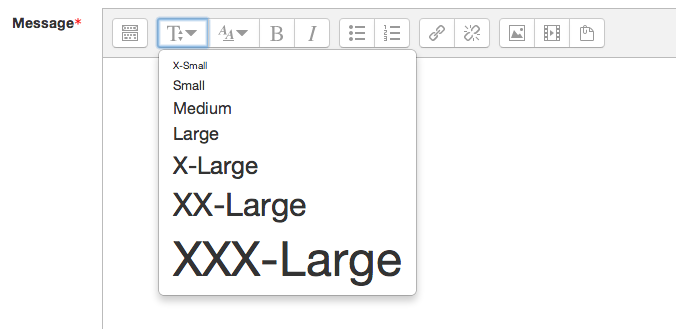
A plugin for atto to allow the font size to be altered.
Comments
Comments are no longer open for new posts. Existing comments remain available to read.
I reminder everyone: you have to change the sittings (Add the new button) from this URL:
http://yourMoodleSite.edu/admin/settings.php?section=editorsettingsatto
الزر يعمل بنجاح، أذكر ، لازم تضيفوا الزر ضمن قائمة الأزرار لكي تظهر في شريط أدوات المحرر من الرابط المذكور في الأعلى. تحياتي للجميع
Tx for taking the trouble.
Peter
I have been trying to replicate the problem you are experiencing, but I'm not entirely sure what the problem is. Could you please give me more details about the problem and perhaps some instructions on how to test it?
Also, the fontsize plugin is only for resizing text. It will not resize images (including smilies).
Hope this helps!
Installed the upgrade and it works. Tx.
However... when I selected a smiley
Smileys were working before the update.
Putting a
What you've done there is created a new "group" of buttons with the fontsize button in the group. You could also have added the word fontsize to any of the other groups (separated by commas).
For example: style1 = bold, italic, underline, strike, subscript, superscript, fontsize, morefontcolors, backcolor
Hope this helps,
Adam
Could you tell me what didn't work? Did the install go OK? Is the button appearing? Does the drop down show allowing you to select a size? Does the output in atto show a tag when in "edit code" mode?
Give me some more details and I'll get it working for you! I tested it in 3 separate Moodles running 2.8 and all went well there...
Cheers!