Auto enrolment
Premium Certified Partner
Maintained by
Catalyst IT, Eugene Venter
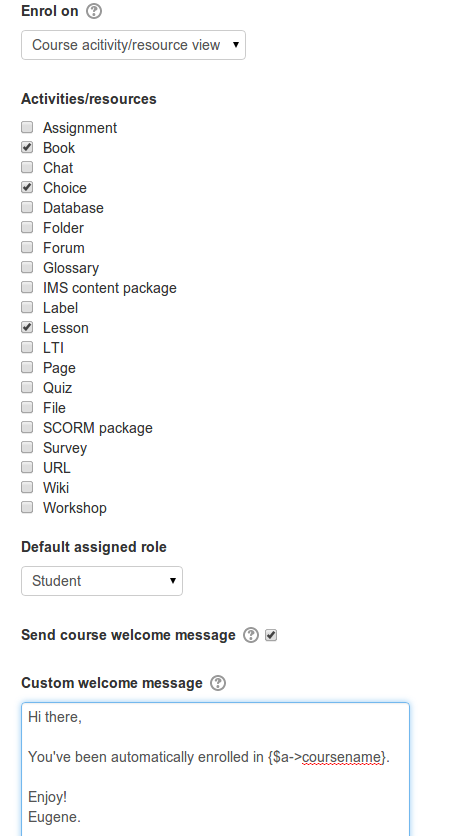
This plugin allows for an enrolment into a course to occur automatically when a user views a course or course activity/resource. The plugin can also be configured to enrol a user upon login.
Comments
Comments are no longer open for new posts. Existing comments remain available to read.
I installed this plugin and got the following error:
"Coding error detected, it must be fixed by a programmer: Block type admin has been disabled by the administrator"
This is when a learner logs in for the first time and views the course.
Can you please assist?
Right now you can only have one trigger for all courses that run auto enrolment. It should be possible to alter the code (well, mostly only names so it doesn't create duplicates, and maybe minor changes to whatever it does in the database) so I can have a second install of that plugin and therefor have different triggers for different courses depending on the plugin version that I chooses for that course, right?! Anyone tried that already?
It seems to be impossible to delete this enrolment method from a course once it is added. Will this be resolved in future updates?
Thanks, Catherine
Thanks.
Many thanks
I'd tried to install it, but I got the following error after uploaded it to my moodle server:
Error instaling Validating enrol_auto ... Error
[Error] Write access check [E:\Moodle\dirroot/enrol]
Installation aborted due to validation failure
Are there any instructions on how to use this plugin?
I have installed the plugin and turned it on in the Manage plugins screen.
I am attempting to use the activity enrol feature... I have assumed that if the user completes an activity they will be enrolled into a specified course.
Have I got this correct?
Hope you or others can guide me.
Cheers
Mark
How do I apply the auto enrol - to courses already set up - in bulk?
Thanks,
Emmett