Max Pomazuev
Lead maintainer

Site administration ' Plugins ' Install plugins, upload the ZIP file and install the plugin as prompted.Download ZIP file from https://github.com/examus/moodle-availability_examus/releases/, login to your Moodle site as an admin, open Site administration ' Plugins ' Install plugins, upload the ZIP file and install it.
Due to security reasons, it's recommended to have a separate user with special permissions for the integration.
examus. To do that, go to Site administration ' Users ' Accounts ' Add a new user. Fill the required fields. Create a password for the user.webservice. Go to Site administration ' Users ' Permissions ' Define roles. Click the Add a new role button. Choose a role archetype Authenticated user as a basis. Click Continue.System where this role can be assigned. In the bottom part of the page, allow the following capabilities:Short name, Custom full name. Click the Create this role button.Site administration ' Users ' Permissions ' Assign system roles. Choose the role created in the previous step (webservice). Add the previously created examus user to the Existing users field.Site administration ' Advanced features. Enable web services. Save changes.Site administration ' Plugins ' Web services ' Manage protocols. Enable the REST protocol. Save changes.Site administration ' Plugins ' Web services ' Manage tokens, click Add.Examus for the previously created user examus (or Admin User). Leave the IP restriction field empty.The new client will be used by Examus proctoring service to authenticate your users.
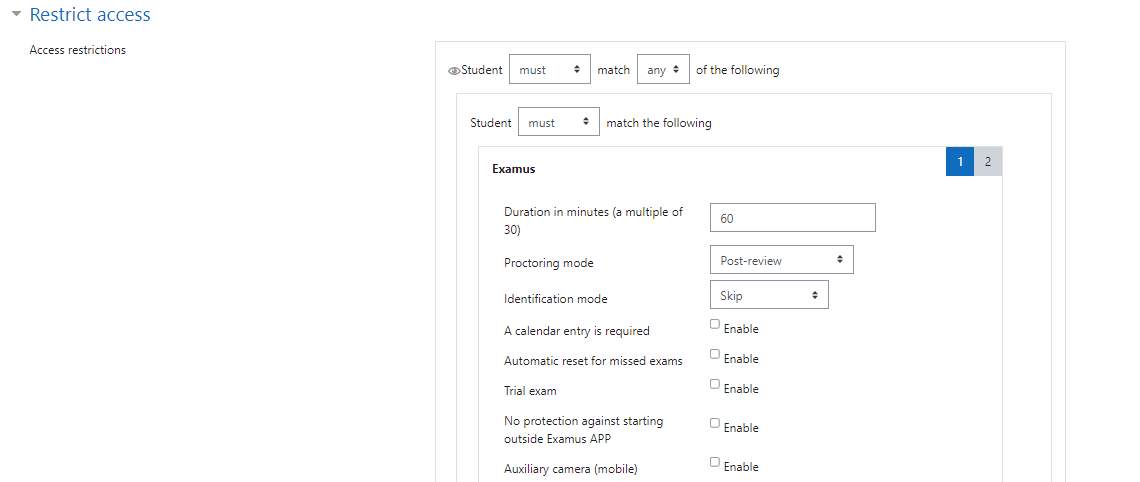
Site administration ' Server ' OAuth provider settings, click Add new client. You can use any Client identifier, for example, examus. Paste the received 'Redirect URL'. Save changes.Client identifier and Client secret values to Examus. We will use them for integration.Edit settings for the module (quiz) you want to use with Examus proctoring. Scroll down to Restrict access.Add restrictions... ' Examus to enable proctoring for this module.If the student attempted the module once, for every following attempt a new Examus entry must be created in the following way.
Site administration ' Reports ' Examus settings.New entry.