Groups and Groupings

A Moodle block to display groups and groupings to users. The plugin differentiates between the capability rights of users to evaluate the appropriate amount of information to be displayed.
Price option: Free

Supports Moodle 3.0-5.0 See all versions
Latest release: 10 months ago
Installations: 291
Downloads (last 90 days): 123

Frankenstyle name: block_groups
Blocks

Description

A Moodle block to display groups and groupings to users. The plugin differentiates between the capability rights of users to evaluate the appropriate amount of information to be displayed.

Teachers' view

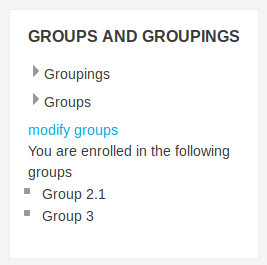
In initial state value groups and groupings are not listed.

142e18d6-4541-11e7-86c8-e4423c55951d.png

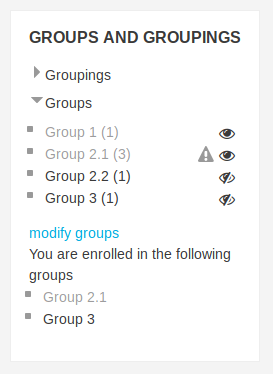
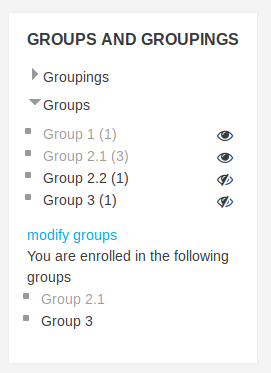
The block displays all existing groups and groupings as well as all enrolled groups on request. The number inside the brackets displays the number of members in a group or grouping. Additionally, groups can be hidden, illustrated by an eye icon and a change in opacity. When the icon is clicked the visibility of groups changes. Moreover, all groups can be changed with one click. Javascript files exist to update the block. When the block is installed for the first time all groups are hidden. The following picture shows a course with 4 groups. Group 1 and Group 2.1 are hidden. The other groups are visible.
195400aa-4541-11e7-9d25-184ee8cbcc7d.png
In case the required change is not possible a warning message is displayed and the affected group is marked with a triangle.
162f7b84-4541-11e7-9a6a-36949f1b5edd.png1d2b760e-4541-11e7-948c-5f0318aa9c4c.png

Students' view

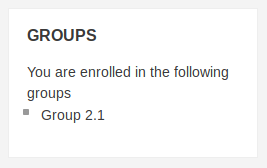
In the current state of the block groupings are not displayed to the students. Students are only able to view the groups they are enrolled in. In case they are not enrolled in any visible group, no block is displayed.
63beab3c-4545-11e7-941b-db39feebb205.png


No support in the comments section on this page

Please note that we don't provide any support for this plugin in the comments section on this page anymore.

We appreciate your commendation and reviews for this plugin in the comments. For bug reports and support requests create a ticket in the bug tracker which is linked below.

Thanks for your cooperation.

Contributors

Awards

Early bird 3.2
Automated testing support
Early bird 3.3
Early bird 3.4
Early bird 3.5
Privacy friendly
Early bird 3.6
Early bird 3.7
Early bird 3.8
Early bird 3.9
Early bird 3.10
Early bird 3.11
Early bird 4.2
Early bird 4.3
Early bird 4.4