telegram_forum

This block allows teachers to automatically send all new forum topics to Telegram Channels.
Price option: Free

Supports Moodle 3.9-5.1 See all versions
Latest release: 8 months ago
Installations: 74
Downloads (last 90 days): 35

Frankenstyle name: block_telegram_forum
Blocks

Description

Many students do not use email anymore. Telegram is an alternative with free bot API. This plugin is based in two elements of Telegram:

  • Bot created by the administrator
  • Channel created by the teacher

If a teacher installs the block and configures it in a proper way, every new topic of the course in which the block is enabled will be sent to the Telegram Channel configured. This way, the student has an alert in its mobile phone.

We will probably increase the plugin to include other alerts and the selection of them.

------------

Subscription needed

In order to send forum topics to Telegram Channel the administrator of Moodle and the teacher that uses the block in a course need to have an account in telegram and to make some configurations. Following you can learn what you need to do.

- Administrator

The administrator needs to:

  • Create a Telegram account for the organization where Moodle is installed or use its own (https://telegram.org or download Telegram APP in cell phone).
  • Create a Telegram Bot and take note of its token and its name  (https://core.telegram.org/bots, item 6).
  • Fill Bot Token and Bot Name when installing de plugin.


- Teacher

The teacher needs to:

  • Create a Telegram account (https://telegram.org or download Telegram APP in cell phone).
  • Create a Telegram Private Channel.
  • Add the bot as an admin of the Private Channel.
  • Take note of the channel share link. Just go into your channel and click in the channel name.
  • Take note of Channel ID.

  1. log in web telegram
  2. Click on the target channel then you will find the url displayed on your browser.
        If it's a private channel then the url must be similar to:

    https://web.telegram.org/#/im?p=c1018013852_555990343349619165
        For this case, the channel ID would be 1018013852.
        It's important to know that channel's IDs are always negative and 13 characters long!
        So add -100 to it, making the correct ID -1001018013852.

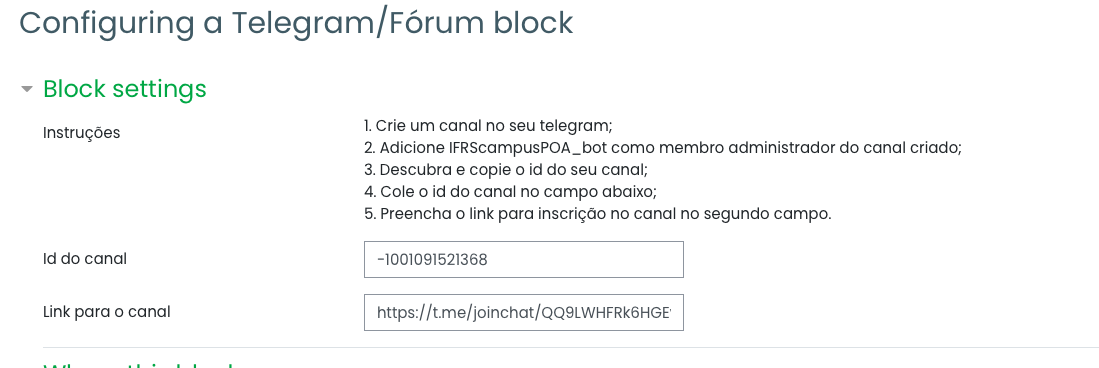
  • Fill Channel ID and Channel Link when enabling block in course.


Contributors

Awards

Privacy friendly