Manuel Menzinger
Lead maintainer
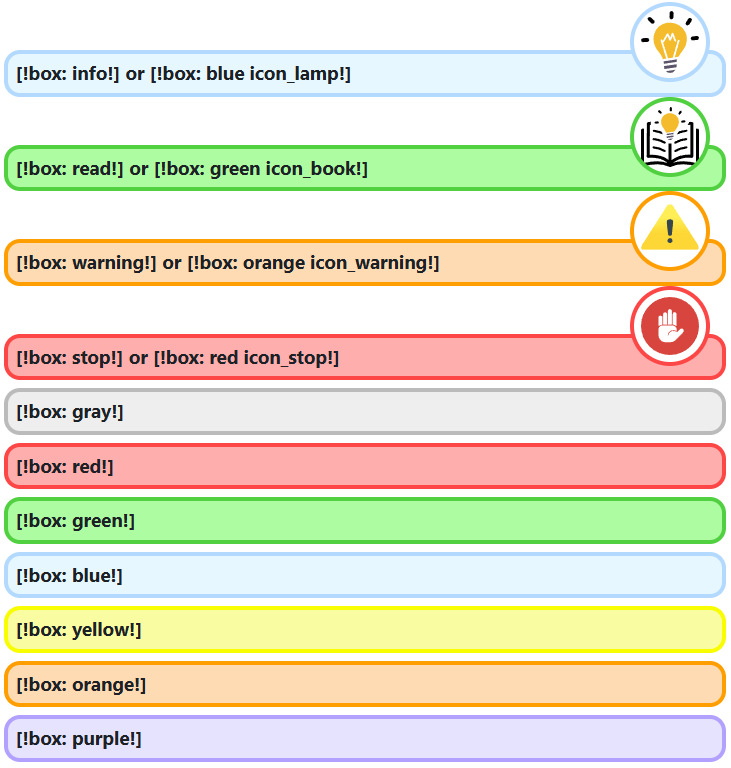
This simple filter allows users to add css to their content, without switching to code-view. It also provides pre-made css-classes to visually enhance basic text areas.
Use [!box: ... !] to directly apply a bordered css-style around the content. There are several classes that can be used. Classes of a different category can also be combined (e.g.: [!box: info purple!])
To limit the box to just a part of the content, the tags [!box-start: ... !] and [!box-end!] can be used.
[!box: info red!]
[!box-start: read!] This is important to read! [!box-end!]
Currently available classes:
// pre-made classes
info
read
warning
stop
ok
wrong

// icons
icon_lamp
icon_book
icon_warning
icon_stop
icon_ok
icon_wrong

// colors
gray
red
green
blue
yellow
orange
purple
Use [!style: ... !] to directly apply css-styles to a new div around the content.
[!style: color:red; font-weight:bold; !]
Use [!class: ... !] to directly apply css-classes to a new div around the content.
[!class: my_awesome_class !]
To limit style and class to a specific part of the content, -start and -end can be used.
[!style-start: color:green;!]...[!style-end!]
[!class-start: my_class!]...[!class-end!]
Use [!page: ... !] to directly add pure css to the whole page. It gets injected using a style element.
[!page:
    * {
    font-family: "Times New Roman", Times, serif;
    }
!]
Use [!: ... !] and [!!] to directly apply css to a new span around a part of the content.
[!: color:red; font-weight:bold; !] Attention! [!!]
In general, different elements can be nested.
[!box-start: info!]
    [!style-start: text-decoration: underline; !]...[!style-end!]
[!box-end!]
To nest multiple of the same element, a number can be appended to the start and end tags.
[!box-start: info!]
    [!box-start1: warning!]
        [!box-start2: stop!]Stop![!box-end2!]
    [!box-end1!]
[!box-end!]

[!:color:red!]T[!1:color:green!]es[!1!]t[!!]
For convenience there are some abbreviations for common used css attributes. These are available in style- and inline-elements.
b ... font-weight: bold;
i ... font-style: italic;
u ... text-decoration: underline;
s ... text-decoration: line-through;
c:[color] ... color: [color];
bg:[color] ... background-color:[color];
fs:[number][unit] or just [number][unit] ... font-size:
[number][unit];
Example:
[!style-start:c:red;1.5em;u;b;!]
    Awe[!:bg:#333;c:#fff;i;s;2em;!]so[!!]me
[!style-end!]

