eLeDia GmbH
Lead maintainer

eLeDia supports and maintains future versions of this plugin for clients only. Please ask for our commercial support.
Overview
After deleting a user his data will become anonymous.
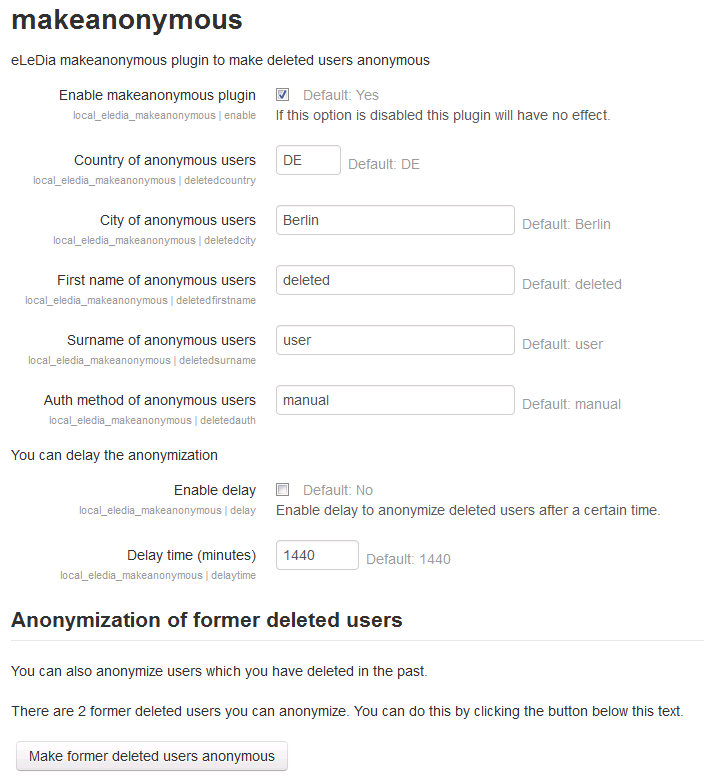
Firstname, surname, city, country and auth method of anonymized users can be set up.
Anonymized usernames will be a hash value of old username and deleting time with prefix 'deletedUser_'.
Anonymized e-mail addresses will be the new username with surfix '@delet.ed'.
You can also delay the anonymization by setting up a delay time.
Since version 0.4 you can also anonymize users which you have deleted in the past (before using the plugin).
Requirements
Moodle 2.4, 2.5, 2.6, 2.7 or 2.8
Installation
The zip-archive includes the same directory hierarchy as moodle.
So you only have to copy the files to the correspondent place.
Copy the folder eledia_makeanonymous to moodle/local/eledia_makeanonymous.
The langfiles normaly can be left into the folder moodle/local/eledia_makeanonymous/lang.
All languages should be encoded with utf8.
After it you have to run the admin-page of moodle (http://your-moodle-site/admin)
in your browser. You have to loged in as admin before.
The installation process will be displayed on the screen.
That's all.
Administration
You can setup the plugin by going to
Site administration --> Plugins --> Local plugins --> makeanonymous.
Version control
0.5 (2014121200)
- the plugin now uses the new task and event apis
0.4 (2014082802)
- you can now anonymize users which you have deleted in the past (before using the plugin)
0.3 (2013082800)
- set timestamps to 0
- added anonymization of remaining database fields
- added option to edit auth method of anonymized users
0.2 (2013070202)
- added option to enable/disable the plugin
0.1 (2013032800)
- first release