Sebsoft BV
Lead maintainer

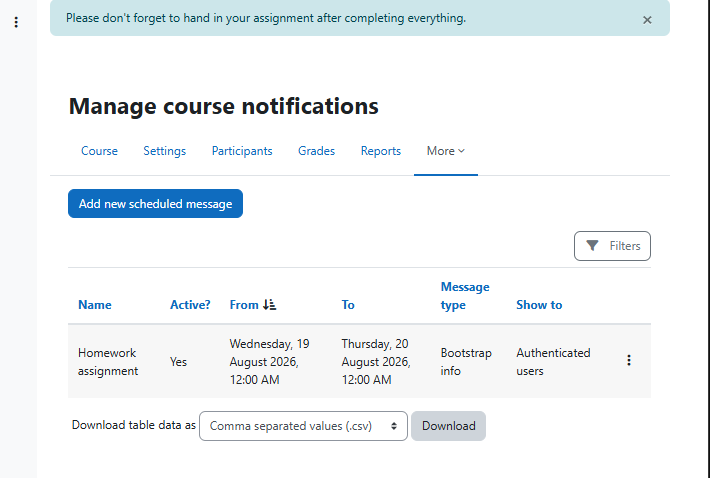

Scheduled Messages makes it easy to deliver timely announcements in Moodle without having to manually publish and remove them at the right moment.
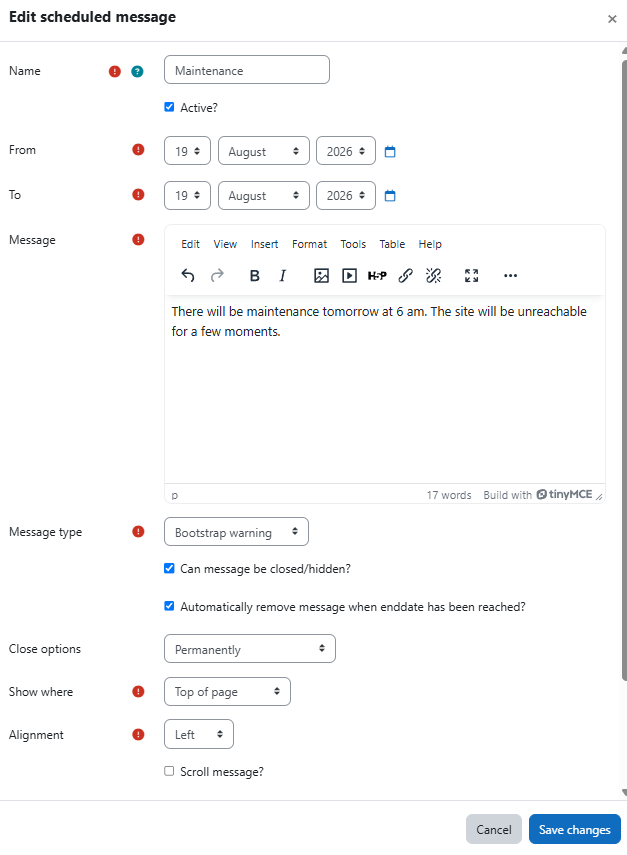
Create a rich-text message, define when it should be visible, choose who should see it and decide where it should appear. The plugin automatically displays the message during the configured date range.
Messages can be managed site-wide or within individual courses. Course users with the appropriate capability can manage notifications for their own course without requiring site administrator access.
Schedule messages with a start and end date, and enable or disable them independently.
Create site-wide or course-specific notifications for flexible communication across Moodle.
Target different audiences, including authenticated users, unauthenticated visitors and guest users.
Use rich-text content to include formatted text, links and other supported Moodle editor content.
Choose where messages appear: as a site banner, at the top of the page or in the user notifications area.
Choose the appropriate visual style using Bootstrap info, warning, error or success alerts, or use a custom background colour.
Control message presentation with left, centre or right alignment and an optional scrolling display.
Allow users to dismiss messages either for their current login session or permanently.
Reuse messages when needed by resetting previously stored hidden states.
Delegate course communication using Moodle capabilities, allowing authorised users to manage notifications within their course context.
Scheduled Messages can be used for planned maintenance announcements, important deadlines, temporary instructions, course reminders, upcoming events, service disruptions, policy changes or any other information that should be visible only when it is relevant.
The plugin is designed for Moodle 4.5 and later and integrates with Moodle's existing permissions, editor, privacy and reporting APIs.

