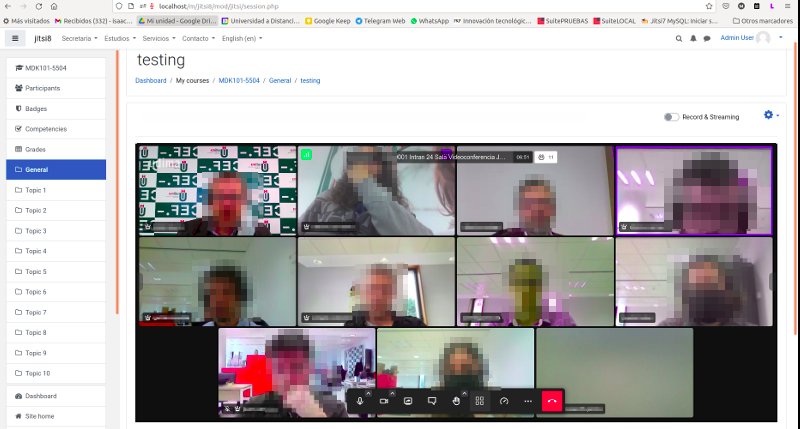
mod_jitsi integrates Jitsi Meet videoconferencing directly into Moodle courses. Teachers schedule sessions as standard activities; students join in one click — no app to install, no account required.
The plugin works out of the box using the public server at meet.jit.si (5-minute embed limit — enough to evaluate). For production you need your own server: GCP auto-managed is the easiest full-featured option; JaaS (8x8) is the quickest no-infrastructure option.
Key features
- Schedule webconferences as standard Moodle activities
- Activity completion based on time attended
- Unlimited participants (limited by server bandwidth)
- Moodle profile pictures as avatars
- Guest URLs for users outside Moodle (with optional email invitation)
- Private 1-on-1 sessions — call any coursemate directly from their profile
- Real-time participant list with names linked to Moodle profiles
- HD audio and video, tile view, breakout rooms, chat, polls, virtual backgrounds
- YouTube video sharing with synchronised playback
- Full moderation control (token-based mode recommended)
- YouTube live streaming with automatic recording publishing
- GCP/Jibri recording directly to Google Cloud Storage with AI processing
- Dropbox recording with manual or automatic link publishing
- JaaS (8x8) cloud recordings automatically captured
- Detailed attendance report with recording view tracking and heatmap
- Site-wide session usage statistics
mod_jitsi Account
Some features require a free registration at portal.sergiocomeron.com — it takes less than a minute. See the privacy policy for what data is collected and how it is used.
Features that require registration:
- Attendance report — per-activity report with live session data and per-student minutes
- Recording view tracking — progress bars showing which parts of each video each student watched
- Viewing heatmap — which parts of each recording were watched by what fraction of students, including replays
- Course overview — per-course dashboard: sessions, participants, top recordings and engagement ranking
- Session usage statistics — site-wide stats with daily breakdown
Registration is not about locking features: it exists so the developer can see which Moodle versions, server types and features are actually used. Anyone can modify the open-source code and bypass it.
Supported server types
- GCP auto-managed (BETA) — the plugin provisions a complete Jitsi + Jibri server in Google Cloud Platform: JWT, SSL, recording to GCS and AI features configured automatically. A Google Cloud account with billing is all you need.
- 8x8 JaaS — Jitsi as a Service, free up to 25 monthly active users. No infrastructure required. Cloud recordings captured automatically (expire after 24 hours). jaas.8x8.vc
- Self-hosted Jitsi — your own Jitsi server with full control and optional JWT token authentication for moderation. Requires the jitsi-token-moderation-plugin for JWT moderation to work correctly.
- Public server (meet.jit.si or other public instances) — no configuration required; limited to 5 minutes in embed mode.
Recordings
The plugin supports multiple recording methods:
- GCP/Jibri to Google Cloud Storage — the recommended method when using a GCP auto-managed server. Recordings are saved directly to GCS and published automatically in the Recordings tab. Unlocks AI features (summary, quiz, transcription).
- YouTube streaming — recordings published automatically via the YouTube Data API v3 (OAuth 2.0 setup required; multiple accounts with round-robin supported)
- Dropbox — teachers record to their Dropbox account and publish the link manually. The plugin can embed the video directly with an HTML5 player.
- JaaS (8x8) cloud recordings — links captured automatically when the session ends. Links expire after 24 hours and are automatically hidden.
- External links — any recording link can be added manually to the Recordings tab.
AI features for GCS recordings
When recordings are stored in Google Cloud Storage (GCP/Jibri setup), they can be processed by Google Vertex AI (Gemini 2.5 Flash) to generate:
- AI Summary — a structured educational summary of the recording
- AI Quiz — a set of true/false questions automatically created as a Moodle quiz in the course
- AI Transcription — a timestamped transcript with chapter headings and clickable timestamps
AI features are disabled by default. Enabling them sends recordings to Google Vertex AI — review GDPR implications first. Teachers see a confirmation modal before each generation.
Private sessions
When enabled, any user can start a private 1-on-1 video call with a coursemate directly from their Moodle profile page — without needing a scheduled Jitsi activity. Call history is shown in a dedicated hub page. Instant Moodle notification sent to the other participant when a session is started.
Token-based moderation
Configuring JWT token authentication gives full moderation control: only users with the Jitsi Moderation capability become Jitsi moderators and can mute, disable cameras or remove participants. Self-hosted servers need the jitsi-token-moderation-plugin.
Session usage statistics
Administrators can access a site-wide statistics page with date range filtering showing sessions, unique participants, total minutes, recordings and daily breakdown charts. Stats are pre-computed nightly for performance. Requires mod_jitsi Account registration.
Disclaimer
This plugin is not related to or partnered with 8x8 Inc. nor with Jitsi as a Service (JaaS).