Deleted User Anonymizer

Moodle retains some user data by design even after user deletion, which may be a concern depending on the specific data privacy policies of an organisation or local legal interpretations. This plugin anonymizes the remaining personal data in the mdl_user-table after deletion.
Price option: Free

Supports Moodle 4.5 See all versions
Latest release: 7 months ago
Installations: 9
Downloads (last 90 days): 9

Frankenstyle name: tool_deleted_user_anonymizer
Administration tools

Description

Deleted User Anonymizer is a "tool plugin" that anonymizes deleted users in Moodle. There are two ways to trigger the anonymization process:

  1. Event trigger: When a user is deleted, anonymization is automatically triggered for that user.
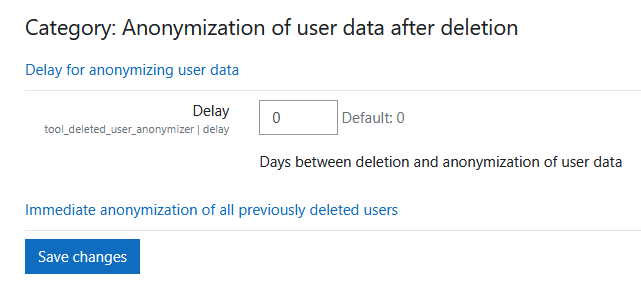
  2. Manual anonymization: Administrators can manually trigger anonymization for all previously deleted users.

If user fields are not deleted during account deletion, they are anonymized as follows:

  • The userid remains unchanged.
  • The firstname is replaced with a random adjective.
  • The lastname is replaced with a random animal name.
  • The username is replaced with the new firstname + lastname + a timestamp.

Installation

  1. Clone the repository into the /admin/tool/user_anonymizer directory of your Moodle installation:
  2. Visit Site administration ' Notifications to trigger the installation, or run admin/cli/upgrade.php.

Configuration

After installation, the plugin can be configured via: Website-Administration ' Plugins ' Admin tools ' Delay for anonymizing user data

Contributors