
Offline Quiz
Maintained by
AMC Academic Moodle Cooperation
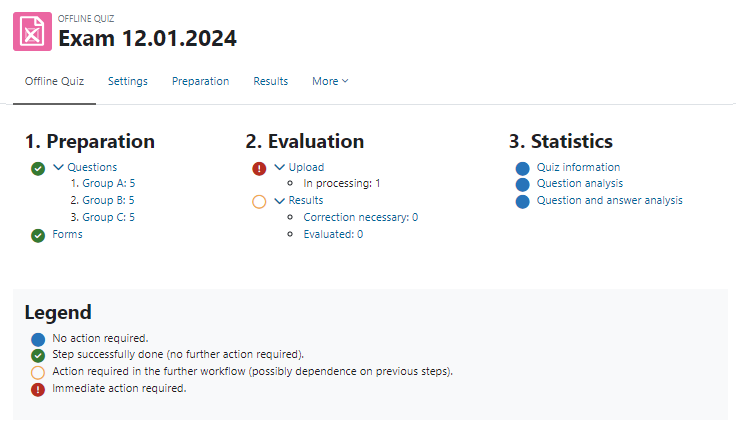
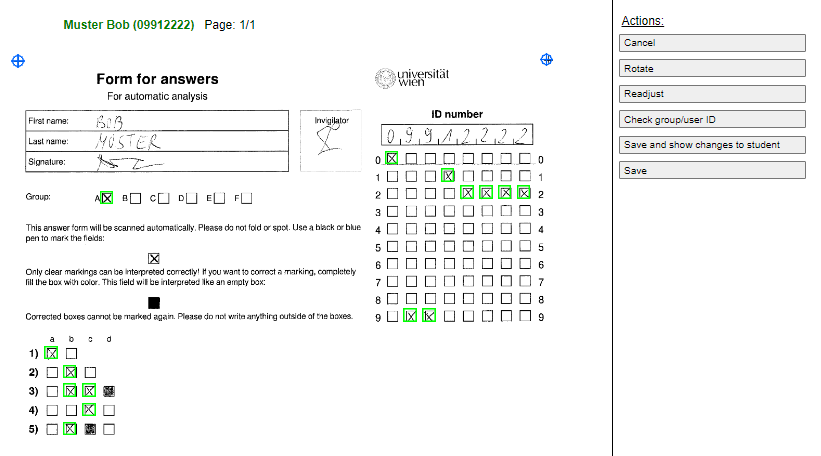
The Offline Quiz activity allows the creation of multiple choice tests with questions from the question bank of a Moodle course, which are handed out to students in printed form. After completion, the answer forms are scanned and can be automatically evaluated online directly in Moodle.
Comments
Comments are no longer open for new posts. Existing comments remain available to read.
Now I need update Moodle to 3.3 version. In Test Moodle 3.3, I install OfflineQuiz and didn't have any problem. There are some information to me about this? It's work normaly..
Thank you!!
Now I would like to know which ID number to fill in form for answers? I put the idUser and it is informing that there is no user.
User ID Model: 0007627
Thank you again.
it is not possible to implement a button, since the cronjob takes a while to scan the pages (around 20 seconds per page on my local computer e.g.). We don't want the users to have to wait 20 minutes after a big upload, especially since you already should have a cron installed for moodle itself.
About the real Name of the students: This is actually one of the most requested features, but not that easy to implement since the algorithm would not allow such a change at the moment. We are working on making this change possible in the mid to long future, but it's not the first priority at the moment.
Best regards
I installed the Offline Quiz in Moodle 3.0 and I'am having problems with cron. Is there a way to put cron on a button on the screen for the user?
Another detail, the answer form have no way out with the student's code and name?
That would make life easier for teachers.
Thank you very much
What to do after uploading the answer form, nothing is shown , how to grade them after import the attempts ???
Thanks
Notice: Undefined index: startcolumn in /var/www/html/moodle32/lib/tcpdf/tcpdf.php on line 19450
Notice: Undefined index: startx in /var/www/html/moodle32/lib/tcpdf/tcpdf.php on line 19451
Notice: Undefined index: startpage in /var/www/html/moodle32/lib/tcpdf/tcpdf.php on line 19454
Notice: Undefined index: startpage in /var/www/html/moodle32/lib/tcpdf/tcpdf.php on line 19457
Notice: Undefined index: in /var/www/html/moodle32/lib/tcpdf/tcpdf.php on line 19457
Notice: Undefined index: startpage in /var/www/html/moodle32/lib/tcpdf/tcpdf.php on line 19458
Notice: Undefined index: in /var/www/html/moodle32/lib/tcpdf/tcpdf.php on line 19458
Notice: Undefined index: startpage in /var/www/html/moodle32/lib/tcpdf/tcpdf.php on line 19490
Notice: Undefined index: startx in /var/www/html/moodle32/lib/tcpdf/tcpdf.php on line 19710
I deleted the line and no longer see this warning.
Thank you for this very useful plugin.
Sincerely, Gabriel
P.S. There is another warning, see below
Notice: A non well formed numeric value encountered in /data/www/moodle/mod/offlinequiz/correct.php on line 724
this line of Code is not necessary anymore since php 4.2. (See https://www.w3schools.com/php/func_math_srand.asp) The warning won't do you any harm though. But I will delete this line for the next release. You can either just leave it with double or do nothing at all, both works fine.
Notice: A non well formed numeric value encountered in /data/www/moodle/mod/offlinequiz/report/rimport/report.php on line 219
I have modified line 219 by adding (double) . Line 219 becomes:
srand((double)microtime() * 1000000);
Now the warning has disappeared. Could you confirm that adding "(double)" is the right choice?
Thank you.
@Michał P: would you mind creating an Issue at our official github repo: https://github.com/academic-moodle-cooperation/moodle-mod_offlinequiz? Please add the equation to reproduce this bug.
«math xmlns=¨http://www.w3.org/1998/Math/MathML¨»«mn»2«/mn»«mi»x«/mi»«mo»+«/mo»«mn»1«/mn»«mo»=«/mo»«mn»0«/mn»«/math»