
Offline Quiz
Maintained by
AMC Academic Moodle Cooperation
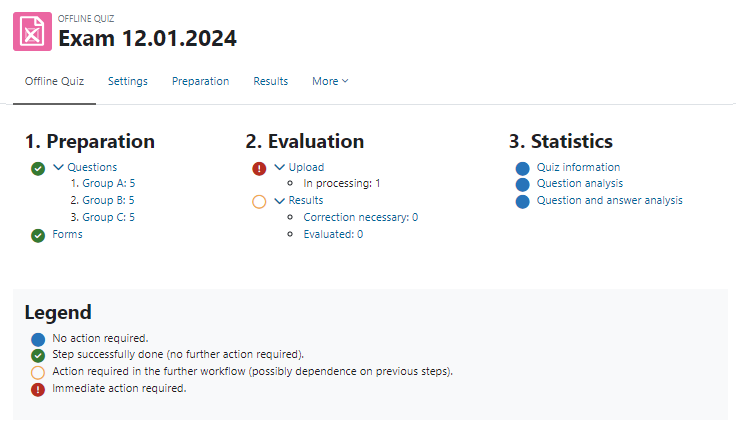
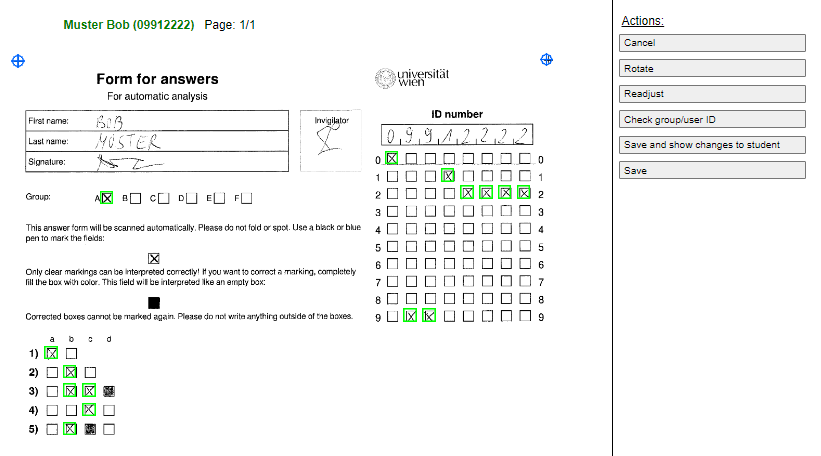
The Offline Quiz activity allows the creation of multiple choice tests with questions from the question bank of a Moodle course, which are handed out to students in printed form. After completion, the answer forms are scanned and can be automatically evaluated online directly in Moodle.
Comments
Comments are no longer open for new posts. Existing comments remain available to read.
thank you for answering, using 3.1, but still i had to set the pages. all the rest worked as usual.
again i would like to say that your product is amazing! thank you so much.
Thanks. Cheers Kat
everything is working great, but i have 1 issue when i did a demo test. the test contains 220 questions, so it's spreads to 3 pages. after i scanned the pages, i needed to tell the system which page is which. this is not done automatically?
thank you for a great solution
yes it is already possible - just go to the settings of your offline quiz instance and change in the "Forms Settings" section the settings for "Format for question sheets".
Help text: Choose whether you want your question sheets in PDF, DOCX or TEX format. Answer forms and correction sheets will always be generated in PDF format.
Cheers Kat
is it possible to print the quiz to word doc and not pdf?
thanks
if the test contains a lot of questions, the answers in the answer sheet are grouped by 8 answers, anyway to change this to groups of 10 answers? thanks!
@Trần Nam Định Do you have your imagemagick set up correctly? It seems like the imagemagick convert doesn't work.
instead of my equation. Please help me!
Your configuration seems alright, if you use the right user (the same user as your webserver). Maybe there is a problem with PHP 7, because I don't know, if we tested the cronjob with php7. I will look into that, but I will need some time. Maybe you can try yourself if it works with php5.
With this php /home/pm1yedpj/public_html/moodle2/mod/offlinequiz/cron.php --cli=1, not working
X-Powered-By: PHP/7.0.11
Content-type: text/html; charset=UTF-8
Anything else i can do?
Is this ok? php /home/pm1yedpj/public_html/moodle2/mod/offlinequiz/cron.php --cli=1 >> /home/pm1yedpj/public_html/moodle2/cron-olq.log.$DATE 2>&1