
Offline Quiz
Maintained by
AMC Academic Moodle Cooperation
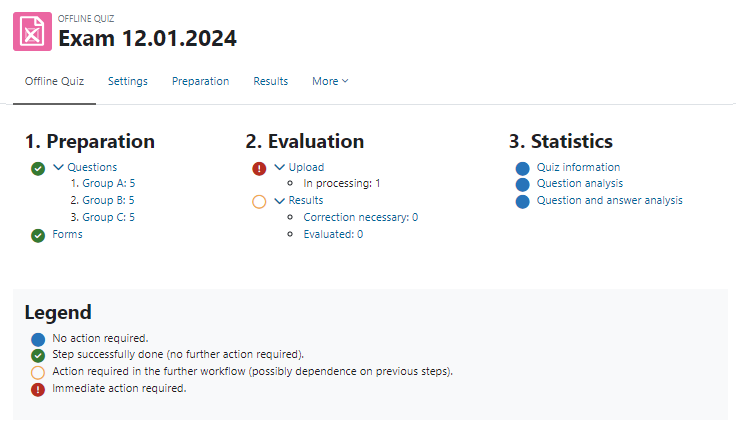
The Offline Quiz activity allows the creation of multiple choice tests with questions from the question bank of a Moodle course, which are handed out to students in printed form. After completion, the answer forms are scanned and can be automatically evaluated online directly in Moodle.
Comments
Comments are no longer open for new posts. Existing comments remain available to read.
Wonder if anyone has any pointers or past experience working with MathType by wiris and offline quiz. I am really
struggling to display the MathType images in pdf format.
So, here is what I have done so far
1) Created a simple question that has the following answer options, lets say
a. 1/2
b. 2/4
c. 3/5
The fractions are written using MathType.
When I look at the preview HTML, I was seeing MathML tags instead of the picture, so I made some changes to locallib.php and added the wirisfilter in the list of filters and rendered the questions and answer text via the filter. It worked great and I can see images in html. So far so good.
Then I tried to generate the questions pdf file and found that the images were missing in pdf.
I have explored through pdflib.php. I think we need to update the function fix_image_paths of html2text.php to somehow read the mathtype image file and include the content in the form of a png/gif file but unable to figure out exactly how to do that.
Wondering if there is an easy option to do so. Any pointers would be appreciated.
~Vip
However, accented words are replaced by a question mark (�). Could you give me a tip on how to solve this?
We are using Moodle 3.5. The Offline Quiz plugin worked just fine when I tested it in December (after you helped me with the ID number issue I was having, thank you).
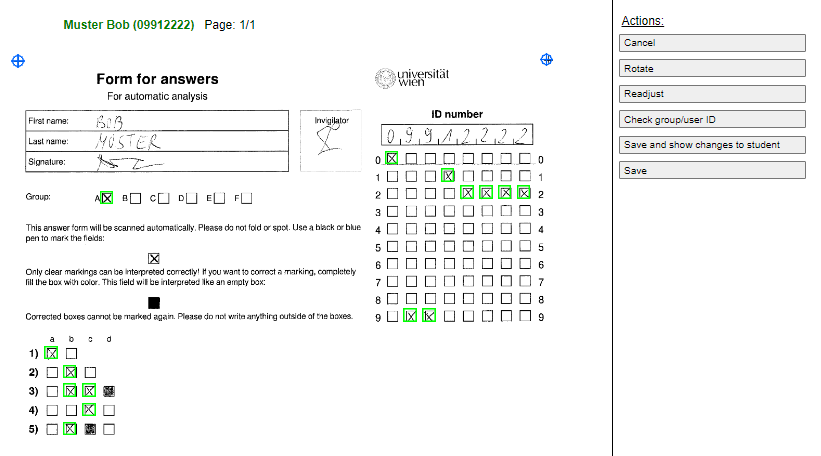
However, now when I make a new quiz I have a problem when uploading the scanned answersheets. The upload is fine but then the upload error report shows 'Invalid Listnumber'. I can click on Correct and then the message on top of the scanned image says 'Could not detect barcode for list! Please select a list or try to readjust sheet'. There is a drop down menu beneath the message from which I can choose the Test Group number.
This message then disappears and the error code 'Insecure markings' then displays in red at the top of the scanned image and shows 6 small green boxes scattered aroud the image on the left hand side where the tick boxes are (as well as 2 blue flashing ones which turn green if I click on them) There are only 5 questions so not sure what the boxes correspond to. Additionally, the right hand side of the page has 9 wide red boxes over the ID area from which I can choose the learner ID (the full number in each drop down). I canalso click on the green and blue boxex and they disappear. I then Save the changes and the scanned image disappears. A new message shows 'Sheet of participants list imported' No marking is done.
Needless to say, try as I might I cannot resolve this. Please can you advise?
Many thanks
Jane
Now, when the technicians are planning to buy a new printer / scanner, they want to make sure that it does a good job with batch scanning of Offline Quiz answer sheets of students.
We have had some mixed experiences with this. There always seem to be 3% or so of answer sheets that have to be re-adjusted manually before the plugin can process them. Is this as good as it gets? Or should we be aiming higher? If so, can you recommend any printers / scanners that work particularly well with the plugin on the basis of your experience?
Thanks.
Now, when the technicians are planning to buy a new printer / scanner, they want to make sure that it does a good job with batch scanning of Offline Quiz answer sheets of students.
We have had some mixed experiences with this. There always seem to be 3% or so of answer sheets that have to be re-adjusted manually before the plugin can process them. Is this as good as it gets? Or should we be aiming higher? If so, can you recommend any printers / scanners that work particularly well with the plugin on the basis of your experience?
Thanks.
We are using Moodle 3.5, and Offline quizz v3.5.4. The plugin worked just fine during the last year. But since september, we are facing a problem : for each scanned page, a block display the following message : "Invalid page number. Choose a page number or try to readjust the sheet". We juste Can't manually reajust 600 sheet... Have you a solution ?
Just update Moodle to v3.8 and got this error message:
"Use of subplugins.php has been deprecated. Please update your '/XXXXXX/offlinequiz' plugin to provide a subplugins.json file instead."
Ricardo
@Ricardo, there were some Problems with the implementation this time with the Docx-Format. It didn't work and we had to update the library which took a lot of work. After some last tests we will release it after our christmas break somewhere in January. If you don't use the DOCX you can safely use the 3.7 Version, it should work with 3.8.