
Semester overview
Maintained by
AMC Academic Moodle Cooperation
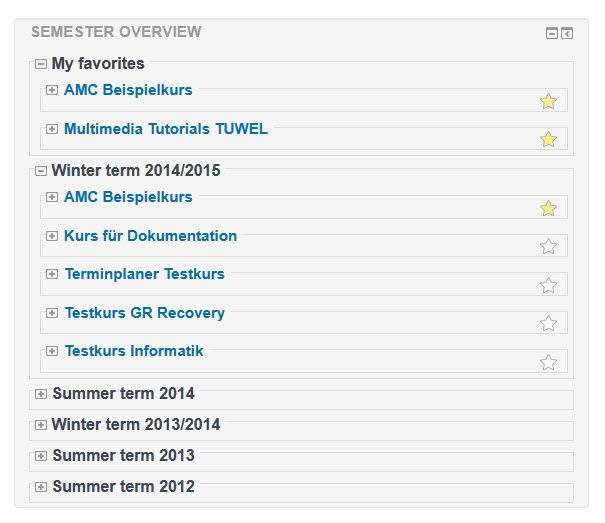
In the semsort block (blocks/semester_sortierung), courses are grouped by their starting dates in a semester view on the MyMoodle page.
Comments
Product ratings and reviews are coming to Moodle Marketplace. Until then, existing comments remain available to read, but new posts have been disabled.
For further information on how to use moodle core features check the course overview functionality and the filter options.
Thank you for your support of this block!
Thank you
Example: By default a course starting date of June 1, 2018 currently is placed into the Winter term 2018/2019. However could that June 1, 2018 date be something adjusted through a settings change for the plugin. So a course starting date of May 1, 2018 be placed in the Winter term 2018/2019 not the previous term.
Sorry for the delay, the update for Moodle 3.5 will be faster.
yeah there will be an update soon.
Cheers Kasia
Any update to Moodle 3.4?
Ricardo
I have news from our developer, Simeon Naydenov, who is responsible for this plugin.
This is the line which deals with the year:
$year = userdate($timestamp, '%Y');
What you are missing is a Hebrew Calendar type.
You can download different calendar types from here - https://moodle.org/plugins/browse.php?list=category&id=51
Our developer tested with a Persian calendar and the semsort block works as it should:
Summer term 1396
Winter term 1394/1395
Summer term 1394
Winter term 1393/1394
...
The problem is that there is no official Hebrew Calendar type available to download.
Looking at the Persian calendar type's code, it shouldn't take more than a few hours to write a Hebrew one. So that’s what you probably try to figure out, if you can write your own Hebrew Calendar or if there maybe is somewhere already one, that hasn’t been published yet.
I hope that we could help you or at least give you a direction.
Cheers Kasia