
Course Insights




Versions
Current version
1.0.0 (2026072003)
1.0.0
Plugin type: Local plugins
Frankenstyle component name: local_courseinsights
Version build number: 2026072003
Version release name: 1.0.0
Maturity: Stable
Supported Moodle versions: 4.4, 4.5, 5.0, 5.1, 5.2
Issue/bug tracker URL: https://github.com/tandreigaabriel/moodle-local_courseinsights/issues
Release notes for v1.0.0
This release marks the first stable 1.0 milestone and includes significant new functionality added since the initial listing.
New since last submission:
Risk scoring engine — configurable rules flag at-risk students with weighted scores and risk levels (low / medium / high)
Intervention tracker — staff can open, assign, note, and resolve student intervention cases with a full audit trail
52-week engagement heatmap per course
Submission timeline (30-day daily bar chart)
Student inactivity reminders via scheduled task
Digest email summaries for managers
Logstore rollup table for incremental pre-aggregation, improving performance on large sites
Fixed:
Intervention messages now delivered correctly — the intervention_contact message provider had a capability restriction that silently blocked student receipt; removed so students can receive staff messages
Staff-to-student messages now use notification = 1 (system notifications), bypassing messaging policy restrictions and user block lists
0.47.0 (2026070507)
0.47.0
Plugin type: Local plugins
Frankenstyle component name: local_courseinsights
Version build number: 2026070507
Version release name: 0.47.0
Maturity: Stable
Supported Moodle versions: 4.4, 4.5, 5.0, 5.1, 5.2
Issue/bug tracker URL: https://github.com/tandreigaabriel/moodle-local_courseinsights/issues
Course Insights for Moodle
local_courseinsights — Developed by TAG Web Design
What is Course Insights?
Course Insights gives Moodle administrators and managers a single place to see how every course on their site is performing — without digging through individual gradebooks or running manual reports.
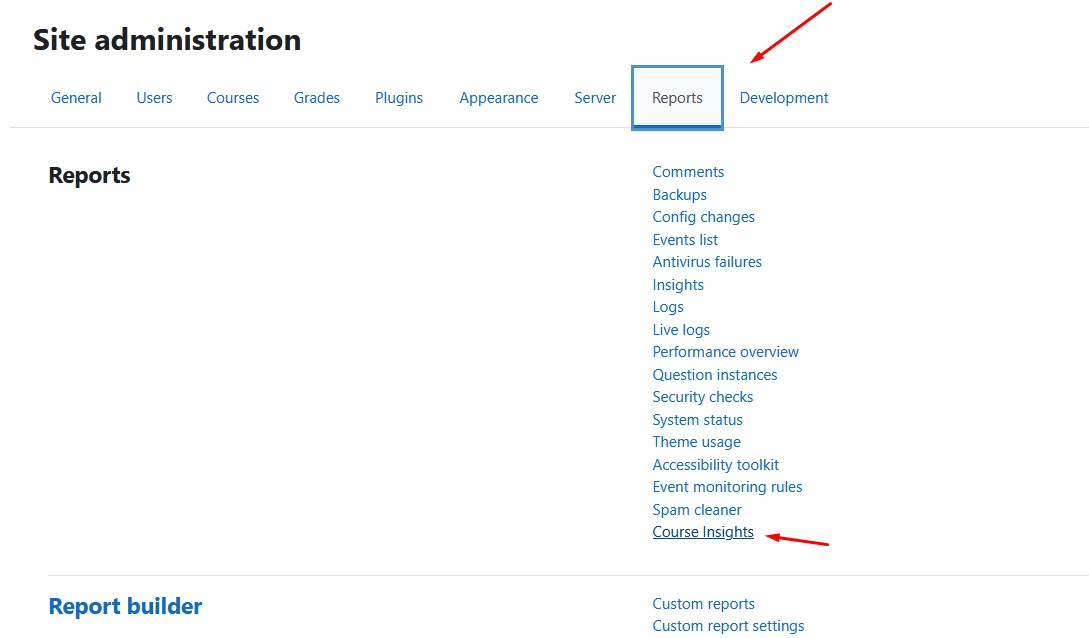
Install it once, point your browser to Site administration ' Reports ' Course Insights, and immediately see enrolment numbers, submission rates, quiz activity, student health scores, and last activity dates across all your courses — filtered, sorted, and ready to export.
After licence activation, the core reports work without changing student-facing pages. Optional features such as reminders, alerts, digest emails, branding, and webhooks can be enabled from the plugin settings.
Features
Dashboard
- Course cards — each course shows completion rate, enrolled students, teachers, assignments, last student activity, and an Active / Inactive badge at a glance
- Health score — every course is graded A to F based on completion rate, recent activity, and engagement; spot struggling courses instantly
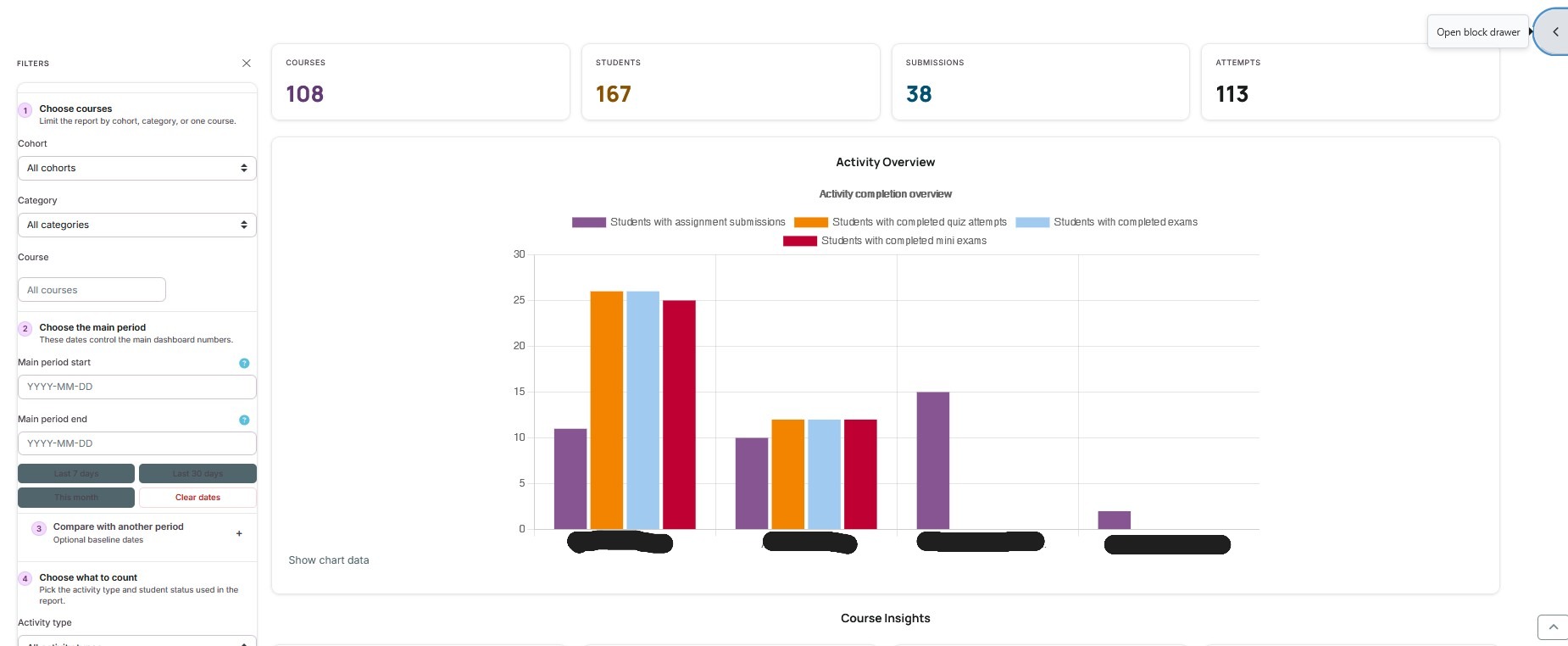
- Filter by category, course, cohort, date range, activity type (assignments / quizzes / exams), and student status — all filters update the dashboard instantly via AJAX
- Filter presets — save your most-used filter combinations and restore them in one click
- Compare period — optionally compare the main date range against a separate baseline date range; trend arrows show whether submissions and attempts are improving or declining
- Bar chart overview — visual comparison of activity across your top courses
- Pagination — handles hundreds of courses without slowing down
Per-course detail page
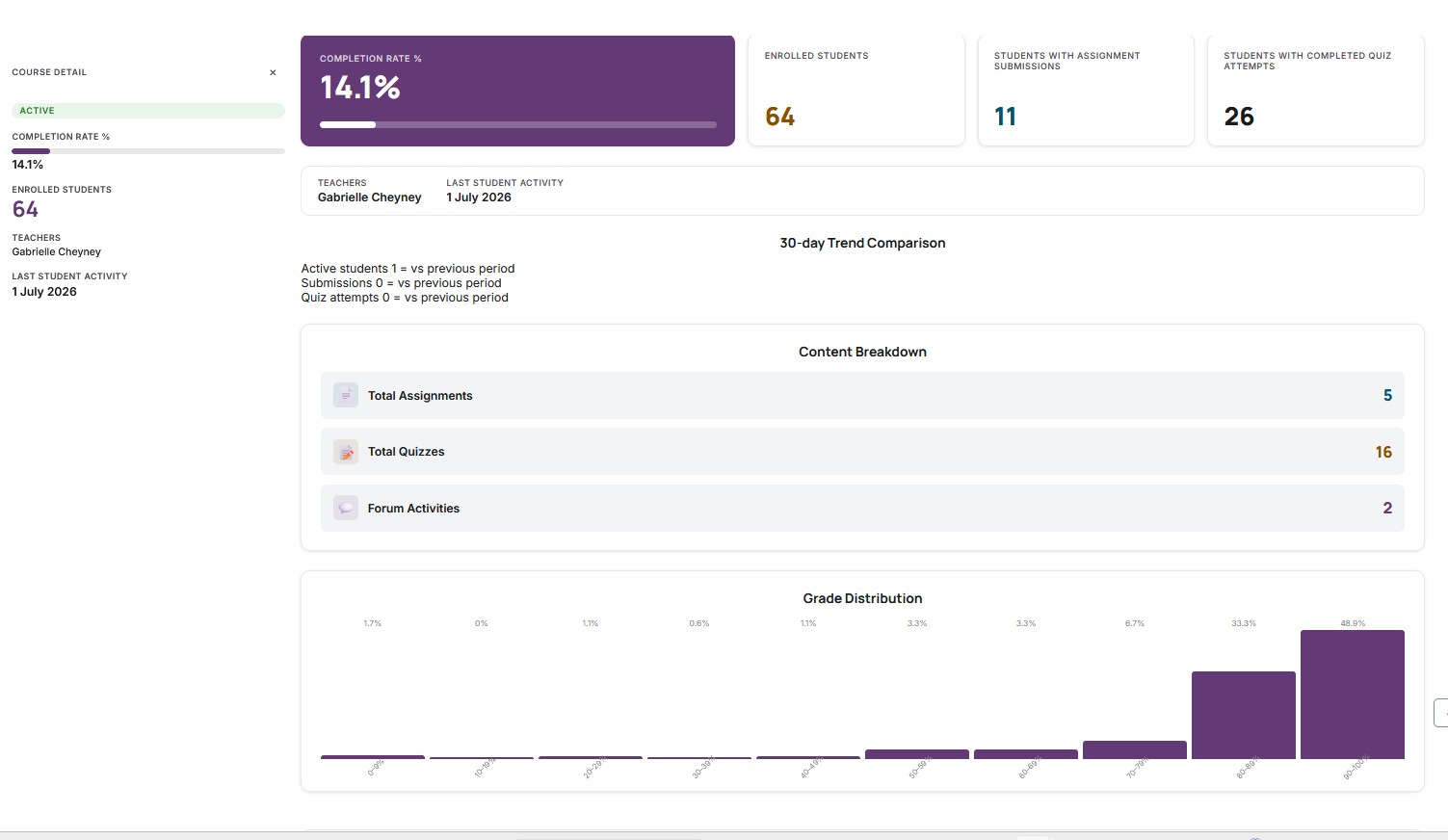
Click "Detailed Report" on any course card to open a full breakdown:
- Completion rate hero with enrolled students and teachers
- Grade distribution histogram across all assignments and quizzes
- 52-week engagement heatmap — see when students are active throughout the year
- Student activity table — per-student last access, submissions, and quiz attempts
- Submission timeline — 30-day daily submission bar chart
- Quiz score breakdown — average, min, max, and pass rate per quiz
- Print / PDF view — print-ready layout with one click
- Cached aggregate charts — grade distribution, heatmap, submission timeline, quiz breakdown, trend, and completion funnel are rebuilt by the scheduled cache task so course detail pages load faster on large sites
Exports
- CSV export — download the full filtered dataset
- xlsx export — download as an Excel spreadsheet
Automated alerts
- Get notified when a course falls below a completion threshold or goes inactive for too many days
- Alerts are sent to course editing teachers via Moodle messaging
- Configurable thresholds; enabled per site
Student inactivity reminders
- Nightly reminder task can email students who have not accessed an enrolled, incomplete course for the configured number of days
- One email is sent per student and can list several inactive courses
- Reminder tracking prevents the same student/course reminder being sent again until another full inactivity period has passed
Digest emails
- Weekly or monthly summary emails listing all courses with their health score, completion rate, and submission counts
- Sent automatically to site managers
REST API & webhook
- REST API — query course data programmatically via Moodle's external functions
- Webhook — push nightly course data to any external LMS, analytics platform, or dashboard as JSON
White-label branding
- Add your institution's name, logo, and accent colour to replace the default Course Insights header on every page
Requirements
- Moodle 4.5 or later
- PHP 8.1 or later
- A Moodle-supported database engine, including MariaDB, MySQL, or PostgreSQL
Licensing
Course Insights is a commercial plugin distributed under the GNU GPL v3.
A licence key is required to use the plugin. Course Insights is purchased through Moodle Marketplace; licence keys are issued after the Marketplace purchase has been verified.
After purchasing through Moodle Marketplace, your licence key will be delivered to the email address used at checkout. Enter the key in Site administration ' Plugins ' Local plugins ' Course Insights settings ' Licence Key and save. Activation is automatic; no further steps are needed.
Installation
Option A — Moodle admin interface
- Download the plugin ZIP.
- Log in as site administrator.
- Go to Site administration ' Plugins ' Install plugins.
- Upload the ZIP and follow the prompts.
Option B — Manual
- Extract the ZIP and copy the
courseinsightsfolder to:
/path/to/moodle/local/courseinsights/
- Log in as site administrator.
- Go to Site administration ' Notifications and click Upgrade Moodle database now.
Access
After installation the dashboard is available from:
Site administration ' Reports ' Course Insights
For a shorter product overview, see about.md.
How the plugin works
Course Insights reads existing Moodle course, enrolment, activity, completion, grade, and access-log data. It does not change courses, enrolments, grades, or student activity records.
Scheduled processing
The plugin uses Moodle scheduled tasks to keep heavy reports fast:
| Task | Default time | What it does |
|---|---:|---|
| Build Course Insights summary cache | 02:00 daily | Rebuilds dashboard summaries, Site Overview snapshots, at-risk student snapshots, and aggregate Detailed Report snapshots |
| Renew licence token | 03:00 Monday | Refreshes the local licence status from the licence service |
| Send course alerts | 07:00 daily | Sends alerts to editing teachers when configured thresholds are breached |
| Send digest email | 08:00 daily | Checks whether weekly/monthly digest emails are due |
| Send student inactivity reminders | 09:00 daily | Emails inactive students when enabled |
These tasks run when Moodle cron runs. If Moodle cron is not running, caches and emails will not update.
Cache and snapshot tables
The cache task is designed to be repeatable. Running it every night does not duplicate normal report rows:
| Table | Purpose | Duplicate protection |
|---|---|---|
| local_courseinsights_summary | Dashboard all-time course summaries | The task deletes and rebuilds the all-time summary set |
| local_courseinsights_site | Site Overview KPI/chart payloads | One row per snapshot key; updated in place |
| local_courseinsights_atrisk | At-risk student snapshot for the configured inactivity threshold | The task deletes and rebuilds rows for that threshold |
| local_courseinsights_detail | Aggregate Detailed Report chart payloads | One row per course; updated in place |
| local_courseinsights_reminders | Student reminder send history | Unique student+course row; updated after later reminders |
The Detailed Report cache stores aggregate chart data only. Student Activity and Top Students by Grade are still read live because they display identifiable student information.
At-risk students
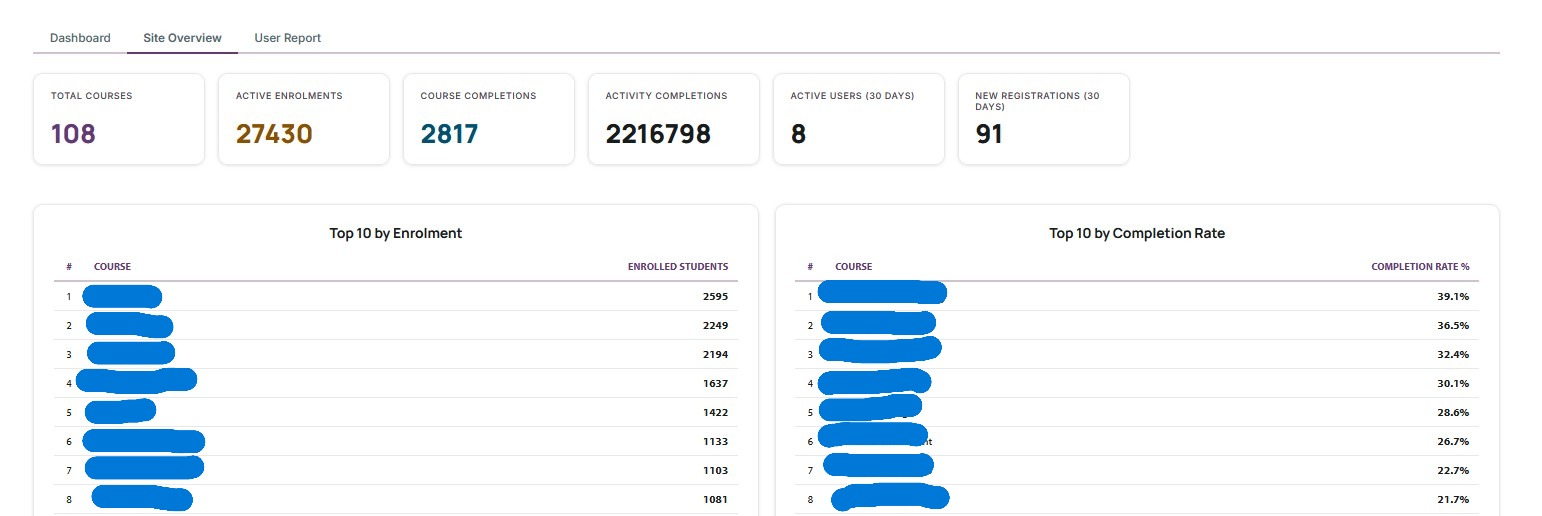
The Site Overview at-risk table lists active, enrolled, incomplete students whose course access is older than the configured Student inactivity threshold. If a student has never accessed the course, the plugin displays Never for last access and calculates days inactive from the enrolment time.
Student reminder emails
Student reminders work like this:
- Enable Student inactivity reminders in Course Insights settings.
- Set Student inactivity threshold (days).
- Moodle cron runs the
send_student_remindersscheduled task. - The task finds active, confirmed, unsuspended students enrolled in visible, incomplete courses.
- A student is included when their last course access is older than the threshold, or they have never accessed the course.
- The task sends one Moodle notification/email per student with links to the inactive course(s).
- The plugin records the send in
local_courseinsights_remindersso the same student/course is not reminded again until another full threshold period has passed.
Example: if the threshold is 14 days and a reminder is sent today, the same student/course will not be reminded again until at least 14 more days have passed.
Capabilities
| Capability | Default roles | Description |
|---|---|---|
| local/courseinsights:view | Manager, Editing teacher | View the dashboard and course detail pages |
| local/courseinsights:export | Manager, Editing teacher | Export reports as CSV or xlsx |
| local/courseinsights:manage | Manager | Manage plugin settings |
Configuration
All settings are at Site administration ' Plugins ' Local plugins ' Course Insights settings.
| Setting | Default | Purpose |
|---|---|---|
| Licence Key | — | Enter the licence key issued after Moodle Marketplace purchase verification |
| Mini exam keywords | mini,mini exam | Keywords used to identify mini exams from quiz names |
| Exam keywords | exam,final | Keywords used to identify exams from quiz names |
| Student role IDs | 5,11,25 | Comma-separated Moodle role IDs counted as students |
| Enable summary cache | Off | Pre-aggregate data nightly for faster loading on large sites |
| Alerts enabled | Off | Enable automated low-engagement alerts to course teachers |
| Alert completion threshold | 50 | Alert when course completion drops below this % |
| Alert inactive days | 30 | Alert when no student activity for this many days |
| Student inactivity reminders | Off | Email inactive students from the scheduled reminder task |
| Student inactivity threshold | 14 | Number of inactive days used by student reminders and the Site Overview at-risk snapshot |
| Digest emails | Off | Send weekly or monthly summary emails to managers |
| Webhook URL | — | POST course data nightly to an external URL |
Troubleshooting
Dashboard not visible
Make sure the plugin is installed and the user has local/courseinsights:view. Purge all caches after installation.
No data shown
Check that the Student role IDs setting matches the role IDs on your site. The default (5) is the standard Student role but may differ on your installation.
Licence not activating
Make sure your server can make outbound HTTPS requests to tandreig.com. Check Site administration ' Server ' HTTP for any proxy settings that may be blocking outbound connections.
If the key was requested but has not arrived, use the post-purchase licence delivery form at tandreig.com/request-key and include the same email address and Moodle site URL used for the Marketplace purchase verification.
For installation, configuration, or plugin usage help, use the plugin support form at tandreig.com/plugins/support.
Privacy
Course Insights reads existing Moodle data (courses, enrolments, assignments, quizzes, grades, completions, and access logs). It stores aggregate course/report snapshots for performance.
The plugin also stores limited personal tracking data for:
- student inactivity reminder history (
userid,courseid,timereminded) - Site Overview at-risk snapshots (
userid,courseid, inactivity threshold, last access time, calculated inactive days)
These records are used to prevent duplicate reminders and to make the Site Overview load quickly. See PRIVACY.md or the plugin's privacy provider for full details.
Moodle review notes addressed
The plugin has been adjusted for Moodle review feedback:
- Log aggregation avoids MySQL-only date functions and groups bounded timestamp rows in PHP or uses scheduled snapshots.
- Site Overview and Detailed Report heavy views use scheduled snapshot tables so large sites do not run the most expensive reports on every page load.
- Licence wording is Marketplace-first; the external form is documented only as post-purchase licence delivery and verification.
- The admin licence notice uses language strings for visible text and no longer links to an off-Marketplace purchase/request page.
- Licence activation uses Moodle's
\curlwrapper instead of directcurl_init(). - The Privacy API declares and exports/deletes reminder and at-risk student snapshot records.
- Alert recipients are preloaded for affected courses to avoid querying teachers inside the per-course send loop.
- Cache and message-provider language strings are defined in
lang/en/local_courseinsights.php.
Support
- Plugin support form: tandreig.com/plugins/support
- Licence key delivery form: tandreig.com/request-key — use this only after a Moodle Marketplace purchase so the purchase can be verified and matched to the Moodle site URL
- Bug reports & feature requests: github.com/tandreigaabriel/moodle-local_courseinsights/issues
- Developed and maintained by: TAG Web Design — Andrei Toma
License
GNU General Public License v3 or later — see LICENSE or gnu.org/licenses/gpl-3.0.html
Changelog
0.47.0
- Filter sidebar is now organised into numbered steps: courses, main date range, optional comparison period, and activity/student scope
- Main and comparison date labels were renamed to make it clearer which period controls the dashboard and which period is only the baseline
- README now documents the Moodle review fixes, including portable log aggregation, Marketplace-first licence delivery, Privacy API coverage, Moodle curl usage, and missing language strings
- README now separates the plugin support form from the post-purchase licence key delivery form
0.46.9
- Compare Period filter section now uses plugin-owned
<details>/<summary>markup instead of Moodle's default collapsible form header, so the visible button style changes consistently across themes
0.46.8
- At-risk snapshot now calculates inactive days for never-accessed students from enrolment time and displays
Neverfor last access - Student reminder query now groups by student/course to avoid duplicate course entries when multiple enrolment methods exist
- Compare period UI tightened so Moodle's built-in collapse arrow does not leak into the filter header
- README expanded with licence, scheduled-task, cache, at-risk, and student-reminder workflow details
- Added
PRIVACY.mdand refreshedabout.mdso public documentation matches the current privacy and licence behaviour
0.46.7
- Detailed Report performance: aggregate chart data is rebuilt into per-course snapshots by the scheduled cache task
- Site Overview and Detailed Report caches update existing rows instead of duplicating snapshot rows
0.46.2
- Filter panel UI overhaul: accordion headers now full-row clickable buttons with chevron on the right and no grey square icon; course autocomplete unified into a single searchable control; all filter fields now consistent full width; compare period labels left-aligned
- PHPCBF code-style cleanup on filter form and language file
0.46.1
- Site Overview performance: MUC cache for site KPIs (1800 s TTL); upgrade step pre-warms the cache on install/upgrade
0.46.0
- Top students leaderboard on the course detail page — top 20 students by course total grade, with gold / silver / bronze badges
0.45.0
- Activity completion funnel on the course detail page — per-activity completion rate, bar turns red below 50 %
- User Report form rewritten as a proper Moodle form (moodleform) for reliable autocomplete behaviour
- Bug fixes:
{course_completions}column iscoursenotcourseid— fixed in top-courses, at-risk, and student-reminders queries
0.44.0
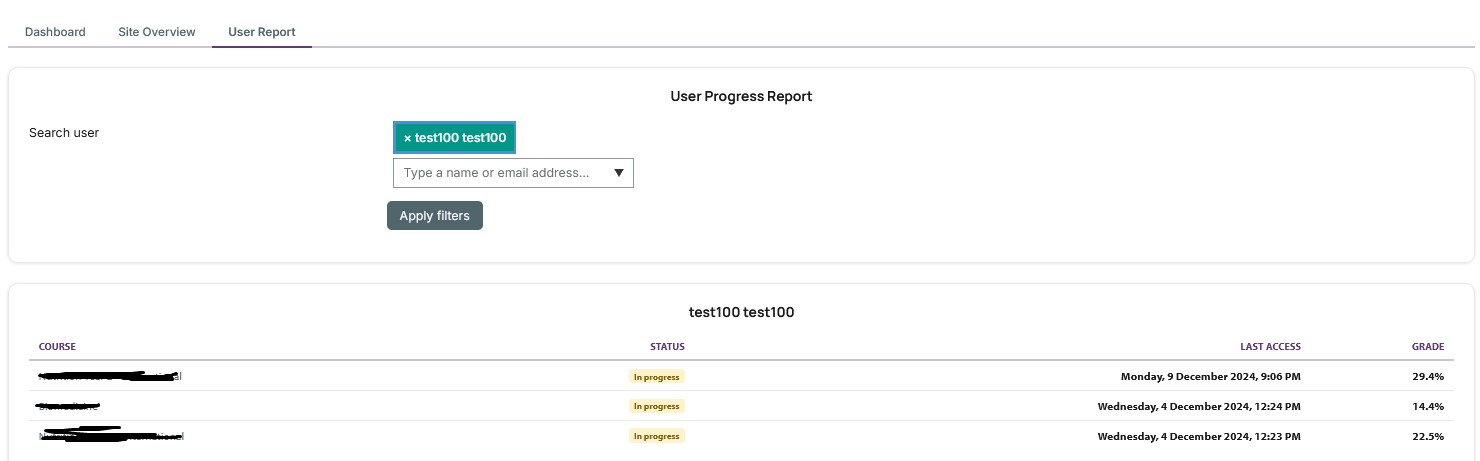
- User Progress Report (third tab) — search any user to see their enrolled courses with completion status, grade, and last access
- Monthly active users trend table on Site Overview (12-month history from logstore)
- At-risk students table on Site Overview (enrolled, not completed, inactive beyond the configured threshold)
- User autocomplete AMD module and
search_usersexternal function
0.43.0
- Student inactivity reminders — nightly task emails students who have not accessed an enrolled course for the configured number of days; deduplication table prevents repeat sends
- Bug fix: top-courses-by-completion query fixed for MariaDB (derived-table alias)
0.41.0
- Summary cache — pre-aggregated course data stored nightly;
completionrate,lastactivity, andteacherscolumns added to the summary table for faster dashboard loads
0.40.0
- Dashboard print / PDF view
- 30-day comparison period with trend arrows on stat cards
- xlsx export button added to dashboard
0.39.0
- Licence gate — activate via the key delivered for the purchase channel; 7-day grace period; weekly auto-renewal
0.37.0
- Major SQL performance refactor — 13 correlated subqueries replaced with JOIN-based aggregations
0.36.0
- MUC caching for filter dropdowns; window-function COUNT eliminates separate count query
0.35.0
- Bug fixes: user preference API, invisible course redirect, cache query visibility filter
0.33.0
- White-l
0.17.0 (2026062005)
0.17.0
Plugin type: Local plugins
Frankenstyle component name: local_courseinsights
Version build number: 2026062005
Version release name: 0.17.0
Maturity: Alpha
Supported Moodle versions: 4.5, 5.0, 5.1, 5.2
Issue/bug tracker URL: https://github.com/tandreigaabriel/moodle-local_courseinsights/issues
Course Insights for Moodle
local_courseinsights — Maintained by Andrei Toma
Description
Course Insights is a Moodle local plugin that gives administrators and managers a fast, clear overview of student activity across all courses — in one place. It aggregates enrolment, assignment, quiz, forum, and grade data from existing Moodle tables and presents it as a filterable, exportable card dashboard with per-course detail pages. No configuration required after installation. No impact on student-facing pages.
Whether you manage a dozen courses or hundreds, Course Insights lets you spot low engagement, track submission rates, and compare quiz performance without digging through individual course gradebooks.
Features
- Card-based dashboard — each course is shown as a card with completion rate progress bar, enrolled/teacher/assignment/quiz meta, last activity subtitle, and Active/Inactive status badge
- Per-course detail page — click "Detailed Report" on any card to open a full breakdown: completion rate hero, enrolled students, submissions, and Content Breakdown (Total Assignments, Total Quizzes, Forum Activities)
- Course completion rate — per-course percentage of enrolled students who have completed the course, sourced from
{course_completions}; shown as a progress bar on every card - Live AJAX dashboard — filter by category, course, date range, activity type, or student status; results update instantly without a full page reload
- Server-side pagination — 50 courses per page; page changes via AJAX without losing filter state; safe on sites with hundreds of courses
- Summary stat cards — always shows total Courses and Students; Submissions shown when assignment filter is active; Attempts shown when a quiz/exam filter is active
- Bar chart overview — visual comparison of activity across courses (auto-truncated to top 20 for readability)
- Quick date presets — "Last 7 days", "Last 30 days", "This month", and "Clear dates" buttons for fast date range selection
- Category filter — nested subcategory support; selecting a parent category includes all descendant courses at any depth
- Student status filter — report on active, suspended, or all enrolled students
- Teacher column — comma-separated list of editing teachers per course, visible on cards and the detail page
- Last student activity date — per-course most recent student access; shown as subtitle on cards and in the detail page info grid
- CSV export — download the full filtered dataset with one click
- Summary cache — optional nightly pre-aggregation task for fast loading on large sites
- Navigation node — accessible from Site administration ' Reports ' Course Insights
- Role-aware — separate
view,export, andmanagecapabilities; works for managers and editing teachers out of the box
Requirements
- Moodle 4.5 or later (tested on 4.5 and 5.0)
- PHP 8.1 or later
- MariaDB or MySQL
Installation
Option A — Moodle admin interface
- Download or build the plugin ZIP.
- Log in as site administrator.
- Go to Site administration ' Plugins ' Install plugins.
- Upload the ZIP file and follow the upgrade prompts.
Option B — Manual installation
- Copy the
courseinsightsfolder into your Moodle installation at:
/path/to/moodle/local/courseinsights/
- Log in as site administrator.
- Go to Site administration ' Notifications.
- Click Upgrade Moodle database now.
Access
Once installed, the dashboard is available from:
Site administration ' Reports ' Course Insights
Direct URL: /local/courseinsights/index.php
Per-course detail page: /local/courseinsights/course_detail.php?courseid=X
Capabilities
| Capability | Default roles | Description |
| ----------------------------- | ------------------------- | ---------------------- |
| local/courseinsights:view | Manager, Editing teacher | View the dashboard |
| local/courseinsights:export | Manager, Editing teacher | Export report as CSV |
| local/courseinsights:manage | Manager | Manage plugin settings |
Capabilities are assigned at system context. Grant them to additional roles via Site administration ' Users ' Permissions ' Define roles.
Configuration
Plugin settings are available from:
Site administration ' Plugins ' Local plugins ' Course Insights settings
| Setting | Default | Description |
| -------------------- | ---------------- | --------------------------------------------------------------------------------- |
| Mini exam keywords | mini,mini exam | Comma-separated words used to identify mini exams from quiz names |
| Exam keywords | exam,final | Comma-separated words used to identify exams from quiz names |
| Student role IDs | 5,11,25 | Comma-separated Moodle role IDs counted as students in reports |
| Enable summary cache | Off | When enabled, allows the dashboard to use cached all-time data for faster loading |
Summary Cache
The plugin includes an optional scheduled task — Build Course Insights summary cache — that runs nightly at 02:00 and pre-aggregates all-time report data into the local_courseinsights_summary table.
The cache is used only when:
- Enable summary cache is turned on in settings
- Use summary cache is checked on the dashboard
- No date range filter is active
- Activity type filter is set to All
- Student status filter is set to Active
Manage the task schedule under Site administration ' Server ' Scheduled tasks.
Troubleshooting
Dashboard not visible in Site administration ' Reports
Ensure the plugin is installed and the logged-in user has the local/courseinsights:view capability. Purge caches after installation: Site administration ' Development ' Purge all caches.
No data shown
Confirm that the Student role IDs setting contains the correct Moodle role IDs for your site. The default values (5, 11, 25) may not match your Moodle instance.
Exams or mini exams show zero
Check the Exam keywords and Mini exam keywords settings. The plugin matches quiz names against these keywords (case-insensitive, partial match).
Support
- Bug reports & feature requests: github.com/tandreigaabriel/moodle-local_courseinsights/issues
- Developed and maintained by: TAG Web Design — Andrei Toma
Privacy
This plugin reads existing Moodle course, enrolment, assignment, quiz, forum, and grade data. It stores only aggregated course-level summary data in its own table (local_courseinsights_summary). No personal data is stored by this plugin.
License
GNU General Public License v3 or later — see LICENSE or https://www.gnu.org/licenses/gpl-3.0.html
Changelog
0.17.0
- Course insight cards updated to match design: "Last activity: date" subtitle under course name, fixed meta grid (Enrolled / Teachers / Assignments / Quiz attempts), "Detailed Report" footer button on each card
- New per-course detail page (
course_detail.php) showing: breadcrumb navigation, completion rate hero, enrolled students card, submissions card, and Content Breakdown section (Total Assignments, Total Quizzes, Forum Activities sourced from{forum}table) - New
templates/course_detail.mustachetemplate with breadcrumb, stat hero, breakdown list, and info grid - Eight new lang strings:
backtodashboard,contentbreakdown,coursedetail,detailedreport,forumactivities,lastactivitylabel,totalassignments,totalquizzes report_service::get_course_detail()static method added: queries per-course completion rate, enrolled students, submissions, quiz attempts, assignments count, quizzes count, forum count, teachers, and last activity
0.16.0
- Complete visual redesign — table replaced with a responsive card-based layout
- Dashboard Overview stat pills: Courses, Students, Submissions, Attempts
- Activity Overview bar chart moved into a titled card section
- Course insight cards with completion rate progress bar, meta grid, and Active/Inactive badge
- CSS custom properties (
--ci-primary,--ci-surface-*, etc.) scoped to plugin wrappers for consistent theming report_service::build_course_cards()replacesbuild_table_rows()for card context- AJAX filter refresh, pagination, and CSV export all preserved from prior versions
0.15.0
- Nested category filter — selecting a category now includes courses from all subcategories at any depth, not just direct children
- Category dropdown shows the tree hierarchy with indentation (ordered by path) for easier navigation
0.14.0
- Persistent server-side sort — clicking any column header reloads the dashboard sorted by that column; clicking again reverses direction
- Sort state is stored in hidden form fields (
sortby/sortdir) so it survives filter changes, AJAX reloads, and page navigation; sort is also included in the CSV export URL - NULLs (e.g. no completion rate, no last activity) always sort to the bottom in both directions
- Cache is bypassed when sort is not the default (course name ascending), consistent with other filter bypass rules
- Removed client-side DOM sort (which reset on every AJAX filter change) in favour of the server-side ORDER BY
0.13.0
- Quick date presets added — "Last 7 days", "Last 30 days", "This month", and "Clear dates" buttons appear below the date range inputs
- Clicking a preset populates
startdate/enddatefields and immediately triggers an AJAX dashboard reload at page 0 - Dates are computed in the user's local timezone
- No server-side changes — JS-only feature
0.12.0
- Course completion rate column added — shows the percentage of enrolled students who have completed each course
- Sourced from
{course_completions}(timecompleted IS NOT NULL); denominator is enrolled students matching the active student status filter - Visible in all activity type modes (always alongside enrolled students count)
- Displays
-when no enrolled students or when using cached data (cache pre-dates this column) - Included in CSV export
0.11.0
- Course category filter added — filter the dashboard by Moodle course category using a new select dropdown
get_category_options()fetches all visible categories from{course_categories}ordered by namecategoryidadded to all filter pipelines:get_filters_from_request(),get_course_overview(),get_course_count(),get_export_url(), fragment callback, and AMD module- Category filter triggers AJAX dashboard reload and resets to page 0
- Summary cache bypassed when a category filter is active (cache is all-course, category-agnostic)
- Trailing blank lines in lang file cleaned up
0.10.0
- Server-side pagination added — 50 courses per page, controlled by
DEFAULT_PER_PAGEinreport_service.php get_course_count()runs a fastCOUNT(*)query (no subqueries) to compute total pages without loading all rowsget_course_overview()now accepts$pageand$perpage; passing$perpage = 0returns all rows (used by export and cache rebuild)get_pagination_context()builds Bootstrap 5 pagination context with smart ellipsis for large page counts- AJAX filter changes reset to page 0; pagination button clicks reload the fragment with the new page, preserving current filters
export.phpandrebuild_summary_cache()always fetch all records regardless of pagination- Courses stat card now always shows the total course count across all pages
- Table upgraded to
table-hoverfor improved readability
0.9.0
- Teachers column added — shows the comma-separated names of editing teachers assigned to each course, always visible regardless of the active activity type filter
- Uses
GROUP_CONCATon{role_assignments}joined to theeditingteacherrole shortname - Included in CSV export
0.8.0
- Last student activity date column added — shows the most recent date any student accessed each course, sourced from
user_lastaccess - Column is always visible regardless of the active activity type filter
- Displays
-when no student has accessed the course; formatted as a human-readable date otherwise - Date included in CSV export
0.7.0
- Summary stat cards added above the chart — always shows Courses and Students totals; Submissions shown when assignments filter is active; Attempts shown when any quiz/exam filter is active
report_service::get_stats()helper added to compute totals from report records- Four new lang strings:
stat_courses,stat_students,stat_submissions,stat_attempts
0.6.0
- Sortable columns — click any table header to sort ascending/descending; click again to reverse
- Dash (
-) values always sort to the bottom regardless of direction - Sort resets cleanly when a filter change triggers an AJAX dashboard refresh
- Keyboard accessible: column headers are focusable and respond to Enter/Space
- Sort direction indicator (- / -) shown on the active column
0.5.0
- AJAX filter refresh — changing a filter select now updates only the dashboard section in-place using Moodle's Fragment API; no full page reload
- Fragment callback
local_courseinsights_output_fragment_dashboard()added tolib.php - AMD module updated to use
core/fragment,core/templates, andcore/notification - Dashboard wrapped in
[data-region]target for partial DOM replacement - Context ID passed to AMD
init()for secure fragment requests
0.4.0
- Refactored dashboard to Mustache template (
templates/dashboard.mustache) - Added AMD module (
amd/src/filter.js) — filter selects auto-submit on change - Added
styles.cssfor plugin-scoped CSS - Added
lib.php— navigation node for editing teachers - Chart now respects the active activity type filter (only shows relevant series)
- Hidden courses excluded from report and course filter dropdown
- Empty-state message shown when no courses match the filters
- Chart truncation noted when more than 20 courses exist
usecachecheckbox hidden when summary cache is disabled in settingsrebuild_summary_cache()wrapped in a database transaction
0.3.1
- Granted
viewandexportcapabilities to theeditingteacherarchetype by default - Moved privacy provider to correct PSR-4 path (
classes/privacy/provider.php) - Minor PHPDoc corrections
0.3.0
- Renamed from
local_cnmreportstolocal_courseinsights - Added activity type column filtering
- Added CSV formula-injection guard
- Added
get_visible_columns()andget_column_value()helpers
0.1.0
- Initial release