moodle-block_coursefiles
Moodle block which provides information on the files currently attached to a course.
Requirements
This plugin requires Moodle 3.2
Changes
2017-02-28 - Updated display for block with Bootstrap 4 components
2016-01-22 - Added caching for reports
2015-02-06 - Added new global report page for viewing all course file usage in one place
2015-02-05 - Initial version
Installation
Install the plugin like any other plugin to folder
/blocks/coursefiles
See http://docs.moodle.org/32/en/Installing_plugins for details on installing Moodle plugins
Usage
The block_coursefiles plugin has three views:
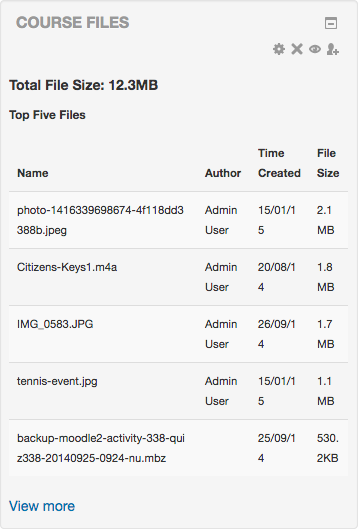
The main block view will show an overview of the file storage used as well as the largest 5 files on a course
The block has a report page that will show a list of all the files on a course, ordered by size.
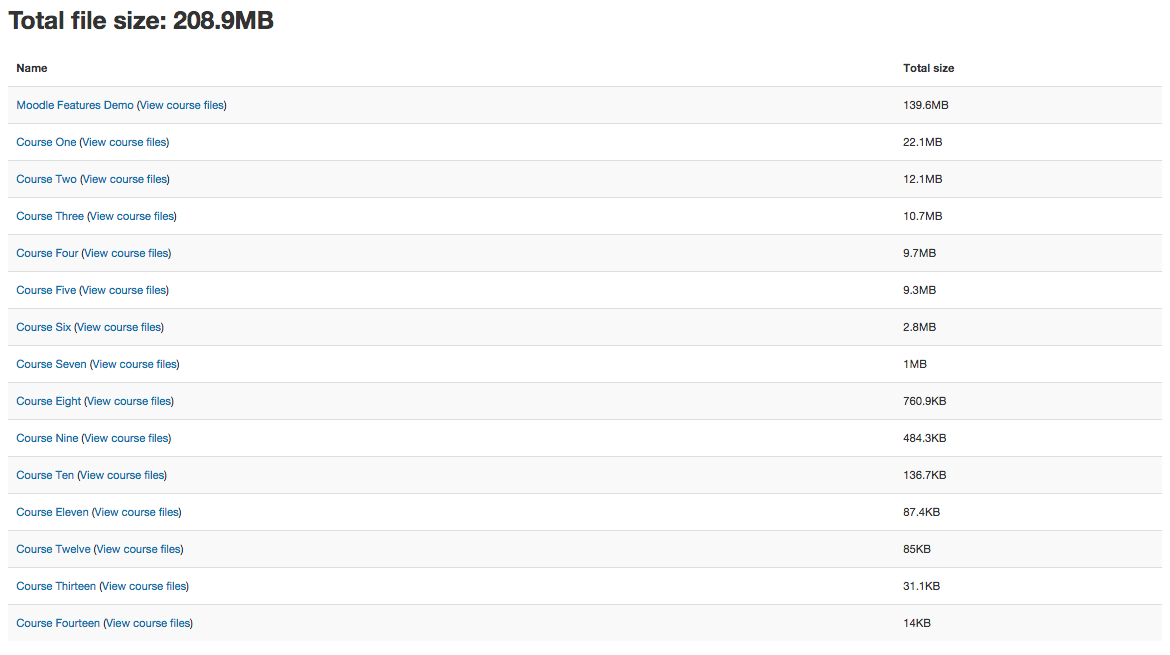
The block also has a global report page that will show a list of all courses and their total storage usage.
The global report is available in the Reports section of the Site Administration block.
Themes
block_coursefiles should work with all themes from moodle core.
Settings
block_coursefiles has neither a settings page nor settings in config.php.
Further information
block_coursefiles is found in the Moodle Plugins repository: http://moodle.org/plugins/view.php?plugin=block_coursefiles
Report a bug or suggest an improvement: https://github.com/iamandrew/moodle-block_coursefiles/issues
Right-to-left support
This plugin has not been tested with Moodle's support for right-to-left (RTL) languages.
If you want to use this plugin with a RTL language and it doesn't work as-is, you are free to send me a pull request on
github with modifications.
Thanks
Thanks to Peter Hinds & Yair Spielmann for ideas and suggestions
Copyright
Andrew Davidson