Webcam snapshot icon

Webcam snapshot

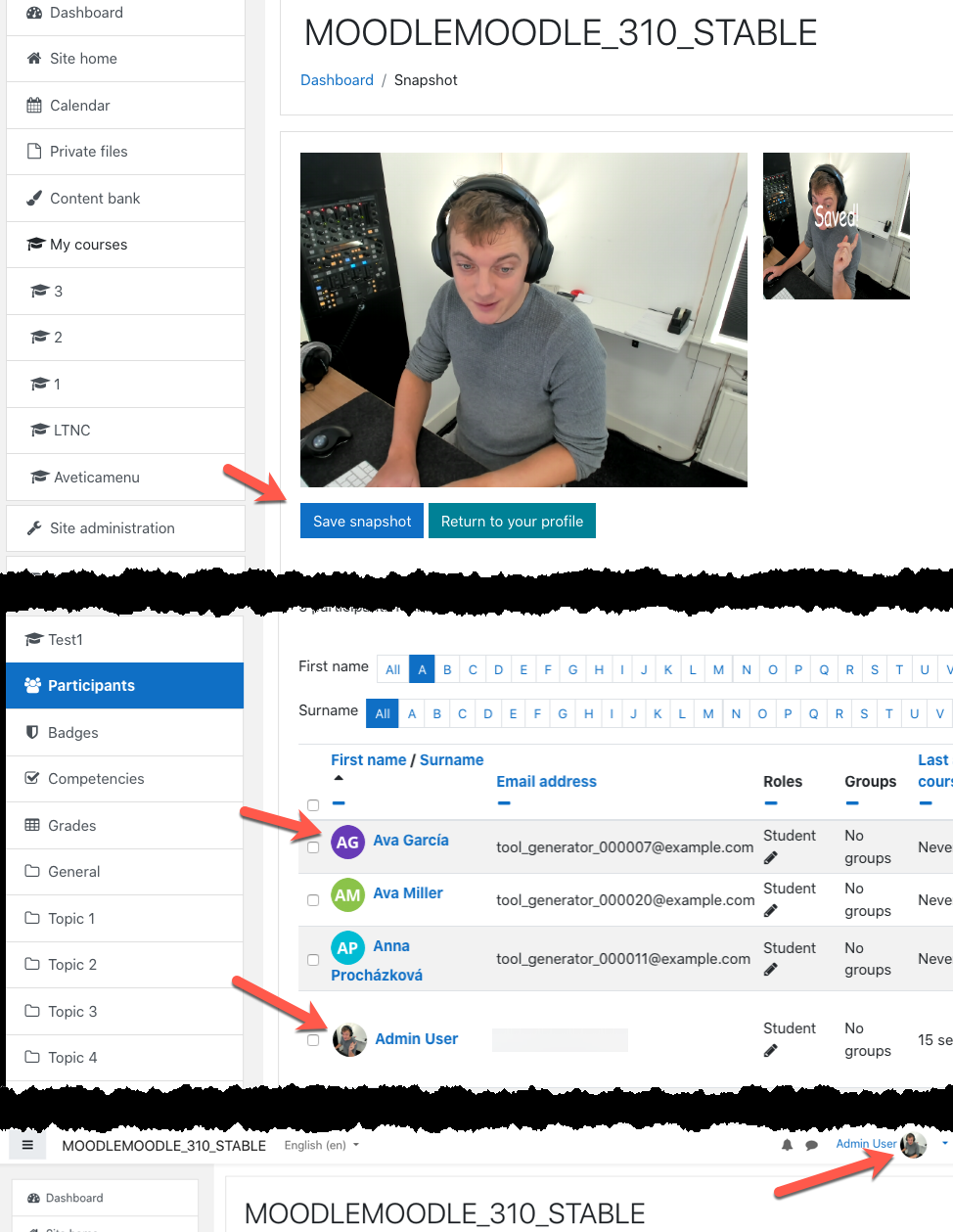
This block allows users to make a profile picture with their webcam.
Price option: Free

Supports Moodle 2.6-5.1 See all versions
Latest release: 3 months ago
Installations: 155
Downloads (last 90 days): 104

Frankenstyle name: block_mfavatar
Blocks

Comments

Comments are no longer open for new posts. Existing comments remain available to read.

Hi Elton, will test it this weekend. I think it still works fine.
Luuk,
Will Webcam Snapshot work on Moodle 2.9? I would really like to use it.
In the last update, I added a HTML5 support WEBRTC to get a userstream this is indeed optional and will look a little bit different. You can turn it of and on in the block settings.
@simon: If you know how I can let it work on IOS would be create, they don't support WebRTC. And even think there is no browser based solution for only from a app this should be possible.
Hi Luuk. Haha. It's working now. If I don't change the default settings, then the screen looks the same as your screenshots.
Hi Luuk - I am using my laptop's default webcam. Not a Logitech addon hardware.
Hi Luuk
I am facing the same issue (#2) of the large box and smaller box as Simon Bertoli. And my snapshot, after saving as the image inside the smaller box, doesn't show up in the block.
HI Luuk
Thanks for the great block, 2 things
1 - On iPhone and iPad it shows the 'Install Flash' icon.
2 - The main page of taking a snapshot does not look like the screenshots above.. all I get is a box to show the camera and when we click save snapshot it adds a smaller box of the snapshot with saved across it.
New release 2015-04-18 added Webrtc Support, this allows most browsers to make snapshot without flash!!
Thanks.
There are no settings needed for this block.
Also in your version you can only add the block to http://yourmoodle/my [My moodle page].
New version can be download above.
- invalid setting link remove
- block can added to more pages then my home only
Forgot to mention, using Moodle 2.8. And thanks for your hard work and for contributing this module! smile
Using a LAMP stack on localhost server. Installed via Moodle repo successfully. MoodleFreak Avatar shows up in moodle/admin/blocks.php block module list. However, when I click on "settings", i.e. moodle/admin/block.php?block=43, I get a 404 not found error. Also, it doesn't show up in "Add a block" drop-down list.
Have I missed something?
I added a installation video to the description above. Hope this will help.
I cant quite get this working. I've installed it, but it isnt clear how i access it, I cant see any webcam block and clicking edit profile functions as usual?
Any help is much appreciated smile
Thanks for fixing things promptly Luuk. This has been approved and is available to the public now. You can wait for the confirmation from the community to see if it works in lower Moodle versions for them. Good luck the the maintenance and further development of this. Over.
This can be approved once the bug tracker permissions are fixed.