User Restore
Maintained by
Sebsoft BV, Rogier van Dongen
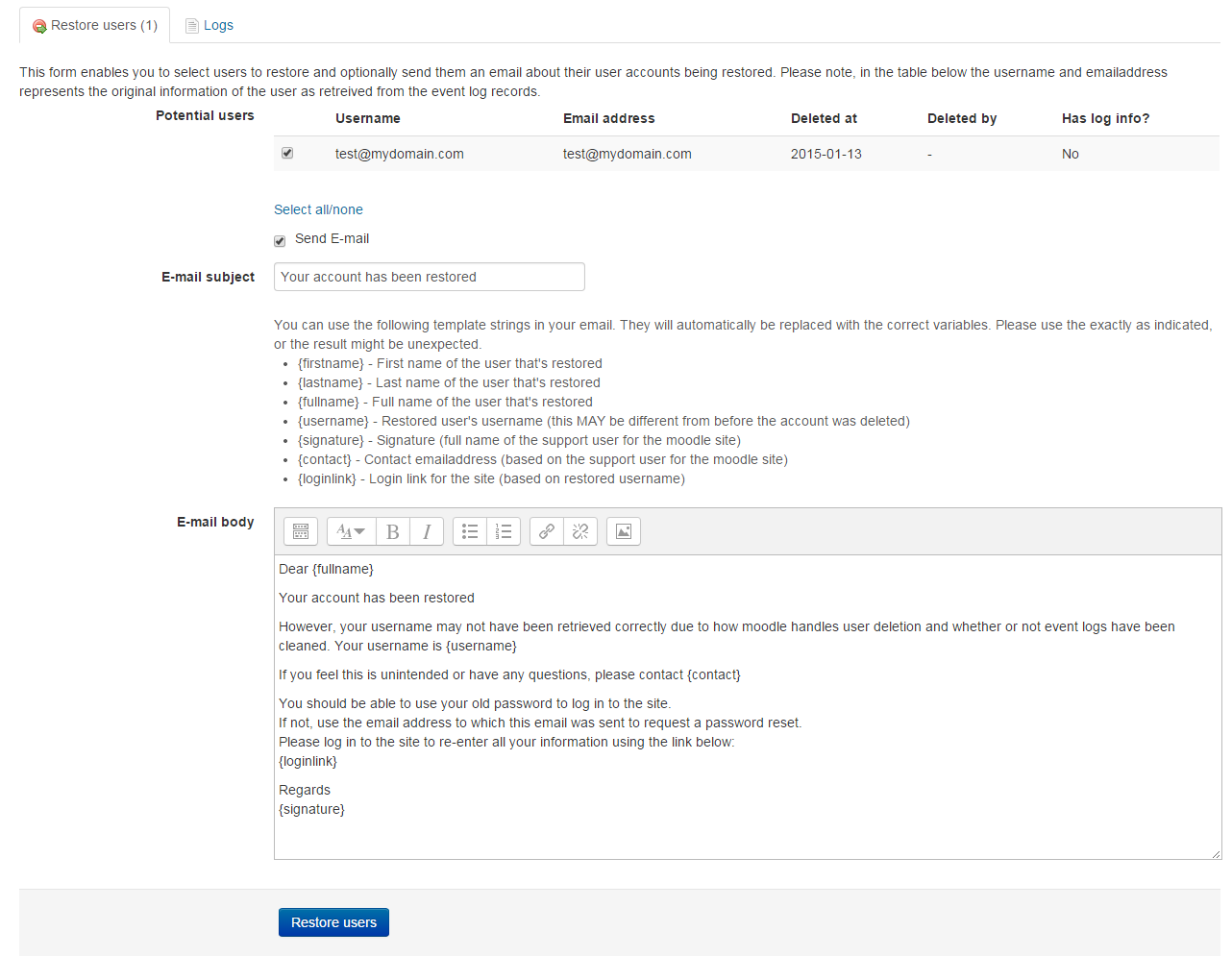
The Sebsoft User Restore Plugin offers you the possibility to restore user accounts
that were deleted from moodle.

Comments
Product ratings and reviews are coming to Moodle Marketplace. Until then, existing comments remain available to read, but new posts have been disabled.
There's a simple reason for this: the cache refill should fill all deleted users and this warning message (or better said: informative message) is basically telling you there are deleted users that are not in the cache. There's no real way to get around this message for now but I'll see if I can change this for one of the next versions.
The plugin should work for 3.9 btw (as you already found out); the supported Moodle versions however havent (yet) been updated (or verified for all that matters).
Cheers, Rogier
This information went missing. Apparently this message window cleans out anything resembling HTML tags (would be nice if Moodle would convert this to visible characters instead of completely cleaning it)
I do have an idea, but this would have to be checked before I can be certain this assumption is correct.
Assuming you run a newer Moodle version, I'm making the assumption Moodle's most recent record in the logstore for any of the deleted users might lack the correct information.
This would be the information that should be available in the "other" field of the table.
If you have access to the database you could try and see if my assumption is correct by filtering the logstore under the following conditions:
component = 'core'
action= 'deleted'
target = 'user'
objectid = Do note you should sort in descending order on the timecreated field of the logstore, then lookat the first record found (i.e. the most recent one for the specific user)
I have tried to message you from moodle.org's messaging system but I seem to be unable to send you a message at all.
If you need/want more support, I advice you to contact me directly, you can send me a message on moodle.org if needed so we can go from there.
---
For everyone else reading along: the note Gemma added on Oct 21 is one of the side effects of a rewrite.
Older version of this plugin worked directly on the logstore table. This caused an gigantic CPU load and in many cases, a timeout when trying to load the overview page.
The newer version works by hooking in to Moodle's user_deleted event handler, which executes on a per user basis, directly after the user has been deleted.
To speed up loading the information on the overview pages in this plugin, information is stored in a cache record (which of course is cleaned after a purge).
While this does speed up the overview pages, it does have the side effect of potentially massively slowing down the process of batch-deleting 100s or 1000s of users.
As soon as I have the time, I'm willing to look into a solution to resolve this new side effect. However, for the time being I cannot make any promises yet.
Cheers,
Rogier
This change has a increasing impact on deleting users. You should be aware of a difference between a few seconds up until half an hour depending on the number of users your deleted at the same time. I delete batches of users between the 30 and 2000.
We've attempted to resolve the issues around timeouts and page load times.
This means we're now using a caching mechanism, hoping to speed up the process. Please do note the cache must be filled before the restore page can work.
Do note that caching the deleted user info can be a very lengthy process. If you run into any problems, please send me a note.
Cheers & good luck!
I installed the plugin on 3.3 and every time I tried to use it, the Moodle site goes down.
Any help would be appreciated.
Premi
Any update to Moodle 3.4?
Ricardo
Changes for Version 3.3.0 (build 2017092500)
* Fixed deprecated pix_url references (replaced by image_url)
* Added setting for maximum number of users to display on restore.php / restore form
* Added paging bar on restore.php
* Minimum required Moodle version: 3.3
Cheers!
No real changes worth mentioning other than a code overhaul to comply to stricter Moodle Coding Standards.
Functionality tested up to Moodle 3.3
On the roadmap (Jarrod Miles, thanks for bringing up this issue): think of a better method of generating the lists for restoring users. Either by pagination or (preferred) a searchbox / user picklist.
Cheers!