Anti-hammering / Login blocker
Maintained by
Sebsoft BV, Rogier van Dongen
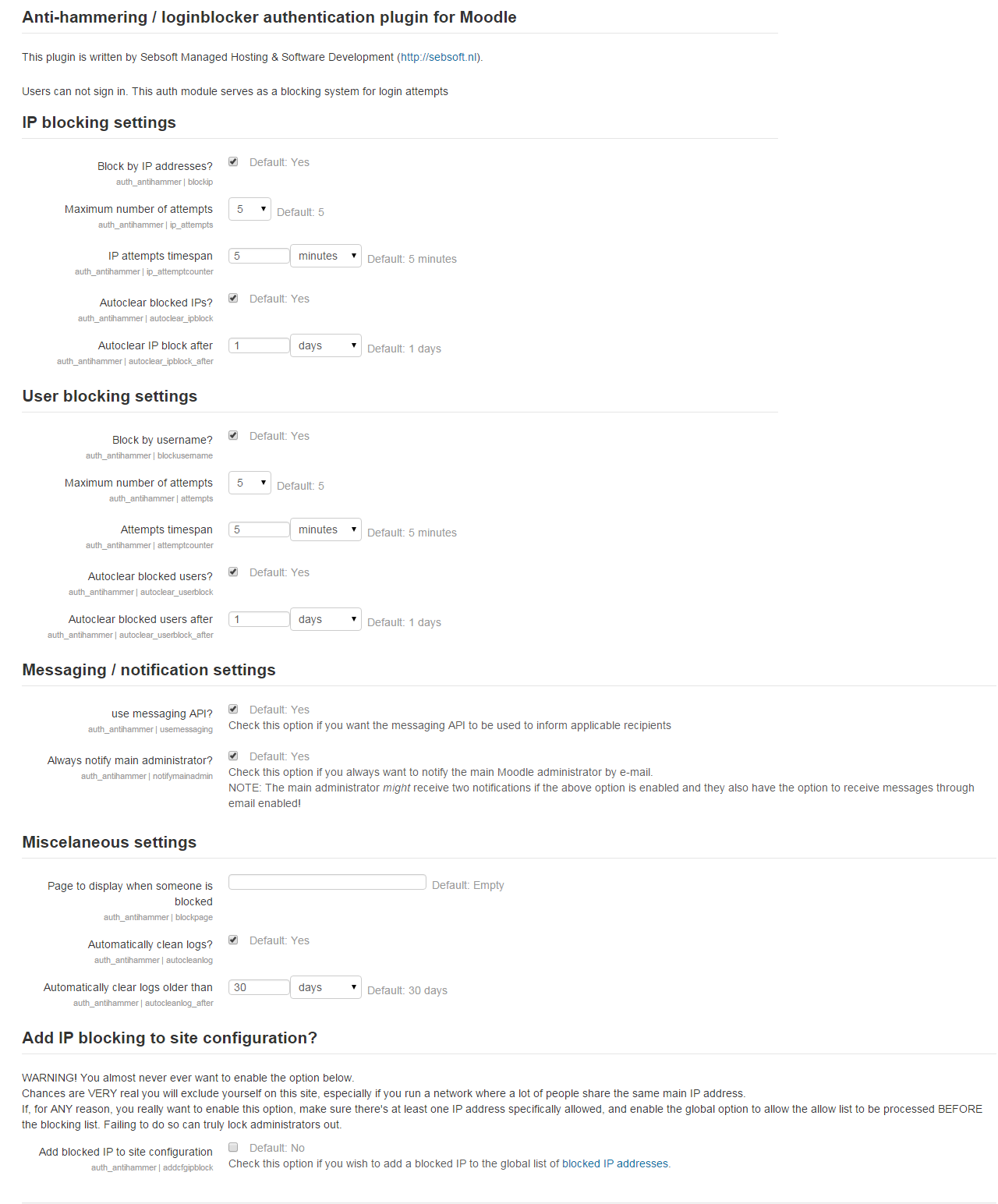
The Sebsoft Anti Hammering Authentication Plugin offers you the possibility to prevent hammering your login system.
This plugin can be configured to "smart detect" so called hammering on IP basis or for users in general.
Comments
Product ratings and reviews are coming to Moodle Marketplace. Until then, existing comments remain available to read, but new posts have been disabled.
*Warning*: Whatever you do, do *never* enable both the user mode in Antihammer
AND the account lockout feature together, this may/will cause unintended side effects.
Please allow me some time to work out any extra details (I'm extremely busy at the moment); but I can already provide you some answers:
- Yes, the authentication plugins are loaded and applied/called "in sequence" conforming to the sequence as set in the administration interface. So you are absolutely correct the antihammer plugin should be your very first in the sequence. This makes sure any checks are done before anything else (please also be aware we do NOT actually validate the login process itself but rather the so called loginpage hook. If data (such as the username) is available because of e.g. a postback, it will be used for the user detection/blocking feature. However, because this hook is called before anything else or even before the page is first loaded, this is exactly where we hook into checking the IP address. In short: we hook into the process at the very first possibility, indeed trying to prevent as much wasteful code execution as possible.
For your other question regarding defaults: you're not the only one who is confused, I've been asked this question multiple times before.
It's pretty easy: when you define global settings, the whole idea (and often mandated to be provided), plugin defaults indicate exactly what they imply: default settings.
When a plugin gets installed _first_ time, these are the defaults used to pre-fill any checkboxes (e.g.: checked when the default implies "Yes").
Please note "first time", because after that, the _known_ configuration will be used to set the state of checkboxes, dropdown, lists, text entries, etc etc.
In other words: only on first installation (OR when introducing a new setting) will these defaults actually be used. They will still be indicated as the defaults and whenever you perform a "reset to defaults" these values will be used.
In any other circumstance, I fully agree with your confusion: it only adds information to the interface that can be misinterpreted and might eaise more questions than it provides answers. It's just how Moodle has imp[lemented things though. Unless they change the interface (which can always be requested in the Moodle Tracker), it's something you have to deal with, as misleading or confusing as the indications may be.
For now, these are my answers. I hope to get some time free any time soon to implement more fine grained ways of offender penalties.
Cheers
The plugin seems to work as intended up to Moodle 4.0DEV
Cheers
Please can you confirm whether the latest version is compatible with Moodle V3.11?
Many thanks,
I just finished installing the new version of Antihammer on my beta system. Thank you for responding so fully to my previous post and for implementing the repeat offenders feature. Of course, I have a few more questions.
My intention is to use the IP blocker mode and not the User mode. With that in consideration I expect that if a bad actor makes repeated, failed attempts to access the system from the same IP address, then the plugin will lock out any further attempts to log into Moodle from that IP address no matter what username they employ. In a case where they make one attempt for user A followed by an attempt for users B, C, D, etc. the source IP address would be blocked. If that is true, then I expect that an attack like I described would be blocked since all of the attempts were made from the same IP address. For a brute force attack to succeed, the bad guys would have to attack from many different IP addresses. Am I wrong?
On another subject, Moodle allows me to rearrange the order that the Authentication plugins are listed. I assume that this means that the methods are applied in the order that they are listed. Therefore, placing Antihammer at the beginning of the list means that blocked IP addresses will be stopped before the other authentication methods are attempted and no time would be wasted trying to process those plugins. Again, please correct me if I’m wrong.
Also, I’m a bit confused by the way that the setting options are presented. For example the first setting is labeled “Block by IP addresses?” followed by an empty check-box and then the words “Default: Yes”. My understanding of a “default” value is that if you don’t alter the setting the default value would be used but since the check-box is empty, does that mean that checking the box will disable IP blocking? More confusion is added when you look at the setting for “Autoclear blocked IPs?” and the Default is also Yes but in this case, after installation the box is already checked! I see this same situation in many other plugins from other developers. Wouldn’t it be clearer if the check-box was replaced by radio buttons labeled yes and no?
Finally, you might consider giving us the option of specifying the time length of the successive penalties for the repeated violations.
Thank you,
Natassia
See changelog for details, most notory changes are the implementation of repeat offenders (must be enabled in global settings first, each time we double up in block duration), removing full IP blocks instead of single block records, IP whitelist (through global settings) and IP lookup (both Moodle's internal iplookup and by opening a new tab to whatismyaddress IP lookup). Support up to Moodle 3.10 has been validated.
Cheers!
Rogier
1: maximum attempts basically indicates the maximum number of detected login failures before a temporary account blocking is forced. No other actions are taken into account (this plugin only works in the login scope).
2: From the top of my head: I don't think you can unblock an IP address as such. You can remove single "blocking" records but when a range of users was detected (for example as a result of dictionary/brute force hacking), those can only be removed on a per record basis (although you also have the option to remove all records). Will take this into account for a future release!
3: the repeat offenders feature would be a nice feature indeed. I'll consider it for a future release.
4: Antihammer can be a good line of defense, but please: always take into consideration you may want to tackle this on a different level as well, if possible. These brute force attacks still initiate Moodle "in full". This plugin can do nothing about that because it forces itself in the login process. Therefore the brute force attack could still take your site down.
2. Someone else asked about manually unblocking users, what about IP addresses? Is there a way to manually unblock an IP address?
3. You should consider adding a "repeat offenders" feature similar to the one used in OSSEC. If an offender is blocked they have to wait until they are unblocked. If they commit the same offence within a given time interval, they are blocked for a longer time period; another violation makes the penalty even longer. This way if a legitimate user just screws up their password, they might only have to wait 5 minutes before they can try again (and hopefully not bother calling customer service).
4. We recently had an attack where someone tried using a list of cracked passwords from another site, hoping to find someone that reused their same username and password. They made 30 000 (thirty-thousand) attempts within one hour! They were unsuccessful and our system was able to withstand the burst of traffic. I plan to install Antihammer to defend against any future attempts.
Cheers!
Rogier
@Sa brine: thanks for the report, will be fixed ASAP
New version will likely be available today or after the weekend
Cheers!
This error message me display Argument 4 passed to table_sql::set_sql() must be of the type array, null given, called in /antihammer/classes/table.php on line 223.
Please help me.
Added option to remove all current blocks, modified code according to Moodle expectations (read: resolve notification in debug modus).
Cheers!