Anti-hammering / Login blocker
Versions
Current version
4.0.0 (build 2025120101) (2025120101)
4.0.0 (build 2025120101)
Plugin type: Authentication
Frankenstyle component name: auth_antihammer
Version build number: 2025120101
Version release name: 4.0.0 (build 2025120101)
Maturity: Stable
Supported Moodle versions: 3.10, 3.11, 4.0, 4.1, 4.2, 4.3, 4.4, 4.5, 5.0, 5.1
Repository URL (Git): https://github.com/sebsoftnl/moodle-auth_antihammer
Repository branch:
Repository tag: 4.0.0
Issue/bug tracker URL: https://github.com/sebsoftnl/moodle-auth_antihammer/issues
Version 3.7.2 (build 2025120100)
- Fix loads of CI errors
- Better code compliance
- DISABLE code checks in privacy provider (as Moodle is buggy in the alphabetical order checks).
- We no longer prefer IP blocks before user blocks. They will both be processed without precedence.
Effectively, this will put both an IP block AND a user block (when applicable). - Added user based repeat offenders (before we only did IP based).
Version 3.7.1 (build 2023011600)
- Fixed repeat offenders from settings.php (gave a section error).
Version 3.7.0 (build 2022090100)
- Removed all MOODLE_INTERNAL checks from singular classes as per MDLSITE-5967.
- Fix several CI issues
- Minimum required Moodle version: 3.10
Version 3.6.3 (build 2020121603)
- Runner now working more correct again; fixing heaps of coding standards issues.
Version 3.6.2 (build 2020121602)
- Fixed 2 coding standards issues.
Resolved #1 (missing notifyblocking string).
Validated working for Moodle 4.0
Version 3.6.1 (build 2020121601)
- Added warning message for when account lockout in Moodle and antihammer are both enabled.
Version 3.6.0 (build 2020121600)
- Added more actions in tables, especially related to looking up IP addresses.
- Added option to remove a complete IP block.
- Verified working on Moodle 3.10
- Replaced most internal images for Moodle images, except for the hammer.
- Added notification/check related to this plugin not being enabled.
- Added repeat offenders functionality (BETA functionality!)
- Added IP whitelist
Version 3.5.3 (build 2020070100)
- Added "courseid" to message(s) to prevent debugging output.
- Added option to remove all "current block records"
- Renamed .txt files to .md (readme, changelog)
- Added LICENSE.md
- Verified working on Moodle 3.9
Version 3.5.1 (build 2018050301)
- Updated privacy provider.
Version 3.5.0 (build 2018050300)
- Added privacy API.
Version 3.3.0 (build 2017092501)
- Fixed bug as reported by Rekha C
- Version bump
Version 3.3.0 (build 2017092500)
- Fixed deprecated pix_url references (replaced by image_url)
- Validated functionality for Moodle 3.3 onwards
- Minimum required Moodle version: 3.3
Version 3.0.0 (build 2017050100)
- Code overhaul to comply to Moodle standards
- Validated for Moodle 3.0 onwards
3.7.0 (build 2022090100) (2022090100)
3.7.0 (build 2022090100)
Plugin type: Authentication
Frankenstyle component name: auth_antihammer
Version build number: 2022090100
Version release name: 3.7.0 (build 2022090100)
Maturity: Stable
Supported Moodle versions: 3.10, 3.11, 4.0
Repository URL (Git): https://github.com/sebsoftnl/moodle-auth_antihammer
Repository branch:
Repository tag: 3.7.0
Issue/bug tracker URL: https://github.com/sebsoftnl/moodle-auth_antihammer/issues
Version 3.7.0 (build 2022090100)
- Removed all MOODLE_INTERNAL checks from singular classes as per MDLSITE-5967.
- Fix several CI issues
- Minimum required Moodle version: 3.10
Version 3.6.3 (build 2020121603)
- Runner now working more correct again; fixing heaps of coding standards issues.
Version 3.6.2 (build 2020121602)
- Fixed 2 coding standards issues.
Resolved #1 (missing notifyblocking string).
Validated working for Moodle 4.0
Version 3.6.1 (build 2020121601)
- Added warning message for when account lockout in Moodle and antihammer are both enabled.
Version 3.6.0 (build 2020121600)
- Added more actions in tables, especially related to looking up IP addresses.
- Added option to remove a complete IP block.
- Verified working on Moodle 3.10
- Replaced most internal images for Moodle images, except for the hammer.
- Added notification/check related to this plugin not being enabled.
- Added repeat offenders functionality (BETA functionality!)
- Added IP whitelist
Version 3.5.3 (build 2020070100)
- Added "courseid" to message(s) to prevent debugging output.
- Added option to remove all "current block records"
- Renamed .txt files to .md (readme, changelog)
- Added LICENSE.md
- Verified working on Moodle 3.9
Version 3.5.1 (build 2018050301)
- Updated privacy provider.
Version 3.5.0 (build 2018050300)
- Added privacy API.
Version 3.3.0 (build 2017092501)
- Fixed bug as reported by Rekha C
- Version bump
Version 3.3.0 (build 2017092500)
- Fixed deprecated pix_url references (replaced by image_url)
- Validated functionality for Moodle 3.3 onwards
- Minimum required Moodle version: 3.3
Version 3.0.0 (build 2017050100)
- Code overhaul to comply to Moodle standards
- Validated for Moodle 3.0 onwards
3.6.3 (build 2020121603) (2020121603)
3.6.3 (build 2020121603)
Plugin type: Authentication
Frankenstyle component name: auth_antihammer
Version build number: 2020121603
Version release name: 3.6.3 (build 2020121603)
Maturity: Stable
Supported Moodle versions: 3.7, 3.8, 3.9, 3.10, 3.11, 4.0
Repository URL (Git): https://github.com/sebsoftnl/moodle-auth_antihammer
Repository branch:
Repository tag: 3.6.3
Issue/bug tracker URL: https://github.com/sebsoftnl/moodle-auth_antihammer/issues
Version 3.6.3 (build 2020121603)
- Runner now working more correct again; fixing heaps of coding standards issues.
Version 3.6.2 (build 2020121602)
- Fixed 2 coding standards issues.
Resolved #1 (missing notifyblocking string).
Validated working for Moodle 4.0
Version 3.6.1 (build 2020121601)
- Added warning message for when account lockout in Moodle and antihammer are both enabled.
Version 3.6.0 (build 2020121600)
- Added more actions in tables, especially related to looking up IP addresses.
- Added option to remove a complete IP block.
- Verified working on Moodle 3.10
- Replaced most internal images for Moodle images, except for the hammer.
- Added notification/check related to this plugin not being enabled.
- Added repeat offenders functionality (BETA functionality!)
- Added IP whitelist
Version 3.5.3 (build 2020070100)
- Added "courseid" to message(s) to prevent debugging output.
- Added option to remove all "current block records"
- Renamed .txt files to .md (readme, changelog)
- Added LICENSE.md
- Verified working on Moodle 3.9
Version 3.5.1 (build 2018050301)
- Updated privacy provider.
Version 3.5.0 (build 2018050300)
- Added privacy API.
Version 3.3.0 (build 2017092501)
- Fixed bug as reported by Rekha C
- Version bump
Version 3.3.0 (build 2017092500)
- Fixed deprecated pix_url references (replaced by image_url)
- Validated functionality for Moodle 3.3 onwards
- Minimum required Moodle version: 3.3
Version 3.0.0 (build 2017050100)
- Code overhaul to comply to Moodle standards
- Validated for Moodle 3.0 onwards
3.6.0 (build 2020121600) (2020121600)
3.6.0 (build 2020121600)
Plugin type: Authentication
Frankenstyle component name: auth_antihammer
Version build number: 2020121600
Version release name: 3.6.0 (build 2020121600)
Maturity: Stable
Supported Moodle versions: 3.7, 3.8, 3.9, 3.10, 3.11
Repository URL (Git): https://github.com/sebsoftnl/moodle-auth_antihammer
Repository branch:
Repository tag:
Issue/bug tracker URL: https://github.com/sebsoftnl/moodle-auth_antihammer/issues
SEBSOFT ANTIHAMMER PLUGIN
The Sebsoft Anti Hammering Authentication Plugin offers you the possibility to prevent hammering your login system.
This plugin can be configured to "smart detect" so called hammering on IP basis or for users in general.
Hammering is the process of pretty much brute force attacking Moodle's login system.
This plugin detects the IP address of the remote client, and will track the entered username (and, if the
username exists, also the Moodle userid) and stores it's information to block the user and/or IP address
depending on the configuration of your authentication plugin.
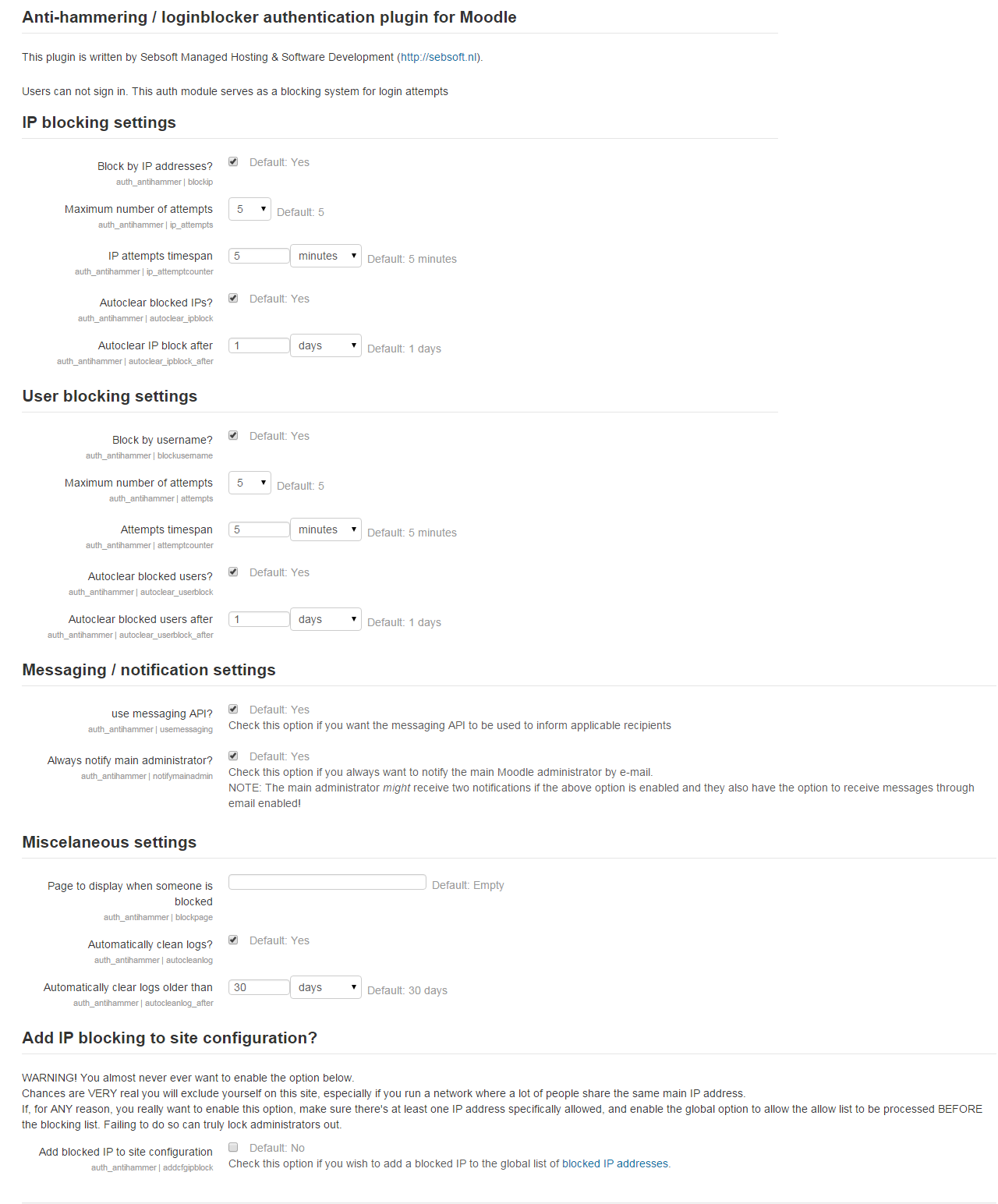
When the plugin has been installed, you should enable or disable blocking by IP and/or username and
configure the timespan at which detection is valid and number of times an attempt can be made.
This plugin can also be configured to make use of the messaging API in moodle.
This is a specific setting that needs to be enabled; if not configured the messaging API will not be used.
Please note receiving messages is not configured for everybody by default. Every applicable person (usually
administrators) MUST configure their preferences if they'd like to receive these messages.
Moodle's lockout system vs Antihammer:
Moodle already has the capability to (temporarily) lock out users https://docs.moodle.org/30/en/Site_policies#Account_lockout)
However, this plugin will add to that functionality, enabling to also take a look at specific IP usage of users trying to login.
There is no interaction with the lock out users system of Moodle.
If you want to be able to use the default method of Moodle account locking, but want to use
this plugin for the additional functions of being able to block hammering/testing of passwords
from a certain IP, you need to enable the IP Settings of the antihammer plugin.
You need to keep the User mode/setting disabled if you wish to keep Moodle's standard account lockout.
Furthermore this function differs from the Moodle implementation as Moodle will also allow
you to configure if you want to send an e-mail with a unlock link.
The Antihammer authentication method does not do this, as it's more of a way to
provide additional security and possibly block attacks with admin notification.
Warning: Whatever you do, do never enable both the user mode in Antihammer
AND the account lockout feature together, this may/will cause unintended side effects.
Important note:
This plugin does not neccessarily prevent brute force hacking when IP detection is not configured.
When the only checks are done based on the username, and an attacker uses a different username on virtually
every request (dictionary hacking), a lot of log/status records will be created, but this plugin can't
really do anything (simple because the username is differing too often). In that case IP blocking might help.
Please note this authentication plugin creates administration menu items to view the logs and status tables.
INSTALLATION
- Copy the antihammer folder to your auth directory.
- Configure your authentication plugin.
- We're ready to run!
3.5.3 (build 2020070100) (2020070100)
3.5.3 (build 2020070100)
Plugin type: Authentication
Frankenstyle component name: auth_antihammer
Version build number: 2020070100
Version release name: 3.5.3 (build 2020070100)
Maturity: Stable
Supported Moodle versions: 3.5, 3.6, 3.7, 3.8, 3.9
Repository URL (Git):
Repository branch:
Repository tag:
Issue/bug tracker URL: https://github.com/sebsoftnl/moodle-auth_antihammer/issues
SEBSOFT ANTIHAMMER PLUGIN
The Sebsoft Anti Hammering Authentication Plugin offers you the possibility to prevent hammering your login system.
This plugin can be configured to "smart detect" so called hammering on IP basis or for users in general.
Hammering is the process of pretty much brute force attacking Moodle's login system.
This plugin detects the IP address of the remote client, and will track the entered username (and, if the
username exists, also the Moodle userid) and stores it's information to block the user and/or IP address
depending on the configuration of your authentication plugin.
When the plugin has been installed, you should enable or disable blocking by IP and/or username and
configure the timespan at which detection is valid and number of times an attempt can be made.
This plugin can also be configured to make use of the messaging API in moodle.
This is a specific setting that needs to be enabled; if not configured the messaging API will not be used.
Please note receiving messages is not configured for everybody by default. Every applicable person (usually
administrators) MUST configure their preferences if they'd like to receive these messages.
Moodle's lockout system vs Antihammer:
Moodle already has the capability to (temporarily) lock out users https://docs.moodle.org/30/en/Site_policies#Account_lockout)
However, this plugin will add to that functionality, enabling to also take a look at specific IP usage of users trying to login.
There is no interaction with the lock out users system of Moodle.
If you want to be able to use the default method of Moodle account locking, but want to use
this plugin for the additional functions of being able to block hammering/testing of passwords
from a certain IP, you need to enable the IP Settings of the antihammer plugin.
You need to keep the User mode/setting disabled if you wish to keep Moodle's standard account lockout.
Furthermore this function differs from the Moodle implementation as Moodle will also allow
you to configure if you want to send an e-mail with a unlock link.
The Antihammer authentication method does not do this, as it's more of a way to
provide additional security and possibly block attacks with admin notification.
Warning: Whatever you do, do never enable both the user mode in Antihammer
AND the account lockout feature together, this may/will cause unintended side effects.
Important note:
This plugin does not neccessarily prevent brute force hacking when IP detection is not configured.
When the only checks are done based on the username, and an attacker uses a different username on virtually
every request (dictionary hacking), a lot of log/status records will be created, but this plugin can't
really do anything (simple because the username is differing too often). In that case IP blocking might help.
Please note this authentication plugin creates administration menu items to view the logs and status tables.
INSTALLATION
- Copy the antihammer folder to your auth directory.
- Configure your authentication plugin.
- We're ready to run!
3.5.2 (build 2018050302) (2018050302)
3.5.2 (build 2018050302)
Plugin type: Authentication
Frankenstyle component name: auth_antihammer
Version build number: 2018050302
Version release name: 3.5.2 (build 2018050302)
Maturity: Stable
Supported Moodle versions: 3.5, 3.6, 3.7, 3.8
Repository URL (Git): https://bitbucket.org/sebsoft/moodle-auth_antihammer
Repository branch:
Repository tag:
Issue/bug tracker URL: https://github.com/sebsoftnl/moodle-auth_antihammer/issues
SEBSOFT ANTIHAMMER PLUGIN
The Sebsoft Anti Hammering Authentication Plugin offers you the possibility to prevent hammering your login system.
This plugin can be configured to "smart detect" so called hammering on IP basis or for users in general.
Hammering is the process of pretty much brute force attacking Moodle's login system.
This plugin detects the IP address of the remote client, and will track the entered username (and, if the
username exists, also the Moodle userid) and stores it's information to block the user and/or IP address
depending on the configuration of your authentication plugin.
When the plugin has been installed, you should enable or disable blocking by IP and/or username and
configure the timespan at which detection is valid and number of times an attempt can be made.
This plugin can also be configured to make use of the messaging API in moodle.
This is a specific setting that needs to be enabled; if not configured the messaging API will not be used.
Please note receiving messages is not configured for everybody by default. Every applicable person (usually
administrators) MUST configure their preferences if they'd like to receive these messages.
Moodle's lockout system vs Antihammer:
Moodle already has the capability to (temporarily) lock out users https://docs.moodle.org/30/en/Site_policies#Account_lockout)
However, this plugin will add to that functionality, enabling to also take a look at specific IP usage of users trying to login.
There is no interaction with the lock out users system of Moodle.
If you want to be able to use the default method of Moodle account locking, but want to use
this plugin for the additional functions of being able to block hammering/testing of passwords
from a certain IP, you need to enable the IP Settings of the antihammer plugin.
You need to keep the User mode/setting disabled if you wish to keep Moodle's standard account lockout.
Furthermore this function differs from the Moodle implementation as Moodle will also allow
you to configure if you want to send an e-mail with a unlock link.
The Antihammer authentication method does not do this, as it's more of a way to
provide additional security and possibly block attacks with admin notification.
Warning: Whatever you do, do never enable both the user mode in Antihammer
AND the account lockout feature together, this may/will cause unintended side effects.
Important note:
This plugin does not neccessarily prevent brute force hacking when IP detection is not configured.
When the only checks are done based on the username, and an attacker uses a different username on virtually
every request (dictionary hacking), a lot of log/status records will be created, but this plugin can't
really do anything (simple because the username is differing too often). In that case IP blocking might help.
Please note this authentication plugin creates administration menu items to view the logs and status tables.
INSTALLATION
- Copy the antihammer folder to your auth directory.
- Configure your authentication plugin.
- We're ready to run!
3.5.1 (build 2018050301) (2018050301)
3.5.1 (build 2018050301)
Plugin type: Authentication
Frankenstyle component name: auth_antihammer
Version build number: 2018050301
Version release name: 3.5.1 (build 2018050301)
Maturity: Stable
Supported Moodle versions: 3.5, 3.6, 3.7, 3.8
Repository URL (Git): https://bitbucket.org/sebsoft/moodle-auth_antihammer
Repository branch:
Repository tag:
Issue/bug tracker URL: https://github.com/sebsoftnl/moodle-auth_antihammer/issues
SEBSOFT ANTIHAMMER PLUGIN
The Sebsoft Anti Hammering Authentication Plugin offers you the possibility to prevent hammering your login system.
This plugin can be configured to "smart detect" so called hammering on IP basis or for users in general.
Hammering is the process of pretty much brute force attacking Moodle's login system.
This plugin detects the IP address of the remote client, and will track the entered username (and, if the
username exists, also the Moodle userid) and stores it's information to block the user and/or IP address
depending on the configuration of your authentication plugin.
When the plugin has been installed, you should enable or disable blocking by IP and/or username and
configure the timespan at which detection is valid and number of times an attempt can be made.
This plugin can also be configured to make use of the messaging API in moodle.
This is a specific setting that needs to be enabled; if not configured the messaging API will not be used.
Please note receiving messages is not configured for everybody by default. Every applicable person (usually
administrators) MUST configure their preferences if they'd like to receive these messages.
Moodle's lockout system vs Antihammer:
Moodle already has the capability to (temporarily) lock out users https://docs.moodle.org/30/en/Site_policies#Account_lockout)
However, this plugin will add to that functionality, enabling to also take a look at specific IP usage of users trying to login.
There is no interaction with the lock out users system of Moodle.
If you want to be able to use the default method of Moodle account locking, but want to use
this plugin for the additional functions of being able to block hammering/testing of passwords
from a certain IP, you need to enable the IP Settings of the antihammer plugin.
You need to keep the User mode/setting disabled if you wish to keep Moodle's standard account lockout.
Furthermore this function differs from the Moodle implementation as Moodle will also allow
you to configure if you want to send an e-mail with a unlock link.
The Antihammer authentication method does not do this, as it's more of a way to
provide additional security and possibly block attacks with admin notification.
Warning: Whatever you do, do never enable both the user mode in Antihammer
AND the account lockout feature together, this may/will cause unintended side effects.
Important note:
This plugin does not neccessarily prevent brute force hacking when IP detection is not configured.
When the only checks are done based on the username, and an attacker uses a different username on virtually
every request (dictionary hacking), a lot of log/status records will be created, but this plugin can't
really do anything (simple because the username is differing too often). In that case IP blocking might help.
Please note this authentication plugin creates administration menu items to view the logs and status tables.
INSTALLATION
- Copy the antihammer folder to your auth directory.
- Configure your authentication plugin.
- We're ready to run!
3.5.0 (build 2018050300) (2018050300)
3.5.0 (build 2018050300)
Plugin type: Authentication
Frankenstyle component name: auth_antihammer
Version build number: 2018050300
Version release name: 3.5.0 (build 2018050300)
Maturity: Stable
Supported Moodle versions: 3.5
Repository URL (Git): https://bitbucket.org/sebsoft/moodle-auth_antihammer
Repository branch:
Repository tag:
Issue/bug tracker URL: https://github.com/sebsoftnl/moodle-auth_antihammer/issues
SEBSOFT ANTIHAMMER PLUGIN
The Sebsoft Anti Hammering Authentication Plugin offers you the possibility to prevent hammering your login system.
This plugin can be configured to "smart detect" so called hammering on IP basis or for users in general.
Hammering is the process of pretty much brute force attacking Moodle's login system.
This plugin detects the IP address of the remote client, and will track the entered username (and, if the
username exists, also the Moodle userid) and stores it's information to block the user and/or IP address
depending on the configuration of your authentication plugin.
When the plugin has been installed, you should enable or disable blocking by IP and/or username and
configure the timespan at which detection is valid and number of times an attempt can be made.
This plugin can also be configured to make use of the messaging API in moodle.
This is a specific setting that needs to be enabled; if not configured the messaging API will not be used.
Please note receiving messages is not configured for everybody by default. Every applicable person (usually
administrators) MUST configure their preferences if they'd like to receive these messages.
Moodle's lockout system vs Antihammer:
Moodle already has the capability to (temporarily) lock out users https://docs.moodle.org/30/en/Site_policies#Account_lockout)
However, this plugin will add to that functionality, enabling to also take a look at specific IP usage of users trying to login.
There is no interaction with the lock out users system of Moodle.
If you want to be able to use the default method of Moodle account locking, but want to use
this plugin for the additional functions of being able to block hammering/testing of passwords
from a certain IP, you need to enable the IP Settings of the antihammer plugin.
You need to keep the User mode/setting disabled if you wish to keep Moodle's standard account lockout.
Furthermore this function differs from the Moodle implementation as Moodle will also allow
you to configure if you want to send an e-mail with a unlock link.
The Antihammer authentication method does not do this, as it's more of a way to
provide additional security and possibly block attacks with admin notification.
Warning: Whatever you do, do never enable both the user mode in Antihammer
AND the account lockout feature together, this may/will cause unintended side effects.
Important note:
This plugin does not neccessarily prevent brute force hacking when IP detection is not configured.
When the only checks are done based on the username, and an attacker uses a different username on virtually
every request (dictionary hacking), a lot of log/status records will be created, but this plugin can't
really do anything (simple because the username is differing too often). In that case IP blocking might help.
Please note this authentication plugin creates administration menu items to view the logs and status tables.
INSTALLATION
- Copy the antihammer folder to your auth directory.
- Configure your authentication plugin.
- We're ready to run!
3.3.0 (build 2017092501) (2017092501)
3.3.0 (build 2017092501)
Plugin type: Authentication
Frankenstyle component name: auth_antihammer
Version build number: 2017092501
Version release name: 3.3.0 (build 2017092501)
Maturity: Stable
Supported Moodle versions: 3.3, 3.4
Repository URL (Git): https://bitbucket.org/sebsoft/moodle-auth_antihammer
Repository branch:
Repository tag:
Issue/bug tracker URL: https://github.com/sebsoftnl/moodle-auth_antihammer/issues
SEBSOFT ANTIHAMMER PLUGIN
The Sebsoft Anti Hammering Authentication Plugin offers you the possibility to prevent hammering your login system.
This plugin can be configured to "smart detect" so called hammering on IP basis or for users in general.
Hammering is the process of pretty much brute force attacking Moodle's login system.
This plugin detects the IP address of the remote client, and will track the entered username (and, if the
username exists, also the Moodle userid) and stores it's information to block the user and/or IP address
depending on the configuration of your authentication plugin.
When the plugin has been installed, you should enable or disable blocking by IP and/or username and
configure the timespan at which detection is valid and number of times an attempt can be made.
This plugin can also be configured to make use of the messaging API in moodle.
This is a specific setting that needs to be enabled; if not configured the messaging API will not be used.
Please note receiving messages is not configured for everybody by default. Every applicable person (usually
administrators) MUST configure their preferences if they'd like to receive these messages.
Moodle's lockout system vs Antihammer:
Moodle already has the capability to (temporarily) lock out users https://docs.moodle.org/30/en/Site_policies#Account_lockout)
However, this plugin will add to that functionality, enabling to also take a look at specific IP usage of users trying to login.
There is no interaction with the lock out users system of Moodle.
If you want to be able to use the default method of Moodle account locking, but want to use
this plugin for the additional functions of being able to block hammering/testing of passwords
from a certain IP, you need to enable the IP Settings of the antihammer plugin.
You need to keep the User mode/setting disabled if you wish to keep Moodle's standard account lockout.
Furthermore this function differs from the Moodle implementation as Moodle will also allow
you to configure if you want to send an e-mail with a unlock link.
The Antihammer authentication method does not do this, as it's more of a way to
provide additional security and possibly block attacks with admin notification.
Warning: Whatever you do, do never enable both the user mode in Antihammer
AND the account lockout feature together, this may/will cause unintended side effects.
Important note:
This plugin does not neccessarily prevent brute force hacking when IP detection is not configured.
When the only checks are done based on the username, and an attacker uses a different username on virtually
every request (dictionary hacking), a lot of log/status records will be created, but this plugin can't
really do anything (simple because the username is differing too often). In that case IP blocking might help.
Please note this authentication plugin creates administration menu items to view the logs and status tables.
INSTALLATION
- Copy the antihammer folder to your auth directory.
- Configure your authentication plugin.
- We're ready to run!
3.0.0 (build 2017020100) (2017050100)
3.0.0 (build 2017020100)
Plugin type: Authentication
Frankenstyle component name: auth_antihammer
Version build number: 2017050100
Version release name: 3.0.0 (build 2017020100)
Maturity: Stable
Supported Moodle versions: 3.0, 3.1, 3.2, 3.3
Repository URL (Git): https://bitbucket.org/sebsoft/auth_antihammering
Repository branch:
Repository tag:
Issue/bug tracker URL: https://github.com/sebsoftnl/moodle-auth_antihammer/issues
SEBSOFT ANTIHAMMER PLUGIN
The Sebsoft Anti Hammering Authentication Plugin offers you the possibility to prevent hammering your login system.
This plugin can be configured to "smart detect" so called hammering on IP basis or for users in general.
Hammering is the process of pretty much brute force attacking Moodle's login system.
This plugin detects the IP address of the remote client, and will track the entered username (and, if the
username exists, also the Moodle userid) and stores it's information to block the user and/or IP address
depending on the configuration of your authentication plugin.
When the plugin has been installed, you should enable or disable blocking by IP and/or username and
configure the timespan at which detection is valid and number of times an attempt can be made.
This plugin can also be configured to make use of the messaging API in moodle.
This is a specific setting that needs to be enabled; if not configured the messaging API will not be used.
Please note receiving messages is not configured for everybody by default. Every applicable person (usually
administrators) MUST configure their preferences if they'd like to receive these messages.
Moodle's lockout system vs Antihammer:
Moodle already has the capability to (temporarily) lock out users https://docs.moodle.org/30/en/Site_policies#Account_lockout)
However, this plugin will add to that functionality, enabling to also take a look at specific IP usage of users trying to login.
There is no interaction with the lock out users system of Moodle.
If you want to be able to use the default method of Moodle account locking, but want to use
this plugin for the additional functions of being able to block hammering/testing of passwords
from a certain IP, you need to enable the IP Settings of the antihammer plugin.
You need to keep the User mode/setting disabled if you wish to keep Moodle's standard account lockout.
Furthermore this function differs from the Moodle implementation as Moodle will also allow
you to configure if you want to send an e-mail with a unlock link.
The Antihammer authentication method does not do this, as it's more of a way to
provide additional security and possibly block attacks with admin notification.
Warning: Whatever you do, do never enable both the user mode in Antihammer
AND the account lockout feature together, this may/will cause unintended side effects.
Important note:
This plugin does not neccessarily prevent brute force hacking when IP detection is not configured.
When the only checks are done based on the username, and an attacker uses a different username on virtually
every request (dictionary hacking), a lot of log/status records will be created, but this plugin can't
really do anything (simple because the username is differing too often). In that case IP blocking might help.
Please note this authentication plugin creates administration menu items to view the logs and status tables.
INSTALLATION
- Copy the antihammer folder to your auth directory.
- Configure your authentication plugin.
- We're ready to run!
2.7.1 (build 2017020100) (2017020100)
2.7.1 (build 2017020100)
Plugin type: Authentication
Frankenstyle component name: auth_antihammer
Version build number: 2017020100
Version release name: 2.7.1 (build 2017020100)
Maturity: Stable
Supported Moodle versions: 3.0, 3.1, 3.2
Repository URL (Git): https://bitbucket.org/sebsoft/moodle-auth_antihammer
Repository branch:
Repository tag:
Issue/bug tracker URL: https://github.com/sebsoftnl/moodle-auth_antihammer/issues
SEBSOFT ANTIHAMMER PLUGIN
The Sebsoft Anti Hammering Authentication Plugin offers you the possibility to prevent hammering your login system.
This plugin can be configured to "smart detect" so called hammering on IP basis or for users in general.
Hammering is the process of pretty much brute force attacking Moodle's login system.
This plugin detects the IP address of the remote client, and will track the entered username (and, if the
username exists, also the Moodle userid) and stores it's information to block the user and/or IP address
depending on the configuration of your authentication plugin.
When the plugin has been installed, you should enable or disable blocking by IP and/or username and
configure the timespan at which detection is valid and number of times an attempt can be made.
This plugin can also be configured to make use of the messaging API in moodle.
This is a specific setting that needs to be enabled; if not configured the messaging API will not be used.
Please note receiving messages is not configured for everybody by default. Every applicable person (usually
administrators) MUST configure their preferences if they'd like to receive these messages.
Moodle's lockout system vs Antihammer:
Moodle already has the capability to (temporarily) lock out users https://docs.moodle.org/30/en/Site_policies#Account_lockout)
However, this plugin will add to that functionality, enabling to also take a look at specific IP usage of users trying to login.
There is no interaction with the lock out users system of Moodle.
If you want to be able to use the default method of Moodle account locking, but want to use
this plugin for the additional functions of being able to block hammering/testing of passwords
from a certain IP, you need to enable the IP Settings of the antihammer plugin.
You need to keep the User mode/setting disabled if you wish to keep Moodle's standard account lockout.
Furthermore this function differs from the Moodle implementation as Moodle will also allow
you to configure if you want to send an e-mail with a unlock link.
The Antihammer authentication method does not do this, as it's more of a way to
provide additional security and possibly block attacks with admin notification.
Warning: Whatever you do, do never enable both the user mode in Antihammer
AND the account lockout feature together, this may/will cause unintended side effects.
Important note:
This plugin does not neccessarily prevent brute force hacking when IP detection is not configured.
When the only checks are done based on the username, and an attacker uses a different username on virtually
every request (dictionary hacking), a lot of log/status records will be created, but this plugin can't
really do anything (simple because the username is differing too often). In that case IP blocking might help.
Please note this authentication plugin creates administration menu items to view the logs and status tables.
INSTALLATION
- Copy the antihammer folder to your auth directory.
- Configure your authentication plugin.
- We're ready to run!
Changelog:
2.7.1
- Compatibility with moodle 3.2 verified
- Fixed issue #7 (Cron errors)
2.7.0 (build 2015080100) (2015080100)
2.7.0 (build 2015080100)
Plugin type: Authentication
Frankenstyle component name: auth_antihammer
Version build number: 2015080100
Version release name: 2.7.0 (build 2015080100)
Maturity: Stable
Supported Moodle versions: 2.7, 2.8, 2.9, 3.0
Repository URL (Git): https://bitbucket.org/sebsoft/moodle-auth_antihammer
Repository branch:
Repository tag:
Issue/bug tracker URL: https://github.com/sebsoftnl/moodle-auth_antihammer/issues
SEBSOFT ANTIHAMMER PLUGIN
The Sebsoft Anti Hammering Authentication Plugin offers you the possibility to prevent hammering your login system.
This plugin can be configured to "smart detect" so called hammering on IP basis or for users in general.
Hammering is the process of pretty much brute force attacking Moodle's login system.
This plugin detects the IP address of the remote client, and will track the entered username (and, if the
username exists, also the Moodle userid) and stores it's information to block the user and/or IP address
depending on the configuration of your authentication plugin.
When the plugin has been installed, you should enable or disable blocking by IP and/or username and
configure the timespan at which detection is valid and number of times an attempt can be made.
This plugin can also be configured to make use of the messaging API in moodle.
This is a specific setting that needs to be enabled; if not configured the messaging API will not be used.
Please note receiving messages is not configured for everybody by default. Every applicable person (usually
administrators) MUST configure their preferences if they'd like to receive these messages.
Moodle's lockout system vs Antihammer:
Moodle already has the capability to (temporarily) lock out users https://docs.moodle.org/30/en/Site_policies#Account_lockout)
However, this plugin will add to that functionality, enabling to also take a look at specific IP usage of users trying to login.
There is no interaction with the lock out users system of Moodle.
If you want to be able to use the default method of Moodle account locking, but want to use
this plugin for the additional functions of being able to block hammering/testing of passwords
from a certain IP, you need to enable the IP Settings of the antihammer plugin.
You need to keep the User mode/setting disabled if you wish to keep Moodle's standard account lockout.
Furthermore this function differs from the Moodle implementation as Moodle will also allow
you to configure if you want to send an e-mail with a unlock link.
The Antihammer authentication method does not do this, as it's more of a way to
provide additional security and possibly block attacks with admin notification.
Warning: Whatever you do, do never enable both the user mode in Antihammer
AND the account lockout feature together, this may/will cause unintended side effects.
Important note:
This plugin does not neccessarily prevent brute force hacking when IP detection is not configured.
When the only checks are done based on the username, and an attacker uses a different username on virtually
every request (dictionary hacking), a lot of log/status records will be created, but this plugin can't
really do anything (simple because the username is differing too often). In that case IP blocking might help.
Please note this authentication plugin creates administration menu items to view the logs and status tables.
INSTALLATION
- Copy the antihammer folder to your auth directory.
- Configure your authentication plugin.
- We're ready to run!